Indoor Residual Spraying (IRS)
Indoor Residual Spraying (IRS) is a malaria vector control intervention that consists in the application of a long-lasting, residual insecticide to potential malaria vector resting surfaces (e.g. internal walls, eaves and ceilings of all houses, structures or domestic animal shelters). When anopheline vectors come to rest onto the sprayed surfaces, they absorb a lethal dose of insecticide and die. Thus the mosquitoes are impeded from biting and transmitting the malaria parasite to people in the vicinity.
IRS is one of the two malaria vector control interventions recommended by WHO for large scale deployment.
Indoor Residual Spraying - Residual Efficacy Monitoring
Indoor Residual Spraying (IRS) campaigns lose their effect slowly over time because the insecticide impregnated on the vector resting surfaces fades away. The efficacy of IRS over time is monitored by measuring the percentage of susceptible mosquitoes that die within 24h of exposure to the sprayed surfaces. IRS is considered to retain optimal efficacy when at least 80% of the susceptible mosquitoes die. IRS efficacy is measured through a procedure called the WHO cone bioassay, which consists in attaching plastic cones to sprayed surfaces, introducing susceptible mosquitoes into them, leaving mosquitos in for 30 min to allow contact with the sprayed surface (exposure period) and measuring mosquito mortality 24h (or longer for certain insecticides) after the end of those 30min (holding period).

The linked webinar supports this design document and further clarifies the configuration and the use cases for this module.
| Section | Description |
|---|---|
| Basic Info | Key identifying info of the WHO cone bioassay being conducted (date and place) |
| Campaign | ID of the IRS campaign |
| House information | Key household information on the history of IRS and the characteristics of the house where the bioassay is conducted. |
| Test initial conditions | Type of vectors used, the time gap between the IRS campaign and the day of the bioassay, and the number of tested mosquitoes in each cone. |
| Knock-down | Where to report the number of knock-downs mosquitoes at the end of the exposure period. |
| Environmental conditions during bioassay | Minimal and maximal temperatures and humidity recorded during the exposure period. |
| Mortality observation times | Where to report the number of dead mosquitoes at the end of the holding period. The user can choose among three holding periods (24, 48 and 72 hours) - multiple choices are accepted in accordance with the variability of the protocols followed locally. Depending on the selection of the times, the following sections can appear: - Mortality 24 hours after exposure - The 24hrs exposure time is the reference time to measure efficacy. Whenever the adjusted mortality falls below 80% the user will be warned. - Mortality 48 hours after exposure - Mortality 72 hours after exposure The three sections collect the same information, i.e. the observed number of dead mosquitoes at the end of the holding period. |
| Environmental conditions during holding period | Minimal and maximal temperatures and humidity recorded during the holding period. |
| Status and Comments | Where to report the completeness of the event and add eventual comments. |
Data elements
The full list of data elements is available in the IRS Residual Efficacy Metadata reference.
Some of the DEs in this program could be shared with other E&VC programs.
Event details
New event registration

Before registering a new event the user should select an OU, the program, and the reporting institution - Partner, MoH, or Publication
Basic info
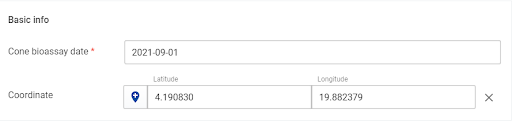
The basic information is related to the date of the bioassay and the coordinates of the compound where the WHO cone bioassay is conducted - the date has been set as a compulsory data element. The coordinates can either be entered manually or the location can be found and clicked on the pop-up map that appears upon clicking on the location icon on the left of the latitude. The coordinates will be in that case automatically filled in the latitude and longitude fields. Campaign The Campaign ID data element has been added to the dataset to be able to analyze the information by each and every campaign, and to identify the campaigns running in the same location. The DE has been set as an open field by default, but it could be set up also as an automatic assignation of a preset name for the different campaigns, or as an option list with some predefined names (or placeholders). The name of the campaign itself should be following local nomenclatures and campaign procedures. The screenshot below shows just an example of a possible name.

House information

The section collects the information on the house (wall, floor and roof types), its head, and the insecticide used in the IRS campaign.
Users can select between using the “insecticide sprayed”, the “product used for spraying” or both, depending on data analysis needs. At last one of these two variables, as well as the wall type, should be mandatory so that data can be analyzed meaningfully. The wall, roof and floor type options lists can and should be adapted to better mirror the local context. The options in the insecticide sprayed or the product used for spraying lists correspond to the IRS products prequalified by the WHO.
Test initial conditions
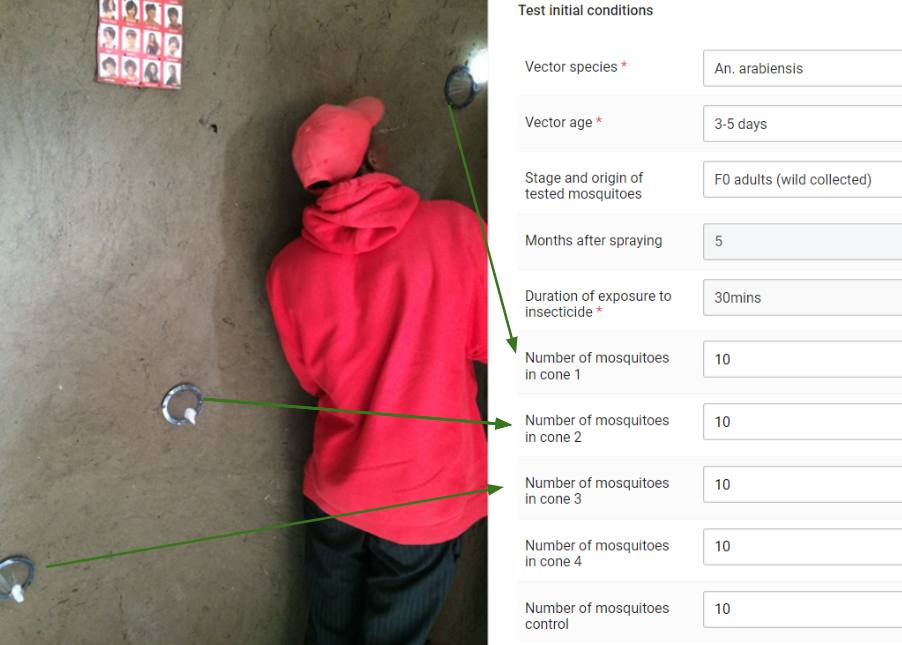
The baseline information of the test is summarized in this section.
The vector species and the control vector species have an option lists of Anopheles spp and Aedes spp vectors to choose from. The complete list is available in this table - countries should adapt and reduce it to include just the species used on site.
The recommended mosquito g is 3-5 days but if there are deviations from protocol they should be reported by choosing another option in the Vector age menu.
The time after spraying in an essential variable to analyze WHO cone bioassay data, as it will allow us to visualize the mortality over time (1 month, 2 months, etc after the IRS campaign) which is the end goal of this test. The data element automatically calculates the value via a program rule subtracting the date of the last spraying to the date of the bioassay.
The exposure time is automatically assigned to 30min, as this is part of the WHO cone bioassay protocol.
According to the WHO con bioassay, the number of mosquitos in each cone should always be 10. However, due to lack of mosquitoes, to difficulties picking the mosquitoes from the cage for introduction into cones or to mosquitoes escaping during their introduction into cones, the number is sometimes smaller or greater. The true number of mosquitoes introduced in each cone should be reported here.
For each bioassay, a control test should be conducted. This is a WHO cone bioassay in which mosquitoes are introduced in plastic cones attached to unsprayed surfaces. The total number of mosquitoes used in such a control test should be reported into the “Number of mosquitoes control”.
Knock-down

The section provides the space to report the number of knock-down mosquitoes in each cone at the end of the 30min exposure period.
Environmental conditions during bioassay

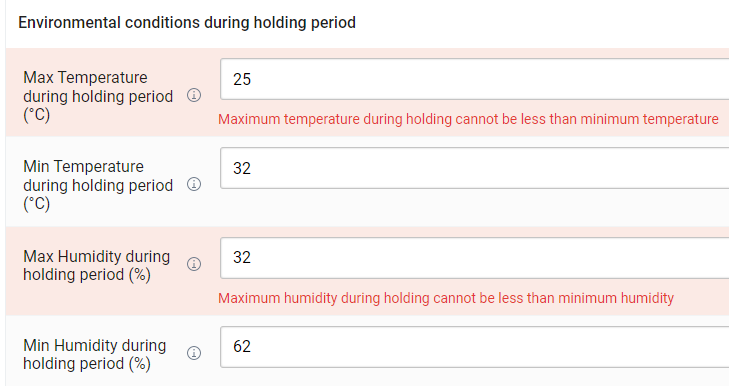
The section collects the temperature and humidity conditions during the period of the bioassay. A program rule will ensure that the MIN and MAX temperatures and humidities are not mixed and will report an error if they are entered in the wrong order.
Mortality observation times

The section has been designed to select the mortality observation times. The user should tick the time according to the procedure followed to let the section where the number of dead mosquitoes is reported appear. For the sake of simplicity this guide will only show the structure of the 24 hours observation time- the sections for the 48 and 72 hours after exposure follow the exact same structure and design principles. Mortality 24h after exposure

This section reports the number of observed dead mosquitos after 24 hours holding period post-exposure to the sprayed surfaces. The mortalities are automatically calculated in real time via a program rule that assigns a value to the DE.
Should the adjusted mortality fall under the 80% threshold, the system will automatically display a warning message indicating that the event has fallen below optimal efficacy.

The 80% threshold is also highlighted in what can be considered the key visualization of the module.

Whenever the adjusted mortality after 24 hrs passes the 80% threshold, the DE below will automatically appear to highlight the event. It is on the user then to investigate in the dashboard whether this was the first time the mortality falls under the threshold in that specific location.

The section also has an error message linked to the mortality of the control group, which says that if control mortality is above 20%, the test should be discarded.

The final mortality- Mosquito mortality -24h (%) (which considers all cones) is calculated via two program rules: one that considers the numbers of mosquitoes introduced and dead in all cones to calculate the total mortality and a second one that corrects that value with the Abott’s formula if the control mortality is >=5% and <20%.

Mortality 48/72h after exposure
The sections for the Mortality 48h after exposure, and Mortality 72h after exposure will automatically appear if ticked as explained in the “Mortality observation times” section . The structure of the sections for the 48 and 72 hours are identical to the one shown and explained for 24 hours.
NOTE
Please note that as the reference exposure time to evaluate the efficacy of IRS activities is the 24 hours time, the YES/NO DE to highlight whether the mortality has passed the 80% threshold has not been set up for the mortalities after 48 and72 hours after exposure.
Environmental conditions during holding period

The section collects the temperature and humidity conditions during the holding period. The min and max temperatures and humidities follow the same rule shown in the “Environmental conditions during bioassay” section.
Status and comments
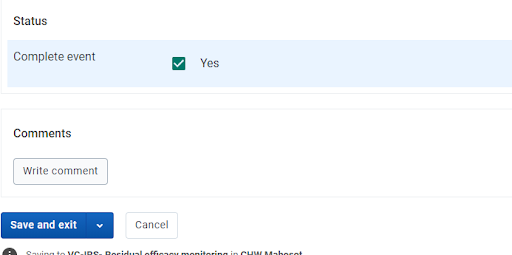
The status should be ticked if the event is completed. If the data is entered as the test is conducted, for example, the house information and test initial conditions have been entered but the 24h, 48h, or 72h have not yet passed, the user can close the event marking it as incomplete and continue the data entry later when the number of dead mosquitoes at 24h, 48h or 72h has been evaluated.
Program Rules
Some program rules have been applied at data entry in order to calculate the value of some DEs. This use of the PRs removes the complexity of maintaining a huge number of program indicators, guides the user through the protocol (e.g. by telling them the needed exposure time) and allows for easier disaggregation of data in visualizations.
The full list of PRs is available in the metadata reference file.
Analytics
Program Indicators
The full list of program indicators is available in the metadata reference file. The list of PIs can be expanded depending on local analytic needs.
Visualizations
The IRS- RE package comes with predefined IRS-Residual Efficacy visualizations that can be added to a more general E&VC dashboards integrating the various interventions. The table below provides the naming and info about the visualizations
| Item name | Title | Type | Metadata used |
|---|---|---|---|
| VC-IRS-REM - 001 | Average adjusted mortality 24h after exposure | Line | VC-IRS- Bioassays with valid results VC-IRS- Adjusted mortality after 24h in valid tests (%) |
| VC-IRS-REM - 002 | Number of events with adjusted mortality < 80% | Single Value | VC-IRS- Bioassays with adjusted mortality below 80% (cumulative) |
| VC-IRS-REM - 003 | Events with adjusted mortality below 80% by months after spraying | Map | VC-IRS - Residual efficacy monitoring |
| VC-IRS-REM - 004 | Mosquito mortality vs months after spraying | Scatter | VC-IRS- Adjusted mortality after 24h in valid tests (%) VC-IRS- Months after spraying (for valid bioassays) |
| VC-IRS-REM - 005 | Bioassays (by reporting institution) | Pivot Table | VC-IRS- Bioassays with valid results VC-IRS- Bioassays with adjusted mortality below 80% |
| VC-IRS-REM - 006 | Adjusted mortality after 24h in valid tests (%) by reporting institution | Pivot Table | VC-IRS- Adjusted mortality after 24h in valid tests (%) |
| VC-IRS-REM - 007 | Average adjusted mortality in valid cone bioassays (MoH) | Map | VC-IRS- Adjusted mortality after 24h in valid tests (%) |
| VC-IRS-REM - 008 | Average adjusted mortality in valid cone bioassays (Partner) | Map | VC-IRS- Adjusted mortality after 24h in valid tests (%) |
| VC-IRS-REM - 009 | Average adjusted mortality in valid cone bioassays (Publication) | Map | VC-IRS- Adjusted mortality after 24h in valid tests (%) |