Administração de Dados
The data administration module provides a range of functions to ensure that the data stored in the DHIS2 database is integral and that the database performance is optimised. These functions should be executed on a regular basis by a data administrator to ensure that the quality of the data stored is optimal.
Data integrity
DHIS2 can perform a wide range of data integrity checks on the data contained in the database. Identifying and correcting data integrity issues is extremely important for ensuring that the data used for analysis purposes is valid. Each of the data integrity checks that are performed by the system will be described, along with general procedures that can be performed to resolve these issues.
In the Data Administration app, the checks are organized into two tabs: Standard checks and Slow checks. Slow checks can take significant time and resources to complete on large databases (for example, checks that query the datavalues table directly), so they must be run individually rather than all at once. On the Standard checks tab, use Run all standard checks to run every standard check in one go.
Elementos de dados sem conjunto de dados
Each data element must be assigned to a data set. Values for data elements will not be able to be entered into the system if a data element is not assigned to a data set. Choose Maintenance->Datasets->Edit from the main menu and then add the "orphaned" data element to the appropriate data set.
Elementos de dados sem grupos
Some Data Elements have been allocated to several Data Element Groups. This is currently not allowed, because it will result in duplication of linked data records in the analytics record sets that provide aggregated data. Go to Maintenance -> Data Element Groups to review each Data Element identified and remove the incorrect Group allocations.
Elementos de dados que violam conjuntos de grupos exclusivos
Some data elements have been allocated to several data element groups that are members of the same data element group set. All group sets in DHIS2 are defined as exclusive, which means that a data element can only be allocated to one data element group within that group set. Go to Maintenance -> Data elements and indicators -> Data element groups to review each data element identified in the integrity check. Either remove the data element from all groups except the one that it should be allocated to, or see if one of the groups should be placed in a different group set.
Elementos de dados no conjunto de dados, mas não em formulários ou seções
Data elements have been assigned to a data set, but have not been assigned to any sections of the data set forms. All data sets which use section forms, should generally have all data elements in the data set assigned to exactly one section of the dataset.
Elementos de dados atribuídos a conjuntos de dados com diferentes tipos de período
Data elements should not be assigned to two separate data sets whose period types differ. The recommended approach would be to create two separate data elements (for instance a monthly and yearly data element) and assign these to respective datasets.
Conjuntos de dados não atribuídos a unidades de organização
Todos os conjuntos de dados devem ser atribuídos a pelo menos uma unidade organizacional.
Seções com combinações de categorias inválidas
Data sets which use section forms should only have a single category combination within each section. This violation could result from assigning a data element to a section, but then changing the category combination of this data element at a later point in time.
Indicadores com fórmulas idênticas
Although this rule will not affect data quality, it generally does not make sense to have two indicators with the exact same definition. Review the identified indicators and their formulas and delete or modify any indicator that appears to be the duplicate.
Indicadores sem grupos
All data elements and indicators must be assigned to at least one group, so these Indicators need to be allocated to their correct Data Element and Indicator Group. From the main menu, go to Data elements/Indicators -> Indicator Groups, and allocate each of the `Orphaned` indicators to its correct group.
Numeradores de indicador inválidos
Violations of this rule may be caused by an incorrect reference to a deleted or modified data element. Review the indicator and make corrections to the numerator definition.
Denominadores de indicador inválidos
Violations of this rule may be caused by an incorrect reference to a deleted or modified data element. Review the indicator and make corrections to the denominator definition.
Indicadores que violam conjuntos de grupos exclusivos
Some indicators have been allocated to several indicator groups that are members of the same indicator group set. All group sets in DHIS2 are defined as exclusive, which means that an indicator can only be allocated to one indicator group within that group set. Go to Maintenance -> Data elements and indicators -> Indicator groups to review each indicator identified in the integrity check. Either remove the indicator from all groups except the one that it should be allocated to, or see if one of the groups should be placed in a different group set.
Períodos duplicados
If periods have been imported from external applications, it may be possible that some periods will be duplicated. If you have any periods which appear to be duplicated here, you will need to resolve these directly in the DHIS2 database. All data which has been assigned to the duplicated period, should be moved to the correct period, and the duplicate period should be removed.
Unidades de organização com referências cíclicas
Organisation units cannot be both parent and children of each other, directly nor indirectly. If this situation occurs, you will need to resolve the cyclic reference directly in the DHIS2 database in the "organisation unit" table, by reassigning the "parentid" field of the organisation units.
Unidades de organização órfãs
All organisation units must exist within the organisation unit hierarchy. Go to Organisation units -> Hierarchy Operations and move the offending organisation unit into the proper position in the hierarchy.
Unidades organizacionais sem grupos
All organisation units must be allocated to at least one group. The problem might either be that you have not defined any compulsory OrgUnit Group Set at all, or that there are violations of the compulsory rule for some OrgUnits . NOTE: If you have defined no compulsory OrgUnit Group Sets, then you must first define them by going to Organisation units->Organisation unit group sets and define at least one compulsory Group Set (the group set 'Type' are nearly universally relevant). If you have the relevant group sets, go to Maintenance -> OrgUnit Groups to review each OrgUnit identified and add the relevant Group allocation.
Unidades organizacionais que violam conjuntos de grupos obrigatórios
These organisation units have not been assigned to the any organisation unit group within one of the compulsory organisation unit group sets. When a group set is defined as compulsory, it means that an organisation unit must be allocated to at least one organisation unit group within that group set. For instance, all organisation units must belong to one of the groups in the 'Type' group set. It might belong to the `Hospital` or the `Clinic` or any other 'type' group - but it must belong to exactly one of them. Go to Organisation units->Organisation unit groups to review each organisation unit identified in the integrity check. Allocate all organisation units to exactly one compulsory group.
Unidades organizacionais que violam conjuntos de grupos exclusivos
Some organisation units have been allocated to several organisation unit groups that are members of the same organisation unit group set. All group sets in DHIS2 are defined as exclusive, which means that an organisation unit can only be allocated to one organisation unit group within that Group Set. For instance, one organisation unit cannot normally belong to the both the 'Hospital' and 'Clinic' groups , but rather to only to one of them. Go to Organisation unit->Organisation unit groups to review each organisation unit identified in the integrity check. Remove the organisation units from all groups except the one that it should be allocated to.
Grupos de unidades organizacionais sem conjuntos de grupos
The organisation unit groups listed here have not been allocated to a group set. Go to Maintenance->Organisation unit->Organisation unit group sets and allocate the Organisation unit group to the appropriate group set.
Regras de validação sem grupos
All validation rules must be assigned to a group. Go to Maintenance app > Validation rule group and assign the offending validation rule to a group.
Expressões do lado esquerdo da regra de validação inválida
An error exists in the left-side validation rule definition. Go to Maintenance app -> Validation rule and click Edit on the offending rule. Click Left side and make the required corrections.
Expressões do lado direito da regra de validação inválida
An error exists in the right-side validation rule definition. Go to Maintenance app -> Validation rule and click Edit on the offending rule. Click Right side and make the required corrections.
Regras do programa sem condição
O relatório destacará todas as ** Regras do programa ** não configuradas com ** Condição **. A avaliação de regras sem condição é sempre avaliada como falsa.
Regras do programa sem prioridade
O relatório destacará todas as ** Regras do programa ** não configuradas com ** Prioridade **. Isso é opcional, mas sua existência é muito importante quando ** ProgramRuleActionType ** é ** ASSIGN **. As regras com o tipo de ação ASSIGN devem ter prioridade mais alta do que o resto dos tipos de ação.
Regras do programa sem ação
O relatório destacará todas as ** Regras do programa ** não configuradas com qualquer ** ProgramRuleAction **.
ProgramRuleVariables sem dataElements
O relatório destacará todas as ** variáveis de regra do programa ** não configuradas com ** DataElement **. O relatório será baseado na configuração do tipo de fonte. DataElement deve ser fornecido quando o tipo de origem de ProgramRuleVariable é ** DataElement **.
ProgramRuleVariables sem atributos
O relatório destacará todas as ** variáveis de regra do programa ** não configuradas com ** TrackedEntityAttribute **. O relatório será baseado na configuração do tipo de fonte. TrackedEntityAttribute deve ser fornecido quando o tipo de origem de ProgramRuleVariable for ** Atributo **.
ProgramRuleActions sem objetos de dados.
Report will highlight all the Program rule actions not configured with any Data object. Data object can be either DataElement of TrackedEntityAttribute. There are certain ProgramRuleActions which are responsible for assigning values to either dataElement or trackedEntityAttribute.
ProgramRuleActions sem notificação
O relatório destacará todas as ** Ações de regra de programa ** que têm ProgramRuleActionType definido como SENDMESSAGE / SCHEDULEMESSAGE onde a configuração não fornece nenhum link para notificação.
ProgramRuleActions sem id de seção
O relatório destacará todas as ** Ações de regra de programa ** que têm ProgramRuleActionType definido como ** HIDESECTION **, mas a configuração não fornece nenhum id de seção.
ProgramRuleActions sem id de estágio do programa
O relatório destacará todas as ** Ações de regra de programa ** que têm ProgramRuleActionType definido como ** HIDEPROGRAMSTAGE **, mas a configuração não fornece nenhum id de estágio do programa.
Expressão de indicador de programa inválida
Relata todas as violações na expressão do indicador do programa causadas por ** DataElement ** inválido ou ** TrackedEntityAttribute ** inválido.
Expressão de filtro de indicador de programa inválida
Relata todas as violações na expressão do filtro do indicador do programa causadas por ** DataElement ** inválido ou ** TrackedEntityAttribute ** inválido.
Tracked entity attributes having a suboptimal search configuration
Reports all tracked entity attributes with suboptimal configuration, which could potentially result in slower search performance when searching for tracked entities using those attributes.
Partial trigram indexes on trackedentityattributevalue in sync with the tracked entity attribute
Reports all tracked entity attributes that are not in sync with the trigram index in the database. This means that some indexes may need to be created, deleted, or both.
Tracked entity attributes with a partial trigram index created
Reports all tracked entity attributes that have a partial trigram index in the trackedentityattributevalue table.
Manutenção
| Função | Descrição |
|---|---|
| Clear analytics tables | Completely empties the analytics tables. These tables are used to generate aggregate data for the pivot tables, GIS and reports. |
| Analyze analytics tables | Performs a PostgreSQL analyze operation on all analytics tables. |
| Remove zero data values | Removes zero data values from the database. Values registered for data elements with aggregation operator average is not removed, as such values will be significant when aggregating the data, contrary to values registered for data elements with aggregation operator sum. Reducing the number of data values will improve system performance. |
| Permanently remove soft deleted data values / events / enrollments / tracked entity instances | When a data value is deleted in DHIS2, the system will mark the corresponding database row as deleted, and not actually delete the row. Running this maintenance function will physically remove these data value rows from the database. |
| Prune periods | Removes all periods which have no registered data values. Reducing the number of periods will improve system performance. |
| Remove expired invitations | Will delete users which represent user account invitations that now have gone past their expiry date. |
| Drop SQL views | DHIS2 lets you set up and manage SQL views as system objects with corresponding database SQL views. Running this maintenance function will drop underlying SQL views for all system views. Use the Create SQL views function to recreate these SQL views. |
| Create SQL views | Recreates all SQL views in the database. |
| Update category option combinations | Rebuilds the category option combinations. This may be required after altering the category options which belong to a given category. |
| Update organisation unit paths | The organisation unit table in the DHIS2 database has a column "path" which contains a concatenated string of all ancestors in the hierarchy for each organisation unit. Running this maintenance function will update and ensure that these values are in sync with the current organisation unit hierarchy. This column is managed by DHIS2, but a manual update might be useful when doing data loading directly in the database. |
| Clear application cache | Clears the system cache. |
| Recarregar aplicativos | Manually reloads and detects installed DHIS2 apps. The installed apps are also detected when the system starts and when installing or uninstall apps. |
Resource tables
Resource tables are supporting tables that are used during analysis of data. One would typically join the contents of these tables with the data value table when doing queries from third-party applications like Microsoft Excel. They are also used extensively by the analysis modules of DHIS2. Regeneration of the resource tables should only be done once all data integrity issues are resolved. The resource tables are also generated automatically, every time the analytics process is run by the system.
-
Organisation unit structure (analytics_rs_orgunitstructure)
This table should be regenerated any time there have been any changes made to the organisational unit hierarchy. This table provides information about the organisation unit hierarchy. It has one row for each organisation unit, one column for each organisation unit level and the organisation unit identifiers for all parents in the lineage as values.
-
Data element group set structure (analytics_rs_dataelementgroupsetstructure)
This table provides information about which data elements are members of which data element group sets. The table has one row for each data element, one column for each data element group set and the names of the data element group as values.
-
Indicator group set structure (analytics_rs_indicatorgroupsetstructure)
This table provides information about which indicators are members of which indicator group sets. The table has one row for each indicator, one column for each indicator group set and the names of the indicator group as values.
-
Organisation unit group set structure (analytics_rs_organisationunitgroupsetstructure)
This table provides information about which organisation units are members of which organisation unit group sets. The table has one row for each organisation unit, one column for each organisation unit group set and the names of the organisation unit groups as values.
-
Category structure (analytics_rs_categorystructure)
This table provides information about which data elements are members of which categories. The table has one row for each data element, one column for each category and the names of the category options as values.
-
Data element category option combo name (analytics_rs_categoryoptioncomboname)
This table should be regenerated any time there have been changes made to the category combination names. It contains readable names for the various combinations of categories.
-
Data element structure (analytics_rs_dataelementstructure)
This table provides information about all data elements and which period type (frequency) they capture data at. The period type is determined through the data set membership and hence relies on data elements to be member of data sets with similar period types to have a defined behaviour.
-
Date periods structure (analytics_rs_dateperiodstructure)
This table provides information about all periods and which period type they are associated with. For each period type with lower frequency than itself, it contains information about which period it will fall within.
-
Periods structure (analytics_rs_periodstructure)
Similar to
analytics_rs_dateperiodstructure, containing a scoped set of periods more adapted for aggregated analytics. It's based onperiodandperiodtypetables. -
Data element category option combinations (analytics_rs_dataelementcategoryoptioncombo)
This table provides a mapping between data elements and all possible category option combinations.
-
Data set organisation unit category (analytics_rs_datasetorganisationunitcategory)
This table provides information related to data sets, organisation units and its category option combinations associated. If no association is found, it uses the default category option combo.
Analytics tables management
DHIS2 generates database tables which the system then uses as basis for various analytics functions. These tables are also valuable if you write advanced SQL reports. In the Data Administration app, you can execute the tables generation immediately. If you want to schedule them to be executed at regular intervals, this can be done in the Scheduler app. This means that you can refresh recent analytics on demand and see updated pivot tables without waiting for all of the past years data to re-process.
Note
You can also generate the tables through the web API. This task is typically performed by a system administrator.
-
Abra o aplicativo ** Data Administration ** e clique em ** Analytics Tables **.
-
Selecione as partes do processo de análise que deseja ignorar:
-
** Pule a geração de dados agregados e dados de integridade **
-
** Pule a geração de tabelas de recursos **
-
** Pule a geração de dados do evento **
-
** Pular geração de dados de inscrição **
-
Skip generation of organisation unit ownership data
-
Skip generation of tracked entity data (checked by default)
-
Skip generation of outlier data (checked by default)
-
-
Select Number of last years of data to include. (If 0 is selected, then you will run latest or continuous analytics, as defined in Continuous analytics table.)
-
Clique em ** Iniciar exportação **.
Data statistics
The data statistics module provides an overview of the number of objects stored in the DHIS2 database.

The total number of each type of object is presented in a series of tables with summary statistics of each object.
Lock exceptions
Lock exceptions provide fine-grained control over exemption from a locked data set. After the expiry of the data set, data entry will be denied by default, unless an exception has been granted through the Lock exception interface.
Adding a lock exception
By granting a lock exception, data entry will be enabled even after the expiry period of the data set has passed.
- Open the Data Administration app and click Lock Exception.
- Click Add lock exception at the top of the page
- Select the desired data set, organisation units and time period (see screenshot below)
- Click Add lock exception
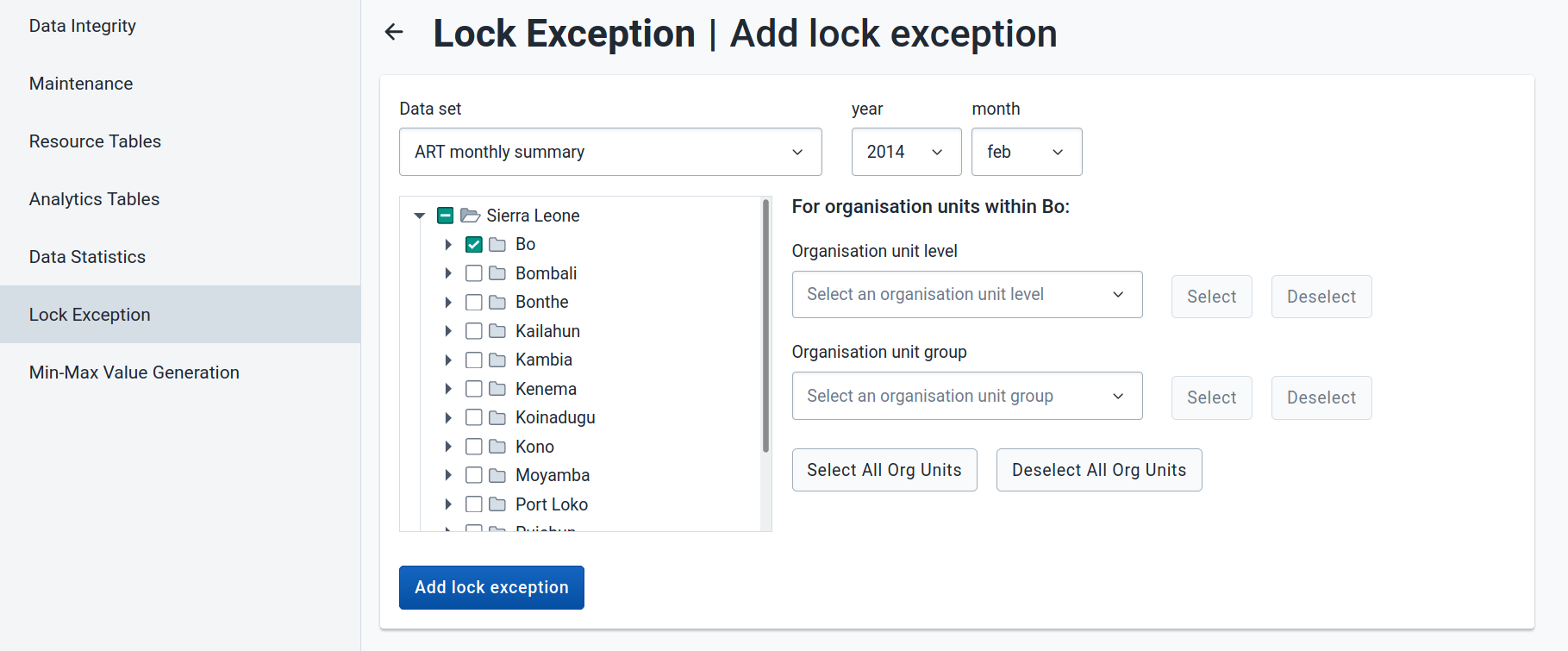
In the example above, a data lock exception would be created for "Bo" for the "ART monthly summary" dataset for "February 2014".
In order to run this function, no extra authority is needed.
Deleting a lock exception
- Open the Data Administration app and click Lock Exception.
- In the list, find the lock exception for the organisation unit, data set and period you want to remove, and click its remove icon.
- Click Yes, remove lock exception to confirm, or No, cancel to keep it.
This removes the lock exception for that single organisation unit only.
Batch deletion
If the same data set and period combination has lock exceptions across many organisation units (for example, a lock exception applied to 100 organisation units for the same data set and period), you can remove all of them in one action instead of one at a time.
- Open the Data Administration app and click Lock Exception.
- Click Batch deletion at the top of the page.
- Find the desired data set and period combination in the list, and click its remove icon.
- Click Yes, remove lock exception to confirm.
This removes the lock exception for that data set and period across all organisation units it applies to, not just one.
Min-Max Value Generation
This administrative function can be used to generate min-max values, which are used as part of the data quality and validation process for specific organization units and data sets. Simply select the dataset from the left hand frame, and then select the required organisation units to generate the min-max values for from the organisational units selector on the right. Press the "Generate" button to generate or regenerate all min-max values. Press "Remove" to remove all min-max values which are currently stored in the database. In order to run this function, the user MUST have the authority F_GENERATE_MIN_MAX_VALUES.

Cache Statistics
This option is for system administrators only to use. The cache statistics shows the status of the application level cache. The application level cache refers to the objects and query results that the application is caching in order to speed up performance. If the database has been modified directly the application cache needs to be cleared for it to take effect.