Cold chain equipment life cycle management / Tracker program
Introdução
This very simple Tracker program is very similar to the biomedical equipment lifecycle management solution but customized for cold chain equipment and considers the World Health Organization PQS (Program Quality Standards) appliance catalogue as well as the WHO PQS standard for Global asset identification.
In addition it offers a solution for creating and maintaining a dedicated catalogue of (selected) prequalified equipment which serves as a template for registering and enrolling new cold chain appliances. This allows "copying" the template of any specific prequalified appliance and adding device specific attributes such as the serial number or manufacturing date.
For purposes of demonstration a few specifications of a few refrigerators and freezers from the WHO PQS catalogue are configured but the same approach can be used for any other type of health care equipment.
Use case
The cold chain equipment lifecycle management "Tracker program " allows establishing, updating and maintaining a complete catalogue of cold chain appliances with all their "generic" specifications commonly used in the country with .
Whenever a new piece of cold chain appliance is delivered to and installed at a healthcare facility, the respective "generic" appliance is selected from the national catalogue and "enrolled" in the "Cold chain equipment lifecycle management / Tracker program" of the respective "Organisation Unit". The "enrolment" is completed with device specific attributes such as the manufacturing date, GTIN and serial number which can be "copied" directly from the scanned GS1 DataMatrix code attached to the appliance.
For healthcare facilities where cold chain appliance are not yet furnished with GS1 DataMatrix codes, alternatively a unique identifier can be assigned to every appliance.
DHIS2 configuration
This application is configured as a "Tracker program" which uses only simple, native DHIS2 functionality. The number, description and contents of each of the stages can be very easily customized to national needs without any programming knowledge.
Metadata overview
1 CATEGORY
1.1 Category option
1.2 Category
1.3 Category combination2 DATA ELEMENT
2.1 Data element - "Aggregate"
2.2 Data element - "Tracker"3 DATA SET
3.1 Data set
4 INDICATOR
4.1 Program indicator
5 ORGANISATION UNIT
5.1 Organisation unit
6 PROGRAM
6.1 Program
6.2 Tracked entity attribute
6.3 Relationship type
6.4 Tracked entity type
6.5 Program rule
6.6 Program rule variable7 OTHER
7.1 Option set
7.2 Legend
7.3 Predictor
7.4 Predictor group
1 CATEGORY
This metadata is needed (only) for configuring an "aggregate" default Data entry form for "hosting" the daily and monthly aggregated Tracker data and making it available for various analytics visualizations and dashboards.
1.1 Category option
1 CCE Inspection / count
Name (*): "CCE inspection / count"
Short name (*): "CCE inspection / count - CCE"
Organisation units selected: (select as for the Tracker Program)2 CCE Status functional / count
Name (*): "CCE Status functional / count"
Short name (*): "CCE Status functional / count - CCE"
Organisation units selected: (select as for the Tracker Program)3 CCE Status non-functional / count
Name (*): "CCE Status non-functional / count"
Short name (*): "CCE Status non-functional / count - CCE"
Organisation units selected: (select as for the Tracker Program)4 Corrective maintenance / count
Name (*): "Corrective maintenance / count"
Short name (*): "Corrective maintenance / count - CCE"
Organisation units selected: (select as for the Tracker Program)5 Repair request / count
Name (*): "Repair request / count"
Short name (*): "Repair request / count - CCE"
Organisation units selected: (select as for the Tracker Program)6 Temperature / average
Name (*): "Temperature / average"
Short name (*): "Temperature / average - CCE"
Organisation units selected: (select as for the Tracker Program)7 Temperature / count
Name (*): "Temperature / count"
Short name (*): "Temperature / count - CCE"
Organisation units selected: (select as for the Tracker Program)8 Temperature / maximum
Name (*): "Temperature / maximum"
Short name (*): "Temperature / maximum - CCE"
Organisation units selected: (select as for the Tracker Program)9 Temperature / minimum
Name (*): "Temperature / minimum"
Short name (*): "Temperature / minimum - CCE"
Organisation units selected: (select as for the Tracker Program)10 Temperature alarm / count
Name (*): "Temperature alarm / count"
Short name (*): "Temperature alarm / count - CCE"
Organisation units selected: (select as for the Tracker Program)11 Temperature count - 0-2° C
Name (*): "Temperature count - 0-2° C"
Short name (*): "Temperature count - 0-2° C - CCE"
Organisation units selected: (select as for the Tracker Program)12 Temperature count - 2-8° C
Name (*): "Temperature count - 2-8° C"
Short name (*): "Temperature count - 2-8° C - CCE"
Organisation units selected: (select as for the Tracker Program)13 Temperature count - above 8° C
Name (*): "Temperature count - above 8° C"
Short name (*): "Temperature count - above 8° C"
Organisation units selected: (select as for the Tracker Program)14 Temperature count - below 0° C
Name (*): "Temperature count - below 0° C"
Short name (*): "Temperature count - below 0° C - CCE"
Organisation units selected: (select as for the Tracker Program)
1.2 Category
Name (*): Cold chain appliance report
Short name (*): "Cold chain appliance report - CCE"
Data dimension type (*): "Disaggregation"
Category options: note the order of "Category options""Temperature / count"
"Temperature / minimum"
"Temperature / average"
"Temperature / maximum"
"Temperature count - below 0° C"
"Temperature count - 0-2° C"
"Temperature count - 2-8° C"
"Temperature count - above 8° C"
"Temperature alarm / count"
"CCE Inspection / count"
"CCE Status functional / count"
"CCE Status non-functional / count"
"Repair request / count"
"Corrective maintenance / count"
1.3 Category combination
Name (*): Cold chain appliance report
Data dimension type (*): "Disaggregation"
Skip category total in reports: taga
Categories: "Cold chain appliance report"
2 DATA ELEMENT
2.1 Data element - "Aggregate"
1 Refrigerator 1 - DLY
Name (*): "Refrigerator 1 - DLY"
Short name (*): "Refrigerator 1 - DLY - CCE"
Domain Type (*): "Aggregate"
Value type (*): "Number"
Aggregation type (*): "Sum"
Store zero data values: tag
Category combination (*): "Cold chain appliance report"
Aggregation levels: "Facility"2 Refrigerator 1 - MTH
Name (*): "Refrigerator 1 - MTH"
Short name (*): "Refrigerator 1 - MTH - CCE"
Domain Type (*): "Aggregate"
Value type (*): "Number"
Aggregation type (*): "Sum"
Store zero data values: tag
Category combination (*): "Cold chain appliance report"
Aggregation levels: "Facility"3 Refrigerator 2 - DLY
Name (*): "Refrigerator 2 - DLY"
Short name (*): "Refrigerator 2 - DLY - CCE"
Domain Type (*): "Aggregate"
Value type (*): "Number"
Aggregation type (*): "Sum"
Store zero data values: tag
Category combination (*): "Cold chain appliance report"
Aggregation levels: "Facility"4 Refrigerator 1 - MTH
Name (*): "Refrigerator 2 - MTH"
Short name (*): "Refrigerator 2 - MTH - CCE"
Domain Type (*): "Aggregate"
Value type (*): "Number"
Aggregation type (*): "Sum"
Store zero data values: tag
Category combination (*): "Cold chain appliance report"
Aggregation levels: "Facility"
2.2 Data element - "Tracker"
Name
"Alarm cause" / "Long text"
"Alarm corrective action" / "Long text"
"Alarm escalated to supervisor" / "Yes/No"
"Alarm resolved" / "Yes/No"
"Alarm type" / "Long text" "Appliance functional 0/1"
"Appliance functional/non-functional" / Option set "Appliance functional / non-functional"
"Assessment of technical fault" / "Long text" "Audible or visible alarm" / Option set "Audible or visible alarm"
“Clean refrigerator with water and mild detergent" / "Yes/No"
“Clean the grill on the side of the refrigerator" / "Yes/No"
"Cold chain appliance installation report" / "Long text"
"Cold chain appliance product number" / "Long text"
"Cold chain appliance restored to service" / "Yes/No"
"Cold chain technician" / "User name"
"Daily inspection completed" / "Yes/No"
"Daily tasks completed" / "Yes/No"
"Defect image" / "Image"
"Equipment removed from cold chain appliance inventory" / "Yes/No"
"Equipment restored to service" / "Yes/No"
"Interventions" / "Long text"
“Lid gasket checked for sealing when the lid is closed” / "Yes/No"
"Method of disposal" / "Long text"
“Monthly tasks” / “Long text”
"Reason for disposal" / "Long text"
"Reason for repair request" / "Long text"
"Received at" / "Organisation unit"
"Received from" / "Organisation unit" "Repair request completed"
"Repair request submitted"
"Sent from" / "Organisation unit"
"Technical fault resolved" / "Yes/No"
"Temperature recording" / "Number" "Transferred to" / "Organisation unit"
"Urgency of repair request" / "Long text"
"Water droplets wiped off from the inside wall" / "Yes/No"
"Water removed at the bottom of the refrigerator" / "Yes/No"
"Weekly tasks" / “Text”Short name (*): same as "Name (*) - CCE"
Domain Type (*): "Tracker"
Value type (*): see above
Aggregation type (*): "None"
3 DATA SET
Note that, apart from the "Period type" the two "Daily" and "Monthly" Data sets are identical
3.1 Data set
1 Cold chain appliance report - Daily
Name (*): "Cold chain appliance report - Daily"
Short name (*): "Cold chain appliance report - Daily - CCE"
Expiry days: "1"
Open future periods for data entry: "1"
Days after period to qualify for timely submission: "1"
Period type: "Daily"
Category combination: "None"
Data elements"Refrigerator 1 - DLY"
"Refrigerator 2 - DLY"Organisation units selected: (select as for the Tracker Program)
2 Cold chain appliance report - Monthly
Name (*): "Cold chain appliance report - Monthly"
Short name (*): "Cold chain appliance report - Daily - Monthly"
Expiry days: "1"
Open future periods for data entry: "1"
Days after period to qualify for timely submission: "1"
Period type: "Monthly"
Category combination: "None"
Data elements"Refrigerator 1 - MTH"
"Refrigerator 2 - MTH"Organisation units selected: (select as for the Tracker Program)
4 INDICATOR
4.1 Program indicator
Note that the Program Indicators are only given for "Refrigerator 1" but are entirely analogous for "Refrigerator 2" etc. except for the "Refrigerator number" in the "Edit filter".
Note that the various IDs will differ in every DHIS2 instance and the entities are given separately where that is necessary for the configuration.
1. CCE alarme event / count - Refrigerator 1 - PI
1 Program indicator details
Program (*): "Cold chain appliance lifecycle management"
Name (*): "CCE alarm event / count - Refrigerator 1 - PI"
Short Name (*): "CCE alarm event / count - Ref 1 - PI"
Aggregation type (*): "Count"
Analytics type: "Event"
Organisation unit field: "Event organisation unit (default)"
Analytics period boundariesBoundary target: "Event date"
Analytics period boundary target: "After start of reporting period"
Boundary target: "Event date"
Analytics period boundary target: "Before end of reporting period"Display in form: tag
2 Edit expression
Expression: "V{event_count}"
3 Edit filter
Expression: "A{dryPiUSHf8c} == 'Refrigerator 1' && V{program_stage_id} == 'enhyS0nPpI7'"
Refrigerator number == 'Refrigerator 1' && Program stage id == 'enhyS0nPpI7' ["Cold chain appliance alarm"]2. CCE appliance status - Functional count - Refrigerator 1 - PI
1 Program indicator details
Program (*): "Cold chain appliance lifecycle management"
Name (*): "CCE appliance status - Functional count - Refrigerator 1 - PI"
Short Name (*): "CCE status - Functional count - Ref 1 - PI"
Aggregation type (*): "Count"
Analytics type: "Event"
Organisation unit field: "Event organisation unit (default)"
Analytics period boundariesBoundary target: "Event date"
Analytics period boundary target: "After start of reporting period"
Boundary target: "Event date"
Analytics period boundary target: "Before end of reporting period"Display in form: tag
2 Edit expression
Expression: "V{event_count}"
3 Edit filter
Expression: "V{program_stage_id}'YXDjOR3Djyp' && A{dryPiUSHf8c}'Refrigerator 1' && #{YXDjOR3Djyp.F1Fw6ohltv6}'1'"
*Program stage id'YXDjOR3Djyp' ["Cold chain appliance inspection"] && Refrigerator number=='Refrigerator 1' && Cold chain appliance inspection.Appliance functional 0/1=='1'*3. CCE appliance status - Non-Functional count - Refrigerator 1 - PI
1 Program indicator details
Program (*): "Cold chain appliance lifecycle management"
Name (*): "CCE appliance status - Non-functional count - Refrigerator 1 - PI"
Short Name (*): "CCE status - Non-functional count - Ref 1 - PI"
Aggregation type (*): "Count"
Analytics type: "Event"
Organisation unit field: "Event organisation unit (default)"
Analytics period boundariesBoundary target: "Event date"
Analytics period boundary target: "After start of reporting period"
Boundary target: "Event date"
Analytics period boundary target: "Before end of reporting period"Display in form: tag
2 Edit expression
Expression: "V{event_count}"
3 Edit filter
Expression: "V{program_stage_id}'YXDjOR3Djyp' ["Cold chain appliance inspection"] && A{dryPiUSHf8c}'Refrigerator 1' && #{YXDjOR3Djyp.F1Fw6ohltv6}'0'"
*Program stage id'YXDjOR3Djyp' && Refrigerator number=='Refrigerator 1' && Cold chain appliance inspection.Appliance functional 0/1=='0'*4. CCE compartment temperature / -2-0° C - Refrigerator 1 - PI
1 Program indicator details
Program (*): "Cold chain appliance lifecycle management"
Name (*): "CCE compartment temperature / -2-0° C - Refrigerator 1 - PI"
Short Name (*): "CCE compartment / -2-0° C - Ref 1 - PI"
Aggregation type (*): "Count"
Analytics type: "Event"
Organisation unit field: "Event organisation unit (default)"
Analytics period boundariesBoundary target: "Event date"
Analytics period boundary target: "After start of reporting period"
Boundary target: "Event date"
Analytics period boundary target: "Before end of reporting period"Display in form: tag
2 Edit expression
Expression: "V{event_count}"
3 Edit filter
Expression: "A{dryPiUSHf8c} == 'Refrigerator 1' && #{pIxmuheCjo0.rWEbPyt2Fyc}>-2 && #{pIxmuheCjo0.rWEbPyt2Fyc}<=0 && V{program_stage_id}== 'pIxmuheCjo0'"
Refrigerator number == 'Refrigerator 1' && Temperature recording.Temperature recording>-2 && Temperature recording.Temperature recording<=0 && Program stage id== 'pIxmuheCjo0'5. CCE compartment temperature / 0-2° C - Refrigerator 1 - PI
1 Program indicator details
Program (*): "Cold chain appliance lifecycle management"
Name (*): "CCE compartment temperature / 0-2° C - Refrigerator 1 - PI"
Short Name (*): "CCE compartment / 0-2° C - Ref 1 - PI"
Aggregation type (*): "Count"
Analytics type: "Event"
Organisation unit field: "Event organisation unit (default)"
Analytics period boundariesBoundary target: "Event date"
Analytics period boundary target: "After start of reporting period"
Boundary target: "Event date"
Analytics period boundary target: "Before end of reporting period"Display in form: tag
2 Edit expression
Expression: "V{event_count}"
3 Edit filter
Expression: "A{dryPiUSHf8c} == 'Refrigerator 1' && #{pIxmuheCjo0.rWEbPyt2Fyc}>0 && #{pIxmuheCjo0.rWEbPyt2Fyc}<=2 && V{program_stage_id}== 'pIxmuheCjo0'"
Refrigerator number == 'Refrigerator 1' && Temperature recording.Temperature recording>0 && Temperature recording.Temperature recording<=2 && Program stage id== 'pIxmuheCjo0'6. CCE compartment temperature / 10-12° C - Refrigerator 1 - PI
1 Program indicator details
Program (*): "Cold chain appliance lifecycle management"
Name (*): "CCE compartment temperature / 10-12° C - Refrigerator 1 - PI"
Short Name (*): "CCE compartment / 10-12° C - Ref 1 - PI"
Aggregation type (*): "Count"
Analytics type: "Event"
Organisation unit field: "Event organisation unit (default)"
Analytics period boundariesBoundary target: "Event date"
Analytics period boundary target: "After start of reporting period"
Boundary target: "Event date"
Analytics period boundary target: "Before end of reporting period"Display in form: tag
2 Edit expression
Expression: "V{event_count}"
3 Edit filter
Expression: "A{dryPiUSHf8c} == 'Refrigerator 1' && #{pIxmuheCjo0.rWEbPyt2Fyc}>10 && #{pIxmuheCjo0.rWEbPyt2Fyc}<12 && V{program_stage_id}== 'pIxmuheCjo0'"
Refrigerator number == 'Refrigerator 1' && Temperature recording.Temperature recording>10 && Temperature recording.Temperature recording<=12 && Program stage id== 'pIxmuheCjo0'7. CCE compartment temperature / 2-4° C - Refrigerator 1 - PI
1 Program indicator details
Program (*): "Cold chain appliance lifecycle management"
Name (*): "CCE compartment temperature / 2-4° C - Refrigerator 1 - PI"
Short Name (*): "CCE compartment / 2-4° C - Ref 1 - PI"
Aggregation type (*): "Count"
Analytics type: "Event"
Organisation unit field: "Event organisation unit (default)"
Analytics period boundariesBoundary target: "Event date"
Analytics period boundary target: "After start of reporting period"
Boundary target: "Event date"
Analytics period boundary target: "Before end of reporting period"Display in form: tag
2 Edit expression
Expression: "V{event_count}"
3 Edit filter
Expression: "A{dryPiUSHf8c} == 'Refrigerator 1' && #{pIxmuheCjo0.rWEbPyt2Fyc}>2 && #{pIxmuheCjo0.rWEbPyt2Fyc}<=4 && V{program_stage_id}== 'pIxmuheCjo0'"
Refrigerator number == 'Refrigerator 1' && Temperature recording.Temperature recording>2 && Temperature recording.Temperature recording<=4 && Program stage id== 'pIxmuheCjo0'8. CCE compartment temperature / 2-8° C - Refrigerator 1 - PI
1 Program indicator details
Program (*): "Cold chain appliance lifecycle management"
Name (*): "CCE compartment temperature / 2-8° C - Refrigerator 1 - PI"
Short Name (*): "CCE compartment / 2-8° C - Ref 1 - PI"
Aggregation type (*): "Count"
Analytics type: "Event"
Organisation unit field: "Event organisation unit (default)"
Analytics period boundariesBoundary target: "Event date"
Analytics period boundary target: "After start of reporting period"
Boundary target: "Event date"
Analytics period boundary target: "Before end of reporting period"Display in form: tag
2 Edit expression
Expression: "V{event_count}"
3 Edit filter
Expression: "A{dryPiUSHf8c} == 'Refrigerator 1' && #{pIxmuheCjo0.rWEbPyt2Fyc}>2 && #{pIxmuheCjo0.rWEbPyt2Fyc}<=8 && V{program_stage_id}== 'pIxmuheCjo0'"
Refrigerator number == 'Refrigerator 1' && Temperature recording.Temperature recording>2 && Temperature recording.Temperature recording<=8 && Program stage id== 'pIxmuheCjo0'9. CCE compartment temperature / 4-6° C - Refrigerator 1 - PI
1 Program indicator details
Program (*): "Cold chain appliance lifecycle management"
Name (*): "CCE compartment temperature / 4-6° C - Refrigerator 1 - PI"
Short Name (*): "CCE compartment / 4-6° C - Ref 1 - PI"
Aggregation type (*): "Count"
Analytics type: "Event"
Organisation unit field: "Event organisation unit (default)"
Analytics period boundariesBoundary target: "Event date"
Analytics period boundary target: "After start of reporting period"
Boundary target: "Event date"
Analytics period boundary target: "Before end of reporting period"Display in form: tag
2 Edit expression
Expression: "V{event_count}"
3 Edit filter
Expression: "A{dryPiUSHf8c} == 'Refrigerator 1' && #{pIxmuheCjo0.rWEbPyt2Fyc}>4 && #{pIxmuheCjo0.rWEbPyt2Fyc}<=6 && V{program_stage_id}== 'pIxmuheCjo0'"
Refrigerator number == 'Refrigerator 1' && Temperature recording.Temperature recording>4 && Temperature recording.Temperature recording<=6 && Program stage id== 'pIxmuheCjo0'10. CCE compartment temperature / 6-8° C - Refrigerator 1 - PI
1 Program indicator details
Program (*): "Cold chain appliance lifecycle management"
Name (*): "CCE compartment temperature / 6-8° C - Refrigerator 1 - PI"
Short Name (*): "CCE compartment / 6-8° C - Ref 1 - PI"
Aggregation type (*): "Count"
Analytics type: "Event"
Organisation unit field: "Event organisation unit (default)"
Analytics period boundariesBoundary target: "Event date"
Analytics period boundary target: "After start of reporting period"
Boundary target: "Event date"
Analytics period boundary target: "Before end of reporting period"Display in form: tag
2 Edit expression
Expression: "V{event_count}"
3 Edit filter
Expression: "A{dryPiUSHf8c} == 'Refrigerator 1' && #{pIxmuheCjo0.rWEbPyt2Fyc}>6 && #{pIxmuheCjo0.rWEbPyt2Fyc}<=8 && V{program_stage_id}== 'pIxmuheCjo0'"
Refrigerator number == 'Refrigerator 1' && Temperature recording.Temperature recording>6 && Temperature recording.Temperature recording<=8 && Program stage id== 'pIxmuheCjo0'11. CCE compartment temperature / 8-10° C - Refrigerator 1 - PI
1 Program indicator details
Program (*): "Cold chain appliance lifecycle management"
Name (*): "CCE compartment temperature / 8-10° C - Refrigerator 1 - PI"
Short Name (*): "CCE compartment / 8-10° C - Ref 1 - PI"
Aggregation type (*): "Count"
Analytics type: "Event"
Organisation unit field: "Event organisation unit (default)"
Analytics period boundariesBoundary target: "Event date"
Analytics period boundary target: "After start of reporting period"
Boundary target: "Event date"
Analytics period boundary target: "Before end of reporting period"Display in form: tag
2 Edit expression
Expression: "V{event_count}"
3 Edit filter
Expression: "A{dryPiUSHf8c} == 'Refrigerator 1' && #{pIxmuheCjo0.rWEbPyt2Fyc}>8 && #{pIxmuheCjo0.rWEbPyt2Fyc}<=10 && V{program_stage_id}== 'pIxmuheCjo0'"
Refrigerator number == 'Refrigerator 1' && Temperature recording.Temperature recording>8 && Temperature recording.Temperature recording<=10 && Program stage id== 'pIxmuheCjo0'12. CCE compartment temperature / above 8° C - Refrigerator 1 - PI
1 Program indicator details
Program (*): "Cold chain appliance lifecycle management"
Name (*): "CCE compartment temperature / above 8° C - Refrigerator 1 - PI"
Short Name (*): "CCE compartment / above 8° C - Ref 1 - PI"
Aggregation type (*): "Count"
Analytics type: "Event"
Organisation unit field: "Event organisation unit (default)"
Analytics period boundariesBoundary target: "Event date"
Analytics period boundary target: "After start of reporting period"
Boundary target: "Event date"
Analytics period boundary target: "Before end of reporting period"Display in form: tag
2 Edit expression
Expression: "V{event_count}"
3 Edit filter
Expression: "A{dryPiUSHf8c} == 'Refrigerator 1' && V{program_stage_id} == 'pIxmuheCjo0' && #{pIxmuheCjo0.rWEbPyt2Fyc}>8"
Refrigerator number == 'Refrigerator 1' && Program stage id == 'pIxmuheCjo0' && Temperature recording.Temperature recording>813. CCE compartment temperature / average - Refrigerator 1 - PI
1 Program indicator details
Program (*): "Cold chain appliance lifecycle management"
Name (*): "CCE compartment temperature / average - Refrigerator 1 - PI"
Short Name (*): "CCE compartment temperature / avg - Ref 1 - PI"
Aggregation type (*): "Average"
Analytics type: "Event"
Organisation unit field: "Event organisation unit (default)"
Analytics period boundariesBoundary target: "Event date"
Analytics period boundary target: "After start of reporting period"
Boundary target: "Event date"
Analytics period boundary target: "Before end of reporting period"Display in form: tag
2 Edit expression
Expression: "#{pIxmuheCjo0.rWEbPyt2Fyc}"
Temperature recording.Temperature recording3 Edit filter
Expression: "A{dryPiUSHf8c} == 'Refrigerator 1'"
Refrigerator number == 'Refrigerator 1'14. CCE compartment temperature / below 0° C - Refrigerator 1 - PI
1 Program indicator details
Program (*): "Cold chain appliance lifecycle management"
Name (*): "CCE compartment temperature / below 0° C - Refrigerator 1 - PI"
Short Name (*): "CCE compartment / below 0° C - Ref 1 - PI "
Aggregation type (*): "Count"
Analytics type: "Event"
Organisation unit field: "Event organisation unit (default)"
Analytics period boundariesBoundary target: "Event date"
Analytics period boundary target: "After start of reporting period"
Boundary target: "Event date"
Analytics period boundary target: "Before end of reporting period"Display in form: tag
2 Edit expression
Expression: "V{event_count}"
3 Edit filter
Expression: "A{dryPiUSHf8c} == 'Refrigerator 1' && #{pIxmuheCjo0.rWEbPyt2Fyc}<=0 && V{program_stage_id}'pIxmuheCjo0'"
*Refrigerator number == 'Refrigerator 1' && Temperature recording.Temperature recording<=0 && Program stage id'pIxmuheCjo0'*15. CCE compartment temperature / maximum - Refrigerator 1 - PI
1 Program indicator details
Program (*): "Cold chain appliance lifecycle management"
Name (*): "CCE compartment temperature / maximum - Refrigerator 1 - PI"
Short Name (*): "CCE compartment temperature / max - Ref 1 - PI"
Aggregation type (*): "Average"
Analytics type: "Event"
Organisation unit field: "Event organisation unit (default)"
Analytics period boundariesBoundary target: "Event date"
Analytics period boundary target: "After start of reporting period"
Boundary target: "Event date"
Analytics period boundary target: "Before end of reporting period"Display in form: tag
2 Edit expression
Expression: "#{pIxmuheCjo0.rWEbPyt2Fyc}"
Temperature recording.Temperature recording3 Edit filter
Expression: "A{dryPiUSHf8c} == 'Refrigerator 1'"
Refrigerator number == 'Refrigerator 1'16. CCE compartment temperature / minimum - Refrigerator 1 - PI
1 Program indicator details
Program (*): "Cold chain appliance lifecycle management"
Name (*): "CCE compartment temperature / minimum - Refrigerator 1 - PI"
Short Name (*): "CCE compartment temperature / min - Ref 1 - PI"
Aggregation type (*): "Min"
Analytics type: "Event"
Organisation unit field: "Event organisation unit (default)"
Analytics period boundariesBoundary target: "Event date"
Analytics period boundary target: "After start of reporting period"
Boundary target: "Event date"
Analytics period boundary target: "Before end of reporting period"Display in form: tag
2 Edit expression
Expression: "#{pIxmuheCjo0.rWEbPyt2Fyc}"
Temperature recording.Temperature recording3 Edit filter
Expression: "A{dryPiUSHf8c} == 'Refrigerator 1'"
Refrigerator number == 'Refrigerator 1'17. CCE compartment temperature recording / count - Refrigerator 1 - PI
1 Program indicator details
Program (*): "Cold chain appliance lifecycle management"
Name (*): "CCE compartment temperature recording / count - Refrigerator 1 - PI"
Short Name (*): "CCE compartment temp. / count - Ref 1 - PI"
Aggregation type (*): "Count"
Analytics type: "Event"
Organisation unit field: "Event organisation unit (default)"
Analytics period boundariesBoundary target: "Event date"
Analytics period boundary target: "After start of reporting period"
Boundary target: "Event date"
Analytics period boundary target: "Before end of reporting period"Display in form: tag
2 Edit expression
Expression: "V{event_count}"
Event count (only for event status ACTIVE and/or COMPLETED, it can interfere with event status filter)3 Edit filter
Expression: "A{dryPiUSHf8c} == 'Refrigerator 1' && V{program_stage_id} == 'pIxmuheCjo0'"
Refrigerator number == 'Refrigerator 1' && Program stage id == 'pIxmuheCjo0'18. CCE corrective maintenance / count - Refrigerator 1 - PI
1 Program indicator details
Program (*): "Cold chain appliance lifecycle management"
Name (*): "CCE corrective maintenance / count - Refrigerator 1 - PI"
Short Name (*): "CCE corrective maintenance / count - Ref 1 - PI"
Aggregation type (*): "Count"
Analytics type: "Event"
Organisation unit field: "Event organisation unit (default)"
Analytics period boundariesBoundary target: "Event date"
Analytics period boundary target: "After start of reporting period"
Boundary target: "Event date"
Analytics period boundary target: "Before end of reporting period"Display in form: tag
2 Edit expression
Expression: "V{event_count}"
Event count (only for event status ACTIVE and/or COMPLETED, it can interfere with event status filter)3 Edit filter
Expression: "A{dryPiUSHf8c} == 'Refrigerator 1' && V{program_stage_id} == 'KLP2W5dFdmn'"
Refrigerator number == 'Refrigerator 1' && Program stage id == 'KLP2W5dFdmn'19. CCE inspection / count - Refrigerator 1 - PI
1 Program indicator details
Program (*): "Cold chain appliance lifecycle management"
Name (*): "CCE inspection / count - Refrigerator 1 - PI"
Short Name (*): "CCE inspection / count - Ref 1 - PI"
Aggregation type (*): "Count"
Analytics type: "Event"
Organisation unit field: "Event organisation unit (default)"
Analytics period boundariesBoundary target: "Event date"
Analytics period boundary target: "After start of reporting period"
Boundary target: "Event date"
Analytics period boundary target: "Before end of reporting period"Display in form: tag
2 Edit expression
Expression: "V{event_count}"
Event count (only for event status ACTIVE and/or COMPLETED, it can interfere with event status filter)3 Edit filter
Expression: "A{dryPiUSHf8c} == 'Refrigerator 1' && V{program_stage_id} == 'YXDjOR3Djyp'"
Refrigerator number == 'Refrigerator 1' && Program stage id == 'YXDjOR3Djyp'20. CCE monthly preventive maintenance / count - Refrigerator 1 - PI
1 Program indicator details
Program (*): "Cold chain appliance lifecycle management"
Name (*): "CCE monthly preventive maintenance / count - Refrigerator 1 - PI"
Short Name (*): "CCE monthly preventive / count - Ref 1 - PI"
Aggregation type (*): "Count"
Analytics type: "Event"
Organisation unit field: "Event organisation unit (default)"
Analytics period boundariesBoundary target: "Event date"
Analytics period boundary target: "After start of reporting period"
Boundary target: "Event date"
Analytics period boundary target: "Before end of reporting period"Display in form: tag
2 Edit expression
Expression: "V{event_count}"
Event count (only for event status ACTIVE and/or COMPLETED, it can interfere with event status filter)3 Edit filter
Expression: "A{dryPiUSHf8c} == 'Refrigerator 1' && V{program_stage_id} == 'mbEAkVCuDDN'"
Refrigerator number == 'Refrigerator 1' && Program stage id == 'mbEAkVCuDDN'21. CCE repair requests / count - Refrigerator 1 - PI
1 Program indicator details
Program (*): "Cold chain appliance lifecycle management"
Name (*): "CCE repair requests / count - Refrigerator 1 - PI"
Short Name (*): "CCE repair requests / count - Ref 1 - PI"
Aggregation type (*): "Count"
Analytics type: "Event"
Organisation unit field: "Event organisation unit (default)"
Analytics period boundariesBoundary target: "Event date"
Analytics period boundary target: "After start of reporting period"
Boundary target: "Event date"
Analytics period boundary target: "Before end of reporting period"Display in form: tag
2 Edit expression
Expression: "V{event_count}"
Event count (only for event status ACTIVE and/or COMPLETED, it can interfere with event status filter)3 Edit filter
Expression: "A{dryPiUSHf8c} == 'Refrigerator 1' && V{program_stage_id} == 'rAIjSDYkVLS'"
Refrigerator number == 'Refrigerator 1' && Program stage id == 'rAIjSDYkVLS'22. CCE weekly preventive maintenance / count - Refrigerator 1 - PI
1 Program indicator details
Program (*): "Cold chain appliance lifecycle management"
Name (*): "CCE weekly preventive maintenance / count - Refrigerator 1 - PI"
Short Name (*): "CCE weekly preventive / count - Ref 1 - PI"
Aggregation type (*): "Count"
Analytics type: "Event"
Organisation unit field: "Event organisation unit (default)"
Analytics period boundariesBoundary target: "Event date"
Analytics period boundary target: "After start of reporting period"
Boundary target: "Event date"
Analytics period boundary target: "Before end of reporting period"Display in form: tag
2 Edit expression
Expression: "V{event_count}"
Event count (only for event status ACTIVE and/or COMPLETED, it can interfere with event status filter)3 Edit filter
Expression: "A{dryPiUSHf8c} == 'Refrigerator 1' && V{program_stage_id} == 'dbNugAFrdEc'"
Refrigerator number == 'Refrigerator 1' && Program stage id == 'dbNugAFrdEc'
5 ORGANISATION UNIT
5.1 Organisation unit
In addition to the national health facility register and structure, create a OU for the PQS catalogue repository:
Name (*): "World Health Organization PQS catalogue"
Short name (*): "WHO PQS catalogue"
6 PROGRAM
6.1 Program
1 Program details
Name (*): "Cold chain appliance lifecycle management"
Short name (*): " Cold chain appliance lifecycle management"
Color: "#64B5F6"
Icon: "cold chain outline"
Tracked entity type (*): select "Cold chain appliance"
Category combination (*): select "None"
Display front page list: tag2 Enrollment details
Allow future enrollment dates: do not tag
Allow future incident dates: do not tag
Only enrol once (per tracked entity instance lifetime): do not tag
Show incident date: tag
Description of incident date: "Cold chain appliance management"
Description of enrollment date: leave blank
Ignore overdue events: leave untagged
Feature type: "Point"
Related program: (blank)Note that the "Feature type" will prompt the user to enter the geolocation during registration (by entering longitude and latitude on the web or selecting the pin icon on a mobile device).
3 Attributes
1 Assign attributes
Program tracked entity attributes: select and arrange in the following order:
"Appliance image"
"Place of installation"
"PQS code category"
"PQS code"
"Type of appliance"
“Company”
"Manufactured in"
"Manufacturer's reference"
"Production date"
"Product number"
"GTIN"
"Serial number"
"GS1 GIAI"
"Unique identifier"Display in list: tag all
Mobile render type: see above2 Create registration form
Name: "Cold chain appliance lifecycle management" ADD SECTION TO FORM
"Appliance image"
"Place of installation"
"PQS code category"
"PQS code"
"Type of appliance"
“Company”
"Manufactured in"
"Manufacturer's reference"
"Production date"
"Product number"
"GTIN"
"Serial number"
"GS1 GIAI"
"Unique identifier"4 Program stages
1 Stage details
Name
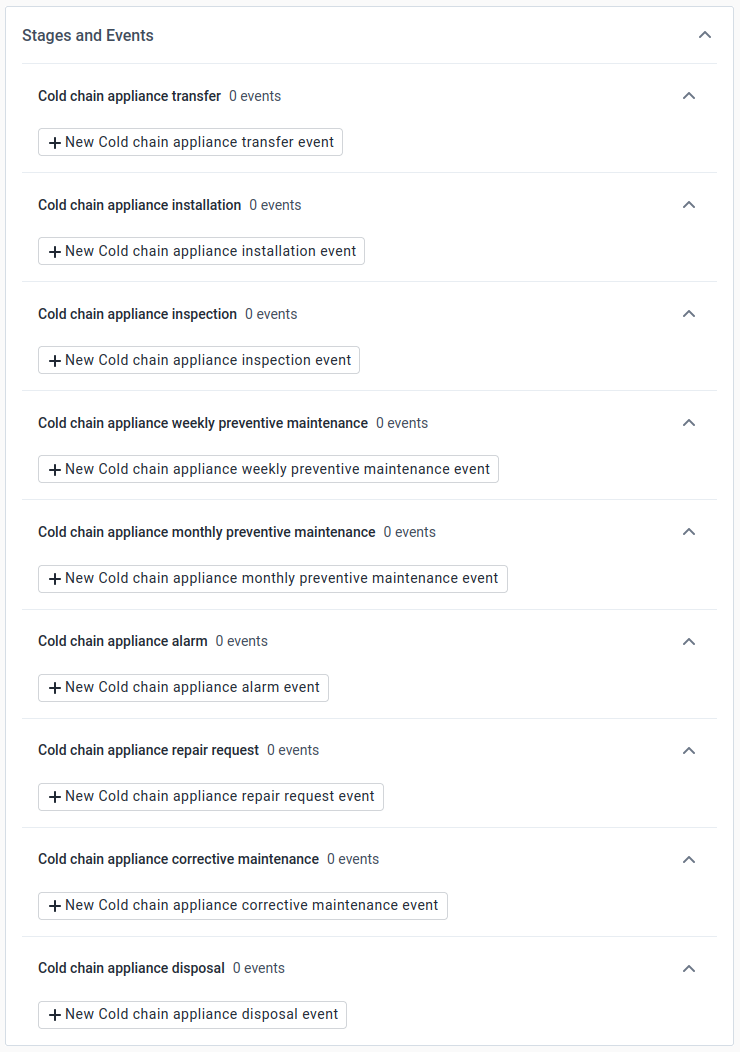
"Cold chain appliance transfer" / "Repeatable"
"Cold chain appliance installation" / "Repeatable"
"Cold chain appliance inspection" / "Repeatable"
"Cold chain appliance weekly preventive maintenance" / "Repeatable"
"Cold chain appliance monthly preventive maintenance" / "Repeatable"
"Cold chain appliance alert" / "Repeatable"
"Cold chain appliance repair request" / "Repeatable"
"Cold chain appliance corrective maintenance" / "Repeatable"
"Cold chain appliance disposal" / not repeatableRepeatable: see above
2 Assign data elements
Cold chain appliance transfer
"Sent from"
"Transferred to"
"Received from"
"Received at"Cold chain appliance installation
"Cold chain appliance installation report"Cold chain appliance inspection
"Daily inspection completed"
"Functional status"Cold chain appliance weekly preventive maintenance "Water removed at the bottom of the refrigerator" "Water droplets wiped off from the inside wall" "Lid gasket checked for sealing when the lid is closed"
Cold chain appliance monthly preventive maintenance “Clean refrigerator with water and mild detergent” “Clean the grill on the side of the refrigerator”
Cold chain appliance alarm
"Alarm type"
"Alarm cause"
"Alarm corrective action"
"Alarm resolved"
"Alarm escalated to supervisor"Cold chain appliance repair request
"Reason for repair request"
"Urgency of repair request"
“Defect image”
“Cold chain technician”Cold chain appliance corrective maintenance
"Assessment of technical fault"
"Interventions"
"Technical fault resolved"
"Equipment restored to service"Cold chain appliance disposal
"Reason for disposal" "Method of disposal" "Equipment removed from cold chain appliance inventory"Display in report: make visible for all items
Mobile render type: "Default"
Desktop render type: "Default"3 Create data entry form
"BASIC" is configured by default, no configuration is needed.
5 Access
Organisation units: tag the health care facility for assigning to the DHIS2 Capture.
Roles and access: "Biomedical equipment life cycle management" appears by default
SELECT ALL6 Notifications (not applicable)
6.2 Tracked entity attribute
Name (*):
"Appliance image" / "Image"
"Company" / "Text"
"Energy source" / "Text"
"Freezer gross volume (litres)" / "Number"
"GS1 GIAI" / "Text"
"GTIN" / "Text"
"Manufactured in" / "Text"
"Manufacturer's reference" / "Text"
"Place of installation" / "Text"
"PQS code" / "Text"
"PQS code category" / "Text"
"Product number" / "Text"
"Production date" / "Date"
"Product number" / "Text"
"Serial number" / "Text"
"Type of appliance" / "Text"
"Unique identifier" / "Text"
"Vaccine gross volume (litres)" / "Number"
"Vaccine storage capacity (litres)" / "Number"Name (*): (see above)
Short name (*): same as "Name ()"
**Value type*: "Text"
Aggregation type: "None"
Inherit: check (appears as a blue tag with a white tick)
6.3 Relationship type
Name (*): "World Health Organization PQS catalogue"
Relationship name seen from initiating entity (*): "World Health Organization PQS catalogue"
From constraint (*): "Tracked entity instance"
Tracked entity type (*): "Cold chain appliance"
Program: "Cold chain appliance lifecycle management"
To constraint (*): "Tracked entity instance"
Tracked entity type (*): "Cold chain appliance"
Program: "Cold chain appliance lifecycle management"
6.4 Tracked entity type
Color: leave empty
Icon: leave empty
Description: leave empty
Enable tracked entity instance audit log: check (appears as white tick in a blue box)
Minimum number of attributes required to search: 1
Tracked entity type attributes: assign the following Tracked entity attributes in this order"Appliance image" / "Image"
"Place of installation" / "Text"
"PQS code category" / "Text"
"PQS code" / "Text"
"Type of appliance" / "Text"
"Company" / "Text"
"Manufactured in" / "Text"
"Manufacturer's reference" / "Text"
"Energy source" / "Text"
"Vaccine storage capacity (litres)" / "Number"
"Vaccine gross volume (litres)" / "Number"
"Freezer gross volume (litres)"
"Production date" / "Date"
"Product number" / "Text"
"GTIN" / "Text"
"Serial number" / "Text"
"GS1 GIAI" / "Text"
"Unique identifier" / "Text"
"Unique identifier scan" / "Text"
"Donated by" / "Text"Display in list: tag all
Searchable: tag except for "Appliance image", "Manufactured in" and "Production date"
6.5 Program rule
1 Enter program rule details
Program (*): "Cold chain appliance lifecycle management"
Name (*): "GS1 GIAI specifications"
Description: "Parses the GS1 GIAI, "extracts" GTIN, serialized number and production date and writes them to the respective attribute fields".2 Enter program rule expression
Condition: "d2:hasValue(A{GS1 GIAI})"
3 Define program rule actions
Action details
GTIN
Action (*): "Assign to"
Tracked entity attribute to assign to: "GTIN"
Expression to evaluate and assign: "d2:extractDataMatrixValue( 'gtin', A{GS1 GIAI})"Production date
Action (*): "Assign to"
Tracked entity attribute to assign to: "Production date"
Expression to evaluate and assign: "d2:extractDataMatrixValue( 'production date', A{GS1 GIAI})"Serial number
Action (*): "Assign to"
Tracked entity attribute to assign to: "Serial number"
Expression to evaluate and assign: "d2:extractDataMatrixValue( 'serial number', A{GS1 GIAI})"
6.6 Program rule variable
Name (*): "GS1 GIAI"
Source type (*): "Tracked entity attribute"
Tracked entity attribute: "Cold chain appliance lifecycle management GS1 GIAI"
7 OTHER
7.1 Legend
1 Alarm count Name (*): "Alarm count"
1 No alarms
Name: "No alarms"
Start value: "0"
End value: "1"
Color code: "#06FF00" (green)2 1-5 alarms
Name: "1-5 alarms"
Start value: "1"
End value: "5"
Color code: "#FFA500" (orange)3 6-10 alarms
Name: "6-10 alarms"
Start value: "5"
End value: "10"
Color code: "#FF1300" (red)4 More than 10 alarms
Name: "More than 10 alarms"
Start value: "10"
End value: "100"
Color code: "#9904A5" (purple)2 Cold chain appliance - temperature ranges Name (*): "Cold chain appliance - temperature ranges"
1 At or below 0° Celsius
Name: "At or below 0° Celsius"
Start value: "-273.15"
End value: "0"
Color code: "#0A0909" (black)2 0° to +2° Celsisus
Name: "2 0° to +2° Celsisus"
Start value: "0"
End value: "2"
Color code: "#FB023D" (red)3 +2° to +8° Celsius
Name: "+2° to +8° Celsius"
Start value: "2"
End value: "8"
Color code: "#19F00" (green)4 Above +8° Celsius
Name: "Above +8° Celsius"
Start value: "8"
End value: "100"
Color code: "#FFA500" (orange)3 Functional / non-functional Name (*): "Functional / non-functional"
1 Non-functional alarms
Name: "Non-functional"
Start value: "0"
End value: "1"
Color code: "#FF2100" (red)2 Functional
Name: "Functional"
Start value: "1"
End value: "2"
Color code: "#00FF37" (greeen)
7.2 Option set
1 Alarm type
PRIMARY DETAILS
Name: "Alarm type"
Value type (*): "Text"OPTIONS
1 Audible alarm
Name (*): "Audible alarm"
Code (*): "Audible alarm"2 Visual alarm
Name (*): "Visual alarm"
Code (*): "Visual alarm"3 Mobile app notification
Name (*): "Mobile app notification"
Code (*): "Mobile app notification"2 Appliance functional / non-functional
PRIMARY DETAILS
Name: "Appliance functional / non-functional"
Value type (*): "Text"OPTIONS
1 Functional
Name (*): "Functional"
Code (*): "Functional"2 Non-functional
Name (*): "Non-functional"
Code (*): "Non-functional"
7.3 Predictor
Note that the Predictors are only given for "Refrigerator 1" but are entirely analogous for "Refrigerator 2" etc. except for selecting the corresponding Program Indicator with "Refrigerator 2" in the "Generator".
Note that the Predictors are only given for the "Daily" "Period type" denoted by "DLY" (and for "Refrigerator 1") but are entirely analogous for "Monthly" "Period type" denoted by "MTH" except for selecting the corresponding "Output data element" of "Refrigerator 1 - MTH" and selecting "Monthly" as "Period type"
1 T2A - Refrigerator 1 - CCE status functional / count - DLY
Name (*): "T2A - Refrigerator 1 - CCE status functional / count - DLY"
Short name (*): "T2A - Ref 1 - CCE status functional / count - DLY"
Output data element (*): "Refrigerator 1 - DLY"
Output category option combo "CCE Status functional / count"
Period type (*): "Daily"
Organisation unit levels "Facility"
Organisation units providing data (*) "At selected level(s) only"
Generator (*)Description: "T2A - Ref 1 - CCE status functional / count - DLY"
Expression: "I{otg8rNpyfYz}"
CCE appliance status - Functional count - Refrigerator 1 - PISequential sample count (*): "0"
Annual sample count (*): "0"2 T2A - Refrigerator 1 - CCE status non-functional / count - DLY
Name (*): "T2A - Refrigerator 1 - CCE status non-functional / count - DLY"
Short name (*): "T2A - Ref 1 - CCE status non-funct / count - DLY"
Output data element (*): "Refrigerator 1 - DLY"
Output category option combo "CCE Status non-functional / count"
Period type (*): "Daily"
Organisation unit levels "Facility"
Organisation units providing data (*) "At selected level(s) only"
Generator (*)Description: "T2A - Ref 1 - CCE status non-funct / count - DLY"
Expression: "I{abLaHl56JjE}"
CCE appliance status - Non-functional count - Refrigerator 1 - PISequential sample count (*): "0"
Annual sample count (*): "0"3 T2A - Refrigerator 1 - Cold chain appliance alarm event / count - DLY
Name (*): "T2A - Refrigerator 1 - Cold chain appliance alarm event / count - DLY"
Short name (*): "T2A - Refrigerator 1 - Alarm count - DLY"
Output data element (*): "Refrigerator 1 - DLY"
Output category option combo "Temperature alarm / count"
Period type (*): "Daily"
Organisation unit levels "Facility"
Organisation units providing data (*) "At selected level(s) only"
Generator (*)Description: "T2A - Refrigerator 1 - Alarm count - DLY"
Expression: "I{PBUg2Gas2jj}"
CCE alarm event / count - Refrigerator 1 - PISequential sample count (*): "0"
Annual sample count (*): "0"4 T2A - Refrigerator 1 - Cold chain appliance compartment temperature 0-2° C / count - DLY
Name (*): "T2A - Refrigerator 1 - Cold chain appliance compartment temperature 0-2° C / count - DLY"
Short name (*): "T2A - Refrigerator 1 - Temp 0-2° C count - DLY"
Output data element (*): "Refrigerator 1 - DLY"
Output category option combo "Temperature count - 0-2° C"
Period type (*): "Daily"
Organisation unit levels "Facility"
Organisation units providing data (*) "At selected level(s) only"
Generator (*)Description: "T2A - Refrigerator 1 - Temp 0-2° C count - DLY"
Expression: "I{NZUDjkS0za9}"
CCE compartment temperature / 0-2° C - Refrigerator 1 - PISequential sample count (*): "0"
Annual sample count (*): "0"5 T2A - Refrigerator 1 - Cold chain appliance compartment temperature 2-8° C / count - DLY
Name (*): "T2A - Refrigerator 1 - Cold chain appliance compartment temperature 2-8° C / count - DLY"
Short name (*): "T2A - Refrigerator 1 - Temp 2-8° C count - DLY"
Output data element (*): "Refrigerator 1 - DLY"
Output category option combo "Temperature count - 2-8° C"
Period type (*): "Daily"
Organisation unit levels "Facility"
Organisation units providing data (*) "At selected level(s) only"
Generator (*)Description: "T2A - Refrigerator 1 - Temp 2-8° C count - DLY"
Expression: "I{tv3ZdB5fpAO}"
CCE compartment temperature / 2-8° C - Refrigerator 1 - PISequential sample count (*): "0"
Annual sample count (*): "0"6 T2A - Refrigerator 1 - Cold chain appliance compartment temperature above 8° C / count - DLY
Name (*): "T2A - Refrigerator 1 - Cold chain appliance compartment temperature above 8° C / count - DLY"
Short name (*): "T2A - Refrigerator 1 - Temp above 8° C count - DLY"
Output data element (*): "Refrigerator 1 - DLY"
Output category option combo "Temperature count - above 8° C"
Period type (*): "Daily"
Organisation unit levels "Facility"
Organisation units providing data (*) "At selected level(s) only"
Generator (*)Description: "T2A - Refrigerator 1 - Temp above 8° C count - DLY"
Expression: "CCE compartment temperature / above 8° C - Refrigerator 1 - PI"
**Sequential sample count (*): "0"
Annual sample count (*): "0"7 T2A - Refrigerator 1 - Cold chain appliance compartment temperature below 0° C / count - DLY
Name (*): "T2A - Refrigerator 1 - Cold chain appliance compartment temperature below 0° C / count - DLY"
Short name (*): "T2A - Refrigerator 1 - Temp below 0° C count - DLY"
Output data element (*): "Refrigerator 1 - DLY"
Output category option combo ""
Period type (*): "Daily"
Organisation unit levels "Facility"
Organisation units providing data (*) "At selected level(s) only"
Generator (*)Description: "T2A - Refrigerator 1 - Temp below 0° C count - DLY"
Expression: "I{hPXNqqtp3PH}"
CCE compartment temperature / below 0° C - Refrigerator 1 - PISequential sample count (*): "0"
Annual sample count (*): "0"8 T2A - Refrigerator 1 - Cold chain appliance corrective maintenance / count - DLY
Name (*): "T2A - Refrigerator 1 - Cold chain appliance corrective maintenance / count - DLY"
Short name (*): "T2A - Ref 1 - Corrective maintenance - DLY"
Output data element (*): "Refrigerator 1 - DLY"
Output category option combo "Repair request / count"
Period type (*): "Daily"
Organisation unit levels "Facility"
Organisation units providing data (*) "At selected level(s) only"
Generator (*)Description: "T2A - Ref 1 - Corrective maintenance - DLY"
Expression: "I{Ff3Slc3H12n}"
CCE corrective maintenance / count - Refrigerator 1 - PISequential sample count (*): "0"
Annual sample count (*): "0"9 T2A - Refrigerator 1 - Cold chain appliance temperature recording / count - DLY
Name (*): "T2A - Refrigerator 1 - Cold chain appliance temperature recording / count - DLY"
Short name (*): "T2A - Ref 1 - Temperture count - DLY"
Output data element (*): "Refrigerator 1 - DLY"
Output category option combo "Temperature / count"
Period type (*): "Daily"
Organisation unit levels "Facility"
Organisation units providing data (*) "At selected level(s) only"
Generator (*)Description: "T2A - Ref 1 - Temperture count - DLY"
Expression: "I{aeNUUrSzVgn}"
CCE compartment temperature recording / count - Refrigerator 1 - PISequential sample count (*): "0"
Annual sample count (*): "0"10 T2A - Refrigerator 1 - Cold chain inspection / count - DLY
Name (*): "T2A - Refrigerator 1 - Cold chain inspection / count - DLY"
Short name (*): "T2A - Refrigerator 1 - Inspection count - DLY"
Output data element (*): "Refrigerator 1 - DLY"
Output category option combo "CCE inspection / count"
Period type (*): "Daily"
Organisation unit levels "Facility"
Organisation units providing data (*) "At selected level(s) only"
Generator (*)Description: "T2A - Refrigerator 1 - Inspection count - DLY"
Expression: "I{jZdvDePrnGf}"
CCE inspection / count - Refrigerator 1 - PISequential sample count (*): "0"
Annual sample count (*): "0"11 T2A - Refrigerator 1 - Compartment temperature average - DLY
Name (*): "T2A - Refrigerator 1 - Compartment temperature average - DLY"
Short name (*): "T2A - Refrigerator 1 - Temp avg - DLY"
Output data element (*): "Refrigerator 1 - DLY"
Output category option combo "Temperature / average"
Period type (*): "Daily"
Organisation unit levels "Facility"
Organisation units providing data (*) "At selected level(s) only"
Generator (*)Description: "T2A - Refrigerator 1 - Temp avg - DLY"
Expression: "I{sdCM8qkTgLp}"
CCE compartment temperature / average - Refrigerator 1 - PISequential sample count (*): "0"
Annual sample count (*): "0"12 T2A - Refrigerator 1 - Compartment temperature maximum - DLY
Name (*): "T2A - Refrigerator 1 - Compartment temperature maximum - DLY"
Short name (*): "T2A - Refrigerator 1 - Temp max - DLY"
Output data element (*): "Refrigerator 1 - DLY"
Output category option combo "Temperature / maximum"
Period type (*): "Daily"
Organisation unit levels "Facility"
Organisation units providing data (*) "At selected level(s) only"
Generator (*)Description: "T2A - Refrigerator 1 - Temp max - DLY"
Expression: "I{Y9nlWojSPM4}"
CCE compartment temperature / maximum - Refrigerator 1 - PISequential sample count (*): "0"
Annual sample count (*): "0"13 T2A - Refrigerator 1 - Compartment temperature minimum - DLY
Name (*): "T2A - Refrigerator 1 - Compartment temperature minimum - DLY"
Short name (*): "T2A - Refrigerator 1 - Temp min - DLY"
Output data element (*): "Refrigerator 1 - DLY"
Output category option combo "Temperature / minimum"
Period type (*): "Daily"
Organisation unit levels "Facility"
Organisation units providing data (*) "At selected level(s) only"
Generator (*)Description: "T2A - Refrigerator 1 - Temp min - DLY"
Expression: "I{SPjXOLRNqBe}"
CCE compartment temperature / minimum - Refrigerator 1 - PISequential sample count (*): "0"
Annual sample count (*): "0"14 T2A - Refrigerator 1 - Repair request / count - DLY
Name (*): "T2A - Refrigerator 1 - Repair request / count - DLY"
Short name (*): "T2A - Refrigerator 1 - Repair request - DLY"
Output data element (*): "Refrigerator 1 - DLY"
Output category option combo "Repair request / count"
Period type (*): "Daily"
Organisation unit levels "Facility"
Organisation units providing data (*) "At selected level(s) only"
Generator (*)Description: "T2A - Refrigerator 1 - Repair request - DLY"
Expression: "I{jOpIYexqBu8}"
CCE repair requests / count - Refrigerator 1 - PISequential sample count (*): "0"
Annual sample count (*): "0"15 T2A - Refrigerator 2 - Cold chain appliance alarm event / count - DLY
Name (*): "T2A - Refrigerator 2 - Cold chain appliance alarm event / count - DLY"
Short name (*): "T2A - Refrigerator 2 - Alarm count - DLY"
Output data element (*): "Refrigerator 1 - DLY"
Output category option combo "Temperature alarm / count"
Period type (*): "Daily"
Organisation unit levels "Facility"
Organisation units providing data (*) "At selected level(s) only"
Generator (*)Description: "T2A - Refrigerator 2 - Alarm count - DLY"
Expression: "I{PBUg2Gas2jj}"
CCE alarm event / count - Refrigerator 1 - PISequential sample count (*): "0"
Annual sample count (*): "0"16 T2A - Refrigerator 2 - Cold chain appliance compartment temperature 0-2° C / count - DLY
Name (*): "T2A - Refrigerator 2 - Cold chain appliance compartment temperature 0-2° C / count - DLY"
Short name (*): "T2A - Refrigerator 2 - 0-2° C count - DLY"
Output data element (*): "Refrigerator 1 - DLY"
Output category option combo "Temperature count - 0-2° C"
Period type (*): "Daily"
Organisation unit levels "Facility"
Organisation units providing data (*) "At selected level(s) only"
Generator (*)Description: "T2A - Refrigerator 2 - 0-2° C count - DLY"
Expression: "I{NZUDjkS0za9}"
*CCE compartment temperature / 0-2° C - Refrigerator 1 - PI *Sequential sample count (*): "0"
Annual sample count (*): "0"
7.4 Predictor group
Name (*): "DHIS2-CCE - T2A - Predictors"
Predictors"T2A - Refrigerator 1 - [any description]"
"T2A - Refrigerator 2 - [any description]"
DHIS2 ANALYTICS
Xx
Analytics overview
1. Android Capture app - offline analytics
OA 1 - [Title]
OA 2 - [Title]
OA 3 - [Title]
TO BE DEVELOPED2. Working list
WL 1 - [Title]
WL 2 - [Title]
WL 3 - [Title]3. Line Listing LL 1 - [Title]
LL 2 - [Title]
LL 3 - [Title]4. Data visualizer
DV 1 - [Title]
DV 2 - [Title]
DV 3 - [Title]5. Event Report
ER 1 - [Title]
ER 2 - [Title]
ER 3 - [Title]6. Maps
Map 1 - [Title]
Map 2 - [Title]
Map 3 - [Title]7. Dashboard
DB 1 - [Title]
DB 2 - [Title]
DB 3 - [Title]
1 Android Capture app - offline analytics
Name: XXX
XXX
TO BE DEVELOPED
2 Working lists
WL 1 Catalogue WHO PQS
Columns to show in table
"Appliance image" (not that currently only a hyperlink for opening an image is available)
"PQS category"
"PQS code"
"Type of appliance"
"Company"
"Manufactured in"
"Manufacturer's reference"
"Energy source"
"Vaccine storage capacity (litres)"
"Vaccine gross volume (litres)"
"Freezer gross volume (litres)"More filters
"Place of installation": select "Catalogue WHO PQS"
"PQS category"
"PQS code"
"Type of appliance"
"Company"
"Manufactured in"
"Manufacturer's reference"
"Energy source"
"Vaccine storage capacity (litres)"
"Vaccine gross volume (litres)"
"Freezer gross volume (litres)"
WL 2 National Cold Chain Appliance Registry - Detailed
Columns to show in table
"Appliance image" (not that currently only a hyperlink for opening an image is available)
"Refrigerator number"
"Place of installation"
"PQS category"
"PQS code"
"Type of appliance"
"Company"
"Manufactured in"
"Manufacturer's reference"
"Energy source"
"Vaccine storage capacity (litres)"
"Vaccine gross volume (litres)"
"Freezer gross volume (litres)"
"Production date"
"Product number"
"GTIN"
"Serial number"
"GS1 GIAI"
"Unique identifier"
"Donor name"
"Date of donation"More filters "Place of installation": exclude "Catalogue WHO PQS"
"PQS code"
"Energy source"
"Serial number"
WL 3 National Cold Chain Appliance Registry - Compact
Columns to show in table
"Appliance image" (not that currently only a hyperlink for opening an image is available)
"Refrigerator number"
"Place of installation"
"PQS category"
"PQS code"
"Type of appliance"
"Company"
"Manufactured in"
"Manufacturer's reference"
"Energy source"
"Vaccine storage capacity (litres)"
"Vaccine gross volume (litres)"
"Freezer gross volume (litres)"
"Production date"
"Product number"
"GTIN"
"Serial number"
"GS1 GIAI"
"Unique identifier"
"Donor name"
"Date of donation"More filters "Place of installation": exclude "Catalogue WHO PQS"
"PQS code"
"Type of appliance"
"Company"
"Manufacturer's reference"
"Serial number"
"Donor name"
3 Line Listing
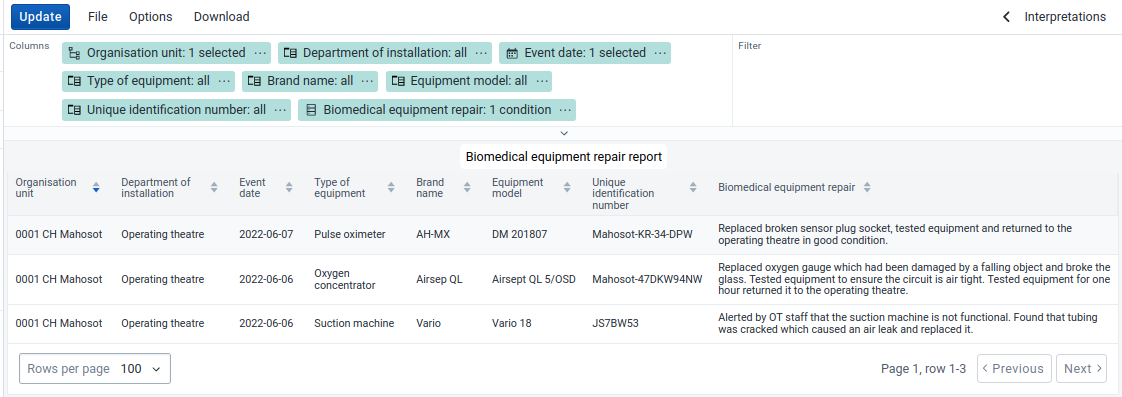
LL 1 - Name: "Cold chain equipment alarm report"
Columns
"Last updated on": select "Today" and "Last 30 days" "Organisation unit" select the country or lower level as required "Place of installation"
"PQS code"
"Type of appliance"
"Company"
"Manufacturer's reference"
"Serial number"
"Alarm type"
"Alarm cause": "Condition": "is not empty / not null" "Alarm corrective action"
"Alarm resolved"
"Alarm escalated and supervisor informed"
LL 2 - Name: "CCE Cold chain appliance corrective maintenance"
Columns
"Last updated on": select "Today" and "Last 30 days" "Organisation unit" select the country or lower level as required "Place of installation"
"PQS code"
"Type of appliance"
"Company"
"Manufacturer's reference"
"Assessment of technical fault"
"Interventions"
"Technical fault resolved" "Equipment restored to service"
LL 3 - Name: "CCE Cold chain appliance disposal report"
Columns
"Last updated on": select "Today" and "Last 30 days" "Organisation unit" select the country or lower level as required "Place of installation"
"PQS code"
"Type of appliance"
"Company"
"Manufacturer's reference"
"Serial number"
"Reason for disposal"
"Method of disposal" "Equipment removed from cold chain appliance inventory"
LL 4 - Name: "CCE Cold chain appliance inspection report"
Columns
"Last updated on": select "Today" and "Last 30 days" "Organisation unit" select the country or lower level as required "Place of installation"
"PQS code"
"Type of appliance"
"Company"
"Manufacturer's reference"
"Serial number"
"Daily inspection completed"
"Appliance functional/non-functional": select "functional" and "non-functional" "Appliance functional 0/1"Options > Legend
Use a legend for table cell colours": tag Legend style: "Legend changes background colour" Legend type: "Choose a single legend for the entire visualization" Legend: "Functional / non-functional" Show legend key: tag
LL 5 - Name: "CCE Cold chain appliance installation report"
Columns
"Last updated on": select "Today" and "Last 30 days" "Organisation unit" select the country or lower level as required "Place of installation"
"PQS code"
"Type of appliance"
"Company"
"Manufacturer's reference"
"Serial number"
"Cold chain appliance report"
LL 6 - Name: "CCE Cold chain appliance life cycle report"
Columns
"Last updated on": select "Today" and "Last 30 days" "Organisation unit" select the country or lower level as required "Place of installation"
"PQS code"
"Type of appliance"
"Company"
"Manufacturer's reference"
""
""
"" ""
LL 7 - Name: "CCE Cold chain appliance corrective maintenance"
Columns
"Last updated on": select "Today" and "Last 30 days" "Organisation unit" select the country or lower level as required "Place of installation"
"PQS code"
"Type of appliance"
"Company"
"Manufacturer's reference"
""
""
"" ""
LL 8 - Name: "CCE Cold chain appliance corrective maintenance"
Columns
"Last updated on": select "Today" and "Last 30 days" "Organisation unit" select the country or lower level as required "Place of installation"
"PQS code"
"Type of appliance"
"Company"
"Manufacturer's reference"
""
""
"" ""
LL 9 - Name: "CCE Cold chain appliance corrective maintenance"
Columns
"Last updated on": select "Today" and "Last 30 days" "Organisation unit" select the country or lower level as required "Place of installation"
"PQS code"
"Type of appliance"
"Company"
"Manufacturer's reference"
""
""
"" ""
LL 10 - Name: "CCE Cold chain appliance corrective maintenance"
Columns
"Last updated on": select "Today" and "Last 30 days" "Organisation unit" select the country or lower level as required "Place of installation"
"PQS code"
"Type of appliance"
"Company"
"Manufacturer's reference"
""
""
"" ""
LL 11 - Name: "CCE Cold chain appliance corrective maintenance"
Columns
"Last updated on": select "Today" and "Last 30 days" "Organisation unit" select the country or lower level as required "Place of installation"
"PQS code"
"Type of appliance"
"Company"
"Manufacturer's reference"
""
""
"" ""
4 Data visualizer
Name: XXX
XXX
5 Event report
Name: XXX
XXX
6 Maps
Name: XXX
XXX
7 Dashboard
Name: XXX
XXX
Android Settings app
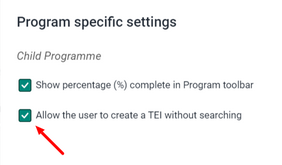
Appearance > Program > Specific settings > Add a Program Setting
Select "Cold chain appliance lifecycle management"
Allow the user to create a TEI without searching: check (appears as a white tick in a green box)
 |
|
DHIS2 user interfaces
Web portal / Tracker program
Web portal / Line listing


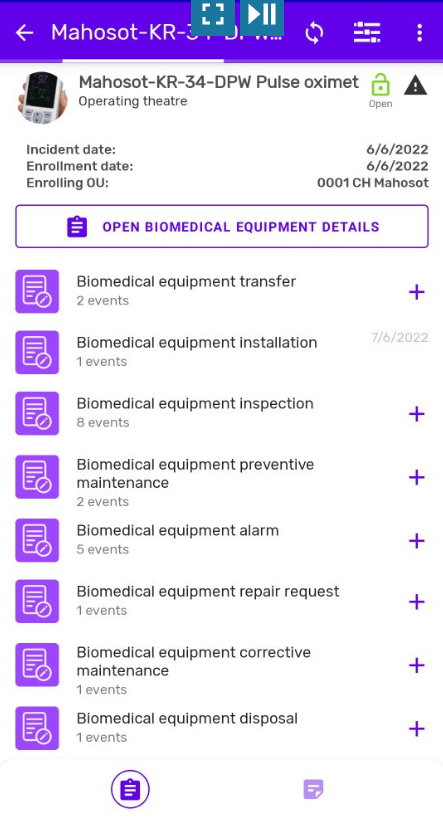
Capture Android app
Workflow for registering new appliances
The WHO PQS-catalogue lists 76 different attributes for section "E003: Refrigerators and freezers" although not all attributes apply to every appliance. For example, some attributes apply only to refrigerators and others only to freezer and AC (Alternating Current) and DC (Direct Current) devices have different attributes. Moreover, any specific use case is likely not to need all attributes available from the WHO PQS-catalogue.
When a new appliance (refrigerator or freezer) is registered, the respective TEAs (Tracked Entity Attributes) would all have to be entered manually. In order to facilitate this process and reduce the likelihood of errors, the DHIS2 PQS plugin can be used to automatically populate all generic attributes which are defined by the manufacturer and apply to all devices with the same PQS reference number.
Before using this tool for the first time, the DHIS2 "pqs-plugin" needs to be installed from the "Custom apps" section of the native "App Management" portal in the DHIS2 web application.
After installation of the DHIS2 "pqs-plugin", any new devices can be quickly registered with the following workflow:
-
Login into the DHIS2 instance
-
Open the "Capture" app
-
Select the Tracker Program where the new appliance should be registered (for example "Cold chain appliance lifecycle management - CCE)
-
Select the "Organisation unit" where the appliance should be registered
-
Select "Create new cold chain appliance - cce" (or other Tracker Program name in use)
-
In the "Details" section select the require appliance from the drop-down menu of the "Appliance identifier" field
-
All attributes from WHO PQS catalogue (json-file) are instantly fetched from the WHO website and posted into the respective attribute fields
-
In the last section ("Applaince specifications") enter the appliance specific attributes such as the "Production date" or the "Serial number" which are specific to individual appliances and not available from the WHO PQS catalogue
-
Select "Save cold chain appliance - cce"
Note that only appliances from the pre-configure option set can be selected and this option set has to be updated whenever new appliances are prequalified by the WHO.