Vital Events - Tracker System Design Guide
Introdução
Alcançar as metas relacionadas à saúde dos Objetivos de Desenvolvimento Sustentável (ODS) exigirá sistemas de saúde fortes e resilientes. O sistema de informação em saúde é um dos seis blocos de construção essenciais dos sistemas de saúde. A obtenção de melhores resultados de saúde para mulheres, adolescentes e crianças depende de decisões e acções bem informadas e oportunas tomadas por gestores de sistemas de saúde e formuladores de políticas. Investir na melhoria do Registro Civil e Estatísticas Vitais (CRVS) é fundamental para avançar na divulgação dos indicadores do ODS nº 3 relacionados à saúde.
Não obstante a importância da disponibilidade de estatísticas vitais, a implementação desigual dos sistemas de registro civil é resultado de múltiplas barreiras, como distância e acessibilidade, custos diretos e indiretos diretos e indiretos, falta de conhecimento e factores culturais que desfavorecem a população. -populações como mulheres ou migrantes.
O Vital Events (VE) Tracker é uma ferramenta projetada para aumentar a disponibilidade e o uso de dados confiáveis com o objetivo de reforçar o desempenho dos sistemas de saúde. O módulo rastreador oferece a oportunidade de melhorar a pontualidade e a precisão dos dados e expandir a cobertura do relatório de eventos principais, como nascimentos, natimortos e óbitos, acionando notificações em tempo real diretamente do ponto de atendimento. As notificações por si só não substituirão o CRVS Nacional oficial ou a estrutura legal dos países implementadores, mas melhorarão e fortalecerão a base de um repositório estatístico demográfico confiável.
Este pacote foi desenvolvido em resposta a uma necessidade expressa da declaração conjunta do UNICEF, GAVI e WHO, na qual todas as agências reafirmaram seu compromisso com os SGDs e populações vulneráveis, especialmente mulheres e crianças, trabalhando em conjunto com governos e parceiros para fortalecer os sistemas CRVS . O projecto é baseado na Orientação do UNICEF`s para formuladores de políticas, gerentes e parceiros de desenvolvimento de programas de saúde sobre CONTRIBUIÇÕES DO SETOR DA SAÚDE PARA MELHORAR O REGISTRO CIVIL DE NASCIMENTOS E MORTES EM PAÍSES DE BAIXA RENDA
Este documento destina-se a ser utilizado por implementadores do DHIS2 a nível nacional e regional para poder apoiar a implementação e localização da versão 1.1.0. do pacote. Fluxos de trabalho locais, diretrizes nacionais e as respectivas diretrizes de produtos de vacinação devem ser considerados durante a configuração e adaptação deste pacote.
System Design Overview
Use case
O objetivo geral é promover os direitos das crianças e das mulheres, bem como o planejamento e a programação baseados em evidências, por meio do fortalecimento dos dados populacionais no país, acelerando os nascimentos vivos, natimortos, notificação de óbitos/completude do registro.
O modelo de dados do rastreador no DHIS2 permite que um indivíduo seja cadastrado e acompanhado em uma série de serviços de saúde prestados ao longo do tempo. Esse modelo pode ser aproveitado para rastrear a conclusão dos calendários de vacinação dos indivíduos de acordo com a política nacional e as recomendações do produto, bem como capturar dados robustos de nível individual para apoiar a análise da distribuição, aceitação e conclusão da vacina de acordo com dados demográficos, condições subjacentes e outras variáveis .
Usuários pretendidos
- Usuários clínicos: o programa rastreador Vital Events é otimizado para entrada de dados no Point of Care.
- Gerentes de instalações, escritórios distritais de saúde e funcionários do programa nacional: os dados gerados através do programa alimentam um painel padronizado que monitora os principais indicadores para cada evento vital.
Information flow
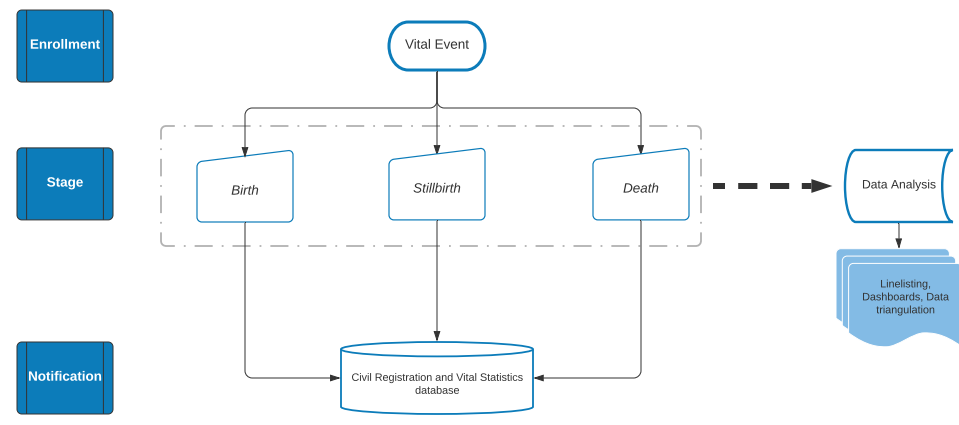
While the workflow around the registration of the vital event will vary from country to country, the tracker has been designed following the information flow in the flowchart above.
Each vital event will go through an enrollment process. Depending on the event itself, a birth, stillbirth, or death event will each require stage-specific information. Finally, once all the data has been entered in the system, the user can send a real time notification to the CRVS and the reported contacts via either SMS, system notification, or data exchange.
Standard data analyses in the form of predefined dashboards will be available from the information encoded in the enrollment and the different stages. The analytics will also give the possibility to link this package to other DHIS2 packages for data triangulation analysis (e.g. the immunization registry, the HIV tracker, or the cause of death just to name a few) if they are installed in the same instance.
Version 1.0.0. vs version 1.1.0.
The design of the Vital Events tracker program has been reviewed and adjusted to improve its flow of information and the end-user experience. The differences between the baseline and version 1.1.0. can be found in the Vital Events Diff File and in Jira.
Tracker Program Configuration
| Structure | Descrição |
|---|---|
| 1.Enrollment | Primeira etapa do programa. Na secção de perfil o usuário deverá fornecer a informação sobre o tipo de notificação (nascimento, óbito, natimorto) para seguir para a próxima etapa. |
| 2. Birth details OR Death details OR Stillbirth details | The second step of the program. The information required in order to send the notification is stage-specific depending on the selected outcome in enrollment. The death notification is further differentiated depending on the age of the deceased (below or above 28 days). |
Please note that all the TEAs and DEs have been set as compulsory when entering data. This decision has been made to increase the completeness and quality of the notification data, and to ensure a proper review of the package’s model upon implementation as local adaptations can potentially affect other DEs or TEAs.
Data elements
a lista completa de Elementos de Dados presentes na configuração padrão deste pacote está disponível no Arquivo Simples de Eventos Vitais. Os DEs no pacote podem ser expandidos para melhor refletir as necessidades locais e as políticas de CRVS. Certifique-se de consultar a Common Tracker Library antes de adicionar mais elementos de dados ou TEAs, pois alguns que planeja integrar no programa também podem ser categorizados como GEN - .
Program Stages’ details
Inscrição
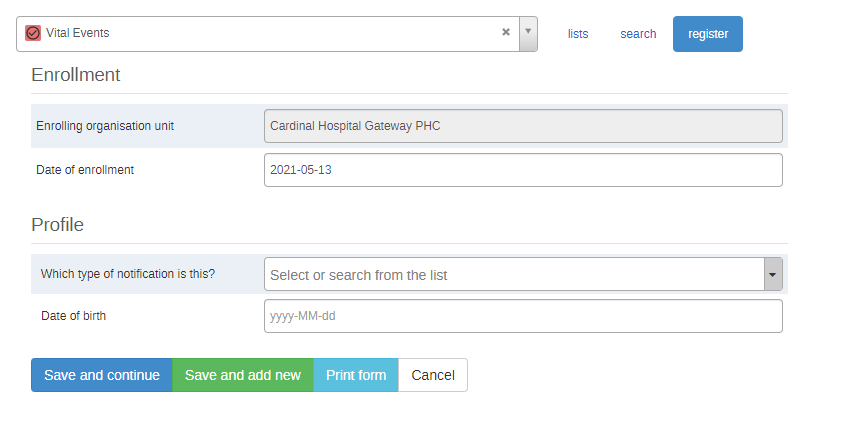
The enrollment stage expands based on the selection of the desired type of notification - birth, death, or stillbirth. Nonetheless, the majority of the Tracked Entity Attributes (TEAs) requested in the profiles for the different types of notifications are the same. More details are avialable in the chapters describing the three noifications.
Os TEAs na secção de perfil do estágio de Inscrição podem ser expandidos para refletir os regulamentos locais e as informações necessárias - por exemplo, pode haver a adição de um identificador único, ou das informações sobre o pessoal responsável por uma determinada instalação.
Please make sure you consult the Common Tracker Library before adding more data elements or TEAs, as some you are planning to integrate in the program might be also categorized as GEN - .
Birth enrollment
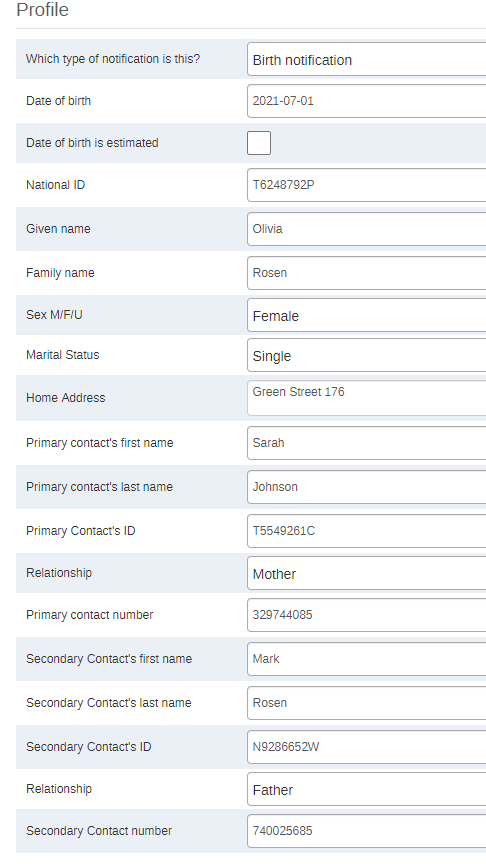
At this point baby Olivia has been enrolled in the system, but the notification has not been sent yet.
Note: the Sex DE displays only the Male and Female options in the Birth Enrollment stage.
Birth details stage
The second stage of the program, “Birth details” will request more information about the baby and the delivery. Olivia’s birth notification will only be sent to the CRVS and the contacts’ numbers if:
- “Send notification” is ticked
- All required data points are filled in
- The stage will be marked “complete”.
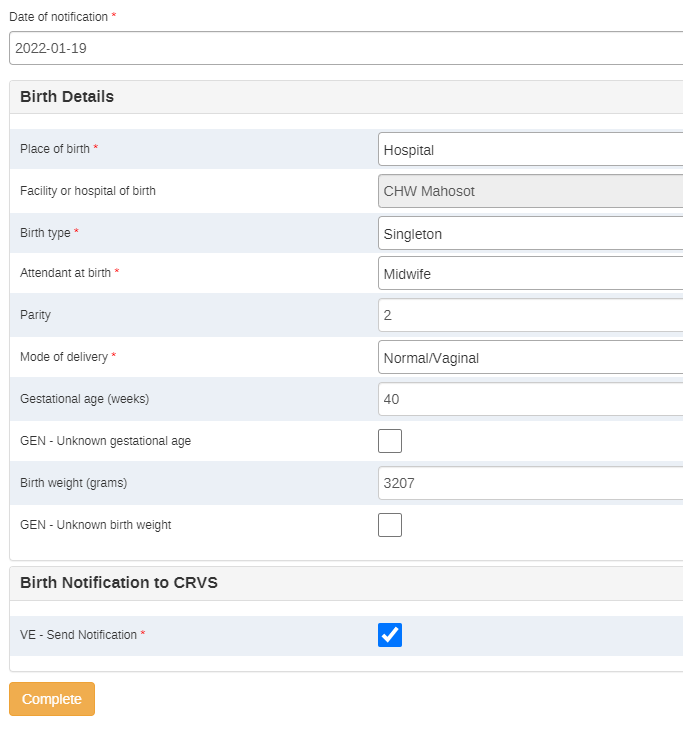
The data elements reported in this stage and options available in dropdown lists can be changed/reduced/increased according to the local context.
Note
The automatic warnings are triggered whenever the birth weight exceeds the upper and the lower guideline limits. The lower threshold for the warning trigger has been set at 2500 g, whereas the upper limit has been set at 4500 g. This warning has been set purely to avoid data entry mistakes such as mistyping or mixing of weight units (kg instead of g). Please note that the warning message does not imply the health status of the newborn. Should the notification not have info on the gestational weeks and the weight of the newborn, the user should tick the boxes provided - rules have been set to prevent the completion of the stage if the data element (e.g. Gestational age) and its correspondent unknown data element (Unknown gestational age) are either both filled, or both blank. This is of particular important for the reporting of unknonwn variables - the program indicators measuring the numbers of unkonwn gestational age and unknown weight are only weighting the number of boxes that have been ticked, not if the weight or gestational age are left empty as a proxy for unknown information.
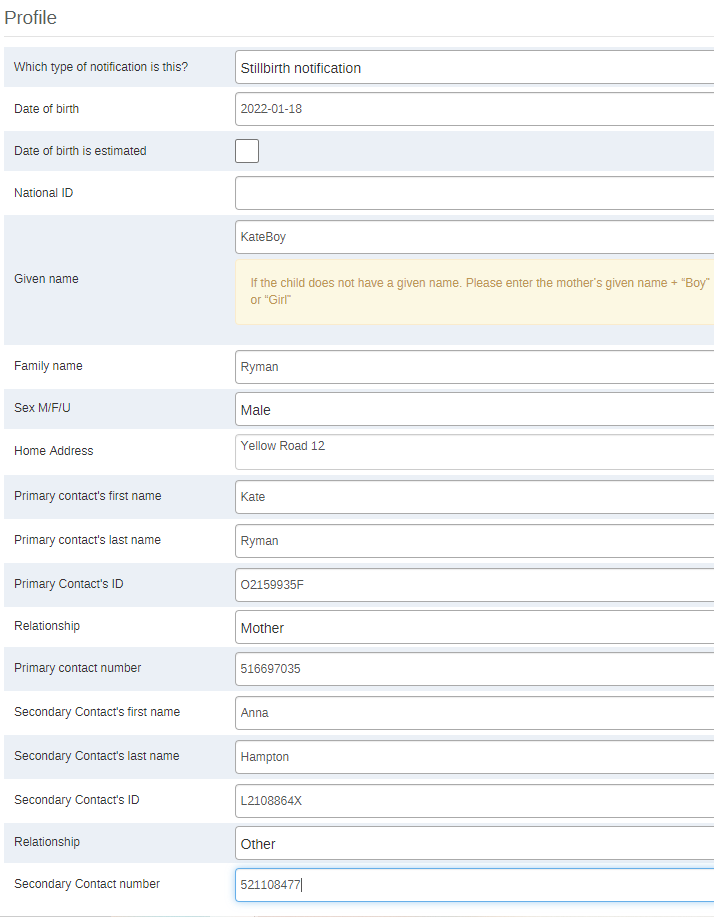
Stillbirth enrollment
At this point the baby boy has been enrolled in the system, but the notification has not been sent yet. As the boy had not been named yet, he was reported as per the warning under the “Given Name” TEA. The warning will appear by default whenever “stillbirth” is selected as a type of notificatio, though it can be adapted or removed according to local policies and guidelines.
Note
Stillbirth Enrollment is the only stage where the "Unknown" option is available for the reporting of the sex of the tracked entity.
Stillbirth details stage
The second stage of the notification process for a stillbirth will request more information about the delivery and the deceased baby.
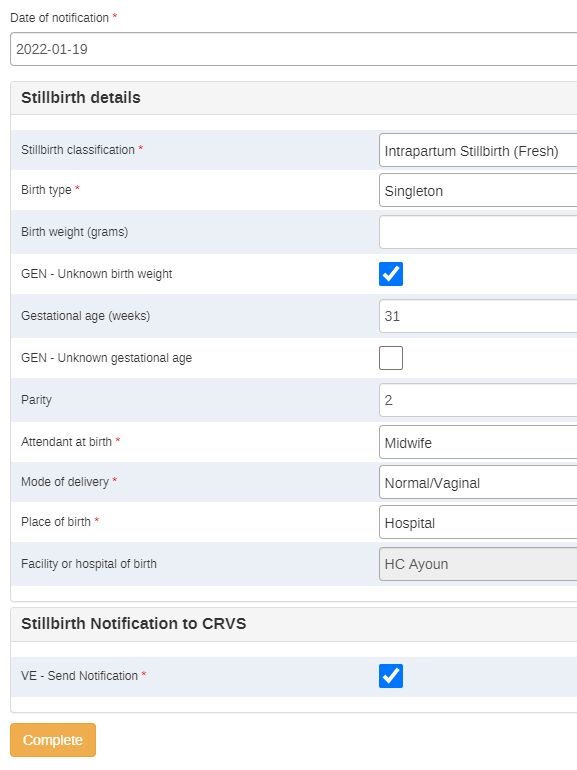
Just as for the birth notification stage, there are some automatic warnings set up to better guide the data entry. The warnings are triggered whenever the information provided falls out of normal ranges. They do not provide medical guidance, rather just a reminder to be particularly attentive when entering these data.
-
The automatic warnings are triggered whenever:
-
The stillbirth gestational age is lower than 22 weeks. This placeholder warning is set at 22 weeks as the lower limit: as per international standards, a death can be classified as a stillbirth after 22 weeks. If any other national guidelines have different thresholds (e.g. 20 weeks) the threshold can be changed accordingly. If there is no threshold on the weeks set locally, a different warning could be configured for the weight with a threshold set at 500 grams.
-
The birth weight exceeds the upper and the lower guideline limits. The lower threshold for the warning has been set at 2500 g, whereas the upper limit has been set at 4500 g.
-
The user fills in both or neither the data element and its correspondent unknown tick option.
Death enrollment
The death notification differs depending on the age of the deceased.
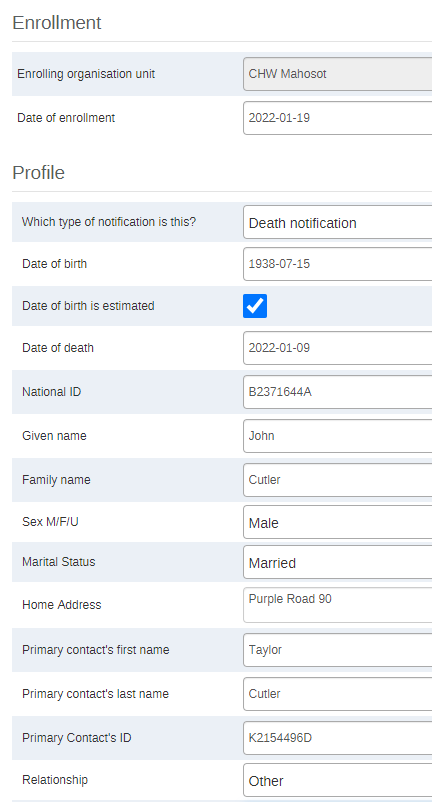
Enrollment of a death occurring > 28 days after birth
John died at the age of 83 years. The son and main contact, Taylor, was not sure about his father’s birthday. The data clerk has therefore ticked the “Date of birth is estimated” box.
Note
- an automatic warning message (same message as the one appearing for the name of stillbirths) will appear below the Given Name TEA for all the deaths of children occurring within the first year of life (set as a placeholder). The warning message or the threshold can be changed or removed according to local guidelines.
- The Sex data element only presents the "Male" and "Female" options.
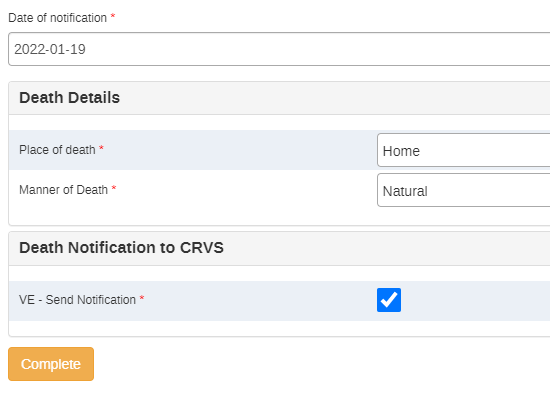
Death details of a death occurring > 28 days after birth
The information requested in the death details stage is minimal. Please note that in case definitions are not clear (e.g. Manner of death), the data entry operator will be able to access the definitions of the DEs just by clicking on them in the data entry form.
Enrollment of a death occurring ⩽ 28 days after birth
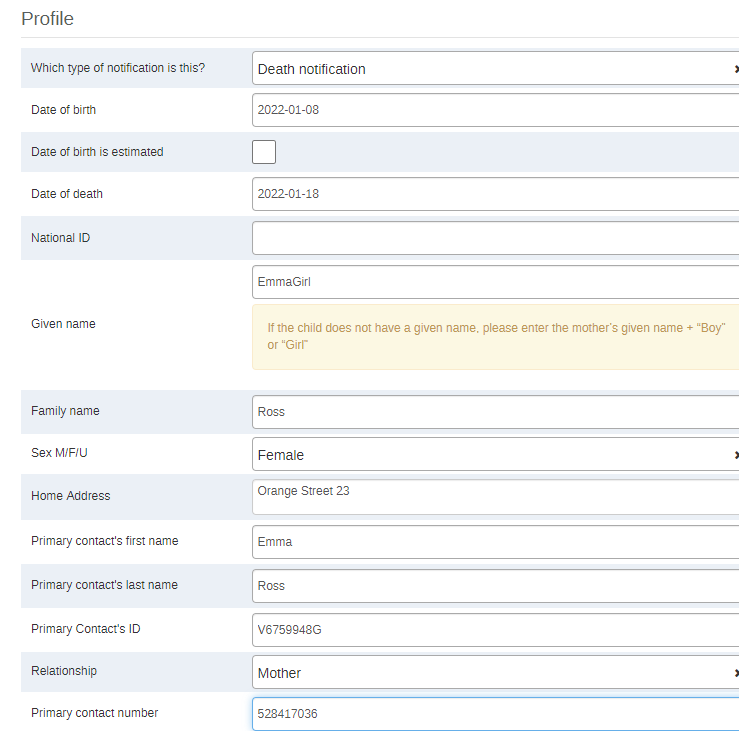
A baby girl died a couple of weeks after birth. She had not been given a name yet, so for the purpose of the enrollment itself, she will be recorded according to the warning reported in the screenshot below. The warning and its context can be modified according to the local contexts and regulations.
Death details of a death occurring ⩽ 28 days after birth
The information requested in the “Death details “ stage is more similar to the data requested for a birth or a stillbirth notification, than just a death.
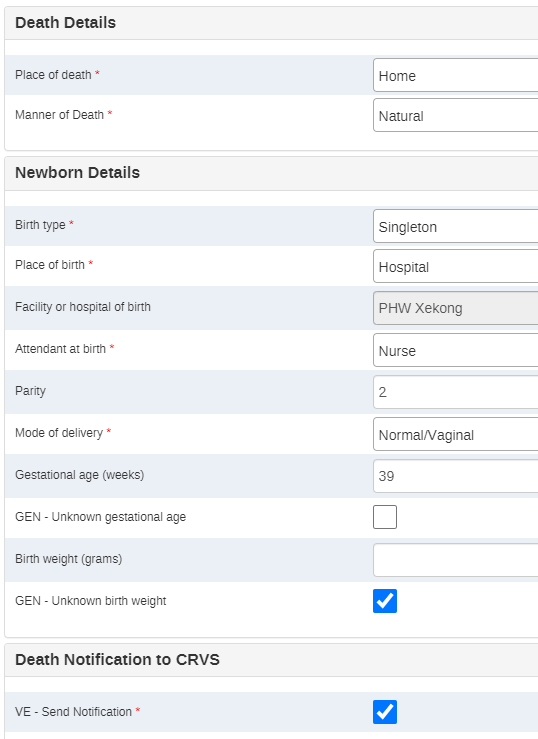
The data elements reported in this stage and options available in dropdown lists can be changed/reduced/increased according to the local context.
Observação
O aviso automático é acionado sempre que o peso ao nascer excede os limites superior e inferior da diretriz. O limite inferior para o disparo de aviso foi definido em 2500 g, enquanto o limite superior foi definido em 4500 g. Este aviso foi definido apenas para evitar erros de entrada de dados, como erros de digitação ou mistura de unidades de peso (kg em vez de g). Observe que a mensagem de aviso não implica o estado de saúde das informações do recém-nascido, pois um recém-nascido de 2500 gramas pode facilmente ser um bebê saudável.
User groups
| User group | painel de controle | Metadados do programa | Dados do Programa |
|---|---|---|---|
| VE - Administrador | Pode editar e visualizar | Pode editar e visualizar | Só pode ver |
| VE - Acesso | Pode editar e visualizar | Só pode ver | Só pode ver |
| VE - Captura de dados | Sem acesso | Só pode ver | Pode capturar e visualizar |
| Estes devem ser adaptados dependendo do contexto local. |
Realtime notifications
O DHIS2 possui um módulo de notificações SMS, mas para usar as notificações é necessário configurar um gateway SMS. Consulte a documentação sobre gateways sms aqui: https://docs.dhis2.org/master/en/developer/html/webapi_sms.html
O programa inclui uma mensagem a ser enviada ao contacto(s) registrado do evento de vida notificado:
“Obrigado por notificar o programa Nacional de Registo Civil e Estatísticas Vitais deste XXX”
XXX sendo igual a natimorto, nascimento ou óbito dependendo da notificação preenchida.
Além de enviar um SMS como resultado da avaliação de uma regra do programa, o DHIS2 também pode enviar SMS ou e-mails que podem ser acionados por outros eventos, incluindo falhas de trabalho do sistema ou em segundo plano e resultados da análise de validação. As ferramentas de tratamento de feedback também estão disponíveis para resultados de validação e a prioridade será definida para a importância da regra de validação violada.
Isso pode ser configurado em Manutenção -> Programa -> Notificação do programa / Notificação do estágio do programa.
As seguintes opções estão disponíveis ao escolher um destinatário:
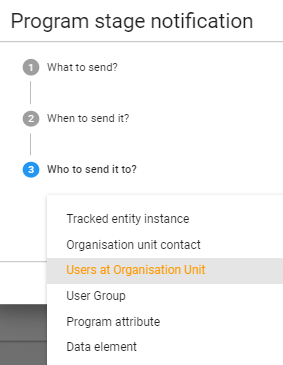
Para enviar uma notificação via SMS, criamos um Atributo de Entidade Rastreada chamado “Telefone móvel” que pode ser selecionado como um “Atributo do programa” para ser usado como destinatário.
Analytics
The full list of program indicators and indicators is available in the Vital Events Flat File. Please mind that all the indicators’ calculations use only the notified births/deaths/stillbirths, not the enrolled ones. This choice has been made in order to easily detect discrepancies in the system between enrollments without final notifications and the total number of notified events; and in order to align with the nature of the program itself - notifications.
Observação
O limite de 2 meses presente em algumas das análises foi definido como um espaço reservado para o período legal de notificação. O período de tempo terá que ser adaptado localmente de acordo com as Diretrizes Nacionais
Painéis
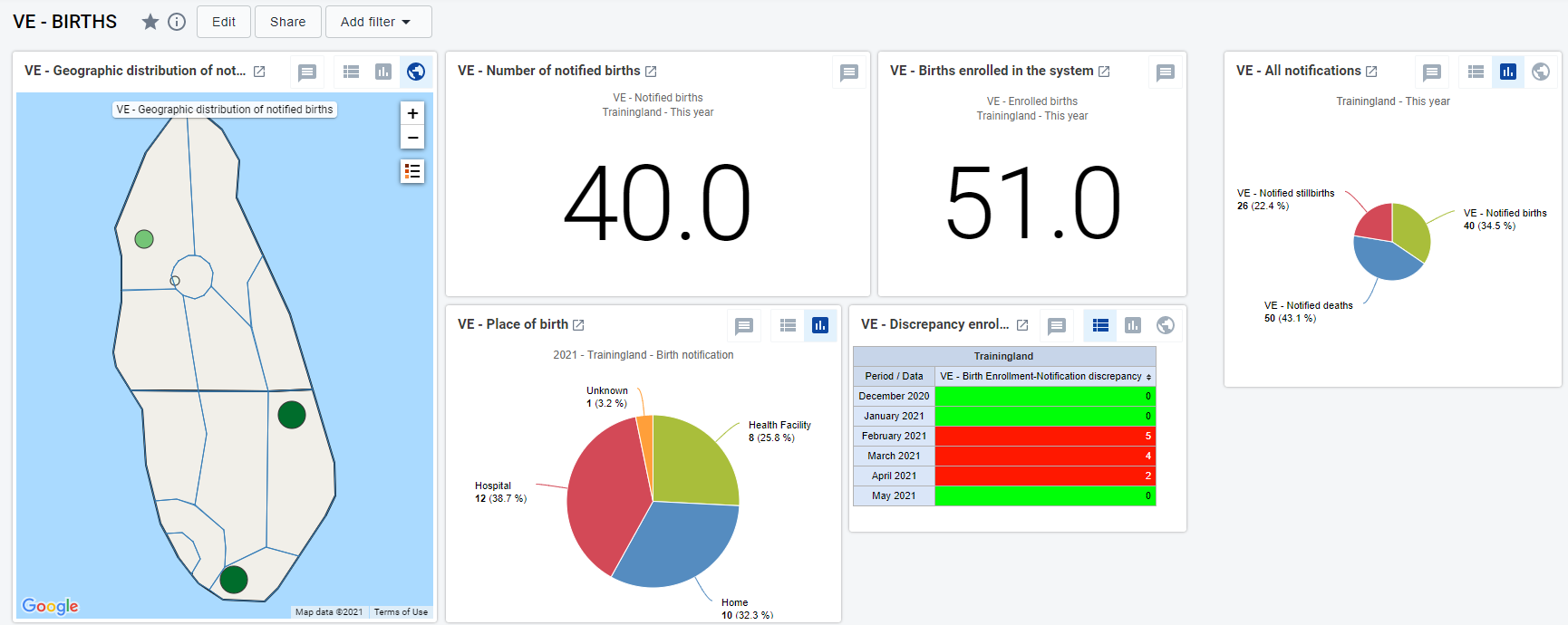
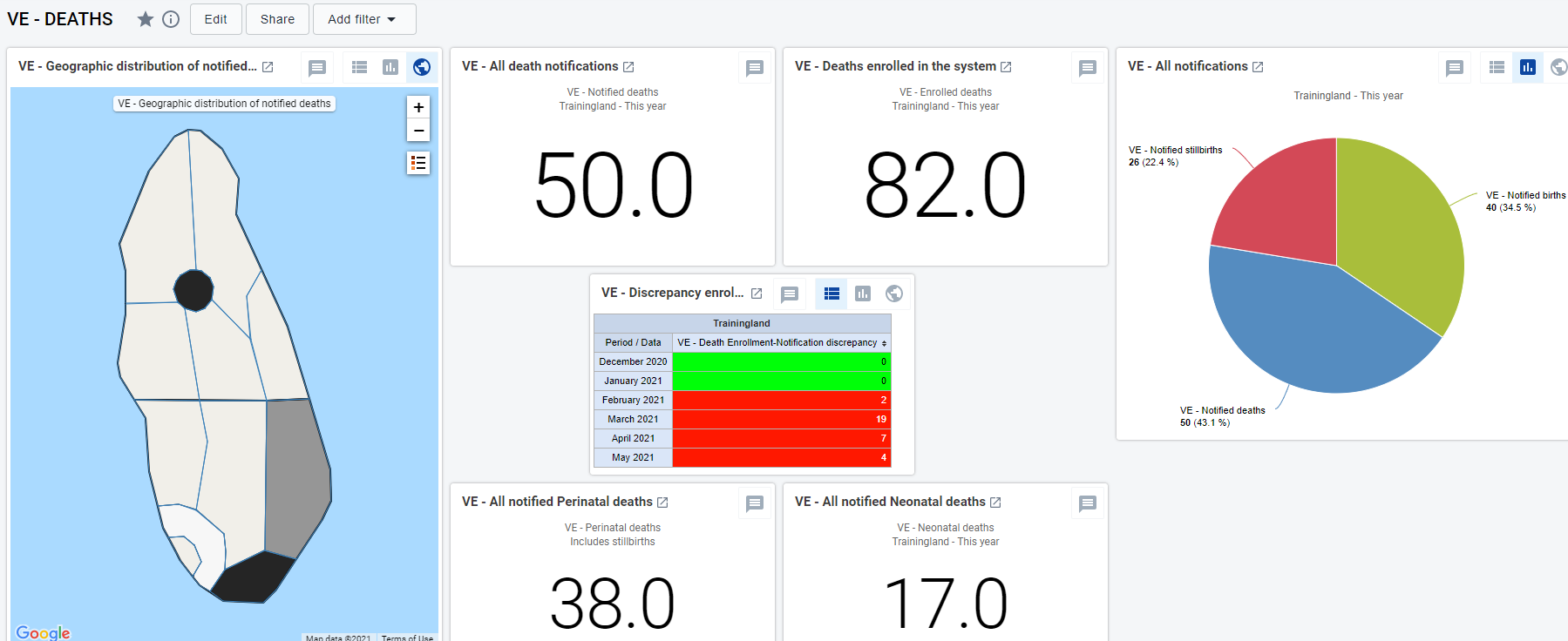
O pacote tem três painéis predefinidos: um para Nascimentos, um para Óbitos e um para Natimortos. Todos eles fornecem uma visão geral sobre os números agregados de informações relacionadas à causa específica da notificação.
Painel de nascimento - distribuições geográficas de casos notificados, total agregado de indicadores-chave, tabela de discrepâncias, taxas de natalidade, informações específicas do estágio (por exemplo, atendente no parto, local de nascimento)
Painel de óbitos - distribuição geográfica dos casos notificados, todas as principais taxas de mortalidade, totais dos principais indicadores para monitoramento, informações específicas do estágio (por exemplo, sexo do falecido, local do óbito), informações ausentes.
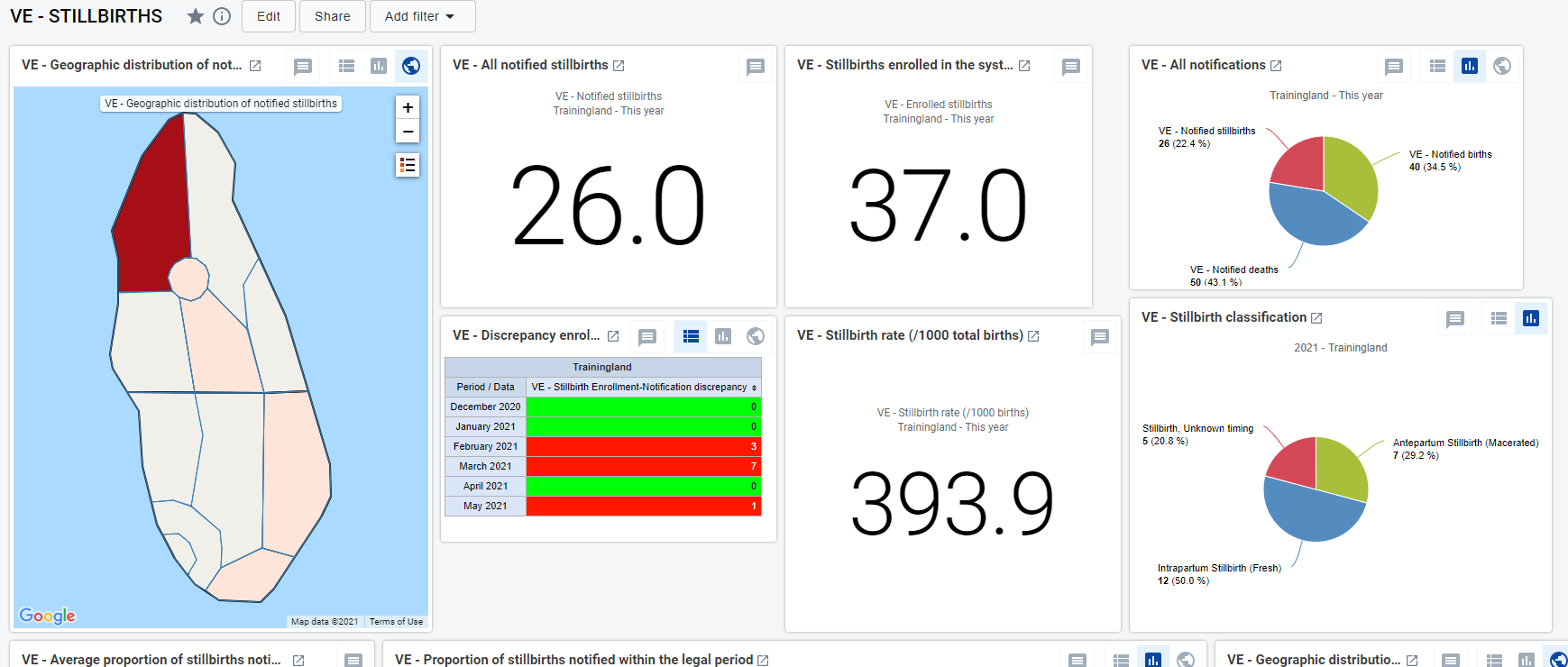
Painel de natimortos - distribuição geográfica dos natimortos notificados, data agregada nos principais indicadores, taxa de natimortos, informações específicas do estágio (por exemplo, tipo de natimorto, visão geral das semanas de gestação, informações ausentes).
Triangulation of data coming from other packages
O objetivo desta secção é destacar as etapas e secções específicas dos pacotes em que um evento de vida é registrado e propor elementos de dados adicionais para triangular os dados em relação às notificações enviadas do programa VE.
Elementos de dados adicionais propostos:
-
Has this birth/death/stillbirth been notified and registered in the national CRVS system? Y / N / Unknown
SE NÃO
-
Is this birth/death/stillbirth being notified at the present moment? Y / N
Here below is a list of the programs and the possible linkages that are recommended to triangulate the data and to obtain extra information on missed opportunities of notifications. As a result, the triangulation of information could help the health system with the improvement of their demographic statistics. As a general principle the VE data can be triangulated against any tracker package that contains and reports information on any of the vital events - births, deaths, and stillbirths.
Adverse events following immunisation (AEFI) tracker
Os dados coletados neste rastreador que podem ser potencialmente triangulados com o rastreador VE são as mortes após um AEFI.
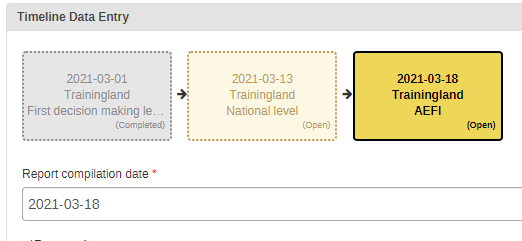
Uma pergunta sobre a notificação de óbito pode ser adicionada ao rastreador de AEFI assim que a etapa do programa de nível nacional for concluída e a etapa de AEFI aparecer.
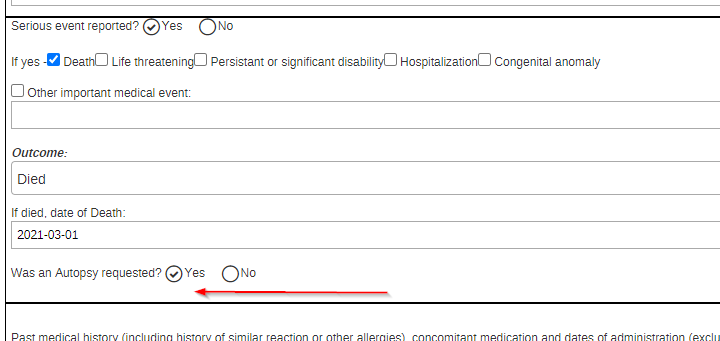
Se “Morte” for o desfecho selecionado, a informação sobre se a morte do paciente foi notificada e, em caso de resposta negativa, se a morte está sendo notificada agora, poderia ir após a pergunta da autópsia.
Se as perguntas forem adicionadas ao rastreador AEFI, alguns indicadores extras podem ser configurados para ter uma melhor visão geral do grau de potenciais oportunidades perdidas de notificação:
- Número de mortes relacionadas a AEFI relatadas como não registradas
- Número de notificações de óbito enviadas no momento da conclusão da avaliação em nível nacional
TB Case Surveillance
O rastreador de vigilância de casos de TB acompanha o paciente desde a detecção de uma infecção por TB até o resultado do tratamento.
Se na etapa “Desfecho” o paciente for informado como falecido, as informações complementares sobre a possível notificação de óbito podem ser informadas após a DE “Desfecho do tratamento TB”.
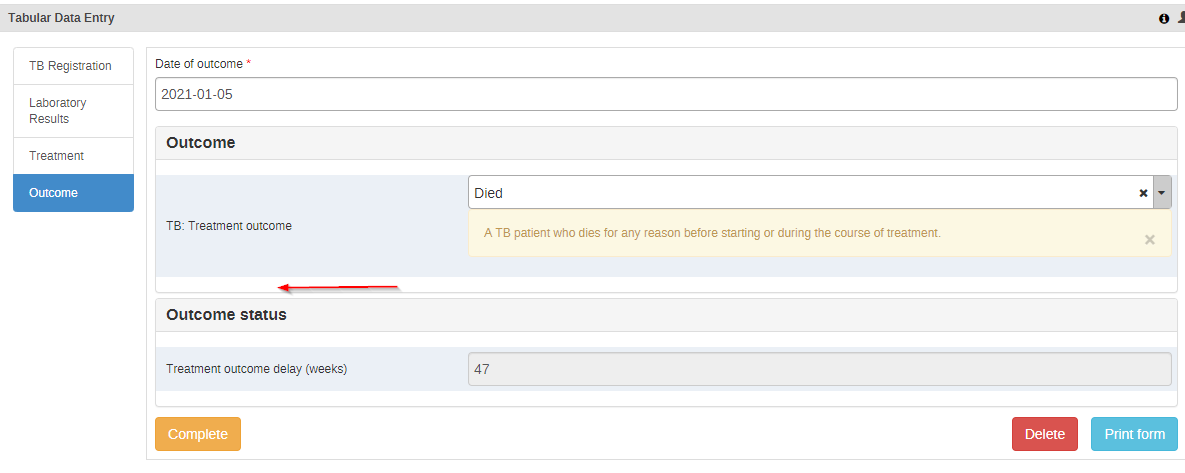
Se as perguntas forem adicionadas ao rastreador de vigilância de casos de TB, alguns indicadores extras podem ser configurados para ter uma melhor visão geral do grau de potenciais oportunidades perdidas de notificação:
- Número de mortes relacionadas à tuberculose não notificadas
- Número de notificações de óbito enviadas no momento da conclusão do desfecho de TB