Laboratory interoperability reference implementation
This guide accompanies the repository DHIS2 Tracker Lab Result Integration - reference implementation
Introduction
This guide is for implementers considering, evaluating, or building laboratory interoperability with DHIS2. It sets out what any laboratory integration is made of and the design decisions you will have to answer for yourself, alongside one worked set of answers.
Laboratory results are one of the more common — and more painful — interoperability problems in DHIS2 implementations. Laboratory systems are almost always external to DHIS2, run by a different team, and rarely designed with DHIS2 in mind. Results have to reach the right person's record reliably, without manual re-entry and without the risk of landing against the wrong case. What counts as a relevant result varies by disease and by country, since not every test is performed at every level of the health system. Beyond getting the result onto the case, it is often useful to track how the laboratory side is performing — turnaround times, for example.
Interoperability is not a prerequisite for capturing laboratory data in a surveillance system. Giving laboratory staff direct access to enter just the relevant results can speed up data capture considerably, at low cost and with no integration work at all. Whether interoperability is worth the investment over something that simple is a cost/benefit and sustainability question to work through for your own context before committing — this guide picks up once that decision has been made in favour of interoperability.
What this guide covers — and what's in the repository
Laboratory results are typically typed by hand into whatever case-based surveillance or EMR-style program holds the patient's record. That is slow, prone to transcription errors, and delays the information reaching the health workers and managers who need it. Sending the result electronically instead removes the retyping step and the errors that come with it, and makes the result available to everyone with access to the record as soon as it lands.
The system on the other side of this integration is usually a Laboratory Information System (LIS): a system built around laboratory workflow, tracking a specimen from intake through testing to reported result and making that result available to the staff and clinicians who rely on it.
On the DHIS2 side, the scenario is an integrated surveillance and outbreak response system inspired by the Africa CDC Toolkit for Surveillance and Outbreak Response: DHIS2 holds the case record that the laboratory result has to reach.
This reference implementation covers the flow of test results into DHIS2 — it does not cover placing test orders. The scenario is that a specimen has already been collected and identified, the laboratory has processed it, and the result now needs to reach the correct record in DHIS2. Generating the identifier that links the two sides — here, a specimen ID — and placing the underlying laboratory order are assumed to have happened earlier in the surveillance workflow.
This guide vs. the repository
The two are meant to be read together, and they do different jobs:
| This guide | The repository |
|---|---|
| What laboratory interoperability involves, conceptually | The working code |
| The design decisions you face, the options available, and their tradeoffs | Quick start, Docker setup, and how to run it |
| Which answers this reference implementation chose, and why | Architecture diagrams and implementation detail |
| What it assumes of your DHIS2 configuration before you start | The preconfigured demo database and metadata |
| What to settle before go-live — ownership, error handling, data entry SOPs | Configuration, mapping files, and test scripts |
How laboratory interoperability works
The same four parts turn up in every laboratory results integration, whatever technology sits behind it — and on their own they are not enough to make one work. What this reference implementation puts in each slot — which standard, which identifier, where the mapping lives, how the two sides talk to each other — is a series of choices, and each one is set out under Design decisions alongside the alternatives it passed over.
- A destination — the system holding the case record the result has to reach, and the reason the integration exists at all. In this guide, DHIS2.
- A source producing the result — whatever reports the result once the laboratory has finished processing the specimen, in a form other systems can consume. In production, the LIS.
- A shared way of structuring the result — an agreed structure, ideally backed by an existing standard, that both sides understand, so that any system producing results in that shape can be consumed without a bespoke integration per laboratory.
- Something that moves the result between them — the component that fetches the result, transforms it, and writes it into the destination. This is the part implementers have to build or configure, and where most of the decisions below land.
None of these roles is tied to a particular product. Swapping in a different laboratory system, a different results standard, or a different destination changes how each part is implemented, not the shape of the integration.
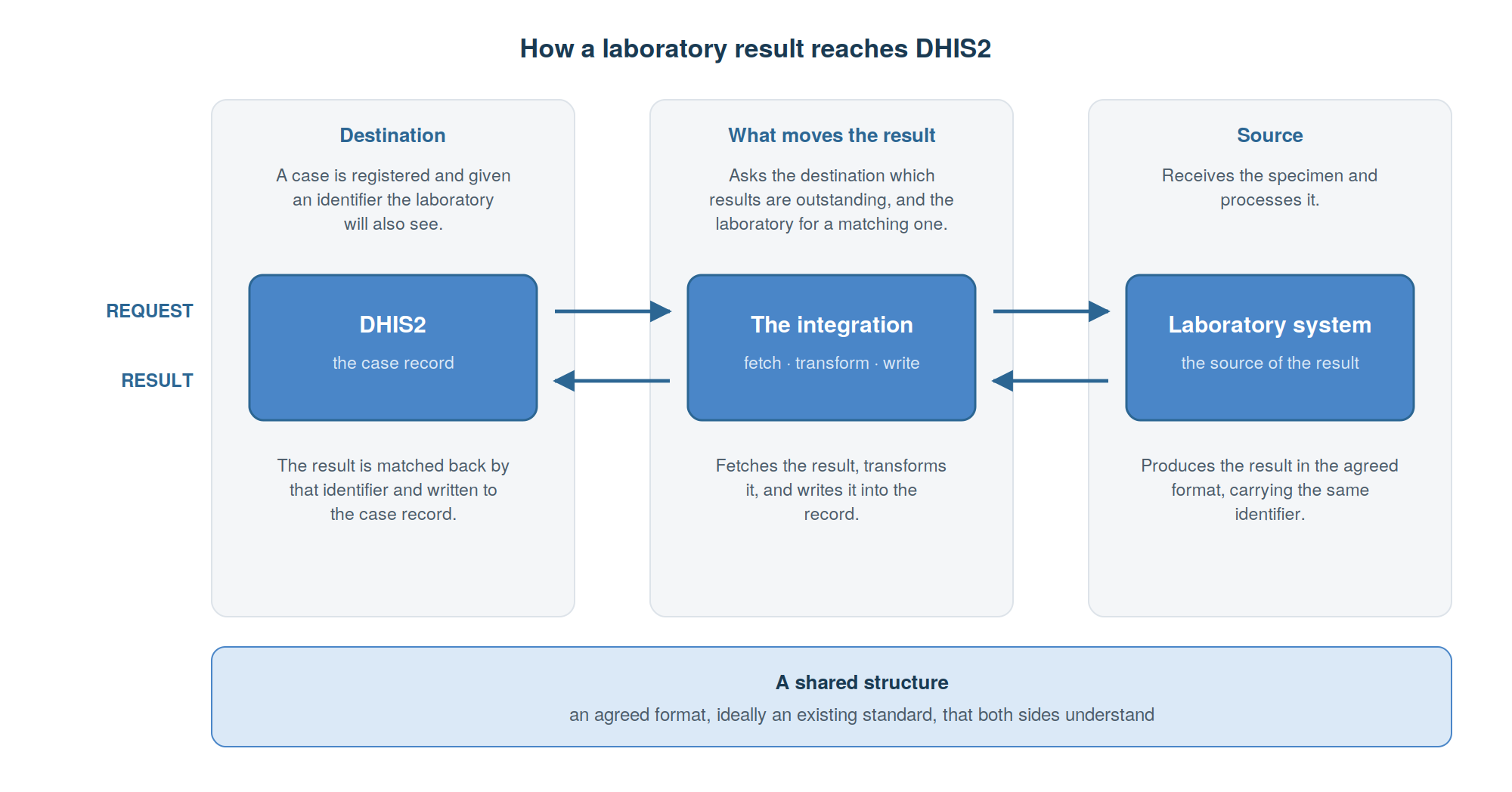
Moving the result is a three-step pipeline: fetch it from the laboratory system once it's ready, transform it into the shape DHIS2 expects, and write it into the correct record. Two things have to be settled before any of it can run, and the pipeline itself supplies neither: what that shared identifier is — see How a case is uniquely identified — and who holds the queue of outstanding work, the laboratory system, the middleware, or DHIS2.
Prerequisites and assumptions
This reference implementation takes a few things as given. Where they don't hold in your context, that work comes before the integration is useful to you.
A shared identifier
The two sides have to agree on an identifier that travels with the result and links it back to a case. Which identifier that is, is a design decision in its own right — see How a case is uniquely identified. This reference implementation uses a specimen ID, and assumes the implementation already has a way of assigning one. How that ID is generated is outside the scope of this guide; the results workflow is built on top of it. That reliance brings three conditions with it:
- The specimen ID must exist in DHIS2 before the result arrives — captured in the surveillance program prior to synchronisation.
- The laboratory system must reuse that same, pregenerated ID when it returns the result.
- The ID must be unique across all lab requests, not just within a single case: two cases must never be able to collide on the same specimen ID.
This implementation takes the specimen ID as unique and correct — it does not detect or resolve duplicate or malformed IDs.
The DHIS2 program shape
The DHIS2 instance this reference implementation ships with carries programs covering case surveillance and contact tracing. It also assumes a particular shape on the DHIS2 side: three logical stages of the same case record. This is a common shape in case-based surveillance programs, but a modelling choice nonetheless.
- an enrollment stage, where the case is registered against a suspected diagnosis;
- a lab request stage, where the specimen ID is captured, establishing the link;
- a lab report stage, which starts out empty and is what this integration populates.
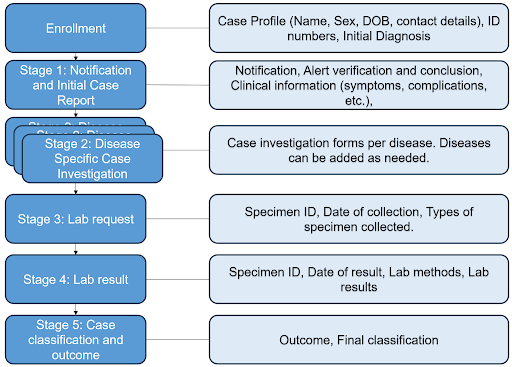
Both the lab request and report stages are repeatable, so one case can carry several specimens, each with its own laboratory result. The result itself is written against the enrollment and event it belongs to. The specimen ID does two other jobs: it is what the laboratory is searched on, and it is how a returning correction is recognised as belonging to a report already imported rather than as a new one — which is why it is mandatory on the request stage, and why every result event carries it as a data value. Once a matching report exists, the lab report form is populated for the surveillance officer to review; no human intervention is needed.
Completion as the trigger
Completing the request is what makes it visible to the integration. A lab request event must be marked complete before it is acted on; one left in progress is never picked up, however well filled in it is. That is deliberate — it lets data entry finish before half-entered specimen IDs are searched on — but it puts a step in the hands of facility staff that the integration depends on. Say so explicitly in the data entry standard operating procedure. Completing the request does not place a laboratory order.
Design decisions
The sections below set out the decisions an implementer needs to make when building a laboratory results integration. This reference implementation answers each one a particular way; a different country context may reasonably answer them differently. Each is presented the same way: what you're deciding, the most common options, how to choose between them, and what this reference implementation does.
Whatever you decide, write the answers down along with your reasons. That record is worth as much to whoever maintains the integration next as the code is.
| Decision | What is at stake | What this reference implementation chose |
|---|---|---|
| 1. Case-based or aggregate surveillance | Whether matching is needed at all | Case-based surveillance, into Tracker |
| 2. How a case is uniquely identified | Whether a result can reach the right case at all | The specimen ID, captured on the lab request |
| 3. Communication pattern between DHIS2 and the laboratory | How the two sides coordinate, and who governs it | No shared workflow state; REST on both sides |
| 4. How results reach DHIS2: push, poll or both | Who has to be able to reach whom | Polling, with a dedicated layer calling both sides |
| 5. Point-to-point or an interoperability layer | Who has to make a change when the mapping changes | A dedicated layer, with the mapping held in DHIS2 |
| 6. Handling unmatched and failed results | Whether people end up trusting the integration | Logged, with an implicit retry next cycle; no queue or alerting |
| 7. Which standard and implementation guide | How much translation work you take on | HL7 FHIR R4 with the Universal Laboratory Report IG |
| 8. Which terminology to adopt | Whether a result means the same thing to anyone else | An international terminology: LOINC |
| 9. Terminology and code mapping | What happens to a result whose code has no mapping | Laboratory codes bound to DHIS2 metadata through attributes |
| 10. Where the result lands in the tracker data model | Whether the history of a result survives | Repeatable report stage, one event per result, updated in place |
1. Case-based or aggregate surveillance
What you're deciding. Which surveillance data model the results are heading into: a case-based one, where each result belongs to a named case, or an aggregate one, where results are counted. This is the first decision because it settles whether matching is needed at all, and matching is where most of the cost of laboratory interoperability sits.
Option A: case-based surveillance, into tracker. Each result belongs to an individual case record. Necessary when a named case needs its result — case management, contact tracing, clinical follow-up, line-listed reporting. Every decision that follows about identifiers and matching applies, and this is where the effort goes.
Option B: aggregate surveillance, into a data set. Results arrive as counts by facility and period rather than as individual records. Matching disappears entirely, and usually so do patient identifiers crossing the boundary.
Option C: case-based in, aggregate out. Import individual results into Tracker for case management and derive aggregate reporting from them inside DHIS2. Often the right end state, but only once the case-based path is justified on its own terms.
How to choose. This is the cost/benefit question from the introduction, one level down. Start from what the surveillance program actually does with a result: if someone has to act on a named case, it is case-based. If the requirement is genuinely counts, a periodic extract from the LIS — or a routine report entered by laboratory staff — may satisfy it at a fraction of the cost and with none of the matching risk.
What this reference implementation does. Case-based surveillance. It is built around a case-based surveillance program into tracker data model, where a laboratory result has to reach the record of one identified case — which is why every decision below is framed in those terms.
2. How a case is uniquely identified
What you're deciding. An incoming result has to reach exactly one record in DHIS2. The identifier carrying that match has to exist on both sides, be unique enough that a result never lands on the wrong case, and be practical for laboratory staff to capture.
Options. A specimen ID, a national ID, a surveillance-program-specific case ID, an insurance number, a phone number, or the patient's name. DHIS2 supports several identifier types on the same case, so the choice need not be all-or-nothing.
How to choose. A specimen ID keeps patient identifiers out of the exchange entirely — a privacy advantage — but it links a sample to a case and says nothing about the person, so it cannot tell you that two cases are the same individual. A person-level identifier can, at the cost of carrying identifying data across the boundary and of ambiguous matches. A name can be ambiguous or restricted for privacy reasons; a case ID may not be visible to the laboratory at all. See the DHIS2 documentation on tracked entity attributes as personal identifiers.
What this reference implementation does. It matches on the specimen ID — usually the identifier already understood on both sides — captured in a mandatory field on the lab request stage. Capture it by barcode rather than typing wherever you can. Note that the match only becomes possible once the lab request event is marked complete, see Completion as the trigger.
An alternative: matching on a person-level identifier. This is not what this reference implementation does, and none of it ships in the repository. It is set out here because the situation comes up often — no specimen ID shared between the two systems, or an integration that also has to recognise the same person across separate episodes — and this is generally how implementations solve it.
The National ID tracked entity attribute is the natural candidate. That path needs four things:
- The identifier held on both sides — if only one side captures it, there is nothing to match on.
- Attributes to triangulate the match — the specimen collection date and the date sent to the laboratory narrow the candidates and reduce accidental mismatches.
- A date window, typically from the enrollment date onwards, so an earlier result for the same person isn't matched to the current case.
- A record of what has already been synchronised, normally held in the interoperability layer.
Even then the match may be genuinely ambiguous, since the same person may have several enrollments, so a manual confirmation step is part of the design rather than an edge case. What that costs to build and to run is set out under Adapting this reference implementation to your context.
3. Communication pattern between DHIS2 and the laboratory
What you're deciding. How the laboratory request and its eventual result move between the two systems, and how much of the workflow each side needs to know about. Often no explicit workflow-management layer is needed at all — the two systems simply exchange resources as the moment requires.
Options and how to choose. Work through the questions below for your own context. The right-hand column records how this reference implementation answers each one.
| Question to work through | This reference implementation |
|---|---|
| Does the state of the workflow need to be shared between DHIS2 and the laboratory system, or is it enough for each side to hold its own view? | Each side holds its own view. There is no shared workflow state and no separate sync-status store |
| Which paradigm do you want to use — REST, messaging, services, or a mix? | REST on both sides: the DHIS2 Web API and the LIS FHIR API |
| Who owns and manages the specimen and result — DHIS2 (as the requester), the laboratory system (as the performer), or another participant, such as a referral laboratory sitting between the two? | DHIS2 as requester, the laboratory system as performer |
| Is there a need for the laboratory to confirm it has accepted the request, or can that be presumed? | Presumed — no acceptance step |
| Is there a need to negotiate whether, or how, the requested test will be performed? | No negotiation step |
| Can DHIS2 and the laboratory system communicate directly — can they post to each other's servers, if using REST? | Neither system contacts the other. A layer sits between them and calls both |
| Is there an ability, or a need, to use a queue server to facilitate the workflow? | No queue server is used |
| How many potential actors are involved — a single laboratory, or several candidate laboratories? | A single laboratory |
| Will the workflow always be directed at a specific laboratory, or is there a pool of laboratories that could choose to perform the requested test? | Always directed at a specific laboratory |
A context with several candidate laboratories, or a laboratory able to push results as soon as they're ready, may reasonably answer these differently. Several of these are worth confirming rather than assuming — in particular that credentials will be issued and maintained on each side, and that one real result can travel end to end, by hand if necessary, before anything is automated.
Governance on both sides — and above them. The questions above settle how the two systems behave; something else has to settle who decides. Each side needs its own data and metadata governance: someone who owns the DHIS2 metadata and approves changes to it, someone who owns the laboratory's test catalogue and codes. Without that, an ordinary change on either side breaks the exchange silently.
Governing each side separately is not enough, though. The exchange between them is a third thing, and it needs an agreement of its own — normally at national or program level rather than between the two teams that happen to have built it. That agreement is where to settle what is exchanged and for what purpose, who may see the data once it has crossed the boundary, how a change on one side is notified to the other and with how much notice, who arbitrates when the two disagree, and who is accountable when results stop flowing. Countries with a health information exchange strategy usually have somewhere for this to live; where there is none, write it down anyway — the alternative is a national dependency held together by the memory of whoever set it up.
4. How results reach DHIS2: push, poll or both
What you're deciding. How DHIS2 learns that a result is ready. This is usually settled by network reality rather than preference, so establish it early: it determines who has to be able to reach whom, and who operates what.
Option A: poll. Something asks, on a schedule, whether there is anything new, keeping track of what it has already taken so nothing imports twice. It needs only outbound connectivity from wherever the poller runs — which matters, because the LIS often sits behind a laboratory firewall while DHIS2 sits in a national data centre, and neither can accept inbound connections. It also recovers by itself: an hour of downtime is caught up on the next run.
Option B: push. The source notifies the destination as soon as a result is final — in FHIR, via Subscriptions. Lower latency, no wasted calls. But the LIS must be able to reach an endpoint on your side, somebody has to operate and secure it, and the LIS needs its own retry policy: a missed notification is a lost result. It also asks more of the LIS vendor than you may be able to influence.
Option C: both. Push for latency, a periodic poll as the safety net. The most robust arrangement and the most work to build.
How to choose. Start from connectivity direction and operational ownership, not from latency — laboratory turnaround is measured in hours or days, so a poll every few minutes is invisible to a surveillance officer. Check what the polling cost scales with: polling DHIS2 for open cases grows with the number of active cases, not the number of results, which is worth modelling before national rollout.
What this reference implementation does. It polls both sides; neither system ever initiates contact. On a schedule, the interoperability layer fetches active enrollments in the surveillance program, finds the completed lab requests within them, and searches the laboratory for a report matching each specimen ID. It keeps no separate record of what it has already imported — it works that out from the result events already in DHIS2 — so there is nothing to reconcile if it restarts. Only final, amended, appended or corrected reports are picked up.
5. Point-to-point or an interoperability layer
What you're deciding. Where the fetch, transform and write logic lives — and with it the mapping, the logging, and the record of what has been synchronised. What it really decides is who has to make a change when your DHIS2 metadata changes, which in the long run matters more than the initial build.
Option A: direct, point-to-point. The LIS writes straight to the DHIS2 Web API, or DHIS2 pulls results itself. Fewest moving parts, nothing extra to host, and defensible for a single laboratory with a cooperative vendor. The cost comes later: the LIS is coupled to your DHIS2 metadata, so every change becomes a vendor request, and the second laboratory starts from scratch.
Option B: a dedicated interoperability layer. A component of your own between the two systems, giving you one place for mapping, logging and error handling, and shielding each side from the other's changes. The cost is another service to deploy, monitor, secure and staff.
Option C: an established HIE or mediator platform — OpenHIM, for example. Adds routing, audit and client authentication across many systems rather than just this one. Heavier to operate, and it makes most sense where the country already has a health information exchange strategy and this is one integration among several.
How to choose. The case for a layer strengthens with the number of laboratories, the number of integrations, and how likely your metadata is to change. Weigh that against who will actually run it: a layer nobody is funded to operate is a liability, and a point-to-point integration that works is better than an elegant architecture that goes unmaintained. Whichever you choose, keep the mapping out of compiled code, so that changing how results land is a configuration change rather than a release.
What this reference implementation does. A dedicated layer of its own, built on Apache Camel and configured rather than coded. The part worth borrowing is less the technology than where the mapping is kept: both the structural transformation and the terminology mapping live in DHIS2, not in the layer. The transformation that turns a laboratory report into a DHIS2 event is a script held in the DHIS2 datastore, so changing how a result maps onto your stage is a datastore edit rather than a redeployment; the terminology mapping lives in DHIS2 metadata, see Terminology and code mapping. That lets a DHIS2 implementer change how results land without involving the team that maintains the layer — which is most of the reason to prefer a layer over a point-to-point integration in the first place.
6. Handling unmatched and failed results
What you're deciding. What happens to the results that don't sail through. This decides whether people trust the integration: one that loses results occasionally and silently is worse than manual entry, because staff stop checking and stop believing what they see. It is placed here because it is the decision most often left until last; some of what it lists is settled by the decisions that follow.
Plan for at least these: no matching lab request; more than one candidate match; several reports for the same specimen ID; a code with no DHIS2 mapping; a missing or malformed specimen ID; a request never marked complete; the same result arriving twice; an import DHIS2 rejects; and either system being unreachable.
Options. For genuinely unmatched results: hold them in a queue or review app for manual matching, reject them with a notification back to the laboratory, or park them in DHIS2 for later reconciliation.
How to choose. This is a policy question as much as a technical one. Someone has to look at failures, through some interface, on some cadence — a national data manager, the laboratory focal point, or the team running the integration. Name them before go-live and give them somewhere to look, and make re-processing safe so that a repeat import updates rather than duplicates. For production, close these gaps: a retry policy, alerting on repeated failures, a periodic check for lab requests left open past a plausible turnaround time, handling for laboratory results DHIS2 knows nothing about, and a named owner for the error log.
What this reference implementation does. It is driven from DHIS2's lab requests and only asks the laboratory about specimen IDs it already knows, so every report it fetches already has a lab request to land on. That boundary rests on the specimen ID being unique: it expects at most one report per specimen ID, and its behaviour is undefined if the laboratory returns more than one. Within that boundary: an empty specimen ID is skipped; an incomplete lab request is passed over; a specimen with no report yet is reconsidered on the next cycle; a correction updates the result event in place. Imports are checked and logged, and a failed import retries on the next cycle. Visibility is the logs.
7. Which standard and implementation guide
What you're deciding. The shared structure that lets DHIS2 consume results without a bespoke integration per laboratory. Few implementers start from a free choice here: the LIS emits what it emits, and the country may already have a standard. The realistic question is how much translation work you take on, and where you put it.
Option A: HL7 FHIR with an international implementation guide. A maintained, internationally reviewed set of profiles for exactly this exchange, plus a body of tooling behind it.
Option B: a national FHIR IG. Where the country has one it usually takes precedence, and may be mandated as part of a national health information exchange architecture. Check before adopting an international IG — retrofitting later is expensive.
Option C: plain FHIR with no IG. Faster to start with and reasonable for a single known laboratory, but you give up the guarantees about which elements are present and how they are coded, and end up maintaining those constraints yourself, informally.
Option D: HL7 v2 messages. A large share of laboratory systems in production emit v2, not FHIR. You then need something that receives and maps the messages before the rest of the pipeline looks like this one. A v2-only LIS is not a reason to abandon the integration: it moves the translation upstream and leaves the DHIS2-facing half largely unchanged.
Option E: a proprietary API or flat-file export. Often the pragmatic reality with a single laboratory, and sometimes the only thing on offer. It works, but you own the contract — define it, version it, renegotiate it whenever the vendor changes anything, and start again for the second laboratory.
How to choose. Work through, in this order: what the LIS can actually produce today; whether a national IG or HIE standard applies; how many laboratories you expect to onboard; and where the translation should sit — in the LIS, in an interface engine, or in your own interoperability layer. Note that the guide you adopt usually narrows, and sometimes mandates, the coding systems available to you — see Which terminology to adopt.
What this reference implementation does. HL7 FHIR R4 with the Universal Laboratory Report IG, chosen for its broad scope: it grew out of the earlier European Laboratory Report IG into a global, HL7-maintained standard. A HAPI FHIR server stands in for an LIS, so the demo stays focused on the DHIS2-facing side.
8. Which terminology to adopt
What you're deciding. Which coding system names the tests and the results that cross the boundary. This is not the same question as the exchange format: the format carries the codes, the terminology supplies them.
Option A: an international terminology. A maintained, widely adopted coding system — LOINC for what was measured, SNOMED CT for findings, organisms and specimens, NPU in some European contexts. Results stay comparable beyond your own systems.
Option B: a national or local code list. Often the only thing your laboratories already share, and the fastest to adopt: no licence question and no migration for the people entering data. It stops at your border, though — no comparability with other countries, and every new partner needs its own mapping.
Option C: both, with the local list mapped to an international one. Laboratories keep reporting what they already report and the integration translates on the way in, so national reporting works today and comparability arrives without a migration. The cost is a mapping table someone has to own and keep current.
How to choose. In this order: what your laboratories already report, because a terminology nobody uses is a migration project before it is an integration; what the implementation guide you have chosen expects or mandates; licensing, which is a legal and procurement question and can eliminate an option outright; and what your results have to line up with — national analytics only, or regional and global reporting too. Whatever you adopt, budget for maintenance: terminologies release updates on their own schedule, and an unversioned mapping drifts out of date quietly.
What this reference implementation does. An international terminology — LOINC codes identify the test performed. That follows from the implementation guide it adopted, which allows LOINC and NPU — see Which standard and implementation guide.
9. Terminology and code mapping
What you're deciding. Every incoming laboratory code has to resolve to the right DHIS2 data element or option. Not every one will — either the terminology doesn't cover it, or no mapping has been defined for it yet. What happens then is worth deciding deliberately rather than discovering later.
Option A: fall back to free text. The value is at least captured, but free text is considerably harder to analyse. Treat it as a fallback for the codes you can't yet resolve rather than a default, and close that gap with a proper mapping over time.
Option B: extend the implementation guide. Propose new codes, or maintain a local extension of the value set, so the result stays structured and codeable. This avoids the analytical downside of free text, but means engaging with the IG's governance process or versioning a local extension — slower than switching a data element to free text.
How to choose. Weigh how often the missing code is likely to recur against how much analytical value is lost by leaving it as free text in the meantime. Either way, give the mapping an owner: codes are added to terminologies, laboratories change the panels they run, and DHIS2 metadata evolves — an unmaintained mapping quietly degrades into a growing share of unmapped results.
What this reference implementation does. Laboratory codes are bound to DHIS2 metadata through attributes: each data element or option that corresponds to a laboratory concept carries the relevant code in a dedicated attribute, and the integration builds its lookup from those values. Because the mapping lives in DHIS2 metadata rather than in the layer, an implementer can revise it without involving the team that maintains the integration. Which coding system those values come from is settled separately — see Which terminology to adopt.
10. Where the result lands in the tracker data model
What you're deciding. How the result is represented in the case record — which decides whether the history of a result survives, what a reviewer sees, and how the data behaves in analytics. A program design decision, so it is made once and is awkward to change after data has accumulated.
A laboratory result is not necessarily final: a laboratory can issue a correction, an amendment, or an appended addition to a report it has already sent. A design that keeps only the latest value silently discards the fact that something changed.
Option A: a repeatable lab report stage, one event per incoming result, updated in place. One form to read. A correction overwrites the earlier value, so the record shows the current answer and no history.
Option B: a repeatable lab report stage, multiple events per incoming result. Every correction and amendment is its own event, so a reviewer sees what changed and when. The cost is that "the result" becomes a derived question: reports and program indicators have to pick the right event, usually the latest for a specimen, and that logic has to be written deliberately.
How to choose. Ask how often your laboratory issues corrections, whether a reviewer needs to see that a value changed, and what you intend to report on. If turnaround time is a goal, both the request and the result need reliable dates. Decide up front which result counts for analytics — the first final one or the latest amendment — because your indicators depend on it.
What this reference implementation does. A repeatable lab report stage holding one event per incoming result, updated in place. A report re-issued as a correction or amendment updates that same event rather than adding another, so the record shows the current answer; the status change is recorded in the event notes and in the tracker change log. The program shape this sits in — and the request stage that links to it — is described under The DHIS2 program shape.
Adapting this reference implementation to your context
As with other DHIS2 reference implementations, this one is a starting point rather than a drop-in solution. Every design decision above is an answer this implementation gave; where a different answer applies, a piece of it has to change with it. The table below is the whole section at a glance, in the order to work through it — each piece links to the part of the guide behind it, and is described underneath.
| Piece | Effort | What it touches | What changing it means |
|---|---|---|---|
| Program design | Medium | Metadata, configuration, the transformation | The stages change and everything pointing at them follows |
| Matching attribute, if not a specimen ID | High | Search, sync state, failure handling, a new review app | Three parts reworked and a confirmation step that does not exist here |
| Metadata the integration points at | Low | Configuration | Replacing the metadata identifiers with local ones |
| Terminology adopted | Medium | The codes themselves, and the binding below | Agreeing a coding system and, where it is not free, licensing it |
| Terminology binding | Low | DHIS2 metadata | Editing attributes on data elements and options; no code |
| What the laboratory system emits | Low–High | The source side only | An address change if it speaks the same guide; a translation component to build and run if not |
| Data transformation | Medium | The DHIS2 datastore | Editing a script, not rebuilding and redeploying |
| How results are triggered | Medium | Infrastructure to operate | An interval if polling stays; an endpoint to stand up and secure if push replaces it |
| Failure handling | High | New components and named owners | Building a failure handling and alert mechanism |
Program design. Start here, because everything else points at it: which stages the case record has, whether a case can carry more than one specimen and more than one result, and which result the indicators count. Matching on something other than a specimen ID changes the shape of the request stage too.
Matching attribute, if not a specimen ID. Matching on something that identifies the person rather than the sample is not a setting to change. Three parts of the integration have to be rebuilt:
- How the laboratory is searched. Today it asks for one specimen ID and expects one report back. It would instead ask for everything belonging to a person within a date range, and work out which of those results is the one.
- How it remembers what it has already taken. Today it does not need to: the specimen ID tells it. Without one, it has to keep a record of the sync status itself.
- What happens when the match is unclear. Today a result that belongs to nobody cannot arrive. Here it can, and so can a result that fits two cases — so somebody has to be shown the candidates and asked to choose, for example in a custom app or plugin that does not exist yet, with the workload that comes with it.
Metadata the integration points at. It has to be told which program to work in, which stages hold the request and the report, which data element holds the identifier, and which attribute carries the laboratory codes. The configuration key names are in the repository.
Terminology adopted. Which coding system names the tests and the results — an international one, a national or local list, or both with the local list mapped across. Licensing can settle this, and it is a legal and procurement question rather than a technical one, so establish where the country stands before any mapping work starts.
Terminology binding. The data elements and options have to carry the codes the laboratories actually report, so an arriving code can be looked up. Decide in advance what happens to a result whose code has no match, and give someone the job of keeping the mapping current as codes and test panels change.
What the laboratory system emits. A stand-in server plays the laboratory here, producing exactly what the chosen implementation guide describes. A real system that produces the same thing needs only an address change; one that produces something else needs a translation step in between.
Data transformation. The rules that turn an arriving report into a DHIS2 event live in DHIS2 itself, not inside the integration's code. They have to match the local stages on one side and whatever the laboratory sends on the other.
How results are triggered. The integration asks the laboratory for new results on a schedule, which suits places where neither system can accept incoming connections. Where the laboratory can notify instead, the endpoint that receives those notifications has to be operated and secured.
Failure handling. In this implementation, failures are written to a log and a failed import is tried again next time round. No queue or alerting mechanism in place.
Resources
- Laboratory interoperability reference implementation — the code, quick start and configuration reference.
- Universal Laboratory Report Implementation Guide — the FHIR profiles used here.
- LOINC — codes naming the test performed.
- SNOMED International — SNOMED CT licensing by country.
- DHIS2 Web API documentation — the API the results are written through.
- DHIS2 documentation: tracked entity attributes as personal identifiers.
Questions and contributions. Questions or feedback can be posted on the DHIS2 Community of Practice.