Malaria Elimination Case Surveillance & Foci Investigation System Design
Introduction
Transforming the surveillance system into a core intervention is the third pillar of the Global technical strategy for malaria 2016–2030. As countries progress towards malaria elimination, the aim of surveillance is to detect all malaria cases; investigate every confirmed malaria case; identify the likely location of an infection in order to direct actions to interrupt transmission and to ensure that each detected case is promptly treated and monitored to prevent secondary infection. An ideal surveillance information system for malaria elimination includes rapid and complete case reporting, central data storage and management, automated data analysis, and customized outputs and feedback that lead to timely and targeted responses. The DHIS2 tracker package for malaria case surveillance and foci investigation is an aid for malaria surveillance in burden reduction and elimination settings.
The data elements included follow WHO-recommendations based on WHO global standards and normative guidance as stipulated in the organisations guidelines and guiding documents; in particular, the Malaria Surveillance, Monitoring and Evaluation: A reference manual. The data gathered is rendered into actionable indicators and dashboards in line with the work of the WHO surveillance assessment toolkit. The tracker packages supporting case notification, case investigation, foci investigation and classification workflows are designed to be used in conjunction with the aggregate DHIS2 packages for malaria programme monitoring in elimination and burden reduction settings to strengthen data quality, analysis and data-driven decision making.
System Design Overview
The Malaria metadata package for individual data contains two tracker programs supporting case notification, case investigation, foci investigation, and classification workflows as described WHO’s Malaria Surveillance, Monitoring and Evaluation: A reference manual Manual.
These tracker programs are intended to be deployed together to support typical workflows for:
- Malaria case notification, investigation and classification
- Foci investigation and classification
- Linking case data with foci
In elimination settings, case investigation, detection and focus investigation are elimination surveillance activities that are interconnected and are important for reliable determination of source of infection and classification of cases and foci to inform appropriate response.
While national standard operating procedures may vary, the figure below illustrates typical elimination surveillance workflows with the examples of case notification within 1 day, case investigation within 3 days and focus investigation within 7 days, based on China’s “1–3–7” approach. In the DHIS2 package design, the Malaria Case Notification, Investigation & Response program supports the case notification and investigation in the left two panels of the diagram; while the Malaria Foci Investigation program supports the focus investigation shown on the right panel.
- FIG 1: Case notification and case and focus investigation systems according to the “1-3-7” approach supported by DHIS2 package design

Source: Malaria Surveillance, Monitoring and Evaluation: A reference manual Manua
- MAL CS - Malaria Case Notification, Investigation & Response program
This is a longitudinal case-based surveillance program that supports a typical workflow for notifying confirmed malaria cases and following them up through case investigation and focus investigation to determine the source of infection and classification of cases and foci in order to guide effective responses.
It allows for cases to be linked through relationships- case to cases (detected reactively) and; a case to a foci registered in the related tracker program “Foci Investigation”. The “Foci Investigation” programme provides details on the actions taken around the index case that triggered a case investigation and the appropriate response measures that were carried out within the focus.
- MAL-FOCI- Malaria Foci Investigation program
Is a registry of all foci and their classification status, as well as effective response interventions undertaken within a foci to manage them and potential for reclassification, should the need arise.
- Dashboards
In addition to the metadata, the package also includes seven preconfigured yet editable dashboards. These are populated with indicators from the respective programs. The programs are made to work in tandem and fulfil different aspects of the burden reduction process and malaria elimination.
Program structure
Program Summary
MAL-CS: Malaria Case Notification, Investigation & Response
| Stage | Description |
|---|---|
| Enrollment | This section allows for the recording of information about the case and its associated organisation unit.. When a patient is enrolled in the case-based programme, they are also enrolled into their reporting health facility organisation unitand assigned a unique ID and collects general questions about the patient such as full name,age , Sex, occupation and contact details. This enrollment also serves as a case notification which is necessary to trigger an investigation. |
| Diagnosis and treatment stage | This stage records all information associated with the diagnosis of the patient, case detection setting, history of malaria and travel history of the patient which is necessary for a case to be preliminarily classified. This stage is conducted at the health facility level and is typically completed within 24 hours (1 day) of detection. |
| Case investigation and classification | This stage involves the recording of information on, household members screened and those testing positive s capturing of the household coordinated and recording of any vector control interventions undertaken. This stage is conducted at the index case household and is typically completed within 3 days of detection by the investigation team. |
| Neighbouring household investigation | This stage allows the investigators to investigate neighbouring households which are located within a predetermined radius around the index case. This stage involves the screening for malaria of all household members, capturing the neighbouring households' coordinates and recording of any vector control interventions that were carried out... This is a repeatable stage and is conducted at each neighbouring household visited and is typically completed within 3 days of index case detection by the investigation team. |
| Case outcome | In this stage once all investigations are concluded, registration of the final case classification as well as the outcome of the patient is recorded. This stage is to be completed ideally within 3 days of detection. |
| Routine focus investigation | This stage gathers information on the type of population in the focus and response vector control interventions carried out . The routine focus investigation is conducted typically within 7 days of every passively detected case. |
MAL-FOCI: Malaria Foci Investigation
| Stage | Description |
|---|---|
| Enrollment | This stage gathers basic information about the foci ranging from the date of its registration to the foci name and is assigned with a unique ID, creating a foci profile. |
| Focus status, investigation and classification | This is a repeatable stage which captures the status of the focus, vector behaviour, insecticide resistance status and final classification where the status of the focus is recorded and the focus is classified. |
| Foci Response | This stage is a repeatable stage that records responses and vector control interventions carried out in this focus. |
Workflow
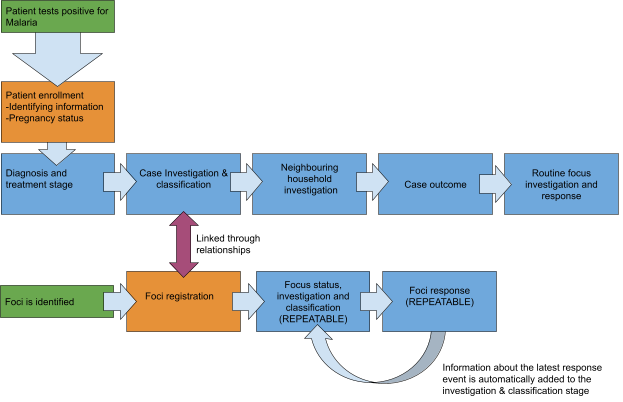
The program assumes that all people registered have tested positive for malaria and is divided in five non-repeatable stages which follow the case through the lifetime of their enrollment.
Intended Users
The programme is intended to be used at point of care facilities and field level for data entry purposes, and the indicators populate dashboards that are thought to be used at national, district, facility levels. Currently, data-entry users have access to all the stages, but depending on in-country workflows they could be divided by program stage, for example, granting only the investigation team access to the investigation stage.
User Groups
User groups have been divided on the basis of use and function. A user can belong to more than one user group if their functions overlap. In addition, further compartmentalisation can be made through assigning specific user groups for the different stages. Users will also need to be assigned an organisation unit.
- MAL-CS: Malaria Case Notification, Investigation & Response
- MAL-CS- Data Analysis: Has access to all dashboards but cannot modify metadata or enter new data
- MAL-CS- Data Entry: Can enter data and create new patient records
- MAL-CS- Metadata Admin: Can modify the metadata
The implementing country should ensure that users have data entry and search rights for their respective Organisation units.
- MAL-FOCI: Foci Investigation & Response
- MAL-FOCI- Data Analysis: Has access to all dashboards but cannot modify metadata or enter new data
- MAL-FOCI- Data Entry: Can enter data and create new patient records
- MAL-FOCI- Metadata Admin: Can modify the metadata
Tracker Configuration
MAL-CS: Malaria Case Notification, Investigation & Response - Program configuration
The “Malaria case notification, investigation and response” program follows a confirmed malaria case from when they are diagnosed with malaria until a decision on focus response is made. The case is represented by the tracked entity type “Malaria Case”. A case can be enrolled in the programme on more than one occasion.
The program displays the front page list in order to have an at a glance list of cases in the organisation unit, and it requires a minimum of two attributes to search for cases with 50 maximum of TEIs to return in search.
The program has been set as “Audited” meaning that users have access to enrollments in other org units, but that an audit trail of who has accessed which records is kept. For a more secure approach where access is more restricted, see here.
MAL-FOCI: Malaria Foci Investigation - Program configuration
The “Malaria Foci Investigation” program registers all the foci which have been identified. A foci is defined by the WHO as “a defined and circumscribed zone situated in an area that is or has been malarious and in which the necessary epidemiological and ecological factors are present for the transmission of malaria”. In practice investigation and detection of cases in the focus are part of the broader focus investigation, while the latter may also include additional investigations to determine causes of transmission. The foci are represented by the tracked entity type “focus area”.
The program displays the front page list in order to have an at a glance list of foci in the org unit, and it requires a minimum of one attribute to search for foci with no maximum of TEIs to return in search.
Foci do not do not have sensitive personal information registered in their enrollment as they are geographical settings, they have been set with access level “open”. This should be evaluated by local data protection legislation.
It currently has no feature point to capture coordinates at enrollment level as these are captured in the investigation stage.
Prefixes
Throughout the metadata package, elements are prefixed with either “MAL” an object which os shared with other Malaria programmes, “MAL-CS”; an object which is for the case surveillance program, “MAL-FOCI” for objects which are part of the Malaria Foci programme, and GEN, which are generic for our standard metadata packages.
Unique Identifiers
The programs use different unique identifiers to aid with deduplication and with locating a case/foci. These include automatically generated IDs and should be adapted to local needs.
System Case ID - An identifier which is unique for the whole system with an automatically generated pattern in the format RANDOM(XXX######).
Malaria Local Case - ID An identifier which is unique for the whole system. It is currently not automatically generated to allow for it to be based on e.g., a paper record.
Focus ID - An identifier which is unique for the whole system with an automatically generated pattern in the format RANDOM(XXX##) For more information about the text patterns in DHIS2, see here.
Tracked Entity Type
MAL-CS:Malaria Case Notification, Investigation & Response
The Case Surveillance program uses the tracked entity type “Case” instead of “Person” which is what is commonly used in our metadata packages. This means that each time someone becomes infected, they become a case. A case is only allowed to be enrolled once. If someone becomes re-infected with malaria, they will have to be registered as a new case, and there are fields (in the diagnosis and treatment stage) where information about their previous infection can be recorded.
This means that there could be several “case” tracked entities which represent the same individual, and have the same National ID number, and therefore, this attribute should not be unique for the instance. A new “System case ID” is generated for each case.
Depending on implementation needs, an alternative would be to use the tracked entity type “person” and allow for multiple enrollments. In such case, it would require a new case ID for every time an infection is recorded, which results in a new enrollment, and therefore it should not be an attribute in the enrollment of the person and should rather be added as a data element in a program stage.
MAL-FOCI: Foci Investigation & Response
The Foci program uses the tracked entity type “Focus Area”, with the mandatory attributes “Focus ID” and “Focus Name”
Relationships
It is recommended to confgure two relationship types to link malaria cases to each other (within the same Tracker program), and to link malaria cases with their focus area (between Tracker programs) using the relationships widget.
MAL - Case-to-case: this relationship type is intended to be a bidirectional relationship that links a malaria case with another malaria case within the same Tracker program. for example, two malaria cases that were identified within the same village and presumed to part of the same outbreak. * From contraint: Tracked entitity instance, using Tracked Entity Type 'Malaria Case' within the Program 'Malaria Case Notification, Investigation and Response' * To constraint: Tracked entity instance, using Tracked Entity Type 'Malaria Case' within the Program 'Malaria Case Notification, Investigation and Response'


MAL - Case-to-focus: this relationship type is intended to be a bidirectional relationship, in order to a malaria case (TEI in one tracker program) with a malaric focus (TEI in a separate tracker program). Case to focus allows the user to connect a case with an existing or new foci. Likewise, it allows for a foci to be linked with a reported case. * From contraint: Tracked entity instance, using Tracked Entity Type 'Malaria Case' within the Program 'Malaria Case Notification, Investigation and Response' * To constraint: Tracked entity instance, using Tracked Entity Type 'Focus area' within the Program 'Malaria Foci Investigation'


The information shown in the relationship widget can be changed by adding the attributes to the tracked entity type and marking the box “show in list”. 
Stages in Detail
MAL-CS: Malaria Case Notification, Investigation & Response - Stages
- Enrollment
In the enrollment stage, each case is registered and assigned a System case ID as well as a Malaria case ID. These can be configured to be automatically generated and unique, depending on the needs of the implementation.
| Name | UID | Value type | Options/Logic (if applicable) | Mandatory? |
|---|---|---|---|---|
| Enrollment date | qDkgAbB5Jlk | DATE | YES | |
| System Case ID | HAZ7VQ730yn | TEXT | Automatically assigned | NO |
| Malaria Local Case ID | NXazwhBRpfA | TEXT | NO | |
| First Name | sB1IHYu2xQT | TEXT | NO | |
| Surname | ENRjVGxVL6l | TEXT | NO | |
| Date of birth | NI0QRzJvQ0k | DATE | NO | |
| Date of birth is estimated | Z1rLc1rVHK8 | TRUE_ONLY | NO | |
| Age (years) | B6TnnFMgmCk | INTEGER_ZERO_OR_POSITIVE | Calculated by program rule | NO |
| Sex | oindugucx72 | TEXT | FEMALE MALE | NO |
| Pregnancy Status | sPDKWSQ2vKQ | TEXT | Only visible if Female of reproductive age /YES NO | NO |
| Malaria - Occupation | ZZmkcCkzzWr | TEXT | NURSE STUDENT TEACHER TRUCKDRIVER MINEWORKER SEASONALWORKER MIGRANTWORKER FARMER | NO |
| Present Home Address | CpDhdm55uhl | TEXT | NO | |
| Address (permanent) | XN0145qZ7kH | TEXT | NO | |
| Nationality | spkM2E9dn2J | TEXT | Complete country list ISO codes | NO |
| Mobile phone number | fctSQp5nAYl | PHONE_NUMBER | NO | |
| Head of Household (First Name) | YCKldfKePsC | TEXT | NO | |
| Head of Household (Last Name) | uLvB95ZxIUL | TEXT | NO |
- Diagnosis and treatment stage
This stage is divided into three sections. It is mandatory to enter a date of diagnosis and a case detection setting. Both these elements are heavily used for indicator calculations.
| Section | Name | UID | Value type | Logic/ Options (if any) | Mandatory? |
|---|---|---|---|---|---|
| N/A | Date of diagnosis | hYyB7FUS5eR | DATE | YES | |
| Case Detection | Detection setting | fazCI2ygYkq | TEXT | PASSIVE REACTIVE PROACTIVE | YES |
In the malaria diagnosis section, all data relevant to the diagnosis process are recorded. There are programme rules included to facilitate data entry and hiding options when not relevant.
| Section | Name | UID | Value type | Logic/ Options (if any) | Mandatory? |
|---|---|---|---|---|---|
| Malaria diagnosis | Reason for conducting case investigation | zFiMMpGyBgr | TEXT | Only available if “Proactive is selected in detection setting. DEVELOPMENT_OF_ACTIVITIES POPULATION_MOVEMENT REFUGEE_CRISIS CLIMATIC_TRIGGERS OTHER | NO |
| Malaria diagnosis | Conducting case investigation (other) | J4fIuC5ZLsU | TEXT | NO | |
| Malaria diagnosis | Temperature | J7hdx5FCJvG | NUMBER | NO | |
| Malaria diagnosis | Weight | JINgGHgqzSN | INTEGER_POSITIVE | NO | |
| Malaria diagnosis | Symptom onset date | YEpmDm1I01R | DATE | Calculated by program rule if days with symptoms are added | NO |
| Malaria diagnosis | Symptom onset date is estimated | S6uZEpdNh8o | YES_ONLY | NO | |
| Malaria diagnosis | Number of days with symptoms | kJiPLxGq2yI | INTEGER_ZERO_OR_POSITIVE | Calculated by program rule if date is added | NO |
| Malaria diagnosis | Malaria Diagnosis confirmed by | qdjVZojEK8S | TEXT | RDT MICROSCOPY OTHER | NO |
| Malaria diagnosis | Diagnosis method (Other) | FxYWTORW4mT | TEXT | Only visible i “Other” is selected | NO |
| Malaria diagnosis | Malaria plasmodium species identified | vGxpKVMkmaW | TEXT | Only visible if a diagnosis method is selectedPF PK PM PO PV MIX OTHER | NO |
| Malaria diagnosis | Malaria positive species (other) | voV7EhjhyJ3 | TEXT | NO | |
| Malaria diagnosis | Malaria parasite density | Wwu7UAt7bZW | INTEGER_ZERO_OR_POSITIVE | Only visible if “Microscopy” is selected | NO |
| Malaria diagnosis | presence of gametocytes | LCxi1dciA1C | BOOLEAN | Only visible if “Microscopy” is selected | NO |
| Malaria diagnosis | MAL-CS Severity of disease | SzVk2KvkSSd | TEXT | SIMPLE SEVERE | NO |
| Malaria diagnosis | Malaria Medication | nTMP8Aj1rYA | TEXT | AL ALPLUSPQ AS-SP ASPLUSAQ ASPLUSMQ ASPLUSMQPLUSPQ ASPLUSSP ASPLUSSPPLUSPQ CHLOROQUINE DHA-PPQ DHA-PPQPLUSPQ RADICAL_CURE OTHER | NO |
| Malaria diagnosis | Admission Status | MKMyvXshCdB | TEXT | ADMITTED REFERRED OPD | NO |
| Malaria diagnosis | Reason for referral | Zlro25GTcNK | TEXT | Only visible if case admission status is “Referred”FURTHER_MANAGEMENT OUTOFSTOCK | NO |
The travel details section refers to recent travel history of the case, both within and outside the country in order to determine preliminary classification pending investigation. Basic decision support programme rules are also included.
| Section | Name | UID | Value type | Options (if any) | Mandatory? |
|---|---|---|---|---|---|
| Travel Details | Recent travel within the country | hiymQVgVG2v | TEXT | YES NO | NO |
| Travel Details | Travel within country (30 days symptoms) | qpp5fp1RVaX | TEXT | Only available if case has traveled recently YES NO | NO |
| Travel Details | Travel inside country Region/District | SI1D9IfXiI4 | TEXT | Only available if case has traveled recently | NO |
| Travel Details | Travel inside country town/village name | eYOHoeSizJk | TEXT | Only available if case has traveled recently | NO |
| Travel Details | Travel inside country last night | BRNQ61bbt28 | DATE | Only available if case has traveled recently | NO |
| Travel Details | Travel inside country First Night | Oc9Y7jvdU2g | DATE | Only available if case has traveled recently | NO |
| Travel Details | Travel outside country | OhU3RfPlQGR | TEXT | YES NO | NO |
| Travel Details | Travel outside country last month | B1zbtdPXMRk | TEXT | Only available if case has traveled recentlyYES NO | NO |
| Travel Details | Country traveled to | f9xYwUwrHq9 | TEXT | Only available if case has traveled recentlyFull country list | NO |
| Travel Details | Travel outside country Region/District | kwv9fXr7gbj | TEXT | Only available if case has traveled recently | NO |
| Travel Details | Travel outside country town/village name | JZw2d0yzmHB | TEXT | Only available if case has traveled recently | NO |
| Travel Details | Travel outside country last night | mw2Rso4RHEF | DATE | Only available if case has traveled recently | NO |
| Travel Details | Travel outside country first night | JBBAwCahDQ3 | DATE | Only available if case has traveled recently | NO |
| Travel Details | Travel history narrative | i7JwJXVEl2C | TEXT | NO | |
| Travel Details | Preliminary case classification | bcGuRgKDZei | TEXT | LOCAL IMPORTED INTRODUCED RECRUDESCENT INDUCED | NO |
| Travel Details | Classification Narrative | pIcW9I0z5LL | TEXT | NO |
The history of malaria section deals with data related to previous Malaria infections, including the previous treatment and species identified.
| Section | Name | UID | Value type | Logic/ Options (if any) | Mandatory? |
|---|---|---|---|---|---|
| History of Malaria | Blood transfusion within past 3 months | yO0ZIegEsDk | BOOLEAN | NO | |
| History of Malaria | history | cpXwLgQTLeO | BOOLEAN | NO | |
| History of Malaria | Date of previous diagnosis | Urz28endlF6 | DATE | Only available if there is a history of confirmed malaria | NO |
| History of Malaria | plasmodium species (previous) | xTeHON9Jisk | TEXT | Only available if there is a history of confirmed malariaPF PK PM PO PV MIX OTHER | NO |
| History of Malaria | Malaria Medication (previous) | JndDE3YbCEB | TEXT | Only available if there is a history of confirmed malariaAL ALPLUSPQ AS-SP ASPLUSAQ ASPLUSMQ ASPLUSMQPLUSPQ ASPLUSSP ASPLUSSPPLUSPQ CHLOROQUINE DHA-PPQ DHA-PPQPLUSPQ RADICAL_CURE OTHER | NO |
The final section is not visible in the data entry screen, but it is of utmost importance for indicator calculations. It is always hidden through a program rule with the expression “true” meaning it's always hidden. Both data elements are automatically populated. The notification date comes from the current date when the report is being filled and the diagnosis date comes from the “date of diagnosis” feature in the event. The latter one is there to allow for that value to be used in indicators in other stages.
| Section | Name | UID | Value type | Options (if any) | Mandatory? |
|---|---|---|---|---|---|
| Hidden section for indicator purposes (Diagnosis) | Notification date | fPbtS7glDT2 | DATE | NO | |
| Hidden section for indicator purposes (Diagnosis) | Diagnosis date | ObiXORrILyV | DATE | NO |
- Case investigation and classification
This is where the magic happens. The case notification, investigation and response is the stage that is recorded as close as possible to the cases. The investigation is conducted at household using a mobile device. It includes a feature point where investigators can record the coordinates of the cases at household level. These coordinates are then used to populate the geographical dashboards.
The first section deals with the location of the case
| Section | Name | UID | Value type | Options (if any) | Mandatory? |
|---|---|---|---|---|---|
| Feature | Event point | Coordinates | NO | ||
| Feature | Date of case investigation | wYTF0YCHMWr | DATE | YES | |
| Case household investigation | Location where case investigation is conducted | xS8sL2MMpc0 | TEXT | HEALTHFACILITY HOUSEHOLD TELEPHONIC | NO |
| Case household investigation | Village name | Th6dW4kwZji | TEXT | Only available if investigation was held in a household | NO |
The index case household investigation is the investigation of the physical location and screening of household members where the cases reside. Basic validation rules are triggered if numbers are not correct (for example, more household members own a net than there are household members)
| Index case household investigation and response | Name of head of household | SlqoeFUJvUV | TEXT | NO | |
|---|---|---|---|---|---|
| Index case household investigation and response | Number of household members | lezQpdvvGjY | INTEGER_ZERO_OR_POSITIVE | NO | |
| Index case household investigation and response | Household members tested for malaria | y57kkdyw35d | INTEGER_ZERO_OR_POSITIVE | NO | |
| Index case household investigation and response | Household members malaria positive | qxWAgIAfZAh | INTEGER_ZERO_OR_POSITIVE | NO | |
| Index case household investigation and response | Sleeping places | QtZBHQORAvK | INTEGER_ZERO_OR_POSITIVE | NO | |
| Index case household investigation and response | Household members own net | uPNwmZl8Clb | INTEGER_ZERO_OR_POSITIVE | NO | |
| Index case household investigation and response | Residents in household who slept under a net the previous night | KA6RY4BB41F | INTEGER | YES | |
| Index case household investigation and response | Household sprayed in the past 12 months | AeVEKN0zwJJ | BOOLEAN | YES | |
| Index case household investigation and response | Malaria Vector Control Intervention - Indoor Residual Spraying | oYbOVrpDnRo | YES_ONLY | NO | |
| Index case household investigation and response | Malaria Vector Control Intervention - LLIN Distribution | CSYSRYrevdf | YES_ONLY | NO | |
| Index case household investigation and response | Vector Control Intervention - Larval Source Management | wwIvEJUmxx8 | YES_ONLY | NO |
The final section is not visible in the data entry screen, but it is of utmost importance for indicator calculations. It is always hidden through a program rule and both data elements are automatically populated. The two different data elements are automatically filled with data from the diagnosis stage using programme rules.
| Section | Name | UID | Value type | Options (if any) | Mandatory? |
|---|---|---|---|---|---|
| Hidden section for indicator purposes (Investigation) | Detection setting | fazCI2ygYkq | TEXT | PASSIVE REACTIVE PROACTIVE | NO |
| Hidden section for indicator purposes (Investigation) | Diagnosis date | ObiXORrILyV | DATE | NO |
- Neighbouring household investigation
This stage records the data for the investigations done at the households in a predetermined radius of the case. Basic validation rules are triggered if numbers are not correct (for example, more household members own a net than there are household members).
| Section | Name | UID | Value type | Options (if any) | Mandatory? |
|---|---|---|---|---|---|
| Nearby household investigation | Investigation date | VgsOuy9mXyZ | DATE | YES | |
| Nearby household investigation | Name of head of household | SlqoeFUJvUV | TEXT | NO | |
| Nearby household investigation | Number of household members | lezQpdvvGjY | INTEGER_ZERO_OR_POSITIVE | NO | |
| Nearby household investigation | Household members tested for malaria | y57kkdyw35d | INTEGER_ZERO_OR_POSITIVE | NO | |
| Nearby household investigation | Household members malaria positive | qxWAgIAfZAh | INTEGER_ZERO_OR_POSITIVE | NO | |
| Nearby household investigation | Sleeping places | QtZBHQORAvK | INTEGER_ZERO_OR_POSITIVE | NO | |
| Nearby household investigation | Household members own net | uPNwmZl8Clb | INTEGER_ZERO_OR_POSITIVE | NO | |
| Nearby household investigation | Residents in household who slept under a net the previous night | KA6RY4BB41F | INTEGER | NO | |
| Nearby household investigation | Household sprayed in the past 12 months | AeVEKN0zwJJ | BOOLEAN | NO | |
| Nearby household investigation | Malaria Vector Control Intervention - LLIN Distribution | CSYSRYrevdf | yes_ONLY | NO | |
| Nearby household investigation | Malaria Vector Control Intervention - Indoor Residual Spraying | oYbOVrpDnRo | yes_ONLY | NO |
- Case outcome
The case outcome records the final case classification after the case has been investigated as well as the outcome of the illness with the following data elements:
| Case outcome | Report date | eHvTba5ijAh | DATE | TRUE | |
|---|---|---|---|---|---|
| Case outcome | Malaria Final case classification | y3CG06h1Clh | TEXT | INDIGENOUS IMPORTED INTRODUCED RECRUDESCENT INDUCED | FALSE |
| Case outcome | Outcome of illness | zXNfOKXRBA9 | TEXT | CURED DIED ABSCONDED | TRUE |
It also includes a hidden section with the data element “Admission status”, which is assigned automatically from the same data element present in the “Diagnostic and Treatment” Stage.
| Section | TEA / DE / eventDate | UID | valueType | optionSet | mandatory |
|---|---|---|---|---|---|
| Hidden Section for indicator purposes (Outcome) | Admission Status | MKMyvXshCdB | TEXT | ADMITTED REFERRED OPD | NO |
- Routine focus investigation and response
This stage is completed following every case outcome. It has five sections and is non repeatable.
In the locality section the user selects if the locality was urban or rural.
| Section | Name | UID | Value type | Options (if any) | Mandatory? |
|---|---|---|---|---|---|
| feature | Date of focus investigation | KwrBvn1EJT3 | DATE | YES | |
| Locality | Locality | r4GBctr3Xdh | TEXT | URBAN RURAL | NO |
In the Types of population section, users select the type or types of population that exist in the case’s foci. More than one can be selected
| Section | TEA / DE / eventDate | UID | valueType | optionSet | mandatory |
|---|---|---|---|---|---|
| Type(s) of populations | MAL- Migrant | BK2d3ktuJWa | YES_ONLY | NO | |
| Type(s) of populations | MAL- Refugee | HUzRTYRFcYn | YES_ONLY | NO | |
| Type(s) of populations | MAL- Resident | Cd5AUkJT1mE | YES_ONLY | NO | |
| Type(s) of populations | MAL- Temporary worker | VJ7qLlRgm7e | YES_ONLY | NO |
The response section gathers the date of response.
| Section | TEA / DE / eventDate | UID | valueType | optionSet | mandatory |
|---|---|---|---|---|---|
| Response | Date of response | G7f2D1vl3fD | DATE | NO |
MAL-FOCI: Foci Investigation & Response - Stages
- Enrollment
In the foci enrollment there are only four attributes in addition to the date of registration. It has a polygon attribute which has been configured from the Tracked Entity Type and which allows it to capture the perimeter of a focus. Note that this is not configured as a program feature, because there is no support for representing polygon features in the output maps.
| Name | UID | valueType | optionSet | mandatory | mandatory |
|---|---|---|---|---|---|
| Date of Foci Registration | M3xtLkYBlKI | DATE | YES | NO | |
| Polygon | TE type attribute | Polygonal coordinates | NO | ||
| Malaria foci investigation Focus Name | Kv4fmHVAzwX | TEXT | NO | ||
| Malaria foci investigation Locality | phxAY4PQdsT | TEXT | URBAN RURAL | NO | |
| Malaria foci investigation Focus ID | K9innmM1nuW | TEXT | NO | ||
| Malaria foci investigation Focus Definition | cnXnFAStrrd | TEXT | VILLAGEFOCUS DISTRICTFOCUS REGIONFOCUS | NO |
- Focus Status investigation and classification stage
This is a repeatable stage where the details of the focus investigation are recorded. It has five sections and following the investigation the focus should be classified Subsequent stages will include previous classification and any interventions that might have been undertaken.
The first section is hidden through programme rules if there have not been any interventions or investigations previously. If there have been interventions, then the section is displayed and most of these data elements are automatically completed based on the values from their other stages.
It has a point feature which allows you to record coordinates as a point on the map to mark the location of the focus.
| Stage | Section | TEA / DE / eventDate | UID | valueType | optionSet | mandatory |
|---|---|---|---|---|---|---|
| Feature | Point | Coordinates | ||||
| Feature | Date of foci investigation | CWaAcQYKVpq | DATE | YES | ||
| Focus Status | - Date of classification | Ah29MGrnVjJ | DATE | NO | ||
| Focus Status | - Classification | V1OnhZYfSa2 | TEXT | ACTIVE RESIDUAL_NON-ACTIVE CLEARED | NO | |
| Focus Status | - Previous Vector Control Interventions - LLIN distribution | jhoCqSTA2QB | YES_ONLY | NO | ||
| Focus Status | - Previous Vector Control Intervention - INDOOR residual spraying | e6hRE1N1Fcc | YES_ONLY | NO | ||
| Focus Status | - Previous Vector Control Intervention - Larval Source management | dbMsAGvictz | YES_ONLY | NO |
- The Foci investigation section is where the bulk of the work happens.
| Section | TEA / DE / eventDate | UID | valueType | optionSet | mandatory |
|---|---|---|---|---|---|
| Foci Investigation | - Total Population in the Focus | HDRons6AfbL | INTEGER_POSITIVE | NO | |
| Foci Investigation | - Malaria Households | VNM6zoPECqd | INTEGER_POSITIVE | NO | |
| Foci Investigation | MAL- Resident | Cd5AUkJT1mE | YES_ONLY | NO | |
| Foci Investigation | MAL- Migrant | BK2d3ktuJWa | YES_ONLY | NO | |
| Foci Investigation | MAL- Temporary worker | VJ7qLlRgm7e | YES_ONLY | NO | |
| Foci Investigation | MAL- Refugee | HUzRTYRFcYn | YES_ONLY | NO | |
| Foci Investigation | - Type of Population - Other | QZZA5IfHAAU | YES_ONLY | NO | |
| Foci Investigation | - Type of Population - Specify Other | ehBd9cR5bq4 | TEXT | Only shown if other is selected | NO |
| Foci Investigation | - Geographical features | SaHE38QFFwZ | TEXT | HILLY PLATUE HILLY_AND_PLATUE | NO |
| Foci Investigation | - Development activity present | Tj642rK34Qf | YES_ONLY | NO | |
| Foci Investigation | - Development activity type | jzksn7lA2ac | TEXT | Only shown if yes is selected previously--AGRICULTURE CONSTRUCTION MINING PLANTATION OTHER | NO |
| Foci Investigation | - Development activity other specify | gd8U1R3ALDA | TEXT | Only shown if other is selected | NO |
The vector behaviour section deals with the resting and biting behaviour of the mosquitoes in the area.
| Section | TEA / DE / eventDate | UID | valueType | optionSet | mandatory |
|---|---|---|---|---|---|
| Vector Behaviour | - Biting Behaviour | PxKiOhLn7mV | TEXT | INDOORBITING OUTDOORBITING | NO |
| Vector Behaviour | - Resting Behaviour | X1DpyS5FN3T | TEXT | INDOOR OUTDOOR | NO |
The Insecticide resistance section registers if there is insecticide resistance in the area and to which insecticide.
| Section | TEA / DE / eventDate | UID | valueType | optionSet | mandatory |
|---|---|---|---|---|---|
| Insecticide Resistance | - Malaria Proven insecticide resistance | fyjPqlHE7Dn | BOOLEAN | NO | |
| Insecticide Resistance | - Malaria Insecticide Name | UFTvUJIMiH0 | TEXT | Only appears if YES is previously selected.BENDIOCARB01 CARBOSULFAN04 DDT4 DIELDRIN4 MALATHION5 PIRIMPHOS025 DELTAMETHRIN005 | NO |
The classification section lets the health worker register the focus status and how it is classified based on the evidence gathered. For the next investigation, this value will be available in the data elements at the beginning of the form.
| Section | TEA / DE / eventDate | UID | valueType | optionSet | mandatory |
|---|---|---|---|---|---|
| Classification | - Focus final classification | fjdU9F6EngS | TEXT | ACTIVE RESIDUAL_NON-ACTIVE CLEARED | YES |
| Classification | - Focus date of classification | bl7EMKxJIIT | DATE | YES | |
| Classification | - Additional Information Evidence | PILB3GtIwiJ | TEXT | NO |
- Foci Response stage
| Section | TEA / DE / eventDate | UID | valueType | optionSet | mandatory |
|---|---|---|---|---|---|
| Foci Response | Date of foci response | uvMKOn1oWvd | DATE | YES | |
| Foci Response | - Households included | k0rev4WSffi | INTEGER_POSITIVE | NO | |
| Foci Response | - People included | DX4LVYeP7bw | INTEGER_POSITIVE | NO |
| Section | TEA / DE / eventDate | UID | valueType | optionSet | mandatory |
|---|---|---|---|---|---|
| Vector Control | MAL- Follow-up Vector Control Intervention - LLIN Distribution | JhpYDsTUfi2 | YES_ONLY | NO | |
| Vector Control | MAL- Follow-up Vector Control Intervention - INDOOR Residual Spraying | yhX7ljWZV9q | YES_ONLY | NO | |
| Vector Control | - Follow-up Vector Control Intervention - Larval Source Management | c2c62aRFIfr | YES_ONLY | NO |
Program rules
Program rules have been configured to hide data elements/sections based on workflow logic during data entry, as well as to assign values to other data elements or event dates. Due to limitations in calculating indicators based on data from multiple events, some program rules have been used to move data into data elements that are part of “hidden sections" throughout the program. When modifying the package, extra care should be taken that the data elements in these hidden sections are being populated correctly. This can be tested directly in Tracker by removing the program rules which hide the sections. The rules for this are all called “Hide Section for indicator purposes”.
Analytics
Dashboards
The package includes seven dashboards, 6 of them are based exclusively on indicators from MAL-CS, the remaining one has a combination of Indicators from MAL-CS and MAL-FOCI. A number has been added to their name to keep them in a logical order and they are prefixed with the respective programme.
MAL-CS- 01 Trends

MAL-CS-02 Epidemiology

MAL-CS-03 Treatment and Diagnostic

MAL-CS-04 Case Notification & Investigation

MAL-CS-05- Case Classification

MAL-CS-06- Geolocation

Foci polygons
The Foci Investigation and Response programme allows for polygons to be captured instead of points. Currently these are not included as map objects in the programmes by default, but they can be added as a tracked entity layer.
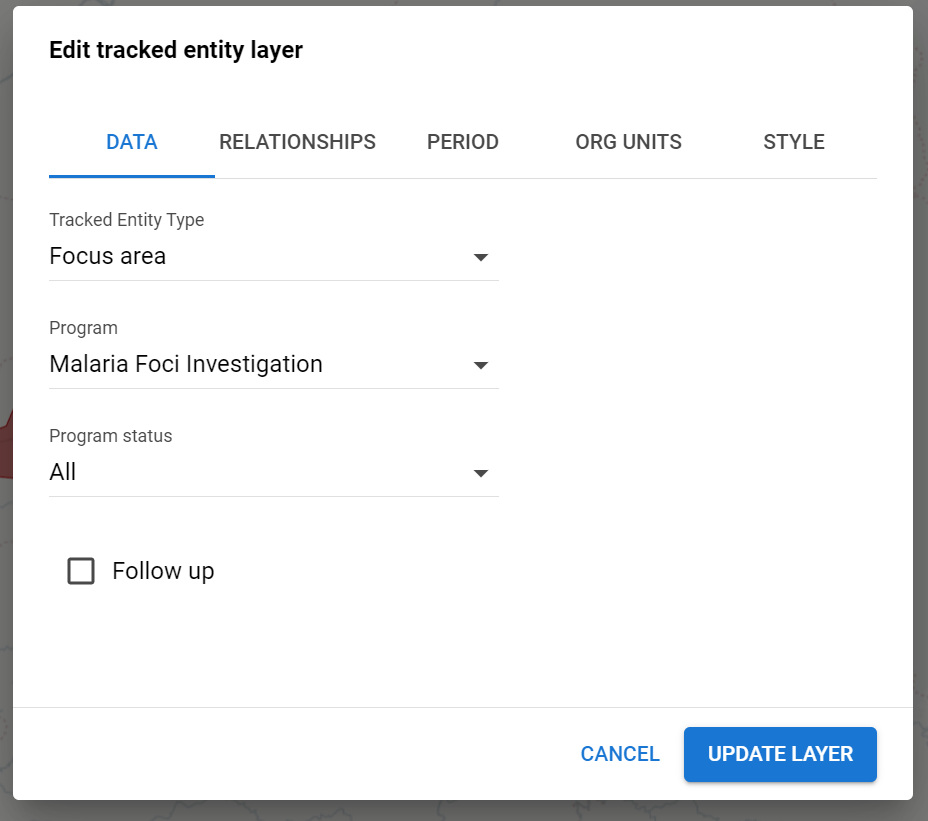
MAL-FOCI

Indicators and Program Indicators
The indicators in this package have been built based on specifications from guiding documents from the WHO.
Program indicators are used most frequently in this package (e.g. counting events or enrollments filtered by a condition). Due to limitations in calculating indicators based on data from multiple events, some program rules have been used to move data into data elements that are part of “hidden sections" throughout the program. When modifying the package, extra care should be taken that the data elements in these hidden sections are being populated correctly. This can be tested directly in Tracker by removing the program rules which hide the sections. The rules for this are all called “Hide Section for indicator purposes”.
Indicators are used when there is a numerator and denominator. In this package, indicators typically contain program indicator in the numerator and denominator in order to calculate values such as % of cases investigated, % of cases notified on time, % of cases by risk group, etc.
Note: Indicators that calculate a percentage of cases based on detection vs. outcome can show a result exceeding 100%, this results from cases in which the outcome happens in the following period. In particular for confirmed cases classified, the percentage can be more than 100% since the confirmation comes from diagnosis and treatment and the classification from the outcome, in a report the outcome could be in a different period.
Android compatibility
The program as it stands is fully compatible with Android. When implementing with Android, especially if the program is modified, it is important to be familiar with the Android implementation guide