
DHIS2 Documentation Team
Copyright © 2008-2023 DHIS2 Team
source.revision.date: 2026-06-30
Warranty: THIS DOCUMENT IS PROVIDED BY THE AUTHORS ‘’AS IS’’ AND ANY EXPRESS OR IMPLIED WARRANTIES, INCLUDING, BUT NOT LIMITED TO, THE IMPLIED WARRANTIES OF MERCHANTABILITY AND FITNESS FOR A PARTICULAR PURPOSE ARE DISCLAIMED. IN NO EVENT SHALL THE AUTHORS OR CONTRIBUTORS BE LIABLE FOR ANY DIRECT, INDIRECT, INCIDENTAL, SPECIAL, EXEMPLARY, OR CONSEQUENTIAL DAMAGES (INCLUDING, BUT NOT LIMITED TO, PROCUREMENT OF SUBSTITUTE GOODS OR SERVICES; LOSS OF USE, DATA, OR PROFITS; OR BUSINESS INTERRUPTION) HOWEVER CAUSED AND ON ANY THEORY OF LIABILITY, WHETHER IN CONTRACT, STRICT LIABILITY, OR TORT (INCLUDING NEGLIGENCE OR OTHERWISE) ARISING IN ANY WAY OUT OF THE USE OF THIS MANUAL AND PRODUCTS MENTIONED HEREIN, EVEN IF ADVISED OF THE POSSIBILITY OF SUCH DAMAGE.
License: Permission is granted to copy, distribute and/or modify this document under the terms of the GNU Free Documentation License, Version 1.3 or any later version published by the Free Software Foundation; with no Invariant Sections, no Front-Cover Texts, and no Back-Cover Texts. A copy of the license is included in the source of this documentation, and is available here online: http://www.gnu.org/licenses/fdl.html
The Web API is a component which makes it possible for external systems to access and manipulate data stored in an instance of DHIS2. More precisely, it provides a programmatic interface to a wide range of exposed data and service methods for applications such as third-party software clients, web portals and internal DHIS2 modules.
The Web API adheres to many of the principles behind the REST architectural style. To mention some important ones:
The DHIS2 Web API supports three protocols for authentication:
Verify and get information about the currently authenticated user by making a GET request to the following endpoint.
GET /api/me
Get the list of authorities for the currently authenticatd user.
GET /api/me/authorization
Check whether the currently authenticated user has the given authority.
GET /api/me/authorization/{authority}
For example, to check whether the user has the F_CONSTANT_ADD authority.
GET /api/me/authorization/F_CONSTANT_ADD
The response will be either true or false in JSON format.
The DHIS2 Web API supports Basic authentication. Basic authentication is a technique for clients to send login credentials over HTTP to a web server. Technically speaking, the username is appended with a colon and the password, Base64-encoded, prefixed Basic and supplied as the value of the Authorization HTTP header. More formally that is:
Authorization: Basic base64encode(username:password)
Most network-aware development environments provide support for Basic authentication, such as Apache HttpClient and Spring RestTemplate. An important note is that this authentication scheme provides no security since the username and password are sent in plain text and can be easily observed by an attacker. Using Basic is recommended only if the server is using SSL/TLS (HTTPS) to encrypt communication with clients. Consider this a hard requirement in order to provide secure interactions with the Web API.
DHIS2 supports two-factor authentication. This can be enabled per user. When enabled, users will be asked to enter a 2FA code when logging in. You can read more about 2FA here.
Personal access tokens (PATs) are an alternative to using passwords for authentication to DHIS2 when using the API.
PATs can be a more secure alternative to HTTP Basic Authentication, and should be your preferred choice when creating a new app/script etc.
HTTP Basic Authentication is considered insecure because, among other things, it sends your username and password in clear text. It may be deprecated in future DHIS2 versions or made opt-in, meaning that basic authentication would need to be explicitly enabled in the configuration.
Your PATs will automatically inherit all the permissions and authorizations your user has. It is therefore extremely important that you limit the access granted to your token depending on how you intend to use it, see Configuring your token.
If you only want the token to have access to a narrow and specific part of the server, it is advised to rather create a new special user that you assign only the roles/authorities you want it to have access to.
To create a new PAT, you have two choices: * A. Create a token in the UI on your account's profile page. * B. Create a token via the API.
Log in with your username and password, go to your profile page (Click top right corner, and chose "Edit profile" from the dropdown). On your user profile page, choose "Personal access tokens" from the left side menu. You should now be on the "Manage personal access tokens" page and see the text: "You don't have any active personal access tokens". Click "Generate new token" to make a new token. A "Generate new token" popup will be shown and present you with two choices:
"This type is used for integrations and scripts that won't be accessed by a browser".
If you plan to use the token in an application, a script or similar, this type should be your choice.
"This type us used for applications, like public portals, that will be accessed with a web browser".
If you need to link to DHIS2 on a webpage, or e.g. embed in an iframe, this is probably the type of token you want.
After choosing what token type you want, you can configure different access constraints on your token. By constraint, we mean how to limit and narrow down how your token can be used. This can be of crucial importance if you plan on using the token in a public environment, e.g. on a public dashboard on another site, embedded in an iframe. Since tokens always have the same access/authorities that your user currently has, taking special care is needed if you intend to use it in any environment you don't have 100% control over.
NB: If anyone else gets their hands on your token, they can do anything your user can do. It is not possible to distinguish between actions performed using the token and other actions performed by your user.
Important: It is strongly advised that you create a separate unique user with only the roles/authorities you want the token to have if you plan on using PAT tokens in a non-secure and/or public environment, e.g. on a PC or server, you don't have 100% control over, or "embedded" in a webpage on another server.
Expiry time simply sets for how long you want your token to be usable, the default is 30 days. After the expiry time, the token will simply return a 401 (Unauthorized) message. You can set any expiry time you want, but it is strongly advised that you set an expiry time that is reasonable for your use case.
This is a comma-separated list of IP addresses you want to limit where the token requests can come from.
Important: IP address validation relies on the X-Forwarded-For header, which can be spoofed. For security, make sure a load balancer or reverse proxy overwrites this header.
A comma-separated list of HTTP methods you want your token to be able to use. If you only need your token to view data, not modify or delete, selecting only the GET HTTP method makes sense.
HTTP referer is a header added to the request, when you click on a link, this says which site/page you were on when you clicked the link. Read more about the HTTP referer header here: https://en.wikipedia.org/wiki/HTTP_referer
This can be used to limit the use of a "public" token embedded on another page on another site. Making sure that the referer header match the site hostname in should come from, can help avoid abuse of the token, e.g. if someone posts it on a public forum.
Important: this is not a security feature. The referer header can easily be spoofed. This setting is intended to discourage unauthorized third-party developers from connecting to public access instances.
When you are done configuring your token, you can save it by clicking the "Generate new token" button, on the bottom right of the pop-up. When doing so the token will be saved and a secret token key will be generated on the server. The new secret token key will be shown on the bottom of the PAT token list with a green background, and the text "Newly created token". The secret token key will look similar to this:
d2pat_5xVA12xyUbWNedQxy4ohH77WlxRGVvZZ1151814092
Example of how to create a new Personal Access Token using the API:
POST /api/apiToken
Content-Type: application/json
Authorization: Basic admin district

{}
{}) in the payload! This will return a response containing a token similar to this:
{
  "httpStatus": "Created",
  "httpStatusCode": 201,
  "status": "OK",
  "response": {
     "responseType": "ApiTokenCreationResponse",
     "key": "d2pat_5xVA12xyUbWNedQxy4ohH77WlxRGVvZZ1151814092",
     "uid": "jJYrtIVP7qU",
     "klass": "org.hisp.dhis.security.apikey.ApiToken",
     "errorReports": []
  }
}
Note: The token key will only be shown once here in this response. You need to copy and save this is in a secure place for use later!
The token itself consists of three parts: 1. Prefix: (d2pat_) indicates what type of token this is. 2. Random bytes Base64 encoded: (5xVA12xyUbWNedQxy4ohH77WlxRGVvZZ) 3. CRC32 checksum: (1151814092) the checksum part is padded with 0 so that it always stays ten characters long.
To change any of the constraints on your token, you can issue the following HTTP API request.
Note: Only the constraints are possible to modify after the token has been created.
PUT /api/apiToken/jJYrtIVP7qU
Content-Type: application/json
Authorization: Basic admin district
{
  "version": 1,
  "type": "PERSONAL_ACCESS_TOKEN",
  "expire": 163465349603200,
  "attributes": [
      {
        "type": "IpAllowedList",
        "allowedIps": ["192.168.0.1"]
      },
      {
        "type": "MethodAllowedList",
        "allowedMethods": ["GET"]
      }
  ]
}
To issue a request with your newly created token, use the Authorization header accordingly. The authorization header format is:
Authorization: ApiToken [YOUR_SECRET_API_TOKEN_KEY]
For example:
GET /api/apiToken/jJYrtIVP7qU
Content-Type: application/json
Authorization: ApiToken d2pat_5xVA12xyUbWNedQxy4ohH77WlxRGVvZZ1151814092
You can delete your PATs either in the UI on your profile page where you created it, or via the API like this:
DELETE /api/apiToken/jJYrtIVP7qU
Content-Type: application/json
Authorization: ApiToken d2pat_5xVA12xyUbWNedQxy4ohH77WlxRGVvZZ1151814092
DHIS2 supports the OAuth2 authentication protocol. OAuth2 is an open standard for authorization which allows third-party clients to connect on behalf of a DHIS2 user and get a reusable bearer token for subsequent requests to the Web API. DHIS2 does not support fine-grained OAuth2 roles but rather provides applications access based on user roles of the DHIS2 user.
Each client for which you want to allow OAuth 2 authentication must be registered in DHIS2. To add a new OAuth2 client go to Apps > Settings > OAuth2 Clients in the user interface, click Add new and enter the desired client name and the grant types.
An OAuth2 client can be added through the Web API. As an example, we can send a payload like this:
{
  "name": "OAuth2 Demo Client",
  "cid": "demo",
  "secret": "1e6db50c-0fee-11e5-98d0-3c15c2c6caf6",
  "grantTypes": [
    "password",
    "refresh_token",
    "authorization_code"
  ],
  "redirectUris": [
    "http://www.example.org"
  ]
}
The payload can be sent with the following command:
SERVER="https://play.dhis2.org/dev"
curl -X POST -H "Content-Type: application/json" -d @client.json
  -u admin:district "$SERVER/api/oAuth2Clients"
This client will be used as the basis for the next grant type examples.
The simplest of all grant types is the password grant type. This grant type is similar to basic authentication in the sense that it requires the client to collect the user's username and password. As an example we can use our demo server:
SERVER="https://play.dhis2.org/dev"
SECRET="1e6db50c-0fee-11e5-98d0-3c15c2c6caf6"

curl -X POST -H "Accept: application/json" -u demo:$SECRET "$SERVER/uaa/oauth/token"
  -d grant_type=password -d username=admin -d password=district
This will give you a response similar to this:
{
  "expires_in": 43175,
  "scope": "ALL",
  "access_token": "07fc551c-806c-41a4-9a8c-10658bd15435",
  "refresh_token": "a4e4de45-4743-481d-9345-2cfe34732fcc",
  "token_type": "bearer"
}
For now, we will concentrate on the access_token, which is what we will use as our authentication (bearer) token. As an example, we will get all data elements using our token:
SERVER="https://play.dhis2.org/dev"
curl -H "Authorization: Bearer 07fc551c-806c-41a4-9a8c-10658bd15435" "$SERVER/api/33/dataElements.json"
In general the access tokens have limited validity. You can have a look at the expires_in property of the response in the previous example to understand when a token expires. To get a fresh access_token you can make another round trip to the server and use refresh_token which allows you to get an updated token without needing to ask for the user credentials one more time.
SERVER="https://play.dhis2.org/dev"
SECRET="1e6db50c-0fee-11e5-98d0-3c15c2c6caf6"
REFRESH_TOKEN="a4e4de45-4743-481d-9345-2cfe34732fcc"

curl -X POST -H "Accept: application/json" -u demo:$SECRET "$SERVER/uaa/oauth/token"
  -d "grant_type=refresh_token" -d "refresh_token=$REFRESH_TOKEN"
The response will be exactly the same as when you get a token to start with.
Authorized code grant type is the recommended approach if you don't want to store the user credentials externally. It allows DHIS2 to collect the username/password directly from the user instead of the client collecting them and then authenticating on behalf of the user. Please be aware that this approach uses the redirectUris part of the client payload.
Step 1: Visit the following URL using a web browser. If you have more than one redirect URIs, you might want to add &redirect_uri=http://www.example.org to the URL:
SERVER="https://play.dhis2.org/dev"
$SERVER/uaa/oauth/authorize?client_id=demo&response_type=code
Step 2: After the user has successfully logged in and accepted your client access, it will redirect back to your redirect uri like this:
http://www.example.org/?code=XYZ
Step 3: This step is similar to what we did in the password grant type, using the given code, we will now ask for an access token:
SERVER="https://play.dhis2.org/dev"
SECRET="1e6db50c-0fee-11e5-98d0-3c15c2c6caf6"

curl -X POST -u demo:$SECRET -H "Accept: application/json" $SERVER/uaa/oauth/token
-d "grant_type=authorization_code" -d "code=XYZ"
The Web API uses a consistent format for all error/warning and informational messages:
{
  "httpStatus": "Forbidden",
  "message": "You don't have the proper permissions to read objects of this type.",
  "httpStatusCode": 403,
  "status": "ERROR"
}
Here we can see from the message that the user tried to access a resource I did not have access to. It uses the http status code 403, the HTTP status message forbidden and a descriptive message.
| Name | Description |
|---|---|
| httpStatus | HTTP Status message for this response, see RFC 2616 (Section 10) for more information. |
| httpStatusCode | HTTP Status code for this response, see RFC 2616 (Section 10) for more information. |
| status | DHIS2 status, possible values are OK | WARNING | ERROR, where OK means everything was successful, ERROR means that operation did not complete and WARNING means the operation was partially successful, if the message contains a response property, please look there for more information. |
| message | A user-friendly message telling whether the operation was a success or not. |
| devMessage | A more technical, developer-friendly message (not currently in use). |
| response | Extension point for future extensions of the WebMessage format. |
Throughout the Web API, we refer to dates and periods. The date format is:
yyyy-MM-dd
For example, if you want to express March 20, 2014, you must use 2014-03-20.
The period format is described in the following table (also available on the API endpoint /api/periodTypes)
| Interval | Format | Example | Description |
|---|---|---|---|
| Day | yyyyMMdd | 20040315 | March 15, 2004 |
| Week | yyyyWn | 2004W10 | Week 10 2004 |
| Week Wednesday | yyyyWedWn | 2015WedW5 | Week 5 with start Wednesday |
| Week Thursday | yyyyThuWn | 2015ThuW6 | Week 6 with start Thursday |
| Week Saturday | yyyySatWn | 2015SatW7 | Week 7 with start Saturday |
| Week Sunday | yyyySunWn | 2015SunW8 | Week 8 with start Sunday |
| Bi-week | yyyyBiWn | 2015BiW1 | Week 1-2 20015 |
| Month | yyyyMM | 200403 | March 2004 |
| Bi-month | yyyyMMB | 200401B | January-February 2004 |
| Quarter | yyyyQn | 2004Q1 | January-March 2004 |
| Six-month | yyyySn | 2004S1 | January-June 2004 |
| Six-month April | yyyyAprilSn | 2004AprilS1 | April-September 2004 |
| Year | yyyy | 2004 | 2004 |
| Financial Year April | yyyyApril | 2004April | Apr 2004-Mar 2005 |
| Financial Year July | yyyyJuly | 2004July | July 2004-June 2005 |
| Financial Year Oct | yyyyOct | 2004Oct | Oct 2004-Sep 2005 |
In some parts of the API, like for the analytics resource, you can utilize relative periods in addition to fixed periods (defined above). The relative periods are relative to the current date and allow e.g. for creating dynamic reports. The available relative period values are described in the table below.
| Name | Keyword |
|---|---|
| Today | TODAY |
| Yesterday | YESTERDAY |
| Last 3 days | LAST_3_DAYS |
| Last 7 days | LAST_7_DAYS |
| Last 14 days | LAST_14_DAYS |
| Last 30 days | LAST_30_DAYS |
| Last 60 days | LAST_60_DAYS |
| Last 90 days | LAST_90_DAYS |
| Last 180 days | LAST_180_DAYS |
| This month | THIS_MONTH |
| This bi-month | THIS_BIMONTH |
| Last bi-month | LAST_BIMONTH |
| This quarter | THIS_QUARTER |
| Last quarter | LAST_QUARTER |
| This six-month | THIS_SIX_MONTH |
| Last six-month | LAST_SIX_MONTH |
| Weeks this year | WEEKS_THIS_YEAR |
| Months this year | MONTHS_THIS_YEAR |
| Bi-months this year | BIMONTHS_THIS_YEAR |
| Quarters this year | QUARTERS_THIS_YEAR |
| This year | THIS_YEAR |
| Months last year | MONTHS_LAST_YEAR |
| Quarters last year | QUARTERS_LAST_YEAR |
| Last year | LAST_YEAR |
| Last 5 years | LAST_5_YEARS |
| Last 10 years | LAST_10_YEARS |
| Last 12 months | LAST_12_MONTHS |
| Last 6 months | LAST_6_MONTHS |
| Last 3 months | LAST_3_MONTHS |
| Last 6 bi-months | LAST_6_BIMONTHS |
| Last 4 quarters | LAST_4_QUARTERS |
| Last 2 six-months | LAST_2_SIXMONTHS |
| This financial year | THIS_FINANCIAL_YEAR |
| Last financial year | LAST_FINANCIAL_YEAR |
| Last 5 financial years | LAST_5_FINANCIAL_YEARS |
| Last 10 financial years | LAST_10_FINANCIAL_YEARS |
| This week | THIS_WEEK |
| Last week | LAST_WEEK |
| This bi-week | THIS_BIWEEK |
| Last bi-week | LAST_BIWEEK |
| Last 4 weeks | LAST_4_WEEKS |
| Last 4 bi-weeks | LAST_4_BIWEEKS |
| Last 12 weeks | LAST_12_WEEKS |
| Last 52 weeks | LAST_52_WEEKS |
It is possible retrieve the ISO representations of these relative periods by making a GET request to the /api/relativePeriods/{RELATIVE_PERIOD_KEYWORD}
The endpoint supports the following parameters: - startDate: Represents the start date to calculate the relative period from. Format: yyyy-MM-dd. Default is today if not provided. - financialYearStart: Should be one of FINANCIAL_YEAR_FEBRUARY, FINANCIAL_YEAR_APRIL, FINANCIAL_YEAR_JULY, FINANCIAL_YEAR_AUGUST, FINANCIAL_YEAR_SEPTEMBER, FINANCIAL_YEAR_OCTOBER. Default is FINANCIAL_YEAR_OCTOBER if not provided.
As an example, to get the ISO representation of the relative period LAST_3_MONTHS from the date 2021-08-15, you can issue the following request: GET /api/relativePeriods/LAST_3_MONTHS?startDate=2021-08-15
The response in this case would be:
{
[
"202105",
"202106",
"202107"
]
}
Analytics query resources support extra parameters to express periods.
Default pe dimension will fall back to:
eventDate for /analytics/events/queryenrollmentDate for /analytics/enrollments/queryAdding conditions on one or more date fields and combining them are allowed.
In resources supporting custom date periods, there are extra query parameters that will be combined to express conditions on the time dimension.
| custom date period | events query resource | enrollment query resource |
|---|---|---|
eventDate | [x] | [ ] |
enrollmentDate | [x] | [x] |
scheduledDate | [x] | [ ] |
incidentDate | [x] | [x] |
lastUpdated | [x] | [x] |
Conditions can be expressed in the following format:
/api/analytics/events/query/...?...&eventDate=2021&...
It's possible to combine more time fields in the same query:
/api/analytics/events/query/...?...&eventDate=2021&incidentDate=202102&...
All of these conditions can be combined with pe dimension:
/api/analytics/events/query/...?...&dimension=pe:TODAY&enrollmentDate=2021&incidentDate=202102&...
Supported formats are described in "date and period format" above. An extra format is provided to express a range of dates: yyyyMMdd_yyyyMMdd and yyyy-MM-dd_yyyy-MM-dd.
In the example bellow, the endpoint will return events that are scheduled to happen between 20210101 and 20210104:
/api/analytics/events/query/...?...&dimension=pe:TODAY&enrollmentDate=2021&incidentDate=202102&scheduledDate=20210101_20210104&...
All available system authorities can be listed with identifiers and names using the following endpoint.
GET /api/authorities
It returns the following format:
{
  "systemAuthorities": [
    {
      "id": "ALL",
      "name": "ALL"
    },
    {
      "id": "F_ACCEPT_DATA_LOWER_LEVELS",
      "name": "Accept data at lower levels"
    }
  ]
}
This section provides an explanation of the identifier scheme concept. Identifier schemes are used to map metadata objects to other metadata during import, and to render metadata as part of exports. Note that not all schemes work for all API calls, and not all schemes can be used for both input and output. This is outlined in the sections explaining the various API endpoints.
The full set of identifier scheme object types available are listed below, using the name of the property to use in queries:
The general idScheme applies to all types of objects. It can be overridden by specific object types.
The default scheme for all parameters is UID (stable DHIS2 identifiers). The supported identifier schemes are described in the table below.
| Scheme | Description |
|---|---|
| ID, UID | Match on DHIS2 stable Identifier, this is the default id scheme. |
| CODE | Match on DHIS2 Code, mainly used to exchange data with an external system. |
| NAME | Match on DHIS2 Name, please note that this uses what is available as object.name, and not the translated name. Also note that names are not always unique, and in that case, they can not be used. |
| ATTRIBUTE:ID | Match on metadata attribute, this attribute needs to be assigned to the type you are matching on, and also that the unique property is set to true. The main usage of this is also to exchange data with external systems, it has some advantages over CODE since multiple attributes can be added, so it can be used to synchronize with more than one system. |
Note that identifier schemes is not an independent feature but needs to be used in combination with resources such as data value import, metadata import and GeoJson import.
As an example, to specify CODE as the general id scheme and override with UID for organisation unit id scheme you can use these query parameters:
?idScheme=CODE&orgUnitIdScheme=UID
As another example, to specify an attribute for the organisation unit id scheme, code for the data element id scheme and use the default UID id scheme for all other objects you can use these parameters:
?orgUnitIdScheme=ATTRIBUTE:j38fk2dKFsG&dataElementIdScheme=CODE
The entry point for browsing the Web API is /api. This resource provides links to all available resources. Four resource representation formats are consistently available for all resources: HTML, XML, JSON, and JSONP. Some resources will have other formats available, like MS Excel, PDF, CSV, and PNG. To explore the API from a web browser, navigate to the /api entry point and follow the links to your desired resource, for instance /api/dataElements. For all resources which return a list of elements certain query parameters can be used to modify the response:
| Parameter | Option values | Default option | Description |
|---|---|---|---|
| paging | true | false | true | Indicates whether to return lists of elements in pages. |
| page | number | 1 | Defines which page number to return. |
| pageSize | number | 50 | Defines the number of elements to return for each page. |
| order | property:asc/iasc/desc/idesc | Order the output using a specified order, only properties that are both persisted and simple (no collections, idObjects etc) are supported. iasc and idesc are case insensitive sorting. If it is wanted to sort for more than one property, separate them using a comma. |
An example of how these parameters can be used to get a full list of data element groups in XML response format is:
/api/dataElementGroups.xml?links=false&paging=false
You can query for elements on the name property instead of returning a full list of elements using the query query variable. In this example we query for all data elements with the word "anaemia" in the name:
/api/dataElements?query=anaemia
You can get specific pages and page sizes of objects like this:
/api/dataElements.json?page=2&pageSize=20
You can completely disable paging like this:
/api/indicatorGroups.json?paging=false
To order the result based on a specific property:
/api/indicators.json?order=shortName:desc
To order the result based on created datetime property first (descending order) and then by name property (ascending order):
/api/indicators.json?order=created:desc,name:asc
You can find an object based on its ID across all object types through the identifiableObjects resource:
/api/identifiableObjects/<id>
DHIS2 supports translations of database content, such as data elements, indicators, and programs. All metadata objects in the Web API have properties meant to be used for display / UI purposes, which include displayName, displayShortName, displayDescription and displayFormName (for data elements and tracked entity attributes).
| Parameter | Values | Description |
|---|---|---|
| translate | true | false | Translate display* properties in metadata output (displayName, displayShortName, displayDescription, and displayFormName for data elements and tracked entity attributes). Default value is true. |
| locale | Locale to use | Translate metadata output using a specified locale (requires translate=true). |
The translations for an object is rendered as part of the object itself in the translations array. Note that the translations array in the JSON/XML payloads is normally pre-filtered for you, which means they can not directly be used to import/export translations (as that would normally overwrite locales other than current users).
Example of data element with translation array filtered on user locale:
{
  "id": "FTRrcoaog83",
  "displayName": "Accute French",
  "translations": [
    {
      "property": "SHORT_NAME",
      "locale": "fr",
      "value": "Accute French"
    },
    {
      "property": "NAME",
      "locale": "fr",
      "value": "Accute French"
    }
  ]
}
Example of data element with translations turned off:
{
  "id": "FTRrcoaog83",
  "displayName": "Accute Flaccid Paralysis (Deaths < 5 yrs)",
  "translations": [
    {
      "property": "FORM_NAME",
      "locale": "en_FK",
      "value": "aa"
    },
    {
      "property": "SHORT_NAME",
      "locale": "en_GB",
      "value": "Accute Flaccid Paral"
    },
    {
      "property": "SHORT_NAME",
      "locale": "fr",
      "value": "Accute French"
    },
    {
      "property": "NAME",
      "locale": "fr",
      "value": "Accute French"
    },
    {
      "property": "NAME",
      "locale": "en_FK",
      "value": "aa"
    },
    {
      "property": "DESCRIPTION",
      "locale": "en_FK",
      "value": "aa"
    }
  ]
}
Note that even if you get the unfiltered result, and are using the appropriate type endpoint i..e /api/dataElements we do not allow updates, as it would be too easy to make mistakes and overwrite the other available locales.
To read and update translations you can use the special translations endpoint for each object resource. These can be accessed by GET or PUT on the appropriate /api/<object-type>/<object-id>/translations endpoint.
As an example, for a data element with identifier FTRrcoaog83, you could use /api/dataElements/FTRrcoaog83/translations to get and update translations. The fields available are property with options NAME, SHORT_NAME, FORM_NAME, DESCRIPTION, locale which supports any valid locale ID and the translated property value.
Example of NAME property for French locale:
{
  "property": "NAME",
  "locale": "fr",
  "value": "Paralysie Flasque Aiguë (Décès <5 ans)"
}
This payload would then be added to a translation array, and sent back to the appropriate endpoint:
{
  "translations": [
    {
      "property": "NAME",
      "locale": "fr",
      "value": "Paralysie Flasque Aiguë (Décès <5 ans)"
    }
  ]
}
For a data element with ID FTRrcoaog83 you can PUT this to /api/dataElements/FTRrcoaog83/translations. Make sure to send all translations for the specific object and not just for a single locale (if not you will potentially overwrite existing locales for other locales).
The status code will be 204 No Content if the data value was successfully saved or updated, or 404 Not Found if there was a validation error (e.g. more than one SHORT_NAME for the same locale).
The Web API /api can be used with a DHIS2 version number, example:
/api/42/dataElements
Versions 28-43 are supported. Calling an endpoint with or without a version does not change the behaviour of the API. The behaviour is the same no matter which approach is used. We aim to remove supporting API calls with versions, so please use API calls without the use of a version number.
The support for using versions is due to legacy design, which didn't evolve as originally envisioned.
To filter the metadata there are several filter operations that can be applied to the returned list of metadata. The format of the filter itself is straight-forward and follows the pattern property:operator:value, where property is the property on the metadata you want to filter on, operator is the comparison operator you want to perform and value is the value to check against (not all operators require value).
Please see the schema section to discover which properties are available. In addition to the listed properties filters can apply to custom attribute values by using the attribute's ID as property name.
Recursive filtering, ie. filtering on associated objects or collection of objects, is supported as well.
| Operator | Types | Value required | Description |
|---|---|---|---|
| eq | string | boolean | integer | float | enum | collection (checks for size) | date | true | Equality |
| !eq | string | boolean | integer | float | enum | collection (checks for size) | date | true | Inequality |
| ieq | string | true | Case insensitive string, match exact |
| ne | string | boolean | integer | float | enum | collection (checks for size) | date | true | Inequality |
| like | string | true | Case sensitive string, match anywhere |
| !like | string | true | Case sensitive string, not match anywhere |
| $like | string | true | Case sensitive string, match start |
| !$like | string | true | Case sensitive string, not match start |
| like$ | string | true | Case sensitive string, match end |
| !like$ | string | true | Case sensitive string, not match end |
| ilike | string | true | Case insensitive string, match anywhere |
| !ilike | string | true | Case insensitive string, not match anywhere |
| $ilike | string | true | Case insensitive string, match start |
| !$ilike | string | true | Case insensitive string, not match start |
| ilike$ | string | true | Case insensitive string, match end |
| !ilike$ | string | true | Case insensitive string, not match end |
| gt | string | boolean | integer | float | collection (checks for size) | date | true | Greater than |
| ge | string | boolean | integer | float | collection (checks for size) | date | true | Greater than or equal |
| lt | string | boolean | integer | float | collection (checks for size) | date | true | Less than |
| le | string | boolean | integer | float | collection (checks for size) | date | true | Less than or equal |
| null | all | false | Property is null |
| !null | all | false | Property is not null |
| empty | collection | false | Collection is empty |
| token | string | true | Match on multiple tokens in search property |
| !token | string | true | Not match on multiple tokens in search property |
| in | string | boolean | integer | float | date | true | Find objects matching 1 or more values |
| !in | string | boolean | integer | float | date | true | Find objects not matching 1 or more values |
Operators will be applied as logical and query. If you need a or query, you can have a look at the in filter and the section below. The filtering mechanism allows for recursion. See below for some examples.
Get data elements with id property ID1 or ID2:
/api/dataElements?filter=id:eq:ID1&filter=id:eq:ID2
Get data elements, ignoring case, with name property MyDataElement:
/api/dataElements?filter=name:ieq:mydataelement
Get all data elements which have a data set with id ID1:
/api/dataElements?filter=dataSetElements.dataSet.id:eq:ID1
Get all data elements with aggregation operator sum and value type int:
/api/dataElements.json?filter=aggregationOperator:eq:sum&filter=type:eq:int
You can do filtering within collections, e.g. to get data elements which are members of the ANC data element group you can use the following query using the id property of the associated data element groups:
/api/dataElements.json?filter=dataElementGroups.id:eq:qfxEYY9xAl6
To get data elements with a particular attribute value for a metadata attribute, a filter for the attribute ID and the attribute value can be specified using the same collection query syntax:
/api/dataElements.json?filter=attributeValues.attribute.id:eq:n2xYlNbsfko&filter=attributeValues.value:eq:AFP
Get data elements which have any option set:
/api/dataElements?filter=optionSet:!null
Since all operators are and by default, you can't find a data element matching more than one id, for that purpose you can use the in operator.
/api/dataElements.json?filter=id:in:[fbfJHSPpUQD,cYeuwXTCPkU]
As mentioned in the section before, the default logical operator applied to the filters is AND which means that all object filters must be matched. There are however cases where you want to match on one of several filters (maybe id and code field) and in those cases, it is possible to switch the root logical operator from AND to OR using the rootJunction parameter.
Example: Normal filtering where both id and code must match to have a result returned
/api/dataElements.json?filter=id:in:[id1,id2]&filter=code:eq:code1
Example: Filtering where the logical operator has been switched to OR and now only one of the filters must match to have a result returned
/api/dataElements.json?filter=id:in:[id1,id2]&filter=code:eq:code1&rootJunction=OR
In addition to the specific property based filtering mentioned above, we also have token based AND filtering across a set of properties: id, code, and name (also shortName if available). These properties are commonly referred to as identifiable. The idea is to filter metadata whose id, name, code or short name containing something.
Example: Filter all data elements containing 2nd in any of the following: id,name,code, shortName
/api/dataElements.json?filter=identifiable:token:2nd
It is also possible to specify multiple filtering values.
Example: Get all data elements where ANC visit is found in any of the identifiable properties. The system returns all data elements where both tokens (ANC and visit) are found anywhere in identifiable properties.
/api/dataElements.json?filter=identifiable:token:ANC visit
It is also possible to combine the identifiable filter with property-based filter and expect the rootJunction to be applied.
/api/dataElements.json?filter=identifiable:token:ANC visit&filter=displayName:ilike:tt1

/api/dataElements.json?filter=identifiable:token:ANC visit
  &filter=displayName:ilike:tt1&rootJunction=OR
In many situations, the default views of the metadata can be too verbose. A client might only need a few fields from each object and want to remove unnecessary fields from the response. To discover which fields are available for each object please see the schema section. In addition to the listed properties custom attributes can be included for top level objects by using the attribute's ID as property name.
The format for include/exclude allows for infinite recursion. To filter at the "root" level you can just use the name of the field, i.e. ?fields=id,name which would only display the id and name fields for every object. For objects that are either collections or complex objects with properties on their own, you can use the format ?fields=id,name,dataSets[id,name] which would return id, name of the root, and the id and name of every data set on that object. Negation can be done with the exclamation operator, and we have a set of presets of field select. Both XML and JSON formats are supported.
Example: Get id and name on the indicators resource:
/api/indicators?fields=id,name
Example: Get id and name from data elements, and id and name from the associated data sets:
/api/dataElements?fields=id,name,dataSets[id,name]
Example: Get id, name and the value of a user defined attribute with ID DnrLSdo4hMl for organisation units:
/api/organisationUnits?fields=id,name,DnrLSdo4hMl
The attribute is then included as property DnrLSdo4hMl of each matching object in the response. This can be renamed using the rename transformer as shown in the next section.
To exclude a field from the output you can use the exclamation ! operator. This is allowed anywhere in the query and will simply not include that property as it might have been inserted in some of the presets.
A few presets (selected fields groups) are available and can be applied using the : operator.
| Operator | Description |
|---|---|
| <field-name> | Include property with name, if it exists. |
| <object>[<field-name>, ...] | Includes a field within either a collection (will be applied to every object in that collection), or just on a single object. |
| !<field-name>, <object>[!<field-name> | Do not include this field name, it also works inside objects/collections. Useful when you use a preset to include fields. |
| *, <object>[*] | Include all fields on a certain object, if applied to a collection, it will include all fields on all objects on that collection. |
| :<preset> | Alias to select multiple fields. Three presets are currently available, see the table below for descriptions. |
| Preset | Description |
|---|---|
| all | All fields of the object |
| * | Alias for all |
| identifiable | Includes id, name, code, created, lastUpdated and lastUpdatedBy fields |
| nameable | Includes id, name, shortName, code, description, created and lastUpdated fields |
| persisted | Returns all persisted property on an object, does not take into consideration if the object is the owner of the relation. |
| owner | Returns all persisted property on an object where the object is the owner of all properties, this payload can be used to update through the API. |
Example: Include all fields from data sets except organisation units:
/api/dataSets?fields=:all,!organisationUnits
Example: Include only id, name and the collection of organisation units from a data set, but exclude the id from organisation units:
/api/dataSets/BfMAe6Itzgt?fields=id,name,organisationUnits[:all,!id]
Example: Include nameable properties from all indicators:
/api/indicators.json?fields=:nameable
Field transforms can be used to transform properties. The syntax is described below.
/api/dataElements/ID?fields=id~rename(i),name~rename(n)
This will rename the id property to i and name property to n.
Multiple transformers can be applied to a single property by repeating the transformer operator:
/api/dataElementGroups.json?fields=id,displayName,dataElements~isNotEmpty~rename(haveDataElements)
The supported transformer operators are described in the table below.
| Name | Arguments | Description |
|---|---|---|
| size | Gives sizes of strings (length) and collections | |
| isEmpty | Is string or collection empty | |
| isNotEmpty | Is string or collection not empty | |
| rename | Arg1: name | Renames the property name |
| paging | Arg1: page,Arg2: pageSize | Pages a collection, default pageSize is 50. |
| pluck | Optional Arg1: fieldName | Converts an array of objects to an array of a selected field of that object. By default, the first field that is returned by the collection is used (normally the ID). |
| keyBy | Optional Arg1: fieldName | Converts an array of objects to an object where the fieldName (default id) is used as the key. This can be useful for quick lookups in JavaScript for example |
Examples of transformer usage are found below.
Get the size of a collection:
/api/dataElements?fields=dataSets~size
Test if a collection is empty:
/api/dataElements?fields=dataSets~isEmpty
Test if a collection is not empty:
/api/dataElements?fields=dataSets~isNotEmpty
Rename properties:
/api/dataElements/ID?fields=id~rename(i),name~rename(n)
Apply paging to a collection:
/api/dataElementGroups?fields=id,displayName,dataElements~paging(1;20)
Get array with IDs of organisation units:
/api/categoryOptions.json?fields=id,organisationUnits~pluck
Get array with names of organisation units:
/api/categoryOptions.json?fields=id,organisationUnits~pluck[name]
Key the dataElements array by the id field:
/api/dataElementGroups.json?fields=id,name,dataElements~keyBy[id,name,valueType]
Key the dataElements array by the valueType field, since multiple hits this will results in arrays (of data elements):
/api/dataElementGroups.json?fields=id,name,dataElements~keyBy(valueType)[id,name,valueType]
All metadata entities in DHIS2 have their own API endpoint which supports CRUD operations (create, read, update and delete). The endpoint URLs follows this format:
/api/<entityName>
The entityName uses the camel-case notation. As an example, the endpoint for data elements is:
/api/dataElements
NOTE: When updating objects, all existing property values will be overwritten, even if the new value is null. Please use JSON Patch API in case you want do partial update to an object.
The following request query parameters are available across all metadata endpoints.
| Param | Type | Required | Options (default first) | Description |
|---|---|---|---|---|
| preheatCache | boolean | false | true | false | Turn cache-map preheating on/off. This is on by default, turning this off will make initial load time for importer much shorter (but will make the import itself slower). This is mostly used for cases where you have a small XML/JSON file you want to import, and don't want to wait for cache-map preheating. |
| importStrategy | enum | false | CREATE_AND_UPDATE | CREATE | UPDATE | DELETE | Import strategy to use, see below for more information. |
For creating new objects you will need to know the endpoint, the type format, and make sure that you have the required authorities. As an example, we will create and update a constant. To figure out the format, we can use the new schema endpoint for getting format description. So we will start with getting that info:
http://<server>/api/schemas/constant.json
From the output, you can see that the required authorities for create are F_CONSTANT_ADD, and the important properties are: name and value. From this, we can create a JSON payload and save it as a file called constant.json:
{
  "name": "PI",
  "value": "3.14159265359"
}
The same content as an XML payload:
<constant name="PI" xmlns="http://dhis2.org/schema/dxf/2.0">
  <value>3.14159265359</value>
</constant>
We are now ready to create the new constant by sending a POST request to the constants endpoint with the JSON payload using curl:
curl -d @constant.json "http://server/api/constants" -X POST
  -H "Content-Type: application/json" -u user:password
A specific example of posting the constant to the demo server:
curl -d @constant.json "https://play.dhis2.org/api/constants" -X POST
  -H "Content-Type: application/json" -u admin:district
If everything went well, you should see an output similar to:
{
  "status": "SUCCESS",
  "importCount": {
    "imported": 1,
    "updated": 0,
    "ignored": 0,
    "deleted": 0
  },
  "type": "Constant"
}
The process will be exactly the same for updating, you make your changes to the JSON/XML payload, find out the ID of the constant, and then send a PUT request to the endpoint including ID:
curl -X PUT -d @pi.json -H "Content-Type: application/json"
  -u user:password "http://server/api/constants/ID"
Deleting objects is very straight forward, you will need to know the ID and the endpoint of the type you want to delete, let's continue our example from the last section and use a constant. Let's assume that the id is abc123, then all you need to do is the send the DELETE request to the endpoint + id:
curl -X DELETE -u user:password "http://server/api/constants/ID"
A successful delete should return HTTP status 204 (no content).
The collections resource lets you modify collections of objects.
In order to add or remove objects to or from a collection of objects you can use the following pattern:
/api/{collection-object}/{collection-object-id}/{collection-name}/{object-id}
You should use the POST method to add, and the DELETE method to remove an object. When there is a many-to-many relationship between objects, you must first determine which object owns the relationship. If it isn't clear which object this is, try the call both ways to see which works.
The components of the pattern are:
collection object: The type of objects that owns the collection you want to modify.
collection object id: The identifier of the object that owns the collection you want to modify.
collection name: The name of the collection you want to modify.
object id: The identifier of the object you want to add or remove from the collection.
As an example, in order to remove a data element with identifier IDB from a data element group with identifier IDA you can do a DELETE request:
DELETE /api/dataElementGroups/IDA/dataElements/IDB
To add a category option with identifier IDB to a category with identifier IDA you can do a POST request:
POST /api/categories/IDA/categoryOptions/IDB
You can add or remove multiple objects from a collection in one request with a payload like this:
{
  "identifiableObjects": [{
      "id": "IDA"
    }, {
      "id": "IDB"
    }, {
      "id": "IDC"
    }
  ]
}
Using this payload you can add, replace or delete items:
Adding Items:
POST /api/categories/IDA/categoryOptions
Replacing Items:
PUT /api/categories/IDA/categoryOptions
Delete Items:
DELETE /api/categories/IDA/categoryOptions
You can both add and remove objects from a collection in a single POST request to the following URL:
POST /api/categories/IDA/categoryOptions
The payload format is:
{
  "additions": [{
      "id": "IDA"
    }, {
      "id": "IDB"
    }, {
      "id": "IDC"
    }
  ],
  "deletions": [{
      "id": "IDD"
    }, {
      "id": "IDE"
    }, {
      "id": "IDF"
    }
  ]
}
DHIS 2 supports system wide validation of metadata payloads, which means that create and update operations on the API endpoints will be checked for valid payload before allowing changes to be made. To find out what validations are in place for a specific endpoint, have a look at the /api/schemas endpoint, i.e. to figure out which constraints a data element have, you would go to /api/schemas/dataElement.
You can also validate your payload manually by sending it to the proper schema endpoint. If you wanted to validate the constant from the create section before, you would send it like this:
POST /api/schemas/constant
A simple (non-validating) example would be:
curl -X POST -d "{\"name\": \"some name\"}" -H "Content-Type: application/json"
  -u admin:district "https://play.dhis2.org/dev/api/schemas/dataElement"
Which will yield the result:
[
   {
      "message" : "Required property missing.",
      "property" : "type"
   },
   {
      "property" : "aggregationOperator",
      "message" : "Required property missing."
   },
   {
      "property" : "domainType",
      "message" : "Required property missing."
   },
   {
      "property" : "shortName",
      "message" : "Required property missing."
   }
]
For our API endpoints that deal with metadata, we support partial updates (PATCH) using the JSON patch standard. The payload basically outlines a set of operation you want applied to a existing metadata object. For JSON patch details and examples, see jsonpatch.com. Three operators are supported: add, remove and replace.
Below is a few examples relevant to DHIS2. Note that any update to a payload should be thought of as a HTTP PUT operation, i.e. any mutation must result in a valid PUT metadata payload.
The default importReportMode for JSON patch is ERRORS_NOT_OWNER which implies that when updating any property which is not owned by that particular object (for example trying to add a indicator group directly to an indicator) you will get an error.
As per the JSON patch specification you must always use the mimetype application/json-patch+json when sending patches.
PATCH /api/dataElements/{id}
[
  {"op": "add", "path": "/name", "value": "New Name"},
  {"op": "add", "path": "/valueType", "value": "INTEGER"}
]
PATCH /api/dataElementGroups/{id}
[
  {"op": "add", "path": "/dataElements/-", "value": {"id": "data-element-id"}}
]
PATCH /api/dataElementGroups/{id}
[
  {"op": "remove", "path": "/dataElements"}
]
PATCH /api/dataElements/{id}
[
    {"op": "add", "path": "/domainType", "value": "TRACKER"},
    {"op": "add", "path": "/valueType", "value": "INTEGER"}
]
PATCH /api/organisationUnitGroups/{id}
[
  {"op": "remove", "path": "/organisationUnits/1"}
]
PATCH /api/dataElements/{id}?importReportMode=ERRORS_NOT_OWNER
[
    {"op": "add", "path": "/dataElementGroups/-", "value": {"id": "data-element-group-id"}}
]
PATCH /api/dataElements/{id}?importReportMode=ERRORS_NOT_OWNER
[
    {"op": "add", "path": "/dataElementGroups/0", "value": {"name": "new-name"}}
]
PATCH /api/dataSets/{id}?importReportMode=ERRORS_NOT_OWNER
[
    {"op": "remove-by-id", "path": "/organisationUnits", "id": "u6CvKyF0Db5"}
]
If path property is invalid or does not exist the patch service will return an error as below
PATCH /api/dataSets/{id}?importReportMode=ERRORS_NOT_OWNER
[
    {"op": "remove-by-id", "path": "/test", "id": "u6CvKyF0Db5"}
]
{
    "httpStatus": "Bad Request",
    "httpStatusCode": 400,
    "status": "ERROR",
    "message": "Invalid path /test"
}
Field filtering works almost the same for CSV (please note that using CSV on the /api/metadata endpoint is not supported), but not that field fransformations are not yet supported.
For endpoints that support CSV (our metadata endpoints like /api/dataElements /api/organisationUnits) you can either use the Accept header with value text/csv or you can use the extension .csv. Be aware that complex objects are not supported, and we only support id-object collections (so a list of UIDs will be returned).
| Name | Options | Description |
|---|---|---|
| fields | Same as metadata field filter (with the caveats mentioned above) | Default filter is id,displayName |
| skipHeader | false/true | Should the header (with column names) be included or not |
| separator | Default: . | Column separator |
| arraySeparator | Default: ; | If one of the field is a collection of id-objects this separator will separate all the UIDs |
/api/dataElements.csv?fields=id,displayName,dataElementGroups
/api/organisationUnits.csv?fields=id,displayName,organisationUnitGroups,geometry
This section explains the metatada API which is available at /api/metadata. XML and JSON resource representations are supported.
/api/metadata
The most common parameters are described below in the "Export Parameter" table. You can also apply this to all available types by using type:fields=<filter> and type:filter=<filter>. You can also enable/disable the export of certain types by setting type=true|false.
| Name | Options | Description |
|---|---|---|
| fields | Same as metadata field filter | Default field filter to apply for all types, default is :owner. |
| filter | Same as metadata object filter | Default object filter to apply for all types, default is none. |
| order | Same as metadata order | Default order to apply to all types, default is name if available, or created if not. |
| translate | false/true | Enable translations. Be aware that this is turned off by default (in other endpoints this is on by default). |
| locale | <locale> | Change from user locale, to your own custom locale. |
| defaults | INCLUDE/EXCLUDE | Should auto-generated category object be included or not in the payload. If you are moving metadata between 2 non-synced instances, it might make sense to set this to EXCLUDE to ease the handling of these generated objects. |
| skipSharing | false/true | Enabling this will strip the sharing properties from the exported objects. This includes user, publicAccess, userGroupAccesses, userAccesses, and externalAccess. |
| inclusionStrategy | NON_NULL, ALWAYS, NON_EMPTY | NON_NULL includes properties which are not null, ALWAYS includes all properties, NON_EMPTY includes non empty properties (will not include strings of 0 length or empty collections) |
| download | false/true | Enabling this will add HTTP header Content-Disposition that specifies that the data should be handled as an attachment and will be offered by web browsers as a download. |
Export all metadata. Be careful as the response might be very large depending on your metadata configuration:
/api/metadata
Export all metadata ordered by lastUpdated descending:
/api/metadata?defaultOrder=lastUpdated:desc
Export metadata only including indicators and indicator groups:
/api/metadata?indicators=true&indicatorGroups=true
Export id and displayName for all data elements, ordered by displayName:
/api/metadata?dataElements:fields=id,name&dataElements:order=displayName:desc
Export data elements and indicators where name starts with "ANC":
/api/metadata?filter=name:^like:ANC&dataElements=true&indicators=true
When you want to exchange metadata for a data set, program, category combo, dashboard, option set or data element group from one DHIS2 instance to another instance there are six dedicated endpoints available:
/api/dataSets/{id}/metadata.json

/api/programs/{id}/metadata.json

/api/categoryCombos/{id}/metadata.json

/api/dashboards/{id}/metadata.json

/api/optionSets/{id}/metadata.json

/api/dataElementGroups/{id}/metadata.json
These exports can then be imported using /api/metadata.
These endpoints also support the following parameters:
| Name | Options | Description |
|---|---|---|
| skipSharing | false/true | Enabling this will strip the sharing properties from the exported objects. This includes user, publicAccess, userGroupAccesses, userAccesses, and externalAccess. |
| download | false/true | Enabling this will add HTTP header Content-Disposition that specifies that the data should be handled as an attachment and will be offered by web browsers as a download. |
This section explains the metadata import API. XML and JSON resource representations are supported. Metadata can be imported using a POST request.
/api/metadata
The importer allows you to import metadata payloads which may include many different entities and any number of objects per entity. The metadata export generated by the metadata export API can be imported directly.
The metadata import endpoint support a variety of parameters, which are listed below.
| Name | Options (first is default) | Description |
|---|---|---|
| importMode | COMMIT, VALIDATE | Sets overall import mode, decides whether or not to only VALIDATE or also COMMIT the metadata, this has similar functionality as our old dryRun flag. |
| identifier | UID, CODE, AUTO | Sets the identifier scheme to use for reference matching. AUTO means try UID first, then CODE. |
| importReportMode | ERRORS, FULL, DEBUG | Sets the ImportReport mode, controls how much is reported back after the import is done. ERRORS only includes ObjectReports for object which has errors. FULL returns an ObjectReport for all objects imported, and DEBUG returns the same plus a name for the object (if available). |
| preheatMode | REFERENCE, ALL, NONE | Sets the preheater mode, used to signal if preheating should be done for ALL (as it was before with preheatCache=true) or do a more intelligent scan of the objects to see what to preheat (now the default), setting this to NONE is not recommended. |
| importStrategy | CREATE_AND_UPDATE, CREATE, UPDATE, DELETE | Sets import strategy, CREATE_AND_UPDATE will try and match on identifier, if it doesn't exist, it will create the object. |
| atomicMode | ALL, NONE | Sets atomic mode, in the old importer we always did a best effort import, which means that even if some references did not exist, we would still import (i.e. missing data elements on a data element group import). Default for new importer is to not allow this, and similar reject any validation errors. Setting the NONE mode emulated the old behavior. |
| flushMode | AUTO, OBJECT | Sets the flush mode, which controls when to flush the internal cache. It is strongly recommended to keep this to AUTO (which is the default). Only use OBJECT for debugging purposes, where you are seeing hibernate exceptions and want to pinpoint the exact place where the stack happens (hibernate will only throw when flushing, so it can be hard to know which object had issues). |
| skipSharing | false, true | Skip sharing properties, does not merge sharing when doing updates, and does not add user group access when creating new objects. |
| skipValidation | false, true | Skip validation for import. NOT RECOMMENDED. |
| async | false, true | Asynchronous import, returns immediately with a Location header pointing to the location of the importReport. The payload also contains a json object of the job created. |
| userOverrideMode | NONE, CURRENT, SELECTED | Allows you to override the user property of every object you are importing, the options are NONE (do nothing), CURRENT (use import user), SELECTED (select a specific user using overrideUser=X) |
| overrideUser | User ID | If userOverrideMode is SELECTED, use this parameter to select the user you want override with. |
NOTE When updating objects, all property values will be overwritten even if the new values are
null. Please use JSON Patch API in case you want do partial update to an object.
An example of a metadata payload to be imported looks like this. Note how each entity type have their own property with an array of objects:
{
  "dataElements": [
    {
      "name": "EPI - IPV 3 doses given",
      "shortName": "EPI - IPV 3 doses given",
      "aggregationType": "SUM",
      "domainType": "AGGREGATE",
      "valueType": "INTEGER_ZERO_OR_POSITIVE"
    },
    {
      "name": "EPI - IPV 4 doses given",
      "shortName": "EPI - IPV 4 doses given",
      "aggregationType": "SUM",
      "domainType": "AGGREGATE",
      "valueType": "INTEGER_ZERO_OR_POSITIVE"
    }
  ],
  "indicators": [
    {
      "name": "EPI - ADS stock used",
      "shortName": "ADS stock used",
      "numerator": "#{LTb8XeeqeqI}+#{Fs28ZQJET6V}-#{A3mHIZd2tPg}",
      "numeratorDescription": "ADS 0.05 ml used",
      "denominator": "1",
      "denominatorDescription": "1",
      "annualized": false,
      "indicatorType": {
        "id": "kHy61PbChXr"
      }
    }
  ]
}
When posting this payload to the metadata endpoint, the response will contain information about the parameters used during the import and a summary per entity type including how many objects were created, updated, deleted and ignored:
{
  "importParams": {
    "userOverrideMode": "NONE",
    "importMode": "COMMIT",
    "identifier": "UID",
    "preheatMode": "REFERENCE",
    "importStrategy": "CREATE_AND_UPDATE",
    "atomicMode": "ALL",
    "flushMode": "AUTO",
    "skipSharing": false,
    "skipTranslation": false,
    "skipValidation": false,
    "metadataSyncImport": false,
    "firstRowIsHeader": true,
    "username": "UNICEF_admin"
  },
  "status": "OK",
  "typeReports": [
    {
      "klass": "org.hisp.dhis.dataelement.DataElement",
      "stats": {
        "created": 2,
        "updated": 0,
        "deleted": 0,
        "ignored": 0,
        "total": 2
      }
    },
    {
      "klass": "org.hisp.dhis.indicator.Indicator",
      "stats": {
        "created": 1,
        "updated": 0,
        "deleted": 0,
        "ignored": 0,
        "total": 1
      }
    }
  ],
  "stats": {
    "created": 3,
    "updated": 0,
    "deleted": 0,
    "ignored": 0,
    "total": 3
  }
}
The GeoJSON import is used to attach geometry data to organisation units.
For a bulk import a GeoJSON file with a feature collection is expected. Each feature in the collection requires a reference to the organisation unit it should be linked to.
By default, the geometry from the file is stored as the geometry property of an organisation unit. To store additional geometries attributes of type GEOJSON can be created. When attributes are use all geometries from a file are stored for the same attribute which is provided with an additional parameter attributeId.
| Name | Type | Default | Description |
|---|---|---|---|
geoJsonId | boolean | true | When true the id property of the GeoJSON features is expected to hold the organisation unit identifier |
geoJsonProperty | String | undefined | If geoJsonId is false this parameter names the property in the GeoJSON feature's properties that holds the organisation unit identifier |
orgUnitProperty | enum: [id, code, name] | id | The property of the organisation unit that is referred to by the identifiers used in the GeoJSON file |
attributeId | String | undefined | When set the geometry is stored as value of the attribute referenced by ID |
dryRun | boolean | false | When true the import is processed without actually updating the organisation units |
async | boolean | false | When true the import is processed asnychronously |
Uasge:
POST /api/organisationUnits/geometry
The post body is the GeoJSON file. Content type should be application/json or application/geo+json. The file may be .zip or .gzip compressed.
For example, a default file where id is used to refer to an organisation unit id has this structure:
{
  "type": "FeatureCollection",
  "features": [
    {
      "type": "Feature",
      "id": "O6uvpzGd5pu",
      "geometry": { ... }
    },
    ...
  ]
}
A file where a feature property is used to refer to the organisation unit code would have this structure:
{
  "type": "FeatureCollection",
  "features": [
    {
      "type": "Feature",
      "properties": { "code": "OU1_CODE" },
      "geometry": { ... }
    },
    ...
  ]
}
coordinates in a geometry may be pairs or triplets. If a third dimension is present it is stripped during the import. A geometry may also be null to effectively clear or delete the geometry for specific organisation units. There is a special bulk deletion API that is described in the next section.
When run synchronously an import report is returned directly. The HTTP status code is always OK, the status in the message payload indicates if all rows were imported successfully. The import counts statistics contained in the report give further information:
imported: number of organisation units that were successfully updated with a geometry that did not have one before for the updated propertyupdated: number of organisation units that were successfully updated with a geometry that did have value for the updated property alreadyignored: number of organisation units that failed to updatedeleted: number of organisation units that where successfully update with a empty geometryWhen the import is run asynchronous the request returns immediately with status OK and job configuration response that contains a relative reference to the task endpoint that allows to track the status of the asynchronous import. For example:
/api/system/tasks/GEOJSON_IMPORT/{job-id}
The summary that is returned directly for synchronous execution is available at
/api/system/taskSummaries/GEOJSON_IMPORT/{job-id}
once the import is finished.
To clear or unset the geometry data for all organisation units use:
DELETE /api/organisationUnits/geometry
To clear or unset the geometry data for a specific GEOJSON attribute for all organisation units use:
DELETE /api/organisationUnits/geometry?attributeId={attr-id}
Clearing is always synchronous and returns a similar report as the bulk import. It does not support any other parameters. No dry-run can be performed. Bulk clearing requires the F_PERFORM_MAINTENANCE authority.
The single import allows to update the geometry of a single organisation unit.
POST /api/organisationUnits/{id}/geometry
The post body only contains the GeoJSON geometry value, for example:
{
  "type": "Polygon",
  "coordinates": [...]
}
attributeId and dryRun parameters. To clear the geometry GeoJSON data of an individual organisation unit use:
DELETE /api/organisationUnits/{id}/geometry
Similarly to clear a GEOJSON attribute value for an individual organisation unit use:
DELETE /api/organisationUnits/{id}/geometry?attributeId={attr-id}
Clearing is always synchronous returns a similar report as single import. The dry-run parameter is supported as well. The performing user requires authority to modify the target organisation unit.
A resource which can be used to introspect all available DXF 2 objects can be found on /api/schemas. For specific resources you can have a look at /api/schemas/<type>.
To get all available schemas in XML:
GET /api/schemas.xml
To get all available schemas in JSON:
GET /api/schemas.json
To get JSON schema for a specific class:
GET /api/schemas/dataElement.json
DHIS2 includes a collection of icons that can be used to give visual context to metadata. There are two different kind of icons: - Default icons: they are pre-installed in the application and are not possible to modify nor delete. - Custom icons: can be created, updated and deleted at will.
Both of them be accessed through the icons resource.
GET /api/icons
This endpoint returns a list of information about the available default and custom icons. By default key, description, keywords and href will be included in response. But fields parameter can be used to change this behaviour.
{
  key: "mosquito_outline",
  description: "Mosquito outline",
  keywords: [
    "malaria",
    "mosquito",
    "dengue"
  ],
  "created": "2024-02-12T09:50:11.794",
  "lastUpdated": "2024-02-12T09:50:11.794",
  href: "<dhis server>/api/icons/mosquito_outline/icon.svg"
}
It's also possible to get a particular icon directly by filtering by its key, in the example below, the key is mosquito_outline.
GET /api/icons/mosquito_outline
A list of custom icons can be fetched retrieved certain request parameters
GET /api/icons?type=CUSTOM
| Request parameter | Type | Allowed values | Description |
|---|---|---|---|
type | Text | DEFAULT,CUSTOM,ALL | What type of icons should be retrieved. Default is ALL |
keys | Text | List of keys custom icons should be retrieved for | |
keywords | Text | List of keywords custom icons should be retrieved for | |
search | Text | Search for a given text across icon keys and keywords, and retrieve all icons that contain this text in their key or keywords. | |
createdStartDate | Date | Starting point of created date | |
createdEndDate | Date | End point of created date | |
lastUpdatedStartDate | Date | Starting point of last updated date | |
lastUpdatedEndDate | Date | End point of last updated date |
| Request parameter | Type | Allowed values | Description |
|---|---|---|---|
page | Integer | Any positive integer | Page number to return. Defaults to 1 if missing |
pageSize | Integer | Any positive integer | Page size. Defaults to 50. |
paging | Boolean | true|false | Indicates whether paging should be ignored and all rows should be returned. Defaults to true, meaning that by default all requests are paginated, unless paging=false |
| Request parameter | Type | Allowed values | Description |
|---|---|---|---|
order | Text | created:desc | Comma-separated list of property name and sort direction pairs in format propName:sortDirection. By default icons will be ordered based on key:asc |
The endpoints accept a fields parameter which controls which fields will be returned in the JSON response. fields parameter accepts a comma separated list of field names. If nothing is specified, default fields will be used and those are
key,keywords,description,fileResourceUid,createdByUserUid,href
A custom icon resource can be downloaded by providing the icon key:
GET /api/icons/{key}/icon
Custom icons can be created, modified and deleted. To create a custom icon, use the resource below.
POST /api/icons
It expects a payload containing the icon key, description, list of keywords and the file resource uid to be linked to the data.
{
    "key": "iconKey",
    "description": "description",
    "keywords": ["keyword 1","keyword 2"],
    "fileResourceUid": "ARsqBjfB2cf"
}
Only custom icons can be updated using below resource.
PUT /api/icons
With the following payload, the icon's description and keywords would be updated.
{
    "key": "iconKey",
    "description": "new description",
    "keywords": ["new keyword 1", "new keyword 2"]
}
Please notice that's also possible to just update one of the two. That means in case we would like to update the description while keeping the keywords, we would just need to provide the icon key and the descripton json field. Same would work the other way around, to update the keywords and leave the original description untouched.
Only custom icon can be deleted using below resource.
DELETE /api/icons/{icon_key}
Some metadata types have a property named renderType. The render type property is a map between a device and a renderingType. Applications can use this information as a hint on how the object should be rendered on a specific device. For example, a mobile device might want to render a data element differently than a desktop computer.
There is currently two different kinds of renderingTypes available:
Value type rendering
Program stage section rendering
There is also 2 device types available:
MOBILE
DESKTOP
The following table lists the metadata and rendering types available. The value type rendering has addition constraints based on the metadata configuration, which will be shown in a second table.
| Metadata type | Available RenderingTypes |
|---|---|
| Program Stage Section | * LISTING (default) * SEQUENTIAL * MATRIX |
| Data element | * DEFAULT * DROPDOWN * VERTICAL_RADIOBUTTONS * HORIZONTAL_RADIOBUTTONS * VERTICAL_CHECKBOXES * HORIZONTAL_CHECKBOXES * SHARED_HEADER_RADIOBUTTONS * ICONS_AS_BUTTONS * SPINNER * ICON * TOGGLE * VALUE * SLIDER * LINEAR_SCALE * AUTOCOMPLETE * QR_CODE * BAR_CODE * GS1_DATAMATRIX |
Since handling the default rendering of data elements and tracked entity attributes are depending on the value type of the object, there is also a DEFAULT type to tell the client it should be handled as normal. Program Stage Section is LISTING as default.
| Value type | Is object an optionset? | RenderingTypes allowed |
|---|---|---|
| TRUE_ONLY | No | DEFAULT, VERTICAL_RADIOBUTTONS, HORIZONTAL_RADIOBUTTONS, VERTICAL_CHECKBOXES, HORIZONTAL_CHECKBOXES, TOGGLE |
| BOOLEAN | No | |
| - | Yes | DEFAULT, DROPDOWN, VERTICAL_RADIOBUTTONS, HORIZONTAL_RADIOBUTTONS, VERTICAL_CHECKBOXES, HORIZONTAL_CHECKBOXES, SHARED_HEADER_RADIOBUTTONS, ICONS_AS_BUTTONS, SPINNER, ICON |
| INTEGER | No | DEFAULT, VALUE, SLIDER, LINEAR_SCALE, SPINNER |
| TEXT | No | DEFAULT, VALUE, AUTOCOMPLETE, QR_CODE, BAR_CODE, GS1_DATAMATRIX |
| INTEGER_POSITIVE | No | |
| INTEGER_NEGATIVE | No | |
| INTEGER_ZERO_OR_POSITIVE | No | |
| NUMBER | No | |
| UNIT_INTERVAL | No | |
| PERCENTAGE | No |
A complete reference of the previous table can also be retrieved using the following endpoint:
GET /api/staticConfiguration/renderingOptions
Value type rendering also has some additional properties that can be set, which is usually needed when rendering some of the specific types:
| Property | Description | Type |
|---|---|---|
| type | The RenderingType of the object, as seen in the first table. This property is the same for both value type and program stage section, but is the only property available for program stage section. | Enum (See list in the Metadata and Rendering Type table) |
| min | Only for value type rendering. Represents the minimum value this field can have. | Integer |
| max | Only for value type rendering. Represents the maximum value this field can have. | Integer |
| step | Only for value type rendering. Represents the size of the steps the value should increase, for example for SLIDER og LINEAR_SCALE | Integer |
| decimalPoints | Only for value type rendering. Represents the number of decimal points the value should use. | Integer |
The renderingType can be set when creating or updating the metadata listed in the first table. An example payload for the rendering type for program stage section looks like this:
{
  "renderingType": {
    "type": "MATRIX"
  }
}
For data element and tracked entity attribute:
{
  "renderingType": {
    "type": "SLIDER",
    "min": 0,
    "max": 1000,
    "step": 50,
    "decimalPoints": 0
  }
}
Most metadata have a property names "style". This property can be used by clients to represent the object in a certain way. The properties currently supported by style is as follows:
| Property | Description | Type |
|---|---|---|
| color | A color, represented by a hexadecimal. | String (#000000) |
| icon | An icon, represented by a icon-name. | String |
Currently, there is no official list or support for icon-libraries, so this is currently up to the client to provide. The following list shows all objects that support style:
Data element
Data element category option
Data set
Indicator
Option
Program
Program Indicator
Program Section
Program Stage
Program Stage Section
Relationship (Tracker)
Tracked Entity Attribute
Tracked Entity Type
When creating or updating any of these objects, you can include the following payload to change the style:
{
  "style": {
    "color": "#ffffff",
    "icon": "my-beautiful-icon"
  }
}
The category merge endpoint allows you to merge a number of categories (sources) into a target category.
Note
Categories can only be merged when:
- they have identical category options
- source and target categories do not share category combos
- source categories do not share category combos with each other
These constraints ensure only duplicate Categories can be merged, and it helps to keep system integrity.
The main authority required to perform a category merge is F_CATEGORY_MERGE.
Merge categories with a POST request:
POST /api/categories/merge
The payload in JSON format looks like the following:
{
  "sources": [
    "FbLZS3ueWbQ",
    "dPSWsKeAZNw"
  ],
  "target": "rEq3Hkd3XXH",
  "deleteSources": true
}
The JSON properties are described in the following table.
| Field | Required | Value |
|---|---|---|
| sources | Yes | Array of identifiers of the categories to merge (the source categories) |
| target | Yes | Identifier of the category to merge the sources into (the target category) |
| deleteSources | No | Whether to delete the source categories after the operation. Default is false. |
The merge operation will merge the source categories into the target category. One or many source categories can be specified. Only one target should be specified.
The merge operation will transfer all source category metadata associations to the target category. The following metadata get updated:
| Metadata | Property | Action taken |
|---|---|---|
| CategoryOption | categories | remove sources |
| CategoryCombo | categories | remove sources, add target |
| CategoryDimension | dimension | replace source with target |
| User | catDimensionConstraints | - User has one or more sources and target -> delete all source constraints - User has one or more sources, no target -> update one source to target, delete other source constraints |
The following constraints and error codes apply.
| Error code | Description |
|---|---|
| E1530 | At least one source Category must be specified |
| E1531 | Target Category must be specified |
| E1532 | Target Category cannot be a source category |
| E1533 | Source/Target Category does not exist: {uid} |
| E1535 | Source CategoryOptions do not match target CategoryOptions |
| E1536 | Source and target Categories cannot share a CategoryCombo |
| E1537 | Source Categories cannot share a CategoryCombo |
Sample success response looks like:
{
    "httpStatus": "OK",
    "httpStatusCode": 200,
    "status": "OK",
    "response": {
        "mergeReport": {
            "mergeErrors": [],
            "mergeType": "Category",
            "sourcesDeleted": [
                "FbLZS3ueWbQ", "dPSWsKeAZNw"
            ],
            "message": "Category merge complete"
        }
    }
}
Sample error response looks like:
{
    "httpStatus": "Conflict",
    "httpStatusCode": 409,
    "status": "WARNING",
    "message": "One or more errors occurred, please see full details in merge report.",
    "response": {
        "mergeReport": {
            "mergeErrors": [
                {
                    "message": "At least one source Category must be specified",
                    "errorCode": "E1530",
                    "args": []
                },
                {
                    "message": "Target Category does not exist: `abcdefg1221`",
                    "errorCode": "E1533",
                    "args": [
                        "Target",
                        "abcdefg1221"
                    ]
                }
            ],
            "mergeType": "Category",
            "sourcesDeleted": [],
            "message": "Category merge has errors"
        }
    }
}
The category option merge endpoint allows you to merge a number of category options (sources) into a target category option.
The main authority required to perform a category option merge is F_CATEGORY_OPTION_MERGE.
Other authorities required relate to the general sharing and access of category options, F_CATEGORY_OPTION_PUBLIC_ADD and F_CATEGORY_OPTION_DELETE.
Merge category options with a POST request:
POST /api/categoryOptions/merge
The payload in JSON format looks like the following:
{
  "sources": [
    "FbLZS3ueWbQ",
    "dPSWsKeAZNw"
  ],
  "target": "rEq3Hkd3XXH",
  "deleteSources": true
}
The JSON properties are described in the following table.
| Field | Required | Value |
|---|---|---|
| sources | Yes | Array of identifiers of the category options to merge (the source category options) |
| target | Yes | Identifier of the category option to merge the sources into (the target category option) |
| deleteSources | No | Whether to delete the source category options after the operation. Default is false. |
The merge operation will merge the source category options into the target category option. One or many source category options can be specified. Only one target should be specified.
The merge operation will transfer all source category option metadata associations to the target category option. The following metadata get updated:
| Metadata | Property | Action taken |
|---|---|---|
| Category | categoryOptions | remove sources, add target |
| CategoryDimension | items | remove sources, add target |
| CategoryOptionCombo | categoryOptions | remove sources, add target |
| CategoryOptionGroup | members | remove sources, add target |
| OrganisationUnit | categoryOptions | remove sources, add target |
The following constraints and error codes apply.
| Error code | Description |
|---|---|
| E1530 | At least one source CategoryOption must be specified |
| E1531 | Target CategoryOption must be specified |
| E1532 | Target CategoryOption cannot be a source category option |
| E1533 | Source/Target CategoryOption does not exist: {uid} |
Sample success response looks like:
{
    "httpStatus": "OK",
    "httpStatusCode": 200,
    "status": "OK",
    "response": {
        "mergeReport": {
            "mergeErrors": [],
            "mergeType": "CategoryOption",
            "sourcesDeleted": [
                "FbLZS3ueWbQ", "dPSWsKeAZNw"
            ],
            "message": "CategoryOption merge complete"
        }
    }
}
Sample error response looks like:
{
    "httpStatus": "Conflict",
    "httpStatusCode": 409,
    "status": "WARNING",
    "message": "One or more errors occurred, please see full details in merge report.",
    "response": {
        "mergeReport": {
            "mergeErrors": [
                {
                    "message": "At least one source CategoryOption must be specified",
                    "errorCode": "E1530",
                    "args": []
                },
                {
                    "message": "Target CategoryOption does not exist: `abcdefg1221`",
                    "errorCode": "E1533",
                    "args": [
                        "Target",
                        "abcdefg1221"
                    ]
                }
            ],
            "mergeType": "CategoryOption",
            "sourcesDeleted": [],
            "message": "CategoryOption merge has errors"
        }
    }
}
CategoryOptionCombos are unique in that they are auto-generated by the system, most of the time (imports are allowed with specific expectations, mentioned below). They are generated based on their category model:
- CategoryOption - Category (has category options) - CategoryCombo (has categories)
There will be a CategoryOptionCombo created for each combination of Category CategoryOption.
CategoryCombo [CC1] Category has 2 CategoryOptions C1=[CO1, CO2], C2=[CO3, CO4]CategoryOptionCombos from this category model would produce 4 CategoryOptionCombos: This is important to understand when trying to import CategoryOptionCombos. Validation is performed when importing CategoryOptionCombos to ensure that the provided set of CategoryOptionCombos matches the expected generated set of CategoryOptionCombos. This is to ensure no invalid state/relationships can enter the system, which prevent all sorts of issues (orphaned data, hidden relationships in the DB not exposed in the API etc.).
Note
This validation is performed using the
UIDs of theCategoryOptionCombos. No otheridSchemeis supported.
The category option combo merge endpoint allows you to merge a number of category options (sources) into a target category option. This can be used to clean up the system, removing duplicates for instance.
Note
Only duplicate category option combos can be merged. There's more info about this in the validation section below.
The main authority required to perform a category option combo merge is F_CATEGORY_OPTION_COMBO_MERGE.
Merge category option combos with a POST request:
POST /api/categoryOptionCombos/merge
The payload in JSON format looks like the following:
{
  "sources": [
    "FbLZS3ueWbQ",
    "dPSWsKeAZNw"
  ],
  "target": "rEq3Hkd3XXH",
  "dataMergeStrategy": "DISCARD"
}
The JSON properties are described in the following table.
| Field | Required | Value |
|---|---|---|
| sources | Yes | Array of identifiers of the category option combos to merge (the source category option combos) |
| target | Yes | Identifier of the category option combo to merge the sources into (the target category option combo) |
| dataMergeStrategy | Yes | How to handle merging of data values. Options are 'DISCARD' or 'LAST_UPDATED'. DISCARD will delete all source data values. LAST_UPDATED will merge all data values and use the last updated value where duplicates are met. |
The merge operation will merge the source category option combos into the target category option combo. One or many source category option combos can be specified. Only one target should be specified.
The merge operation will transfer all source category option combo metadata associations to the target category option combo.
Note
All source category option combos will always be deleted during a merge. The is because after all source references have been handled, empty category option combos are left. These are not seen as valid by the system.
The following metadata get updated:
| Metadata | Property | Action taken |
|---|---|---|
| CategoryOption | categoryOptionCombos | remove sources |
| CategoryCombo | optionCombos | remove sources |
| DataElementOperand | categoryOptionCombo | set as target |
| DataDimensionItem | dataelementoperand_categoryoptioncomboid | set as target |
| Expression | expression | replace source with target |
| Indicator | numerator | replace source with target |
| Indicator | denominator | replace source with target |
| MinMaxDataElement | optionCombo | set as target |
| Predictor | outputCombo | set as target |
| SMSCode | optionId | set as target |
| Data | Property | Action taken |
|---|---|---|
| DataValue | categoryOptionCombo | merge strategy (DISCARD or LAST_UPDATED) |
| DataValue | attributeOptionCombo | merge strategy (DISCARD or LAST_UPDATED) |
| DataApproval | attributeOptionCombo | merge strategy (DISCARD or LAST_UPDATED) |
| DataApprovalAudit | attributeOptionCombo | DISCARD or leave depending if sources are deleted or not |
| Event | attributeOptionCombo | merge strategy (DISCARD or LAST_UPDATED) |
| DataValueAudit | categoryOptionCombo | DISCARD or leave depending if sources are deleted or not |
| DataValueAudit | attributeOptionCombo | DISCARD or leave depending if sources are deleted or not |
| CompleteDataSetRegistration | attributeOptionCombo | merge strategy (DISCARD or LAST_UPDATED) |
Note
The following properties haven been purposely excluded from the merge as these may use references for external systems. If you encounter issues with these fields, they may need to be updated.
Indicator: aggregateExportCategoryOptionCombo & aggregateExportAttributeOptionCombo
ProgramIndicator: aggregateExportCategoryOptionCombo & aggregateExportAttributeOptionCombo
The following constraints and error codes apply. One of the main validation points is regarding duplicate CategoryOptionCombos. A duplicate CategoryOptionCombo is one which satisfies the criteria: - has the same CategoryCombo - has the same CategoryOptions - has a different UID
| Error code | Description |
|---|---|
| E1530 | At least one source CategoryOptionCombo must be specified |
| E1531 | Target CategoryOptionCombo must be specified |
| E1532 | Target CategoryOptionCombo cannot be a source CategoryOptionCombo |
| E1533 | Source/Target CategoryOptionCombo does not exist: {uid} |
| E1534 | dataMergeStrategy field must be specified. With value DISCARD or LAST_UPDATED |
| E1540 | CategoryOptionCombos must be duplicates (same cat combo, same cat options, different UID) in order to merge |
There are unique constraints in place that can prevent a successful merge. These constraints are set by DHIS2 in order to maintain a logical domain model.
Below are a list of the known database unique key constraints at the time of writing. For example, you can only have 1 min max data element with the same org unit, data element and category option combo.
| Table | Unique key constraint |
|---|---|
| minmaxdataelement | orgunit, dataelement, categoryoptioncombo |
Sample success response looks like:
{
    "httpStatus": "OK",
    "httpStatusCode": 200,
    "status": "OK",
    "response": {
        "mergeReport": {
            "mergeErrors": [],
            "mergeType": "CategoryOptionCombo",
            "sourcesDeleted": [
                "FbLZS3ueWbQ", "dPSWsKeAZNw"
            ],
            "message": "CategoryOptionCombo merge complete"
        }
    }
}
Sample error response looks like:
{
    "httpStatus": "Conflict",
    "httpStatusCode": 409,
    "status": "WARNING",
    "message": "One or more errors occurred, please see full details in merge report.",
    "response": {
        "mergeReport": {
            "mergeErrors": [
                {
                    "message": "At least one source CategoryOptionCombo must be specified",
                    "errorCode": "E1530",
                    "args": []
                },
                {
                    "message": "Target CategoryOptionCombo does not exist: `abcdefg1221`",
                    "errorCode": "E1533",
                    "args": [
                        "Target",
                        "abcdefg1221"
                    ]
                }
            ],
            "mergeType": "CategoryOptionCombo",
            "sourcesDeleted": [],
            "message": "CategoryOptionCombo merge has errors"
        }
    }
}
A database constraint sample error response:
{
  "httpStatus": "Conflict",
  "httpStatusCode": 409,
  "status": "ERROR",
  "message": "ERROR: duplicate key value violates unique constraint \"minmaxdataelement_unique_key\"\n  Detail: Key (sourceid, dataelementid, categoryoptioncomboid)=(193236, 1148617, 167661) already exists."
}
The category combo merge endpoint allows you to merge a number of category combos (sources) into a target category combo.
Note
Category combos can only be merged when:
- source and target category combos have identical categories
- all category option combos belonging to the involved category combos are valid (correct number of options, valid option membership)
- no pre-existing duplicate category option combos exist within the involved category combos
These constraints ensure only equivalent category combos can be merged and help maintain system integrity.
Warning
A category combo merge will result in duplicate category option combos. These should be merged immediately after the category combo merge to maintain system integrity. Duplicates can be found using the data integrity check
category_option_combos_have_duplicates.
The main authority required to perform a category combo merge is F_CATEGORY_COMBO_MERGE.
Merge category combos with a POST request:
POST /api/categoryCombos/merge
The payload in JSON format looks like the following:
{
  "sources": [
    "FbLZS3ueWbQ",
    "dPSWsKeAZNw"
  ],
  "target": "rEq3Hkd3XXH",
  "deleteSources": true
}
The JSON properties are described in the following table.
| Field | Required | Value |
|---|---|---|
| sources | Yes | Array of identifiers of the category combos to merge (the source category combos) |
| target | Yes | Identifier of the category combo to merge the sources into (the target category combo) |
| deleteSources | No | Whether to delete the source category combos after the operation. Default is false. |
The merge operation will merge the source category combos into the target category combo. One or many source category combos can be specified. Only one target should be specified.
The merge operation will transfer all source category combo metadata associations to the target category combo. The following metadata get updated:
| Metadata | Property | Action taken |
|---|---|---|
| Category | categoryCombos | remove sources |
| CategoryOptionCombo | categoryCombo | set as target |
| DataElement | categoryCombo | set as target |
| DataSetElement | categoryCombo | set as target |
| DataSet | categoryCombo | set as target |
| Program | categoryCombo | set as target |
| Program | enrollmentCategoryCombo | set as target |
| ProgramIndicator | categoryCombo | set as target |
| ProgramIndicator | attributeCategoryCombo | set as target |
| DataApprovalWorkflow | categoryCombo | set as target |
The following constraints and error codes apply.
| Error code | Description |
|---|---|
| E1530 | At least one source CategoryCombo must be specified |
| E1531 | Target CategoryCombo must be specified |
| E1532 | Target CategoryCombo cannot be a source CategoryCombo |
| E1533 | Source/Target CategoryCombo does not exist: {uid} |
| E1545 | Source and target CategoryCombos must have identical Categories: source {uid} has {categories} |
| E1546 | CategoryOptionCombo has incorrect number of CategoryOptions. Expected {n} but found {m} for COC: {uid} |
| E1547 | CategoryOptionCombo has CategoryOptions that are not valid for the CategoryCombo categories: {uid} |
| E1548 | Duplicate CategoryOptionCombo {uid} found for CategoryCombo {uid}. Fix this before attempting the merge. |
Sample success response looks like:
{
    "httpStatus": "OK",
    "httpStatusCode": 200,
    "status": "OK",
    "response": {
        "mergeReport": {
            "mergeErrors": [],
            "mergeType": "CategoryCombo",
            "sourcesDeleted": [
                "FbLZS3ueWbQ", "dPSWsKeAZNw"
            ],
            "message": "CategoryCombo merge complete. There will be duplicate CategoryOptionCombos as a result of the merge. These should be merged immediately to help keep system integrity. Duplicates can be found using the data integrity check `category_option_combos_have_duplicates`"
        }
    }
}
Sample error response looks like:
{
    "httpStatus": "Conflict",
    "httpStatusCode": 409,
    "status": "WARNING",
    "message": "One or more errors occurred, please see full details in merge report.",
    "response": {
        "mergeReport": {
            "mergeErrors": [
                {
                    "message": "At least one source CategoryCombo must be specified",
                    "errorCode": "E1530",
                    "args": []
                },
                {
                    "message": "Target CategoryCombo does not exist: `abcdefg1221`",
                    "errorCode": "E1533",
                    "args": [
                        "Target",
                        "abcdefg1221"
                    ]
                }
            ],
            "mergeType": "CategoryCombo",
            "sourcesDeleted": [],
            "message": "CategoryCombo merge has errors"
        }
    }
}
Caution
Merging DataElements should be carried out with the utmost care. Particular attention should be given to the merging of data values that have data element references involved in the merge. Knowing the potential side effects of a merge should be fully understood before performing the merge. The merging of DataElements has far-reaching effects. The information below will try to help show what's involved in a DataElement merge. A DataElement merge touches all the major parts of the system (metadata, data, tracker, analytics and audit).
System performance may be impacted if the source DataElements are linked to large amounts of Data/Audit records particularly.
The data element merge endpoint allows you to merge a number of data elements (sources) into a target data element.
The main authority required to perform a data element merge is F_DATA_ELEMENT_MERGE.
Other authorities required relate to the general sharing and access of data elements, F_DATAELEMENT_PUBLIC_ADD and F_DATAELEMENT_DELETE.
Merge data elements with a POST request:
POST /api/dataElements/merge
The payload in JSON format looks like the following:
{
  "sources": [
    "jNb63DIHuwU",
    "WAjjFMDJKcx"
  ],
  "target": "V9rfpjwHbYg",
  "deleteSources": true,
  "dataMergeStrategy": "DISCARD"
}
The JSON properties are described in the following table.
| Field | Required | Value |
|---|---|---|
| sources | Yes | Array of identifiers of the data elements to merge (the source data elements) |
| target | Yes | Identifier of the data element to merge the sources into (the target data element) |
| deleteSources | No | Whether to delete the source data elements after the operation. Default is false. If true is chosen, then all source audit records will also be deleted. |
| dataMergeStrategy | Yes | How to handle merging of data values. Options are 'DISCARD' or 'LAST_UPDATED'. DISCARD will delete all source data values. LAST_UPDATED will merge all data values and use the last updated value where duplicates are met. |
The merge operation will merge the source data elements into the target data element. One or many source data elements can be specified. Only one target should be specified.
The merge operation will transfer all source data element metadata associations to the target data element. The following metadata get updated:
| Metadata | Property | Action taken |
|---|---|---|
| DataDimensionItem | dataElement | set to target |
| EventVisualization | dataElementValueDimension | set to target |
| ProgramStageDataElement | dataElement | set to target |
| ProgramNotificationTemplate | recipientDataElement | set to target |
| ProgramRuleVariable | dataElement | set to target |
| ProgramRuleAction | dataElement | set to target |
| TrackedEntityDataElementDimension | dataElement | set to target |
| MinMaxDataElement | dataElement | set to target |
| SMSCode | dataElement | set to target |
| SMSCode | dataElement | set to target |
| Predictor | output | set to target |
| DataSetElement | dataElement | set to target |
| DataElementOperand | dataElement | set to target |
| ProgramStageDataElement | dataElements | remove sources, add target |
| Section | dataElements | remove sources, add target |
| DataElementGroup | members | remove sources, add target |
| Event | eventDataValues | remove sources, add target |
| Indicator | numerator | replace source with target |
| Indicator | denominator | replace source with target |
| Predictor | generator | replace source with target |
| Predictor | sampleSkipTest | replace source with target |
| DataEntryForm | htmlCode | replace source with target |
| ProgramIndicator | expression | replace source with target |
| ProgramIndicator | filter | replace source with target |
| DataValue | dataElement |
| Data | Property | Action taken |
|---|---|---|
| Event | eventDataValues | action based on merge strategy (DISCARD / LAST_UPDATED). DISCARD will delete all source event data values. LAST_UPDATED will use the event data value which was last updated, when more than one exists. |
| DataValue | dataElement | action based on merge strategy (DISCARD / LAST_UPDATED). DISCARD will delete all source data values. LAST_UPDATED will use the data value which was last updated, when more than one exists. |
| TrackedEntityDataValueChangeLog | deleted if sources are being deleted, otherwise no action. | |
| DataValueAudit | deleted if sources are being deleted, otherwise no action. |
The following constraints and error codes apply.
| Error code | Description |
|---|---|
| E1530 | At least one source DataElement must be specified |
| E1531 | Target DataElement must be specified |
| E1532 | Target DataElement cannot be a source indicator |
| E1533 | Source/Target DataElement does not exist: {uid} |
| E1550 | All source ValueTypes must match target ValueType: ValueType. Other ValueTypes found: ValueType |
| E1551 | All source DataElementDomains must match target DataElementDomain: DataElementDomain. Other DataElementDomains found: DataElementDomain |
| E1534 | dataMergeStrategy field must be specified. With value DISCARD or LAST_UPDATED |
There are unique constraints in place that can prevent a successful merge. These constraints are set by DHIS2 in order to maintain a logical domain model.
Below are a list of the known database unique key constraints at the time of writing. For example, you can only have 1 data set element with the same dataset and data element.
| Table | Unique key constraint |
|---|---|
| minmaxdataelement | orgunit, dataelement, categoryoptioncombo |
| programstagedataelement | programstage, dataelement |
| datasetelement | dataset, dataelement |
Sample success response looks like:
{
    "httpStatus": "OK",
    "httpStatusCode": 200,
    "status": "OK",
    "response": {
        "mergeReport": {
            "mergeErrors": [],
            "mergeType": "DataElement",
            "sourcesDeleted": [
                "vQ0dGV9EDrw"
            ],
            "message": "DataElement merge complete"
        }
    }
}
Sample error response looks like:
{
    "httpStatus": "Conflict",
    "httpStatusCode": 409,
    "status": "WARNING",
    "message": "One or more errors occurred, please see full details in merge report.",
    "response": {
        "mergeReport": {
            "mergeErrors": [
                {
                    "message": "At least one source DataElement must be specified",
                    "errorCode": "E1530",
                    "args": []
                },
                {
                    "message": "Target DataElement does not exist: `abcdefg1221`",
                    "errorCode": "E1533",
                    "args": [
                        "Target",
                        "abcdefg1221"
                    ]
                }
            ],
            "mergeType": "DataElement",
            "sourcesDeleted": [],
            "message": "DataElement merge has errors"
        }
    }
}
Another sample validation error response:
{
    "httpStatus": "Conflict",
    "httpStatusCode": 409,
    "status": "WARNING",
    "message": "One or more errors occurred, please see full details in merge report.",
    "response": {
        "mergeReport": {
            "mergeErrors": [
                {
                    "message": "All source ValueTypes must match target ValueType: `TEXT`. Other ValueTypes found: `NUMBER`",
                    "errorCode": "E1550",
                    "args": []
                }
            ],
            "mergeType": "DataElement",
            "sourcesDeleted": [],
            "message": "DataElement merge has errors"
        }
    }
}
A database constraint sample error response:
{
  "httpStatus": "Conflict",
  "httpStatusCode": 409,
  "status": "ERROR",
  "message": "ERROR: duplicate key value violates unique constraint \"minmaxdataelement_unique_key\"\n  Detail: Key (sourceid, dataelementid, categoryoptioncomboid)=(193236, 1148617, 167661) already exists."
}
This section describes indicators and indicator expressions.
To retrieve indicators you can make a GET request to the indicators resource like this:
/api/indicators
Indicators represent expressions which can be calculated and presented as a result. The indicator expressions are split into a numerator and denominator. The numerators and denominators are mathematical expressions which can contain references to data elements, other indicators, constants and organisation unit groups. The variables will be substituted with data values when used e.g. in reports. Variables which are allowed in expressions are described in the following table.
| Variable | Object | Description |
|---|---|---|
| #{<data-element-id>.<category-option-combo-id>.<attribute-option-combo-id>} | Data element operand | Refers to a combination of an aggregate data element and a category option combination. Both category and attribute option combo ids are optional, and a wildcard "*" symbol can be used to indicate any value. |
| #{<dataelement-id>.<category-option-group-id>.<attribute-option-combo-id>} | Category Option Group | Refers to an aggregate data element and a category option group, containing multiple category option combinations. |
| #{<data-element-id>} | Aggregate data element | Refers to the total value of an aggregate data element across all category option combinations. |
| D{<program-id>.<data-element-id>} | Program data element | Refers to the value of a tracker data element within a program. |
| A{<program-id>.<attribute-id>} | Program tracked entity attribute | Refers to the value of a tracked entity attribute within a program. |
| I{<program-indicator-id>} | Program indicator | Refers to the value of a program indicator. |
| R{<dataset-id>.<metric>} | Reporting rate | Refers to a reporting rate metric. The metric can be REPORTING_RATE, REPORTING_RATE_ON_TIME, ACTUAL_REPORTS, ACTUAL_REPORTS_ON_TIME, EXPECTED_REPORTS. |
| C{<constant-id>} | Constant | Refers to a constant value. |
| N{<indicator-id>} | Indicator | Refers to an existing Indicator. |
| OUG{<orgunitgroup-id>} | Organisation unit group | Refers to the count of organisation units within an organisation unit group. |
Within a Data element operand or an Aggregate data element, the following substitutions may be made:
| Item | Value | Description |
|---|---|---|
| data-element-id | data-element-id | An aggregate data element |
| data-element-id | deGroup:data-element-group-id | All the aggregate data elements in a data element group |
| category-option-combo-id | category-option-combo-id | A category option combination |
| category-option-combo-id | co:category-option-id | All the category option combinations in a category option |
| category-option-combo-id | coGroup:category-option-group-id | All the category option combinations in a category option group |
| category-option-combo-id | coGroup:co-group-id1&co-group-id2... | All the category option combinations that are members of multiple category option groups |
The syntax looks like this:
#{<dataelement-id>.<catoptcombo-id>} + C{<constant-id>} + OUG{<orgunitgroup-id>}
A corresponding example looks like this:
#{P3jJH5Tu5VC.S34ULMcHMca} + C{Gfd3ppDfq8E} + OUG{CXw2yu5fodb}
Note that for data element variables the category option combo identifier can be omitted. The variable will then represent the total for the data element, e.g. across all category option combos. Example:
#{P3jJH5Tu5VC} + 2
Data element operands can include any of category option combination and attribute option combination, and use wildcards to indicate any value:
#{P3jJH5Tu5VC.S34ULMcHMca} + #{P3jJH5Tu5VC.*.j8vBiBqGf6O} + #{P3jJH5Tu5VC.S34ULMcHMca.*}
An example using a data element group:
#{deGroup:oDkJh5Ddh7d} + #{deGroup:GBHN1a1Jddh.j8vBiBqGf6O}
An example using a category option, data element group, and a category option group:
#{P3jJH5Tu5VC.co:FbLZS3ueWbQ} + #{deGroup:GBHN1a1Jddh.coGroup:OK2Nr4wdfrZ.j8vBiBqGf6O}
An example using multiple category option groups:
#{P3jJH5Tu5VC.coGroup:OK2Nr4wdfrZ&j3C417uW6J7&ddAo6zmIHOk}
An example using a program data element and a program attribute:
( D{eBAyeGv0exc.vV9UWAZohSf} * A{IpHINAT79UW.cejWyOfXge6} ) / D{eBAyeGv0exc.GieVkTxp4HH}
An example combining program indicators and aggregate indicators:
I{EMOt6Fwhs1n} * 1000 / #{WUg3MYWQ7pt}
An example using a reporting rate:
R{BfMAe6Itzgt.REPORTING_RATE} * #{P3jJH5Tu5VC.S34ULMcHMca}
Another reporting rate example using actual data set reports and expected reports:
R{BfMAe6Itzgt.ACTUAL_REPORTS} / R{BfMAe6Itzgt.EXPECTED_REPORTS}
An example using an existing indicator:
N{Rigf2d2Zbjp} * #{P3jJH5Tu5VC.S34ULMcHMca}
Expressions can be any kind of valid mathematical expression, as an example:
( 2 * #{P3jJH5Tu5VC.S34ULMcHMca} ) / ( #{FQ2o8UBlcrS.S34ULMcHMca} - 200 ) * 25
To retrieve program indicators you can make a GET request to the program indicators resource like this:
/api/programIndicators
Program indicators can contain information collected in a program. Indicators have an expression which can contain references to data elements, attributes, constants and program variables. Variables which are allowed in expressions are described in the following table.
| Variable | Description |
|---|---|
| #{<programstage-id>.<dataelement-id>} | Refers to a combination of program stage and data element id. |
| A{<attribute-id>} | Refers to a tracked entity attribute. |
| V{<variable-id>} | Refers to a program variable. |
| C{<constant-id>} | Refers to a constant. |
The syntax looks like this:
#{<programstage-id>.<dataelement-id>} + #{<attribute-id>} + V{<varible-id>} + C{<constant-id>}
A corresponding example looks like this:
#{A03MvHHogjR.a3kGcGDCuk6} + A{OvY4VVhSDeJ} + V{incident_date} + C{bCqvfPR02Im}
Expressions are mathematical formulas which can contain references to data elements, constants and organisation unit groups. To validate and get the textual description of an expression, you can make a GET request to the expressions resource:
/api/expressions/description?expression=<expression-string>
The response follows the standard JSON web message format. The status property indicates the outcome of the validation and will be "OK" if successful and "ERROR" if failed. The message property will be "Valid" if successful and provide a textual description of the reason why the validation failed if not. The description provides a textual description of the expression.
{
  "httpStatus": "OK",
  "httpStatusCode": 200,
  "status": "OK",
  "message": "Valid",
  "description": "Acute Flaccid Paralysis"
}
The indicator merge endpoint allows you to merge a number of indicators (sources) into a target indicator.
The authority F_INDICATOR_MERGE is required to perform indicator merges.
Merge indicators with a POST request:
POST /api/indicators/merge
The payload in JSON format looks like the following:
{
  "sources": [
    "jNb63DIHuwU",
    "WAjjFMDJKcx"
  ],
  "target": "V9rfpjwHbYg",
  "deleteSources": true
}
The JSON properties are described in the following table.
| Field | Required | Value |
|---|---|---|
| sources | Yes | Array of identifiers of the indicators to merge (the source indicators) |
| target | Yes | Identifier of the indicator to merge the sources into (the target indicator) |
| deleteSources | No | Whether to delete the source indicators after the operation. Default is false |
The merge operation will merge the source indicators into the target indicator. One or many source indicators can be specified. Only one target should be specified.
The merge operation will transfer all source indicator metadata associations to the target indicator. The following metadata get updated:
| Metadata | Property | Action taken |
|---|---|---|
| IndicatorGroup | members | Source indicator removed, target indicator added |
| DataSet | indicators | Source indicator removed, target indicator added |
| DataDimensionalItem | n/a | Any linked data items with sources will be linked with the target |
| Section | indicators | Source indicator removed, target indicator added |
| Configuration | infrastructuralIndicators (IndicatorGroup) | Source indicator removed, target indicator added |
| Indicator | numerator / denominator | Replace any source reference with the target reference |
| DataEntryForm | htmlCode | Replace any source reference with the target reference |
| Visualization | sorting | Replace any source reference with the target reference as Sorting dimension |
The following constraints and error codes apply.
| Error code | Description |
|---|---|
| E1530 | At least one source indicator must be specified |
| E1531 | Target indicator must be specified |
| E1532 | Target indicator cannot be a source indicator |
| E1533 | Source/Target indicator does not exist: {uid} |
Sample success response looks like:
{
    "httpStatus": "OK",
    "httpStatusCode": 200,
    "status": "OK",
    "response": {
        "mergeReport": {
            "mergeErrors": [],
            "mergeType": "Indicator",
            "sourcesDeleted": [
                "vQ0dGV9EDrw"
            ],
            "message": "Indicator merge complete"
        }
    }
}
Sample error response looks like:
{
    "httpStatus": "Conflict",
    "httpStatusCode": 409,
    "status": "WARNING",
    "message": "One or more errors occurred, please see full details in merge report.",
    "response": {
        "mergeReport": {
            "mergeErrors": [
                {
                    "message": "At least one source Indicator must be specified",
                    "errorCode": "E1530",
                    "args": []
                },
                {
                    "message": "Target Indicator does not exist: `abcdefg1221`",
                    "errorCode": "E1533",
                    "args": [
                        "Target",
                        "abcdefg1221"
                    ]
                }
            ],
            "mergeType": "Indicator",
            "sourcesDeleted": [],
            "message": "Indicator merge has errors"
        }
    }
}
The indicator type merge endpoint allows you to merge a number of indicator types into a target indicator type.
The authority F_INDICATOR_TYPE_MERGE is required to perform indicator type merges.
Merge indicator types with a POST request:
POST /api/indicatorTypes/merge
The payload in JSON format looks like the following:
{
  "sources": [
    "jNb63DIHuwU",
    "WAjjFMDJKcx"
  ],
  "target": "V9rfpjwHbYg",
  "deleteSources": true
}
The JSON properties are described in the following table.
| Field | Required | Value |
|---|---|---|
| sources | Yes | Array of identifiers of the indicator types to merge (the source indicator types). |
| target | Yes | Identifier of the indicator type to merge the sources into (the target indicator type). |
| deleteSources | No | Whether to delete the source indicator types after the operation. Default is false. |
The merge operation will merge the source indicator types into the target indicator type. One or many source indicator types can be specified. Only one target should be specified.
The merge operation will transfer all of the indicator metadata associations to the source indicator types over to the target indicator type.
The following constraints and error codes apply.
| Error code | Description |
|---|---|
| E1530 | At least one source IndicatorType must be specified |
| E1531 | Target IndicatorType must be specified |
| E1532 | Target IndicatorType cannot be a source indicator type |
| E1533 | Source/Target IndicatorType does not exist: {uid} |
Sample success response looks like:
{
    "httpStatus": "OK",
    "httpStatusCode": 200,
    "status": "OK",
    "response": {
        "mergeReport": {
            "mergeErrors": [],
            "mergeType": "IndicatorType",
            "sourcesDeleted": [
                "vQ0dGV9EDrw"
            ],
            "message": "IndicatorType merge complete"
        }
    }
}
Sample error response looks like:
{
    "httpStatus": "Conflict",
    "httpStatusCode": 409,
    "status": "WARNING",
    "message": "One or more errors occurred, please see full details in merge report.",
    "response": {
        "mergeReport": {
            "mergeErrors": [
                {
                    "message": "At least one source IndicatorType must be specified",
                    "errorCode": "E1530",
                    "args": []
                },
                {
                    "message": "Target IndicatorType does not exist: `abcdefg1221`",
                    "errorCode": "E1533",
                    "args": [
                        "Target",
                        "abcdefg1221"
                    ]
                }
            ],
            "mergeType": "IndicatorType",
            "sourcesDeleted": [],
            "message": "IndicatorType merge has errors"
        }
    }
}
The organisationUnits resource follows the standard conventions as other metadata resources in DHIS2. This resource supports some additional query parameters.
To get a list of organisation units you can use the following resource.
/api/33/organisationUnits
| Query parameter | Options | Description |
|---|---|---|
| userOnly | false | true | Data capture organisation units associated with current user only. |
| userDataViewOnly | false | true | Data view organisation units associated with current user only. |
| userDataViewFallback | false | true | Data view organisation units associated with current user only with fallback to data capture organisation units. |
| query | string | Query against the name, code and ID properties. |
| level | integer | Organisation units at the given level in the hierarchy. |
| maxLevel | integer | Organisation units at the given max level or levels higher up in the hierarchy. |
| withinUserHierarchy | false | true | Limits search and retrieval to organisation units that are within the users data capture scope. |
| withinUserSearchHierarchy | false | true | Limits search and retrieval to organisation units that are within the current users search scope. Note: "withinUserHierarchy", if true, takes higher precedence. |
| memberCollection | string | For displaying count of members within a collection, refers to the name of the collection associated with organisation units. |
| memberObject | UID | For displaying count of members within a collection, refers to the identifier of the object member of the collection. |
To get an organisation unit including organisation units in its sub-hierarchy you can use the following resource.
/api/33/organisationUnits/{id}
| Query parameter | Options | Description |
|---|---|---|
| includeChildren | false | true | Include immediate children of the specified organisation unit, i.e. the units at the immediate level below in the subhierarchy. |
| includeDescendants | false | true | Include all children of the specified organisation unit, i.e. all units in the sub-hierarchy. |
| includeAncestors | false | true | Include all parents of the specified organisation unit. |
| level | integer | Include children of the specified organisation unit at the given level of the sub-hierarchy. This is relative to the organisation unit, starting on 1 for the level immediately below the org unit. |
Purpose-built endpoint to retrieve associations between category options and organisation units. This endpoint is the preferred way to retrieve program organisation unit associations.
/api/33/categoryOptions/orgUnits?categoryOptions={categoryOptionIdA},{categoryOptionIdB}
responses will have the following format:
{
  "<categoryOptionIdA>": [
    "<orgUnitUid>",
    "<orgUnitUid>"
  ],
  "<categoryOptionIdB>": [
    "<orgUnitUid>",
    "<orgUnitUid>"
  ],
  "<categoryOptionIdC>": []
}
Category options that are accessible by all organisation units are returned with an empty array ([]) of organisation units.
Purpose-built endpoint to retrieve associations between programs and organisation units. This endpoint is the preferred way to retrieve program organisation unit associations.
/api/33/programs/orgUnits?programs={programIdA},{programIdB}
responses will have the following format:
{
  "<programIdA>": [
    "<orgUnitUid>",
    "<orgUnitUid>"
  ],
  "<programIdB>": [
    "<orgUnitUid>",
    "<orgUnitUid>"
  ],
  "<programIdC>": []
}
Programs which are accessible by all organisation units are returned with an empty array ([]) of organisation units.
The organisation unit split endpoint allows you to split organisation units into a number of target organisation units.
Split organisation units with a POST request:
POST /api/organisationUnits/split
The payload in JSON format looks like the following:
{
  "source": "rspjJHg4WY1",
  "targets": [
    "HT0w9YLMLyn",
    "rEpnzuNpRKM"
  ],
  "primaryTarget": "HT0w9YLMLyn",
  "deleteSource": true
}
The JSON properties are described in the following table.
| Field | Required | Value |
|---|---|---|
| source | Yes | Identifier of the organisation unit to split (the source organisation unit). |
| targets | Yes | Array of identifiers of the organisation units to split the source into (the target organisation units). |
| primaryTarget | No | Identifier of the organisation unit to transfer the aggregate data, events and tracked entities associated with the source over to. If not specified, the first target will be used. |
| deleteSource | No | Whether to delete the source organisation unit after the operation. Default is true. |
The split operation will split the source org unit into the target org units. It is recommended to first create new target org units before performing the split, and at a minimum ensure that no aggregate data exists for the target org units. Any number of target org units can be specified.
The split operation will transfer all of the metadata associations of the source org unit over to the target org units. This includes data sets, programs, org unit groups, category options, users, visualizations, maps and event reports.
The operation will transfer all data records of the source org unit over to the org unit specified as the primary target, or if not specified, the first specified target org unit. This includes aggregate data values, data approval records, events, tracked entities and more.
The following constraints and error codes apply.
| Error code | Description |
|---|---|
| E1510 | Source org unit must be specified |
| E1511 | At least two target org units must be specified |
| E1512 | Source org unit cannot be a target org unit |
| E1513 | Primary target must be specified |
| E1514 | Primary target must be a target org unit |
| E1515 | Target org unit does not exist |
The organisation unit merge endpoint allows you to merge a number of organisation units into a target organisation unit.
The main authority required to perform an organisation unit merge is F_ORGANISATION_UNIT_MERGE.
Merge organisation units with a POST request:
POST /api/organisationUnits/merge
The payload in JSON format looks like the following:
{
  "sources": [
    "jNb63DIHuwU",
    "WAjjFMDJKcx"
  ],
  "target": "V9rfpjwHbYg",
  "dataValueMergeStrategy": "LAST_UPDATED",
  "dataApprovalMergeStrategy": "LAST_UPDATED",
  "deleteSources": true
}
The JSON properties are described in the following table.
| Field | Required | Value |
|---|---|---|
| sources | Yes | Array of identifiers of the organisation units to merge (the source organisation units). |
| target | Yes | Identifier of the organisation unit to merge the sources into (the target organisation unit). |
| dataValueMergeStrategy | No | Strategy for merging data values. Options: LAST_UPDATED (default), DISCARD. |
| dataApprovalMergeStrategy | No | Strategy for merging data approval records. Options: LAST_UPDATED (default), DISCARD. |
| deleteSources | No | Whether to delete the source organisation units after the operation. Default is true. |
The merge operation will merge the source org units into the target org unit. It is recommended to first create a new target org unit before performing the merge, and at a minimum ensure that no aggregate data exists for the target org unit. Any number of source org units can be specified.
The merge operation will transfer all of the metadata associations of the source org units over to the target org unit. This includes data sets, programs, org unit groups, category options, users, visualizations, maps and event reports. The operation will also transfer all event and tracker data, such as events, enrollments, ownership history, program ownership and tracked entities, over to the target org unit.
The specified data value merge strategy defines how data values are handled. For strategy LAST_UPDATED, data values for all source org units are transferred over to the target org unit, and in situation where data values exist for the same parameters, the last updated or created data value will be used. This is done to avoid duplication of data. For strategy DISCARD, data values are not transferred over to the target org unit, and simply deleted. The specified data approval merge strategy defines how data approval records are handled, and follows the same logic as data values.
The following constraints and error codes apply.
| Error code | Description |
|---|---|
| E1500 | At least two source orgs unit must be specified |
| E1501 | Target org unit must be specified |
| E1502 | Target org unit cannot be a source org unit |
| E1503 | Source org unit does not exist |
The dataSets resource follows the standard conventions as other metadata resources in DHIS2. This resource supports some additional query parameters.
/api/33/dataSets
To retrieve the version of a data set you can issue a GET request:
GET /api/33/dataSets/<uid>/version
To bump (increase by one) the version of a data set you can issue a POST request:
POST /api/33/dataSets/<uid>/version
The dataset notification templates resource follows the standard conventions as other metadata resources in DHIS2.
GET /api/33/dataSetNotficationTemplates
To retrieve data set notification template you can issue a GET request:
GET /api/33/dataSetNotficationTemplates/<uid>
To add data set notification template you can issue a POST request:
POST /api/33/dataSetNotficationTemplates
To delete data set notification template you can issue a DELETE request:
DELETE /api/33/dataSetNotficationTemplates/<uid>
JSON payload sample is given below:
{
  "name": "dataSetNotificationTemplate1",
  "dataSetNotificationTrigger": "DATA_SET_COMPLETION",
  "relativeScheduledDays": 0,
  "notificationRecipient": "ORGANISATION_UNIT_CONTACT",
  "dataSets": [{
    "id": "eZDhcZi6FLP"
  }],
  "deliveryChannels": ["SMS","EMAIL"],
  "subjectTemplate": "V{data_set_name}",
  "messageTemplate": "V{data_set_name}V{registration_period}",
  "sendStrategy": "SINGLE_NOTIFICATION"
}
notificationRecipient can be one of: - USER_GROUP for internal messages - ORGANISATION_UNIT_CONTACT for external messages
The filledOrganisationUnitLevels resource provides an ordered list of organisation unit levels, where generated levels are injected into the list to fill positions for which it does not exist a persisted level.
GET /api/33/filledOrganisationUnitLevels
To set the organisation unit levels you can issue a POST request with a JSON payload and content type application/json looking like this:
{
  "organisationUnitLevels": [{
    "name": "National",
    "level": 1,
    "offlineLevels": 3
  }, {
    "name": "District",
    "level": 2
  }, {
    "name": "Chiefdom",
    "level": 3
  }, {
    "name": "Facility",
    "level": 4
  }]
}
A predictor allows you to generate data values based on an expression. This can be used for example to generate targets, thresholds, or estimated values.
To retrieve predictors you can make a GET request to the predictors resource like this:
/api/predictors
You can create a predictor with a POST request to the predictors resource:
POST /api/predictors
A sample payload looks like this:
{
  "id": "AG10KUJCrRk",
  "name": "Malaria Outbreak Threshold Predictor",
  "shortName": "Malaria Outbreak Predictor",
  "description": "Computes the threshold for potential malaria outbreaks based on the mean plus 1.5x the std dev",
  "output": {
    "id": "nXJJZNVAy0Y"
  },
  "generator": {
    "expression": "AVG(#{r6nrJANOqMw})+1.5*STDDEV(#{r6nrJANOqMw})",
    "description": "Maximum normal malaria case count",
    "missingValueStrategy": "NEVER_SKIP",
    "slidingWindow": false
  },
  "periodType": "Monthly",
  "sequentialSampleCount": 4,
  "sequentialSkipCount": 1,
  "annualSampleCount": 3,
  "organisationUnitLevels": [4]
}
The output element refers to the identifier of the data element for which to saved predicted data values. The generator element refers to the expression to use when calculating the predicted values.
A predictor always has a generator expression that describes how the predicted value is calculated. A predictor may also have a skip test expression returning a boolean value. When the skip test expression is present, it is evaluated in each of the sampled periods to tell whether values from that period should be skipped.
The following variables may be used in either a generator expression or a skip test expression:
| Variable | Object | Description |
|---|---|---|
| #{ | Aggregate data element | Refers to the total value of an aggregate data element across all category option combinations. |
| #{ | Data element operand | Refers to a combination of an aggregate data element and a category option combination. |
| D{ | Program data element | Refers to the value of a tracker data element within a program. |
| A{ | Program tracked entity attribute | Refers to the value of a tracked entity attribute within a program. |
| I{ | Program indicator | Refers to the value of a program indicator. |
| R{ | Reporting rate | Refers to a reporting rate metric. The metric can be REPORTING_RATE, REPORTING_RATE_ON_TIME, ACTUAL_REPORTS, ACTUAL_REPORTS_ON_TIME, EXPECTED_REPORTS. |
| C{ | Constant | Refers to a constant value. |
| OUG{ | Organisation unit group | Refers to the count of organisation units within an organisation unit group. |
| [days] | Number of days | The number of days in the current period. |
To run all predictors (generating predicted values) you can make a POST request to the run resource:
POST /api/predictors/run
To run a single predictor you can make a POST request to the run resource for a predictor:
POST /api/predictors/AG10KUJCrRk/run
To retrieve programs you can make a GET request to the programs resource like this:
/api/programs
Starting in version 2.42, a program may optionally define one of more category mappings. These mappings can be used to add disaggregations to program indicators for the program. A program indicator for this program can choose which mappings to use for the categories in its category combination and/or attribute combination.
This allows program indicator data to be viewed by category and category option such as in the Data Visualizer. It also allows an Aggregate data exchange to generate values from the program indicator that contain a category option combination and/or an attribute option combination.
These category mappings can be generated by the Maintenance (Preview) App or they can be added using the Web API. This section describes the format of the category mappings if you are using the Web API.
A new program has no category mappings. In the Web API this looks like:
"categoryMappings": []
To add category mappings to the program, you can edit this part of the program definition and then import the result back into DHIS2. Here is an example of how the edited field could look:
"categoryMappings": [
  {
    "id": "goor7Li4See",
    "categoryId": "cX5k9anHEHd",
    "mappingName": "standard Gender mapping",
    "optionMappings": [
      {
        "optionId": "apsOixVZlf1",
        "filter": "#{Zj7UnCAulEk.oZg33kd9taw} == 'Female'"
      },
      {
        "optionId": "jRbMi0aBjYn",
        "filter": "#{Zj7UnCAulEk.oZg33kd9taw} == 'Male'"
      }
    ]
  },
  {
    "id": "ESesheeva1i",
    "categoryId": "VPqYge5RB93",
    "mappingName": "standard Outcome mapping",
    "optionMappings": [
      {
        "optionId": "e3oqm527jBS",
        "filter": "#{Zj7UnCAulEk.sAg4Niej9bo} == 'Managed at PHU'"
      },
      {
        "optionId": "rSdQZYDmHJm",
        "filter": "#{Zj7UnCAulEk.sAg4Niej9bo} == 'Referred'"
      }
    ]
  },
  {
    "id": "laiHaid9eit",
    "categoryId": "fkAkrdC7eJF",
    "mappingName": "Referrals Age at event",
    "optionMappings": [
      {
        "optionId": "K4gwuiVvW3z",
        "filter": "d2:yearsBetween(#{wYTF0YCHMWr.AZLp9Shoab9},V{event_date})<5"
      },
      {
        "optionId": "oaFqxkefkPs",
        "filter": "d2:yearsBetween(#{wYTF0YCHMWr.AZLp9Shoab9},V{event_date})>=5"
      }
    ]
  },
  {
    "id": "SeNg0bohFah",
    "categoryId": "fkAkrdC7eJF",
    "mappingName": "Referrals Age at analyitcs period start",
    "optionMappings": [
      {
        "optionId": "K4gwuiVvW3z",
        "filter": "d2:yearsBetween(#{wYTF0YCHMWr.AZLp9Shoab9},V{analytics_period_start})<5"
      },
      {
        "optionId": "oaFqxkefkPs",
        "filter": "d2:yearsBetween(#{wYTF0YCHMWr.AZLp9Shoab9},V{analytics_period_start})>=5"
      }
    ]
  }
]
In this example, the program defines four category mappings that can be used by the program indicators assigned to the program: - A mapping for the Gender category - A mapping for the Outcome category - Two mappings for the Referrals Age category. A program indicator can choose which mapping it wants to use depending on whether it wants to show the age at the event date or the age at the analytics period start.
The categoryMappings fields are:
| name | description |
|---|---|
| id | An 11 character UID that uniquely identifies the mapping. The first character must be an upper or lower case letter, followed by 10 characters each being an upper or lower case letter or a digit. The id should be chosen so that it is unique. This UID is used by program indicators for the mappings they choose. |
| categoryId | The UID of the category to be mapped. In this example they are the UIDs for Gender, Outcome, and Referrals Age. |
| mappingName | A name you assign to the mapping. If you define more than one mapping for a category, the name must be unique within the mappings for that category in that program. |
| optionMappings | These specify a filter for each category option within the category. |
| optionId | The UID of the category option to which this filter applies. |
| filter | The filter to use for this category option. The filter must have the same syntax as the filter expression for a program indicator in the program. Tip: You can use the Maintenance App to generate and validate the filter: construct it as a filter expression for a new or existing program indicator for the program, make sure it's valid, and then copy-and-paste it into the metadata. (You don't have to save the program indicator with this filter.) |
A program indicator may select which program mappings to use in its categoryMappingIds field. A new program indicator has no category mapping ids. In the Web API this looks like:
"categoryMappingIds": [],
You can replace this with the category mappings that you want the program indicator to use. For example, if the program indicator has selected a category combination that combines Gender and Outcome, this field could be edited to contain the mapping ids for these categories such as defined in the above categoryMappings example:
"categoryMappingIds": [
    "goor7Li4See",
    "ESesheeva1i"
],
This section is about sending and reading program rules, and explains the program rules data model. The program rules give functionality to configure dynamic behaviour in the programs in DHIS2.
The program rules data model consists of programRuleVariables, programRules and programRuleActions. The programRule contains an expression - when this expression is true, the child programRuleActions is triggered. The programRuleVariables is used to address data elements, tracked entity data values and other data values needed to run the expressions. All programRules in a program share the same library of programRuleVariables, and one programRuleVariable can be used in several programRules' expressions.
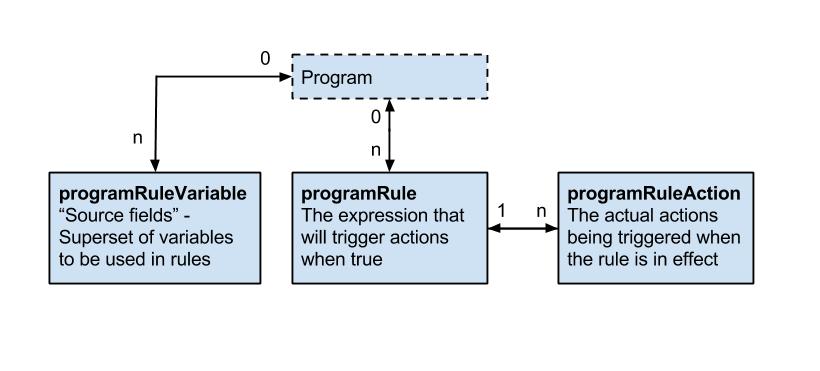
The following table gives a detailed overview over the programRule model.
| name | description | Compulsory |
|---|---|---|
| program | The program of which the programRule is executed in. | Compulsory |
| name | The name with which the program rule will be displayed to dhis2 configurators. Not visible to the end user of the program. | Compulsory |
| description | The description of the program rule, can be used by configurators to describe the rule. Not visible to the end user of the program. | Compulsory |
| programStage | If a programStage is set for a program rule, the rule will only be evaluated inside the specified program stage. | optional |
| condition | The expression that needs to be evaluated to true in order for the program rule to trigger its child actions. The expression is written using operators, function calls, hard coded values, constants and program rule variables. d2:hasValue('hemoglobin') && #{hemoglobin} <= 7 | Compulsory |
| priority | The priority to run the rule in cases where the order of the rules matters. In most cases the rules does not depend on being run before or after other rules, and in these cases the priority can be omitted. If no priority is set, the rule will be run after any rules that has a priority defined. If a priority(integer) is set, the rule with the lowest priority will be run before rules with higher priority. | optional |
The following table gives a detailed overview over the programRuleAction model.
| name | description | Compulsory |
|---|---|---|
| programRule | The programRule that is the parent of this action. | Compulsory |
| programRule- ActionType | The type of action that is to be performed. * DISPLAYTEXT - Displays a text in a given widget.* DISPLAYKEYVALUEPAIR - Displays a key and value pair(like a program indicator) in a given widget.* HIDEFIELD - Hide a specified dataElement or trackedEntityAttribute.- content - if defined, the text in content will be displayed to the end user in the instance where a value is previously entered into a field that is now about to be hidden (and therefore blanked). If content is not defined, a standard message will be shown to the user in this instance. - dataElement - if defined, the HIDEFIELD action will hide this dataElement when the rule is effective. - trackedEntityDataValue - if defined, the HIDEFIELD action will hide this trackedEntityDataValue when the rule is effective. * HIDESECTION - Hide a specified section.- programStageSection - must be defined. This is the programStageSection that will be hidden in case the parent rule is effective. * ASSIGN - Assign a value to either a dataElement or trackedEntityAttribute or a ProgramRuleVariable. Intended to help the user calculate something or fill in an obvious value somewhere.- content - if defined, the value in data is assigned to this variable. If content id defined, and thus a variable is assigned for use in other rules, it is important to also assign a programRule.priority to make sure the rule with an ASSIGN action runs before the rule that will in turn evaluate the assigned variable. - data - must be defined, data forms an expression that is evaluated and assigned to either a variable(#{myVariable}), a dataElement, or both. - dataElement - if defined, the value in data is assigned to this data element. Either the content or dataElement must be defined for the ASSIGN action to be effective. * SHOWWARNING - Show a warning to the user, not blocking the user from completing the event or registration.- content - if defined, content is a static part that is displayed at the end of the error message. - data - if defined, data forms an expression that is evaluated and added to the end of the warning message. - dataElement - if defined, the warning message is displayed next to this data element. - trackedEntityAttribute - if defined, the warning message is displayed next to this tracked entity attribute. Either dataElement or trackedEntityAttribute must be specified. * SHOWERROR - Show an error to the user, blocking the user from completing the event or registration.- content - if defined, content is a static part that is displayed in the start of the error message. - data - if defined, data forms an expression that is evaluated and added to the end of the error message. - dataElement - if defined, the error message is linked to this data element. - trackedEntityAttribute - if defined, the error message is linked to this tracked entity attribute. Either dataElement or trackedEntityAttribute must be specified. * WARNINGONCOMPLETE - Show a warning to the user on the "Complete form" dialog, but allowing the user to complete the event.- content - if defined, content is a static part that is displayed at the end of the error message. - data - if defined, data forms an expression that is evaluated and added to the end of the warning message. - dataElement - if defined, the warning message prefixed with the name/formName of the data element. * ERRORONCOMPLETE - Show an error to the user on in a modal window when the user tries to complete the event. The user is prevented from completing the event.- content - if defined, content is a static part that is displayed in the start of the error message. - data - if defined, data forms an expression that is evaluated and added to the end of the error message. - dataElement - if defined, the error message is linked to this data element. * CREATEEVENT - Create an event within the same enrollment.- content - data - if defined, contains data values to assign the created event. The format is <uid>:<data value>. Where several values is specified, these are separated with comma. AcMrnleqHqc:100,AqK1IHqCkEE:'Polyhydramnios' - programStage - must be defined, and designates the program stage that the rule shall create an event of. * SETMANDATORYFIELD - Set a field to be mandatory.- dataElement - if defined, this data element will be set to be mandatory in the data entry form. - trackedEntityAttribute - if defined, this tracked entity attribute will be set to mandatory in the registration form or profile. * SENDMESSAGE - To send message at completion of event/enrollment or at data value update.- messageTemplate - if defined, this template will be delivered either as SMS or EMAIL depending upon DeliveryChannel value in message template. * SCHEDULEMESSAGE - To schedule message at completion of event/enrollment or at data value update.- messageTemplate - if defined, this template will be delivered either as SMS or EMAIL depending upon DeliveryChannel value in message template. - Date to send message - Expression which is going to be used for evaluation of scheduled date. This expression should result in Date, any other resultant will be discarded and notification will not get scheduled. * HIDEPROGRAMSTAGE - Prevent adding new events to stage. * HIDEOPTION - Hide option (from an optionSet). * HIDEOPTIONGROUP - Hide option group (hide the options that belong to that option group). * SHOWOPTIONGROUP - Show option group (show the options that belong to that option group). | Compulsory |
| location | Used for actionType DISPLAYKEYVALUEPAIR and DISPLAYTEXT to designate which widget to display the text or keyvaluepair in. Compulsory for DISPLAYKEYVALUEPAIR and DISPLAYTEXT. | See description |
| content | Used for user messages in the different actions. See the actionType overview for a detailed explanation for how it is used in each of the action types. Compulsory for SHOWWARNING, SHOWERROR, WARNINGONCOMPLETE, ERRORONCOMPLETE, DISPLAYTEXT and DISPLAYKEYVALUEPAIR. Optional for HIDEFIELD and ASSIGN. | See description |
| data | Used for expressions in the different actions. See the actionType overview for a detailed explanation for how it is used in each of the action types. Compulsory for ASSIGN. Optional for SHOWWARNING, SHOWERROR, WARNINGONCOMPLETE, ERRORONCOMPLETE, DISPLAYTEXT, CREATEEVENT and DISPLAYKEYVALUEPAIR | See description |
| dataElement | Used for linking rule actions to dataElements. See the actionType overview for a detailed explanation for how it is used in each of the action types. Optional for SHOWWARNING, SHOWERROR, WARNINGONCOMPLETE, ERRORONCOMPLETE, ASSIGN and HIDEFIELD | See description |
| trackedEntity- Attribute | Used for linking rule actions to trackedEntityAttributes. See the actionType overview for a detailed explanation for how it is used in each of the action types. Optional for SHOWWARNING, SHOWERROR and HIDEFIELD. | See description |
| option | Used for linking rule actions to options. See the actionType overview for a detailed explanation for how it is used in each of the action types. Optional for HIDEOPTION | See description |
| optionGroup | Used for linking rule actions to optionGroups. See the actionType overview for a detailed explanation for how it is used in each of the action types. Compulsory for SHOWOPTIONGROUP, HIDEOPTIONGROUP. | See description |
| programStage | Only used for CREATEEVENT rule actions. Compulsory for CREATEEEVENT. | See description |
| programStage- Section | Only used for HIDESECTION rule actions. Compulsory for HIDESECTION | See description |
There are certain validations added to ProgramRuleAction model in 2.37. Main purpose was to keep user from creating erroneous ProgramRules in order to keep the database consistent. These validations depends on program rule action type. Each action type has its own respective validation.
| name | validation check for id existence |
|---|---|
| SENDMESSAGE | Notification template id |
| SCHEDULEMESSAGE | Notification template id |
| HIDESECTION | ProgramStage section id |
| HIDEPROGRAMSTAGE | ProgramStage id |
| HIDEFIELD | DataElement or TrackedEntityAttribute id |
| HIDEOPTION | Option id |
| HIDEOPTIONGROUP | Option group id |
| SHOWOPTIONGROUP | Option group id |
| SETMANDATORYFIELD | DataElement or TrackedEntityAttribute id |
| SHOWERROR | Always valid |
| SHOWWARNING | Always valid |
| DISPLAYTEXT | DataElement or TrackedEntityAttribute id |
| DISPLAYKEYVALUEPAIR | |
| ASSIGN | DataElement or TrackedEntityAttribute id |
| WARNINGONCOMPLETE | DataElement or TrackedEntityAttribute id |
| ERRORONCOMPLETE | DataElement or TrackedEntityAttribute id |
Apart from above validations, data field in program rule action which normally contains expression can also be evaluated using below api endpoint.
POST /api/programRuleActions/data/expression/description?programId=<uid>
{
  "condition": "1 + 1"
}
The following table gives a detailed overview over the programRuleVariable model.
| name | description | Compulsory |
|---|---|---|
| name | the name for the programRuleVariable - this name is used in expressions. #{myVariable} > 5 | Compulsory |
| sourceType | Defines how this variable is populated with data from the enrollment and events. DATAELEMENT_NEWEST_EVENT_PROGRAM_STAGE - This source type works the same way as DATAELEMENT_NEWEST_EVENT_PROGRAM, except that it only evaluates values from one program stage. This source type can be useful in program rules where the same data element is used in several program stages, and a rule needs to evaluate the newest data value from within one specific stage. In order to know what event is the newest, the report date (event date) is used. If you have many events with the same report date, the system choose the one with the latest createdAt property of the event. DATAELEMENT_NEWEST_EVENT_PROGRAM - This source type is used when a program rule variable needs to reflect the newest known value of a data element, regardless of what event the user currently has open. **NB Future dates are "newer" than current or past dates. In order to know what event is the newest, the report date (event date) is used. If you have many events with the same report date, the system choose the one with the latest createdAt property of the event.DATAELEMENT_CURRENT_EVENT - Program rule variables with this source type will contain the data value from the same event that the user currently has open. This is the most commonly used source type, especially for skip logic (hide actions) and warning/error rules. *DATAELEMENT_PREVIOUS_EVENT - Program rule variables with this source type will contain the value from a specified data element from a previous event. Only older events is evaluated, not including the event that the user currently has open. This source type is commonly used when a data element only should be collected once during an enrollment, and should be hidden in subsequent events. Another use case is making rules for validating input where there is an expected progression from one event to the next - a rule can evaluate whether the previous value is higher/lower and give a warning if an unexpected value is entered. *CALCULATED_VALUE - Program rule variable with this source type is not connected directly to any form data - but will be populated as a result of some other program rules **ASSIGN* action. This variable will be used for making preliminary calculations, having a ASSIGN program rule action and assigning a value, this value can be used by other program rules - potentially making the expressions simpler and more maintainable. These variables will not be persisted and will stay in memory only during the execution of the set of program rules. Any program rule that assigns a data value to a preliminary calculated value would normally also have a priority assigned - to make sure that the preliminary caculation is done before the rule that consumes the calculated value. *TEI_ATTRIBUTE - Populates the program rule variable with a specified tracked entity attribute for the current enrollment. Use this is the source type to create program rules that evaluate data values entered during registration. This source type is also useful when you create program rules that compare data in events to data entered during registration. This source type is only used for tracker programs (programs with registration). | Compulsory |
| valueType | valueType parameter defines the type of the value that this ProgramRuleVariable can contain. Its value is dependent on sourceType parameter. If source is DataElement or TrackedEntityAttribute then valueType will be derived from valueType of the source. When the sourceType is CALCULATED_VALUE, then valueType should be provided by the user otherwise it will default to ValueType.TEXT | Compulsory |
| dataElement | Used for linking the programRuleVariable to a dataElement. Compulsory for all sourceTypes that starts with DATAELEMENT_. | See description |
| trackedEntity- Attribute | Used for linking the programRuleVariable to a trackedEntityAttribute. Compulsory for sourceType TEI_ATTRIBUTE. | See description |
| useCodeFor- OptionSet | If checked, the variable will be populated with the code - not the name - from any linked option set. Default is unchecked, meaning that the name of the option is populated. | |
| programStage | Used for specifying a specific program stage to retreive the programRuleVariable value from. Compulsory for DATAELEMENT_NEWEST_EVENT_PROGRAM_STAGE. | See description |
programRules resource is available in API.To retrieve list of programRules you can do a GET request like this:
/api/programRules
To retrieve single programRule you can do a GET request like this:
/api/programRules/<program_rule_uid>
To save/add single programRule you can do a POST request like this:
/api/programRules/<program_rule_uid>
To update single programRule you can do a PUT request like this:
/api/programRules/<program_rule_uid>
To delete single programRule you can do a DELETE request like this:
/api/programRules/<program_rule_uid>
To retrieve description of programRule condition you can use POST and provide condition string in the POST body.
/api/programRules/condition/description?<program_rule_uid>
To retrieve information about a form (which corresponds to a data set and its sections) you can interact with the form resource. The form response is accessible as XML and JSON and will provide information about each section (group) in the form as well as each field in the sections, including labels and identifiers. By supplying period and organisation unit identifiers the form response will be populated with data values.
| Parameter | Option | Description |
|---|---|---|
| pe | ISO period | Period for which to populate form data values. |
| ou | UID | Organisation unit for which to populate form data values. |
| metaData | false | true | Whether to include metadata about each data element of form sections. |
To retrieve the form for a data set you can do a GET request like this:
/api/dataSets/<dataset-id>/form.json
To retrieve the form for the data set with identifier "BfMAe6Itzgt" in XML:
/api/dataSets/BfMAe6Itzgt/form
To retrieve the form including metadata in JSON:
/api/dataSets/BfMAe6Itzgt/form.json?metaData=true
To retrieve the form filled with data values for a specific period and organisation unit in XML:
/api/dataSets/BfMAe6Itzgt/form.xml?ou=DiszpKrYNg8&pe=201401
When it comes to custom data entry forms, this resource also allows for creating such forms directly for a data set. This can be done through a POST or PUT request with content type text/html where the payload is the custom form markup such as:
curl -d @form.html "localhost/api/dataSets/BfMAe6Itzgt/form"
  -H "Content-Type:text/html" -u admin:district -X PUT
References to files can be stored with the document resource.
| Field name | Description |
|---|---|
| name | unique name of document |
| external | flag identifying the location of the document. TRUE for external files, FALSE for internal ones |
| url | the location of the file. URL for external files. File resource id for internal ones (see File resources) |
A GET request to the documents endpoint will return all documents:
/api/documents
A POST request to the documents endpoint will create a new document:
curl -X POST -d @document.json -H "Content-type: application/json"
  "http://dhis.domain/api/documents"
{
  "name": "dhis home",
  "external": true,
  "url": "https://www.dhis2.org"
}
A GET request with the id of a document appended will return information about the document. A PUT request to the same endpoint will update the fields of the document:
/api/documents/<documentId>
Appending /data to the GET request will return the actual file content of the document:
/api/documents/<documentId>/data
DHIS2 supports import of metadata in the CSV format, such as data elements, organisation units and validation rules. Properties for the various metadata objects are identified based on the column order/column index (see below for details). You can omit non-required object properties/columns, but since the column order is significant, an empty column must be included. In other words, if you would like to specify properties/columns which appear late in the column order but not specify certain columns which appear early in the order you can include empty/blank columns for them.
The first row of the CSV file is considered to be a header and is ignored during import. The comma character should be used as a text delimiter. Text which contains commas must be enclosed in double quotes.
To upload metadata in CSV format you can make a POST request to the metadata endpoint:
POST /api/metadata?classKey=CLASS-KEY
The following object types are supported. The classKey query parameter is mandatory and can be found next to each object type in the table below.
| Object type | Class key |
|---|---|
| Data elements | DATA_ELEMENT |
| Data element groups | DATA_ELEMENT_GROUP |
| Category options | CATEGORY_OPTION |
| Category option groups | CATEGORY_OPTION_GROUP |
| Organisation units | ORGANISATION_UNIT |
| Organisation unit groups | ORGANISATION_UNIT_GROUP |
| Validation rules | VALIDATION_RULE |
| Option sets | OPTION_SET |
| Translations | TRANSLATION |
Tip
If using curl, the
--data-binaryoption should be used as it preserves line breaks and newlines, which is essential for CSV data.
As an example, to upload a file of data elements in CSV format with curl you can use the following command:
curl --data-binary @data_elements.csv "http://localhost/api/metadata?classKey=DATA_ELEMENT"
  -H "Content-Type:application/csv" -u admin:district
The formats for the currently supported object types for CSV import are listed in the following sections.
| Index | Column | Required | Value (default first) | Description |
|---|---|---|---|---|
| 1 | Name | Yes | Name. Max 230 char. Unique. | |
| 2 | UID | No | UID | Stable identifier. Exactly 11 alpha-numeric characters, beginning with a letter. Will be generated by system if not specified. |
| 3 | Code | No | Stable code. Max 50 char. | |
| 4 | Short name | No | 50 first char of name | Will fall back to first 50 characters of name if unspecified. Max 50 char. Unique. |
| 5 | Description | No | Free text description. | |
| 6 | Form name | No | Max 230 char. | |
| 7 | Domain type | No | AGGREGATE | TRACKER | Domain type for data element, can be aggregate or tracker. Max 16 char. |
| 8 | Value type | No | INTEGER | NUMBER | UNIT_INTERVAL | PERCENTAGE | INTEGER_POSITIVE | INTEGER_NEGATIVE | INTEGER_ZERO_OR_POSITIVE | FILE_RESOURCE | COORDINATE |TEXT | LONG_TEXT | LETTER | PHONE_NUMBER | EMAIL | BOOLEAN | TRUE_ONLY | DATE | DATETIME | Value type. Max 16 char. |
| 9 | Aggregation type | No | SUM | AVERAGE | AVERAGE_SUM_ORG_UNIT | COUNT | STDDEV | VARIANCE | MIN | MAX | NONE | Aggregation type indicating how to aggregate data in various dimensions. Max 16 char. |
| 10 | Category combination | No | UID | UID of category combination. Will default to default category combination if not specified. |
| 11 | Url | No | URL to data element resource. Max 255 char. | |
| 12 | Zero is significant | No | false | true | Indicates whether zero values will be stored for this data element. |
| 13 | Option set | No | UID | UID of option set to use for data. |
| 14 | Comment option set | No | UID | UID of option set to use for comments. |
An example of a CSV file for data elements can be seen below. The first row will always be ignored. Note how you can skip columns and rely on default values to be used by the system. You can also skip columns which you do not use which appear to the right of the ones
name,uid,code,shortname,description
"Women participated skill development training",,"D0001","Women participated in training"
"Women participated community organizations",,"D0002","Women participated in organizations"
| Index | Column | Required | Value (default first) | Description |
|---|---|---|---|---|
| 1 | Name | Yes | Name. Max 230 characters. Unique. | |
| 2 | UID | No | UID | Stable identifier. Max 11 char. Will be generated by system if not specified. |
| 3 | Code | No | Stable code. Max 50 char. | |
| 4 | Parent | No | UID | UID of parent organisation unit. |
| 5 | Short name | No | 50 first char of name | Will fall back to first 50 characters of name if unspecified. Max 50 characters. Unique. |
| 6 | Description | No | Free text description. | |
| 7 | Opening date | No | 1970-01-01 | Opening date of organisation unit in YYYY-MM-DD format. |
| 8 | Closed date | No | Closed date of organisation unit in YYYY-MM-DD format, skip if currently open. | |
| 9 | Comment | No | Free text comment for organisation unit. | |
| 10 | Feature type | No | NONE | MULTI_POLYGON | POLYGON | POINT | SYMBOL | Geospatial feature type. |
| 11 | Coordinates | No | Coordinates used for geospatial analysis in Geo JSON format. | |
| 12 | URL | No | URL to organisation unit resource. Max 255 char. | |
| 13 | Contact person | No | Contact person for organisation unit. Max 255 char. | |
| 14 | Address | No | Address for organisation unit. Max 255 char. | |
| 15 | No | Email for organisation unit. Max 150 char. | ||
| 16 | Phone number | No | Phone number for organisation unit. Max 150 char. |
A minimal example for importing organisation units with a parent unit looks like this:
name,uid,code,parent
"West province",,"WESTP","ImspTQPwCqd"
"East province",,"EASTP","ImspTQPwCqd"
| Index | Column | Required | Value (default first) | Description |
|---|---|---|---|---|
| 1 | Name | Yes | Name. Max 230 characters. Unique. | |
| 2 | UID | No | UID | Stable identifier. Max 11 char. Will be generated by system if not specified. |
| 3 | Code | No | Stable code. Max 50 | |
| 4 | Description | No | Free text description. | |
| 5 | Instruction | No | Free text instruction. | |
| 6 | Importance | No | MEDIUM | HIGH | LOW | Importance of validation rule. |
| 7 | Rule type (ignored) | No | VALIDATION | SURVEILLANCE | Type of validation rule. |
| 8 | Operator | No | equal_to | not_equal_to | greater_than | greater_than_or_equal_to | less_than | less_than_or_equal_to | compulsory_pair | exclusive_pair | Expression operator. |
| 9 | Period type | No | Monthly | Daily | Weekly | Quarterly | SixMontly | Yearly | Period type. |
| 10 | Left side expression | Yes | Mathematical formula based on data element and option combo UIDs. | |
| 11 | Left side expression description | Yes | Free text. | |
| 12 | Left side missing value strategy | No | SKIP_IF_ANY_VALUE_MISSING | SKIP_IF_ALL_VALUES_MISSING | NEVER_SKIP | Behavior in case of missing values in left side expression. |
| 13 | Right side expression | Yes | Mathematical formula based on data element and option combo UIDs. | |
| 14 | Right side expression description | Yes | Free text. | |
| 15 | Right side missing value strategy | No | SKIP_IF_ANY_VALUE_MISSING | SKIP_IF_ALL_VALUES_MISSING | NEVER_SKIP | Behavior in case of missing values in right side expression. |
| Index | Column | Required | Value (default first) | Description |
|---|---|---|---|---|
| 1 | OptionSetName | Yes | Name. Max 230 characters. Unique. Should be repeated for each option. | |
| 2 | OptionSetUID | No | UID | Stable identifier. Max 11 char. Will be generated by system if not specified. Should be repeated for each option. |
| 3 | OptionSetCode | No | Stable code. Max 50 char. Should be repeated for each option. | |
| 4 | OptionName | Yes | Option name. Max 230 characters. | |
| 5 | OptionUID | No | UID | Stable identifier. Max 11 char. Will be generated by system if not specified. |
| 6 | OptionCode | Yes | Stable code. Max 50 char. |
The format for option sets is special. The three first values represent an option set. The three last values represent an option. The first three values representing the option set should be repeated for each option.
optionsetname,optionsetuid,optionsetcode,optionname,optionuid,optioncode
"Color",,"COLOR","Blue",,"BLUE"
"Color",,"COLOR","Green",,"GREEN"
"Color",,"COLOR","Yellow",,"YELLOW"
"Sex",,,"Male",,"MALE"
"Sex",,,"Female",,"FEMALE"
"Sex",,,"Unknown",,"UNKNOWN"
"Result",,,"High",,"HIGH"
"Result",,,"Medium",,"MEDIUM"
"Result",,,"Low",,"LOW"
"Impact","cJ82jd8sd32","IMPACT","Great",,"GREAT"
"Impact","cJ82jd8sd32","IMPACT","Medium",,"MEDIUM"
"Impact","cJ82jd8sd32","IMPACT","Poor",,"POOR"
| Index | Column | Required | Value (default first) | Description |
|---|---|---|---|---|
| 1 | OptionGroupName | Yes | Name. Max 230 characters. Unique. Should be repeated for each option. | |
| 2 | OptionGroupUid | No | Stable identifier. Max 11 char. Will be generated by system if not specified. Should be repeated for each option. | |
| 3 | OptionGroupCode | No | Stable code. Max 50 char. Should be repeated for each option. | |
| 4 | OptionGroupShortName | Yes | Short Name. Max 50 characters. Unique. Should be repeated for each option. | |
| 5 | OptionSetUid | Yes | Stable identifier. Max 11 char. Should be repeated for each option. | |
| 6 | OptionUid | No | Stable identifier. Max 11 char. | |
| 7 | OptionCode | No | Stable code. Max 50 char. |
Sample OptionGroup CSV payload
optionGroupName,optionGroupUid,optionGroupCode,optionGroupShortName,optionSetUid,optionUid,optionCode
optionGroupA,,,groupA,xmRubJIhmaK,,OptionA
optionGroupA,,,groupA,xmRubJIhmaK,,OptionB
optionGroupB,,,groupB,QYDAByFgTr1,,OptionC
| Index | Column | Required | Value (default first) | Description |
|---|---|---|---|---|
| 1 | OptionGroupSetName | Yes | Name. Max 230 characters. Unique. Should be repeated for each option. | |
| 2 | OptionGroupSetUid | No | Stable identifier. Max 11 char. Will be generated by system if not specified. Should be repeated for each option. | |
| 3 | OptionGroupSetCode | No | Stable code. Max 50 char. Should be repeated for each option. | |
| 4 | OptionGroupSetDescription | No | Description. Should be repeated for each option. | |
| 5 | DataDimension | No | TRUE, FALSE | |
| 6 | OptionSetUid | No | OptionSet UID. Stable identifier. Max 11 char. |
Sample OptionGroupSet CSV payload
name,uid,code,description,datadimension,optionsetuid
optiongroupsetA,,,,,xmRubJIhmaK
optiongroupsetB,,,,false,QYDAByFgTr1
| Index | Column | Required | Value (default first) | Description |
|---|---|---|---|---|
| 1 | Name | Yes | Name. Max 230 char. Unique. | |
| 2 | UID | No | UID | Stable identifier. Exactly 11 alpha-numeric characters, beginning with a letter. Will be generated by system if not specified. |
| 3 | Code | No | Stable code. Max 50 char. | |
| 4 | Short name | Yes | 50 first char of name | Will fall back to first 50 characters of name if unspecified. Max 50 char. Unique. |
| 5 | denominator | Yes | Indicator expression. | |
| 6 | denominatorDescription | No | Max 230 char. | |
| 5 | numerator | Yes | Indicator expression. | |
| 6 | numeratorDescription | No | Max 230 char. | |
| 6 | annualized | Yes | TRUE, FALSE | |
| 6 | decimals | No | Number of decimals to use for indicator value, null implies default. | |
| 6 | Indicator Type | Yes | UID |
An example of a CSV file for Indicators can be seen below. The first row will always be ignored. Note how you can skip columns and rely on default values to be used by the system. You can also skip columns which you do not use which appear to the right of the ones
Name,UID,Code,Description,shortName,denominator,denominatorDescription,numerator,numeratorDescription,annualized,decimals,indicatorType
Indicator A,yiAKjiZVoOU,CodeA,Indicator A description,Indicator A shortname,#{fbfJHSPpUQD},denominatorDescription,#{h0xKKjijTdI},numeratorDescription,false,2,sqGRzCziswD
Indicator B,Uvn6LCg7dVU,CodeB,Indicator B description,Indicator B shortname,#{fbfJHSPpUQD},denominatorDescription,#{h0xKKjijTdI},numeratorDescription,false,2,sqGRzCziswD
In addition to importing objects, you can also choose to only import the group-member relationship between an object and a group. Currently, the following group and object pairs are supported
Organisation Unit Group - Organisation Unit
Data Element Group - Data Element
Indicator Group - Indicator
Option Group Set - Option Group
The CSV format for these imports are the same
| Index | Column | Required | Value (default first) | Description |
|---|---|---|---|---|
| 1 | UID | Yes | UID | The UID of the collection to add an object to |
| 2 | UID | Yes | UID | The UID of the object to add to the collection |
| Index | Column | Required | Value (default first) | Description |
|---|---|---|---|---|
| 1 | Name | Yes | Name. Max 230 characters. Unique. | |
| 2 | UID | No | UID | Stable identifier. Max 11 chars. Will be generated by system if not specified. |
| 3 | Code | No | Stable code. Max 50 char. | |
| 4 | Short name | No | Short name. Max 50 characters. | |
| 5 | Data Dimension Type | Yes | Data Dimension Type, can be either DISAGGREGATION or ATTRIBUTE |
| Index | Column | Required | Value (default first) | Description |
|---|---|---|---|---|
| 1 | Name | Yes | Name. Max 230 characters. Unique. | |
| 2 | UID | No | UID | Stable identifier. Max 11 chars. Will be generated by system if not specified. |
| 3 | Code | No | Stable code. Max 50 char. | |
| 4 | Short name | No | Short name. Max 50 characters. |
An example of category options looks like this:
name,uid,code,shortname
"Male",,"MALE"
"Female",,"FEMALE"
The deleted objects resource provides a log of metadata objects being deleted.
/api/deletedObjects
Whenever an object of type metadata is deleted, a log is being kept of the uid, code, the type and the time of when it was deleted. This API is available at /api/deletedObjects field filtering and object filtering works similarly to other metadata resources.
Get deleted objects of type data elements:
GET /api/deletedObjects.json?klass=DataElement
Get deleted object of type indicator which was deleted in 2015 and forward:
GET /api/deletedObjects.json?klass=Indicator&deletedAt=2015-01-01
Certain types of metadata objects can be marked as favorites for the currently logged in user. This applies currently for dashboards.
/api/dashboards/<uid>/favorite
To make a dashboard a favorite you can make a POST request (no content type required) to a URL like this:
/api/dashboards/iMnYyBfSxmM/favorite
To remove a dashboard as a favorite you can make a DELETE request using the same URL as above.
The favorite status will appear as a boolean favorite field on the object (e.g. the dashboard) in the metadata response.
A logged user can subscribe to certain types of objects. Currently subscribable objects are those of type EventChart, EventReport, Map, Visualization and EventVisualization.
Note
The EventChart and EventReport objects are deprecated. Use EventVisualization instead.
To get the subscribers of an object (return an array of user IDs) you can make a GET request:
/api/<object-type>/<object-id>/subscribers
See example as follows:
/api/visualizations/DkPKc1EUmC2/subscribers
To check whether the current user is subscribed to an object (returns a boolean) you can perform a GET call:
/api/<object-type>/<object-id>/subscribed
See example as follows:
/api/visualizations/DkPKc1EUmC2/subscribed
To subscribe/de-subscribe to an object you perform a POST/DELETE request (no content type required):
/api/<object-type>/<object-id>/subscriber
File resources are objects used to represent and store binary content. The FileResource object itself contains the file meta-data (name, Content-Type, size, etc.) as well as a key allowing retrieval of the contents from a database-external file store. The FileResource object is stored in the database like any other but the content (file) is stored elsewhere and is retrievable using the contained reference (storageKey).
/api/fileResources
The contents of file resources are not directly accessible but are referenced from other objects (such as data values) to store binary content of virtually unlimited size.
To create a file resource that does not require a corresponding data value, POST to the endpoint /api/fileResources with a multipart upload:
curl "https://server/api/fileResources" -X POST
  -F "file=@/path/to/file/name-of-file.png"
uid of a file resource can be provided when it is created, for example: curl "https://server/api/fileResources?uid=0123456789x" -X POST
-F "file=@/path/to/file/name-of-file.png"
To create both a file resource and a data value that references the file, POST to the /api/dataValues/file endpoint in DHIS 2.36 or later:
curl "https://server/api/dataValues/file?de=xPTAT98T2Jd
  &pe=201301&ou=DiszpKrYNg8&co=Prlt0C1RF0s" -X POST
  -F "file=@/path/to/file/name-of-file.png"
For the api/fileResources endpoint, the only form parameter required is file, which is the file to upload. For the api/dataValues/file endpoint, the parameters required are the same as for a post to api/dataValues, with the addition of file.
The filename and content-type should also be included in the request but will be replaced with defaults when not supplied.
On successfully creating a file resource the returned data will contain a response field which in turn contains the fileResource like this:
{
  "httpStatus": "Accepted",
  "httpStatusCode": 202,
  "status": "OK",
  "response": {
    "responseType": "FileResource",
    "fileResource": {
      "name": "name-of-file.png",
      "created": "2015-10-16T16:34:20.654+0000",
      "lastUpdated": "2015-10-16T16:34:20.667+0000",
      "externalAccess": false,
      "publicAccess": "--------",
      "user": { ... },
      "displayName": "name-of-file.png",
      "contentType": "image/png",
      "contentLength": 512571,
      "contentMd5": "4e1fc1c3f999e5aa3228d531e4adde58",
      "storageStatus": "PENDING",
      "id": "xm4JwRwke0i"
    }
  }
}
Note that the response is a 202 Accepted, indicating that the returned resource has been submitted for background processing (persisting to the external file store in this case). Also, note the storageStatus field which indicates whether the contents have been stored or not. At this point, the persistence to the external store is not yet finished (it is likely being uploaded to a cloud-based store somewhere) as seen by the PENDING status.
Even though the content has not been fully stored yet the file resource can now be used, for example as referenced content in a data value (see Working with file data values). If we need to check the updated storageStatus or otherwise retrieve the metadata of the file, the fileResources endpoint can be queried.
curl "https://server/api/fileResources/xm4JwRwke0i" -H "Accept: application/json"
This request will return the FileResource object as seen in the response of the above example.
File resources must be referenced (assigned) from another object in order to be persisted in the long term. A file resource which is created but not referenced by another object such as a data value is considered to be in staging. Any file resources which are in this state and are older than two hours will be marked for deletion and will eventually be purged from the system.
The ID returned by the initial creation of the file resource is not retrievable from any other location unless the file resource has been referenced (in which the ID will be stored as the reference), so losing it will require the POST request to be repeated and a new object to be created. The orphaned file resource will be cleaned up automatically.
File resource objects are immutable, meaning modification is not allowed and requires creating a completely new resource instead.
Certain types of files are blocked from being uploaded for security reasons.
The following content types are blocked.
| Content type | Content type |
|---|---|
| text/html | application/x-ms-dos-executable |
| text/css | application/vnd.microsoft.portable-executable |
| text/javascript | application/vnd.apple.installer+xml |
| font/otf | application/vnd.mozilla.xul+xml |
| application/x-shockwave-flash | application/x-httpd-php |
| application/vnd.debian.binary-package | application/x-sh |
| application/x-rpm | application/x-csh |
| application/java-archive |
The following file extensions are blocked.
| File extension | File extension | File extension |
|---|---|---|
| html | deb | xul |
| htm | rpm | php |
| css | jar | bin |
| js | jsp | sh |
| mjs | exe | csh |
| otf | msi | bat |
| swf | mpkg |
This section explains the metadata versioning APIs.
/api/metadata/version: This endpoint will return the current metadata version of the system on which it is invoked.| Name | Required | Description |
|---|---|---|
| versionName | false | If this parameter is not specified, it will return the current version of the system or otherwise it will return the details of the versionName passed as parameter. (versionName is of the syntax "Version_<id>" |
Example: Get the current metadata version of this system
Request:
/api/metadata/version
Response:
{
  "name": "Version_4",
  "created": "2016-06-30T06:01:28.684+0000",
  "lastUpdated": "2016-06-30T06:01:28.685+0000",
  "externalAccess": false,
  "displayName": "Version_4",
  "type": "BEST_EFFORT",
  "hashCode": "848bf6edbaf4faeb7d1a1169445357b0",
  "id": "Ayz2AEMB6ry"
}
Example: Get the details of version with name "Version_2"
Request:
/api/metadata/version?versionName=Version_2
Response:
{
  "name": "Version_2",
  "created": "2016-06-30T05:59:33.238+0000",
  "lastUpdated": "2016-06-30T05:59:33.239+0000",
  "externalAccess": false,
  "displayName": "Version_2",
  "type": "BEST_EFFORT",
  "hashCode": "8050fb1a604e29d5566675c86d02d10b",
  "id": "SaNyhusVxBG"
}
/api/metadata/version/history: This endpoint will return the list of all metadata versions of the system on which it is invoked.| Name | Required | Description |
|---|---|---|
| baseline | false | If this parameter is not specified, it will return list of all metadata versions. Otherwise we need to pass a versionName parameter of the form "Version_<id>". It will then return the list of versions present in the system which were created after the version name supplied as the query parameter. |
Example: Get the list of all versions in this system
Request:
/api/metadata/version/history
Response:
{
  "metadataversions": [{
    "name": "Version_1",
    "type": "BEST_EFFORT",
    "created": "2016-06-30T05:54:41.139+0000",
    "id": "SjnhUp6r4hG",
    "hashCode": "fd1398ff7ec9fcfd5b59d523c8680798"
  }, {
    "name": "Version_2",
    "type": "BEST_EFFORT",
    "created": "2016-06-30T05:59:33.238+0000",
    "id": "SaNyhusVxBG",
    "hashCode": "8050fb1a604e29d5566675c86d02d10b"
  }, {
    "name": "Version_3",
    "type": "BEST_EFFORT",
    "created": "2016-06-30T06:01:23.680+0000",
    "id": "FVkGzSjAAYg",
    "hashCode": "70b779ea448b0da23d8ae0bd59af6333"
  }]
}
Example: Get the list of all versions in this system created after "Version_2"
Request:
/api/metadata/version/history?baseline=Version_2
Response:
{
  "metadataversions": [{
    "name": "Version_3",
    "type": "BEST_EFFORT",
    "created": "2016-06-30T06:01:23.680+0000",
    "id": "FVkGzSjAAYg",
    "hashCode": "70b779ea448b0da23d8ae0bd59af6333"
  }, {
    "name": "Version_4",
    "type": "BEST_EFFORT",
    "created": "2016-06-30T06:01:28.684+0000",
    "id": "Ayz2AEMB6ry",
    "hashCode": "848bf6edbaf4faeb7d1a1169445357b0"
  }]
 }
/api/metadata/version/create: This endpoint will create the metadata version for the version type as specified in the parameter.| Name | Required | Description |
|---|---|---|
| type | true | The type of metadata version which needs to be created. * BEST_EFFORT * ATOMIC |
Users can select the type of metadata which needs to be created. Metadata Version type governs how the importer should treat the given version. This type will be used while importing the metadata. There are two types of metadata.
BEST_EFFORT: This type suggests that missing references can be ignored and the importer can continue importing the metadata (e.g. missing data elements on a data element group import).
ATOMIC: This type ensures a strict type checking of the metadata references and the metadata import will fail if any of the references do not exist.
Note
It's recommended to have an ATOMIC type of versions to ensure that all systems (central and local) have the same metadata. Any missing reference is caught in the validation phase itself. Please see the importer details for a full explanation.
Example: Create metadata version of type BEST_EFFORT
Request:
curl -X POST -u admin:district "https://play.dhis2.org/dev/api/metadata/version/create?type=BEST_EFFORT"
Response:
{
  "name": "Version_1",
  "created": "2016-06-30T05:54:41.139+0000",
  "lastUpdated": "2016-06-30T05:54:41.333+0000",
  "externalAccess": false,
  "publicAccess": "--------",
  "user": {
    "name": "John Traore",
    "created": "2013-04-18T17:15:08.407+0000",
    "lastUpdated": "2016-04-06T00:06:06.571+0000",
    "externalAccess": false,
    "displayName": "John Traore",
    "id": "xE7jOejl9FI"
  },
  "displayName": "Version_1",
  "type": "BEST_EFFORT",
  "hashCode": "fd1398ff7ec9fcfd5b59d523c8680798",
  "id": "SjnhUp6r4hG"
}
/api/metadata/version/{versionName}/data: This endpoint will download the actual metadata specific to the version name passed as path parameter.
/api/metadata/version/{versionName}/data.gz: This endpoint will download the actual metadata specific to the version name passed as path parameter in a compressed format (gzipped).
| Name | Required | Description |
|---|---|---|
| versionName | true | Path parameter of the form "Version_<id>" so that the API downloads the specific version |
Example: Get the actual metadata for "Version 5"
Request:
curl -u admin:district "https://play.dhis2.org/dev/api/metadata/version/Version_5/data"
Response:
{
  "date": "2016-06-30T06:10:23.120+0000",
  "dataElements": [
    {
      "code": "ANC 5th Visit",
      "created": "2016-06-30T06:10:09.870+0000",
      "lastUpdated": "2016-06-30T06:10:09.870+0000",
      "name": "ANC 5th Visit",
      "id": "sCuZKDsix7Y",
      "shortName": "ANC 5th Visit ",
      "aggregationType": "SUM",
      "domainType": "AGGREGATE",
      "zeroIsSignificant": false,
      "valueType": "NUMBER",
      "categoryCombo": {
        "id": "p0KPaWEg3cf"
      },
      "user": {
        "id": "xE7jOejl9FI"
      }
    }
  ]
}
This section explains the Metadata Synchronization API available starting 2.24
/api/metadata/sync: This endpoint performs metadata sync of the version name passed in the query parameter by downloading and importing the specified version from the remote server as defined in the settings app.| Name | Required | Description |
|---|---|---|
| versionName | true | versionName query parameter of the form "Version_<id>" . The api downloads this version from the remote server and imports it in the local system. |
This API should be used with utmost care. Please note that there is an alternate way to achieve sync in a completely automated manner by leveraging the Metadata Sync Task from the "Data Administration" app. See Chapter 22, Section 22.17 of User Manual for more details regarding Metadata Sync Task.
This sync API can alternatively be used to sync metadata for the versions which have failed from the metadata sync scheduler. Due to its dependence on the given metadata version number, care should be taken for the order in which this gets invoked. E.g. If this api is used to sync some higher version from the central instance, then the sync might fail as the metadata dependencies are not present in the local instance.
Assume the local instance is at Version_12 and if this endpoint is used to sync Version_15 (of type BEST_EFFORT) from the central instance, the scheduler will start syncing metadata from Version_16. So the local instance will not have the metadata versions between Version_12 and Version_15. You need to manually sync the missing versions using these endpoints only.
Example: Sync Version_6 from central system to this system
Request:
curl -u admin:district "https://play.dhis2.org/dev/api/metadata/sync?versionName=Version_6"
DHIS2 provides a metadata repository containing metadata packages with various content. A metadata package is a DHIS2-compliant JSON document which describes a set of metadata objects.
To retrieve an index over available metadata packages you can issue a GET request to the metadataRepo resource:
GET /api/synchronization/metadataRepo
A metadata package entry contains information about the package and a URL to the relevant package. An index could look like this:
{
  "packages": [
    {
      "id": "sierre-leone-demo",
      "name": "Sierra Leone demo",
      "description": "Sierra Leone demo database",
      "version": "0.1",
      "href": "https://dhis2.org/metadata-repo/221/sierra-leone-demo/metadata.json"
    },
    {
      "id": "trainingland-org-units",
      "name": "Trainingland organisation units",
      "description": "Trainingland organisation units with four levels",
      "version": "0.1",
      "href": "https://dhis2.org/metadata-repo/221/trainingland-org-units/metadata.json"
    }
  ]
}
A client can follow the URLs and install a metadata package through a POST request with content type text/plain with the metadata package URL as the payload to the metadataPull resource:
POST /api/synchronization/metadataPull
An example curl command looks like this:
curl "localhost:8080/api/synchronization/metadataPull" -X POST
  -d "https://dhis2.org/metadata-repo/221/trainingland-org-units/metadata.json"
  -H "Content-Type:text/plain" -u admin:district
Note
The supplied URL will be checked against the config property
metadata.sync.remote_servers_allowedin thedhis.conffile. If the base URL is not one of the configured servers allowed then the operation will not be allowed. See failure example below.
Some examples where the config set ismetadata.sync.remote_servers_allowed=https://server1.org/,https://server2.org/- supplyhttps://server1.org/path/to/resource-> this will be accepted - supplyhttps://server2.org/resource/path-> this will be accepted - supplyhttps://oldserver.org/resource/path-> this will be rejected
Sample failure response in JSON format.
 {
  "httpStatus": "Conflict",
  "httpStatusCode": 409,
  "status": "ERROR",
  "message": "Provided URL is not in the remote servers allowed list",
  "errorCode": "E1004"
}
Each object created in DHIS2 will have a property named user which is linked to User who created the object.
From version 2.36 we have changed the name of this property to createdBy to avoid confusion.
However, in order to keep the backwards compability, the legacy user property is still included in the payload and works normally as before.
{
  "createdBy": {
      "displayName": "John Kamara",
      "name": "John Kamara",
      "id": "N3PZBUlN8vq",
      "username": "district"
  },
  "user": {
      "displayName": "John Kamara",
      "name": "John Kamara",
      "id": "N3PZBUlN8vq",
      "username": "district"
  }
}
The metadata proposal workflow endpoint allows for a workflow of proposing and accepting changes to metadata.
/api/metadata/proposals
A proposal always targets a single metadata object using:
POST /api/metadata/proposals
Depending on the payload the proposal could:
To propose adding a new metadata object send a JSON payload like the following:
{
  "type": "ADD",
  "target": "ORGANISATION_UNIT",
  "change": {"name":"My Unit", "shortName":"MyOU", "openingDate": "2020-01-01"}
}
change property contains the same JSON object that could directly be posted to the corresponding endpoint to create the object. To propose updating an existing metadata object send a JSON payload like in the below example:
{
  "type": "UPDATE",
  "target": "ORGANISATION_UNIT",
  "targetId": "<id>",
  "change": [
    {"op": "replace", "path": "/name", "value": "New name"}
  ]
}
targetId refers to the object by its ID which should be updated. The change property here contains a JSON patch payload. This is the same patch payload that could be posted to the corresponding endpoint to directly apply the update. To propose the removal of an existing object send a payload like in the last example:
{
  "type": "REMOVE",
  "target": "ORGANISATION_UNIT",
  "targetId": "<id>"
}
targetId refers to the object by its ID which should be removed. A free text comment can be added to any type of comment. Only target type ORGANISATION_UNIT is supported currently.
To accept an open proposal use POST on the proposal resource
POST /api/metadata/proposals/<uid>
When successful the status of the proposal changes to status ACCEPTED. Once accepted the proposal can no longer be rejected.
Should a proposal fail to apply it changes to status NEEDS_UPDATE. The reason field contains a summary of the failures when this information is available.
If a proposal isn't quite right and needs adjustment this can be indicated by opposing the proposal by sending a PATCH for the proposal resource
PATCH /api/metadata/proposals/<uid>
Optionally a plain text body can be added to this to give a reason why the proposal got opposed.
A opposed proposal must be in state PROPOSED and will change to state NEEDS_UPDATE.
A proposal in state NEEDS_UPDATE needs to be adjusted before it can be accepted. To adjust the proposal a PUT request is made for the proposal's resource
PUT /api/metadata/proposals/<uid>
Such an adjustment can either be made without a body or with a JSON body containing an object with the updated change and targetId for the adjustment:
{
  "targetId": "<id>",
  "change": ...
}
change value depends on the proposal type analogous to when a proposal is initially made. To reject an open proposal use DELETE on the proposal resource
DELETE /api/metadata/proposals/<uid>
This changes the status of the proposal conclusively to REJECTED. No further changes can be made to this proposal. It is kept as a documentation of the events.
All proposals can be listed:
GET /api/metadata/proposals/
The result list can be filtered using the filter parameter. For example, to list only accepted proposals use:
GET /api/metadata/proposals?filter=status:eq:ACCEPTED
Similarly to only show open proposals use:
GET /api/metadata/proposals?filter=status:eq:PROPOSED
Filters can also be applied to any field except change. Supported filter operators are those described in the Gist Metadata API. This also includes property transformers described for Gist API.
List of available fields are:
| Field | Description |
|---|---|
| id | unique identifier of the proposal |
| type | ADD a new object, UPDATE an existing object, REMOVE an existing object |
| status | PROPOSED (open proposal), ACCEPTED (successful), NEEDS_UPDATE (accepting caused error or opposed), REJECTED |
| target | type of metadata object to add/update/remove; currently only ORGANISATION_UNIT |
| targetId | UID of the updated or removed object, not defined for ADD |
| createdBy | the user that created the proposal |
| created | the date time when the proposal was created |
| finalisedBy | the user that accepted or rejected the proposal |
| finalised | the date time when the proposal changed to a conclusive state of either accepted or rejected |
| comment | optional plain text comment given for the initial proposal |
| reason | optional plain text given when the proposal was opposed or the errors occurring when accepting a proposal failed |
| change | JSON object for ADD proposal, JSON array for UPDATE proposal, nothing for REMOVE proposal |
Individual change proposals can be viewed using
GET /api/metadata/proposals/<uid>
The fields parameter can be used to narrow the fields included for the shown object. For example:
GET /api/metadata/proposals/<uid>?fields=id,type,status,change
| Type | Validation |
|---|---|
| TEXT | None |
| LONG_TEXT | None |
| LETTER | Value length = 1 AND is a letter |
| PHONE_NUMBER | Validation is based on this regex ^[0-9+\\(\\)#\\.\\s\\/ext-]{6,50}$. Max length is 50. Examples: +4733987937, (+47) 3398 7937, (47) 3398 7937.123 |
| General email format abc@email.com | |
| BOOLEAN | true or false |
| TRUE_ONLY | Only accept true |
| DATE | Use format yyyy-MM-dd |
| DATETIME | Use format yyyy-MM-dd HH:mm:ssZ or yyyy-MM-dd'T'HH:mm:ss |
| TIME | Use fornat HH:mm |
| NUMBER | Value must be numberic with max length = 250 |
| UNIT_INTERVAL | Value is numeric and inclusive between 0 and 1 |
| PERCENTAGE | Value is a number in the inclusive range of 0 to 100 |
| INTEGER | Value is an integer |
| INTEGER_POSITIVE | Value is a positive integer |
| INTEGER_NEGATIVE | Value is a negative integer |
| INTEGER_ZERO_OR_POSITIVE | Value is an positive or zero integer |
| USERNAME | Value is a username of an existing User |
| COORDINATE | None |
| ORGANISATION_UNIT | Value is a valid UID of an existing OrganisationUnit |
| REFERENCE | None |
| AGE | Value is date of birth. Use format as in DATE type. |
| URL | Value is a valid URL |
| FILE_RESOURCE | Value is a valid UID of existing FileResource |
| IMAGE | Value is a valid UID of existing FileResource |
| GEOJSON | Follow GeoJson Specification |
| MULTI_TEXT | None |
A user will often want to create many Programs which share many of the same characteristics, and instead of having to create a new Program from scratch, it is efficient and beneficial to copy an existing Program and make modifications to it.
A template Program could theoretically be setup as a base to copy from, which may help with the consistency of Program setups also.
POST /api/programs/{uid}/copy
Example with a Program with a UID of Program123a
POST /api/programs/Program123a/copy
Successful response will include the new Program UID and will look like this:
{
    "httpStatus": "Created",
    "httpStatusCode": 201,
    "status": "OK",
    "message": "Program created: 'Program456b'"
}
The response will also contain a Location header with a link to the newly-created Program. e.g. when run locally the Location value would be http://localhost:9090/api/programs/Program456b
The API does allow the optional supplying of a custom prefix, which will be prefixed to the following properties.
| Object | Property | Info |
|---|---|---|
| Program | name | Help identify the new Program |
| ProgramIndicator | name | Database constraint - needs to be unique |
| ProgramIndicator | shortName | Database constraint - needs to be unique |
In this example when a custom prefix is supplied, an original Program with a name of My Simple Program would be copied to a new Program with the name my prefix My Simple Program
If no copy options are sent in the API call then the default Copy of prefix will be used for the above properties.
To send a custom prefix just add a HTTP request param prefix like so:
POST /api/programs/{uid}/copy?prefix=my prefix
Note
The database does have limits for the number of characters allowed for properties. At the time of writing these limits are noted in the table below. Bear these in mind.
| Property | character limit |
|---|---|
| name | 230 |
| shortName | 50 |
If a property has exceeded its character limit, then an error will be returned like so:
{
    "httpStatus": "Conflict",
    "httpStatusCode": 409,
    "status": "ERROR",
    "message": "ERROR: value too long for type character varying(230)",
    "errorCode": "E1004"
}
If trying to copy a Program that is not found, a response like this will be returned:
{
    "httpStatus": "Not Found",
    "httpStatusCode": 404,
    "status": "ERROR",
    "message": "Program with id {uid} could not be found.",
    "errorCode": "E1005"
}
A User will need the following authorities to be able to copy a Program:
A Program needs one of the following states for it to be able to be copied:
read & write accessUser to have sharing read & write accessUser is part of a UserGroup that has sharing read & write accessIf a User does not have the correct permissions, a Forbidden response is returned like so:
{
    "httpStatus": "Forbidden",
    "httpStatusCode": 403,
    "status": "ERROR",
    "message": "You don't have write permissions for Program Program123a",
    "errorCode": "E1006"
}
When a Program is copied, certain properties of the Program need different kinds of copying. It is important to be aware of what has been deep-copied and what has been shallow-copied.
First of all let's explain the difference between deep and shallow copying in this context.
A deep copy in this context means that a completely new instance of a Program or Program property has been created with its own unique identifiers. These include amongst others:
Deep copies of Program properties will all belong to the newly-created Program copy.
A shallow copy in this context means that an existing Program property will be reused by the newly-created Program or Program property.
All properties below have been deep copied. Anything not in included in this table means that it has been shallow copied.
| Object | Property of |
|---|---|
| Program | |
| ProgramSection | Program |
| ProgramIndicator | Program |
| ProgramRuleVariable | Program |
| ProgramStage | Program |
| ProgramStageSection | ProgramStage |
| ProgramStageSectionDataElement | ProgramStage |
| Enrollment |
Note
The following properties have been set as empty as an initial approach. This approach should keep things simple to start off with.
| Object | Property |
|---|---|
| ProgramIndicator | groups |
| ProgramStageSection | programIndicators |
| Enrollment | events |
The Metadata Gist API is a RESTful read-only JSON API to fetch and browse metadata. Items in this API contain the gist of the same item in the Metadata API.
The API is specifically designed to avoid:
The standard Metadata API is a flexible and powerful API built to serve any and every use case. The downside of this is that not all features and combinations can scale while keeping good performance in the presence of huge numbers of items. In particular lists with items where each item itself has a property which is a large collection of complex objects have proven problematic as they quickly reference a large part of the entire object graph.
The /gist API was added to provide a metadata API where scaling well is our first priority. The downside of this is that there are more distinct limits to what features are technically reasonable, which means not all features of the standard Metadata API exist for the Gist API.
The Gist API uses a divide and conquer strategy to avoid responses with large partial object graphs. Instead of including nested objects or lists it provides a /gist endpoint URI where this object or list can be viewed in isolation.
The /gist API refers to nested data using URIs rather than including it. This means if a client is interested in this nested information more requests are required but each of them is kept reasonable small and will scale well in context of huge number of potential items.
Known Differences:
pager parameter)pager-transformer but through a paged API endpoint for the particular collection propertymember(<id>) and not-member(<id>) collection field transformerscanRead and canWrite access check filter instead of filtering on the access propertypageListNameKnown Limitations:
from transformationpluck transformer limited to text properties (or simple properties for multi-pluck)Where possible to use the /gist API should be considered the preferable way of fetching metadata information.
The /gist API has 3 kinds of endpoints:
/api/<object-type>/gist: paged list of all known and visible objects of the type (implicit auto=S)/api/<object-type>/<object-id>/gist: view single object by ID (implicit auto=L)/api/<object-type>/<object-id>/<field-name>/gist: paged list of all known and visible items in the collection of owner object's field (implicit auto=M; in case this is a simple field just the field value)These endpoints correspond to the endpoints of the standard metadata API without the /gist suffix and share the majority of parameters and their options with that API.
Since /gist API avoids deeply nested data structures in the response the details of referenced complex objects or list of objects is instead provided in form of a URI to the gist endpoint that only returns the complex object or list of objects. These URIs are provided by the apiEndpoints field of an item which is automatically added to an item when such references exist. The item property itself might contain a transformation result on the object or collection such as its size, emptiness, non-emptiness, id(s) or plucked property such as its name.
To manually browse data it can be handy to use the absoluteUrls=true parameter. Linkage between parts of the gist can now be followed directly in browsers that render JSON responses.
All endpoints of the /gist API accept the same set of parameters. Parameters and their options that do not make sense in the endpoint context are ignored.
Parameters in alphabetical order:
| Parameter | Options | Default | Description |
|---|---|---|---|
absoluteUrls | true or false | false | true use relative paths in links, false use absolute URLs in links |
auto | XS, S, M, L, XL | (context dependent) | extent of fields selected by * field selector |
fields | (depends on endpoint) | * | comma separated list of fields or presets to include |
filter | <field>:<operator> or <field>:<operator>:<value> | comma separated list of query field filters (can be used more than once) | |
headless | true or false | false | true skip wrapping result in a pager (ignores total), false use a pager wrapper object around the result list |
inverse | true or false | false | true return items not in the list, false return items in the list |
locale | (user account configured language) | translation language override | |
order | <field> or <field>:asc or <field>:desc | :asc | comma separated list of query order fields (can be used more than once) |
page | 1-n | 1 | page number |
pageSize | 1-1000 | 50 | number of items on a page |
pageListName | <text> | (object type plural) | overrides the property name of the result entry list |
rootJunction | AND or OR | AND | logical combination of filters, AND= all must match, OR= at least one must match |
total/totalPages | true or false | false | true add total number of matches to the pager, false skip counting total number of matches |
translate | true or false | true | true translate all translatable properties, false skip translation of translatable properties (no effect on synthetic display names) |
absoluteUrls ParameterBy default, URIs in apiEndpoints, href and the pager prev and next members are relative, starting with /<object-type>/ path.
The URIs can be changed to absolute URLs using the absoluteUrls parameter.
For example, /api/users/rWLrZL8rP3K/gist?fields=id,href returns:
{
  "id": "rWLrZL8rP3K",
  "href": "/users/rWLrZL8rP3K/gist"
}
whereas /api/users/rWLrZL8rP3K/gist?fields=id,href&absoluteUrls=true returns:
{
  "id": "rWLrZL8rP3K",
  "href": "http://localhost:8080/api/users/rWLrZL8rP3K/gist?absoluteUrls=true"
}
As the example shows the absoluteUrls parameter is also forwarded or carried over to the included URLs so allowing to browse the responses by following the provided URLs.
auto ParameterEach endpoint implicitly sets a default for the extent of fields matched by the * / :all fields selector:
/api/<object-type>/gist: implies auto=S/api/<object-type>/<object-id>/gist: implies auto=L/api/<object-type>/<object-id>/<field-name>/gist: implies auto=MThe auto parameter is used to manually override the default to make list items include more or less fields. This setting again acts as a default which can be further overridden on a per field basis using an explicit transformation.
Possible options for auto are ("t-shirt sizes"):
XS: includes only IDs and textual propertiesS: excludes complex (object) properties, collection are only linked (not counted)M: complex included as reference URL, references and collections as count and reference URLL: like M but references and collections included as IDs (OBS! unbound in size)XL: like L but references and collections included as ID objects: { "id": <id> }For example, /api/users/gist would list items with fields id, surname, firstName, phoneNumber, email, lastUpdated whereas /api/users/gist?auto=XS only lists id, surname, firstName, phoneNumber, email. Using /api/users/gist?auto=L would also include organisationUnits, dataViewOrganisationUnits, teiSearchOrganisationUnits and userGroups each with the list of IDs of the members in the lists/sets.
fields ParameterSpecifies the list of fields to include for each list item.
Fields are included in the result JSON objects for an item in the provided order. A preset in the list of fields is expanded to the fields it contains at the position in the fields list it appears. Fields within the preset are ordered from simple to complex.
If no fields parameter is provided fields=* is assumed. Note that the fields of the * preset also depend on the auto parameter
To remove a field use either !<name> or -<name> in the list of fields. For example to remove the userGroups from a user, use:
/api/users/gist?fields=*,!userGroups
The same principle can also be used to specify the transformer to use for a field. For example, to include the IDs of the user's user groups use:
/api/users/gist?fields=*,userGroups::ids
The fields parameter does allow listing fields of nested objects. For example to add userCredentials with id and name of a user use:
/api/users/gist?fields=*,userCredentials[id,username]
This creates items of the form:
{
  ...
  "userCredentials": {
    "id": "Z9oOHPi3FHB",
    "username": "guest"
  }
}
When including nested fields of collections the nested field must be a text property.
For example to include all names of a user's userGroups by:
/api/users/gist?fields=*,userGroups[name]
This lists the userGroups as:
{
  "userGroups": {
    "name": [
      "_PROGRAM_Inpatient program",
      "_PROGRAM_TB program",
      "_DATASET_Superuser",
      "_PROGRAM_Superuser",
      "_DATASET_Data entry clerk",
      "_DATASET_M and E Officer"
    ]
  }
}
/api/users/gist?fields=*,userGroups::pluck(name)~rename(userGroups.name)
When requesting a single field, like /api/users/gist?fields=surname the response is a (still paged) list of simple values:
{
  "pager": {
    "page": 1,
    "pageSize": 50
  },
  "users": [
    "Kamara",
    "Wakiki",
    "Nana",
    "Malai",
    ...
  ]
}
When requesting a single field of a specific owner object which has a simple (non collection) value, like for example /api/users/rWLrZL8rP3K/gist?fields=surname the response only include the plain JSON value:
"Wakiki"
Further details on field presets can be found in section Fields.
filter ParameterTo filter the list of returned items add one or more filter parameters.
Multiple filters can either be specified as comma-separated list of a single filter parameter or as multiple filter parameters each with a single filter.
There are two types of filters:
<field>:<operator><field>:<operator>:<value>A field can be:
Available unary operators are:
| Unary Operator | Description |
|---|---|
null | field is null (undefined) |
!null | field is not null (defined) |
empty | field is a empty collection or string |
!empty | field is a non-empty collection or string |
Available binary operators are:
| Binary Operator | Description |
|---|---|
eq | field equals value |
ieq | field equals value (case insensitive) |
!eq, neq, ne | field is not equal value |
lt | field is less than value |
le, lte | field is less than or equal to value |
gt | field is greater than value |
ge, gte | field is greater than or equal to value |
in | field is a collection and value is an item contained in the collection |
!in | field is a collection and value is an item not contained in the collection |
If the <value> of an in or !in filter is a list it is given in the form [value1,value2,...], for example: userGroups:in:[fbfJHSPpUQD,cYeuwXTCPkU].
Any >, >=, < <=, == or != comparison applied to a collection field with a numeric value will compare the size of the collection to the value, for example: userGroups:gt:0.
Any >, >=, < <=, == or != comparison applied to a text field with a integer number value will compare the text length to the value, for example: name:eq:4 (name has length 4).
Available binary pattern matching operators are:
| Binary Operator | Description |
|---|---|
like, ilike | field contains <value> or field matches pattern <value> (when wildcards * or ? in value) |
!like, !ilike | field does not contain <value> or field does not match pattern <value> (when wildcards * or ? in value) |
$like, $ilike, startsWith | field starts with <value> |
!$like, !$ilike, !startsWith | field does not start with <value> |
like$, ilike$, endsWith | field ends with <value> |
!like$, !ilike$, !endsWith | field does not end with <value> |
The like and !like operators can be used by either providing a search term in which case a match is any value where the term occurs anywhere, or they can be used by providing the search pattern using * as any number of characters and ? as any single character.
All pattern matching operators named like are case-sensitive. All others are case-insensitive.
Note that filters on attribute values use text based comparison which means all text filters are supported.
For example, to only list organisations on second level use
/api/organisationUnits/gist?filter=level:eq:2
Similarly, when listing the children of a particular organisation unit the collection can be filtered. To only list those children that are connected to a program one would use:
/api/organisationUnits/rZxk3S0qN63/children/gist?filter=programs:gt:0
Binary operators for access (sharing) based filtering:
| Binary Operator | Description |
|---|---|
canRead | Has user <value> metadata read permission to the object |
canWrite | Has user <value> metadata write permission to the object |
canDataRead | Has user <value> data read permission to the object |
canDataWrite | Has user <value> data write permission to the object |
canAccess | Has user <value0> permission <value1> to the object |
When the user ID <value> is omitted the check is performed for the currently logged-in user. Similarly, if <value0> is ommitted for canAccess filter the check is performed for the currently logged-in user.
When applied to a simple value property, here code, the filter restricts the response to those data elements (owner object) the user can read/write:
/api/dataElements/gist?filter=code:canWrite:OYLGMiazHtW
When applied to a reference property, here categoryCombo, the filter restricts the response to those data elements having a category combo that the user can read/write:
/api/dataElements/gist?filter=categoryCombo:canWrite:OYLGMiazHtW
When applied to a reference collection property, here dataElementGroups, the filter restricts the response to those data elements where a data element group exists in the collection property and which the user can read/write:
/api/dataElements/gist?filter=dataElementGroups:canWrite:OYLGMiazHtW
The canAccess expects two arguments, 1st is user ID, 2nd the access pattern, for example to check metadata read and write access the pattern is rw%:
/api/dataElements/gist?filter=code:canAccess:[OYLGMiazHtW,rw%]
In addition, filter can be grouped to allow combining selected filters with logical OR when the general filter combinator is logical AND, or vice-versa with logical AND when the general combinator is logical OR.
For groups the filter pattern is extended as following:
<group>:<field>:<operator><group>:<field>:<operator>:<value>The group is an arbitrary number between 0 and 9 (when omitted 0 is assumed).
The behaviour is best explained with a small example for an imaginary object type with an age and name property.
?filter=1:age:eq:50&filter=2:name:eq:foo&filter=2:name:eq:bar
The above filter has two groups 1 and 2, and the 2 group has 2 members. This is equivalent to the SQL (note the and and or as well as the grouping braces):
e.age = 50 and (e.name = 'foo' or e.name = 'bar')
Now, if the same filters would be used in combination with rootJunction=OR
?filter=1:age:eq:50&filter=2:name:eq:foo&filter=2:name:eq:bar&rootJunction=OR
the effect would be equivalent to the following SQL instead:
e.age = 50 or (e.name = 'foo' and e.name = 'bar')
headless ParameterEndpoints returning a list by default wrap the items with an envelope containing the pager and the list, which is named according to the type of object listed.
For example /api/organisationUnits/gist returns:
{
  "pager": {
    "page": 1,
    "pageSize": 50,
    "nextPage": "/organisationUnits/gist?page=2"
  },
  "organisationUnits": [
    ...
  ]
}
With headless=true the response to /api/organisationUnits/gist?headless=true is just the [...] list part in above example.
inverse ParameterThe inverse can be used in context of a collection field gist of the form /api/<object-type>/<object-id>/<field-name>/gist to not list all items that are contained in the member collection but all items that are not contained in the member collection.
For example, while
/api/organisationUnits/rZxk3S0qN63/children/gist
would list all organisation units that are children of rZxk3S0qN63 the inverse
/api/organisationUnits/rZxk3S0qN63/children/gist?inverse=true
would list all organisation units that are not children of rZxk3S0qN63. This would e.g. be used to compose a list of all units that can be made a child of a particular unit.
Filters and orders do apply normally, meaning they filter or order the items not contained in the member collection.
locale ParameterThe locale parameter is usually used for testing purposes to ad-hoc switch translation language of display names.
If not specified the translation language is the one configured in the users account settings.
Examples:
/api/organisationUnits/gist?locale=en
/api/organisationUnits/gist?locale=en_GB
order ParameterTo sort the list of items one or more order expressions can be given.
An order expression is either just a field name of a persisted field, or a field name followed by :asc (ascending order - the default) or :desc (descending order).
For example, to sort organisation units alphabetically by name use:
/api/organisationUnits/gist?order=name
Reverse alphabetical order would use:
/api/organisationUnits/gist?order=name:desc
To sort organisation units first by level, then by name use:
/api/organisationUnits/gist?order=level,name
This would start with root(s) at level 1. To start with the leaf units use:
/api/organisationUnits/gist?order=level:desc,name
If no order is specified the result list will have a stable order based on internal data organisation.
page ParameterRefers to the viewed page in paged list starting with 1 for the first page.
If no page parameter is present this is equal to page=1.
The page is always in relation to the pageSize. If a page is given beyond the number of existing matches an empty item list is returned.
pageSize ParameterRefers to the number of items on a page. Maximum is 1000 items.
If no pageSize parameter is present this is equal to pageSize=50.
rootJunction ParameterThe rootJunction parameter can be used to explicitly set the logic junction used between filters. Possible are:
AND: all filters have to match an entry for it to be included in the resultsOR: any of the filters matches an entry for it to be included in the resultsDefault is AND.
pageListName ParameterThe array property in a paged response that contains the matching entry list is named after the object type contained in the list. For /api/organisationUnits/gist it would be named organisationUnits.
This default naming can be customized using the pageListName parameter. For example, /api/organisationUnits/gist?pageListName=matches returns a response root object with the format:
{
  "pager": {},
  "matches": []
}
total or totalPages ParameterBy default, a gist query will not count the total number of matches should those exceed the pageSize limit. Instead, we opt-in to the additional costs the total count implicates.
When not counting the total matches (total=false) the response pager will assume that there is a next page in case pageSize items were found. This could however turn out to be false when browsing to the page. Also, the total field stating the number of total matches is not included in the pager.
For example, /api/organisationUnits/gist returns a pager:
{
  "pager": {
    "page": 1,
    "pageSize": 50,
    "nextPage": "/organisationUnits/gist?page=2"
  }
}
When counting the total matches (total=true) the response pager will contain the total field with the actual number of total matches at the cost of an additional database operation.
The response to /api/organisationUnits/gist?total=true now returns this pager:
{
  "pager": {
    "page": 1,
    "pageSize": 50,
    "total": 1332,
    "nextPage": "/organisationUnits/gist?total=true&page=2",
    "pageCount": 27
  }
}
translate ParameterFields like name or shortName can be translated (internationalised).
By default, any translatable field that has a translation is returned translated given that the user requesting the gist has an interface language configured.
To return the plain non-translated field use translate=false.
For example, /api/organisationUnits/gist returns items like this:
{
  "name": "A translated name",
  ...
}
Whereas /api/organisationUnits/gist?translate=false would return items like:
{
  "name"
  "Plain field name",
  ...
}
Note that synthetic fields displayName and displayShortName are always returning the translated value independent of the translate parameter.
The fields included by default (without fields parameter) correspond to fields=*. This means the list of fields shown depends on object type, endpoint context as well as the auto parameter.
Note that the /gist API always excludes certain fields that usually are of no interest to clients, like for example the translations or sharing fields. These can be added explicitly.
When not explicitly provided by name in the fields parameters the list of fields is computed from a preset. A preset can be used in the list of fields like a field name. It expands to zero, one or many fields depending on the object type, used endpoint and selector.
* / :all: default fields depend on the context and auto parameter:identifiable: all persisted fields of the IdentifiableObject interface:owner: all persisted fields where the listed type is the owner:nameable: all persisted fields of the NameableObject interface:persisted: literally all persisted fieldsA transformer or transformation can be applied to a field by appending any of the indicators ::, ~ or @ followed by the transformer expression.
Available transformer expressions are:
| Transformer | JSON Result Type | Description |
|---|---|---|
rename(<name>) | - | renames the field in the response to <name> |
size | number | number of items in the collection field |
isEmpty | boolean | emptiness of a collection field |
isNotEmpty | boolean | non-emptiness of a collection field |
ids | string or [string] | ID of an object or IDs of collection items |
id-objects | [{ "id": <id> }] | IDs of collection items as object |
member(<id>) | boolean | has member with <id> for collection field |
not-member(<id>) | boolean | not has member with <id> for collection field |
pluck(<field>,...) | string or [string] | extract single text property or multiple simple properties from the object or of each collection item |
from(<field>,...) | depends on bean type | extracts a non-persistent field from one or more persistent ones |
A field can receive both the rename transformer and one of the other transformers, for example:
/api/organisationUnits/gist?fields=*,children::size~rename(child-count)
The returned items now no longer have a children member but a child-count member instead. Note that rename also affects the member name of the URI reference given in apiEndpoints.
The from transformation can be used with one or more persistent fields as parameter. These will be loaded from the database, set in an instance of the listed element object before the non-persistent property transformed with from is extracted from that instance by calling the getter. This allows to extract derived fields while using the same logic that is used in usual metadata API.
For example, a user's (non-persistent property) name is composed of the persistent property firstName and surname. It can be fetched like this:
/api/users/gist?fields=id,name~from(firstName,surname)
Since a user's name is such a common case an auto-detection was added so that in this special case the from transformation is added automatically to name. We are allowed to just use the following which internally adds the from transformation:
/api/users/gist?fields=id,name
While this makes non-persistent properties accessible in general these always have to be included in the fields explicitly. For a user this could be done using the following:
/api/users/gist?fields=*,name
The /gist API is tightly coupled to properties that exist the database. This means properties that aren't stored in the database usually aren't available. The exception to this are the "synthetic" properties which are dynamically computed on the basis of one or more database stored properties.
Synthetic properties are available for all endpoints where the persisted properties needed to compute the synthetic property exist.
Except for the apiEndpoints property which is automatically added when needed all other synthetic properties are not included by default and have to be requested explicitly in the list of fields.
Synthetic fields in alphabetical order:
| Field | Description |
|---|---|
apiEndpoints | contains links to browse nested complex objects or collections |
href | link to the list item itself (single item view) |
displayName | translated name (always translated) |
displayShortName | translated shortName (always translated) |
access | summary on ability of current user to read/write/modify the entry |
href FieldEach item in a /gist response can link to itself. This link is given in the href property.
To add the href field use (for example):
/api/<object-type>/gist?fields=*,href
displayName and displayShortName FieldBy definition the displayName is the translated name and the displayShortName is the translated shortName.
To add displayName or displayShortName add it to the list use (for example):
/api/<object-type>/gist?fields=*,displayName
/api/<object-type>/gist?fields=*,displayShortName
Note that by default all translatable properties like name and shortName would also be translated. When translate=false is used to disable this displayName and displayShortName stay translated.
apiEndpoints FieldThis property provides the links to further browse complex objects or list of items that are included in the /gist response in form of a transformed simple value like an item count.
The apiEndpoints object will have a member of the same name for every member in the item that was transformed to a simple value.
For example,
/api/users/gist?fields=id,userGroups::size,organisationUnits::size
returns items in the form:
{
  "id": "rWLrZL8rP3K",
  "userGroups": 0,
  "organisationUnits": 1,
  "apiEndpoints": {
    "organisationUnits": "/users/rWLrZL8rP3K/organisationUnits/gist",
    "userGroups": "/users/rWLrZL8rP3K/userGroups/gist"
  }
}
The list of userGroups and organisationUnits are included as their size. Each has a corresponding member in apiEndpoints with the path to browse the list.
The paths can be changed to URLs by using the absoluteUrls parameter.
/api/users/gist?fields=id,userGroups::size,organisationUnits::size&absoluteUrls=true
returns items in the form:
{
  "id": "rWLrZL8rP3K",
  "userGroups": 0,
  "organisationUnits": 1,
  "apiEndpoints": {
    "organisationUnits": "http://{host}/api/users/rWLrZL8rP3K/organisationUnits/gist?absoluteUrls=true",
    "userGroups": "http://{host}/api/users/rWLrZL8rP3K/userGroups/gist?absoluteUrls=true"
  }
}
access FieldThe access summary is based on the sharing and the current user. This means it is only applicable for objects that have a sharing property.
For example, when listing data elements with access field
/api/dataElements/gist?fields=*,access
the returned data element items contain a "access" member like the one below:
"access": {
  "manage": false,
  "externalize": false,
  "write": false,
  "read": true,
  "update": false,
  "delete": false
}
DHIS2 allows creating and adding custom attributes to metadata objects. Their values are contained in the attributeValues property of a metadata object in form of a map with the attribute UID as the map's key.
To directly list one or more specific attribute values from this map as if they were usual fields of the metadata object the attribute UID can be used as if it was a name of a usual field.
For example, to include the value of the attribute with UID Y1LUDU8sWBR as the property unit-of-measure in the list use:
/api/dataElements/gist?fields=id,name,Y1LUDU8sWBR::rename(unit-of-measure)
This results in list items of the form:
{
  "id": "qrur9Dvnyt5",
  "name": "Age in years",
  "unit-of-measure": "years"
}
By default, the values are fetched as JSON and extracted from the map of attribute values. This means the listing will contain the proper JSON type for the type of attribute value. This comes at the overhead of fetching all attribute values. To single out the value within the database the PLUCK transformation can be used.
/api/dataElements/gist?fields=id,name,Y1LUDU8sWBR::rename(unit-of-measure)~pluck
The result will look the same but now the value is extracted as text in the database turning any JSON value to a string in the property output.
A few examples starting from simple listings moving on to very specific use cases.
It is preferable to always supply an explicit list of fields so this section will do so.
List organisation units with id and name:
/api/organisationUnits/gist?fields=id,name
List organisation units with id and name and total count:
/api/organisationUnits/gist?fields=id,name&total=true
List users with id and username:
/api/users/gist?fields=id,userCredentials.username
List users with id, username and last login date:
/api/users/gist?fields=id,userCredentials[username,lastLogin]
List only organisation units on second level with id, name and level:
/api/organisationUnits/gist?fields=id,name,level&filter=level:eq:2
List only organisation units that have more than 1 child with id, name and number of children:
/api/organisationUnits/gist?fields=id,name,children::size&filter=children:gt:1
List only organisation units that are not yet a children of another unit zFDYIgyGmXG:
/api/organisationUnits/zFDYIgyGmXG/children/gist?fields=id,name&inverse=true
List users and flag whether they are a member of a specific user group NTC8GjJ7p8P and name that field is-member in the response:
/api/users/gist?fields=id,userCredentials.username,userGroups::member(NTC8GjJ7p8P)~rename(is-member)
List links to all users in pages of 10 items:
/api/users/gist?fields=href&absoluteUrls&pageSize=10
This section is about sending and reading data values.
/api/dataValueSets
To send data values you can make a POST request to the following resource.
POST /api/dataValueSets
A common use-case for system integration is the need to send a set of data values from a third-party system into DHIS. In this example, we will use the DHIS2 demo on http://play.dhis2.org/demo as basis. We assume that we have collected case-based data using a simple software client running on mobile phones for the Mortality <5 years data set in the community of Ngelehun CHC (in Badjia chiefdom, Bo district) for the month of January 2014. We have now aggregated our data into a statistical report and want to send that data to the DHIS2 instance. The base URL to the demo API is http://play.dhis2.org/demo/api. The following links are relative to the base URL.
The resource which is most appropriate for our purpose of sending data values is the /api/dataValueSets resource. A data value set represents a set of data values which have a relationship, usually from being captured off the same data entry form. The format looks like this:
<dataValueSet xmlns="http://dhis2.org/schema/dxf/2.0" dataSet="dataSetID"
  completeDate="date" period="period" orgUnit="orgUnitID" attributeOptionCombo="aocID">
  <dataValue dataElement="dataElementID"
    categoryOptionCombo="cocID" value="1" comment="comment1"/>
  <dataValue dataElement="dataElementID"
    categoryOptionCombo="cocID" value="2" comment="comment2"/>
  <dataValue dataElement="dataElementID"
    categoryOptionCombo="cocID" value="3" comment="comment3"/>
</dataValueSet>
JSON is supported in this format:
{
  "dataSet": "dataSetID",
  "completeDate": "date",
  "period": "period",
  "orgUnit": "orgUnitID",
  "attributeOptionCombo": "aocID",
  "dataValues": [
    {
      "dataElement": "dataElementID",
      "categoryOptionCombo": "cocID",
      "value": "1",
      "comment": "comment1"
    },
    {
      "dataElement": "dataElementID",
      "categoryOptionCombo": "cocID",
      "value": "2",
      "comment": "comment2"
    },
    {
      "dataElement": "dataElementID",
      "categoryOptionCombo": "cocID",
      "value": "3",
      "comment": "comment3"
    }
  ]
}
CSV is supported in this format:
"dataelement","period","orgunit","catoptcombo","attroptcombo","value","strby","lstupd","cmt"
"dataElementID","period","orgUnitID","cocID","aocID","1","username","2015-04-01","comment1"
"dataElementID","period","orgUnitID","cocID","aocID","2","username","2015-04-01","comment2"
"dataElementID","period","orgUnitID","cocID","aocID","3","username","2015-04-01","comment3"
Note
Please refer to the date and period section above for time formats.
Note
Any imported data value which is seen as unchanged will be ignored and the import summary will reflect this. An unchanged data value is classed as one which has the same value for all 3 of these properties: - value - comment - followUp
From the example, we can see that we need to identify the period, the data set, the org unit (facility) and the data elements for which to report.
To obtain the identifier for the data set we make a request to the /api/dataSets resource. From there we find and follow the link to the Mortality < 5 years data set which leads us to /api/dataSets/pBOMPrpg1QX. The resource representation for the Mortality < 5 years data set conveniently advertises links to the data elements which are members of it. From here we can follow these links and obtain the identifiers of the data elements. For brevity we will only report on three data elements: Measles with id f7n9E0hX8qk, Dysentery with id Ix2HsbDMLea and Cholera with id eY5ehpbEsB7.
What remains is to get hold of the identifier of the organisation unit. The dataSet representation conveniently provides a link to organisation units which report on it so we search for Ngelehun CHC and follow the link to the HTML representation at /api/organisationUnits/DiszpKrYNg8, which tells us that the identifier of this org unit is DiszpKrYNg8.
From our case-based data, we assume that we have 12 cases of measles, 14 cases of dysentery and 16 cases of cholera. We have now gathered enough information to be able to put together the XML data value set message:
<dataValueSet xmlns="http://dhis2.org/schema/dxf/2.0" dataSet="pBOMPrpg1QX"
  completeDate="2014-02-03" period="201401" orgUnit="DiszpKrYNg8">
  <dataValue dataElement="f7n9E0hX8qk" value="12"/>
  <dataValue dataElement="Ix2HsbDMLea" value="14"/>
  <dataValue dataElement="eY5ehpbEsB7" value="16"/>
</dataValueSet>
In JSON format:
{
  "dataSet": "pBOMPrpg1QX",
  "completeDate": "2014-02-03",
  "period": "201401",
  "orgUnit": "DiszpKrYNg8",
  "dataValues": [
    {
      "dataElement": "f7n9E0hX8qk",
      "value": "1"
    },
    {
      "dataElement": "Ix2HsbDMLea",
      "value": "2"
    },
    {
      "dataElement": "eY5ehpbEsB7",
      "value": "3"
    }
  ]
}
To perform functional testing we will use the curl tool which provides an easy way of transferring data using HTTP. First, we save the data value set XML content in a file called datavalueset.xml. From the directory where this file resides we invoke the following from the command line:
curl -d @datavalueset.xml "https://play.dhis2.org/demo/api/dataValueSets"
  -H "Content-Type:application/xml" -u admin:district
For sending JSON content you must set the content-type header accordingly:
curl -d @datavalueset.json "https://play.dhis2.org/demo/api/dataValueSets"
  -H "Content-Type:application/json" -u admin:district
The command will dispatch a request to the demo Web API, set application/xml as the content-type and authenticate using admin/district as username/password. If all goes well this will return a 200 OK HTTP status code. You can verify that the data has been received by opening the data entry module in DHIS2 and select the org unit, data set and period used in this example.
The API follows normal semantics for error handling and HTTP status codes. If you supply an invalid username or password, 401 Unauthorized is returned. If you supply a content-type other than application/xml, 415 Unsupported Media Type is returned. If the XML content is invalid according to the DXF namespace, 400 Bad Request is returned. If you provide an invalid identifier in the XML content, 409 Conflict is returned together with a descriptive message.
The previous example showed us how to send a set of related data values sharing the same period and organisation unit. This example will show us how to send large bulks of data values which don't necessarily are logically related.
Again we will interact with the /api/dataValueSets resource. This time we will not specify the dataSet and completeDate attributes. Also, we will specify the period and orgUnit attributes on the individual data value elements instead of on the outer data value set element. This will enable us to send data values for various periods and organisation units:
<dataValueSet xmlns="http://dhis2.org/schema/dxf/2.0">
  <dataValue dataElement="f7n9E0hX8qk"
    period="201401" orgUnit="DiszpKrYNg8" value="12"/>
  <dataValue dataElement="f7n9E0hX8qk"
    period="201401" orgUnit="FNnj3jKGS7i" value="14"/>
  <dataValue dataElement="f7n9E0hX8qk"
    period="201402" orgUnit="DiszpKrYNg8" value="16"/>
  <dataValue dataElement="f7n9E0hX8qk"
    period="201402" orgUnit="Jkhdsf8sdf4" value="18"/>
</dataValueSet>
In JSON format:
{
  "dataValues": [
    {
      "dataElement": "f7n9E0hX8qk",
      "period": "201401",
      "orgUnit": "DiszpKrYNg8",
      "value": "12"
    },
    {
      "dataElement": "f7n9E0hX8qk",
      "period": "201401",
      "orgUnit": "FNnj3jKGS7i",
      "value": "14"
    },
    {
      "dataElement": "f7n9E0hX8qk",
      "period": "201402",
      "orgUnit": "DiszpKrYNg8",
      "value": "16"
    },
    {
      "dataElement": "f7n9E0hX8qk",
      "period": "201402",
      "orgUnit": "Jkhdsf8sdf4",
      "value": "18"
    }
  ]
}
In CSV format:
"dataelement","period","orgunit","categoryoptioncombo","attributeoptioncombo","value"
"f7n9E0hX8qk","201401","DiszpKrYNg8","bRowv6yZOF2","bRowv6yZOF2","1"
"Ix2HsbDMLea","201401","DiszpKrYNg8","bRowv6yZOF2","bRowv6yZOF2","2"
"eY5ehpbEsB7","201401","DiszpKrYNg8","bRowv6yZOF2","bRowv6yZOF2","3"
We test by using curl to send the data values in XML format:
curl -d @datavalueset.xml "https://play.dhis2.org/demo/api/dataValueSets"
  -H "Content-Type:application/xml" -u admin:district
Note that when using CSV format you must use the binary data option to preserve the line-breaks in the CSV file:
curl --data-binary @datavalueset.csv "https://play.dhis2.org/demo/24/api/dataValueSets"
  -H "Content-Type:application/csv" -u admin:district
The data value set resource provides an XML response which is useful when you want to verify the impact your request had. The first time we send the data value set request above the server will respond with the following import summary:
<importSummary>
  <dataValueCount imported="2" updated="1" ignored="1"/>
  <dataSetComplete>false</dataSetComplete>
</importSummary>
This message tells us that 3 data values were imported, 1 data value was updated while zero data values were ignored. The single update comes as a result of us sending that data value in the previous example. A data value will be ignored if it references a non-existing data element, period, org unit or data set. In our case, this single ignored value was caused by the last data value having an invalid reference to org unit. The data set complete element will display the date of which the data value set was completed, or false if no data element attribute was supplied.
The import process can be customized using a set of import parameters.
| Parameter | Values (default first) | Description |
|---|---|---|
| dataElementIdScheme | uid | name | code | attribute:ID | Property of the data element object to use to map the data values. |
| orgUnitIdScheme | uid | name | code | attribute:ID | Property of the org unit object to use to map the data values. |
| attributeOptionComboIdScheme | uid | name | code| attribute:ID | Property of the attribute option combo object to use to map the data values. |
| categoryOptionComboIdScheme | uid | name | code | attribute:ID | Property of the category option combo object to use to map the data values. |
| dataSetIdScheme | uid | name | code| attribute:ID | Property of the data set object to use to map the data values. |
| categoryIdScheme | uid | name | code| attribute:ID | Property of the category object to use to map the data values (ADX only). |
| categoryOptionIdScheme | uid | name | code| attribute:ID | Property of the category option object to use to map the data values (ADX only). |
| idScheme | uid | name | code| attribute:ID | Property of any of the above objects if they are not specified, to use to map the data values. |
| preheatCache | false | true | Indicates whether to preload metadata caches before starting to import data values, will speed up large import payloads with high metadata cardinality. |
| dryRun | false | true | Whether to save changes on the server or just return the import summary. |
| importStrategy | CREATE | UPDATE | CREATE_AND_UPDATE | DELETE | Save objects of all, new or update import status on the server. |
| skipExistingCheck | false | true | Skip checks for existing data values. Improves performance. Only use for empty databases or when the data values to import do not exist already. |
| skipAudit | false | true | Skip audit, meaning audit values will not be generated. Improves performance at the cost of ability to audit changes. Requires authority "F_SKIP_DATA_IMPORT_AUDIT". |
| async | false | true | Indicates whether the import should be done asynchronous or synchronous. The former is suitable for very large imports as it ensures that the request does not time out, although it has a significant performance overhead. The latter is faster but requires the connection to persist until the process is finished. |
| force | false | true | Indicates whether the import should be forced. Data import could be rejected for various reasons of data set locking for example due to approval, data input period, expiry days, etc. In order to override such locks and force data input one can use data import with force=true. However, one needs to be a *superuser* for this parameter to work. |
| dataSet | uid | Provide the data set ID for CSV import where the ID cannot be provided in the file itself |
All parameters are optional and can be supplied as query parameters in the request URL like this:
/api/dataValueSets?dataElementIdScheme=code&orgUnitIdScheme=name
  &dryRun=true&importStrategy=CREATE
They can also be supplied as XML attributes on the data value set element like below. XML attributes will override query string parameters.
<dataValueSet xmlns="http://dhis2.org/schema/dxf/2.0" dataElementIdScheme="code"
  orgUnitIdScheme="name" dryRun="true" importStrategy="CREATE">
</dataValueSet>
Note that the preheatCache parameter can have a huge impact on performance. For small import files, leaving it to false will be fast. For large import files which contain a large number of distinct data elements and organisation units, setting it to true will be orders of magnitude faster.
Data value import supports a set of value types. For each value type, there is a special requirement. The following table lists the edge cases for value types.
| Value type | Requirements | Comment |
|---|---|---|
| BOOLEAN | true | True | TRUE | false | False | FALSE | 1 | 0 | t | f | | Used when the value is a boolean, true or false value. The import service does not care if the input begins with an uppercase or lowercase letter, or if it's all uppercase. |
Regarding the id schemes, by default the identifiers used in the XML messages use the DHIS2 stable object identifiers referred to as UID. In certain interoperability situations we might experience that an external system decides the identifiers of the objects. In that case we can use the code property of the organisation units and other objects to set fixed identifiers. When importing data values we hence need to reference the code property instead of the identifier property of these metadata objects. Identifier schemes can be specified in the XML message as well as in the request as query parameters. To specify it in the XML payload you can do this:
<dataValueSet xmlns="http://dhis2.org/schema/dxf/2.0"
  dataElementIdScheme="CODE" orgUnitIdScheme="UID" idScheme="CODE">
</dataValueSet>
The parameter table above explains how the id schemes can be specified as query parameters. The following rules apply for what takes precedence:
Id schemes defined in the XML or JSON payload take precedence over id schemes defined as URL query parameters.
Specific id schemes such as dataElementIdScheme or orgUnitIdScheme take precedence over the general idScheme.
If no explicit id scheme is defined, the default id scheme is code for ADX format, and uid for all other formats.
The following identifier schemes are available.
uid
code
name
attribute (followed by UID of attribute)
The attribute option is special and refers to meta-data attributes which have been marked as unique. When using this option, attribute must be immediately followed by the identifier of the attribute, e.g. "attribute:DnrLSdo4hMl".
Data values can be sent and imported in an asynchronous fashion by supplying an async query parameter set to true:
/api/dataValueSets?async=true
This will initiate an asynchronous import job for which you can monitor the status at the task summaries API. The API response indicates the unique identifier of the job, type of job and the URL you can use to monitor the import job status. The response will look similar to this:
{
  "httpStatus": "OK",
  "httpStatusCode": 200,
  "status": "OK",
  "message": "Initiated dataValueImport",
  "response": {
    "name": "dataValueImport",
    "id": "YR1UxOUXmzT",
    "created": "2018-08-20T14:17:28.429",
    "jobType": "DATAVALUE_IMPORT",
    "relativeNotifierEndpoint": "/api/system/tasks/DATAVALUE_IMPORT/YR1UxOUXmzT"
  }
}
Please read the section on asynchronous task status for more information.
The following section describes the CSV format used in DHIS2. The first row is assumed to be a header row and will be ignored during import.
| Column | Required | Description |
| Data element | Yes | Refers to ID by default, can also be name and code based on selected id scheme |
| Period | Yes | In ISO format |
| Org unit | Yes | Refers to ID by default, can also be name and code based on selected id scheme |
| Category option combo | No | Refers to ID |
| Attribute option combo | No | Refers to ID (from version 2.16) |
| Value | No | Data value |
| Stored by | No | Refers to username of user who entered the value |
| Last updated | No | Date in ISO format |
| Comment | No | Free text comment |
| Follow up | No | true or false |
An example of a CSV file which can be imported into DHIS2 is seen below.
"dataelement","period","orgunit","catoptcombo","attroptcombo","value","storedby","timestamp"
"DUSpd8Jq3M7","201202","gP6hn503KUX","Prlt0C1RF0s",,"7","bombali","2010-04-17"
"DUSpd8Jq3M7","201202","gP6hn503KUX","V6L425pT3A0",,"10","bombali","2010-04-17"
"DUSpd8Jq3M7","201202","OjTS752GbZE","V6L425pT3A0",,"9","bombali","2010-04-06"
To generate a data value set template for a certain data set you can use the /api/dataSets/<id>/dataValueSet resource. XML and JSON response formats are supported. Example:
/api/dataSets/BfMAe6Itzgt/dataValueSet
The parameters you can use to further adjust the output are described below:
| Query parameter | Required | Description |
|---|---|---|
| period | No | Period to use, will be included without any checks. |
| orgUnit | No | Organisation unit to use, supports multiple orgUnits, both id and code can be used. |
| comment | No | Should comments be include, default: Yes. |
| orgUnitIdScheme | No | Organisation unit scheme to use, supports id | code. |
| dataElementIdScheme | No | Data-element scheme to use, supports id | code. |
To read data values you can make a GET request to the following resource.
GET /api/dataValueSets
Data values can be retrieved in XML, JSON, CSV, and ADX format. Since we want to read data we will use the GET HTTP verb. We will also specify that we are interested in the XML resource representation by including an Accept HTTP header with our request. The following query parameters are available.
| Parameter | Description |
|---|---|
| dataSet | Data set identifier. Can be repeated any number of times. |
| dataElementGroup | Data element group identifier. Can be repeated any number of times (Not supported for ADX). |
| dataElement | Data element identifier. Can be repeated any number of times. |
| period | Period identifier in ISO format. Can be repeated any number of times. |
| startDate | Start date for the time span of the values to export. |
| endDate | End date for the time span of the values to export. |
| orgUnit | Organisation unit identifier. Can be repeated any number of times. |
| children | Whether to include the children in the hierarchy of the organisation units. Boolean value (default false) |
| orgUnitGroup | Organisation unit group identifier. Can be repeated any number of times. |
| attributeOptionCombo | Attribute option combo identifier. Can be repeated any number of times. |
| includeDeleted | Whether to include deleted data values. |
| lastUpdated | Include only data values which are updated since the given time stamp. |
| lastUpdatedDuration | Include only data values which are updated within the given duration. The format is <value><time-unit>, where the supported time units are "d" (days), "h" (hours), "m" (minutes) and "s" (seconds). |
| limit | The max number of results in the response. |
| dataElementIdScheme | Property of the data element object to use for data values in response. |
| orgUnitIdScheme | Property of the org unit object to use for data values in response. |
| categoryOptionComboIdScheme | Property of the category option combo to use for data values in response. |
| attributeOptionComboIdScheme | Property of the attribute option combo objects to use for data values in response. |
| dataSetIdScheme | Property of the data set object to use in the response. |
| categoryIdScheme | Property of the category object to use in the response (ADX only). |
| categoryOptionIdScheme | Property of the category option object to use in the response (ADX only). |
| idScheme | Property of any of the above objects if they are not specified, to use in the response. If not specified, the default idScheme for ADX is code, and for all other formats is uid. |
| inputOrgUnitIdScheme | Identifier property used for the provided orgUnit parameter values; id or code |
| inputDataSetIdScheme | Identifier property used for the provided dataSet parameter values; id or code |
| inputDataElementGroupIdScheme | Identifier property used for the provided dataElementGroup parameter values; id or code |
| inputDataElementIdScheme | Identifier property used for the provided dataElement parameter values; id or code |
| inputIdScheme | General identifier property used for all object types, specific identifier schemes will override the general scheme; id or code |
| compression | Whether to compress the response payload; none, gzip or zip |
| attachment | File name to use for the response, a non-blank value indicates rendering the response as an attachment. |
The following parameters from the list above are required: - either dataSet or dataElementGroup (for ADX this must be dataSet) - either period, both startDate and endDate, lastUpdated, or lastUpdatedDuration - either orgUnit or orgUnitGroup
The following response formats are supported:
xml (application/xml)
json (application/json)
csv (application/csv)
adx (application/adx+xml)
Assuming that we have posted data values to DHIS2 according to the previous section called Sending data values we can now put together our request for a single data value set and request it using cURL:
curl "https://play.dhis2.org/demo/api/dataValueSets?dataSet=pBOMPrpg1QX&period=201401&orgUnit=DiszpKrYNg8"
  -H "Accept:application/xml" -u admin:district
We can also use the start and end dates query parameters to request a larger bulk of data values. I.e. you can also request data values for multiple data sets and org units and a time span in order to export larger chunks of data. Note that the period query parameter takes precedence over the start and end date parameters. An example looks like this:
curl "https://play.dhis2.org/demo/api/dataValueSets?dataSet=pBOMPrpg1QX&dataSet=BfMAe6Itzgt
  &startDate=2013-01-01&endDate=2013-01-31&orgUnit=YuQRtpLP10I&orgUnit=vWbkYPRmKyS&children=true"
  -H "Accept:application/xml" -u admin:district
To retrieve data values which have been created or updated within the last 10 days you can make a request like this:
/api/dataValueSets?dataSet=pBOMPrpg1QX&orgUnit=DiszpKrYNg8&lastUpdatedDuration=10d
The response will look like this:
<?xml version='1.0' encoding='UTF-8'?>
<dataValueSet xmlns="http://dhis2.org/schema/dxf/2.0" dataSet="pBOMPrpg1QX"
  completeDate="2014-01-02" period="201401" orgUnit="DiszpKrYNg8">
<dataValue dataElement="eY5ehpbEsB7" period="201401" orgUnit="DiszpKrYNg8"
  categoryOptionCombo="bRowv6yZOF2" value="10003"/>
<dataValue dataElement="Ix2HsbDMLea" period="201401" orgUnit="DiszpKrYNg8"
  categoryOptionCombo="bRowv6yZOF2" value="10002"/>
<dataValue dataElement="f7n9E0hX8qk" period="201401" orgUnit="DiszpKrYNg8"
  categoryOptionCombo="bRowv6yZOF2" value="10001"/>
</dataValueSet>
You can request the data in JSON format like this:
/api/dataValueSets.json?dataSet=pBOMPrpg1QX&period=201401&orgUnit=DiszpKrYNg8
The response will look like this:
{
  "dataSet": "pBOMPrpg1QX",
  "completeDate": "2014-02-03",
  "period": "201401",
  "orgUnit": "DiszpKrYNg8",
  "dataValues": [
    {
      "dataElement": "eY5ehpbEsB7",
      "categoryOptionCombo": "bRowv6yZOF2",
      "period": "201401",
      "orgUnit": "DiszpKrYNg8",
      "value": "10003"
    },
    {
      "dataElement": "Ix2HsbDMLea",
      "categoryOptionCombo": "bRowv6yZOF2",
      "period": "201401",
      "orgUnit": "DiszpKrYNg8",
      "value": "10002"
    },
    {
      "dataElement": "f7n9E0hX8qk",
      "categoryOptionCombo": "bRowv6yZOF2",
      "period": "201401",
      "orgUnit": "DiszpKrYNg8",
      "value": "10001"
    }
  ]
}
Note that data values are softly deleted, i.e. a deleted value has the deleted property set to true instead of being permanently deleted. This is useful when integrating multiple systems in order to communicate deletions. You can include deleted values in the response like this:
/api/dataValueSets.json?dataSet=pBOMPrpg1QX&period=201401
  &orgUnit=DiszpKrYNg8&includeDeleted=true
You can also request data in CSV format like this:
/api/dataValueSets.csv?dataSet=pBOMPrpg1QX&period=201401&orgUnit=DiszpKrYNg8
The response will look like this:
dataelement,period,orgunit,catoptcombo,attroptcombo,value,storedby,lastupdated,comment,flwup
f7n9E0hX8qk,201401,DiszpKrYNg8,bRowv6yZOF2,bRowv6yZOF2,12,system,2015-04-05T19:58:12.000,comment1,false
Ix2HsbDMLea,201401,DiszpKrYNg8,bRowv6yZOF2,bRowv6yZOF2,14,system,2015-04-05T19:58:12.000,comment2,false
eY5ehpbEsB7,201401,DiszpKrYNg8,bRowv6yZOF2,bRowv6yZOF2,16,system,2015-04-05T19:58:12.000,comment3,false
FTRrcoaog83,201401,DiszpKrYNg8,bRowv6yZOF2,bRowv6yZOF2,12,system,2014-03-02T21:45:05.519,comment4,false
Request data values in CSV format compressed with gzip:
/api/dataValueSets.csv?dataSet=pBOMPrpg1QX&period=202401&orgUnit=DiszpKrYNg8&compression=gzip
The response will be in compressed CSV format. The content can be uncompressed with the gunzip tool.
The following constraints apply to the data value sets resource:
At least one data set must be specified.
Either at least one period or a start date and end date must be specified.
At least one organisation unit must be specified.
Organisation units must be within the hierarchy of the organisation units of the authenticated user.
Limit cannot be less than zero.
This example will show how to send individual data values to be saved in a request. This can be achieved by sending a POST request to the dataValues resource:
POST /api/dataValues
The following query parameters are supported for this resource:
| Query parameter | Required | Description |
|---|---|---|
| de | Yes | Data element identifier |
| pe | Yes | Period identifier |
| ou | Yes | Organisation unit identifier |
| co | No | Category option combo identifier, default will be used if omitted |
| cc | No (must be combined with cp) | Attribute category combo identifier |
| cp | No (must be combined with cc) | Attribute category option identifiers, separated with ; for multiple values |
| ds | No | Data set, to check if POST or DELETE is allowed for period and organisation unit. If specified, the data element must be assigned to this data set. If not specified, a data set containing the data element will be chosen to check if the operation is allowed. |
| value | No | Data value. For boolean values, the following will be accepted: true | True | TRUE | false | False | FALSE | 1 | 0 | t | f | |
| comment | No | Data comment |
| followUp | No | Follow up on data value, will toggle the current boolean value |
If any of the identifiers given are invalid, if the data value or comment is invalid or if the data is locked, the response will contain the 409 Conflict status code and descriptive text message. If the operation leads to a saved or updated value, 200 OK will be returned. An example of a request looks like this:
curl "https://play.dhis2.org/demo/api/dataValues?de=s46m5MS0hxu
  &pe=201301&ou=DiszpKrYNg8&co=Prlt0C1RF0s&value=12"
  -X POST -u admin:district
This resource also allows a special syntax for associating the value to an attribute option combination. This can be done by sending the identifier of the attribute category combination, together with the identifiers of the attribute category options which the value represents within the combination. The category combination is specified with the cc parameter, while the category options are specified as a semi-colon separated string with the cp parameter. It is necessary to ensure that the category options are all part of the category combination. An example looks like this:
curl "https://play.dhis2.org/demo/api/dataValues?de=s46m5MS0hxu&ou=DiszpKrYNg8
  &pe=201308&cc=dzjKKQq0cSO&cp=wbrDrL2aYEc;btOyqprQ9e8&value=26"
  -X POST -u admin:district
You can retrieve a data value with a request using the GET method. The value, comment and followUp params are not applicable in this regard:
curl "https://play.dhis2.org/demo/api/dataValues?de=s46m5MS0hxu
  &pe=201301&ou=DiszpKrYNg8&co=Prlt0C1RF0s"
  -u admin:district
You can delete a data value with a request using the DELETE method.
You can send individual data values as a JSON payload using the following resource using Content-Type: application/json.
POST /api/dataValues
The resource will create a new data value or update a data value if it already exists. The JSON payload format is defined below.
{
  "dataElement": "fbfJHSPpUQD",
  "categoryOptionCombo": "PT59n8BQbqM",
  "period": "202201",
  "orgUnit": "DiszpKrYNg8",
  "value": "10",
  "comment": "OK"
}
The endpoint supports specifying attribute option combos in a nested structure.
{
  "dataElement": "BOSZApCrBni",
  "categoryOptionCombo": "TkDhg29x18A",
  "attribute": {
    "combo": "O4VaNks6tta",
    "options": [
      "C6nZpLKjEJr", "i4Nbp8S2G6A"
    ]
  },
  "dataSet": "lyLU2wR22tC",
  "period": "202201",
  "orgUnit": "DiszpKrYNg8",
  "value": "15",
  "comment": "Good"
}
The status code will be 201 Created if the data value was successfully saved or updated, or 409 Conflict if there was a validation error.
When dealing with data values which have a data element of type file there is some deviation from the method described above. These data values are special in that the contents of the value is a UID reference to a FileResource object instead of a self-contained constant. These data values will behave just like other data values which store text content, but should be handled differently in order to produce meaningful input and output.
There are two methods of storing file resource data values.
Upload the file to the /api/dataValues/file endpoint as described in the file resource section. This works on versions 2.36 and later.
If you are writing code that needs to be compatible with versions of DHIS2 before 2.36, then the process is:
Upload the file to the /api/fileResources endpoint as described in the file resource section.
Retrieve the id property of the returned file resource.
Store the retrieved identifier using the value property of the data value using any of the methods described above.
Only one-to-one relationships between data values and file resources are allowed. This is enforced internally so that saving a file resource id in several data values is not allowed and will return an error. Deleting the data value will delete the referenced file resource. Direct deletion of file resources are not possible.
The data value can now be retrieved as any other but the returned data will be the UID of the file resource. In order to retrieve the actual contents (meaning the file which is stored in the file resource mapped to the data value) a GET request must be made to /api/dataValues/files mirroring the query parameters as they would be for the data value itself. The /api/dataValues/files endpoint only supports GET requests.
It is worth noting that due to the underlying storage mechanism working asynchronously the file content might not be immediately ready for download from the /api/dataValues/files endpoint. This is especially true for large files which might require time consuming uploads happening in the background to an external file store (depending on the system configuration). Retrieving the file resource meta-data from the /api/fileResources/<id> endpoint allows checking the storageStatus of the content before attempting to download it.
From version 2.20 we have included support for an international standard for aggregate data exchange called ADX. ADX is developed and maintained by the Quality Research and Public Health committee of the IHE (Integrating the HealthCare Enterprise). The wiki page detailing QRPH activity can be found at wiki.ihe.net. ADX is still under active development and has now been published for trial implementation. Note that what is implemented currently in DHIS2 is the functionality to read and write ADX formatted data, i.e. what is described as Content Consumer and Content Producer actors in the ADX profile.
The structure of an ADX data message is quite similar to what you might already be familiar with from DXF 2 data described earlier. There are a few important differences. We will describe these differences with reference to a small example:
<adx xmlns="urn:ihe:qrph:adx:2015" xmlns:xsi="http://www.w3.org/2001/XMLSchema-instance"
  xsi:schemaLocation="urn:ihe:qrph:adx:2015 ../schema/adx_loose.xsd"
  exported="2015-02-08T19:30:00Z">
  <group orgUnit="OU_559" period="2015-06-01/P1M"
    completeDate="2015-07-01" dataSet="(TB/HIV)VCCT">
    <dataValue dataElement="VCCT_0" GENDER="FMLE" HIV_AGE="AGE0-14" value="32"/>
    <dataValue dataElement="VCCT_1" GENDER="FMLE" HIV_AGE="AGE0-14" value="20"/>
    <dataValue dataElement="VCCT_2" GENDER="FMLE" HIV_AGE="AGE0-14" value="10"/>
    <dataValue dataElement="PLHIV_TB_0" GENDER="FMLE" HIV_AGE="AGE0-14" value="10"/>
    <dataValue dataElement="PLHIV_TB_1" GENDER="FMLE" HIV_AGE="AGE0-14" value="10"/>

    <dataValue dataElement="VCCT_0" GENDER="MLE" HIV_AGE="AGE0-14" value="32"/>
    <dataValue dataElement="VCCT_1" GENDER="MLE" HIV_AGE="AGE0-14" value="20"/>
    <dataValue dataElement="VCCT_2" GENDER="MLE" HIV_AGE="AGE0-14" value="10"/>
    <dataValue dataElement="PLHIV_TB_0" GENDER="MLE" HIV_AGE="AGE0-14" value="10"/>
    <dataValue dataElement="PLHIV_TB_1" GENDER="MLE" HIV_AGE="AGE0-14" value="10"/>

    <dataValue dataElement="VCCT_0" GENDER="FMLE" HIV_AGE="AGE15-24" value="32"/>
    <dataValue dataElement="VCCT_1" GENDER="FMLE" HIV_AGE="AGE15-24" value="20"/>
    <dataValue dataElement="VCCT_2" GENDER="FMLE" HIV_AGE="AGE15-24" value="10"/>
    <dataValue dataElement="PLHIV_TB_0" GENDER="FMLE" HIV_AGE="AGE15-24" value="10"/>
    <dataValue dataElement="PLHIV_TB_1" GENDER="FMLE" HIV_AGE="AGE15-24" value="10"/>

    <dataValue dataElement="VCCT_0" GENDER="MLE" HIV_AGE="AGE15-24" value="32"/>
    <dataValue dataElement="VCCT_1" GENDER="MLE" HIV_AGE="AGE15-24" value="20"/>
    <dataValue dataElement="VCCT_2" GENDER="MLE" HIV_AGE="AGE15-24" value="10"/>
    <dataValue dataElement="PLHIV_TB_0" GENDER="MLE" HIV_AGE="AGE15-24" value="10"/>
    <dataValue dataElement="PLHIV_TB_1" GENDER="MLE" HIV_AGE="AGE15-24" value="10"/>
  </group>
</adx>
The ADX root element has only one mandatory attribute, which is the exported timestamp. In common with other ADX elements, the schema is extensible in that it does not restrict additional application specific attributes.
Unlike dxf2, ADX requires that the datavalues are grouped according to orgUnit, period and dataSet. The example above shows a data report for the "(TB/HIV) VCCT" dataset from the online demo database. This example is using codes as identifiers instead of dhis2 uids. Codes are the preferred form of identifier when using ADX.
The orgUnit, period and dataSet attributes are mandatory in ADX. The group element may contain additional attributes. In our DHIS2 implementation any additional attributes are simply passed through to the underlying importer. This means that all attributes which currently have meaning in dxf2 (such as completeDate in the example above) can continue to be used in ADX and they will be processed in the same way.
A significant difference between ADX and dxf2 is in the way that periods are encoded. ADX makes strict use of ISO8601 and encodes the reporting period as (date|datetime)/(duration). So the period in the example above is a period of 1 month (P1M) starting on 2015-06-01. So it is the data for June 2015. The notation is a bit more verbose, but it is very flexible and allows us to support all existing period types in DHIS2
Periods begin with the date in which the duration begins, followed by a "/" and then the duration notation as noted in the table. The following table details all of the DHIS2 period types and how they are represented in ADX, along with examples.
| Period type | Duration notation | Example(s) | Duration(s) |
|---|---|---|---|
| Daily | P1D | 2017-10-01/P1M | Oct 01 2017 |
| Weekly | P7D | 2017-10-02/P7D | Oct 02 2017-Oct 08-2017 |
| Weekly Wednesday | P7D | 2017-10-04/P7D | Oct 04 2017-Oct 10-2017 |
| Weekly Thursday | P7D | 2017-10-05/P7D | Oct 05 2017-Oct 011-2017 |
| Weekly Saturday | P7D | 2017-10-07/P7D | Oct 07 2017-Oct 13-2017 |
| Weekly Sunday | P7D | 2017-10-01/P7D | Oct 01 2017-Oct 07-2017 |
| Bi-weekly | P14D | 2017-10-02/P14D | Oct 02 2017-Oct 15 2017 |
| Monthly | P1M | 2017-10-01/P1M | Oct 01 2017-Oct 31 2017 |
| Bi-monthly | P2M | 2017-11-01/P2M | Nov 01 2017-Dec 31 2017 |
| Quarterly | P3M | 2017-09-01/P3M | Sep 01 2017-Dec 31 2017 |
| Six-monthly | P6M | 2017-01-01/P6M 2017-07-01/P6M | Jan 01 2017-Jun 30 2017 Jul 01 2017-Dec 31 2017 |
| Six-monthly April | P6M | 2017-04-01/P6M 2017-10-01/P6M | Apr 01 2017-Sep 30 2017 Oct 01 2017-Mar 31 2018 |
| Six-monthly November | P6M | 2017-10-01/P6M 2018-05-01/P6M | Nov 01 2017-Apr 30 2018 May 01 2018-Oct 31 2018 |
| Yearly | P1Y | 2017-01-01/P1Y | Jan 01 2017-Dec 31 2017 |
| Financial April | P1Y | 2017-04-01/P1Y | April 1 2017-Mar 31 2018 |
| Financial July | P1Y | 2017-07-01/P1Y | July 1 2017-June 30 2018 |
| Financial October | P1Y | 2017-10-01/P1Y | Oct 01 2017-Sep 30 2018 |
| Financial November | P1Y | 2017-11-01/P1Y | Nov 01 2017-Oct 31 2018 |
The dataValue element in ADX is very similar to its equivalent in DXF. The mandatory attributes are dataElement and value. The orgUnit and period attributes don't appear in the dataValue as they are required at the group level.
The most significant difference is the way that disaggregation is represented. DXF uses the categoryOptionCombo to indicate the disaggregation of data. In ADX the disaggregations (e.g. AGE_GROUP and SEX) are expressed explicitly as attributes. If you use code as the id scheme for category, not that you must assign a code to all the categories used for dataElements in the dataSet, and further, that code must be of a form which is suitable for use as an XML attribute. The exact constraint on an XML attribute name is described in the W3C XML standard - in practice, this means no spaces, no non-alphanumeric characters other than '_' and it may not start with a letter. The example above shows examples of 'good' category codes ('GENDER' and 'HIV_AGE'). The same restrictions apply if you use name or attribute as id schemes.
In ADX, only category identifiers are used as XML attributes; identifiers for other metadata types do not have to be usalbe as XML attributes. Note that this syntax is not enforced by DHIS2 when you are assigning names, codes, or DHIS2 attributes, but you will get an informative error message if you try to import ADX data and the category identifiers are either not assigned or not suitable.
The main benefits of using explicit dimensions of disaggregated data are that
The system producing the data does not have to be synchronised with the categoryOptionCombo within DHIS2.
The producer and consumer can match their codes to a 3rd party authoritative source, such as a vterminology service. Note that in the example above the Gender and AgeGroup codes are using code lists from the WHO Global Health Observatory.
Note that this feature may be extremely useful, for example when producing disaggregated data from an EMR system, but there may be cases where a categoryOptionCombo mapping is easier or more desirable. The DHIS2 implementation of ADX will check for the existence of a categoryOptionCombo attribute and, if it exists, it will use that in preference to exploded dimension attributes. Similarly, an attributeOptionCombo attribute on the group element will be processed in the legacy way. Otherwise, the attributeOptionCombo can be treated as exploded categories just as on the dataValue.
In the simple example above, each of the dataElements in the dataSet have the same dimensionality (categorycombo) so the data is neatly rectangular. This need not be the case. dataSets may contain dataElements with different categoryCombos, resulting in a ragged-right ADX data message (i.e. values for different dataElements may have different numbers of categories.)
DHIS2 exposes an endpoint for POST ADX data at /api/dataValueSets using application/xml+adx as content type. So, for example, the following curl command can be used to POST the example data above to the DHIS2 demo server:
curl -u admin:district -X POST -H "Content-Type: application/adx+xml"
  -d @data.xml "https://play.dhis2.org/demo/api/dataValueSets?dataElementIdScheme=code&orgUnitIdScheme=code"
Note the query parameters are the same as are used with DXF data. The ADX endpoint should interpret all the existing DXF parameters with the same semantics as DXF.
DHIS2 exposes an endpoint to GET ADX data sets at /api/dataValueSets using application/xml+adx as the accepted content type. So, for example, the following curl command can be used to retrieve the ADX data:
curl -u admin:district -H "Accept: application/adx+xml"
 "https://play.dhis2.org/demo/api/dataValueSets?dataValueSets?orgUnit=M_CLINIC&dataSet=MALARIA&period=201501"
Note the query parameters are the same as are used with DXF data. An important difference is that the identifiers for dataSet and orgUnit may be either uids or codes.
This section covers marking data for follow-up.
The data value follow-up endpoint allows for marking data values for follow-up.
PUT /api/36/dataValues/followup
The payload in JSON format looks like this:
{
  "dataElement": "s46m5MS0hxu",
  "period": "202005",
  "orgUnit": "DiszpKrYNg8",
  "categoryOptionCombo": "psbwp3CQEhs",
  "attributeOptionCombo": "HllvX50cXC0",
  "followup": true
}
The categoryOptionCombo and attributeOptionCombo fields are optional. A minimal JSON payload looks like this:
{
  "dataElement": "s46m5MS0hxu",
  "period": "202005",
  "orgUnit": "DiszpKrYNg8",
  "followup": false
}
The followup field should be set to true to mark a data value for follow-up, and false to remove the mark.
The response status code will be 200 OK if the operation was successful, and 409 Conflict in case of an error with the request.
To bulk update data values for follow-up use:
PUT /api/dataValues/followups
with JSON payload:
{
  "values": [
    {
      "dataElement": "s46m5MS0hxu",
      "period": "202005",
      "orgUnit": "DiszpKrYNg8",
      "categoryOptionCombo": "psbwp3CQEhs",
      "attributeOptionCombo": "HllvX50cXC0",
      "followup": true
    }
  ]
}
Each item of the bulk update has the same fields and requirements as the single update endpoint.
Bulk update equally confirms with a 200 OK on success or returns a 409 Conflict in case of input errors.
To generate a data validation summary you can interact with the validation resource. The dataSet resource is optimized for data entry clients for validating a data set / form, and can be accessed like this:
GET /api/33/validation/dataSet/QX4ZTUbOt3a.json?pe=201501&ou=DiszpKrYNg8
In addition to validate rules based on data set, there are two additional methods for performing validation: Custom validation and Scheduled validation.
The first path variable is an identifier referring to the data set to validate. XML and JSON resource representations are supported. The response contains violations of validation rules. This will be extended with more validation types in the coming versions.
To retrieve validation rules which are relevant for a specific data set, meaning validation rules with formulas where all data elements are part of the specific data set, you can make a GET request to to validationRules resource like this:
GET /api/validationRules?dataSet=<dataset-id>
The validation rules have a left side and a right side, which is compared for validity according to an operator. The valid operator values are found in the table below.
| Value | Description |
|---|---|
| equal_to | Equal to |
| not_equal_to | Not equal to |
| greater_than | Greater than |
| greater_than_or_equal_to | Greater than or equal to |
| less_than | Less than |
| less_than_or_equal_to | Less than or equal to |
| compulsory_pair | If either side is present, the other must also be |
| exclusive_pair | If either side is present, the other must not be |
The left side and right side expressions are mathematical expressions which can contain references to data elements and category option combinations on the following format:
${<dataelement-id>.<catoptcombo-id>}
The left side and right side expressions have a missing value strategy. This refers to how the system should treat data values which are missing for data elements / category option combination references in the formula in terms of whether the validation rule should be checked for validity or skipped. The valid missing value strategies are found in the table below.
| Value | Description |
|---|---|
| SKIP_IF_ANY_VALUE_MISSING | Skip validation rule if any data value is missing |
| SKIP_IF_ALL_VALUES_MISSING | Skip validation rule if all data values are missing |
| NEVER_SKIP | Never skip validation rule irrespective of missing data values |
Validation results are persisted results of violations found during a validation analysis. If you choose "persist results" when starting or scheduling a validation analysis, any violations found will be stored in the database. When a result is stored in the database it will be used for 3 things:
Generating analytics based on the stored results.
Persisted results that have not generated a notification, will do so, once.
Keeping track of whether or not the result has generated a notification.
Skipping rules that have been already checked when running validation analysis.
This means if you don't persist your results, you will be unable to generate analytics for validation results, if checked, results will generate notifications every time it's found and running validation analysis might be slower.
The validation results persisted can be viewed at the following endpoint:
GET /api/33/validationResults
You can also inspect an individual result using the validation result id in this endpoint:
GET /api/33/validationResults/<id>
Validation results can also be filtered by following properties:
ou=<UID>vr=<UID>pe=<ISO-expression>Each of the above filter properties can occur multiple times, for example:
GET /api/36/validationResults?ou=jNb63DIHuwU&ou=RzgSFJ9E46G
Multiple values for the same filter are combined with OR, results have to match one of the given values.
If more then one filter properties is used these are combined with AND, results have to match one of the values for each of the properties.
For the period filter matching results have to overlap with any of the specified periods.
In addition the validation results can also be filtered on their creation date:
GET /api/36/validationResults?createdDate=<date>
This filter can be combined with any of the other filters.
Validation results are sent out to the appropriate users once every day, but can also be manually triggered to run on demand using the following API endpoint:
POST /api/33/validation/sendNotifications
Only unsent results are sent using this endpoint.
Validation results can be manually deleted by ID,
DELETE /api/36/validationResults/<id>
or using filters
DELETE /api/36/validationResults?<filters>
Supported filter parameters include:
ou=<UID> to match all validation results of an organisation unit; multiple units combine OR when the parameter is provided more than oncevr=<UID> to match all validation results of a validation rule; multiple rules combine OR when the parameter is provided more than oncepe=<ISO-expression> to match all validation results related to a period that overlaps with the specified periodcreated=<ISO-expression> to match all validation results that were created within the provided periodnotificationSent=<boolean> to match either only validation results for which a notification was or wasn't sentIf filters are combined, all conditions have to be true (AND logic).
Some examples:
To delete all validation results related the organisation unit with UID NqwvaQC1ni4 for Q1 of 2020 use:
DELETE /api/36/validationResults?ou=NqwvaQC1ni4&pe=2020Q1
To delete all validation results that were created in week 1 of 2019 and for which notification has been sent use:
DELETE /api/36/validationResults?created=2019W1¬ificationSent=true
Any delete operation will require the authority Perform maintenance tasks.
The outlier detection endpoint allows for detecting outliers in aggregate data values.
GET /api/36/outlierDetection
This endpoint supports two algorithms for detecting outliers:
The outlier values will be ordered according to significance, by default by the absolute deviation from the mean, with the most significant value first. This is helpful to quickly identify the outlier values which have the biggest impact on data quality and data analytics.
The following query parameters are supported.
| Query parameter | Description | Mandatory | Options (default first) |
|---|---|---|---|
| ds | Data set, can be specified multiple times. | No [*] | Data set identifier. |
| de | Data element, can be specified multiple times. | No [*] | Data element identifier. |
| startDate | Start date for interval to check for outliers. | Yes | Date (yyyy-MM-dd). |
| endDate | End date for interval to check for outliers. | Yes | Date (yyyy-MM-dd). |
| ou | Organisation unit, can be specified multiple times. | Yes | Organisation unit identifier. |
| algorithm | Algorithm to use for outlier detection. | No | Z_SCORE, MIN_MAX, MOD_Z_SCORE, INVALID_NUMERIC |
| threshold | Threshold for outlier values. Z_SCORE and MOD_Z_SCORE algorithm only. | No | Numeric, greater than zero. Default: 3.0. |
| dataStartDate | Start date for interval for mean and std dev calculation. Z_SCORE and MOD_Z_SCORE algorithm only. | No | Date (yyyy-MM-dd). |
| dataEndDate | End date for interval for mean and std dev calculation. Z_SCORE and MOD_Z_SCORE algorithm only. | No | Date (yyyy-MM-dd). |
| orderBy | Field to order by. Z_SCORE and MOD_Z_SCOREalgorithm only. | No | MEAN_ABS_DEV, Z_SCORE |
| maxResults | Max limit for the output. | No | Integer, greater than zero and less than system setting keyDataQualityMaxLimit Default: 500. |
[*] You must specify either data sets with the ds parameter, which will include all data elements in the data sets, or specify data elements with the de parameter.
At least one data set or data element, start date and end date, and at least one organisation unit must be defined.
The startDate and endDate parameters are mandatory and refer to the time interval for which you want to detect outliers. The dataStartDate and dataEndDate parameters are optional and refer to the time interval for the data to use when calculating the mean and std dev, which are used to eventually calculate the z-score.
Get outlier values using the default z-score algorithm:
GET /api/36/outlierDetection?ds=BfMAe6Itzgt&ds=QX4ZTUbOt3a
  &ou=O6uvpzGd5pu&ou=fdc6uOvgoji&startDate=2020-01-01&endDate=2020-12-31
Get outlier values using a specific algorithm and a specific threshold:
GET /api/36/outlierDetection?ds=BfMAe6Itzgt&ds=QX4ZTUbOt3a
  &ou=O6uvpzGd5pu&startDate=2020-01-01&endDate=2020-12-31
  &algorithm=Z_SCORE&threshold=2.5
Get outlier values ordered by z-score:
GET /api/36/outlierDetection?ds=BfMAe6Itzgt
  &ou=O6uvpzGd5pu&startDate=2020-01-01&endDate=2020-12-31
  &orderBy=Z_SCORE
Get the top 10 outlier values:
GET /api/36/outlierDetection?ds=BfMAe6Itzgt
  &ou=O6uvpzGd5pu&startDate=2020-01-01&endDate=2020-12-31
  &maxResults=10
Get outlier values with a defined interval for data to use when calculating the mean and std dev:
GET /api/36/outlierDetection?ds=BfMAe6Itzgt
  &ou=O6uvpzGd5pu&startDate=2020-01-01&endDate=2020-12-31
  &dataStartDate=2018-01-01&dataEndDate=2020-12-31
Get outlier values using the min-max algorithm:
GET /api/36/outlierDetection?ds=BfMAe6Itzgt&ds=QX4ZTUbOt3a
  &ou=O6uvpzGd5pu&ou=fdc6uOvgoji&startDate=2020-01-01&endDate=2020-12-31
  &algorithm=MIN_MAX
The following response formats are supported.
| Format | API format |
|---|---|
| JSON | /api/36/outlierDetection.json or Accept: application/json (default format) |
| CSV | /api/36/outlierDetection.csv or Accept: application/csv |
The response contains the following fields:
| Field | Description |
|---|---|
| de | Data element identifier. |
| deName | Data element name. |
| pe | Period ISO identifier. |
| ou | Organisation unit identifier. |
| ouName | Organisation unit name. |
| coc | Category option combination identifier. |
| cocName | Category option combination name. |
| aoc | Attribute option combination identifier. |
| aocName | Attribute option combination name. |
| value | Data value. |
| mean | Mean of data values in the time dimension. |
| stdDev | Standard deviation. |
| absDev | For z-score, absolute deviation from the mean. For min-max, absolute deviation from the min or max boundary. |
| zScore | The z-score. Z-score algorithm only. |
| lowerBound | The lower boundary. |
| upperBound | The upper boundary. |
| followUp | Whether data value is marked for follow-up. |
The mean, stdDev and zScore fields are only present when algorithm is Z_SCORE.
The response will look similar to this. The metadata section contains metadata for the request and response. The outlierValues section contains the outlier values.
{
  "metadata": {
    "algorithm": "Z_SCORE",
    "threshold": 2.5,
    "orderBy": "MEAN_ABS_DEV",
    "maxResults": 10,
    "count": 10
  },
  "outlierValues": [
    {
      "de": "rbkr8PL0rwM",
      "deName": "Iron Folate given at ANC 3rd",
      "pe": "202011",
      "ou": "Pae8DR7VmcL",
      "ouName": "MCH (Kakua) Static",
      "coc": "pq2XI5kz2BY",
      "cocName": "Fixed",
      "aoc": "HllvX50cXC0",
      "aocName": "default",
      "value": 9000.0,
      "mean": 1524.5555,
      "stdDev": 2654.4661,
      "absDev": 7475.4444,
      "zScore": 2.8161,
      "lowerBound": -5111.6097,
      "upperBound": 8160.7208,
      "followUp": false
    },
    {
      "de": "rbkr8PL0rwM",
      "deName": "Iron Folate given at ANC 3rd",
      "pe": "202010",
      "ou": "vELbGdEphPd",
      "ouName": "Jimmi CHC",
      "coc": "pq2XI5kz2BY",
      "cocName": "Fixed",
      "aoc": "HllvX50cXC0",
      "aocName": "default",
      "value": 8764.0,
      "mean": 1448.0833,
      "stdDev": 2502.3031,
      "absDev": 7315.9166,
      "zScore": 2.9236,
      "lowerBound": -4807.6745,
      "upperBound": 7703.8412,
      "followUp": false
    }
  ]
}
The following constraints apply during query validation. Each validation error has a corresponding error code.
| Error code | Message |
|---|---|
| E2200 | At least one data element must be specified |
| E2201 | Start date and end date must be specified |
| E2202 | Start date must be before end date |
| E2203 | At least one organisation unit must be specified |
| E2204 | Threshold must be a positive number |
| E2205 | Max results must be a positive number |
| E2206 | Max results exceeds the allowed max limit: {d} |
| E2207 | Data start date must be before data end date |
| E2208 | Non-numeric data values encountered during outlier value detection |
Several resources for performing data analysis and finding data quality and validation issues are provided.
Note: This endpoint is deprecated and will be removed in 2.38. Use the outlierAnalysis endpoint instead.
To run validation rules and retrieve violations:
GET /api/dataAnalysis/validationRules
The following query parameters are supported:
Table: Validation rule analysis query parameters
| Query parameter | Description | Option | Required | Default | |---|---|---|---| | vrg | Validation rule group | ID | false | If omitted, all validation rule groups will be used | | ou | Organisation unit | ID |true | | | startDate | Start date for the time span | Date (yyyy-MM-dd) | false | Today | | endDate | End date for the time span | Date (yyyy-MM-dd) | false | Today | | persist | Whether to persist violations in the system | false | true | false | false | | notification | Whether to send notifications about violations | false | true | false | false | | maxResults | Max limit for the output | Integer, greater than zero. Maximum as specified by system setting keyDataQualityMaxLimit| false | 500 |
Sample POST body request:
{
    "startDate":"2024-01-01",
    "endDate":"2025-04-10",
    "ou":"ImspTQPwCqd",
    "notification":false,
    "persist":false,
    "vrg":"UP1lctvalPn",
    "maxResults": 500
}

Sample output:
```json
[{
    "validationRuleId": "kgh54Xb9LSE",
    "validationRuleDescription": "Malaria outbreak",
    "organisationUnitId": "DiszpKrYNg8",
    "organisationUnitDisplayName": "Ngelehun CHC",
    "organisationUnitPath": "/ImspTQPwCqd/O6uvpzGd5pu/YuQRtpLP10I/DiszpKrYNg8",
    "organisationUnitAncestorNames": "Sierra Leone / Bo / Badjia / ",
    "periodId": "201901",
    "periodDisplayName": "January 2019",
    "attributeOptionComboId": "HllvX50cXC0",
    "attributeOptionComboDisplayName": "default",
    "importance": "MEDIUM",
    "leftSideValue": 10.0,
    "operator": ">",
    "rightSideValue": 14.0
}, {
    "validationRuleId": "ZoG4yXZi3c3",
    "validationRuleDescription": "ANC 2 cannot be higher than ANC 1",
    "organisationUnitId": "DiszpKrYNg8",
    "organisationUnitDisplayName": "Ngelehun CHC",
    "organisationUnitPath": "/ImspTQPwCqd/O6uvpzGd5pu/YuQRtpLP10I/DiszpKrYNg8",
    "organisationUnitAncestorNames": "Sierra Leone / Bo / Badjia / ",
    "periodId": "201901",
    "periodDisplayName": "January 2019",
    "attributeOptionComboId": "HllvX50cXC0",
    "attributeOptionComboDisplayName": "default",
    "importance": "MEDIUM",
    "leftSideValue": 22.0,
    "operator": "<=",
    "rightSideValue": 19.0
}]
To identify data outliers based on standard deviations of the average value:
GET /api/dataAnalysis/stdDevOutlier
The following query parameters are supported:
| Query parameter | Description | Option |
|---|---|---|
| ou | Organisation unit | ID |
| startDate | Start date for the timespan | Date |
| endDate | End date for the timespan | Date |
| ds | Data sets, parameter can be repeated | ID |
| standardDeviation | Number of standard deviations from the average | Numeric value |
To identify data outliers based on min/max values:
GET /api/dataAnalysis/minMaxOutlier
The supported query parameters are equal to the std dev based outlier analysis resource described above.
To identify data marked for follow-up:
GET /api/dataAnalysis/followup
At least one data set or data element, start date and end date or period, and at least one organisation unit must be defined.
The following query parameters are supported.
| Parameter | Description | Mandatory | Options (default first) |
|---|---|---|---|
| ou | Organisation unit, can be specified multiple times. | Yes | Organisation unit identifier. |
| ds | Data set, can be specified multiple times. | No [*] | Data set identifier. |
| de | Data element, can be specified multiple times. | No [*] | Data element identifier. |
| startDate | Start date for interval to check for outliers. | No [*] | Date (yyyy-MM-dd). |
| endDate | End date for interval to check for outliers. | No [*] | Date (yyyy-MM-dd). |
| pe | ISO period ID. | No [*] | Period ISO ID. |
| peType | ISO period. | No [*] | Period ISO string. |
| coc | Category option combos, can be specified multiple times. | No | Category option combo identifier. |
| maxResults | Max limit for the output. | No | Integer, greater than zero. Default: 50. |
[*] You must specify either data sets with the ds parameter, which will include all data elements in the data sets, or specify data elements with the de parameter. Equally, either startDate and endDate or period must be specified.
The startDate and endDate parameters refer to the time interval for which you want to detect outliers. If a period pe is provided instead the interval start and end is that of the period.
If no option combos coc are provided all data elements of numeric value type are considered.
The data integrity capabilities of the data administration module are available through the web API. This section describes how to run the data integrity process and retrieve the results. The specific details regarding each check are described in the user manual.
A description of the available checks is returned by a request to:
GET /api/dataIntegrity
[
    {
        "name": "data_elements_without_groups",
        "displayName": "Data elements lacking groups",
        "section": "Data Elements",
        "severity": "WARNING",
        "description": "Lists all data elements that have no data element groups",
        "issuesIdType": "dataElements",
        "isSlow": false
    }
]
The name member of the returned check elements is the identifier used for the checks parameter to declare the set of checks to run.
Note
Each check will indicate whether it may require significant time and resources to complete with the
isSlowfield. Users should be cautious about running these checks on production systems as they could lead to decreased performance. These checks can be run individually, but will not be run unless specifically requested.
Checks are grouped semantically by the section member and categorised in one of four severity levels:
| Severity | Description |
|---|---|
| INFO | Indicates that this is for information only. |
| WARNING | A warning indicates that this may be a problem, but not necessarily an error. It is however recommended to triage these issues. |
| SEVERE | An error that should be fixed but which may not necessarily lead to the system not functioning. |
| CRITICAL | An error that must be fixed and which may lead to end-user error or system crashes. |
The available checks can be filtered using the checks parameter.
GET /api/dataIntegrity?checks=<pattern1>,<pattern2>
One or more exact names or patterns using * as a wildcard can be provided.
Additional results can be filtered using a section parameter.
GET /api/dataIntegrity?section=Categories
The section filter will return all exact matches which have the specified section.
Furthermore, to filter (select) only checks marked as isSlow use slow=true,
GET /api/dataIntegrity?slow=true
or to filter (select) only checks that are not performed via database query (programmed checks) use programmatic=true:
GET /api/dataIntegrity?programmatic=true
The slow, programmatic and section filters can be combined in which case all conditions must be met.
Since version 2.38, data integrity checks have two levels of specificity:
summary level that provides an overview of the number of issuesdetails level that provides a list of issues pointing to individual data integrity violations.To trigger a summary analysis for a set of checks run:
POST /api/dataIntegrity/summary?checks=<name1>,<name2>
This triggers a job that runs the check(s) asynchronously. Individual check results will be returned to the application cache as soon as the check has completed.
Alternatively the list of checks can also be given as BODY of the POST request. This can be useful if the list becomes to long to be used in the URL.
To fetch the data integrity summary of the triggered check(s) use:
GET /api/dataIntegrity/summary?checks=<name1>,<name2>
When the checks parameter is omitted, all checks are fetched from the server cache.
The response is a "map" of check results, one for each check that has completed already. This information is cached for one hour or until the check is rerun.
To wait for the summary to be available in the cache a timeout in milliseconds can be added:
GET /api/dataIntegrity/summary?checks=<name1>,<name2>&timeout=500
An example of a summary response could look like:
{
  "<name1>": {
    "name": "<name1>",
    "displayName": "<displayName1>",
    "startTime": "2023-01-11T06:12:56.436",
    "finishedTime": "2023-01-11T06:12:57.021",
    "section": "...",
    "severity": "WARNING",
    "description": "...",
    "count": 12,
    "percentage": 2.3
  },
  "<name2>": {
    "name": "<name2>",
    "displayName": "<displayName2>",
    "startTime": "2023-01-11T06:12:57.345",
    "finishedTime": "2023-01-11T06:12:58.007",
    "section": "...",
    "severity": "WARNING",
    "description": "...",
    "count": 4,
    "percentage": 5.1
  }
}
Each summary response will contain the name, section, severity, description and optionally an introduction and recommendation.
Each summary contains the number of issues found in the count field. When possible, an optional percentage field will provide the percentage of objects with data integrity issues when compared to all objects of the same type. The startTime field indicates when the check was initiated. Using the finishedTime the duration which was required to execute the check can be calculated.
Should a check analysis fail due to programming error or unforeseen data inconsistencies both the summary and the details will have an error field describing the error that occurred. The count of any checks which failed will be set to -1. No percentage will be returned in such cases.
{
  "<name1>": {
    "name": "<name1>",
    "displayName": "<displayName1>",
    "finishedTime": "2022-02-15 14:55",
    "section": "...",
    "severity": "WARNING",
    "description": "...",
    "error": "what has happened",
    "issues": []
  }
}
Note
Each metadata check is run asynchronously on the server. Results will be returned as soon as each check completes. The safest way to ensure that you have retrieved the latest set of results which has been requested is to compare the timestamp of when the request was made with the
finishedTimein the response.
To get a list of the names of checks that are currently being performed by the server use:
GET /api/dataIntegrity/summary/running
To get a list of the names of checks for which results are available already use:
GET /api/dataIntegrity/summary/completed
Metadata integrity checks which are present in the cache, can be retrieved in the Prometheus metrics format by making a request to : GET /api/dataIntegrity/metrics
The response should return a plain text format in the Prometheus plain text exposition format. Several metrics are available for each data integrity check. - Count: A count of the number of issues identified by the metadata check. - Percentage: When available, provides a percentage of the objects which have been identified by the check relative to a baseline. For instance, if check "Organisation units with trailing spaces" has a percent of 2.13, the percentage is calculated by dividing the number of organisation units with trailing spaces by the total number of organisation units. Note that this percentage may not be available for all metadata integrity checks. - Duration: Number of milliseconds that the check took to execute the last time it was run.
An example of the output of this endpoint is provided below:
# HELP dhis_data_integrity_check_count Data integrity check counts { #help-dhis_data_integrity_check_count-data-integrity-check-counts }
# TYPE dhis_data_integrity_check_count gauge { #type-dhis_data_integrity_check_count-gauge }
dhis_data_integrity_check_count{check="orgunits_invalid_geometry"} 1
dhis_data_integrity_check_count{check="user_groups_scarce"} 0
dhis_data_integrity_check_count{check="indicator_no_analysis"} 13
# HELP dhis_data_integrity_check_percentage Data integrity check percentages { #help-dhis_data_integrity_check_percentage-data-integrity-check-percentages }
# TYPE dhis_data_integrity_check_percentage gauge { #type-dhis_data_integrity_check_percentage-gauge }
dhis_data_integrity_check_percentage{check="orgunits_invalid_geometry"} 0.13054830287206268
dhis_data_integrity_check_percentage{check="user_groups_scarce"} 0.0
dhis_data_integrity_check_percentage{check="indicator_no_analysis"} 16.0
# HELP dhis_data_integrity_check_duration Data integrity check durations { #help-dhis_data_integrity_check_duration-data-integrity-check-durations }
# TYPE dhis_data_integrity_check_duration gauge { #type-dhis_data_integrity_check_duration-gauge }
dhis_data_integrity_check_duration{check="orgunits_invalid_geometry"} 11
dhis_data_integrity_check_duration{check="user_groups_scarce"} 1
dhis_data_integrity_check_duration{check="indicator_no_analysis"} 0
Data integrity checks which are not currently in the cache will not be returned by this endpoint. A request would need to be made to the /summary endpoint to trigger the checks to be run or alternatively through a scheduled job.
To run a selection of details checks first trigger them using a POST request:
POST /api/dataIntegrity/details?checks=<name1>,<name2>
Similar to the summary the list of checks can also be given as the POST body.
Then fetch the results from the cache using:
GET /api/dataIntegrity/details?checks=<name1>,<name2>&timeout=500
When the checks parameter is not provided, all checks which have not been marked as isSlow will be scheduled to be run on the server.
Omitting the timeout will not wait for results to be found in the cache, but instead not have a result for the requested check.
The /details response returns a map similar to the summary, but does not contain a count or percentage. Instead, a list of issues is returned.
{
  "<name1>": {
    "name": "<name1>",
    "displayName": "<displayName1>",
    "startTime": "2023-01-11T06:12:56.436",
    "finishedTime": "2023-01-11T06:12:57.021",
    "section": "...",
    "severity": "WARNING",
    "description": "...",
    "issuesIdType": "<object-type-plural>",
    "isSlow": false,
    "issues": [{
      "id": "<id-or-other-identifier>",
      "name": "<name-of-the-id-obj>",
      "comment": "optional plain text description or hint of the issue",
      "refs": ["<id1>", "<id2>"]
    }]
  },
  "<name2>": {
    "name": "<name2>",
    "displayName": "<displayName2>",
    "startTime": "2023-01-11T06:12:57.345",
    "finishedTime": "2023-01-11T06:12:58.007",
    "section": "...",
    "severity": "WARNING",
    "description": "...",
    "issuesIdType": "<object-type-plural>",
    "isSlow": false,
    "issues": []
  }
}
id and name members. Often the issuesIdType is available to indicate the type of objects the id refers to. If the issuesIdType is not available, the id often is not available either and the name is used for an aggregate key of an issue that has no object equivalent. The comment and refs fields are optional for each issue. A comment may provide more context or insight into why this particular issue is regarded to be a data integrity problem. The refs list may also give the identifiers of other objects that contributed to the violation. The finishedTime field shows when the particular check finished processing on the server. The cache will store the result of each completed check for one hour.
Tip
A set of checks can also be specified using wild-cards. To include all checks with element in the name use
checks=*element*. Like full names such patterns can be used in a comma-separated list and be mixed with full names as well. Duplicates will be eliminated. Also a check can be given by its code. A code consists of the first letters of each word in the name as upper case letter. For example,orgunits_invalid_geometryhas the codeOIG.
Similar to the summary a set of names of the currently performed and the already completed details checks can be obtained using:
GET /api/dataIntegrity/details/running
GET /api/dataIntegrity/details/completed
Users of DHIS2 can now create and supply their own Data Integrity Checks. This can be useful if users want to avail of this functionality and extend upon the supplied set of core data integrity checks.
Tip
Users are also encouraged to share their custom checks with others by opening a pull request in the dhis2-core repository containing their
.yamlfile(s). Please selectplatform-backendas reviewer to put the PR on our radar early on. The team will take care of checking and linking the check correctly, so it becomes part of the provided suite of checks with the next release.
An example of a custom check could be for determining if certain users are members of specific user groups. This type of check would be very specific to an implementation, and not generally applicable across all installs. These types of metadata checks can be used to extend the default checks which are included with DHIS2.
Custom checks can be implemented by satisfying the following requirements, each of which we will go into detail: - Supplying your own list of custom data integrity checks in a list file named custom-data-integrity-checks.yaml in your DHIS2_HOME directory - Having a directory named custom-data-integrity-checks in your DHIS2_HOME directory - Supplying your valid custom data integrity check yaml files
DHIS2 will only try to load data integrity files when they are needed. e.g. when making a call to view all data integrity checks:
GET /api/dataIntegrity
DHIS2 will look for a file named custom-data-integrity-checks.yaml in your DHIS2_HOME directory when loading data integrity files. If you are not using custom checks and the file is not present, a warning log like this will be present:
08:29:57.729 WARN o.h.d.d.DataIntegrityYamlReader: Failed to load data integrity check from YAML. Error message `{DHIS2_HOME}/custom-data-integrity-checks.yaml (No such file or directory)
If you are implementing custom data integrity checks then this file must be present. To see what the core data integrity checks file looks like as an example, check out this file.
The custom-data-integrity-checks.yaml file should list all of your custom data integrity checks. As an example, it could look something like this:
checks:
  - categories/my_custom_check.yaml
  - users/my_user_group_check.yaml
  - base_check.yaml
Check names in this file can be preceded with a directory name for logical grouping. From the 3 example checks listed above, the directory structure should look like this:
├── DHIS2_HOME
│   ├── dhis.conf
│   ├── custom-data-integrity-checks.yaml
│   ├── custom-data-integrity-checks
│   │   ├── categories
│   │   │   ├── my_custom_check.yaml
│   │   ├── users
│   │   │   ├── my_user_group_check.yaml
│   │   ├── base_check.yaml
Each data integrity check name and code must be unique. If there are any clashes then the violating custom check will not be loaded.
Note
System data integrity checks are always loaded first. Any name or code clashes resulting from custom checks will not affect these core system checks.
An example data integrity check yaml file is located here for reference. Note the name property.
The data integrity code is calculated dynamically by using the first letter of each word in the name. Some examples:
| Name | Code |
|---|---|
| my_custom_check | MCC |
| my_second_custom_check | MSCC |
| another_custom_check | ACC |
If there is a name clash, a warning log like this will be present:
09:48:43.138 WARN o.h.d.d.DefaultDataIntegrityService: Data Integrity Check `my_custom_check` not added as a check with that name already exists
If there is a code clash, a warning log like this will be present:
09:48:43.138 WARN o.h.d.d.DefaultDataIntegrityService: Data Integrity Check `my_custom_check` not added as a check with the code `MCC` already exists
A data integrity check file must comply with this JSON schema. If a check does not comply with the schema then a warning like this will be present:
09:48:43.136 WARN o.h.d.d.DataIntegrityYamlReader: JsonSchema validation errors found for Data Integrity Check `categories/my_custom_check.yaml`. Errors: [$.name: is missing but it is required]
Any schema violations must be fixed before that check can be loaded and used.
If a data integrity check file contains invalid yaml then a warning log like this could be present:
10:30:37.858 WARN o.h.d.d.DataIntegrityYamlReader: JsonSchema validation errors found for Data Integrity Check `my_custom_check.yaml`. Errors: [$: string found, object expected]
To view and use the custom checks please refer to the main Data Integrity section
Note
It is recommended to follow any naming and format conventions seen in the provided examples above when implementing your own custom checks to help avoid any issues
Details of the data integrity check yaml file, taken from the JSON schema file
| property | required | info |
|---|---|---|
| name | yes | unique name of the check |
| description | yes | description |
| section | yes | used for logical grouping of checks e.g. categories, users |
| section_order | yes | the order of the check when displayed in the UI |
| summary_sql | yes | an SQL query which should return a single result which represents the total count of issues |
| details_sql | yes | an SQL query which should return a list of identified objects from this particular issue. Should return at least uid and name |
| details_id_type | yes | a short string which identifies the section of the details SQL |
| severity | yes | level of severity of the issue. One of [INFO, WARNING, SEVERE, CRITICAL] |
| introduction | yes | outlining the objective of the check |
| recommendation | yes | outlining how to resolve identified issues |
An example of a custom check could be for determining if users have an email. Emails are useful to be able to communicate with users and sent them notifications, as well as password recovery. So, in some instllations of DHIS2, it could be a policy that all users should have emails. An example of this type of custom check is shown below.
---
name: users_should_have_emails
description: Users should have emails.
section: Users
section_order: 6
summary_sql: >-
  WITH users_no_email as (
  SELECT uid,username from
  userinfo where email IS NULL)
  SELECT COUNT(*) as value,
  100*COUNT(*) / NULLIF( ( select COUNT(*) from userinfo), 0) as percent
  from users_no_email;
details_sql: >-
  WITH users_no_email as (
  SELECT uid,username from
  userinfo where email IS NULL)
  SELECT uid,username as from users_no_email;
severity: WARNING
introduction: >
  Users should have defined emails. This is important for password recovery and to be able
  to send notifications to users.
recommendation: >
  Make sure that all users have defined emails.
details_id_type: users
More examples of different types of metadata integrity checks can be found in the DHIS2 source code here.
This section is about complete data set registrations for data sets. A registration marks as a data set as completely captured.
This section explains how to register data sets as complete. This is achieved by interacting with the completeDataSetRegistrations resource:
GET /api/33/completeDataSetRegistrations
The endpoint supports the POST method for registering data set completions. The endpoint is functionally very similar to the dataValueSets endpoint, with support for bulk import of complete registrations.
Importing both XML and JSON formatted payloads are supported. The basic format of this payload, given as XML in this example, is like so:
<completeDataSetRegistrations xmlns="http://dhis2.org/schema/dxf/2.0">
  <completeDataSetRegistration period="200810" dataSet="eZDhcZi6FLP"
    organisationUnit="qhqAxPSTUXp" attributeOptionCombo="bRowv6yZOF2" storedBy="imported"/>
  <completeDataSetRegistration period="200811" dataSet="eZDhcZi6FLP"
    organisationUnit="qhqAxPSTUXp" attributeOptionCombo="bRowv6yZOF2" storedBy="imported"/>
</completeDataSetRegistrations>
The storedBy attribute is optional (as it is a nullable property on the complete registration object). You can also optionally set the date property (time of registration) as an attribute. It the time is not set, the current time will be used.
The import process supports the following query parameters:
| Parameter | Values | Description |
|---|---|---|
| dataSetIdScheme | id | name | code | attribute:ID | Property of the data set to use to map the complete registrations. |
| orgUnitIdScheme | id | name | code | attribute:ID | Property of the organisation unit to use to map the complete registrations. |
| attributeOptionComboIdScheme | id | name | code | attribute:ID | Property of the attribute option combos to use to map the complete registrations. |
| idScheme | id | name | code | attribute:ID | Property of all objects including data sets, org units and attribute option combos, to use to map the complete registrations. |
| preheatCache | false | true | Whether to save changes on the server or just return the import summary. |
| dryRun | false | true | Whether registration applies to sub units |
| importStrategy | CREATE | UPDATE | CREATE_AND_UPDATE | DELETE | Save objects of all, new or update import status on the server. |
| skipExistingCheck | false | true | Skip checks for existing complete registrations. Improves performance. Only use for empty databases or when the registrations to import do not exist already. |
| async | false | true | Indicates whether the import should be done asynchronous or synchronous. The former is suitable for very large imports as it ensures that the request does not time out, although it has a significant performance overhead. The latter is faster but requires the connection to persist until the process is finished. |
The idScheme, dataSetIdScheme, orgUnitIdScheme, attributeOptionComboIdScheme, dryRun and strategy (note the dissimilar naming to parameter importStrategy) can also be set as part of the payload. In case of XML these are attributes, in case of JSON these are members in the completeDataSetRegistrations node.
For example:
<completeDataSetRegistrations xmlns="http://dhis2.org/schema/dxf/2.0"
      orgUnitIdScheme="CODE">
    <completeDataSetRegistration period="200810" dataSet="eZDhcZi6FLP"
    organisationUnit="OU_559" attributeOptionCombo="bRowv6yZOF2" storedBy="imported"/>
</completeDataSetRegistrations>
Should both URL parameter and payload set a scheme the payload takes precedence.
This section explains how to retrieve data set completeness registrations. We will be using the completeDataSetRegistrations resource. The query parameters to use are these:
| Parameter | Description |
|---|---|
| dataSet | Data set identifier, multiple data sets are allowed |
| period | Period identifier in ISO format. Multiple periods are allowed. |
| startDate | Start date for the time span of the values to export |
| endDate | End date for the time span of the values to export |
| created | Include only registrations which were created since the given timestamp |
| createdDuration | Include only registrations which were created within the given duration. The format is <value><time-unit>, where the supported time units are "d", "h", "m", "s" (days, hours, minutes, seconds). The time unit is relative to the current time. |
| orgUnit | Organisation unit identifier, can be specified multiple times. Not applicable if orgUnitGroup is given. |
| orgUnitGroup | Organisation unit group identifier, can be specified multiple times. Not applicable if orgUnit is given. |
| children | Whether to include the children in the hierarchy of the organisation units |
| limit | The maximum number of registrations to include in the response. |
| idScheme | Identifier property used for meta data objects in the response. |
| dataSetIdScheme | Identifier property used for data sets in the response. Overrides idScheme. |
| orgUnitIdScheme | Identifier property used for organisation units in the response. Overrides idScheme. |
| attributeOptionComboIdScheme | Identifier property used for attribute option combos in the response. Overrides idScheme. |
The dataSet and orgUnit parameters can be repeated in order to include multiple data sets and organisation units. |
The period, startDate, endDate, created and createdDuration parameters provide multiple ways to set the time dimension for the request, thus only one can be used. For example, it doesn't make sense to both set the start/end date and to set the periods.
An example request looks like this:
GET /api/33/completeDataSetRegistrations?dataSet=pBOMPrpg1QX
  &startDate=2014-01-01&endDate=2014-01-31&orgUnit=YuQRtpLP10I
  &orgUnit=vWbkYPRmKyS&children=true
You can get the response in xml and json format. You can indicate which response format you prefer through the Accept HTTP header like in the example above. For xml you use application/xml; for json you use application/json.
This section explains how you can un-register the completeness of a data set. To un-complete a data set you will interact with the completeDataSetRegistrations resource:
GET /api/33/completeDataSetRegistrations
This resource supports DELETE for un-registration. The following query parameters are supported:
| Query parameter | Required | Description |
|---|---|---|
| ds | Yes | Data set identifier |
| pe | Yes | Period identifier |
| ou | Yes | Organisation unit identifier |
| cc | No (must combine with cp) | Attribute combo identifier (for locking check) |
| cp | No (must combine with cp) | Attribute option identifiers, separated with ; for multiple values (for locking check) |
| multiOu | No (default false) | Whether registration applies to sub units |
This section explains how to approve, unapprove and check approval status using the dataApprovals resource. Approval is done per data approval workflow, period, organisation unit and attribute option combo.
/api/33/dataApprovals
A data approval workflow is associated with several entities:
To get approval information for a data set you can issue a GET request:
/api/dataApprovals?wf=rIUL3hYOjJc&pe=201801&ou=YuQRtpLP10I
| Query parameter | Required | Description |
|---|---|---|
| wf | Yes | Data approval workflow identifier |
| pe | Yes | Period identifier |
| ou | Yes | Organisation unit identifier |
| aoc | No | Attribute option combination identifier |
Note
For backward compatibility, the parameter
dsfor data set may be given instead ofwffor workflow in this and other data approval requests as described below. If the data set is given, the workflow associated with that data set will be used.
This will produce a response similar to this:
{
  "mayApprove": false,
  "mayUnapprove": false,
  "mayAccept": false,
  "mayUnaccept": false,
  "state": "APPROVED_HERE",
  "approvedBy": "User A",
  "approvedAt": "2022-01-13T12:56:07.005",
  "acceptedBy": "User A",
  "acceptedAt": "2022-01-13T12:56:07.005"
}
The returned parameters are:
| Return Parameter | Description |
|---|---|
| mayApprove | Whether the current user may approve this data selection. |
| mayUnapprove | Whether the current user may unapprove this data selection. |
| mayAccept | Whether the current user may accept this data selection. |
| mayUnaccept | Whether the current user may unaccept this data selection. |
| state | One of the data approval states from the table below. |
| approvedBy | If the selection is approved, and if present (not always needed), the user's name who made this approval. |
| approvedAt | If the selection is approved, and if present (not always needed), the date and time at which the highest level of approval was created. |
| acceptedBy | If the selection is approved, and if present (not always needed), the user's name who made the last update. |
| acceptedAt | If the selection is approved, and if present (not always needed), the date and time at which the highest level of approval was last updated. |
| State | Description |
|---|---|
| UNAPPROVABLE | Data approval does not apply to this selection. (Data is neither approved nor unapproved.) |
| UNAPPROVED_WAITING | Data could be approved for this selection, but is waiting for some lower-level approval before it is ready to be approved. |
| UNAPPROVED_ELSEWHERE | Data is unapproved, and is waiting for approval somewhere else (not approvable here.) |
| UNAPPROVED_READY | Data is unapproved, and is ready to be approved for this selection. |
| APPROVED_HERE | Data is approved, and was approved here (so could be unapproved here.) |
| APPROVED_ELSEWHERE | Data is approved, but was not approved here (so cannot be unapproved here.) This covers the following cases: * Data is approved at a higher level. * Data is approved for wider scope of category options. * Data is approved for all sub-periods in selected period. In the first two cases, there is a single data approval object that covers the selection. In the third case there is not. |
| ACCEPTED_HERE | Data is approved and accepted here (so could be unapproved here.) |
| ACCEPTED_ELSEWHERE | Data is approved and accepted, but elsewhere. |
Note that when querying for the status of data approval, you may specify any combination of the query parameters. The combination you specify does not need to describe the place where data is to be approved at one of the approval levels. For example:
The organisation unit might not be at an approval level. The approval status is determined by whether data is approved at an approval level for an ancestor of the organisation unit.
You may specify individual attribute category options. The approval status is determined by whether data is approved for an attribute category option combination that includes one or more of these options.
You may specify a time period that is longer than the period for the data set at which the data is entered and approved. The approval status is determined by whether the data is approved for all the data set periods within the period you specify.
For data sets which are associated with a category combo you might want to fetch data approval records for individual attribute option combos from the following resource with a GET request:
/api/dataApprovals/categoryOptionCombos?wf=rIUL3hYOjJc&pe=201801&ou=YuQRtpLP10I
To get a list of multiple approval statuses, you can issue a GET request similar to this:
/api/dataApprovals/approvals?wf=rIUL3hYOjJc&pe=201801,201802&ou=YuQRtpLP10I
The parameters wf, pe, ou, and aoc are the same as for getting a single approval status, except that you can provide a comma-separated list of one or more values for each parameter.
This will give you a response containing a list of approval parameters and statuses, something like this:
[
  {
    "aoc": "HllvX50cXC0",
    "pe": "201801",
    "level": "KaTJLhGmU95",
    "ou": "YuQRtpLP10I",
    "permissions": {
      "mayApprove": false,
      "mayUnapprove": true,
      "mayAccept": true,
      "mayUnaccept": false,
      "mayReadData": true,
      "approvedBy": "User A",
      "approvedAt": "2022-01-13T12:56:07.005",
      "acceptedBy": "User A",
      "acceptedAt": "2022-01-13T12:56:07.005"
    },
    "state": "APPROVED_HERE",
    "wf": "rIUL3hYOjJc"
  },
  {
    "aoc": "HllvX50cXC0",
    "pe": "201802",
    "ou": "YuQRtpLP10I",
    "permissions": {
      "mayApprove": true,
      "mayUnapprove": false,
      "mayAccept": false,
      "mayUnaccept": false,
      "mayReadData": true
    },
    "state": "UNAPPROVED_READY",
    "wf": "rIUL3hYOjJc"
  }
]
The returned fields are described in the table below.
| Field | Description |
|---|---|
| aoc | Attribute option combination identifier |
| pe | Period identifier |
| ou | Organisation Unit identifier |
| permissions | The permissions: same definitions as for get single approval status (see table Data approval returned parameters) . |
| state | One of the data approval states (same as for get single approval status.) |
| wf | Data approval workflow identifier |
To approve data you can issue a POST request to the dataApprovals resource. To un-approve data, you can issue a DELETE request to the dataApprovals resource.
POST DELETE /api/33/dataApprovals
To accept data that is already approved you can issue a POST request to the dataAcceptances resource. To un-accept data, you can issue a DELETE request to the dataAcceptances resource.
POST DELETE /api/33/dataAcceptances
These requests contain the following parameters:
| Action parameter | Required | Description |
|---|---|---|
| wf | Yes | Data approval workflow identifier |
| pe | Yes | Period identifier |
| ou | Yes | Organisation unit identifier |
| aoc | No | Attribute option combination identifier |
Note that, unlike querying the data approval status, you must specify parameters that correspond to a selection of data that could be approved. In particular, both of the following must be true:
The organisation unit's level must be specified by an approval level in the workflow.
The time period specified must match the period type of the workflow.
You can approve a bulk of data records by posting to the /api/dataApprovals/approvals resource.
POST /api/33/dataApprovals/approvals
You can unapprove a bulk of data records by posting to the /api/dataApprovals/unapprovals resource.
POST /api/33/dataApprovals/unapprovals
You can accept a bulk of records by posting to the /api/dataAcceptances/acceptances resource.
POST /api/33/dataAcceptances/acceptances
You can unaccept a bulk of records by posting to the /api/dataAcceptances/unacceptances resource.
POST /api/33/dataAcceptances/unacceptances
The approval payload is supported as JSON and looks like this:
{
  "wf": [
    "pBOMPrpg1QX", "lyLU2wR22tC"
  ],
  "pe": [
    "201601", "201602"
  ],
  "approvals": [
    {
      "ou": "cDw53Ej8rju",
      "aoc": "ranftQIH5M9"
    },
    {
      "ou": "cDw53Ej8rju",
      "aoc": "fC3z1lcAW5x"
    }
  ]
}
To retrieve data approval workflows and their data approval levels you can make a GET request similar to this:
/api/dataApprovalWorkflows?
  fields=id,name,periodType,dataApprovalLevels[id,name,level,orgUnitLevel]
F_DATA_APPROVAL_WORKFLOW : allow user to Add/Update Data Approval WorkflowF_DATA_APPROVAL_LEVEL : allow user to Add/Update Data Approval LevelThe sharing solution allows you to share most objects in the system with specific user groups and to define whether objects should be publicly accessible or private. To get and set sharing status for objects you can interact with the sharing resource.
/api/33/sharing
To request the sharing status for an object use a GET request to:
/api/33/sharing?type=dataElement&id=fbfJHSPpUQD
The response looks like the below.
{
  "meta": {
    "allowPublicAccess": true,
    "allowExternalAccess": false
  },
  "object": {
    "id": "fbfJHSPpUQD",
    "name": "ANC 1st visit",
    "publicAccess": "rw------",
    "externalAccess": false,
    "user": {},
    "userGroupAccesses": [
      {
        "id": "hj0nnsVsPLU",
        "access": "rw------"
      },
      {
        "id": "qMjBflJMOfB",
        "access": "r-------"
      }
    ]
  }
}
You can define the sharing status for an object using the same URL with a POST request, where the payload in JSON format looks like this:
{
  "object": {
    "publicAccess": "rw------",
    "externalAccess": false,
    "user": {},
    "userGroupAccesses": [
      {
        "id": "hj0nnsVsPLU",
        "access": "rw------"
      },
      {
        "id": "qMjBflJMOfB",
        "access": "r-------"
      }
    ]
  }
}
In this example, the payload defines the object to have read-write public access, no external access (without login), read-write access to one user group and read-only access to another user group. You can submit this to the sharing resource using curl:
curl -d @sharing.json "localhost/api/33/sharing?type=dataElement&id=fbfJHSPpUQD"
-H "Content-Type:application/json" -u admin:district
It is possible to create surprising sharing combinations. For instance, if
externalAccessis set totruebutpublicAccessis set to--------, then users will have access to the object only when they are logged out.
From 2.36 a new sharing property has been introduced in order to replace the old sharing properties userAccesses, userGroupAccesses, publicAccess, externalAccess in all metadata classes that have sharing enabled. This Sharing object is saved as a JSONB column in database. However, in order make it backward compatible the old sharing objects still work normally as before, for both import and export. In backend sharing data will be saved to new JSONb sharing column instead of the old *accesses tables.
The format looks like this:
{
"name": "ANC 1st visit",
"publicAccess": "rw------",
"externalAccess": false,
"userGroupAccesses": [
{
"access": "r-r-----",
"userGroupUid": "Rg8wusV7QYi",
"displayName": "HIV Program Coordinators",
"id": "Rg8wusV7QYi"
}
],
"userAccesses": [],
"user": {
"displayName": "Tom Wakiki",
"name": "Tom Wakiki",
"id": "GOLswS44mh8",
"username": "system"
},
"sharing": {
"owner": "GOLswS44mh8",
"external": false,
"users": {},
"userGroups": {
"Rg8wusV7QYi": {
"access": "r-r-----",
"id": "Rg8wusV7QYi"
}
},
"public": "rw------"
}
}
You can use JSON Patch API to update sharing for an object by sending a PATCH request to this endpoint with header Content-Type: application/json-patch+json
api/dataElements/fbfJHSPpUQD
sharing format. The payload in JSON format looks like this: [
{
"op": "replace",
"path": "/sharing/users",
"value": {
"NOOF56dveaZ": {
"access": "rw------",
"id": "NOOF56dveaZ"
},
"Kh68cDMwZsg": {
"access": "rw------",
"id": "Kh68cDMwZsg"
}
}
}
]
sharing property of an object like this [
{
"op": "add",
"path": "/sharing/users",
"value": {
"NOOF56dveaZ": {
"access": "rw------",
"id": "NOOF56dveaZ"
},
"Kh68cDMwZsg": {
"access": "rw------",
"id": "Kh68cDMwZsg"
}
}
}
]
sharing like this [
{
"op": "add",
"path": "/sharing/users/NOOF56dveaZ",
"value": {
"access": "rw------",
"id": "NOOF56dveaZ"
}
}
]
sharing like this [
{
"op": "remove",
"path": "/sharing/users/N3PZBUlN8vq"
}
]
cascadeSharing is available for Dashboards. This function copies the userAccesses and userGroupAccesses of a Dashboard to all of the objects in its DashboardItems, including Map, EventReport, EventChart, Visualization. METADATA_WRITE access. The copied UserAccess and UserGroupAccess will only receive the METADATA_READ permission. publicAccess setting of the Dashboard is not copied.publicAccess enabled, then it will be skipped and will not receive the UserAccesses or UserGroupAccesses from the Dashboard.METADATA_READ sharing permission to all target objects. If the user does not, error E5001 is thrown.METADATA_WRITE sharing permission to update any target objects. If a target object should be updated and the user does not have this permission, error E3001 is thrown.METADATA_READ_WRITE permission. publicAccess disabled and are not shared to userA.METADATA_READ access to VisualizationA and DataElementA.POST request to endpoint api/dashboards/cascadeSharing/{dashboardUID}
| Name | Default | Description |
|---|---|---|
| dryRun | false | If this is set to true, then cascade sharing function will proceed without updating any objects. The response will includes errors if any and all objects which will be updated. This helps user to know the result before actually executing the cascade sharing function. |
| atomic | false | If this is set to true, then the cascade sharing function will stop and not updating any objects if there is an error. Otherwise, if this is false then the function will try to proceed with best effort mode. |
Sample response:
{
"errorReports": [
{
"message": "No matching object for reference. Identifier was s46m5MS0hxu, and object was DataElement.",
"mainKlass": "org.hisp.dhis.dataelement.DataElement",
"errorCode": "E5001",
"errorProperties": [
"s46m5MS0hxu",
"DataElement"
]
}
],
"countUpdatedDashBoardItems": 1,
"updateObjects": {
"dataElements": [
{
"id": "YtbsuPPo010",
"name": "Measles doses given"
},
{
"id": "l6byfWFUGaP",
"name": "Yellow Fever doses given"
}
]
}
}
errorReports: includes all errors during cascade sharing process.countUpdatedDashBoardItems: Number of DashboardItem will be or has been updated depends on dryRun mode.updateObjects: List of all objects which will be or has been updated depends on dryRun mode.PATCH request must use header Content-type:application/json-patch+json/api/{object-type}/sharing with PATCH requestapi/{object-type}/{uid}. For instance, you can still update sharing of a DataElement by sending PATCH request to api/dataElements/cYeuwXTCPkU/sharingExample:
curl -X PATCH -d @payload.json -H "Content-Type: application/json-patch+json" "https://play.dhis2.org/dev/api/dataElements/sharing"
/api/metadata/sharing with PATCH requestExample:
curl -X PATCH -d @payload.json -H "Content-Type: application/json-patch+json" "https://play.dhis2.org/dev/api/metadata/sharing"
| Name | Default | Description |
|---|---|---|
| atomic | false | If this is set to true, then the batch function will stop and not updating any objects if there is an error Otherwise, if this is false then the function will try to proceed with best effort mode. |
/api/metadata api.Payload for single object type using /api/{object-type}/sharing looks like this
{
"dataSets":[
"cYeuwXTCPkU",
"aYeuwXTCPkU"
],
"patch":[
{
"op":"add",
"path":"/sharing/users/DXyJmlo9rge",
"value":{
"access":"rw------",
"id":"DXyJmlo9rge"
}
},
{
"op":"remove",
"path":"/sharing/users/N3PZBUlN8vq"
}
]
}
Payload for multiple object types in one payload using api/metadata/sharing
{
"dataElements": {
"fbfJHSPpUQD": [
{
"op": "replace",
"path": "/sharing/users",
"value": {
"NOOF56dveaZ": {
"access": "rw------",
"id": "CotVI2NX0rI"
},
"Kh68cDMwZsg": {
"access": "rw------",
"id": "DLjZWMsVsq2"
}
}
}
]
},
"dataSets": {
"cYeuwXTCPkA": [
{
"op": "remove",
"path": "/sharing/users/N3PZBUlN8vq"
}
],
"cYeuwXTCPkU": [
{
"op": "add",
"path": "/sharing/users/DXyJmlo9rge",
"value": {
"access": "rw------",
"id": "DXyJmlo9rge"
}
}
]
},
"programs": {
"GOLswS44mh8": [
{
"op": "add",
"path": "/sharing/userGroups",
"value": {
"NOOF56dveaZ": {
"access": "rw------",
"id": "NOOF56dveaZ"
},
"Kh68cDMwZsg": {
"access": "rw------",
"id": "Kh68cDMwZsg"
}
}
}
]
}
}
To get a list of all available job types you can use the following endpoint:
GET /api/jobConfigurations/jobTypes
The response contains information about each job type including name, job type, key, scheduling type and available parameters. The scheduling type can either be CRON, meaning jobs can be scheduled using a cron expression with the cronExpression field, or FIXED_DELAY, meaning jobs can be scheduled to run with a fixed delay in between with the delay field. The field delay is given in seconds.
A response will look similar to this:
{
"jobTypes": [
{
"name": "Data integrity",
"jobType": "DATA_INTEGRITY",
"key": "dataIntegrityJob",
"schedulingType": "CRON"
}, {
"name": "Resource table",
"jobType": "RESOURCE_TABLE",
"key": "resourceTableJob",
"schedulingType": "CRON"
}, {
"name": "Continuous analytics table",
"jobType": "CONTINUOUS_ANALYTICS_TABLE",
"key": "continuousAnalyticsTableJob",
"schedulingType": "FIXED_DELAY"
}
]
}
DHIS2 allows for scheduling of jobs of various types. Each type of job has different properties for configuration, giving you finer control over how jobs are run. In addition, you can configure the same job to run with different configurations and at different intervals if required.
| Property | Description | Type |
|---|---|---|
| name | Name of the job. | String |
| cronExpression | The cron expression which defines the interval for when the job should run. | String (Cron expression) |
| jobType | The job type represent which task is run. In the next table, you can get an overview of existing job types. Each job type can have a specific set of parameters for job configuration. | String (Enum) |
| jobParameters | Job parameters, if applicable for job type. | (See list of job types) |
| enabled | A job can be added to the system without it being scheduled by setting enabled to false in the JSON payload. Use this if you want to temporarily stop scheduling for a job, or if a job configuration is not complete yet. | Boolean |
| Name | Type | Default | Description |
|---|---|---|---|
checks | array of string | [] = all | names of the checks to run in order of execution |
type | enum | REPORT | REPORT, SUMMARY or DETAILS |
| Name | Type | Default | Description |
|---|---|---|---|
lastYears | int | empty | Number of years back to include. No value means all years. |
skipTableTypes | array of enum | [] | Skip generation of tables; Possible values: DATA_VALUE, COMPLETENESS, COMPLETENESS_TARGET, ORG_UNIT_TARGET, EVENT, ENROLLMENT, VALIDATION_RESULT |
skipResourceTables | boolean | false | Skip generation of resource tables |
skipPrograms | array of string | [] | Optional list of programs (IDs) that should be skipped |
| Name | Type | Default | Description |
|---|---|---|---|
lastYears | int | empty | Number of years back to include. No value means all years. |
skipTableTypes | array of enum | [] | Skip generation of tables; Possible values: DATA_VALUE, COMPLETENESS, COMPLETENESS_TARGET, ORG_UNIT_TARGET, EVENT, ENROLLMENT, VALIDATION_RESULT |
fullUpdateHourOfDay | int | 0 | Hour of day for full update of analytics tables (0-23) |
| Name | Type | Default | Description |
|---|---|---|---|
pageSize | int | 10000 | number of data values processed as a unit |
| Name | Type | Default | Description |
|---|---|---|---|
pageSize | int | 60 | number of events processed as a unit. Minimum 5, maximum 200. |
| Name | Type | Default | Description |
|---|---|---|---|
pageSize | int | 60 | number of tracked entities processed as a unit. Minimum 5, maximum 200. |
| Name | Type | Default | Description |
|---|---|---|---|
dataValuesPageSize | int | 10000 | number of data values processed as a unit |
| Name | Type | Default | Description |
|---|---|---|---|
relativeStart | int | 0 | A number related to date of execution which resembles the start of the period to monitor |
relativeEnd | int | 0 | A number related to date of execution which resembles the end of the period to monitor |
validationRuleGroups | array of string | [] | Validation rule groups (UIDs) to include in job |
sendNotification | boolean | false | Set true if job should send notifications based on validation rule groups |
persistsResults | boolean | false | Set true if job should persist validation results |
| Name | Type | Default | Description |
|---|---|---|---|
pushAnalysis | array of string | [] | The UIDs of the push analysis you want to run |
| Name | Type | Default | Description |
|---|---|---|---|
relativeStart | int | 0 | A number related to date of execution which resembles the start of the period to monitor |
relativeEnd | int | 0 | A number related to date of execution which resembles the start of the period to monitor |
predictors | array of string | [] | Predictors (UIDs) to include in job |
predictorGroups | array of string | [] | Predictor groups (UIDs) to include in job |
| Name | Type | Default | Description |
|---|---|---|---|
sqlViews | array of string | [] | The UIDs of the SQL views that are updated by the job |
To configure jobs you can do a POST request to the following resource:
/api/jobConfigurations
A job without parameters in JSON format looks like this :
{
"name": "",
"jobType": "JOBTYPE",
"cronExpression": "0 * * ? * *",
}
An example of an analytics table job with parameters in JSON format:
{
"name": "Analytics tables last two years",
"jobType": "ANALYTICS_TABLE",
"cronExpression": "0 * * ? * *",
"jobParameters": {
"lastYears": "2",
"skipTableTypes": [],
"skipResourceTables": false
}
}
As example of a push analysis job with parameters in JSON format:
{
"name": "Push anlysis charts",
"jobType": "PUSH_ANALYSIS",
"cronExpression": "0 * * ? * *",
"jobParameters": {
"pushAnalysis": [
"jtcMAKhWwnc"
]
}
}
An example of a job with scheduling type FIXED_DELAY and 120 seconds delay:
{
"name": "Continuous analytics table",
"jobType": "CONTINUOUS_ANALYTICS_TABLE",
"delay": "120",
"jobParameters": {
"fullUpdateHourOfDay": 4
}
}
List all job configurations:
GET /api/jobConfigurations
Retrieve a job:
GET /api/jobConfigurations/{id}
The response payload looks like this:
{
"lastUpdated": "2018-02-22T15:15:34.067",
"id": "KBcP6Qw37gT",
"href": "http://localhost:8080/api/jobConfigurations/KBcP6Qw37gT",
"created": "2018-02-22T15:15:34.067",
"name": "analytics last two years",
"jobStatus": "SCHEDULED",
"displayName": "analytics last two years",
"enabled": true,
"externalAccess": false,
"jobType": "ANALYTICS_TABLE",
"nextExecutionTime": "2018-02-26T03:00:00.000",
"cronExpression": "0 0 3 ? * MON",
"jobParameters": {
"lastYears": 2,
"skipTableTypes": [],
"skipResourceTables": false
},
"favorite": false,
"configurable": true,
"access": {
"read": true,
"update": true,
"externalize": true,
"delete": true,
"write": true,
"manage": true
},
"lastUpdatedBy": {
"id": "GOLswS44mh8"
},
"favorites": [],
"translations": [],
"userGroupAccesses": [],
"attributeValues": [],
"userAccesses": []
}
Update a job with parameters using the following endpoint and JSON payload format:
PUT /api/jobConfigurations/{id}
{
"name": "analytics last two years",
"enabled": true,
"cronExpression": "0 0 3 ? * MON",
"jobType": "ANALYTICS_TABLE",
"jobParameters": {
"lastYears": "3",
"skipTableTypes": [],
"skipResourceTables": false
}
}
Delete a job using:
DELETE /api/jobConfigurations/{id}
Note that some jobs with custom configuration parameters may not be added if the required system settings are not configured. An example of this is data synchronization, which requires remote server configuration.
Jobs can be run manually using:
POST /api/jobConfigurations/{id}/execute
Since version 2.41 jobs can store errors of the job run to allow inspection at a later point in time.
Note This feature is only accessible for administrator with the
F_JOB_LOG_READauthority and superusers.
To view the errors associated with a specific job use:
GET /api/jobConfigurations/{id}/errors
To search for jobs that match user specified search criteria use:
GET /api/jobConfigurations/errors
with one or more of the following search parameters
user: include jobs ran by this userfrom: include jobs that started after this point in timeto: include jobs that did not start later than this point in timecode: include jobs that have errors with one of the given error codesobject: include jobs that have errors linked to one of the given object IDstype: include job with errors of the specified type(s)When multiple criteria are used all have to be met (AND logic). If multiple code, object or type parameters are given just one has to match (OR logic).
For example, to find tracker import errors for the 1. of January 2024 with error code E1002 (tracked entity already exists) the following search is made:
GET /api/jobConfigurations/errors?type=TRACKER_IMPORT_JOB&code=E1002&from=2024-01-01&to=2024-01-02
The results show the job run error details. By default, the input (the payload of the impport) is excluded from the results. To include it add includeInput=true:
GET /api/jobConfigurations/errors?includeInput=true
Note Not all job types do store their errors. Currently, this feature is mostly supported by import jobs.
While /api/jobConfigurations is centered around the job configuration objects the /api/scheduler API reflects the state of the scheduler and the /api/scheduling API provides job progress tracking information.
The execution steps and state can be observed while the job is running. A list of all types of jobs that are currently running is provided by:
GET /api/scheduling/running/types
To get an overview of all running jobs by job type use:
GET /api/scheduling/running
As there only can be one job running for each type at a time the status of a running job can be viewed in details using:
GET /api/scheduling/running/{type}
For example, to see status of a running ANALYTICS_TABLE job use
GET /api/scheduling/running/ANALYTICS_TABLE
A job is a sequence of processes. Each process has a sequence of stages. Within each stage there might be zero, one or many items. Items could be processed strictly sequential or parallel, n items at a time. Often the number of totalItems is known up-front.
In general the stages in a process and the items in a stage are "discovered" as a "side effect" of processing the data. While most processes have a fixed sequence of stages some processed might have varying stages depending on the data processed. Items are usually data dependent. Most jobs just include a single process.
Each of the nodes in the process-stage-item tree has a status that is either * RUNNING: is currently processed (not yet finished) * SUCCESS: when completed successful * ERROR: when completed with errors or when an exception has occurred * CANCELLED: when cancellation was requested and the item will not complete
Once a job has completed successful or with a failure as a consequence of an exception or cancellation the status moves from the set of running states to the completed job states. This set keeps only the most recent execution state for each job type. The overview is available at:
GET /api/scheduling/completed
Details on a particular job type are accordingly provided at:
GET /api/scheduling/completed/{type}
In case of the ANALYTICS_TABLE job this would be:
GET /api/scheduling/completed/ANALYTICS_TABLE
Once a job is started it works through a sequence of steps. Each step might in turn have collections of items that are processed. While jobs usually cannot be stopped at any point in time we can request cancellation and the process gives up cooperatively once it has completed an item or step and recognises that a cancellation was requested. This means jobs do not stop immediately and leave at an unknown point right in the middle of some processing. Instead, they give up when there is an opportunity to skip to the end. This still means that the overall process is unfinished and is not rolled back. It might just have done a number of steps and skipped others at the end.
To cancel a running job use:
POST /api/scheduling/cancel/{type}
For example, to cancel the ANALYTICS_TABLE job run:
POST /api/scheduling/cancel/ANALYTICS_TABLE
Depending on the current step and item performed this can take from milliseconds to minutes before the cancellation becomes effective. However, the status of the overall process will be shown as CANCELLED immediately when check using
GET /api/scheduling/running/ANALYTICS_TABLE
Only jobs that have been split into processes, stages and items can be cancelled effectively. Not all jobs have been split yet. These will run till completion even if cancellation has been requested.
When a server shuts down while a job is in RUNNING state the job needs to be reverted back to its initial state manually.
To revert a job that has RUNNING state but is not running use:
POST /api/jobConfigurations/{uid}/revert
Sequences of jobs (configurations) can be created using job queues. The queue always uses a unique name and a CRON expression trigger. Once a queue is started it runs all jobs in the queue in the given sequence. The second in sequence starts when the first is finished and so forth.
To list the unique names of existing queues use:
GET /api/scheduler/queues
The response is a array of the names:
["queue_a", "queue_b"]
To get all details of a specific queue use:
GET /api/scheduler/queues/{name}
The details include its name, CRON expression and job sequence:
{
"name": "myQ",
"cronExpression": "0 0 1 ? * *",
"sequence": ["FgAxa6eRSzQ", "BeclVERfWbg" ]
}
To create a new queue send a POST request with a payload object having name, CRON expression and the job sequence:
POST /api/scheduler/queues/{name}
To create a queue with name myQ use a POST to /api/scheduler/queues/myQ:
{
"cronExpression": "0 0 1 ? * *",
"sequence": ["FgAxa6eRSzQ", "BeclVERfWbg" ]
}
name can be present in the payload as well but name specified in the URL path takes precedence. NOTE
The cron expression of all job configurations but the first in a queue is cleared as they do not have a trigger on their own any longer. It needs to be restored manually once a job is removed from a queue.
To update an existing queue CRON expression or sequence use a PUT request
PUT /api/scheduler/queues/{name}
The payload has to state both new CRON expression and job sequence like in the example above to create a new queue.
To rename a queue the new name can be stated in the payload, while the old name is used in the URL path.
To delete a job queue send a DELETE request to its resource URL:
DELETE /api/scheduler/queues/{name}
NOTE
Deleting a queue does not delete any referenced job configurations. Any job configuration that is removed from a queue either by changing the sequence or deleting the queue is disabled. To use it individually supply a CRON expression and enable the configuration again.
The schedule within the scheduler is a list that is based on job configurations and job queues. Either an entry in the schedule is a simple job configuration, or it is a job queue. Both are represented using the same entry format.
To get the scheduler listing use:
GET /api/scheduler
A job configuration in this list looks like this:
{
"name": "User account expiry alert",
"type": "ACCOUNT_EXPIRY_ALERT",
"cronExpression": "0 0 2 ? * *",
"nextExecutionTime": "2023-03-15T02:00:00.000",
"status": "SCHEDULED",
"enabled": true,
"configurable": false,
"sequence": [
{
"id": "fUWM1At1TUx",
"name": "User account expiry alert",
"type": "ACCOUNT_EXPIRY_ALERT",
"cronExpression": "0 0 2 ? * *",
"nextExecutionTime": "2023-03-15T02:00:00.000",
"status": "SCHEDULED"
}
]
}
sequence has only a single item. Information on top level object and the object in the sequence both originate from the job configuration. A job queue in the list looks like this:
{
"name": "myQ",
"type": "Sequence",
"cronExpression": "0 0 1 ? * *",
"nextExecutionTime": "2023-03-15T01:00:00.000",
"status": "SCHEDULED",
"enabled": true,
"configurable": true,
"sequence": [
{
"id": "FgAxa6eRSzQ",
"name": "test Q1",
"type": "ANALYTICS_TABLE",
"cronExpression": "0 0 1 ? * *",
"nextExecutionTime": "2023-03-15T01:00:00.000",
"status": "SCHEDULED"
},
{
"id": "BeclVERfWbg",
"name": "est Q2",
"type": "DATA_INTEGRITY",
"status": "SCHEDULED"
}
]
}
Not all jon configurations can be added to a queue. System jobs and jobs that are already part of a queue cannot be used in another queue. To list job configurations that can be part of any queue use:
GET /api/scheduler/queueable
To list job configurations that can be part of a particular queue use:
GET /api/scheduler/queueable?name={queue}
This will also exclude all jobs that are already part the named queue.
This section covers pull and push of data and metadata.
To initiate a data value push to a remote server one must first configure the URL and credentials for the relevant server from System settings > Synchronization, then make a POST request to the following resource:
/api/33/synchronization/dataPush
To initiate a metadata pull from a remote JSON document you can make a POST request with a url as request payload to the following resource:
/api/33/synchronization/metadataPull
Note
The supplied URL will be checked against the config property
metadata.sync.remote_servers_allowedin thedhis.conffile. If the base URL is not one of the configured servers allowed then the operation will not be allowed. See failure example below.
Some examples where the config set ismetadata.sync.remote_servers_allowed=https://server1.org/,https://server2.org/- supplyhttps://server1.org/path/to/resource-> this will be accepted - supplyhttps://server2.org/resource/path-> this will be accepted - supplyhttps://oldserver.org/resource/path-> this will be rejectedSample failure response
{
"httpStatus": "Conflict",
"httpStatusCode": 409,
"status": "ERROR",
"message": "Provided URL is not in the remote servers allowed list",
"errorCode": "E1004"
}
To check the availability of the remote data server and verify user credentials you can make a GET request to the following resource:
/api/33/synchronization/availability
DHIS2 will audit updates and deletions of aggregate data values, tracked entity data values, tracked entity attribute values and data approval records. This section explains how to retrieve audit records for the mentioned entities. Note that several of the query parameters can be repeated any number of times.
The endpoint for aggregate data value audits is located at:
/api/audits/dataValue
| Parameter | Option | Description |
|---|---|---|
| ds | Data set ID | One or more data set identifiers to get data elements from |
| de | Data element ID | One or more data element identifiers |
| pe | ISO period | One or more period ISO identifiers |
| ou | Organisation unit ID | One or more org unit identifiers |
| auditType | UPDATE | DELETE | Filter by one or more audit types |
| skipPaging | false | true | Turn paging on / off |
| paging | false | true | Enable or disable paging |
| page | Number | Page number (default 1) |
| pageSize | Number | Page size (default 50) |
Example: Get audits for a data set lyLU2wR22tC and audit type CREATE or UPDATE:
/api/33/audits/dataValue?ds=lyLU2wR22tC&auditType=CREATE,UPDATE
Example: Get audits for data element BOSZApCrBni, org unit DiszpKrYNg8 and category option combination TkDhg29x18A:
/api/33/audits/dataValue?de=BOSZApCrBni&ou=DiszpKrYNg8&co=TkDhg29x18A
Once auditing is enabled for tracked entities (by setting allowAuditLog of tracked entity types to true), all read and search operations are logged. The endpoint for accessing audit logs is located at:
/api/audits/trackedEntity
| Parameter | Option | Description |
|---|---|---|
| trackedEntities | Tracked Entity UIDS | One or more tracked entity identifiers (comma separated) |
| user | User | One or more user identifiers |
| auditType | SEARCH | READ | Filter by one or more audit types |
| startDate | Start date | Start date for audits in yyyy-mm-dd format |
| endDate | End date | End date for audits in yyyy-mm-dd format |
| skipPaging | false | true | Turn paging on / off. |
| paging | false | true | Whether to enable or disable paging |
| page | Number | Page number (default 1) |
| pageSize | Number | Page size (default 50) |
Example: Get audits of audit type READ with startDate 2018-03-01 and endDate 2018-04-24 with a page size of 5:
/api/33/audits/trackedEntity.json?startDate=2021-03-01&endDate=2022-04-24&auditType=READ&pageSize=5
Example: Get audits for tracked entity wNiQ2coVZ39:
/api/33/audits/trackedEntity.json?trackedEntities=wNiQ2coVZ39
Once auditing is enabled for tracked entity instances (by setting allowAuditLog of tracked entity types to true), all read and search operations are logged. The endpoint for accessing audit logs is located at:
/api/audits/trackedEntityInstance
| Parameter | Option | Description |
|---|---|---|
| trackedEntities | Tracked Entity UIDS | One or more tracked entity identifiers (comma separated) |
| user | User | One or more user identifiers |
| auditType | SEARCH | READ | Filter by one or more audit types |
| startDate | Start date | Start date for audits in yyyy-mm-dd format |
| endDate | End date | End date for audits in yyyy-mm-dd format |
| skipPaging | false | true | Turn paging on / off. |
| paging | false | true | Whether to enable or disable paging |
| page | Number | Page number (default 1) |
| pageSize | Number | Page size (default 50) |
Example: Get audits of audit type READ with startDate 2018-03-01 and endDate 2018-04-24 with a page size of 5:
/api/33/audits/trackedEntityInstance.json?startDate=2021-03-01&endDate=2022-04-24&auditType=READ&pageSize=5
Example: Get audits for tracked entity wNiQ2coVZ39:
/api/33/audits/trackedEntityInstance.json?trackedEntities=wNiQ2coVZ39
The endpoint for data approval audits is located at:
/api/audits/dataApproval
| Parameter | Option | Description |
|---|---|---|
| dal | Data approval level ID | One or more data approval level identifiers |
| wf | Data approval workflow ID | One or more data approval workflow identifiers |
| ou | Organisation unit ID | One or more organisation unit identifiers |
| aoc | Attribute option combo ID | One or more attribute option combination identifiers |
| startDate | Start date | Start date for approvals in yyyy-mm-dd format |
| endDate | End date | End date for approvals in yyyy-mm-dd format |
| skipPaging | false | true | Turn paging on / off |
| page | Number | Page number (default 1) |
| pageSize | Number | Page size (default 50) |
Example: Get audits for data approval workflow i5m0JPw4DQi:
/api/33/audits/dataApproval?wf=i5m0JPw4DQi
Exaple: Get audits between 2021-01-01 and 2022-01-01 for org unit DiszpKrYNg8:
/api/33/audits/dataApproval?ou=DiszpKrYNg8&startDate=2021-01-01&endDate=2022-01-01
DHIS2 features a mechanism for sending messages for purposes such as user feedback, notifications, and general information to users. Messages are grouped into conversations. To interact with message conversations you can send POST and GET request to the messageConversations resource.
/api/33/messageConversations
Messages are delivered to the DHIS2 message inbox but can also be sent to the user's email addresses and mobile phones as SMS. In this example, we will see how we can utilize the Web API to send, read and manage messages. We will pretend to be the DHIS2 Administrator user and send a message to the Mobile user. We will then pretend to be the mobile user and read our new message. Following this, we will manage the admin user inbox by marking and removing messages.
The resource we need to interact with when sending and reading messages is the messageConversations resource. We start by visiting the Web API entry point at http://play.dhis2.org/demo/api where we find and follow the link to the messageConversations resource at http://play.dhis2.org/demo/api/messageConversations. The description tells us that we can use a POST request to create a new message using the following XML format for sending to multiple users:
<message xmlns="http://dhis2.org/schema/dxf/2.0">
<subject>This is the subject</subject>
<text>This is the text</text>
<users>
<user id="user1ID" />
<user id="user2ID" />
<user id="user3ID" />
</users>
</message>
For sending to all users contained in one or more user groups, we can use:
<message xmlns="http://dhis2.org/schema/dxf/2.0">
<subject>This is the subject</subject>
<text>This is the text</text>
<userGroups>
<userGroup id="userGroup1ID" />
<userGroup id="userGroup2ID" />
<userGroup id="userGroup3ID" />
</userGroups>
</message>
For sending to all users connected to one or more organisation units, we can use:
<message xmlns="http://dhis2.org/schema/dxf/2.0">
<subject>This is the subject</subject>
<text>This is the text</text>
<organisationUnits>
<organisationUnit id="ou1ID" />
<organisationUnit id="ou2ID" />
<organisationUnit id="ou3ID" />
</organisationUnits>
</message>
Since we want to send a message to our friend the mobile user we need to look up her identifier. We do so by going to the Web API entry point and follow the link to the users resource at /api/users. We continue by following link to the mobile user at /api/users/PhzytPW3g2J where we learn that her identifier is PhzytPW3g2J. We are now ready to put our XML message together to form a message where we want to ask the mobile user whether she has reported data for January 2014:
<message xmlns="http://dhis2.org/schema/dxf/2.0">
<subject>Mortality data reporting</subject>
<text>Have you reported data for the Mortality data set for January 2014?</text>
<users>
<user id="PhzytPW3g2J" />
</users>
</message>
To test this we save the XML content into a file called message.xml. We use cURL to dispatch the message the DHIS2 demo instance where we indicate that the content-type is XML and authenticate as the admin user:
curl -d @message.xml "https://play.dhis2.org/demo/api/messageConversations"
-H "Content-Type:application/xml" -u admin:district -X POST
A corresponding payload in JSON and POST command looks like this:
{
"subject": "Hey",
"text": "How are you?",
"users": [
{
"id": "OYLGMiazHtW"
},
{
"id": "N3PZBUlN8vq"
}
],
"userGroups": [
{
"id": "ZoHNWQajIoe"
}
],
"organisationUnits": [
{
"id": "DiszpKrYNg8"
}
]
}
curl -d @message.json "https://play.dhis2.org/demo/api/33/messageConversations"
-H "Content-Type:application/json" -u admin:district -X POST
If all is well we receive a 201 Created HTTP status code. Also, note that we receive a Location HTTP header which value informs us of the URL of the newly created message conversation resource - this can be used by a consumer to perform further action.
We will now pretend to be the mobile user and read the message which was just sent by dispatching a GET request to the messageConversations resource. We supply an Accept header with application/xml as the value to indicate that we are interested in the XML resource representation and we authenticate as the mobile user:
curl "https://play.dhis2.org/demo/api/33/messageConversations"
-H "Accept:application/xml" -u mobile:district
In response we get the following XML:
<messageConversations xmlns="http://dhis2.org/schema/dxf/2.0"
link="https://play.dhis2.org/demo/api/messageConversations">
<messageConversation name="Mortality data reporting" id="ZjHHSjyyeJ2"
link="https://play.dhis2.org/demo/api/messageConversations/ZjHHSjyyeJ2"/>
<messageConversation name="DHIS2 version 2.7 is deployed" id="GDBqVfkmnp2"
link="https://play.dhis2.org/demo/api/messageConversations/GDBqVfkmnp2"/>
</messageConversations>
From the response, we are able to read the identifier of the newly sent message which is ZjHHSjyyeJ2. Note that the link to the specific resource is embedded and can be followed in order to read the full message. We can reply directly to an existing message conversation once we know the URL by including the message text as the request payload. We are now able to construct a URL for sending our reply:
curl -d "Yes the Mortality data set has been reported"
"https://play.dhis2.org/demo/api/messageConversations/ZjHHSjyyeJ2"
-H "Content-Type:text/plain" -u mobile:district -X POST
If all went according to plan you will receive a 200 OK status code.
In 2.30 we added an URL search parameter:
queryString=?&queryOperator=?
The filter searches for matches in subject, text, and senders for message conversations. The default query operator is token, however other operators can be defined in the query.
As users receive and send messages, conversations will start to pile up in their inboxes, eventually becoming laborious to track. We will now have a look at managing a user's messages inbox by removing and marking conversations through the Web-API. We will do so by performing some maintenance in the inbox of the "DHIS Administrator" user.
First, let's have a look at removing a few messages from the inbox. Be sure to note that all removal operations described here only remove the relation between a user and a message conversation. In practical terms this means that we are not deleting the messages themselves (or any content for that matter) but are simply removing the message thread from the user such that it is no longer listed in the /api/messageConversations resource.
To remove a message conversation from a users inbox we need to issue a DELETE request to the resource identified by the id of the message conversation and the participating user. For example, to remove the user with id xE7jOejl9FI from the conversation with id jMe43trzrdi:
curl "https://play.dhis2.org/demo/api/33/messageConversations/jMe43trzrdi
If the request was successful the server will reply with a 200 OK. The response body contains an XML or JSON object (according to the accept header of the request) containing the id of the removed user.
{
"removed" : ["xE7jOejl9FI"]
}
On failure the returned object will contain a message payload which describes the error.
{
"message" : "No user with uid: dMV6G0tPAEa"
}
The observant reader will already have noticed that the object returned on success in our example is actually a list of ids (containing a single entry). This is due to the endpoint also supporting batch removals. The request is made to the same messageConversations resource but follows slightly different semantics. For batch operations, the conversation ids are given as query string parameters. The following example removes two separate message conversations for the current user:
curl "https://play.dhis2.org/demo/api/messageConversations?mc=WzMRrCosqc0&mc=lxCjiigqrJm"
-X DELETE -u admin:district
If you have sufficient permissions, conversations can be removed on behalf of another user by giving an optional user id parameter.
curl "https://play.dhis2.org/demo/api/messageConversations?mc=WzMRrCosqc0&mc=lxCjiigqrJm&user=PhzytPW3g2J"
-X DELETE -u admin:district
As indicated, batch removals will return the same message format as for single operations. The list of removed objects will reflect successful removals performed. Partially erroneous requests (i.e. non-existing id) will therefore not cancel the entire batch operation.
Messages carry a boolean read property. This allows tracking whether a user has seen (opened) a message or not. In a typical application scenario (e.g. the DHIS2 web portal) a message will be marked read as soon as the user opens it for the first time. However, users might want to manage the read or unread status of their messages in order to keep track of certain conversations.
Marking messages read or unread follows similar semantics as batch removals, and also supports batch operations. To mark messages as read we issue a POST to the messageConversations/read resource with a request body containing one or more message ids. To mark messages as unread we issue an identical request to the messageConversations/unread resource. As is the case for removals, an optional user request parameter can be given.
Let's mark a couple of messages as read by the current user:
curl "https://play.dhis2.org/dev/api/messageConversations/read"
-d '["ZrKML5WiyFm","Gc03smoTm6q"]' -X POST
-H "Content-Type: application/json" -u admin:district
The response is a 200 OK with the following JSON body:
{
"markedRead": ["ZrKML5WiyFm", "Gc03smoTm6q"]
}
You can add recipients to an existing message conversation. The resource is located at:
/api/33/messageConversations/id/recipients
The options for this resource is a list of users, user groups and organisation units. The request should look like this:
{
"users": [
{
"id": "OYLGMiazHtW"
},
{
"id": "N3PZBUlN8vq"
}
],
"userGroups": [
{
"id": "DiszpKrYNg8"
}
],
"organisationUnits": [
{
"id": "DiszpKrYNg8"
}
]
}
Creating messages with attachments is done in two steps: uploading the file to the attachments resource, and then including one or several of the attachment IDs when creating a new message.
A POST request to the attachments resource will upload the file to the server.
curl -F file=@attachment.png "https://play.dhis2.org/demo/api/messageConversations/attachments"
-u admin:district
The request returns an object that represents the attachment. The id of this object must be used when creating a message in order to link the attachment with the message.
{
"created": "2018-07-20T16:54:18.210",
"lastUpdated": "2018-07-20T16:54:18.212",
"externalAccess": false,
"publicAccess": "--------",
"user": {
"name": "John Traore",
"created": "2013-04-18T17:15:08.407",
"lastUpdated": "2018-03-09T23:06:54.512",
"externalAccess": false,
"displayName": "John Traore",
"favorite": false,
"id": "xE7jOejl9FI"
},
"lastUpdatedBy": {
"id": "xE7jOejl9FI",
"name": "John Traore"
},
"favorite": false,
"id": "fTpI4GOmujz"
}
When creating a new message, the ids can be passed in the request body to link the uploaded files to the message being created.
{
"subject": "Hey",
"text": "How are you?",
"users": [
{
"id": "OYLGMiazHtW"
},
{
"id": "N3PZBUlN8vq"
}
],
"userGroups": [
{
"id": "ZoHNWQajIoe"
}
],
"organisationUnits": [
{
"id": "DiszpKrYNg8"
}
],
"attachments": [
"fTpI4GOmujz",
"h2ZsOxMFMfq"
]
}
When replying to a message, the ids can be passed as a request parameter.
curl -d "Yes the Mortality data set has been reported"
"https://play.dhis2.org/demo/api/33/messageConversations/ZjHHSjyyeJ2?attachments=fTpI4GOmujz,h2ZsOxMFMfq"
-H "Content-Type:text/plain" -u mobile:district -X POST
Once a message with an attachment has been created, the attached file can be accessed with a GET request to the following URL:
/api/messageConversations/<mcv-id>/<msg-id>/attachments/<attachment-id>
Where
You can use the "write feedback" tool to create tickets and messages. The only difference between a ticket and a message is that you can give a status and a priority to a ticket. To set the status:
POST /api/messageConversations/<uid>/status
To set the priority:
POST /api/messageConversations/<uid>/priority
In 2.29, messages generated by validation analysis now also be used in the status and priority properties. By default, messages generated by validation analysis will inherit the priority of the validation rule in question, or the highest importance if the message contains multiple rules.
In 2.30, validation rules can be assigned to any user while tickets still need to be assigned to a user in the system's feedback recipient group.
| Status | Priority |
|---|---|
| OPEN | LOW |
| PENDING | MEDIUM |
| INVALID | HIGH |
| SOLVED |
You can also add an internal message to a ticket, which can only be seen by users who have "Manage tickets" permissions. To create an internal reply, include the "internal" parameter, and set it to
curl -d "This is an internal message"
"https://play.dhis2.org/demo/api/33/messageConversations/ZjHHSjyyeJ2?internal=true"
-H "Content-Type:text/plain" -u admin:district -X POST
The dashboard is designed to give you an overview of multiple analytical items like maps, charts, pivot tables and reports which together can provide a comprehensive overview of your data. Dashboards are available in the Web API through the dashboards resource. A dashboard contains a list of dashboard items. An item can represent a single resource, like a chart, map or report table, or represent a list of links to analytical resources, like reports, resources, tabular reports and users. A dashboard item can contain up to eight links. Typically, a dashboard client could choose to visualize the single-object items directly in a user interface, while rendering the multi-object items as clickable links.
/api/dashboards
To get a list of your dashboards with basic information including identifier, name and link in JSON format you can make a GET request to the following URL:
/api/dashboards.json
The dashboards resource will provide a list of dashboards. Remember that the dashboard object is shared so the list will be affected by the currently authenticated user. You can retrieve more information about a specific dashboard by following its link, similar to this:
/api/dashboards/vQFhmLJU5sK.json
A dashboard contains information like name and creation date and an array of dashboard items. The response in JSON format will look similar to this response (certain information has been removed for the sake of brevity).
{
"lastUpdated" : "2013-10-15T18:17:34.084+0000",
"id": "vQFhmLJU5sK",
"created": "2013-09-08T20:55:58.060+0000",
"name": "Mother and Child Health",
"href": "https://play.dhis2.org/demo/api/dashboards/vQFhmLJU5sK",
"publicAccess": "--------",
"restrictFilters": false,
"externalAccess": false,
"itemCount": 17,
"displayName": "Mother and Child Health",
"access": {
"update": true,
"externalize": true,
"delete": true,
"write": true,
"read": true,
"manage": true
},
"user": {
"id": "xE7jOejl9FI",
"name": "John Traore",
"created": "2013-04-18T15:15:08.407+0000",
"lastUpdated": "2014-12-05T03:50:04.148+0000",
"href": "https://play.dhis2.org/demo/api/users/xE7jOejl9FI"
},
"dashboardItems": [{
"id": "bu1IAnPFa9H",
"created": "2013-09-09T12:12:58.095+0000",
"lastUpdated": "2013-09-09T12:12:58.095+0000"
}, {
"id": "ppFEJmWWDa1",
"created": "2013-09-10T13:57:02.480+0000",
"lastUpdated": "2013-09-10T13:57:02.480+0000"
}],
"layout": {
"spacing": {
"column": 5,
"row": 5
},
"columns": [{
"index": 0,
"span": 2
}, {
"index": 1,
"span": 1
}]
},
"userGroupAccesses": []
}
A more tailored response can be obtained by specifying specific fields in the request. An example is provided below, which would return more detailed information about each object on a users dashboard.
/api/dashboards/vQFhmLJU5sK/?fields=:all,dashboardItems[:all]
When a user is building a dashboard it is convenient to be able to search for various analytical resources using the /dashboards/q or /dashboards/search resources. These resources let you search for matches on the name property of the following objects: visualizations, eventVisualizations maps, users, reports and resources. You can do a search by making a GET request on the following resource URL pattern, where my-query should be replaced by the preferred search query:
/api/dashboards/q/my-query.json
/api/dashboards/search?q=my-query
For example, this query:
/api/dashboards/q/ma?count=6&maxCount=20&max=REPORT&max=MAP
/api/dashboards/search?q=ma?count=6&maxCount=20&max=REPORT&max=MAP
Will search for the following:
| Query parameter | Description | Type | Default |
|---|---|---|---|
| count | The number of items of each type to return | Positive integer | 6 |
| maxCount | The number of items of max types to return | Positive integer | 25 |
| max | The type to return the maxCount for | String [MAP|USER|REPORT|RESOURCE|VISUALIZATION#124;EVENT_VISUALIZATION,EVENT_CHART,EVENT_REPORT] | N/A |
JSON and XML response formats are supported. The response in JSON format will contain references to matching resources and counts of how many matches were found in total and for each type of resource. It will look similar to this:
{
"visualizations": [{
"name": "ANC: ANC 3 Visits Cumulative Numbers",
"id": "arf9OiyV7df",
"type": "LINE"
}, {
"name": "ANC: 1st and 2rd trends Monthly",
"id": "jkf6OiyV7el",
"type": "PIVOT_TABLE"
}],
"eventVisualizations": [{
"name": "Inpatient: Cases 5 to 15 years this year (case)",
"id": "TIuOzZ0ID0V",
"type": "LINE_LIST"
}, {
"name": "Inpatient: Cases last quarter (case)",
"id": "R4wAb2yMLik",
"type": "LINE_LIST"
}],
"maps": [{
"name": "ANC: 1st visit at facility (fixed) 2013",
"id": "YOEGBvxjAY0"
}, {
"name": "ANC: 3rd visit coverage 2014 by district",
"id": "ytkZY3ChM6J"
}],
"reports": [{
"name": "ANC: 1st Visit Cumulative Chart",
"id": "Kvg1AhYHM8Q"
}, {
"name": "ANC: Coverages This Year",
"id": "qYVNH1wkZR0"
}],
"searchCount": 8,
"visualizationCount": 2,
"eventVisualizationCount": 2,
"mapCount": 2,
"reportCount": 2,
"userCount": 0,
"eventReports": 0,
"eventCharts" :0,
"resourceCount": 0
}
Creating, updating and deleting dashboards follow standard REST semantics. In order to create a new dashboard you can make a POST request to the /api/dashboards resource. From a consumer perspective it might be convenient to first create a dashboard and later add items to it. JSON and XML formats are supported for the request payload. To create a dashboard with the name "My dashboard" you can use a payload in JSON like this:
{
"name": "My dashboard"
}
To update, e.g. rename, a dashboard, you can make a PUT request with a similar request payload the same api/dashboards resource.
To remove a dashboard, you can make a DELETE request to the specific dashboard resource similar to this:
/api/dashboards/vQFhmLJU5sK
As DashboardItem is an embedded object of Dashboard, all operations must be performed through the /api/dashboards/{uid} endpoint.
To add a visualization to a specific dashboard, send a PUT request to:
/api/dashboards/ChZ236jPgXs
The request payload must include the full Dashboard object, including all existing and new DashboardItems.
{
"name": "test",
"layout": {
"columns": []
},
"itemConfig": {
"insertPosition": "END"
},
"restrictFilters": false,
"allowedFilters": [],
"favorites": [],
"displayName": "test",
"user": {
"id": "xE7jOejl9FI",
"code": null,
"name": "John Traore",
"username": "admin"
},
"id": "ChZ236jPgXs",
"dashboardItems": [
{
"x": 0,
"y": 0,
"w": 20,
"h": 29,
"id": "cKd9PKBuHv6",
"type": "VISUALIZATION",
"position": null,
"visualization": {
"id": "LW0O27b7TdD",
"name": "ANC: 1-3 dropout rate Yearly"
},
"i": "cKd9PKBuHv6",
"minH": 4,
"firstOfType": true,
"width": 20,
"height": 29
}
],
"starred": false
}
To update properties of any item inside a dashboard, send a PUT request to:
/api/dashboards/ChZ236jPgXs
The payload must be the latest Dashboard object, including all its items with the updated property value.
To remove an item from a dashboard, remove it from the Dashboard payload and send a PUT request to:
/api/dashboards/ChZ236jPgXs
You can define and save a layout for each dashboard. The following object is responsible to hold this setting.
{
"layout": {
"spacing": {
"column": 5,
"row": 5
},
"columns": [{
"index": 0,
"span": 2
}, {
"index": 1,
"span": 1
}]
}
}
The layout definition will be applied for all dashboard items related to the given dashboard, respecting layout attributes like spacing, columns, span and so on. See, below, a brief description of each attribute.
| Attribute | Description | Type |
|---|---|---|
| layout | This is the root object | Object |
| spacing | Defines the spacing for specific layout components. Currently, it supports columns and rows. | Object |
| columns | Stores specific parameters related to columns (at the moment, index and span) | Array of objects |
The Visualization API is designed to help clients to interact with charts and pivot/report tables. The endpoints of this API are used by the Data Visualization application which allows the creation, configuration and management of charts and pivot tables based on the client's definitions. The main idea is to enable clients and users to have a unique and centralized API providing all types of charts and pivot tables as well as specific parameters and configuration for each type of visualization.
This API was introduced to unify both charts and reportTables APIs and entirely replace them by the visualizations API.
A Visualization object is composed of many attributes (some of them related to charts and others related to pivot tables), but the most important ones responsible to reflect the core information of the object are: "id", "name", "type", "dataDimensionItems", "columns", "rows" and "filters".
The root endpoint of the API is /api/visualizations, and the list of current attributes and elements are described in the table below.
| Field | Description |
|---|---|
| id | The unique identifier. |
| code | A custom code to identify the Visualization. |
| name | The name of the Visualization |
| type | The type of the Visualization. The valid types are: COLUMN, STACKED_COLUMN, BAR, STACKED_BAR, LINE, AREA, PIE, RADAR, GAUGE, YEAR_OVER_YEAR_LINE YEAR_OVER_YEAR_COLUMN, SINGLE_VALUE, PIVOT_TABLE. |
| title | A custom title. |
| subtitle | A custom subtitle. |
| description | Defines a custom description for the Visualization. |
| created | The date/time of the Visualization creation. |
| startDate | The beginning date used during the filtering. |
| endDate | The ending date used during the filtering. |
| sortOrder | The sorting order of this Visualization. Integer value. |
| user | An object representing the creator of the Visualization. |
| publicAccess | Sets the permissions for public access. |
| displayDensity | The display density of the text. |
| fontSize | The font size of the text. |
| fontStyle | Custom font styles for: visualizationTitle, visualizationSubtitle, horizontalAxisTitle, verticalAxisTitle, targetLineLabel, baseLineLabel, seriesAxisLabel, categoryAxisLabel, legend. |
| relativePeriods | An object representing the relative periods used in the analytics query. |
| legendSet | An object representing the definitions for the legend. |
| legendDisplayStyle | The legend's display style. It can be: FILL or TEXT. |
| legendDisplayStrategy | The legend's display style. It can be: FIXED or BY_DATA_ITEM. |
| aggregationType | Determines how the values in the pivot table are aggregated. Valid options: SUM, AVERAGE, AVERAGE_SUM_ORG_UNIT, LAST, LAST_AVERAGE_ORG_UNIT, FIRST, FIRST_AVERAGE_ORG_UNIT, COUNT, STDDEV, VARIANCE, MIN, MAX, NONE, CUSTOM or DEFAULT. |
| regressionType | A valid regression type: NONE, LINEAR, POLYNOMIAL or LOESS. |
| targetLineValue | The chart target line. Accepts a Double type. |
| targetLineLabel | The chart target line label. |
| rangeAxisLabel | The chart vertical axis (y) label/title. |
| domainAxisLabel | The chart horizontal axis (x) label/title. |
| rangeAxisMaxValue | The chart axis maximum value. Values outside of the range will not be displayed. |
| rangeAxisMinValue | The chart axis minimum value. Values outside of the range will not be displayed. |
| rangeAxisSteps | The number of axis steps between the minimum and maximum values. |
| rangeAxisDecimals | The number of decimals for the axes values. |
| baseLineValue | A chart baseline value. |
| baseLineLabel | A chart baseline label. |
| digitGroupSeparator | The digit group separator. Valid values: COMMA, SPACE or NONE. |
| topLimit | The top limit set for the Pivot table. |
| measureCriteria | Describes the criteria applied to this measure. |
| percentStackedValues | Uses stacked values or not. More likely to be applied for graphics/charts. Boolean value. |
| noSpaceBetweenColumns | Show/hide space between columns. Boolean value. |
| regression | Indicates whether the Visualization contains regression columns. More likely to be applicable to Pivot/Report. Boolean value. |
| externalAccess | Indicates whether the Visualization is available as external read-only. Only applies when no user is logged in. Boolean value. |
| userOrganisationUnit | Indicates if the user has an organisation unit. Boolean value. |
| userOrganisationUnitChildren | Indicates if the user has a children organisation unit. Boolean value. |
| userOrganisationUnitGrandChildren | Indicates if the user has a grand children organisation unit . Boolean value. |
| reportingParams | Object used to define boolean attributes related to reporting. |
| rowTotals | Displays (or not) the row totals. Boolean value. |
| colTotals | Displays (or not) the columns totals. Boolean value. |
| rowSubTotals | Displays (or not) the row sub-totals. Boolean value. |
| colSubTotals | Displays (or not) the columns sub-totals. Boolean value. |
| cumulativeValues | Indicates whether the visualization is using cumulative values. Boolean value. |
| hideEmptyColumns | Indicates whether to hide columns with no data values. Boolean value. |
| hideEmptyRows | Indicates whether to hide rows with no data values. Boolean value. |
| fixColumnHeaders | Keeps the columns' headers fixed (or not) in a Pivot Table. Boolean value. |
| fixRowHeaders | Keeps the rows' headers fixed (or not) in a Pivot Table. Boolean value. |
| completedOnly | Flag used in analytics requests. If true, only completed events/enrollments will be taken into consideration. Boolean value. |
| skipRounding | Apply or not rounding. Boolean value. |
| showDimensionLabels | Shows the dimension labels or not. Boolean value. |
| hideTitle | Hides the title or not. Boolean value. |
| hideSubtitle | Hides the subtitle or not. Boolean value. |
| hideLegend | Show/hide the legend. Very likely to be used by charts. Boolean value. |
| showHierarchy | Displays (or not) the organisation unit hierarchy names. Boolean value. |
| showData | Used by charts to hide or not data/values within the rendered model. Boolean value. |
| lastUpdatedBy | Object that represents the user that applied the last changes to the Visualization. |
| lastUpdated | The date/time of the last time the Visualization was changed. |
| favorites | List of user ids who have marked this object as a favorite. |
| subscribers | List of user ids who have subscribed to this Visualization. |
| translations | Set of available object translation, normally filtered by locale. |
| outlierAnalysis | Object responsible to keep settings related to outlier analysis. The internal attribute 'outlierMethod' supports: IQR, STANDARD_Z_SCORE, MODIFIED_Z_SCORE. The 'normalizationMethod' accepts only Y_RESIDUALS_LINEAR for now. |
| seriesKey | Styling options for and whether or not to display the series key. |
| legend | Options for and whether or not to apply legend colors to the chart series. |
To retrieve a list of all existing visualizations, in JSON format, with some basic information (including identifier, name and pagination) you can make a GET request to the URL below. You should see a list of all public/shared visualizations plus your private ones.
GET /api/visualizations.json
If you want to retrieve the JSON definition of a specific Visualization you can add its respective identifier to the URL:
GET /api/visualizations/hQxZGXqnLS9.json
The following representation is an example of a response in JSON format (for brevity, certain information has been removed). For the complete schema, please use GET /api/schemas/visualization.
{
"lastUpdated": "2020-02-06T11:57:09.678",
"href": "http://my-domain/dhis/api/visualizations/hQxZGXqnLS9",
"id": "hQxZGXqnLS9",
"created": "2017-05-19T17:22:00.785",
"name": "ANC: ANC 1st visits last 12 months cumulative values",
"publicAccess": "rw------",
"userOrganisationUnitChildren": false,
"type": "LINE",
"access": {},
"reportingParams": {
"parentOrganisationUnit": false,
"reportingPeriod": false,
"organisationUnit": false,
"grandParentOrganisationUnit": false
},
"dataElementGroupSetDimensions": [],
"attributeDimensions": [],
"yearlySeries": [],
"axes": [
{
"index": 0,
"type": "RANGE",
"title": {
"textMode": "CUSTOM",
"text": "Any Title"
}
}
],
"filterDimensions": [
"dx"
],
"columns": [
{
"id": "ou"
}
],
"dataElementDimensions": [],
"categoryDimensions": [],
"rowDimensions": [
"pe"
],
"columnDimensions": [
"ou"
],
"dataDimensionItems": [
{
"dataDimensionItemType": "DATA_ELEMENT",
"dataElement": {
"id": "fbfJHSPpUQD"
}
}
],
"filters": [
{
"id": "dx"
}
],
"rows": [
{
"id": "pe"
}
]
}
GET /api/visualizations/hQxZGXqnLS9.json?fields=interpretations
will return
{
"interpretations": [
{
"id": "Lfr8I2RPU0C"
},
{
"id": "JuwgdJlJPGb"
},
{
"id": "WAoU2rSpyZp"
}
]
}
As seen, the GET above will return only the interpretations related to the given identifier (in this case hQxZGXqnLS9).
These operations follow the standard REST semantics. A new Visualization can be created through a POST request to the /api/visualizations resource with a valid JSON payload. An example of payload could be:
{
"columns": [
{
"dimension": "J5jldMd8OHv",
"items": [
{
"name": "CHP",
"id": "uYxK4wmcPqA",
"displayName": "CHP",
"displayShortName": "CHP",
"dimensionItemType": "ORGANISATION_UNIT_GROUP"
},
{
"name": "Hospital",
"id": "tDZVQ1WtwpA",
"displayName": "Hospital",
"displayShortName": "Hospital",
"dimensionItemType": "ORGANISATION_UNIT_GROUP"
}
]
}
],
"rows": [
{
"dimension": "SooXFOUnciJ",
"items": [
{
"name": "DOD",
"id": "B0bjKC0szQX",
"displayName": "DOD",
"displayShortName": "DOD",
"dimensionItemType": "CATEGORY_OPTION_GROUP"
},
{
"name": "CDC",
"id": "OK2Nr4wdfrZ",
"displayName": "CDC",
"displayShortName": "CDC",
"dimensionItemType": "CATEGORY_OPTION_GROUP"
}
]
}
],
"filters": [
{
"dimension": "ou",
"items": [
{
"name": "Sierra Leone",
"id": "ImspTQPwCqd",
"displayName": "Sierra Leone",
"displayShortName": "Sierra Leone",
"dimensionItemType": "ORGANISATION_UNIT"
},
{
"name": "LEVEL-1",
"id": "LEVEL-H1KlN4QIauv",
"displayName": "LEVEL-1"
}
]
}
],
"name": "HIV Cases Monthly",
"description": "Cases of HIV across the months",
"category": "XY1vwCQskjX",
"showDimensionLabels": true,
"hideEmptyRows": true,
"hideEmptyColumns": true,
"skipRounding": true,
"aggregationType": "SUM",
"regressionType": "LINEAR",
"type": "PIVOT_TABLE",
"numberType": "VALUE",
"measureCriteria": "Some criteria",
"showHierarchy": true,
"completedOnly": true,
"displayDensity": "NORMAL",
"fontSize": "NORMAL",
"digitGroupSeparator": "SPACE",
"legendDisplayStyle": "FILL",
"legendDisplayStrategy": "FIXED",
"hideEmptyRowItems": "BEFORE_FIRST_AFTER_LAST",
"fixColumnHeaders": true,
"fixRowHeaders": false,
"regression": false,
"cumulative": true,
"sortOrder": 1,
"topLimit": 2,
"rowTotals": true,
"colTotals": true,
"hideTitle": true,
"hideSubtitle": true,
"hideLegend": true,
"showData": true,
"percentStackedValues": true,
"noSpaceBetweenColumns": true,
"rowSubTotals": true,
"colSubTotals": true,
"userOrgUnitType": "TEI_SEARCH",
"externalAccess": false,
"publicAccess": "--------",
"reportingParams": {
"reportingPeriod": true,
"organisationUnit": true,
"parentOrganisationUnit": true,
"grandParentOrganisationUnit": true
},
"parentGraphMap": {
"ImspTQPwCqd": ""
},
"access": {
"read": true,
"update": true,
"externalize": true,
"delete": false,
"write": true,
"manage": false
},
"optionalAxes": [
{
"dimensionalItem": "fbfJHSPpUQD",
"axis": 1
},
{
"dimensionalItem": "cYeuwXTCPkU",
"axis": 2
}
],
"relativePeriods": {
"thisYear": false,
"quartersLastYear": true,
"last52Weeks": false,
"thisWeek": false,
"lastMonth": false,
"last14Days": false,
"biMonthsThisYear": false,
"monthsThisYear": false,
"last2SixMonths": false,
"yesterday": false,
"thisQuarter": false,
"last12Months": false,
"last5FinancialYears": false,
"thisSixMonth": false,
"lastQuarter": false,
"thisFinancialYear": false,
"last4Weeks": false,
"last3Months": false,
"thisDay": false,
"thisMonth": false,
"last5Years": false,
"last6BiMonths": false,
"last4BiWeeks": false,
"lastFinancialYear": false,
"lastBiWeek": false,
"weeksThisYear": false,
"last6Months": false,
"last3Days": false,
"quartersThisYear": false,
"monthsLastYear": false,
"lastWeek": false,
"last7Days": false,
"thisBimonth": false,
"lastBimonth": false,
"lastSixMonth": false,
"thisBiWeek": false,
"lastYear": false,
"last12Weeks": false,
"last4Quarters": false
},
"user": {},
"yearlySeries": [
"THIS_YEAR"
],
"userGroupAccesses": [
{
"access": "rwx-----",
"userGroupUid": "ZoHNWQajIoe",
"displayName": "Bo District M&E officers",
"id": "ZoHNWQajIoe"
}
],
"userAccesses": [
{
"access": "--------",
"displayName": "John Barnes",
"id": "DXyJmlo9rge",
"userUid": "DXyJmlo9rge"
}
],
"legendSet": {
"name": "Death rate up",
"id": "ham2eIDJ9k6",
"legends": [
{
"startValue": 1,
"endValue": 2,
"color": "red",
"image": "some-image"
},
{
"startValue": 2,
"endValue": 3,
"color": "blue",
"image": "other-image"
}
]
},
"outlierAnalysis": {
"enabled": true,
"outlierMethod": "IQR",
"thresholdFactor": 1.5,
"normalizationMethod": "Y_RESIDUALS_LINEAR",
"extremeLines": {
"enabled": true,
"value": 3.5
}
},
"legend": {
"strategy": "FIXED",
"style": "FILL",
"set": {
"id": "fqs276KXCXi",
"displayName": "ANC Coverage"
},
"showKey": false
},
"seriesKey": {
"hidden": true,
"label": {
"fontStyle": {
"textColor": "#cccddd"
}
}
},
"axes": [
{
"index": 0,
"type": "RANGE",
"label": {
"fontStyle": {
"textColor": "#cccddd"
}
},
"title": {
"text": "Range axis title",
"textMode": "CUSTOM",
"fontStyle": {
"textColor": "#000000"
}
},
"decimals": 1,
"maxValue": 100,
"minValue": 20,
"steps": 5,
"baseLine": {
"value": 50,
"title": {
"text": "My baseline",
"fontStyle": {
"textColor": "#000000"
}
}
},
"targetLine": {
"value": 80,
"title": {
"text": "My targetline",
"fontStyle": {
"textColor": "#cccddd"
}
}
}
},
{
"index": 1,
"type": "DOMAIN",
"label": {
"fontStyle": {
"textColor": "#000000"
}
},
"title": {
"text": "Domain axis title",
"textMode": "CUSTOM",
"fontStyle": {
"textColor": "#cccddd"
}
}
}
],
"axes": [
{
"index": 0,
"type": "RANGE",
"label": {
"fontStyle": {
"textColor": "#cccddd"
}
},
"title": {
"text": "Range axis title",
"fontStyle": {
"textColor": "#000000"
}
},
"decimals": 1,
"maxValue": 100,
"minValue": 20,
"steps": 5,
"baseLine": {
"value": 50,
"title": {
"text": "My baseline",
"fontStyle": {
"textColor": "#000000"
}
}
},
"targetLine": {
"value": 80,
"title": {
"text": "My targetline",
"fontStyle": {
"textColor": "#cccddd"
}
}
}
},
{
"index": 1,
"type": "DOMAIN",
"label": {
"fontStyle": {
"textColor": "#000000"
}
},
"title": {
"text": "Domain axis title",
"fontStyle": {
"textColor": "#cccddd"
}
}
}
]
}
To update a specific Visualization, you can send a PUT request to the same /api/visualizations resource with a similar payload PLUS the respective Visualization's identifier, ie.:
PUT /api/visualizations/hQxZGXqnLS9
Finally, to delete an existing Visualization, you can make a DELETE request specifying the identifier of the Visualization to be removed, as shown:
DELETE /api/visualizations/hQxZGXqnLS9
The EventVisualization API is designed to help clients to interact with event charts and reports. The endpoints of this API are used by the Event Visualization application which allows the creation, configuration and management of charts and reports based on the client's definitions. The main idea is to enable clients and users to have a unique and centralized API providing all types of event charts and reports as well as specific parameters and configuration for each type of event visualization. This API was introduced with the expectation to unify both eventCharts and eventReports APIs and entirely replace them in favour of the eventVisualizations API (which means that the usage of eventCharts and eventReports APIs should be avoided). In summary, the following resources/APIs: /api/eventCharts, /api/eventReports are being replaced by /api/eventVisualizations
Note
New applications and clients should avoid using the
eventChartsandeventReportsAPIs because they are deprecated. Use theeventVisualizationsAPI instead.
An EventVisualization object is composed of many attributes (some of them related to charting and others related to reporting), but the most important ones responsible to reflect the core information of the object are: "id", "name", "type", "dataDimensionItems", "columns", "rows" and "filters". The root endpoint of the API is /api/eventVisualizations, and the list of current attributes and elements are described in the table below.
| Field | Description |
|---|---|
| id | The unique identifier. |
| code | A custom code to identify the EventVisualiation. |
| name | The name of the EventVisualiation |
| type | The type of the EventVisualiation. The valid types are: COLUMN, STACKED_COLUMN, BAR, STACKED_BAR, LINE, LINE_LIST, AREA, STACKED_AREA, PIE, RADAR, GAUGE, YEAR_OVER_YEAR_LINE, YEAR_OVER_YEAR_COLUMN, SINGLE_VALUE, PIVOT_TABLE, SCATTER, BUBBLE. |
| title | A custom title. |
| subtitle | A custom subtitle. |
| description | Defines a custom description for the EventVisualiation. |
| created | The date/time of the EventVisualiation creation. |
| startDate | The beginning date used during the filtering. |
| endDate | The ending date used during the filtering. |
| sortOrder | The sorting order of this EventVisualiation. Integer value. |
| user | An object representing the creator of the Visualization. |
| publicAccess | Sets the permissions for public access. |
| displayDensity | The display density of the text. |
| fontSize | The font size of the text. |
| relativePeriods | An object representing the relative periods used in the analytics query. |
| legend | An object representing the definitions for the legend and legend set, display style (FILL or TEXT) and display strategy (FIXED or BY_DATA_ITEM). |
| aggregationType | Determines how the values are aggregated (if applicable). Valid options: SUM, AVERAGE, AVERAGE_SUM_ORG_UNIT, LAST, LAST_AVERAGE_ORG_UNIT, FIRST, FIRST_AVERAGE_ORG_UNIT, COUNT, STDDEV, VARIANCE, MIN, MAX, NONE, CUSTOM or DEFAULT. |
| regressionType | A valid regression type: NONE, LINEAR, POLYNOMIAL or LOESS. |
| targetLineValue | The chart target line. Accepts a Double type. |
| targetLineLabel | The chart target line label. |
| rangeAxisLabel | The chart vertical axis (y) label/title. |
| domainAxisLabel | The chart horizontal axis (x) label/title. |
| rangeAxisMaxValue | The chart axis maximum value. Values outside of the range will not be displayed. |
| rangeAxisMinValue | The chart axis minimum value. Values outside of the range will not be displayed. |
| rangeAxisSteps | The number of axis steps between the minimum and maximum values. |
| rangeAxisDecimals | The number of decimals for the axes values. |
| baseLineValue | A chart baseline value. |
| baseLineLabel | A chart baseline label. |
| digitGroupSeparator | The digit group separator. Valid values: COMMA, SPACE or NONE. |
| topLimit | The top limit set for the Pivot table. |
| measureCriteria | Describes the criteria applied to this measure. |
| percentStackedValues | Uses stacked values or not. More likely to be applied for graphics/charts. Boolean value. |
| noSpaceBetweenColumns | Show/hide space between columns. Boolean value. |
| externalAccess | Indicates whether the EventVisualization is available as external read-only. Boolean value. |
| userOrganisationUnit | Indicates if the user has an organisation unit. Boolean value. |
| userOrganisationUnitChildren | Indicates if the user has a children organisation unit. Boolean value. |
| userOrganisationUnitGrandChildren | Indicates if the user has a grand children organisation unit. Boolean value. |
| rowTotals | Displays (or not) the row totals. Boolean value. |
| colTotals | Displays (or not) the columns totals. Boolean value. |
| rowSubTotals | Displays (or not) the row sub-totals. Boolean value. |
| colSubTotals | Displays (or not) the columns sub-totals. Boolean value. |
| cumulativeValues | Indicates whether the EventVisualization is using cumulative values. Boolean value. |
| hideEmptyRows | Indicates whether to hide rows with no data values. Boolean value. |
| completedOnly | Flag used in analytics requests. If true, only completed events/enrollments will be taken into consideration. Boolean value. |
| showDimensionLabels | Shows the dimension labels or not. Boolean value. |
| hideTitle | Hides the title or not. Boolean value. |
| hideSubtitle | Hides the subtitle or not. Boolean value. |
| showHierarchy | Displays (or not) the organisation unit hierarchy names. Boolean value. |
| showData | Used by charts to hide or not data/values within the rendered model. Boolean value. |
| lastUpdatedBy | Object that represents the user that applied the last changes to the EventVisualization. |
| lastUpdated | The date/time of the last time the EventVisualization was changed. |
| favorites | List of user ids who have marked this object as a favorite. |
| subscribers | List of user ids who have subscribed to this EventVisualization. |
| translations | Set of available object translation, normally filtered by locale. |
| program | The program associated. |
| programStage | The program stage associated. |
| programStatus | The program status. It can be ACTIVE, COMPLETED, CANCELLED. |
| eventStatus | The event status. It can be ACTIVE, COMPLETED, VISITED, SCHEDULE, OVERDUE, SKIPPED. |
| dataType | The event data type. It can be AGGREGATED_VALUES or EVENTS. |
| columnDimensions | The dimensions defined for the columns. |
| rowDimensions | The dimensions defined for the rows. |
| filterDimensions | The dimensions defined for the filters. |
| outputType | Indicates output type of the EventVisualization. It can be EVENT, ENROLLMENT or TRACKED_ENTITY_INSTANCE. |
| collapseDataDimensions | Indicates whether to collapse all data dimensions into a single dimension. Boolean value. |
| hideNaData | Indicates whether to hide N/A data. Boolean value. |
| hideEmptyColumns | Indicates whether to hide columns with no data values. Boolean value. |
| fixColumnHeaders | Fixes (or not) the pivot table column headers. Boolean value. |
| fixRowHeaders | Fixes (or not) the pivot table row headers. Boolean value. |
To retrieve a list of all existing event visualizations, in JSON format, with some basic information (including identifier, name and pagination) you can make a GET request to the URL below. You should see a list of all public/shared event visualizations plus your private ones. GET /api/eventVisualizations.json If you want to retrieve the JSON definition of a specific EventVisualization you can add its respective identifier to the URL: GET /api/eventVisualizations/hQxZGXqnLS9.json The following representation is an example of a response in JSON format (for brevity, certain information has been removed). For the complete schema, please use GET /api/schemas/eventVisualization.
{
"lastUpdated": "2021-11-25T17:18:03.834",
"href": "http://localhost:8080/dhis/api/eventVisualizations/EZ5jbRTxRGh",
"id": "EZ5jbRTxRGh",
"created": "2021-11-25T17:18:03.834",
"name": "Inpatient: Mode of discharge by facility type this year",
"publicAccess": "rw------",
"userOrganisationUnitChildren": false,
"type": "STACKED_COLUMN",
"subscribed": false,
"userOrganisationUnit": false,
"rowSubTotals": false,
"cumulativeValues": false,
"showDimensionLabels": false,
"sortOrder": 0,
"favorite": false,
"topLimit": 0,
"collapseDataDimensions": false,
"userOrganisationUnitGrandChildren": false,
"displayName": "Inpatient: Mode of discharge by facility type this year",
"percentStackedValues": false,
"noSpaceBetweenColumns": false,
"showHierarchy": false,
"hideTitle": false,
"showData": true,
"hideEmptyRows": false,
"hideNaData": false,
"regressionType": "NONE",
"completedOnly": false,
"colTotals": false,
"sharing": {
"owner": "GOLswS44mh8",
"external": false,
"users": {},
"userGroups": {},
"public": "rw------"
},
"programStatus": "CANCELLED",
"hideEmptyRowItems": "NONE",
"hideSubtitle": false,
"outputType": "EVENT",
"hideLegend": false,
"externalAccess": false,
"colSubTotals": false,
"rowTotals": false,
"digitGroupSeparator": "SPACE",
"program": {
"id": "IpHINAT79UW"
},
"access": {
"read": true,
"update": true,
"externalize": true,
"delete": true,
"write": true,
"manage": true
},
"lastUpdatedBy": {
"displayName": "John Traore",
"name": "John Traore",
"id": "xE7jOejl9FI",
"username": "admin"
},
"relativePeriods": {
"thisYear": false,
...
},
"programStage": {
"id": "A03MvHHogjR"
},
"createdBy": {
"displayName": "Tom Wakiki",
"name": "Tom Wakiki",
"id": "GOLswS44mh8",
"username": "system"
},
"user": {
"displayName": "Tom Wakiki",
"name": "Tom Wakiki",
"id": "GOLswS44mh8",
"username": "system"
},
"attributeDimensions": [],
"translations": [],
"legend": {
"set": {
"id": "gFJUXah1uRH"
},
"showKey": false,
"style": "FILL",
"strategy": "FIXED"
},
"filterDimensions": [
"ou",
"H6uSAMO5WLD"
],
"interpretations": [],
"userGroupAccesses": [],
"subscribers": [],
"columns": [
{
"id": "X8zyunlgUfM"
}
]
"periods": [],
"categoryDimensions": [],
"rowDimensions": [
"pe"
],
"itemOrganisationUnitGroups": [],
"programIndicatorDimensions": [],
"attributeValues": [],
"columnDimensions": [
"X8zyunlgUfM"
],
"userAccesses": [],
"favorites": [],
"dataDimensionItems": [],
"categoryOptionGroupSetDimensions": [],
"organisationUnitGroupSetDimensions": [],
"organisationUnitLevels": [],
"organisationUnits": [
{
"id": "ImspTQPwCqd"
}
],
"filters": [
{
"id": "ou"
},
{
"id": "H6uSAMO5WLD"
}
],
"rows": [
{
"id": "pe"
}
]
}
A more tailored response can be obtained by specifying, in the URL, the fields you want to extract. Ie.: GET /api/eventVisualizations/hQxZGXqnLS9.json?fields=interpretations will return
{
"interpretations": [
{
"id": "Lfr8I2RPU0C"
},
{
"id": "JuwgdJlJPGb"
},
{
"id": "WAoU2rSpyZp"
}
]
}
As seen, the GET above will return only the interpretations related to the given identifier (in this case hQxZGXqnLS9).
These operations follow the standard REST semantics. A new EventVisualization can be created through a POST request to the /api/eventVisualizations resource with a valid JSON payload. An example of payload could be:
{
"name": "Inpatient: Cases under 10 years last 4 quarters",
"publicAccess": "rw------",
"userOrganisationUnitChildren": false,
"type": "STACKED_COLUMN",
"subscribed": false,
"userOrganisationUnit": false,
"rowSubTotals": false,
"cumulativeValues": false,
"showDimensionLabels": false,
"sortOrder": 0,
"favorite": false,
"topLimit": 0,
"collapseDataDimensions": false,
"userOrganisationUnitGrandChildren": false,
"displayName": "Inpatient: Cases under 10 years last 4 quarters",
"percentStackedValues": false,
"noSpaceBetweenColumns": false,
"showHierarchy": false,
"hideTitle": false,
"showData": true,
"hideEmptyRows": false,
"userAccesses": [],
"userGroupAccesses": [],
"hideNaData": false,
"regressionType": "NONE",
"completedOnly": false,
"colTotals": false,
"programStatus": "CANCELLED",
"sharing": {
"owner": "GOLswS44mh8",
"external": false,
"users": {},
"userGroups": {},
"public": "rw------"
},
"displayFormName": "Inpatient: Cases under 10 years last 4 quarters",
"hideEmptyRowItems": "NONE",
"hideSubtitle": false,
"outputType": "EVENT",
"hideLegend": false,
"externalAccess": false,
"colSubTotals": false,
"rowTotals": false,
"digitGroupSeparator": "SPACE",
"access": {
"read": true,
"update": true,
"externalize": false,
"delete": true,
"write": true,
"manage": true
},
"lastUpdatedBy": {
"displayName": "Tom Wakiki",
"name": "Tom Wakiki",
"id": "GOLswS44mh8",
"username": "system"
},
"legend": {
"set": {
"id": "gFJUXah1uRH"
},
"showKey": false,
"style": "FILL",
"strategy": "FIXED"
},
"relativePeriods": {
"thisYear": false,
...
},
"program": {
"id": "IpHINAT79UW",
"enrollmentDateLabel": "Date of enrollment",
"incidentDateLabel": "Date of birth",
"name": "Child Programme"
},
"programStage": {
"id": "A03MvHHogjR",
"executionDateLabel": "Report date",
"name": "Birth"
},
"createdBy": {
"displayName": "Tom Wakiki",
"name": "Tom Wakiki",
"id": "GOLswS44mh8",
"username": "system"
},
"user": {
"displayName": "Tom Wakiki",
"name": "Tom Wakiki",
"id": "GOLswS44mh8",
"username": "system"
},
"translations": [],
"filterDimensions": [
"ou"
],
"interpretations": [],
"dataElementDimensions": [
{
"filter": "LE:10",
"dataElement": {
"id": "qrur9Dvnyt5"
}
}
],
"periods": [],
"categoryDimensions": [],
"rowDimensions": [
"pe"
],
"columnDimensions": [
"qrur9Dvnyt5"
],
"organisationUnits": [
{
"id": "ImspTQPwCqd"
}
],
"filters": [
{
"dimension": "ou",
"items": [
{
"id": "ImspTQPwCqd"
}
]
},
{
"dimension": "H6uSAMO5WLD",
"items": []
}
],
"columns": [
{
"dimension": "X8zyunlgUfM",
"items": [],
"repetition": {
"indexes": [1, 2, 3, -2, -1, 0]
}
},
{
"dimension": "eventDate",
"items": [
{
"id": "2021-07-21_2021-08-01"
},
{
"id": "2021-01-21_2021-02-01"
}
]
},
{
"dimension": "incidentDate",
"items": [
{
"id": "2021-10-01_2021-10-30"
}
]
},
{
"dimension": "eventStatus",
"items": [
{
"id": "ACTIVE"
},
{
"id": "COMPLETED"
}
]
},
{
"dimension": "createdBy",
"items": [
{
"id": "userA"
}
]
},
{
"dimension": "lastUpdatedBy",
"items": [
{
"id": "userB"
}
]
}
],
"rows": [
{
"dimension": "pe",
"items": [
{
"id": "LAST_12_MONTHS"
}
]
}
]
}
For multi-program support, the root program should not be specified. This will turn the eventVisualization into a multi-program. Consequently, we have to specify the program and programStage (when applicable) for each dimension in rows, columns, and filters.
Example:
"program": null,
"columns": [
{
"dimension": "ou",
"items": [
{
"id": "O6uvpzGd5pu"
}
],
"program": {
"id": "IpHINAT79UW"
}
},
{
"dimensionType": "CATEGORY_OPTION_GROUP_SET",
"items": [
{
"id": "JLGV7lRQRAg"
},
{
"id": "p916ZCVGNyq"
}
],
"dimension": "C31vHZqu0qU",
"program": {
"id": "kla3mAPgvCH"
},
"programStage": {
"id": "aNLq9ZYoy9W"
}
}
]
Note
The
repetitionattribute (inrows,columnsorfilters) indicates the events indexes to be retrieved. Taking the example above (in the previousjsonpayload), it can be read as follows:1 = First event 2 = Second event 3 = Third event ... -2 = Third latest event -1 = Second latest event 0 = Latest event (default)
To update a specific EventVisualization, you can send a PUT request to the same /api/eventVisualizations resource with a similar payload PLUS the respective EventVisualization's identifier, ie.: PUT /api/eventVisualizations/hQxZGXqnLS9 Finally, to delete an existing EventVisualization, you can make a DELETE request specifying the identifier of the EventVisualization to be removed, as shown: DELETE /api/eventVisualizations/hQxZGXqnLS9
For resources related to data analysis in DHIS2, such as visualizations, maps, event reports, event charts and even visualizations you can write and share data interpretations. An interpretation can be a comment, question, observation or interpretation about a data report or visualization.
/api/interpretations
To read interpretations we will interact with the /api/interpretations resource. A typical GET request using field filtering can look like this:
GET /api/interpretations?fields=*,comments[id,text,user,mentions]
The output in JSON response format could look like below (additional fields omitted for brevity):
{
"interpretations": [
{
"id": "XSHiFlHAhhh",
"created": "2013-05-30T10:24:06.181+0000",
"text": "Data looks suspicious, could be a data entry mistake.",
"type": "MAP",
"likes": 2,
"user": {
"id": "uk7diLujYif"
},
"reportTable": {
"id": "LcSxnfeBxyi"
},
"visualization": {
"id": "LcSxnfeBxyi"
}
}, {
"id": "kr4AnZmYL43",
"created": "2013-05-29T14:47:13.081+0000",
"text": "Delivery rates in Bo looks high.",
"type": "VISUALIZATION",
"likes": 3,
"user": {
"id": "uk7diLujYif"
},
"visualization": {
"id": "HDEDqV3yv3H"
},
"mentions": [
{
"created": "2018-06-25T10:25:54.498",
"username": "boateng"
}
],
"comments": [
{
"id": "iB4Etq8yTE6",
"text": "This report indicates a surge.",
"user": {
"id": "B4XIfwOcGyI"
}
},
{
"id": "iB4Etq8yTE6",
"text": "Likely caused by heavy rainfall.",
"user": {
"id": "B4XIfwOcGyI"
}
},
{
"id": "SIjkdENan8p",
"text": "Have a look at this @boateng.",
"user": {
"id": "xE7jOejl9FI"
},
"mentions": [
{
"created": "2018-06-25T10:03:52.316",
"username": "boateng"
}
]
}
]
}
]
}
| Field | Description |
|---|---|
| id | The interpretation identifier. |
| created | The time of when the interpretation was created. |
| type | The type of analytical object being interpreted. Valid options: VISUALIZATION, MAP, EVENT_REPORT, EVENT_CHART, EVENT_VISUALIZATION, DATASET_REPORT. |
| user | Association to the user who created the interpretation. |
| visualization | Association to the visualization if type is VISUALIZATION |
| eventVisualization | Association to the event visualization if type is EVENT_VISUALIZATION |
| map | Association to the map if type is MAP. |
| eventReport | Association to the event report is type is EVENT_REPORT. |
| eventChart | Association to the event chart if type is EVENT_CHART. |
| dataSet | Association to the data set if type is DATASET_REPORT. |
| comments | Array of comments for the interpretation. The text field holds the actual comment. |
| mentions | Array of mentions for the interpretation. A list of users identifiers. |
For all analytical objects you can append /data to the URL to retrieve the data associated with the resource (as opposed to the metadata). As an example, by following the map link and appending /data one can retrieve a PNG (image) representation of the thematic map through the following URL:
https://play.dhis2.org/demo/api/maps/bhmHJ4ZCdCd/data
For all analytical objects you can filter by mentions. To retrieve all the interpretations/comments where a user has been mentioned you have three options. You can filter by the interpretation mentions (mentions in the interpretation description):
GET /api/interpretations?fields=*,comments[*]&filter=mentions.username:in:[boateng]
You can filter by the interpretation comments mentions (mentions in any comment):
GET /api/interpretations?fields=*,comments[*]
&filter=comments.mentions.username:in:[boateng]
You can filter by intepretations which contains the mentions either in the interpretation or in any comment (OR junction):
GET /api/interpretations?fields=*,comments[*]&filter=mentions:in:[boateng]
When writing interpretations you will supply the interpretation text as the request body using a POST request with content type "text/plain". The URL pattern looks like the below, where {object-type} refers to the type of the object being interpreted and {object-id} refers to the identifier of the object being interpreted.
/api/interpretations/{object-type}/{object-id}
Valid options for object type are visualization, map, eventReport, eventChart, eventVisualization and dataSetReport.
Some valid examples for interpretations are listed below.
Note
The
eventChartsandeventReportsAPIs are deprecated. We recommend using theeventVisualizationsAPI instead.
/api/interpretations/visualization/hQxZGXqnLS9
/api/interpretations/map/FwLHSMCejFu
/api/interpretations/eventReport/xJmPLGP3Cde
/api/interpretations/eventChart/nEzXB2M9YBz
/api/interpretations/eventVisualization/nEzXB2M9YBz
/api/interpretations/dataSetReport/tL7eCjmDIgM
As an example, we will start by writing an interpretation for the visualization with identifier EbRN2VIbPdV. To write visualization interpretations we will interact with the /api/interpretations/visualization/{visualizationId} resource. The interpretation will be the request body. Based on this we can put together the following request using cURL:
curl -d "This visualization shows a significant ANC 1-3 dropout" -X POST
"https://play.dhis2.org/demo/api/interpretations/visualization/EbRN2VIbPdV" -H "Content-Type:text/plain" -u admin:district
Notice that the response provides a Location header with a value indicating the location of the created interpretation. This is useful from a client perspective when you would like to add a comment to the interpretation.
To update an existing interpretation you can use a PUT request where the interpretation text is the request body using the following URL pattern, where {id} refers to the interpretation identifier:
/api/interpretations/{id}
Based on this we can use curl to update the interpretation:
curl -d "This visualization shows a high dropout" -X PUT
"https://play.dhis2.org/demo/api/interpretations/visualization/EV08iI1cJRA" -H "Content-Type:text/plain" -u admin:district
You can use the same URL pattern as above using a DELETE request to remove the interpretation.
When writing comments to interpretations you will supply the comment text as the request body using a POST request with content type "text/plain". The URL pattern looks like the below, where {interpretation-id} refers to the interpretation identifier.
/api/interpretations/{interpretation-id}/comments
Second, we will write a comment to the interpretation we wrote in the example above. By looking at the interpretation response you will see that a Location header is returned. This header tells us the URL of the newly created interpretation and from that, we can read its identifier. This identifier is randomly generated so you will have to replace the one in the command below with your own. To write a comment we can interact with the /api/interpretations/{id}/comments resource like this:
curl -d "An intervention is needed" -X POST
"https://play.dhis2.org/demo/api/interpretations/j8sjHLkK8uY/comments"
-H "Content-Type:text/plain" -u admin:district
To updating an interpretation comment you can use a PUT request where the comment text is the request body using the following URL pattern:
/api/interpretations/{interpretation-id}/comments/{comment-id}
Based on this we can use curl to update the comment:
curl "https://play.dhis2.org/demo/api/interpretations/j8sjHLkK8uY/comments/idAzzhVWvh2"
-d "I agree with that." -X PUT -H "Content-Type:text/plain" -u admin:district
You can use the same URL pattern as above using a DELETE request to the remove the interpretation comment.
To like an interpretation you can use an empty POST request to the like resource:
POST /api/interpretations/{id}/like
A like will be added for the currently authenticated user. A user can only like an interpretation once.
To remove a like for an interpretation you can use a DELETE request to the same resource as for the like operation.
The like status of an interpretation can be viewed by looking at the regular Web API representation:
GET /api/interpretations/{id}
The like information is found in the likes field, which represents the number of likes, and the likedBy array, which enumerates the users who have liked the interpretation.
{
"id": "XSHiFlHAhhh",
"text": "Data looks suspicious, could be a data entry mistake.",
"type": "VISUALIZATION",
"likes": 2,
"likedBy": [
{
"id": "k7Hg12fJ2f1"
},
{
"id": "gYhf26fFkjFS"
}
]
}
The SQL views resource allows you to create and retrieve the result set of SQL views. The SQL views can be executed directly against the database and render the result set through the Web API resource.
/api/sqlViews
SQL views are useful for creating data views which may be more easily constructed with SQL compared combining the multiple objects of the Web API. As an example, lets assume we have been asked to provide a view of all organization units with their names, parent names, organization unit level and name, and the coordinates listed in the database. The view might look something like this:
select ou.name as orgunit, par.name as parent, ou.coordinates, ous.level, oul.name
from organisationunit ou
inner join _orgunitstructure ous on ou.organisationunitid = ous.organisationunitid
inner join organisationunit par on ou.parentid = par.organisationunitid
inner join orgunitlevel oul on ous.level = oul.level
where ou.coordinates is not null
order by oul.level, par.name, ou.name;
We will use curl to first execute the view on the DHIS2 server. This is essentially a materialization process, and ensures that we have the most recent data available through the SQL view when it is retrieved from the server. You can first look up the SQL view from the api/sqlViews resource, then POST using the following command:
curl "https://play.dhis2.org/demo/api/sqlViews/dI68mLkP1wN/execute" -X POST -u admin:district
The next step in the process is the retrieval of the data. The endpoint is available at:
/api/sqlViews/{id}/data(.csv)
The id path represents the SQL view identifier. The path extensions refers to the format of the data download. Append either data for JSON data or data.csv for comma separated values. Support response formats are json, xml, csv, xls, html and html+css.
As an example, the following command would retrieve CSV data for the SQL view defined above.
curl "https://play.dhis2.org/demo/api/sqlViews/dI68mLkP1wN/data.csv" -u admin:district
There are three types of SQL views:
SQL view: Standard SQL views.
Materialized SQL view: SQL views which are materialized, meaning written to disk. Needs to be updated to reflect changes in underlying tables. Supports criteria to filter result set.
SQL queries: Plain SQL queries. Support inline variables for customized queries.
You can do simple filtering on the columns in the result set by appending criteria query parameters to the URL, using the column names and filter values separated by columns as parameter values, on the following format:
/api/sqlViews/{id}/data?criteria=col1:value1&criteria=col2:value2
As an example, to filter the SQL view result set above to only return organisation units at level 4 you can use the following URL:
https://play.dhis2.org/demo/api/sqlViews/dI68mLkP1wN/data.csv?criteria=level:4
SQL views support variable substitution. Variable substitution is only available for SQL view of type query, meaning SQL views which are not created in the database but simply executed as regular SQL queries. Variables can be inserted directly into the SQL query and must be on this format:
${variable-key}
As an example, an SQL query that retrieves all data elements of a given value type where the value type is defined through a variable can look like this:
select * from dataelement where valuetype = '${valueType}';
These variables can then be supplied as part of the URL when requested through the sqlViews Web API resource. Variables can be supplied on the following format:
/api/sqlViews/{id}/data?var=key1:value1&var=key2:value2
An example query corresponding to the example above can look like this:
/api/sqlViews/dI68mLkP1wN/data.json?var=valueType:int
The valueType variable will be substituted with the int value, and the query will return data elements with int value type.
The variable parameter must contain alphanumeric characters only. The variables must contain alphanumeric, dash, underscore and whitespace characters only.
SQL Views of type query also support two system-defined variables that allow the query to access information about the user executing the view:
| variable | means |
|---|---|
| ${_current_user_id} | the user's database id |
| ${_current_username} | the user's username |
Values for these variables cannot be supplied as part of the URL. They are always filled with information about the user.
For example, the following SQL view of type query shows all the organisation units that are assigned to the user:
select ou.path, ou.name
from organisationunit ou_user
join organisationunit ou on ou.path like ou_user.path || '%'
join usermembership um on um.organisationunitid = ou_user.organisationunitid
where um.userinfoid = ${_current_user_id}
order by ou.path;
The SQL view API supports data filtering, equal to the metadata object_filter. For a complete list of filter operators you can look at the documentation for metadata object_filter.
To use filters, simply add them as parameters at the end of the request URL for your SQL view like this. This request will return a result including org units with "bo" in the name at level 2 of the org unit hierarchy:
/api/sqlViews/w3UxFykyHFy/data.json?filter=orgunit_level:eq:2&filter=orgunit_name:ilike:bo
The following example will return all org units with orgunit_level 2 or 4:
/api/sqlViews/w3UxFykyHFy/data.json?filter=orgunit_level:in:[2,4]
And last, an example to return all org units that does not start with "Bo":
/api/sqlViews/w3UxFykyHFy/data.json?filter=orgunit_name:!like:Bo
This endpoint allows the user to query data related to a few different dimensional items. These items are: INDICATOR, DATA_ELEMENT, DATA_SET, PROGRAM_INDICATOR, PROGRAM_DATA_ELEMENT, PROGRAM_ATTRIBUTE, OPTION_SET. The endpoint supports only GET requests and, as other endpoints, can return responses in JSON or XML format.
The URL is /api/dataItems and as you can imagine, it is able to retrieve different objects through the same endpoint in the same GET request. For this reason, some queriable attributes available will differ depending on the dimensional item(s) being queried.
To understand the statement above let's have a look at the followings request examples:
1) GET /api/dataItems?filter=dimensionItemType:eq:DATA_ELEMENT&filter=valueType:eq:TEXT In this example the item type DATA_ELEMENT has a valueType attribute which can be used in the query.
2) GET /api/dataItems?pageSize=50&order=displayName:asc&filter=dimensionItemType:eq:PROGRAM_INDICATOR&filter=displayName:ilike:someName&filter=programId:eq:WSGAb5XwJ3Y
Here, the PROGRAM_INDICATOR allows filtering by programId.
So, based on the examples 1) and 2) if you try filtering a DATA_ELEMENT by programId or filter a PROGRAM_INDICATOR by valueType, you should get no results. In other words, the filter will be applied only when the attribute actually exists for the respective data item.
Another important aspect to be highlighted is that this endpoint does NOT follow the same querying standards as other existing endpoints, like Metadata object filter for example. As a consequence, it supports a smaller set of features and querying. The main reason for that is the need for querying multiple different items that have different relationships, which is not possible using the existing filtering components (used by the others endpoints).
Base on the GET request/query, the following status codes and responses are can be returned.
{
"pager": {
"page": 1,
"pageCount": 27,
"total": 1339,
"pageSize": 50
},
"dataItems": [
{
"simplifiedValueType": "TEXT",
"displayName": "TB program Gender",
"displayShortName": "TB prog. Gen.",
"valueType": "TEXT",
"name": "TB program Gender",
"shortName": "TB prog Gen",
"id": "ur1Edk5Oe2n.cejWyOfXge6",
"programId": "ur1Edk5Oe2n",
"dimensionItemType": "PROGRAM_ATTRIBUTE"
}
]
}
{
"pager": {
"page": 1,
"pageCount": 1,
"total": 0,
"pageSize": 50
},
"dataItems": [
]
}
{
"httpStatus": "Conflict",
"httpStatusCode": 409,
"status": "ERROR",
"message": "Unable to parse element `INVALID_TYPE` on filter dimensionItemType`. The values available are: [INDICATOR, DATA_ELEMENT, DATA_ELEMENT_OPERAND, DATA_SET, PROGRAM_INDICATOR, PROGRAM_DATA_ELEMENT, PROGRAM_ATTRIBUTE]",
"errorCode": "E2016"
}
This endpoint also supports pagination as a default option. If needed, you can disable pagination by adding paging=false to the GET request, i.e.: /api/dataItems?filter=dimensionItemType:in:[INDICATOR]&paging=false.
Here is an example of a payload when the pagination is enabled. Remember that pagination is the default option and does not need to be explicitly set.
{
"pager": {
"page": 1,
"pageCount": 20,
"total": 969,
"pageSize": 50
},
"dataItems": [...]
}
Note
For elements where there is an associated Program, the program name should also be returned as part of the element name (as a prefix). The only exception is
Program Indicators. We will not prefix the element name in this case, in order to keep the same behavior as existing endpoints.The /dataItems endpoint will bring only data items that are defined as aggregatable type. The current list of valid aggregatable types is:
TEXT, LONG_TEXT,LETTER,BOOLEAN,TRUE_ONLY,NUMBER,UNIT_INTERVAL,PERCENTAGE,INTEGER,INTEGER_POSITIVE,INTEGER_NEGATIVE,INTEGER_ZERO_OR_POSITIVE,COORDINATE.Even though the response returns several different attributes, the filtering can only be applied to specific ones:
displayName,name,valueType,id,dimensionItemType,programId.The
orderwill be considered invalid if it is set on top ofname(ie.: order=name:asc) and afilteris set todisplayName(ie.: filter=displayName:ilike:aName), and vice-versa.
Now that we have a good idea of the main features and usage of this endpoint let's have a look in the list of attributes returned in the response.
| Field | Description |
|---|---|
| id | The unique identifier. |
| code | A custom code to identify the dimensional item. |
| name | The name given for the item. |
| displayName | The display name defined. |
| shortName | The short name given for the item. |
| displayShortName | The display short name defined. |
| dimensionItemType | The dimension type. Possible types: INDICATOR, DATA_ELEMENT, REPORTING_RATE, PROGRAM_INDICATOR, PROGRAM_DATA_ELEMENT, PROGRAM_ATTRIBUTE. |
| valueType | The item value type (more specific definition). Possitble types: TEXT, LONG_TEXT, LETTER, BOOLEAN, TRUE_ONLY, UNIT_INTERVAL, PERCENTAGE, INTEGER, INTEGER_POSITIVE, INTEGER_NEGATIVE, INTEGER_ZERO_OR_POSITIVE, COORDINATE |
| simplifiedValueType | The genereal representation of a value type. Valid values: NUMBER, BOOLEAN, DATE, FILE_RESOURCE, COORDINATE, TEXT |
| programId | The associated programId. |
DHIS2 has several resources for data analysis. These resources include maps, visualizations, eventVisualizations, reports and documents. By visiting these resources you will retrieve information about the resource. For instance, by navigating to /api/visualizations/R0DVGvXDUNP the response will contain the name, last date of modification and so on for the chart. To retrieve the analytical representation, for instance, a PNG representation of the visualization, you can append /data to all these resources. For instance, by visiting /api/visualizations/R0DVGvXDUNP/data the system will return a PNG image of the visualization.
| Resource | Description | Data URL | Resource representations |
|---|---|---|---|
| eventCharts | Event charts | /api/eventCharts/<identifier>/data | png |
| maps | Maps | /api/maps/<identifier>/data | png |
| visualizations | Pivot tables and charts | /api/visualizations/<identifier>/data | json | jsonp | html | xml | pdf | xls | csv |
| eventVisualizations | Event charts | /api/eventVisualizations/<identifier>/data | png |
| png | |||
| reports | Standard reports | /api/reports/<identifier>/data | pdf | xls | html |
| documents | Resources | /api/documents/<identifier>/data | <follows document> |
The data content of the analytical representations can be modified by providing a date query parameter. This requires that the analytical resource is set up for relative periods for the period dimension.
| Query parameter | Value | Description |
|---|---|---|
| date | Date in yyyy-MM-dd format | Basis for relative periods in report (requires relative periods) |
| Query parameter | Description |
|---|---|
| width | Width of image in pixels |
| height | Height of image in pixels |
Some examples of valid URLs for retrieving various analytical representations are listed below.
/api/visualizations/R0DVGvXDUNP/data
/api/visualizations/R0DVGvXDUNP/data?date=2013-06-01
/api/visualizations/jIISuEWxmoI/data.html
/api/visualizations/jIISuEWxmoI/data.html?date=2013-01-01
/api/visualizations/FPmvWs7bn2P/data.xls
/api/visualizations/FPmvWs7bn2P/data.pdf
/api/eventVisualizations/x5FVFVt5CDI/data
/api/eventVisualizations/x5FVFVt5CDI/data.png
/api/maps/DHE98Gsynpr/data
/api/maps/DHE98Gsynpr/data?date=2013-07-01
/api/reports/OeJsA6K1Otx/data.pdf
/api/reports/OeJsA6K1Otx/data.pdf?date=2014-01-01
To access analytical, aggregated data in DHIS2 you can work with the analytics resource. The analytics resource is powerful as it lets you query and retrieve data aggregated along all available data dimensions. For instance, you can ask the analytics resource to provide the aggregated data values for a set of data elements, periods and organisation units. Also, you can retrieve the aggregated data for a combination of any number of dimensions based on data elements and organisation unit group sets.
/api/analytics
The analytics resource lets you specify a range of query parameters:
| Query parameter | Required | Description | Options (default first) |
|---|---|---|---|
| dimension | Yes | Dimensions and dimension items to be retrieved, repeated for each. | Any dimension |
| filter | No | Filters and filter items to apply to the query, repeated for each. | Any dimension |
| aggregationType | No | Aggregation type to use in the aggregation process. | SUM | AVERAGE | AVERAGE_SUM_ORG_UNIT | LAST | LAST_AVERAGE_ORG_UNIT | COUNT | STDDEV | VARIANCE | MIN | MAX |
| measureCriteria | No | Filters for the data/measures. | EQ | GT | GE | LT | LE |
| preAggregationMeasureCriteria | No | Filters for the data/measure, applied before aggregation is performed. | EQ | GT | GE | LT | LE |
| startDate | No | Start date for a date range. Will be applied as a filter. Can not be used together with a period dimension or filter. | Date |
| endDate | No | End date for date range. Will be applied as a filter. Can not be used together with a period dimension or filter. | Date |
| skipMeta | No | Exclude the metadata part of the response (improves performance). | false | true |
| skipData | No | Exclude the data part of the response. | false | true |
| skipRounding | No | Skip rounding of data values, i.e. provide full precision. | false | true |
| hierarchyMeta | No | Include names of organisation unit ancestors and hierarchy paths of organisation units in the metadata. | false | true |
| ignoreLimit | No | Ignore limit on max 50 000 records in response, use with care. | false | true |
| tableLayout | No | Use plain data source or table layout for the response. | false | true |
| hideEmptyRows | No | Hides empty rows in response, applicable when table layout is true. | false | true |
| hideEmptyColumns | No | Hides empty columns in response, applicable when table layout is true. | false | true |
| showHierarchy | No | Display full org unit hierarchy path together with org unit name. | false | true |
| includeNumDen | No | Include the numerator and denominator used to calculate the value in the response. | false | true |
| includeMetadataDetails | No | Include metadata details to raw data response. | false | true |
| displayProperty | No | Property to display for metadata. | NAME | SHORTNAME |
| outputIdScheme | No | Identifier scheme used for metadata items in the query response. It accepts identifier, code or attributes. | UID | UUID | CODE | NAME | ATTRIBUTE:<ID> |
| outputOrgUnitIdScheme | No | Identifier scheme used for metadata items in the query response. Overrides "outputIdScheme" specifically for for Org Units. It accepts identifier, code or attributes. | UUID | CODE | NAME | ATTRIBUTE:<ID> |
| outputDataElementIdScheme | No | Identifier scheme used for metadata items in the query response. Overrides "outputIdScheme" specifically for Data Elements. It accepts identifier, code or attributes. | UUID | CODE | NAME | ATTRIBUTE:<ID> |
| inputIdScheme | No | Identifier scheme to use for metadata items in the query request, can be an identifier, code or attributes. | UID | CODE | ATTRIBUTE:<ID> |
| approvalLevel | No | Include data which has been approved at least up to the given approval level, refers to identifier of approval level. | Identifier of approval level |
| relativePeriodDate | No | Date used as basis for relative periods. | Date |
| userOrgUnit | No | Explicitly define the user org units to utilize, overrides organisation units associated with the current user, multiple identifiers can be separated by semicolon. | Organisation unit identifiers |
| columns | No | Dimensions to use as columns for table layout, separated by semi-colon. | Any dimension (must be query dimension) |
| rows | No | Dimensions to use as rows for table layout, separated by semi-colon. | Any dimension (must be query dimension) |
| order | No | Specify the ordering of rows based on value. | ASC | DESC |
| timeField | No | The time field to base event aggregation on. Applies to event data items only. Can be a predefined option or the ID of an attribute or data element with a time-based value type. | EVENT_DATE | ENROLLMENT_DATE | INCIDENT_DATE | DUE_DATE | COMPLETED_DATE | CREATED | LAST_UPDATED | <Attribute ID> | <Data element ID> |
| orgUnitField | No | The organisation unit field to base event aggregation on. Applies to event data items only. Can be the ID of an attribute or data element with the Organisation unit value type. The default option is specified as omitting the query parameter. | <Attribute ID> | <Data element ID> | REGISTRATION | ENROLLMENT | OWNER_AT_START | OWNER_AT_END |
| enhancedConditions | No | Enable enhanced conditions for dimensions and filters. | false | true |
The dimension query parameter defines which dimensions should be included in the analytics query. Any number of dimensions can be specified. The dimension parameter should be repeated for each dimension to include in the query response. The query response can potentially contain aggregated values for all combinations of the specified dimension items.
The filter parameter defines which dimensions should be used as filters for the data retrieved in the analytics query. Any number of filters can be specified. The filter parameter should be repeated for each filter to use in the query. A filter differs from a dimension in that the filter dimensions will not be part of the query response content, and that the aggregated values in the response will be collapsed on the filter dimensions. In other words, the data in the response will be aggregated on the filter dimensions, but the filters will not be included as dimensions in the actual response. As an example, to query for certain data elements filtered by the periods and organisation units you can use the following URL:
/api/analytics?dimension=dx:fbfJHSPpUQD;cYeuwXTCPkU&filter=pe:2014Q1;2014Q2
&filter=ou:O6uvpzGd5pu;lc3eMKXaEfw
The aggregationType query parameter lets you define which aggregation operator should be used for the query. By default, the aggregation operator defined for data elements included in the query will be used. If your query does not contain any data elements but does include data element groups, the aggregation operator of the first data element in the first group will be used. The order of groups and data elements is undefined. This query parameter allows you to override the default and specify a specific aggregation operator. As an example, you can set the aggregation operator to "count" with the following URL:
/api/analytics?dimension=dx:fbfJHSPpUQD&dimension=pe:2014Q1&dimension=ou:O6uvpzGd5pu
&aggregationType=COUNT
The measureCriteria query parameter lets you filter out ranges of data records to return. You can instruct the system to return only records where the aggregated data value is equal, greater than, greater or equal, less than or less or equal to certain values. You can specify any number of criteria on the following format, where criteria and value should be substituted with real values:
/api/analytics?measureCriteria=criteria:value;criteria:value
As an example, the following query will return only records where the data value is greater or equal to 6500 and less than 33000:
/api/analytics?dimension=dx:fbfJHSPpUQD;cYeuwXTCPkU&dimension=pe:2014
&dimension=ou:O6uvpzGd5pu;lc3eMKXaEfw&measureCriteria=GE:6500;LT:33000
Similar to measureCriteria, the preAggregationMeasureCriteria query parameter lets you filter out data, only before aggregation is performed. For example, the following query only aggregates data where the original value is within the criteria defined:
/api/analytics?dimension=dx:fbfJHSPpUQD;cYeuwXTCPkU&dimension=pe:2014
&dimension=ou:O6uvpzGd5pu;lc3eMKXaEfw&preAggregationMeasureCriteria=GE:10;LT:100
The startDate and endDate parameters can be used to specify a custom date range to aggregate over. When specifying a date range you can not specify relative nor fixed periods as dimension or filter. The date range will filter the analytics response. You can use it like this:
/api/analytics.json?dimension=dx:fbfJHSPpUQD;cYeuwXTCPkU
&dimension=ou:ImspTQPwCqd&startDate=2018-01-01&endDate=2018-06-01
In order to have the analytics resource generate the data in the shape of a ready-made table, you can provide the tableLayout parameter with true as value. Instead of generating a plain, normalized data source, the analytics resource will now generate the data in a table layout. You can use the columns and rows parameters with dimension identifiers separated by semi-colons as values to indicate which ones to use as table columns and rows. The column and rows dimensions must be present as a data dimension in the query (not a filter). Such a request can look like this:
/api/analytics.html?dimension=dx:fbfJHSPpUQD;cYeuwXTCPkU&dimension=pe:2014Q1;2014Q2
&dimension=ou:O6uvpzGd5pu&tableLayout=true&columns=dx;ou&rows=pe
The order parameter can be used for analytics resource to generate ordered data. The data will be ordered in ascending (or descending) order of values. An example request for ordering the values in descending order is:
/api/analytics?dimension=dx:fbfJHSPpUQD&dimension=pe:LAST_12_MONTHS
&dimension=ou:O6uvpzGd5pu&order=DESC
DHIS2 features a multi-dimensional data model with several fixed and dynamic data dimensions. The fixed dimensions are the data element, period (time) and organisation unit dimension. You can dynamically add dimensions through categories, category option group sets, organisation unit group sets, data element group sets and organisation unit group sets. The table below displays the available data dimensions in DHIS2. Each data dimension has a corresponding dimension identifier, and each dimension can have a set of dimension items:
| Dimension | Dimension id | Dimension items |
|---|---|---|
| Data elements, indicators, data set reporting rate metrics, data element operands, program indicators, program data elements, program attributes, validation rules | dx | Data element, indicator, data set reporting rate metrics, data element operand, program indicator, program attribute identifiers, keyword DE_GROUP-<group-id>, IN_GROUP-<group-id>, use <dataelement-id>.<optioncombo-id> for data element operands, <program-id>.<dataelement-id> for program data elements, <program-id>.<attribute-id> for program attributes, <validationrule-id> for validation results. |
| Periods (time) | pe | ISO periods and relative periods, see "date and period format" |
| Organisation unit hierarchy | ou | Organisation unit identifiers, and keywords USER_ORGUNIT, USER_ORGUNIT_CHILDREN, USER_ORGUNIT_GRANDCHILDREN, LEVEL-<level> and OU_GROUP-<group-id> |
| Category option combinations | co | Category option combo identifiers (omit to get all items) |
| Attribute option combinations | ao | Category option combo identifiers (omit to get all items) |
| Categories | <category id> | Category option identifiers (omit to get all items) |
| Data element group sets | <group set id> | Data element group identifiers (omit to get all items) |
| Organisation unit group sets | <group set id> | Organisation unit group identifiers (omit to get all items) |
| Category option group sets | <group set id> | Category option group identifiers (omit to get all items) |
It is not necessary to be aware of which objects are used for the various dynamic dimensions when designing analytics queries. You can get a complete list of dynamic dimensions by visiting this URL in the Web API:
/api/dimensions
If you want to retrieve only the dimensional items for a given dynamic dimension you can use the example below. Pagination is disabled by default. It can be enabled by adding the pagination parameter paging=true to the URL.
/api/dimensions/J5jldMd8OHv/items?paging=true
The /dimensions API also provides an endpoint where the clients can get the recomendations for a given set of dimensions. For example:
/api/33/dimensions/recommendations?fields=id&dimension=dx:fbfJHSPpUQD
In the example above, the response will contain the categories which are configured as data dimensions and associated, through data sets and category combos, with the data element fbfJHSPpUQD. In addition, all org unit group sets which are configured as data dimensions will be returned.
The endpoint supports multiple data elements. If one wishes to send multiple data elements, they should be separated by ;. For example:
/api/33/dimensions/recommendations?fields=id&dimension=dx:fbfJHSPpUQD;JuTpJ2Ywq5b
Note
This endpoint returns only dimensions that can be read by the current logged user. It will check if the current user can read the data or the metadata of the respective recommended dimension. Non-authorized dimensions are omitted from the list.
The base URL to the analytics resource is /api/analytics. To request specific dimensions and dimension items you can use a query string on the following format, where dim-id and dim-item should be substituted with real values:
/api/analytics?dimension=dim-id:dim-item;dim-item&dimension=dim-id:dim-item;dim-item
As illustrated above, the dimension identifier is followed by a colon while the dimension items are separated by semi-colons. As an example, a query for two data elements, two periods and two organisation units can be done with the following URL:
/api/analytics?dimension=dx:fbfJHSPpUQD;cYeuwXTCPkU
&dimension=pe:2016Q1;2016Q2&dimension=ou:O6uvpzGd5pu;lc3eMKXaEfw
To query for data broken down by category option combinations instead of data element totals you can include the category dimension in the query string, for instance like this:
/api/analytics?dimension=dx:fbfJHSPpUQD;cYeuwXTCPkU
&dimension=co&dimension=pe:201601&dimension=ou:O6uvpzGd5pu;lc3eMKXaEfw
When selecting data elements you can also select all data elements in a group as items by using the DE_GROUP-<id> syntax:
/api/analytics?dimension=dx:DE_GROUP-h9cuJOkOwY2
&dimension=pe:201601&dimension=ou:O6uvpzGd5pu
When selecting data set reporting rates, the syntax contains a data set identifier followed by a reporting rate metric:
/api/analytics?dimension=dx:BfMAe6Itzgt.REPORTING_RATE;BfMAe6Itzgt.ACTUAL_REPORTS
&dimension=pe:201601&dimension=ou:O6uvpzGd5pu
To query for program data elements (of tracker domain type) you can get those by specifying the program for each data element using the <program-id>.<dataelement-id> syntax:
/api/analytics.json?dimension=dx:eBAyeGv0exc.qrur9Dvnyt5;eBAyeGv0exc.GieVkTxp4HH
&dimension=pe:LAST_12_MONTHS&filter=ou:ImspTQPwCqd
To query for program attributes (tracked entity attributes) you can get those by specifying the program for each attribute using the <program.id>.<attribute-id> syntax:
/api/analytics.json?dimension=dx:IpHINAT79UW.a3kGcGDCuk6;IpHINAT79UW.UXz7xuGCEhU
&dimension=pe:LAST_4_QUARTERS&dimension=ou:ImspTQPwCqd
To query for organisation unit group sets and data elements you can use the following URL. Notice how the group set identifier is used as a dimension identifier and the groups as dimension items:
/api/analytics?dimension=Bpx0589u8y0:oRVt7g429ZO;MAs88nJc9nL
&dimension=pe:2016&dimension=ou:ImspTQPwCqd
To query for data elements and categories you can use this URL. Use the category identifier as a dimension identifier and the category options as dimension items:
/api/analytics?dimension=dx:s46m5MS0hxu;fClA2Erf6IO&dimension=pe:2016
&dimension=YNZyaJHiHYq:btOyqprQ9e8;GEqzEKCHoGA&filter=ou:ImspTQPwCqd
To query using relative periods and organisation units associated with the current user you can use a URL like this:
/api/analytics?dimension=dx:fbfJHSPpUQD;cYeuwXTCPkU
&dimension=pe:LAST_12_MONTHS&dimension=ou:USER_ORGUNIT
When selecting organisation units for a dimension you can select an entire level optionally constrained by any number of boundary organisation units with the LEVEL-<level> syntax. Boundary refers to a top node in a sub-hierarchy, meaning that all organisation units at the given level below the given boundary organisation unit in the hierarchy will be included in the response, and is provided as regular organisation unit dimension items. The level value can either be a numerical level or refer to the identifier of the organisation unit level entity. A simple query for all org units at level three:
/api/analytics?dimension=dx:fbfJHSPpUQD&dimension=pe:2016&dimension=ou:LEVEL-3
A query for level three and four with two boundary org units can be specified like this:
/api/analytics?dimension=dx:fbfJHSPpUQD&dimension=pe:2016
&dimension=ou:LEVEL-3;LEVEL-4;O6uvpzGd5pu;lc3eMKXaEf
When selecting organisation units you can also select all organisation units in an organisation unit group to be included as dimension items using the OU_GROUP-<id> syntax. The organisation units in the groups can optionally be constrained by any number of boundary organisation units. Both the level and the group items can be repeated any number of times:
/api/analytics?dimension=dx:fbfJHSPpUQD&dimension=pe:2016
&dimension=ou:OU_GROUP-w0gFTTmsUcF;OU_GROUP-EYbopBOJWsW;O6uvpzGd5pu;lc3eMKXaEf
You can utilize identifier schemes for the metadata part of the analytics response with the outputIdScheme property like this. You can use ID, code and attributes as identifier scheme:
/api/analytics?dimension=dx:fbfJHSPpUQD;cYeuwXTCPkU
&dimension=pe:2017Q1;2017Q2&dimension=ou:O6uvpzGd5pu&outputIdScheme=CODE
A few things to be aware of when using the analytics resource are listed below.
Data elements, indicator, data set reporting rates, program data elements and program indicators are part of a common data dimension, identified as "dx". This means that you can use any of data elements, indicators and data set identifiers together with the "dx" dimension identifier in a query.
For the category, data element group set and organisation unit group set dimensions, all dimension items will be used in the query if no dimension items are specified.
For the period dimension, the dimension items are ISO period identifiers and/or relative periods. Please refer to the section above called "Date and period format" for the period format and available relative periods.
For the organization unit dimension, you can specify items as either the organization unit or its sub-units associated with the currently authenticated user. Use the keys USER_ORGUNIT for the organization unit itself or USER_ORGUNIT_CHILDREN for its sub-units. You may also specify organization unit identifiers directly or use a combination of both. The authenticated user must have permission to export and analyze data for the designated organization units.
For the organisation unit dimension, you can specify the organisation hierarchy level and the boundary unit to use for the request on the format LEVEL-<level>-<boundary-id>; as an example LEVEL-3-ImspTQPwCqd implies all organisation units below the given boundary unit at level 3 in the hierarchy.
For the organisation unit dimension, the dimension items are the organisation units and their sub-hierarchy - data will be aggregated for all organisation units below the given organisation unit in the hierarchy.
You cannot specify dimension items for the category option combination dimension. Instead, the response will contain the items which are linked to the data values.
The dx dimension is a special dimension which can contain all of the following data types.
| Type | Syntax | Description | Data source |
|---|---|---|---|
| Indicator | <indicator-id> | Indicator identifier. | Aggregated data |
| Indicator grop | IN_GROUP-<indicatorgroup-id> | Keyword followed by an indicator group identifier. Will include all indicators in the group in the response. | Aggregated data |
| Data element | <dataelement-id> | Data element identifier. | Aggregated data |
| Data element group | DE_GROUP-<dataelementgroup-id> | Keyword followed by a data element group identifier. Will include all data elements in the group in the response. | Aggregated data |
| Data element operand | <dataelement-id>.<categoryoptcombo-id>.<attributeoptcombo-id> | Data element identifier followed by one or both of category option combination and attribute option combo identifier. Wildcard "*" symbol can be used to indicate any option combination value. The attribute option combination identifier can be completely left out. | Aggregate data |
| Data set | <dataset-id>.<reporting-rate-metric> | Data set identifier followed by reporting rate metric. Can be REPORTING_RATE | REPORTING_RATE_ON_TIME | ACTUAL_REPORTS | ACTUAL_REPORTS_ON_TIME | EXPECTED_REPORTS. | Data set completeness registrations |
| Program data element | <program-id>.<dataelement-id> | Program identifier followed by data element identifier. Reads from events within the specified program. | Events from the given program |
| Program indicator | <programindicator-id> | Program indicator identifier. Reads from events from within the program associated with the program identifier. | Events from the program of the program indicator |
| Validation result | <validationrule-id> | Validation rule identifier. Will include validation rule violations for the validation rule, requires that validation results are generated and persisted. | Validation results |
Items from all of the various dx types can be combined in an analytics request. An example looks like this:
/api/analytics.json
?dimension=dx:Uvn6LCg7dVU;BfMAe6Itzgt.REPORTING_RATE;IpHINAT79UW.a3kGcGDCuk6
&dimension=pe:LAST_12_MONTHS&filter=ou:ImspTQPwCqd
The group syntax can be used together with any other item as well. An example looks like this:
/api/analytics.json
?dimension=dx:DE_GROUP-qfxEYY9xAl6;IN_GROUP-oehv9EO3vP7;BfMAe6Itzgt.REPORTING_RATE
&dimension=pe:LAST_12_MONTHS&filter=ou:ImspTQPwCqd
Data element operands can optionally specify attribute option combinations and use wildcards e.g. to specify all category option combination values:
/api/analytics.json
?dimension=dx:Uvn6LCg7dVU.*.j8vBiBqGf6O;Uvn6LCg7dVU.Z4oQs46iTeR
&dimension=pe:LAST_12_MONTHS&filter=ou:ImspTQPwCqd
Tip
A great way to learn how to use the analytics API is to use the DHIS2 Data Visualizer web app and create a pivot table. You can play around with pivot tables using the various dimensions and items and click Download > Plain data source > JSON to see the resulting analytics API calls in the address bar of your web browser.
The analytics response containing aggregate data can be returned in various representation formats. As usual, you can indicate interest in a specific format by appending a file extension to the URL, through the Accept HTTP header or through the format query parameter. The default format is JSON. The available formats and content-types are listed below.
json (application/json)
jsonp (application/javascript)
xml (application/xml)
csv (application/csv)
html (text/html)
html+css (text/html)
xls (application/vnd.ms-excel)
As an example, to request an analytics response in XML format you can use the following URL:
/api/analytics.xml?dimension=dx:fbfJHSPpUQD
&dimension=pe:2016&dimension=ou:O6uvpzGd5pu;lc3eMKXaEfw
The JSON response will look like this:
{
"headers": [
{
"name": "dx",
"column": "Data",
"valueType": "TEXT",
"meta": true
},
{
"name": "pe",
"column": "Period",
"valueType": "TEXT",
"meta": true
},
{
"name": "value",
"column": "Value",
"valueType": "NUMBER",
"meta": false
}
],
"height": 4,
"metaData": {
"pe": [
"2016Q1",
"2016Q2"
],
"ou": [
"ImspTQPwCqd"
],
"names": {
"2016Q1": "Jan to Mar 2016",
"2016Q2": "Apr to Jun 2016",
"FbKK4ofIv5R": "Measles Coverage <1 y",
"ImspTQPwCqd": "Sierra Leone",
"eTDtyyaSA7f": "Fully Immunized Coverage"
}
},
"rows": [
[
"eTDtyyaSA7f",
"2016Q2",
"81.1"
],
[
"eTDtyyaSA7f",
"2016Q1",
"74.7"
],
[
"FbKK4ofIv5R",
"2016Q2",
"88.9"
],
[
"FbKK4ofIv5R",
"2016Q1",
"84.0"
]
],
"width": 3
}
The response represents a table of dimensional data. The headers array gives an overview of which columns are included in the table and what the columns contain. The column property shows the column dimension identifier, or if the column contains measures, the word "Value". The meta property is true if the column contains dimension items or false if the column contains a measure (aggregated data values). The name property is similar to the column property, except it displays "value" in case the column contains a measure. The type property indicates the Java class type of column values.
The height and width properties indicate how many data columns and rows are contained in the response, respectively.
The metaData periods property contains a unique, ordered array of the periods included in the response. The metaData ou property contains an array of the identifiers of organisation units included in the response. The metaData names property contains a mapping between the identifiers used in the data response and the names of the objects they represent. It can be used by clients to substitute the identifiers within the data response with names in order to give a more meaningful view of the data table.
The rows array contains the dimensional data table. It contains columns with dimension items (object or period identifiers) and a column with aggregated data values. The example response above has a data/indicator column, a period column and a value column. The first column contains indicator identifiers, the second contains ISO period identifiers and the third contains aggregated data values.
There are several constraints to the input parameters you can provide to the analytics resource. If any of the constraints are violated, the API will return a 409 Conflict response and a response message looking similar to this:
{
"httpStatus": "Conflict",
"httpStatusCode": 409,
"status": "ERROR",
"message": "Only a single indicator can be specified as filter",
"errorCode": "E7108"
}
The httpStatus and httpStatusCode fields indicate the HTTP status and status code per the HTTP specification. The messsage field provides a human-readable description of the validation error. The errorCode field provides a machine-readable code which can be used by clients to handle validation errors. The possible validation errors for the aggregate analytics API are described in the table below.
| Error code | Message |
|---|---|
| E7100 | Query parameters cannot be null |
| E7101 | At least one dimension must be specified |
| E7102 | At least one data dimension item or data element group set dimension item must be specified |
| E7103 | Dimensions cannot be specified as dimension and filter simultaneously |
| E7104 | At least one period as dimension or filter, or start and dates, must be specified |
| E7105 | Periods and start and end dates cannot be specified simultaneously |
| E7106 | Start date cannot be after end date |
| E7107 | Start and end dates cannot be specified for reporting rates |
| E7108 | Only a single indicator can be specified as filter |
| E7109 | Only a single reporting rate can be specified as filter |
| E7110 | Category option combos cannot be specified as filter |
| E7111 | Dimensions cannot be specified more than once |
| E7112 | Reporting rates can only be specified together with dimensions of type |
| E7113 | Assigned categories cannot be specified when data elements are not specified |
| E7114 | Assigned categories can only be specified together with data elements, not indicators or reporting rates |
| E7115 | Data elements must be of a value and aggregation type that allow aggregation |
| E7116 | Indicator expressions cannot contain cyclic references |
| E7117 | A data dimension 'dx' must be specified when output format is DATA_VALUE_SET |
| E7118 | A period dimension 'pe' must be specified when output format is DATA_VALUE_SET |
| E7119 | An organisation unit dimension 'ou' must be specified when output format is DATA_VALUE_SET |
| E7120 | User is not allowed to view org unit |
| E7121 | User is not allowed to read data for object |
| E7122 | Data approval level does not exist |
| E7123 | Current user is constrained by a dimension but has access to no dimension items |
| E7124 | Dimension is present in query without any valid dimension options |
| E7125 | Dimension identifier does not reference any dimension |
| E7126 | Column must be present as dimension in query |
| E7127 | Row must be present as dimension in query |
| E7128 | Query result set exceeded max limit |
| E7129 | Program is specified but does not exist |
| E7130 | Program stage is specified but does not exist |
| E7131 | Query failed, likely because the query timed out |
The analytics dataValueSet resource allows for returning aggregated data in the data value set format. This format represents raw data values, as opposed to data which has been aggregated along various dimensions. Exporting aggregated data as regular data values is useful for data exchange between systems when the target system contains data of finer granularity compared to what the destination system is storing.
As an example, one can specify an indicator in the target system to summarize data for multiple data elements and import this data for a single data element in the destination system. As another example, one can aggregate data collected at organisation unit level 4 in the target system to level 2 and import that data in the destination system.
You can retrieve data in the raw data value set format from the dataValueSet resource:
/api/analytics/dataValueSet
The following resource representations are supported:
json (application/json)
xml (application/xml)
When using the data value set format, exactly three dimensions must be specified as analytics dimensions with at least one dimension item each:
Data (dx)
Period (pe)
Organisation unit (ou)
Any other dimension will be ignored. Filters will be applied as with regular analytics requests. Note that any data dimension type can be specified, including indicators, data elements, data element operands, data sets and program indicators.
An example request which aggregates data for specific indicators, periods and organisation units and returns it as regular data values in XML looks like this:
api/analytics/dataValueSet.xml?dimension=dx:Uvn6LCg7dVU;OdiHJayrsKo
&dimension=pe:LAST_4_QUARTERS&dimension=ou:lc3eMKXaEfw;PMa2VCrupOd
A request which aggregates data for data element operands and uses CODE as output identifier scheme looks like the below. When defining the output identifier scheme, all metadata objects part of the response are affected:
api/analytics/dataValueSet.json?dimension=dx:fbfJHSPpUQD.pq2XI5kz2BY;fbfJHSPpUQD.PT59n8BQbqM
&dimension=pe:LAST_12_MONTHS&dimension=ou:ImspTQPwCqd&outputIdScheme=CODE
When using attribute-based identifier schemes for export there is a risk of producing duplicate data values. The boolean query parameter duplicatesOnly can be used for debugging purposes to return only duplicates data values. This response can be used to clean up the duplicates:
api/analytics/dataValueSet.xml?dimension=dx:Uvn6LCg7dVU;OdiHJayrsKo
&dimension=pe:LAST_4_QUARTERS&dimension=ou:lc3eMKXaEfw&duplicatesOnly=true
The analytics rawData resource allows for returning the data stored in the analytics data tables without any aggregation being performed. This is useful for clients which would like to perform aggregation and filtering on their own without having to denormalize data in the available data dimensions themselves.
/api/analytics/rawData
The following resource representations are supported:
json (application/json)
csv (application/csv)
This resource follows the syntax of the regular analytics resource. Only a subset of the query parameters are supported. Additionally, a startDate and endDate parameter are available. The supported parameters are listed in the table below.
| Query parameter | Required / Notes |
|---|---|
| dimension | Yes |
| startDate | No / yyyy-MM-dd |
| endDate | No / yyyy-MM-dd |
| skipMeta | No |
| skipData | No |
| hierarchyMeta | No |
| showHierarchy | No |
| displayProperty | No |
| outputIdScheme | No |
| outputOrgUnitIdScheme | No |
| outputDataElementIdScheme | No |
| inputIdScheme | No |
| userOrgUnit | No |
The dimension query parameter defines which dimensions (table columns) should be included in the response. It can optionally be constrained with items. The filter query parameter defines which items and dimensions (table columns) should be used as a filter for the response.
For the organisation unit dimension, the response will contain data associated with the organisation unit and all organisation units in the sub-hierarchy (children in the tree). This is different compared to the regular analytics resource, where only the explicitly selected organisation units are included.
To retrieve a response with specific data elements, specific periods, specific organisation units and all data for two custom dimensions you can issue a request like this:
/api/analytics/rawData.json?dimension=dx:fbfJHSPpUQD;cYeuwXTCPkU;Jtf34kNZhzP
&dimension=J5jldMd8OHv&dimension=Bpx0589u8y0
&dimension=pe:LAST_12_MONTHS
&dimension=ou:O6uvpzGd5pu;fdc6uOvgoji
The startDate and endDate parameters allow for fetching data linked to any period between those dates. This avoids the need for defining all periods explicitly in the request:
/api/analytics/rawData.json?dimension=dx:fbfJHSPpUQD;cYeuwXTCPkU;Jtf34kNZhzP
&dimension=J5jldMd8OHv&dimension=Bpx0589u8y0
&startDate=2015-01-01&endDate=2015-12-31
&dimension=ou:O6uvpzGd5pu;fdc6uOvgoji
The filter parameter can be used to filter a response without including that dimension as part of the response, this time in CSV format:
/api/analytics/rawData.csv?dimension=dx:fbfJHSPpUQD;cYeuwXTCPkU;Jtf34kNZhzP
&filter=J5jldMd8OHv:uYxK4wmcPqA;tDZVQ1WtwpA
&startDate=2015-01-01&endDate=2015-12-31
&dimension=ou:O6uvpzGd5pu
The outputIdScheme parameter is useful if you want human readable data responses as it can be set to NAME like this:
/api/analytics/rawData.csv?dimension=dx:fbfJHSPpUQD;cYeuwXTCPkU
&filter=J5jldMd8OHv:uYxK4wmcPqA;tDZVQ1WtwpA
&startDate=2017-01-01&endDate=2017-12-31
&dimension=ou:O6uvpzGd5pu
&outputIdScheme=NAME
The response from the rawData resource will look identical to the regular analytics resource; the difference is that the response contains raw, non-aggregated data, suitable for further aggregation by third-party systems.
When debugging analytics requests it can be useful to examine the data value source of the aggregated analytics response. The analytics/debug/sql resource will provide an SQL statement that returns the relevant content of the datavalue table. You can produce this SQL by doing a GET request with content type "text/html" or "text/plain" like below. The dimension and filter syntax are identical to regular analytics queries:
/api/analytics/debug/sql?dimension=dx:fbfJHSPpUQD;cYeuwXTCPkU
&filter=pe:2016Q1;2016Q2&filter=ou:O6uvpzGd5pu
The event analytics API lets you access aggregated event data and query events captured in DHIS2. This resource lets you retrieve events based on a program and optionally a program stage, and lets you retrieve and filter events on any event dimensions.
/api/analytics/events
Event dimensions include data elements, attributes, organisation units and periods. The aggregated event analytics resource will return aggregated information such as counts or averages. The query analytics resource will simply return events matching a set of criteria and does not perform any aggregation. You can specify dimension items in the form of options from option sets and legends from legend sets for data elements and attributes which are associated with such. The event dimensions are listed in the table below.
| Dimension | Dimension id | Description |
|---|---|---|
| Data elements | <id> | Data element identifiers |
| Attributes | <id> | Attribute identifiers |
| Periods | pe | ISO periods and relative periods, see "date and period format" |
| Organisation units | ou | Organisation unit identifiers and keywords USER_ORGUNIT, USER_ORGUNIT_CHILDREN, USER_ORGUNIT_GRANDCHILDREN, LEVEL-<level> and OU_GROUP-<group-id>. It can be staged, ie: A03MvHHogjR.ou |
| Organisation unit group sets | <org unit group set id> | Organisation unit group set identifiers |
| Categories | <category id> | Category identifiers (program attribute categories only) |
The analytics event API lets you specify a range of query parameters.
| Query parameter | Required | Description | Options (default first) |
|---|---|---|---|
| program | Yes | Program identifier. | Any program identifier |
| stage | No | Program stage identifier. | Any program stage identifier |
| startDate | Yes | Start date for events. | Date in yyyy-MM-dd format |
| endDate | Yes | End date for events. | Date in yyyy-MM-dd format |
| dimension | Yes | Dimension identifier including data elements, attributes, program indicators, periods, organisation units and organisation unit group sets. Parameter can be repeated any number of times. Item filters can be applied to a dimension on the format <item-id>:<operator>:<filter>. Filter values are case-insensitive. | Operators can be EQ | GT | GE | LT | LE | NE | LIKE | IN |
| filter | No | Dimension identifier including data elements, attributes, periods, organisation units and organisation unit group sets. Parameter can be repeated any number of times. Item filters can be applied to a dimension on the format <item-id>:<operator>:<filter>. Filter values are case-insensitive. | |
| hierarchyMeta | No | Include names of organisation unit ancestors and hierarchy paths of organisation units in the metadata. | false | true |
| eventStatus | No | Specify status of events to include. | ACTIVE | COMPLETED | SCHEDULE | OVERDUE | SKIPPED. Can be comma separated (for query only). |
| programStatus | No | Specify enrollment status of events to include. | ACTIVE | COMPLETED | CANCELLED. Can be comma separated (for query only). |
| relativePeriodDate | string | No | Date identifier e.g: "2016-01-01". Overrides the start date of the relative period |
| columns | No | Dimensions to use as columns for table layout. | Any dimension (must be query dimension) |
| rows | No | Dimensions to use as rows for table layout. | Any dimension (must be query dimension) |
| timeField | No | Time field used in aggregations/queries on events. Applies to event data items only. Can be a predefined option or the ID of an attribute or data element with a time-based value type. For "/analytics/events/" endpoints, the default "timeField" is EVENT_DATE. | EVENT_DATE | SCHEDULED_DATE | <Attribute ID> | <Data element ID> |
** There are some cases where it's possible to request specific fields through the dimension param. They are not true dimensions, but gives a better level of flexibility. They are:
EVENT_DATE)Filters by the date an event occurred. Can be used as a root-level dimension or scoped to a specific stage.
| Value form | Example | Meaning |
|---|---|---|
{stageUid}.EVENT_DATE:{period} | dimension=A03MvHHogjR.EVENT_DATE:202205 | Events in stage A03MvHHogjR with an event date in May 2022. |
{stageUid}.EVENT_DATE:{start}_{end} | dimension=A03MvHHogjR.EVENT_DATE:2022-05-01_2022-05-10 | Events in that stage with an event date in the given inclusive date range. |
EVENT_DATE:{period} | dimension=EVENT_DATE:2022Sep | Root-level event date filter using a financial year period. |
SCHEDULED_DATE)Filters by the date an event was scheduled (as opposed to when it actually occurred). Also, it can be scoped to a specific stage (as EVENT_DATE).
| Value form | Example | Meaning |
|---|---|---|
SCHEDULED_DATE:{period} | dimension=SCHEDULED_DATE:202107 | Events in the given stage with a scheduled date in July 2021. |
CREATED)Filters by when the enrollment record was created in the system. Also, it can be scoped to a specific stage (as EVENT_DATE).
| Value form | Example | Meaning |
|---|---|---|
CREATED:{period} | dimension=CREATED:2016Sep | Enrollments created during the financial year starting September 2016. |
COMPLETED)Filters by when the enrollment was marked as completed. Also, it can be scoped to a specific stage (as EVENT_DATE).
| Value form | Example | Meaning |
|---|---|---|
COMPLETED:{period} | dimension=COMPLETED:2022Sep | Enrollments completed during the financial year starting September 2022. |
EVENT_STATUS)Filters by the status of an event within a stage.
| Value form | Example | Meaning |
|---|---|---|
{stageUid}.EVENT_STATUS:{status} | dimension=A03MvHHogjR.EVENT_STATUS:ACTIVE | Events in the stage with status ACTIVE. |
{stageUid}.EVENT_STATUS:{s1};{s2} | dimension=edqlbukwRfQ.EVENT_STATUS:COMPLETED;ACTIVE | Events with status COMPLETED or ACTIVE (OR logic). |
Valid status values: ACTIVE, COMPLETED, SCHEDULED, OVERDUE, SKIPPED.
PROGRAM_STATUS)Filters by the status of the enrollment itself (as opposed to individual events).
| Value form | Example | Meaning |
|---|---|---|
PROGRAM_STATUS:{status} | dimension=PROGRAM_STATUS:ACTIVE | Only enrollments with the specified program status. |
Valid status values: ACTIVE, COMPLETED, CANCELLED.
| Query parameter | Required | Description | Options |
|---|---|---|---|
| ouMode | No | The mode of selecting organisation units. Default is DESCENDANTS, meaning all sub units in the hierarchy. CHILDREN refers to immediate children in the hierarchy; SELECTED refers to the selected organisation units only. More details here | DESCENDANTS, CHILDREN, SELECTED |
| asc | No | Dimensions to be sorted ascending, can reference event date, org unit name and code and any item identifiers. | ouname | programstatus | eventstatus | createdbydisplayname | lastupdatedbydisplayname | eventdate | enrollmentdate | incidentdate | lastupdated | item identifier |
| desc | No | Dimensions to be sorted descending, can reference event date, org unit name and code and any item identifiers. | ouname | programstatus | eventstatus | createdbydisplayname | lastupdatedbydisplayname | eventdate | enrollmentdate | incidentdate | lastupdated | item identifier |
| coordinatesOnly | No | Whether to only return events which have coordinates. | false | true |
| coordinateOuFallback | No | Program instance geometry is applied whenever organization unit geometry is missing. | false | true |
| coordinateField | No | Field to base geospatial event analytics on. Can be set to EVENT (default), ENROLLMENT or TRACKER, or to the identifier of a data element or attribute of value type coordinate or organisation unit. For organisation unit value type items, the organisation unit geometry is used (represented by its centroid). The raw geometry column names eventgeometry, enrollmentgeometry, tegeometry and ougeometry are also accepted. | EVENT | ENROLLMENT | TRACKER | ougeometry | <attribute-id> | <dataelement-id> |
| dataIdScheme | No | Id scheme to be used for data, more specifically data elements and attributes which have an option set or legend set, e.g. return the name of the option instead of the code, or the name of the legend instead of the legend ID, in the data response. | NAME | CODE | UID |
| headers | No | The name of the headers to be returned as part of the response. | One or more headers name separated by comma |
| page | No | The page number. Default page is 1. | Numeric positive value |
| pageSize | No | The page size. Default size is 50 items per page. | Numeric zero or positive value |
| eventDate | no | Events resource only. Custom period on eventDate. See "custom date periods" section. | See "date and period format" section |
| enrollmentDate | no | Custom period on enrollmentDate. See "custom date periods" section. | See "date and period format" section |
| scheduledDate | no | Events resource only. Custom period on scheduledDate. See "custom date periods" section. | See "date and period format" section |
| incidentDate | no | Custom period on incidentDate. See "custom date periods" section. | See "date and period format" section |
| lastUpdated | no | Custom period on lastUpdated. See "custom date periods" section. | See "date and period format" section |
| Query parameter | Required | Description | Options |
|---|---|---|---|
| value | No | Value dimension identifier. Can be a data element or an attribute which must be of numeric value type. | Data element or attribute identifier. It can stage scoped, ie: value=stageId.dimensionid |
| aggregationType | No | Aggregation type for the value dimension. Default is AVERAGE. | SUM | AVERAGE | AVERAGE_SUM_ORG_UNIT | LAST | LAST_AVERAGE_ORG_UNIT | COUNT | STDDEV | VARIANCE | MIN | MAX |
| showHierarchy | No | Display full org unit hierarchy path together with org unit name. | false | true |
| displayProperty | No | Property to display for metadata. | NAME | SHORTNAME |
| sortOrder | No | Sort the records on the value column in ascending or descending order. | ASC | DESC |
| limit | No | The maximum number of records to return. Cannot be larger than 10 000. | Numeric positive value |
| outputType | No | Specify output type for analytical data which can be events, enrollments or tracked entity instances. The two last options apply to programs with registration only. | EVENT | ENROLLMENT | TRACKED_ENTITY_INSTANCE |
| collapseDataDimensions | No | Collapse all data dimensions (data elements and attributes) into a single dimension in the response. | false | true |
| skipMeta | No | Exclude the meta data part of the response (improves performance). | false | true |
| skipData | No | Exclude the data part of the response. | false | true |
| skipRounding | No | Skip rounding of aggregate data values. | false | true |
| aggregateData | No | Produce aggregate values for the data dimensions (as opposed to dimension items). | false | true |
| orgUnitField | No | The organisation unit field to base event aggregation on. Applies to event data items only. Can be the ID of an attribute or data element with the Organisation unit value type. The default option is specified as omitting the query parameter. | <Attribute ID> | <Data element ID> | REGISTRATION | ENROLLMENT | OWNER_AT_START | OWNER_AT_END |
| Query parameter | Required | Description | Options |
|---|---|---|---|
| clusterSize | Yes | Size of clusters in meters. | Numeric positive value |
| coordinateField | No | Field to base geospatial event analytics on. Can be set to EVENT (default), ENROLLMENT or TRACKER, or to the identifier of a data element or attribute of value type coordinate or organisation unit. For organisation unit value type items, the organisation unit geometry is used (represented by its centroid). The raw geometry column names eventgeometry, enrollmentgeometry, tegeometry and ougeometry are also accepted. | EVENT | ENROLLMENT | TRACKER | ougeometry | <attribute-id> | <dataelement-id> |
| bbox | Yes | Bounding box / area of events to include in the response on the format "min longitude, min latitude, max longitude , max latitude". | String |
| includeClusterPoints | No | Include information about underlying points for each cluster, be careful if cluster represent a very high number of points. | false | true |
Note
When
coordinateFieldreferences a data element or tracked entity attribute of value type organisation unit, the organisation unit's own geometry is used, represented by its centroid. In addition to theEVENT,ENROLLMENTandTRACKERkeywords, the raw analytics geometry column nameseventgeometry,enrollmentgeometry,tegeometryandougeometryare accepted directly (tegeometryonly for programs with registration). The aliasespigeometry(enrollment),psigeometry(event) andteigeometry(tracked entity) are deprecated, retained only for backwards compatibility, and will be removed in a future release.
The analytics/events/query resource lets you query for captured events. This resource does not perform any aggregation, rather it lets you query and filter for information about events.
/api/analytics/events/query
You can specify any number of dimensions and any number of filters in a query. Dimension item identifiers can refer to any of data elements, person attributes, person identifiers, fixed and relative periods and organisation units. Dimensions can optionally have a query operator and a filter. Event queries should be on the format described below.
/api/analytics/events/query/<program-id>?startDate=yyyy-MM-dd&endDate=yyyy-MM-dd
&dimension=ou:<ou-id>;<ou-id>&dimension=<item-id>&dimension=<item-id>:<operator>:<filter>
For example, to retrieve events from the "Inpatient morbidity and mortality" program between January and October 2016, where the "Gender" and "Age" data elements are included and the "Age" dimension is filtered on "18", you can use the following query:
/api/analytics/events/query/eBAyeGv0exc?startDate=2016-01-01&endDate=2016-10-31
&dimension=ou:O6uvpzGd5pu;fdc6uOvgoji&dimension=oZg33kd9taw&dimension=qrur9Dvnyt5:EQ:18
To retrieve events for the "Birth" program stage of the "Child programme" program between March and December 2016, where the "Weight" data element, filtered for values larger than 2000:
/api/analytics/events/query/IpHINAT79UW?stage=A03MvHHogjR&startDate=2016-03-01
&endDate=2016-12-31&dimension=ou:O6uvpzGd5pu&dimension=UXz7xuGCEhU:GT:2000
Sorting can be applied to the query for the event date of the event and any dimensions. To sort descending on the event date and ascending on the "Age" data element dimension you can use:
/api/analytics/events/query/eBAyeGv0exc?startDate=2016-01-01&endDate=2016-10-31
&dimension=ou:O6uvpzGd5pu&dimension=qrur9Dvnyt5&desc=EVENTDATE&asc=qrur9Dvnyt5
Paging can be applied to the query by specifying the page number and the page size parameters. If page number is specified but page size is not, a page size of 50 will be used. If page size is specified but page number is not, a page number of 1 will be used. To get the third page of the response with a page size of 20 you can use a query like this:
/api/analytics/events/query/eBAyeGv0exc?startDate=2016-01-01&endDate=2016-10-31
&dimension=ou:O6uvpzGd5pu&dimension=qrur9Dvnyt5&page=3&pageSize=20
Filters can be applied to data elements, person attributes and person identifiers. The filtering is done through the query parameter value on the following format:
&dimension=<item-id>:<operator>:<filter-value>
As an example, you can filter the "Weight" data element for values greater than 2000 and lower than 4000 like this:
&dimension=UXz7xuGCEhU:GT:2000&dimension=UXz7xuGCEhU:LT:4000
You can filter the "Age" data element for multiple, specific ages using the IN operator like this:
&dimension=qrur9Dvnyt5:IN:18;19;20
You can specify multiple filters for a given item by repeating the operator and filter components, all separated with semi-colons:
&dimension=qrur9Dvnyt5:GT:5:LT:15
The available operators are listed below.
| Operator | Description |
|---|---|
| EQ | Equal to |
| !EQ | Not equal to |
| IEQ | Equal to, ignoring case |
| !IEQ | Not equal to, ignoring case |
| GT | Greater than |
| GE | Greater than or equal to |
| LT | Less than |
| LE | Less than or equal to |
| NE | Not equal to |
| LIKE | Like (free text match) |
| !LIKE | Not like (free text match) |
| ILIKE | Like, ignoring case (free text match) |
| !ILIKE | Not like, ignoring case (free text match) |
| IN | Equal to one of multiple values separated by ";" |
By default, the query endpoints filter periods based on eventDate. However, it is possible to filter entries based on lastUpdated or schedule instead, by using the timeField query parameter. For example:
&timeField=LAST_UPDATED
&timeField=SCHEDULED_DATE
By default enhancedConditions flag is set to false. This means all conditions expressed in dimension and filter are meant as AND conditions. For example:
dimension=a:GT:20:LT:40&dimension=b:GT:1:LT:5
translates into the following logical condition:
a>20 and a<40 and b>1 and b<5
However, there are cases in which more control on conditions might be needed and can be enabled by setting enhancedConditions query parameter to true. By doing so, a client can use a special _OR_ separator to join conditions using OR logical operator.
Example:
dimension=a:GT:20:LT:40_OR_b:GT:1:LT:5&dimension=c:EQ:test
translates into the following logical condition:
((a>20 and a<40) or (b>1 and b<5)) and c = "test"
The default response representation format is JSON. The requests must be using the HTTP GET method. The following response formats are supported.
json (application/json)
jsonp (application/javascript)
xls (application/vnd.ms-excel)
As an example, to get a response in Excel format you can use a file extension in the request URL like this:
/api/analytics/events/query/eBAyeGv0exc.xls?startDate=2016-01-01&endDate=2016-10-31
&dimension=ou:O6uvpzGd5pu&dimension=oZg33kd9taw&dimension=qrur9Dvnyt5
You can set the hierarchyMeta query parameter to true in order to include names of all ancestor organisation units in the meta-section of the response:
/api/analytics/events/query/eBAyeGv0exc?startDate=2016-01-01&endDate=2016-10-31
&dimension=ou:YuQRtpLP10I&dimension=qrur9Dvnyt5:EQ:50&hierarchyMeta=true
The default response JSON format will look similar to this:
{
"headers": [
{
"name": "psi",
"column": "Event",
"valueType": "TEXT",
"hidden": false,
"meta": false
},
{
"name": "ps",
"column": "Program stage",
"valueType": "TEXT",
"hidden": false,
"meta": false
},
{
"name": "eventdate",
"column": "Event date",
"valueType": "TEXT",
"hidden": false,
"meta": false
},
{
"name": "storedby",
"column": "Stored by",
"valueType": "TEXT",
"hidden": false,
"meta": true
},
{
"name": "lastupdated",
"column": "Last Updated",
"valueType": "DATE",
"hidden": false,
"meta": true
},
{
"name": "createdbydisplayname",
"column": "Created by (display name)",
"valueType": "TEXT",
"hidden": false,
"meta": true
},
{
"name": "lastupdatedbydisplayname",
"column": "Last updated by (display name)",
"valueType": "TEXT",
"hidden": false,
"meta": true
},
{
"name": "coordinates",
"column": "Coordinates",
"valueType": "COORDINATE",
"hidden": false,
"meta": false
},
{
"name": "ouname",
"column": "Organisation unit name",
"valueType": "TEXT",
"hidden": false,
"meta": false
},
{
"name": "oucode",
"column": "Organisation unit code",
"valueType": "TEXT",
"hidden": false,
"meta": false
},
{
"name": "ou",
"column": "Organisation unit",
"valueType": "TEXT",
"hidden": false,
"meta": false
},
{
"name": "oZg33kd9taw",
"column": "Gender",
"valueType": "TEXT",
"hidden": false,
"meta": false
},
{
"name": "qrur9Dvnyt5",
"column": "Age",
"valueType": "TEXT",
"hidden": false,
"meta": false
}
],
"metaData": {
"names": {
"qrur9Dvnyt5": "Age",
"eBAyeGv0exc": "Inpatient morbidity and mortality",
"ImspTQPwCqd": "Sierra Leone",
"O6uvpzGd5pu": "Bo",
"YuQRtpLP10I": "Badjia",
"oZg33kd9taw": "Gender"
},
"ouHierarchy": {
"YuQRtpLP10I": "/ImspTQPwCqd/O6uvpzGd5pu"
}
},
"width": 8,
"height": 4,
"rows": [
[
"yx9IDINf82o",
"Zj7UnCAulEk",
"2016-08-05",
"system",
"2018-08-07",
"[5.12, 1.23]",
"Ngelehun",
"OU_559",
"YuQRtpLP10I",
"Female",
"50"
],
[
"IPNa7AsCyFt",
"Zj7UnCAulEk",
"2016-06-12",
"system",
"2018-08-07",
"[5.22, 1.43]",
"Ngelehun",
"OU_559",
"YuQRtpLP10I",
"Female",
"50"
],
[
"ZY9JL9dkhD2",
"Zj7UnCAulEk",
"2016-06-15",
"system",
"2018-08-07",
"[5.42, 1.33]",
"Ngelehun",
"OU_559",
"YuQRtpLP10I",
"Female",
"50"
],
[
"MYvh4WAUdWt",
"Zj7UnCAulEk",
"2016-06-16",
"system",
"2018-08-07",
"[5.32, 1.53]",
"Ngelehun",
"OU_559",
"YuQRtpLP10I",
"Female",
"50"
]
]
}
The headers section of the response describes the content of the query result. The event unique identifier, the program stage identifier, the event date, the organisation unit name, the organisation unit code and the organisation unit identifier appear as the first six dimensions in the response and will always be present. Next comes the data elements, person attributes and person identifiers which were specified as dimensions in the request, in this case, the "Gender" and "Age" data element dimensions. The header section contains the identifier of the dimension item in the "name" property and a readable dimension description in the "column" property.
The metaData section, ou object contains the identifiers of all organisation units present in the response mapped to a string representing the hierarchy. This hierarchy string lists the identifiers of the ancestors (parents) of the organisation unit starting from the root. The names object contains the identifiers of all items in the response mapped to their names.
The rows section contains the events produced by the query. Each row represents exactly one event.
In order to have the event analytics resource generate the data in the shape of a ready-made table, you can provide rows and columns parameters with requested dimension identifiers separated by semi-colons as values to indicate which ones to use as table columns and rows. Instead of generating a plain, normalized data source, the event analytics resource will now generate the data in table layout. The column and rows dimensions must be present as a data dimension in the query (not a filter). Such a request can look like this:
/api/analytics.html+css?dimension=dx:cYeuwXTCPkU;fbfJHSPpUQD&dimension=pe:WEEKS_THIS_YEAR
&filter=ou:ImspTQPwCqd&displayProperty=SHORTNAME&columns=dx&rows=pe
The /analytics/events/aggregate resource lets you retrieve aggregated numbers of events captured in DHIS2. This resource lets you retrieve aggregate data based on a program and optionally a program stage, and lets you filter on any event dimension.
/api/analytics/events/aggregate
The events aggregate resource does not return the event information itself, rather the aggregate numbers of events matching the request query. Event dimensions include data elements, person attributes, person identifiers, periods and organisation units. Aggregate event queries should be on the format described below.
/api/analytics/events/aggregate/<program-id>?startDate=yyyy-MM-dd&endDate=yyyy-MM-dd
&dimension=ou:<ou-id>;<ou-id>&dimension=<item-id>&dimension=<item-id>:<operator>:<filter>
For example, to retrieve aggregate numbers for events from the "Inpatient morbidity and mortality" program between January and October 2016, where the "Gender" and "Age" data elements are included, the "Age" dimension item is filtered on "18" and the "Gender" item is filtered on "Female", you can use the following query:
/api/analytics/events/aggregate/eBAyeGv0exc?startDate=2016-01-01&endDate=2016-10-31
&dimension=ou:O6uvpzGd5pu&dimension=oZg33kd9taw:EQ:Female&dimension=qrur9Dvnyt5:GT:50
To retrieve data for fixed and relative periods instead of start and end date, in this case, May 2016 and last 12 months, and the organisation unit associated with the current user, you can use the following query:
/api/analytics/events/aggregate/eBAyeGv0exc?dimension=pe:201605;LAST_12_MONTHS
&dimension=ou:USER_ORGUNIT;fdc6uOvgo7ji&dimension=oZg33kd9taw
In order to specify "Female" as a filter for "Gender" for the data response, meaning "Gender" will not be part of the response but will filter the aggregate numbers in it, you can use the following syntax:
/api/analytics/events/aggregate/eBAyeGv0exc?dimension=pe:2016;
&dimension=ou:O6uvpzGd5pu&filter=oZg33kd9taw:EQ:Female
To specify the "Bo" organisation unit and the period "2016" as filters, and the "Mode of discharge" and Gender" as dimensions, where "Gender" is filtered on the "Male" item, you can use a query like this:
/api/analytics/events/aggregate/eBAyeGv0exc?filter=pe:2016&filter=ou:O6uvpzGd5pu
&dimension=fWIAEtYVEGk&dimension=oZg33kd9taw:EQ:Male
To create a "Top 3 report" for Mode of discharge you can use the limit and sortOrder query parameters similar to this:
/api/analytics/events/aggregate/eBAyeGv0exc?filter=pe:2016&filter=ou:O6uvpzGd5pu
&dimension=fWIAEtYVEGk&limit=3&sortOrder=DESC
To specify a value dimension with a corresponding aggregation type you can use the value and aggregationType query parameters. Specifying a value dimension will make the analytics engine return aggregate values for the values of that dimension in the response as opposed to counts of events.
/api/analytics/events/aggregate/eBAyeGv0exc.json?stage=Zj7UnCAulEk
&dimension=ou:ImspTQPwCqd&dimension=pe:LAST_12_MONTHS&dimension=fWIAEtYVEGk
&value=qrur9Dvnyt5&aggregationType=AVERAGE
To base event analytics aggregation on a specific data element or attribute of value type date or date time you can use the timeField parameter:
/api/analytics/events/aggregate/IpHINAT79UW.json?dimension=ou:ImspTQPwCqd
&dimension=pe:LAST_12_MONTHS&dimension=cejWyOfXge6&stage=A03MvHHogjR
&timeField=ENROLLMENT_DATE
To base event analytics aggregation on a specific data element or attribute of value type organisation unit you can use the orgUnitField parameter:
/api/analytics/events/aggregate/eBAyeGv0exc.json?dimension=ou:ImspTQPwCqd
&dimension=pe:THIS_YEAR&dimension=oZg33kd9taw&stage=Zj7UnCAulEk
&orgUnitField=S33cRBsnXPo
The orgUnitField parameter value may be one of the following:
| orgUnitField | Description |
|---|---|
| <Attribute ID> | ID of an attribute with the organisation unit value type |
| <Data element ID> | ID of a data element with the organisation unit value type |
| REGISTRATION | The organization unit at which the tracked entity instance was registered (created) |
| ENROLLMENT | The organization unit at which the tracked entity instance was enrolled in the program |
| OWNER_AT_START | The tracked entity instance's owning organisation unit at the start of the reporting period |
| OWNER_AT_END | The tracked entity instance's owning organisation unit at the end of the reporting period |
For aggregate queries, you can specify a range / legend set for numeric data element and attribute dimensions. The purpose is to group the numeric values into ranges. As an example, instead of generating data for an "Age" data element for distinct years, you can group the information into age groups. To achieve this, the data element or attribute must be associated with the legend set. The format is described below:
?dimension=<item-id>-<legend-set-id>
An example looks like this:
/api/analytics/events/aggregate/eBAyeGv0exc.json?stage=Zj7UnCAulEk
&dimension=qrur9Dvnyt5-Yf6UHoPkdS6&dimension=ou:ImspTQPwCqd&dimension=pe:LAST_MONTH
The default response representation format is JSON. The requests must be using the HTTP GET method. The response will look similar to this:
{
"headers": [
{
"name": "oZg33kd9taw",
"column": "Gender",
"valueType": "TEXT",
"meta": false
},
{
"name": "qrur9Dvnyt5",
"column": "Age",
"valueType": "TEXT",
"meta": false
},
{
"name": "pe",
"column": "Period",
"valueType": "TEXT",
"meta": false
},
{
"name": "ou",
"column": "Organisation unit",
"valueType": "TEXT",
"meta": false
},
{
"name": "value",
"column": "Value",
"valueType": "TEXT",
"meta": false
}
],
"metaData": {
"names": {
"eBAyeGv0exc": "Inpatient morbidity and mortality"
}
},
"width": 5,
"height": 39,
"rows": [
[
"Female",
"95",
"201605",
"O6uvpzGd5pu",
"2"
],
[
"Female",
"63",
"201605",
"O6uvpzGd5pu",
"2"
],
[
"Female",
"67",
"201605",
"O6uvpzGd5pu",
"1"
],
[
"Female",
"71",
"201605",
"O6uvpzGd5pu",
"1"
],
[
"Female",
"75",
"201605",
"O6uvpzGd5pu",
"14"
],
[
"Female",
"73",
"201605",
"O6uvpzGd5pu",
"5"
]
]
}
Note that the max limit for rows to return in a single response is 10 000. If the query produces more than the max limit, a 409 Conflict status code will be returned.
The analytics/events/cluster resource provides clustered geospatial event data. A request looks like this:
/api/analytics/events/cluster/eBAyeGv0exc?startDate=2016-01-01&endDate=2016-10-31
&dimension=ou:LEVEL-2&clusterSize=100000
&bbox=-13.2682125,7.3721619,-10.4261178,9.904012&includeClusterPoints=false
The cluster response provides the count of underlying points, the center point and extent of each cluster. If the includeClusterPoints query parameter is set to true, a comma-separated string with the identifiers of the underlying events is included. A sample response looks like this:
{
"headers": [
{
"name": "count",
"column": "Count",
"valueType": "INTEGER",
"meta": false
},
{
"name": "center",
"column": "Center",
"valueType": "TEXT",
"meta": false
},
{
"name": "extent",
"column": "Extent",
"valueType": "TEXT",
"meta": false
},
{
"name": "points",
"column": "Points",
"valueType": "TEXT",
"meta": false
}
],
"width": 3,
"height": 4,
"rows": [
[
"3",
"POINT(-13.15818 8.47567)",
"BOX(-13.26821 8.4St7215,-13.08711 8.47807)",
""
],
[
"9",
"POINT(-13.11184 8.66424)",
"BOX(-13.24982 8.51961,-13.05816 8.87696)",
""
],
[
"1",
"POINT(-12.46144 7.50597)",
"BOX(-12.46144 7.50597,-12.46144 7.50597)",
""
],
[
"7",
"POINT(-12.47964 8.21533)",
"BOX(-12.91769 7.66775,-12.21011 8.49713)",
""
]
]
}
The analytics/events/count resource is suitable for geometry-related requests for retrieving the count and extent (bounding box) of events for a specific query. The query syntax is equal to the events/query resource. A request looks like this:
/api/analytics/events/count/eBAyeGv0exc?startDate=2016-01-01
&endDate=2016-10-31&dimension=ou:O6uvpzGd5pu
The response will provide the count and extent in JSON format:
{
"extent": "BOX(-13.2682125910096 7.38679562779441,-10.4261178860988 9.90401290212795)",
"count": 59
}
There are several constraints to the input parameters you can provide to the event analytics resource. If any of the constraints are violated, the API will return a 409 Conflict response and a response message looking similar to this:
{
"httpStatus": "Conflict",
"httpStatusCode": 409,
"status": "ERROR",
"message": "At least one organisation unit must be specified",
"errorCode": "E7200"
}
The possible validation errors for the event analytics API are described in the table below.
| Error code | Message |
|---|---|
| E7200 | At least one organisation unit must be specified |
| E7201 | Dimensions cannot be specified more than once |
| E7202 | Query items cannot be specified more than once |
| E7203 | Value dimension cannot also be specified as an item or item filter |
| E7204 | Value dimension or aggregate data must be specified when aggregation type is specified |
| E7205 | Start and end date or at least one period must be specified |
| E7206 | Start date is after end date |
| E7207 | Page number must be a positive number |
| E7208 | Page size must be zero or a positive number |
| E7209 | Limit is larger than max limit |
| E7210 | Time field is invalid |
| E7211 | Org unit field is invalid |
| E7212 | Cluster size must be a positive number |
| E7213 | Bbox is invalid, must be on format: 'min-lng,min-lat,max-lng,max-lat' |
| E7214 | Cluster field must be specified when bbox or cluster size are specified |
| E7215 | Query item cannot specify both legend set and option set |
| E7216 | Query item must be aggregateable when used in aggregate query |
| E7217 | User is not allowed to view event analytics data |
| E7218 | Spatial database support is not enabled |
| E7219 | Data element must be of value type coordinate in order to be used as coordinate field |
| E7220 | Attribute must be of value type coordinate to in order to be used as coordinate field |
| E7221 | Coordinate field is invalid |
| E7222 | Query item or filter is invalid |
| E7223 | Value does not refer to a data element or attribute which are numeric and part of the program |
| E7224 | Item identifier does not reference any data element, attribute or indicator part of the program |
| E7225 | Program stage is mandatory for data element dimensions in enrollment analytics queries |
| E7226 | Dimension is not a valid query item |
| E7227 | Relationship entity type not supported |
| E7228 | Fallback coordinate field is invalid |
| E7229 | Operator does not allow missing value |
| E7230 | Header param does not exist |
| E7231 | Legacy can be updated only through event visualizations |
| E7232 | Fallback coordinate field is invalid |
| E7234 | Query filter is not valid for query item value type |
| E7235 | Either programId or programStageId must be specified |
| E7236 | Program stage is not associated to program |
| E7237 | Sorting must have a valid dimension and a direction |
| E7238 | Sorting dimension is not a column |
| E7239 | Invalid operator for 'null' value |
| E7240 | Event query with org unit ownership does not support time fields |
| E7241 | Stage parameter cannot be used with stage-specific dimension identifiers |
| E7242 | Period dimension cannot be used with stage-specific date dimensions (ie: EVENT_DATE, SCHEDULED_DATE) |
| E7243 | Duplicate stage dimension identifier |
| E7244 | Multiple stages in stage-specific dimensions are not allowed |
| E7245 | Program stage does not belong to program |
The enrollment analytics API lets you access aggregated event data and query enrollments with their event data captured in DHIS2. This resource lets you retrieve data for a program based on program stages and data elements - in addition to tracked entity attributes. When querying event data for a specific programstages within each enrollment, the data element values for each program stage will be returned as one row in the response from the api. If querying a data element in a program stage that is repeatable, the newest data element value will be used for that data element in the api response.
Enrollment dimensions include data elements, attributes, organisation units and periods. The query analytics resource will simply return enrollments matching a set of criteria and does not perform any aggregation.
| Dimension | Dimension id | Description |
|---|---|---|
| Data elements in program stages | <program stage id>.<data element id> | Data element identifiers must include the program stage when querying data for enrollments. dimension=edqlbukwRfQ.vANAXwtLwcT |
| Attributes | <id> | Attribute identifiers |
| Periods | pe | ISO periods and relative periods, see "date and period format" |
| Organisation units | ou | Organisation unit identifiers and keywords USER_ORGUNIT, USER_ORGUNIT_CHILDREN, USER_ORGUNIT_GRANDCHILDREN, LEVEL-<level> and OU_GROUP-<group-id> |
Data element identifier must include program stage. The program stage can be repeatable. For example the dimension edqlbukwRfQ.vANAXwtLwcT can refer to repeatable program stage. The data element of this stage is accessible via index parameters (enclosed with [ ]).
| Dimension | Index parameters | DataElement value refers to |
|---|---|---|
| edqlbukwRfQ.vANAXwtLwcT | N/A | last execution date |
| edqlbukwRfQ[0].vANAXwtLwcT | 0 | last execution date |
| dqlbukwRfQ[-2].vANAXwtLwcT | -2 | second from last execution date |
| dqlbukwRfQ[1].vANAXwtLwcT | 1 | first execution date |
| dqlbukwRfQ[3].vANAXwtLwcT | 3 | third execution date |
Warning: Indexing of non-repeatable program stage leads to parameter validation error.
The analytics/enrollments/query resource lets you query for captured enrollments. This resource does not perform any aggregation, rather it lets you query and filter for information about enrollments.
/api/analytics/enrollments/query
You can specify any number of dimensions and any number of filters in a query. Dimension item identifiers can refer to any of the data elements in program stages, tracked entity attributes, fixed and relative periods and organisation units. Dimensions can optionally have a query operator and a filter. Enrollment queries should be on the format described below.
/api/analytics/enrollments/query/<program-id>?startDate=yyyy-MM-dd&endDate=yyyy-MM-dd
&dimension=ou:<ou-id>;<ou-id>&dimension=<item-id>&dimension=<item-id>:<operator>:<filter>
For example, to retrieve enrollments in the from the "Antenatal care" program from January 2019, where the "First name" is picked up from attributes, "Chronic conditions" and "Smoking" data elements are included from the first program stage, and "Hemoglobin value" from the following program stage, and only women that have "Cronic conditions" would be included, you can use the following query:
/api/analytics/enrollments/query/WSGAb5XwJ3Y.json
?dimension=ou:ImspTQPwCqd
&dimension=w75KJ2mc4zz
&dimension=WZbXY0S00lP.de0FEHSIoxh:eq:1
&dimension=w75KJ2mc4zz
&dimension=WZbXY0S00lP.sWoqcoByYmD
&dimension=edqlbukwRfQ.vANAXwtLwcT
&startDate=2019-01-01&endDate=2019-01-31
To retrieve enrollments in the from the "Antenatal care" program from last month (relative to the point in time the query is executed), where the "Chronic conditions" and "Smoking" data elements are included from the first program stage, and "Hemoglobin value" from the followup program stage, only including smoking women with hemoglobin less than 20:
/api/analytics/enrollments/query/WSGAb5XwJ3Y.json
?dimension=ou:ImspTQPwCqd
&dimension=WZbXY0S00lP.de0FEHSIoxh&dimension=w75KJ2mc4zz
&dimension=WZbXY0S00lP.sWoqcoByYmD:eq:1
&dimension=edqlbukwRfQ.vANAXwtLwcT:lt:20
&dimension=pe:LAST_MONTH
Sorting can be applied to the query for the enrollment and incident dates of the enrollment:
/api/analytics/enrollments/query/WSGAb5XwJ3Y.xls
?dimension=ou:ImspTQPwCqd
&columns=w75KJ2mc4zz&dimension=WZbXY0S00lP.sWoqcoByYmD
&dimension=pe:LAST_MONTH
&stage=WZbXY0S00lP&pageSize=10
&page=1
&asc=ENROLLMENTDATE
&ouMode=DESCENDANTS
Paging can be applied to the query by specifying the page number and the page size parameters. If page number is specified but page size is not, a page size of 50 will be used. If page size is specified but page number is not, a page number of 1 will be used. To get the second page of the response with a page size of 10 you can use a query like this:
/api/analytics/enrollments/query/WSGAb5XwJ3Y.json
?dimension=ou:ImspTQPwCqd
&dimension=WZbXY0S00lP.de0FEHSIoxh
&dimension=w75KJ2mc4zz
&dimension=pe:LAST_MONTH
&dimension=WZbXY0S00lP.sWoqcoByYmD&pageSize=10
&page=2
Filters can be applied to data elements, person attributes and person identifiers. The filtering is done through the query parameter value on the following format:
&dimension=<item-id>:<operator>:<filter-value>
As an example, you can filter the "Weight" data element for values greater than 2000 and lower than 4000 like this:
&dimension=WZbXY0S00lP.UXz7xuGCEhU:GT:2000&dimension=WZbXY0S00lP.UXz7xuGCEhU:LT:4000
You can filter the "Age" attribute for multiple, specific ages using the IN operator like this:
&dimension=qrur9Dvnyt5:IN:18;19;20
You can specify multiple filters for a given item by repeating the operator and filter components, all separated with semi-colons:
&dimension=qrur9Dvnyt5:GT:5:LT:15
By default, the query endpoints filter periods based on enrollmentDate. However, it is possible to filter entries based on lastUpdated instead, by using the timeField query parameter.
&timeField=LAST_UPDATED
A special keyword NV can be used to filter by null values
Filter by AGE is null
&dimension=qrur9Dvnyt5:EQ:NV
Filter by AGE is not null
&dimension=qrur9Dvnyt5:NE:NV
Filter by AGE is 18, 19 or is null
&dimension=qrur9Dvnyt5:IN:18;19;NV
NV can be used with EQ, NE and IN operators
The available operators are listed below.
| Operator | Description |
|---|---|
| EQ | Equal to |
| GT | Greater than |
| GE | Greater than or equal to |
| LT | Less than |
| LE | Less than or equal to |
| NE | Not equal to |
| LIKE | Like (free text match) |
| IN | Equal to one of multiple values separated by ";" |
The analytics enrollment query API lets you specify a range of query parameters.
| Query parameter | Required | Description | Options (default first) |
|---|---|---|---|
| program | Yes | Program identifier. | Any program identifier |
| startDate | No | Start date for enrollments. | Date in yyyy-MM-dd format |
| endDate | No | End date for enrollments. | Date in yyyy-MM-dd format |
| dimension | Yes | Dimension identifier including data elements, attributes, program indicators, periods, organisation units and organisation unit group sets. Parameter can be repeated any number of times. Item filters can be applied to a dimension on the format <item-id>:<operator>:<filter>. Filter values are case-insensitive. | Operators can be EQ | GT | GE | LT | LE | NE | LIKE | IN |
| filter | No | Dimension identifier including data elements, attributes, periods, organisation units and organisation unit group sets. Parameter can be repeated any number of times. Item filters can be applied to a dimension on the format <item-id>:<operator>:<filter>. Filter values are case-insensitive. | |
| programStatus | No | Specify enrollment status of enrollments to include. | ACTIVE | COMPLETED | CANCELLED |
| relativePeriodDate | string | No | Date identifier e.g: "2016-01-01". Overrides the start date of the relative period |
| ouMode | No | The mode of selecting organisation units. Default is DESCENDANTS, meaning all sub units in the hierarchy. CHILDREN refers to immediate children in the hierarchy; SELECTED refers to the selected organisation units only. More details here | DESCENDANTS, CHILDREN, SELECTED |
| asc | No | Dimensions to be sorted ascending, can reference enrollment date, incident date, org unit name and code. | ouname | programstatus | createdbydisplayname | lastupdatedbydisplayname | enrollmentdate | incidentdate | lastupdated | item identifier |
| desc | No | Dimensions to be sorted descending, can reference enrollment date, incident date, org unit name and code. | ouname | programstatus | createdbydisplayname | lastupdatedbydisplayname | enrollmentdate | incidentdate | lastupdated | item identifier |
| coordinatesOnly | No | Whether to only return enrollments which have coordinates. | false | true |
| coordinateField | No | Field to base geospatial enrollment analytics on. Can be set to EVENT, ENROLLMENT (default) or TRACKER, or to the identifier of a data element or attribute of value type coordinate or organisation unit. For organisation unit value type items, the organisation unit geometry is used (represented by its centroid). The raw geometry column names eventgeometry, enrollmentgeometry, tegeometry and ougeometry are also accepted. | EVENT | ENROLLMENT | TRACKER | ougeometry | <attribute-id> | <dataelement-id> |
| headers | No | The name of the headers to be returned as part of the response. | One or more headers name separated by comma |
| page | No | The page number. Default page is 1. | Numeric positive value |
| pageSize | No | The page size. Default size is 50 items per page. | Numeric zero or positive value |
| timeField | No | Time field used in aggregations/queries on enrollments. Applies to enrollment data items only. Can be a predefined option or the ID of an attribute or data element with a time-based value type. For "/analytics/enrollments/" endpoints, the default "timeField" is ENROLLMENT_DATE. | ENROLLMENT_DATE | LAST_UPDATED | <Attribute ID> | <Data element ID> |
** There are some cases where it's possible to request specific fields through the dimension param. They are not true dimensions, but gives a better level of flexibility. They are:
EVENT_DATE)Filters by the date an event occurred. Can be used as a root-level dimension or scoped to a specific stage.
| Value form | Example | Meaning |
|---|---|---|
{stageUid}.EVENT_DATE:{period} | dimension=A03MvHHogjR.EVENT_DATE:202205 | Events in stage A03MvHHogjR with an event date in May 2022. |
{stageUid}.EVENT_DATE:{start}_{end} | dimension=A03MvHHogjR.EVENT_DATE:2022-05-01_2022-05-10 | Events in that stage with an event date in the given inclusive date range. |
EVENT_DATE:{period} | dimension=EVENT_DATE:2022Sep | Root-level event date filter using a financial year period. |
SCHEDULED_DATE)Filters by the date an event was scheduled (as opposed to when it actually occurred). Also, it can be scoped to a specific stage (as EVENT_DATE).
| Value form | Example | Meaning |
|---|---|---|
SCHEDULED_DATE:{period} | dimension=SCHEDULED_DATE:202107 | Events in the given stage with a scheduled date in July 2021. |
CREATED)Filters by when the enrollment record was created in the system. Also, it can be scoped to a specific stage (as EVENT_DATE).
| Value form | Example | Meaning |
|---|---|---|
CREATED:{period} | dimension=CREATED:2016Sep | Enrollments created during the financial year starting September 2016. |
COMPLETED)Filters by when the enrollment was marked as completed. Also, it can be scoped to a specific stage (as EVENT_DATE).
| Value form | Example | Meaning |
|---|---|---|
COMPLETED:{period} | dimension=COMPLETED:2022Sep | Enrollments completed during the financial year starting September 2022. |
EVENT_STATUS)Filters by the status of an event within a stage.
| Value form | Example | Meaning |
|---|---|---|
{stageUid}.EVENT_STATUS:{status} | dimension=A03MvHHogjR.EVENT_STATUS:ACTIVE | Events in the stage with status ACTIVE. |
{stageUid}.EVENT_STATUS:{s1};{s2} | dimension=edqlbukwRfQ.EVENT_STATUS:COMPLETED;ACTIVE | Events with status COMPLETED or ACTIVE (OR logic). |
Valid status values: ACTIVE, COMPLETED, SCHEDULED, OVERDUE, SKIPPED.
PROGRAM_STATUS)Filters by the status of the enrollment itself (as opposed to individual events).
| Value form | Example | Meaning |
|---|---|---|
PROGRAM_STATUS:{status} | dimension=PROGRAM_STATUS:ACTIVE | Only enrollments with the specified program status. |
Valid status values: ACTIVE, COMPLETED, CANCELLED.
The default response representation format is JSON. The requests must be using the HTTP GET method. The following response formats are supported.
As an example, to get a response in Excel format you can use a file extension in the request URL like this:
/api/analytics/enrollments/query/WSGAb5XwJ3Y.xls
?dimension=ou:ImspTQPwCqd
&dimension=WZbXY0S00lP.de0FEHSIoxh
&columns=w75KJ2mc4zz
&dimension=WZbXY0S00lP.sWoqcoByYmD
&dimension=pe:LAST_MONTH
&stage=WZbXY0S00lP
&pageSize=10&page=1
&asc=ENROLLMENTDATE
&ouMode=DESCENDANTS
The default response JSON format will look similar to this:
{
"headers": [
{
"name": "pi",
"column": "Enrollment",
"valueType": "TEXT",
"hidden": false,
"meta": true
},
{
"name": "tei",
"column": "Tracked entity instance",
"valueType": "TEXT",
"hidden": false,
"meta": true
},
{
"name": "enrollmentdate",
"column": "Enrollment date",
"valueType": "DATE",
"hidden": false,
"meta": true
},
{
"name": "incidentdate",
"column": "Incident date",
"valueType": "DATE",
"hidden": false,
"meta": true
},
{
"name": "storedby",
"column": "Stored by",
"valueType": "TEXT",
"hidden": false,
"meta": true
},
{
"name": "lastupdated",
"column": "Last Updated",
"valueType": "DATE",
"hidden": false,
"meta": true
},
{
"name": "storedby",
"column": "Stored by",
"valueType": "TEXT",
"hidden": false,
"meta": true
},
{
"name": "createdbydisplayname",
"column": "Created by (display name)",
"valueType": "TEXT",
"hidden": false,
"meta": true
},
{
"name": "lastupdatedbydisplayname",
"column": "Last updated by (display name)",
"valueType": "TEXT",
"hidden": false,
"meta": true
},
{
"name": "geometry",
"column": "Geometry",
"valueType": "TEXT",
"hidden": false,
"meta": true
},
{
"name": "longitude",
"column": "Longitude",
"valueType": "NUMBER",
"hidden": false,
"meta": true
},
{
"name": "latitude",
"column": "Latitude",
"valueType": "NUMBER",
"hidden": false,
"meta": true
},
{
"name": "ouname",
"column": "Organisation unit name",
"valueType": "TEXT",
"hidden": false,
"meta": true
},
{
"name": "oucode",
"column": "Organisation unit code",
"valueType": "TEXT",
"hidden": false,
"meta": true
},
{
"name": "ou",
"column": "Organisation unit",
"valueType": "TEXT",
"hidden": false,
"meta": true
},
{
"name": "de0FEHSIoxh",
"column": "WHOMCH Chronic conditions",
"valueType": "BOOLEAN",
"hidden": false,
"meta": true
},
{
"name": "sWoqcoByYmD",
"column": "WHOMCH Smoking",
"valueType": "BOOLEAN",
"hidden": false,
"meta": true
}
],
"metaData": {
"pager": {
"page": 2,
"total": 163,
"pageSize": 4,
"pageCount": 41
},
"items": {
"ImspTQPwCqd": {
"name": "Sierra Leone"
},
"PFDfvmGpsR3": {
"name": "Care at birth"
},
"bbKtnxRZKEP": {
"name": "Postpartum care visit"
},
"ou": {
"name": "Organisation unit"
},
"PUZaKR0Jh2k": {
"name": "Previous deliveries"
},
"edqlbukwRfQ": {
"name": "Antenatal care visit"
},
"WZbXY0S00lP": {
"name": "First antenatal care visit"
},
"sWoqcoByYmD": {
"name": "WHOMCH Smoking"
},
"WSGAb5XwJ3Y": {
"name": "WHO RMNCH Tracker"
},
"de0FEHSIoxh": {
"name": "WHOMCH Chronic conditions"
}
},
"dimensions": {
"pe": [],
"ou": [
"ImspTQPwCqd"
],
"sWoqcoByYmD": [],
"de0FEHSIoxh": []
}
},
"width": 12,
"rows": [
[
"A0cP533hIQv",
"to8G9jAprnx",
"2019-02-02 12:05:00.0",
"2019-02-02 12:05:00.0",
"system",
"2020-08-06 21:20:52.0",
"",
"0.0",
"0.0",
"Tonkomba MCHP",
"OU_193264",
"xIMxph4NMP1",
"0",
"1"
],
[
"ZqiUn2uXmBi",
"SJtv0WzoYki",
"2019-02-02 12:05:00.0",
"2019-02-02 12:05:00.0",
"system",
"2020-08-06 21:20:52.0",
"",
"0.0",
"0.0",
"Mawoma MCHP",
"OU_254973",
"Srnpwq8jKbp",
"0",
"0"
],
[
"lE747mUAtbz",
"PGzTv2A1xzn",
"2019-02-02 12:05:00.0",
"2019-02-02 12:05:00.0",
"system",
"2020-08-06 21:20:52.0",
"",
"0.0",
"0.0",
"Kunsho CHP",
"OU_193254",
"tdhB1JXYBx2",
"",
"0"
],
[
"nmcqu9QF8ow",
"pav3tGLjYuq",
"2019-02-03 12:05:00.0",
"2019-02-03 12:05:00.0",
"system",
"2020-08-06 21:20:52.0",
"",
"0.0",
"0.0",
"Korbu MCHP",
"OU_678893",
"m73lWmo5BDG",
"",
"1"
]
],
"height": 4
}
The headers section of the response describes the content of the query result. The enrollment unique identifier, the tracked entity instance identifier, the enrollment date, the incident date, geometry, latitude, longitude, the organisation unit name and the organisation unit code appear as the first dimensions in the response and will always be present. Next comes the data elements, and tracked entity attributes which were specified as dimensions in the request, in this case, the "WHOMCH Chronic conditions" and "WHOMCH smoking" data element dimensions. The header section contains the identifier of the dimension item in the "name" property and a readable dimension description in the "column" property.
The metaData section, ou object contains the identifiers of all organisation units present in the response mapped to a string representing the hierarchy. This hierarchy string lists the identifiers of the ancestors (parents) of the organisation unit starting from the root. The names object contains the identifiers of all items in the response mapped to their names.
The rows section contains the enrollments produced by the query. Each row represents exactly one enrollment.
The non-aggregation enrollment analytics API also supports linking Program Indicators to Relationship Types, in order to show the result of a calculation of a specific Program Indicator applied to the related entities of the listed Tracked Entity Instance.

For the Program Indicator/Relationship Type link to work, the /api/analytics/enrollments/query API requires an additional dimension which must include the chosen Relationship Type UID and the chosen Program Indicator UID:
/api/analytics/enrollments/query/<program-id>
?dimension=<relationshiptype-id>.<programindicator-id>
For example, to retrieve a list of enrollments from the "WHO RMNCH Tracker" program for January 2019 and display the count of Malaria Cases linked to that Enrollment by "Malaria case linked to person" type of relationship, you can use the following query
/api/analytics/enrollments/query/WSGAb5XwJ3Y.json?dimension=mxZDvSZYxlw.nFICjJluo74
&startDate=2019-01-01&endDate=2019-01-31
The API supports using program indicators which are not associated to the "main" program (that is the program ID specified after /query/).
The tracked entity (TE) analytics API allows querying TEs with their enrollments and event data captured in DHIS2. This resource retrieves data from TE, enrollments, events, and data elements across multiple programs, for a given tracked entity type.
Tracked entity instance dimensions include program attributes (TE attributes), data elements, organization units, and different kinds of periods. The analytics query will simply return TEs matching a set of criteria. It does not perform any aggregation.
| Dimension | Dimension id | Description |
|---|---|---|
| Program attributes (TE attributes) | <attribute id> | The identifier of the program attribute. |
| Data elements in program stages | <program id>.<program stage id>[offset].<data element id> | Data element identifiers must include the program and program stage. ie: dimension=IpHINAT79UW.ZzYYXq4fJie.GQY2lXrypjO |
| Periods | N.A. | There's no direct support for period dimension. Periods are supported through several different specific parameters. See the Periods section below. |
| TEI Organisation units | ou | Organisation unit identifiers, and also the keywords USER_ORGUNIT, USER_ORGUNIT_CHILDREN, USER_ORGUNIT_GRANDCHILDREN, LEVEL-<level> and OU_GROUP-<group-id>. |
| Enrollment Organisation units | <program id>.ou | Organisation unit identifiers, and also the keywords USER_ORGUNIT, USER_ORGUNIT_CHILDREN, USER_ORGUNIT_GRANDCHILDREN, LEVEL-<level> and OU_GROUP-<group-id>. |
| Event Organisation units | <program id><program stage id>.ou | Organisation unit identifiers, and also the keywords USER_ORGUNIT, USER_ORGUNIT_CHILDREN, USER_ORGUNIT_GRANDCHILDREN, LEVEL-<level> and OU_GROUP-<group-id>. |
Dimensions referring to items in repeatable events can include an optional offset. The offset is used to specify which repetition of the event to use. The order of the repetitions is based on the occurred date, with the most recent event being the latest repetition. The offset is an integer value, where 0 refers to the last repetition, -1 to the second last, and so on. Positive values refer to the first (oldest) repetition, second repetition, and so on. The offset is enclosed in square brackets [ ].
Example:
IpHINAT79UW.ZzYYXq4fJie.GQY2lXrypjO -- refers to the last repetition
IpHINAT79UW.ZzYYXq4fJie[-1].GQY2lXrypjO -- refers to the second last repetition
IpHINAT79UW.ZzYYXq4fJie[2].GQY2lXrypjO -- refers to the second repetition
The analytics/trackedEntities/query endpoint provides queries for captured TEs, allowing querying and filtering for information related to TEs, along with their respective enrollments and events. It does not perform any aggregation.
/api/41/analytics/trackedEntities/query
You can specify any number of dimensions and any number of filters in a query. Dimension item identifiers can refer to any of the data elements in program stages, program attributes, tracked entity attributes, fixed and relative periods, and organization units. Dimensions can optionally have a query operator and a filter. TEs queries should be in the format described below.
/api/41/analytics/trackedEntities/query/<tracked-entity-type-id>?dimension=ou:<ou-id>;<ou-id>&
dimension=<item-id>&dimension=<item-id>:<operator>:<filter>
For example, to retrieve TEs of type Person from the "Child Program" and "Antenatal care" programs, where the "First name" is "James":
/api/41/analytics/trackedEntities/query/nEenWmSyUEp?program=IpHINAT79UW,WSGAb5XwJ3Y&dimension=IpHINAT79UW.w75KJ2mc4zz:eq:James
Paging can be applied to the query by specifying the page number and the page size parameters. If the page number is specified but the page size is not, a page size of 50 will be used. If the page size is specified but the page number is not, a page number of 1 will be used. To get the second page of the response with a page size of 10 you can use a query like this:
/api/41/analytics/trackedEntities/query/nEenWmSyUEp?program=IpHINAT79UW,WSGAb5XwJ3Y&dimension=IpHINAT79UW.w75KJ2mc4zz:eq:James
&pageSize=10&page=2
Filters can be applied to data elements, tracked entity attributes, and tracked entity identifiers. The filtering is done through a query parameter in the following format:
&dimension=<item-id>:<operator>:<filter-value>
For example, you can filter the "MCH Infant Weight (g)" data element, of the program "Child Program" and program stage "Baby Postnatal" looking for values greater than 2000 and lower than 4000. The filter is defined like this:
&dimension=IpHINAT79UW.ZzYYXq4fJie.GQY2lXrypjO:GT:2000&dimension=IpHINAT79UW.ZzYYXq4fJie.GQY2lXrypjO:LT:4000
Unlike enrollment and event query endpoints, the TE endpoint supports multiple ways to specify the period the data belongs to. They are based on different date params as shown below:
| Parameter | Description |
|---|---|
| eventDate | TEs will be filtered based on the date the event occurred. |
| enrollmentDate | TEs will be filtered based on the date of enrollment. |
| scheduledDate | TEs will be filtered based on the date the event was scheduled. |
| incidentDate | TEs will be filtered based on enrollment's incident date. |
| lastUpdated | TEs will be filtered based on the date the TE/enrollment/event was last updated. |
| created | TEs will be filtered based on the date the TE/enrollment/event was created. |
Some periods, mentioned above, can be applied to Tracked Entities, Enrollments, or Events, depending on the way they are expressed.
Examples:
lastUpdated=LAST_YEAR
lastUpdated=IpHINAT79UW.LAST_YEAR
lastUpdated=IpHINAT79UW.ZzYYXq4fJie.LAST_YEAR
enrollmentDate=IpHINAT79UW.LAST_YEAR
The analytics TE query API supports a range of query parameters.
| Query parameter | Required | Description | Options (default first) |
|---|---|---|---|
| trackedEntityType | Yes | Tracked entity type identifier. | Any tracked entity type identifier. |
| program | No | Program identifiers. | Any program identifier. Accepts multiple comma-separated identifiers. |
| dimension | No | Dimension identifier including data elements, attributes, program indicators, periods, organization units and organization unit group sets. Can be specified multiple times. Dimension filters can be applied to a dimension in the format <dimension-id>:<operator>:<filter-value>. Filter values can be case-insensitive (depending on the operator). | Operators: EQ | IEQ | GT | GE | LT | LE | NE | LIKE | ILIKE | IN |
| filter | No | Dimension identifier including data elements, attributes, periods, organization units and organization unit group sets. Can be specified multiple times. Dimension filters can be applied to a dimension in the format <dimension-id>:<operator>:<filter-value>. Filter values can be case-insensitive (depending on the operator). | Operators: EQ | IEQ | GT | GE | LT | LE | NE | LIKE | ILIKE | IN |
| headers | No | The name of the headers to be returned as part of the response. | One or more header names (separated by a comma). |
| relativePeriodDate | No | Overrides the start date, so relative periods will use this date as the starting date. | Example: "2016-01-01" |
| ouMode | No | The mode for the selection of organization units. The default is DESCENDANTS, meaning all subunits in the hierarchy. CHILDREN refers to immediate children in the hierarchy; SELECTED refers to the selected organization units only. | DESCENDANTS, CHILDREN, SELECTED |
| asc | No | Dimensions to be sorted ascending. Can reference to enrollment date, incident date, org unit name, and code. | ouname | programstatus | createdbydisplayname | lastupdatedbydisplayname | enrollmentdate | incidentdate | lastupdated | <dimension identifier> |
| desc | No | Dimensions to be sorted descending, can reference to enrollment date, incident date, org unit name and code. | ouname | programstatus | createdbydisplayname | lastupdatedbydisplayname | enrollmentdate | incidentdate | lastupdated | <dimension identifier> |
| page | No | The page number. The default value is 1. | Numeric positive value. |
| pageSize | No | The page size. The default value is 50 (which means 50 items per page). | Numeric zero or positive value. |
| displayProperty | No | Property to display for metadata. | NAME | SHORTNAME |
| includeMetadataDetails | No | Include metadata details to raw data response. | false | true |
| outputIdScheme | No | Identifier scheme used for metadata items in the query response. It accepts identifiers, codes, or attributes. | UID | UUID | CODE | NAME | ATTRIBUTE:<ID> |
| dataIdScheme | No | Id scheme to be used for data, more specifically data elements and attributes that have an option set or legend set, e.g. return the name of the option instead of the code, or the name of the legend instead of the legend ID, in the data response. | NAME | CODE | UID |
| programStatus | No | Specify enrollment status of events to include. Deprecated, prefer enrollmentStatus | ACTIVE | COMPLETED | CANCELLED. Can be comma separated (for query only). |
| enrollmentStatus | No | Specify enrollment status of events to include. | ACTIVE | COMPLETED | CANCELLED. Can be comma separated (for query only). |
| eventStatus | No | Specify the status of events to include. | ACTIVE | COMPLETED | SCHEDULE | OVERDUE | SKIPPED. Can be comma separated (for query only). |
| coordinatesOnly | No | Whether to only return events that have coordinates. | false | true |
| geometryOnly | No | Whether to only return events that have geometries. | false | true |
| userOrgUnit | No | User organization unit identifier. | Any organization unit identifier. |
| skipMeta | No | Skip metadata in the response. | false | true |
| skipData | No | Skip data in the response. | false | true |
| skipRounding | No | Skip rounding of data values. | false | true |
| skipHeaders | No | Skip headers in the response. | false | true |
| totalPages | No | Include the total number of pages in the response. | false | true |
| displayProperty | No | Property to display for metadata. | NAME | SHORTNAME |
Five resources allow to easily retrieve data dimensions:
/analytics/events/query/dimensions /analytics/events/aggregate/dimensions/analytics/enrollments/query/dimensions/analytics/enrollments/aggregate/dimensions/analytics/teis/query/dimensionsResources mentioned above share the following request parameter:
| Query parameter | required | Description | Options |
|---|---|---|---|
| filter | no | Allows field value filtering on the format: filter=field:OP:value&filter=field:OP:value&... | See [dimension filters section].(#webapi_analytics_dimension_filters) |
| fields | no | Allows field filtering | |
| page | no | Page number | Defaults to 1 (first page) |
| pageSize | no | Page size | Defaults to 50 elements per page |
| paging | no | Disables pagination when false | true or false, defaults to true |
| order | no | Allows sorting on the format: order=field:direction | Sortable fields: created (default), lastUpdated, code, uid, id, name, displayName, dimensionTypeDirection can be ASC (default) or DESC |
Dimensions endpoints support filtering the output to narrow down the response to desired elements. Filters are in the format filter=field:op:value&filter=field:op:value&...&filter=field:op:value.
Supported field values are:
DATA_ELEMENTPROGRAM_INDICATORPROGRAM_ATTRIBUTECATEGORYCATEGORY_OPTION_GROUP_SETSupported opvalues are:
startsWith - field starts with!startsWith - field does not start withendsWith - field ends with!endsWith - field does not end with- eq - equalsieq - equals ignoring casene - not equalslike - contains!like - does not containilike - contains ignoring case!ilike - does not contain ignoring caseThe /analytics/events/query/dimensions?programId={programId}&programStageId={programStageId} resource accepts:
programprogramStageprogram and programStageThere are constraints on the combination of program and programStage:
program is specified, the resource returns data dimensions for each program stage in the provided programprogramStage is specified, the resource returns data dimensions for the provided programStageprogram and programStage are specified, the resource returns data dimensions for the provided programStage if it belongs to the provided program. Returns an error otherwise.the returned data dimensions are:
ATTRIBUTEAll value types for data elements and tracked entity attributes are considered supported types, except IMAGE and FILE_RESOURCE.
The /analytics/events/aggregate/dimensions?programStageId=... resource accepts a mandatory programStageId parameter and returns the following data dimensions:
ATTRIBUTE associated with program (derived from programStageId)Data elements and tracked entity attributes are considered supported types if their value type is one of the following:
NUMBERUNIT_INTERVALPERCENTAGEINTEGERINTEGER_POSITIVEINTEGER_NEGATIVEINTEGER_ZERO_OR_POSITIVEBOOLEANTRUE_ONLYThe /analytics/enrollments/query/dimensions?programId=... resource accepts a mandatory id of a tracker program and returns the following data dimensions:
All value types for data elements and tracked entity attributes are considered supported types, except IMAGE and FILE_RESOURCE.
The /analytics/enrollments/aggregate/dimensions?programId=... resource accepts a mandatory id of a tracker program, referring to a program with registration, and returns the following data dimensions:
Data elements and tracked entity attributes are considered supported types if their value type is one of the following:
NUMBERUNIT_INTERVALPERCENTAGEINTEGERINTEGER_POSITIVEINTEGER_NEGATIVEINTEGER_ZERO_OR_POSITIVEBOOLEANTRUE_ONLYThe /analytics/teis/query/dimensions?trackedEntityType=TET resource accepts a mandatory id of a tracked entity type TET and returns the following data dimensions:
for each program P associated with a tracked entity instance of type TET: - Program indicators associated to P - Data elements of supported types in P, with program stage for each data element - Tracked entity attributes of supported types in P that are not marked to be skipped from Analytics. - Program attributes of P
All value types for data elements and tracked entity attributes are considered supported types, except IMAGE and FILE_RESOURCE.
GET /api/analytics/teis/query/dimensions?programStageId=A03MvHHogjR&order=code&filter=name:ilike:weight
{
"page":1,
"total":5,
"pageSize":50,
"dimensions":[
{
"dimensionType":"PROGRAM_INDICATOR",
"created":"2015-08-06T22:49:20.128",
"lastUpdated":"2015-08-06T22:51:19.787",
"name":"Measles + Yellow fever doses low infant weight",
"displayName":"Measles + Yellow fever doses low infant weight",
"id":"tt54DiKuQ9c",
"uid":"tt54DiKuQ9c",
"displayShortName":"Measles + Yellow fever doses low infant weight"
},
{
"dimensionType":"PROGRAM_INDICATOR",
"created":"2017-01-20T10:32:26.388",
"lastUpdated":"2017-01-20T10:32:26.388",
"name":"Weight gain(in g) between birth and last postnatal",
"displayName":"Weight gain(in g) between birth and last postnatal",
"id":"qhTkqwAJLMv",
"uid":"qhTkqwAJLMv",
"displayShortName":"Weight gain(g)"
},
{
"dimensionType":"PROGRAM_INDICATOR",
"created":"2015-09-14T20:25:55.543",
"lastUpdated":"2018-08-28T12:22:47.857",
"name":"Average weight (g)",
"displayName":"Average weight (g)",
"id":"GxdhnY5wmHq",
"uid":"GxdhnY5wmHq",
"displayShortName":"Average weight (g)"
},
{
"dimensionType":"PROGRAM_INDICATOR",
"created":"2015-08-06T22:35:40.391",
"lastUpdated":"2015-08-06T22:35:40.391",
"name":"BCG doses low birth weight",
"displayName":"BCG doses low birth weight",
"id":"hCYU0G5Ti2T",
"uid":"hCYU0G5Ti2T",
"displayShortName":"BCG doses low birth weight"
},
{
"valueType":"NUMBER",
"dimensionType":"DATA_ELEMENT",
"created":"2012-09-20T17:37:45.474",
"lastUpdated":"2014-11-11T21:56:05.418",
"name":"MCH Weight (g)",
"displayName":"MCH Weight (g)",
"id":"A03MvHHogjR.UXz7xuGCEhU",
"uid":"UXz7xuGCEhU",
"code":"DE_2005736",
"displayShortName":"Weight (g)"
}
]
}
The org unit analytics API provides statistics on org units classified by org unit group sets, i.e. counts of org units per org unit group within org unit group sets.
GET /api/orgUnitAnalytics?ou=<org-unit-id>&ougs=<org-unit-group-set-id>
The API requires at least one organisation unit and at least one organisation unit group set. Multiple org units and group sets can be provided separated by a semicolon.
The org unit analytics resource lets you specify a range of query parameters:
| Property | Description | Required |
|---|---|---|
| ou | Org unit identifiers, potentially separated by a semicolon. | Yes |
| ougs | Org unit group set identifiers, potentially separated by a semicolon. | Yes |
| columns | Org unit group set identifiers, potentially separated by a semicolon. Defines which group sets are rendered as columns in a table layout. | No |
The response will contain a column for the parent org unit, columns for each org unit group set part of the request and a column for the count. The statistics include the count of org units which are part of the sub-hierarchy of the org units specified in the request. The response contains a metadata section which specifies the name of each org unit and org unit group part of the response referenced by their identifiers.
The default response is normalized with a single count column. The response can be rendered in a table layout by specifying at least one org unit group set using the columns query parameter.
The org unit analytics endpoint supports the following representation formats:
To fetch org unit analytics for an org unit and org unit group set:
GET /api/orgUnitAnalytics?ou=lc3eMKXaEfw&ougs=J5jldMd8OHv
To fetch org unit analytics data for two org units and two org unit group sets:
GET /api/orgUnitAnalytics?ou=lc3eMKXaEfw;PMa2VCrupOd&ougs=J5jldMd8OHv;Bpx0589u8y0
To fetch org unit analytics data in table mode with one group set rendered as columns:
GET /api/orgUnitAnalytics?ou=fdc6uOvgoji;jUb8gELQApl;lc3eMKXaEfw;PMa2VCrupOd
&ougs=J5jldMd8OHv&columns=J5jldMd8OHv
The possible validation errors specifically for the org unit analytics API are described in the table below. Some errors specified for the aggregate analytics API are also relevant.
| Error code | Message |
|---|---|
| E7300 | At least one organisation unit must be specified |
| E7301 | At least one organisation unit group set must be specified |
Data set reports can be generated through the web api using the /dataSetReport resource. This resource generates reports on data set and returns the result in the form of an HTML table.
/api/dataSetReport
The request supports the following parameters:
| Parameter | Description | Type | Required |
|---|---|---|---|
| ds | Data set to create the report from. | Data set UID | Yes |
| pe | Period(s) to create the report from. May be a comma-separated list. | ISO String | Yes |
| ou | Organisation unit to create the report from. | Organisation unit UID | Yes |
| filter | Filters to be used as filters for the report. Can be repeated any number of times. Follows the analytics API syntax. | One or more UIDs | No |
| selectedUnitOnly | Whether to use captured data only or aggregated data. | Boolean | No |
The data set report resource accepts GET requests only. The response content type is application/json and returns data in a grid. This endpoint works for all types of data sets, including default, section and custom forms.
An example request to retrieve a report for a monthly data set and org unit for October 2018 looks like this:
GET /api/dataSetReport?ds=BfMAe6Itzgt&pe=201810&ou=ImspTQPwCqd&selectedUnitOnly=false
An example request to retrieve a report for a monthly data set and org unit for October, November, and December 2018 looks like this:
GET /api/dataSetReport?ds=BfMAe6Itzgt&pe=201810,201811,201812&ou=ImspTQPwCqd&selectedUnitOnly=false
To get a data set report with a filter you can use the filter parameter. In this case, the filter is based on an org unit group set and two org unit groups:
GET /api/dataSetReport?ds=BfMAe6Itzgt&pe=201810&ou=ImspTQPwCqd
&filter=J5jldMd8OHv:RXL3lPSK8oG;tDZVQ1WtwpA
The data set report endpoint supports output in the following formats. You can retrieve a specific endpoint using the file extension or Accept HTTP header.
A dedicated endpoint is available for data sets with custom HTML forms. This endpoint returns the HTML form content with content type text/html with data inserted into it. Note that you can use the general data set report endpoint also for data sets with custom forms; however, that will return the report in JSON format as a grid. This endpoint only works for data sets with custom HTML forms.
GET /api/dataSetReport/custom
The syntax for this endpoint is otherwise equal to the general data set report endpoint. To retrieve a custom HTML data set report you can issue a request like this:
GET /api/dataSetReport/custom?ds=lyLU2wR22tC&pe=201810&ou=ImspTQPwCqd
The push analysis API includes endpoints for previewing a push analysis report for the logged in user and manually triggering the system to generate and send push analysis reports, in addition to the normal CRUD operations. When using the create and update endpoints for push analysis, the push analysis will be scheduled to run based on the properties of the push analysis. When deleting or updating a push analysis to be disabled, the job will also be stopped from running in the future.
To get an HTML preview of an existing push analysis, you can do a GET request to the following endpoint:
/api/pushAnalysis/<id>/render
To manually trigger a push analysis job, you can do a POST request to this endpoint:
/api/pushAnalysis/<id>/run
A push analysis consists of the following properties, where some are required to automatically run push analysis jobs:
| Property | Description | Type | Required |
|---|---|---|---|
| dashboard | Dashboard on which reports are based | Dashboard UID | Yes |
| message | Appears after title in reports | String | No |
| recipientUserGroups | A set of user groups who should receive the reports | One or more user Group UID | No. Scheduled jobs without any recipient will be skipped. |
| enabled | Indicated whether this push analysis should be scheduled or not. False by default. | Boolean | Yes. Must be true to be scheduled. |
| schedulingFrequency | The frequency of which reports should be scheduled. | "DAILY", "WEEKLY", "MONTHLY" | No. Push analysis without a frequency will not be scheduled |
| schedulingDayOfFrequency | The day in the frequency the job should be scheduled. | Integer. Any value when frequency is "DAILY". 0-7 when frequency is "WEEKLY". 1-31 when frequency is "MONTHLY" | No. Push analysis without a valid day of frequency for the frequency set will not be scheduled. |
The usage analytics API lets you access information about how people are using DHIS2 based on data analysis. When users access favorites, an event is recorded. The event consists of the user name, the UID of the favorite, when the event took place, and the type of event. The different types of events are listed in the table.
/api/dataStatistics
The usage analytics API lets you retrieve aggregated snapshots of usage analytics based on time intervals. The API captures user views (for example the number of times a chart or pivot table has been viewed by a user) and saved analysis favorites (for example favorite charts and pivot tables). DHIS2 will capture nightly snapshots which are then aggregated at request.
The usage analytics (data statistics) API supports two operations:
POST: creates a view event
GET: retrieves aggregated statistics
The usage analytics API lets you create event views. The dataStatisticsEventType parameter describes what type of item was viewed. The favorite parameter indicates the identifier of the relevant favorite.
URL that creates a new event view of charts:
POST /api/dataStatistics?eventType=CHART_VIEW&favorite=LW0O27b7TdD
A successful save operation returns an HTTP status code 201. The table below shows the supported types of events.
| Key | Description |
|---|---|
| VISUALIZATION_VIEW | Visualization view |
| MAP_VIEW | Map view (GIS) |
| EVENT_REPORT_VIEW | Event report view |
| EVENT_CHART_VIEW | Event chart view |
| EVENT_VISUALIZATION_VIEW | Event visualization view |
| DASHBOARD_VIEW | Dashboard view |
| PASSIVE_DASHBOARD_VIEW | Dashboard view (when not explicitly selecting the dashboard) |
| DATA_SET_REPORT_VIEW | Data set report view |
The usage analytics (data statistics) API lets you specify certain query parameters when asking for an aggregated report.
| Query parameter | Required | Description | Options |
|---|---|---|---|
| startDate | Yes | Start date for period | Date in yyyy-MM-dd format |
| endDate | Yes | End date for period | Date in yyyy-MM-dd format |
| interval | Yes | Type of interval to be aggregated | DAY, WEEK, MONTH, YEAR |
The startDate and endDate parameters specify the period for which snapshots are to be used in the aggregation. You must format the dates as shown above. If no snapshots are saved in the specified period, an empty list is sent back. The parameter called interval specifies what type of aggregation will be done.
API query that creates a query for a monthly aggregation:
GET /api/dataStatistics?startDate=2014-01-02&endDate=2016-01-01&interval=MONTH
The usage analytics API lets you retrieve the top favorites used in DHIS2, and by user.
| Query parameter | Required | Description | Options |
|---|---|---|---|
| eventType | Yes | The data statistics event type | See above table |
| pageSize | No | Size of the list returned | For example 5, 10, 25. Default is 25 |
| sortOrder | No | Descending or ascending | ASC or DESC. Default is DESC. |
| username | No | If specified, the response will only contain favorites by this user. | For example 'admin' |
The API query can be used without a username, and will then find the top favorites of the system.
/api/dataStatistics/favorites?eventType=CHART_VIEW&pageSize=25&sortOrder=ASC
If the username is specified, the response will only contain the top favorites of that user.
/api/dataStatistics/favorites?eventType=CHART_VIEW&pageSize=25
&sortOrder=ASC&username=admin
You can return the aggregated data in a usage analytics response in several representation formats. The default format is JSON. The available formats and content types are:
json (application/json)
xml (application/xml)
html (text/html)
API query that requests a usage analytics response in XML format:
/api/dataStatistics.xml?startDate=2014-01-01&endDate=2016-01-01&interval=WEEK
To get an usage analytics response in JSON format:
/api/dataStatistics?startDate=2016-02-01&endDate=2016-02-14&interval=WEEK
The JSON response looks like this:
[
{
"year": 2016,
"week": 5,
"mapViews": 2181,
"chartViews": 2227,
"reportTableViews": 5633,
"eventReportViews": 6757,
"eventChartViews": 9860,
"eventVisualizationViews": 2387,
"dashboardViews": 10082,
"passiveDashboardViews": 0,
"totalViews": 46346,
"averageViews": 468,
"averageMapViews": 22,
"averageChartViews": 22,
"averageReportTableViews": 56,
"averageEventReportViews": 68,
"averageEventChartViews": 99,
"averageEventVisualizationViews": 10,
"averageDashboardViews": 101,
"averagePassiveDashboardViews": 0,
"savedMaps": 1805,
"savedCharts": 2205,
"savedReportTables": 1995,
"savedEventReports": 1679,
"savedEventCharts": 1613,
"savedEventVisualizations": 1231,
"savedDashboards": 0,
"savedIndicators": 1831,
"activeUsers": 99,
"users": 969
},
{
"year": 2016,
"week": 6,
"mapViews": 2018,
"chartViews": 2267,
"reportTableViews": 4714,
"eventReportViews": 6697,
"eventChartViews": 9511,
"dashboardViews": 12181,
"passiveDashboardViews": 0,
"totalViews": 47746,
"averageViews": 497,
"averageMapViews": 21,
"averageChartViews": 23,
"averageReportTableViews": 49,
"averageEventReportViews": 69,
"averageEventChartViews": 99,
"averageDashboardViews": 126,
"averagePassiveDashboardViews": 0,
"savedMaps": 1643,
"savedCharts": 1935,
"savedReportTables": 1867,
"savedEventReports": 1977,
"savedEventCharts": 1714,
"savedDashboards": 0,
"savedIndicators": 1646,
"activeUsers": 96,
"users": 953
}
]
Note that the number of activeUsers indicates the number of distinct users who had any events during the requested time period. The number of users represents the total number of users in the system (both enabled and disabled).
You can retrieve the number of view for a specific favorite by using the favorites resource, where {favorite-id} should be substituted with the identifier of the favorite of interest:
/api/dataStatistics/favorites/{favorite-id}.json
The response will contain the number of views for the given favorite and look like this:
{
"views": 3
}
The geoFeatures resource lets you retrieve geospatial information from DHIS2. Geospatial features are stored together with organisation units. The syntax for retrieving features is identical to the syntax used for the organisation unit dimension for the analytics resource. It is recommended to read up on the analytics api resource before continuing to read this section. You must use the GET request type, and only JSON response format is supported.
As an example, to retrieve geo features for all organisation units at level 3 in the organisation unit hierarchy you can use a GET request with the following URL:
/api/geoFeatures.json?ou=ou:LEVEL-3
To retrieve geo features for organisation units at a level within the boundary of an organisation unit (e.g. at level 2) you can use this URL:
/api/geoFeatures.json?ou=ou:LEVEL-4;O6uvpzGd5pu
The response coordinates value can be read from two properties which is decided by the parameter coordinateField. - The geometry property of the OrganisationUnit: this is the default behaviour which is applied when parameter coordinateField is not provided. - The OrgansationUnit attribute of value type GeoJSON: the api will use the provided coordinateField={attributeId} to get the GeoJSON coordinates from this attribute value.
For example, to retrieve geo features for all organisation units at level 3 as above but get the coordinates from OrganisationUnit attribute tJqtSV4quLb
/api/geoFeatures.json?ou=ou:LEVEL-3&coordinateField=tJqtSV4quLb
The semantics of the response properties are described in the following table.
| Property | Description |
|---|---|
| id | Organisation unit / geo feature identifier |
| na | Organisation unit / geo feature name |
| hcd | Has coordinates down, indicating whether one or more children organisation units exist with coordinates (below in the hierarchy) |
| hcu | Has coordinates up, indicating whether the parent organisation unit has coordinates (above in the hierarchy) |
| le | Level of this organisation unit / geo feature. |
| pg | Parent graph, the graph of parent organisation unit identifiers up to the root in the hierarchy |
| pi | Parent identifier, the identifier of the parent of this organisation unit |
| pn | Parent name, the name of the parent of this organisation unit |
| ty | Geo feature type, 1 = point and 2 = polygon or multi-polygon |
| co | Coordinates of this geo feature |
To export GeoJSON, you can simply add .geosjon as an extension to the endpoint /api/organisationUnits, or you can use the Accept header application/json+geojson.
Two parameters are supported: level (default is 1) and parent (default is root organisation units). Both can be included multiple times. Some examples:
Get all features at level 2 and 4:
/api/organisationUnits.geojson?level=2&level=4
Get all features at level 3 with a boundary organisation unit:
/api/organisationUnits.geojson?parent=fdc6uOvgoji&level=3
Analytics table hooks provide a mechanism for invoking SQL scripts during different phases of the analytics table generation process. This is useful for customizing data in resource and analytics tables, e.g. in order to achieve specific logic for calculations and aggregation. Analytics table hooks can be manipulated at the following API endpoint:
/api/analyticsTableHooks
The analytics table hooks API supports the standard HTTP CRUD operations for creating (POST), updating (PUT), retrieving (GET) and deleting (DELETE) entities.
Analytics table hooks have the following fields:
| Field | Options | Description |
|---|---|---|
| name | Text | Name of the hook. |
| phase | RESOURCE_TABLE_POPULATED, ANALYTICS_TABLE_POPULATED | The phase for when the SQL script should be invoked. |
| resourceTableType | See column "Table type" in table "Phases, table types and temporary tables" below | The type of resource table for which to invoke the SQL script. Applies only for hooks defined with the RESOURCE_TABLE_POPULATED phase. |
| analyticsTableType | See column "Table type" in table "Phases, table types and temporary tables" below | The type of analytics table for which to invoke the SQL script. Applies only for hooks defined with the ANALYTICS_TABLE_POPULATED phase. |
| sql | Text | The SQL script to invoke. |
The ANALYTICS_TABLE_POPULATED phase takes place after the analytics table has been populated, but before indexes have been created and the temp table has been swapped with the main table. As a result, the SQL script should refer to the analytics temp table, e.g. analytics_temp, analytics_completeness_temp, analytics_event_temp_ebayegv0exc.
This applies also to the RESOURCE_TABLE_POPULATED phase, which takes place after the resource table has been populated, but before indexes have been created and the temp table has been swapped with the main table. As a result, the SQL script should refer to the resource temp table, e.g. _orgunitstructure_temp, _categorystructure_temp.
You should define only one of the resourceTableType and analyticsTableType fields, depending on which phase is defined.
You can refer to the temporary database table which matches the specified hook table type only (other temporary tables will not be available). As an example, if you specify ORG_UNIT_STRUCTURE as the resource table type, you can refer to the _orgunitstructure_temp temporary database table only.
The following table shows the valid combinations of phases, table types and temporary tables.
| Phase | Table type | Temporary table |
|---|---|---|
| RESOURCE_TABLE_POPULATED | ORG_UNIT_STRUCTURE | _orgunitstructure_temp |
| DATA_SET_ORG_UNIT_CATEGORY | _datasetorgunitcategory_temp | |
| CATEGORY_OPTION_COMBO_NAME | _categoryoptioncomboname_temp | |
| DATA_ELEMENT_GROUP_SET_STRUCTURE | _dataelementgroupsetstructure_temp | |
| INDICATOR_GROUP_SET_STRUCTURE | _indicatorgroupsetstructure_temp | |
| ORG_UNIT_GROUP_SET_STRUCTURE | _organisationunitgroupsetstructure_temp | |
| CATEGORY_STRUCTURE | _categorystructure_temp | |
| DATA_ELEMENT_STRUCTURE | _dataelementstructure_temp | |
| PERIOD_STRUCTURE | _periodstructure_temp | |
| DATE_PERIOD_STRUCTURE | _dateperiodstructure_temp | |
| DATA_ELEMENT_CATEGORY_OPTION_COMBO | _dataelementcategoryoptioncombo_temp | |
| DATA_APPROVAL_MIN_LEVEL | _dataapprovalminlevel_temp | |
| ANALYTICS_TABLE_POPULATED | DATA_VALUE | analytics_temp |
| COMPLETENESS | analytics_completeness_temp | |
| COMPLETENESS_TARGET | analytics_completenesstarget_temp | |
| ORG_UNIT_TARGET | analytics_orgunittarget_temp | |
| EVENT | analytics_event_temp_{program-uid} | |
| ENROLLMENT | analytics_enrollment_temp_{program-uid} | |
| VALIDATION_RESULT | analytics_validationresult_temp |
You can create hooks with the Maintenance app or with the API.
To create a hook which should run after the resource tables have been populated you can do a POST request like this using JSON as content type:
POST /api/analyticsTableHooks
{
"name": "Update 'Area' in org unit group set resource table",
"phase": "RESOURCE_TABLE_POPULATED",
"resourceTableType": "ORG_UNIT_GROUP_SET_STRUCTURE",
"sql": "update _organisationunitgroupsetstructure_temp set \"uIuxlbV1vRT\" = 'b0EsAxm8Nge'"
}
To create a hook which should run after the data value analytics table has been populated you can do a POST request like this using JSON format:
{
"name": "Update 'Currently on treatment' data in analytics table",
"phase": "ANALYTICS_TABLE_POPULATED",
"analyticsTableType": "DATA_VALUE",
"sql": "update analytics_temp set monthly = '200212' where monthly in ('200210', '200211')"
}
To create a hook which should run after the event analytics tables are populated you can do a POST request like this using JSON format:
{
"name": "Delete data for a data element",
"phase": "ANALYTICS_TABLE_POPULATED",
"analyticsTableType": "EVENT",
"sql": "delete from analytics_event_temp_lxaq7zs9vyr where dx = 'uDX9LKGRwaH'"
}
The Web API provides a resource which can be used to convert SVG content into more widely used formats such as PNG and PDF. Ideally this conversion should happen on the client side, but not all client side technologies are capable of performing this task. Currently PNG and PDF output formats are supported. The SVG content itself should be passed with a svg query parameter, and an optional query parameter filename can be used to specify the filename of the response attachment file. Note that the file extension should be omitted. For PNG you can send a POST request to the following URL with Content-type application/x-www-form-urlencoded, identical to a regular HTML form submission.
api/svg.png
For PDF you can send a POST request to the following URL with content-type application/x-www-form-urlencoded.
api/svg.pdf
| Query parameter | Required | Description |
|---|---|---|
| svg | Yes | The SVG content |
| filename | No | The file name for the returned attachment without file extension |
The analytics outliert API provides endpoints for investigation of the data quality based on Z Score and Modified Z Score. Both scores are statistical measures that help analyze and interpret data in the context of deviations from the middle value. They are particularly useful in identifying outliers or extreme values in a dataset. The API is implemented as a single analytics endpoint:
Query parameters
| Query parameter | Description | Required | Options (default first) |
|---|---|---|---|
| ds | Data set | Yes | Data set identifier |
| startDate | Start date for interval tocheck for outliers | No (relative date period is mandatory in this case) | Date (yyyy-MM-dd) |
| endDate | End date for interval to check for outliers | No (relative date period is mandatory in this case) | Date (yyyy-MM-dd) |
| pe | ISO periods and relative periods | No (start and end date is mandatory in this case) | see "date and period format" |
| relativePeriodDate | Date used as basis for relative periods. | No | Date (yyyy-MM-dd) |
| ou | Organisation unit, organisation unit level or groups (can be combined) | No | Organisation unit (level, group) identifier |
| headers | The name of the headers to be returned as part of the response. One or more headers name separated by comma | No | (NULL), dx, dxname, pename, pe ... |
| orderBy | Sort the records on the value column | No | absdev, zscore, modifiedzscore, median, mean, stddev, medianabsdeviation, lowerbound, upperbound |
| sortOrder | Sort the records on the value column in ascending or descending order | No | ASC, DESC |
| algorithm | Algorithm to use for outlier detection | No | Z_SCORE, MODIFIED_Z_SCORE |
| threshold | Threshold for outlier values Z_SCORE or MODIFIED_Z_SCORE | No | Numeric, greater than zero. Default: 3.0 |
| inputIdScheme | Identifier scheme to use for metadata items in the query request, can be an identifier, code or attributes. | No | UID, ID, CODE, NAME |
| maxResults | Maximum rows (responses) | No | 500 |
| skipRounding | Skip rounding of data values, i.e. provide fine precision (scale 10). | No | false, true |
Request example
GET api/analytics/outlierDetection?ds=BfMAe6Itzgt&ou=ImspTQPwCqd&startDate=2022-07-26&endDate=2022-10-26&algorithm=Z_SCORE&maxResults=30&orderBy=value&threshold=3.0&sortOrder=asc&outputIdScheme=code
Response is delivered in several representation formats. The default format is JSON. The available formats and content types are:
Response example
{
"headers":[
{
"name":"dx",
"column":"Data",
"valueType":"TEXT",
"hidden":false,
"meta":false
},
{
"name":"dxname",
"column":"Data name",
"valueType":"TEXT",
"hidden":false,
"meta":false
},
{
"name":"pe",
"column":"Period",
"valueType":"TEXT",
"hidden":false,
"meta":false
},
{
"name":"pename",
"column":"Period name",
"valueType":"TEXT",
"hidden":false,
"meta":false
},
{
"name":"ou",
"column":"Organisation unit",
"valueType":"TEXT",
"hidden":false,
"meta":false
},
{
"name":"ouname",
"column":"Organisation unit name",
"valueType":"TEXT",
"hidden":false,
"meta":false
},
{
"name":"ounamehierarchy",
"column":"Organisation unit name hierarchy",
"valueType":"TEXT",
"hidden":false,
"meta":false
},
{
"name":"coc",
"column":"Category option combo",
"valueType":"TEXT",
"hidden":false,
"meta":false
},
{
"name":"cocname",
"column":"Category option combo name",
"valueType":"TEXT",
"hidden":false,
"meta":false
},
{
"name":"aoc",
"column":"Attribute option combo",
"valueType":"TEXT",
"hidden":false,
"meta":false
},
{
"name":"aocname",
"column":"Attribute option combo name",
"valueType":"TEXT",
"hidden":false,
"meta":false
},
{
"name":"value",
"column":"Value",
"valueType":"NUMBER",
"hidden":false,
"meta":false
},
{
"name":"mean",
"column":"Mean",
"valueType":"NUMBER",
"hidden":false,
"meta":false
},
{
"name":"stddev",
"column":"Standard deviation",
"valueType":"NUMBER",
"hidden":false,
"meta":false
},
{
"name":"absdev",
"column":"Absolute deviation",
"valueType":"NUMBER",
"hidden":false,
"meta":false
},
{
"name":"zscore",
"column":"zScore",
"valueType":"NUMBER",
"hidden":false,
"meta":false
},
{
"name":"lowerbound",
"column":"Lower boundary",
"valueType":"NUMBER",
"hidden":false,
"meta":false
},
{
"name":"upperbound",
"column":"Upper boundary",
"valueType":"NUMBER",
"hidden":false,
"meta":false
}
],
"metaData":{
"maxResults":30,
"count":3,
"orderBy":"VALUE",
"threshold":3.0,
"algorithm":"Z_SCORE"
},
"rowContext":{
},
"width":18,
"rows":[
[
"DE_22",
"Q_Early breastfeeding (within 1 hr after delivery) at BCG",
"202209",
"September 2022",
"OU_204860",
"Sandaru CHC",
"/Sierra Leone/Kailahun/Penguia/Sandaru CHC",
"COC_292",
"Fixed, <1y",
"default",
"default",
"105.0",
"18.3",
"28.7",
"86.7",
"3.0",
"-67.9",
"104.4"
],
[
"DE_359706",
"BCG doses given",
"202208",
"August 2022",
"OU_595",
"Ngalu CHC",
"/Sierra Leone/Bo/Bargbe/Ngalu CHC",
"COC_292",
"Fixed, <1y",
"default",
"default",
"220.0",
"41.6",
"57.4",
"178.3",
"3.1",
"-130.7",
"213.9"
],
[
"DE_35",
"Yellow Fever doses given",
"202209",
"September 2022",
"OU_1027",
"Yemoh Town CHC",
"/Sierra Leone/Bo/Kakua/Yemoh Town CHC",
"COC_292",
"Fixed, <1y",
"default",
"default",
"466.0",
"48.1",
"114.2",
"417.8",
"3.6",
"-294.6",
"391.0"
]
],
"headerWidth":18,
"height":3
}
| Statistical Measure | Header name | Description | Link |
|---|---|---|---|
| Value | value | The data set/ data element numeric value (Penta1 doses given, Measles doses given, etc.) | |
| Mean | mean | The average value of a set of numbers. Calculated by summing all values and dividing by the count. | https://www.khanacademy.org/math/statistics-probability/summarizing-quantitative-data |
| Standard Deviation | stddev | A measure of the amount of variation or dispersion in a set of values. | https://www.statisticshowto.com/probability-and-statistics/standard-deviation/ |
| Absolute Deviation | absdev | The absolute difference between each data value and the middle value. | https://www.mathsisfun.com/data/mean-absolute-deviation.html |
| Z Score | zscore | A standardized score that represents how many standard deviations a data value is from the mean. | https://www.statisticshowto.com/probability-and-statistics/z-score/ |
| Modified Z Score | modifiedzscore | Similar to the Z score but robust to outliers. It uses the median and median absolute deviation. | https://www.statisticshowto.com/modified-z-scores/ |
| Median Absolute Deviation | medianabsdeviation | A robust measure of the spread of data values, calculated as the median of the absolute deviations from the median. | https://math.stackexchange.com/questions/2232309/median-absolute-deviation-mad-formula |
| Minimum | lowerbound | The minimum is the smallest value in a dataset. It represents the lowest observed value among all the data values. | |
| Maximum | upperbound | The maximum is the largest value in a dataset. It represents the highest observed value among all the data values. |
All error messages are delivered with http status code 409.
| Code | Message |
|---|---|
| E2200 | At least one data element must be specified. |
| E2201 | Start date and end date or relative period must be specified. |
| E2202 | Start date must be before end date. |
| E2203 | At least one organisation unit must be specified. |
| E2204 | Threshold must be a positive number. |
| E2205 | Max results must be a positive number. |
| E2206 | Max results exceeds the allowed max limit: 500. |
| E2207 | Data start date must be before data end date. |
| E2208 | Non-numeric data values encountered during outlier value detection. |
| E2209 | Data start date not allowed. |
| E2210 | Data end date not allowed. |
| E2211 | Algorithm min-max values not allowed. |
| E2212 | Specifying both a start date/end date and a relative period is not allowed. |
| E2213 | Value of param orderBy is not compatible with algorithm Z_SCORE. |
| E7180 | The analytics outliers data does not exist. Please ensure analytics job was run and did not skip the outliers. |
| E7181 | Column dxname specified in orderBy, is not eligible for orderBy or does not exist. |
The values in error messages are examples only.
Error message example
{
"httpStatus": "Conflict",
"httpStatusCode": 409,
"status": "ERROR",
"message": "Start date and end date or relative period must be specified",
"errorCode": "E2201"
}
The analytics API provides endpoints for investigation of query performance issues. It is implemented as part of all analytics endpoints:
Example
GET /api/analytics/explain?displayProperty=NAME
&dimension=dx:Uvn6LCg7dVU;sB79w2hiLp8,ou:USER_ORGUNIT
&filter=pe:THIS_YEAR&includeNumDen=false&skipMeta=false
&skipData=true&includeMetadataDetails=true
The response will show the execution plan that the PostgreSQL planner generates for the supplied statement.
The execution plan shows how the table(s) referenced by the statement will be scanned: by plain sequential scan, index scan,and if multiple tables are referenced, what joins will be used to bring together the required rows from each input table.
The most critical part of the display is the estimated statement execution cost, which is the query planner's estimate of how long it will take to run the statement.
All entry points are secured by authorization. The F_PERFORM_ANALYTICS_EXPLAIN role is required.
/api/analytics/explain
/api/analytics/event/aggregate/{program}/explain
/api/analytics/event/query/{program}/explain
/api/analytics/enrollment/query/{program}/explain
/api/analytics/outlierDetection/explain
DHIS2 features a set of generated database tables which are used as a basis for various system functionality. These tables can be executed immediately or scheduled to be executed at regular intervals through the user interface. They can also be generated through the Web API as explained in this section. This task is typically one for a system administrator and not consuming clients.
The resource tables are used internally by the DHIS2 application for various analysis functions. These tables are also valuable for users writing advanced SQL reports. They can be generated with a POST or PUT request to the following URL:
/api/33/resourceTables
The analytics tables are optimized for data aggregation and used currently in DHIS2 for the pivot table module. The analytics tables can be generated with a POST or PUT request to:
/api/33/resourceTables/analytics
| Query parameter | Options | Description |
|---|---|---|
| skipResourceTables | false | true | Skip generation of resource tables |
| skipAggregate | false | true | Skip generation of aggregate data and completeness data |
| skipEvents | false | true | Skip generation of event data |
| skipEnrollment | false | true | Skip generation of enrollment data |
| skipOrgUnitOwnership | false | true | Skip generation of organization unit ownership data |
| lastYears | integer | Number of last years of data to include |
Note
lastYears=0 means latest or continuous analytics, as defined in Continuous analytics table.
"Data Quality" and "Data Surveillance" can be run through the monitoring task, triggered with the following endpoint:
/api/33/resourceTables/monitoring
This task will analyse your validation rules, find any violations and persist them as validation results.
These requests will return immediately and initiate a server-side process.
To perform maintenance you can interact with the maintenance resource. You should use POST or PUT as a method for requests. The following methods are available.
Analytics tables clear will drop all analytics tables.
POST PUT /api/maintenance/analyticsTablesClear
Analytics table analyze will collects statistics about the contents of analytics tables in the database.
POST PUT /api/maintenance/analyticsTablesAnalyze
Expired invitations clear will remove all user account invitations which have expired.
POST PUT /api/maintenance/expiredInvitationsClear
Period pruning will remove periods which are not linked to any data values.
POST PUT /api/maintenance/periodPruning
Zero data value removal will delete zero data values linked to data elements where zero data is defined as not significant:
POST PUT /api/maintenance/zeroDataValueRemoval
Soft deleted data value removal will permanently delete soft deleted data values.
POST PUT /api/maintenance/softDeletedDataValueRemoval
Soft deleted program stage instance removal will permanently delete soft deleted events.
POST PUT /api/maintenance/softDeletedProgramStageInstanceRemoval
Soft deleted program instance removal will permanently delete soft deleted enrollments.
POST PUT /api/maintenance/softDeletedProgramInstanceRemoval
Soft deleted tracked entity instance removal will permanently delete soft deleted tracked entity instances.
POST PUT /api/maintenance/softDeletedTrackedEntityInstanceRemoval
Drop SQL views will drop all SQL views in the database. Note that it will not delete the DHIS2 SQL view entities.
POST PUT /api/maintenance/sqlViewsDrop
Create SQL views will recreate all SQL views in the database.
POST PUT /api/maintenance/sqlViewsCreate
Category option combo update will remove obsolete and generate missing category option combos for all category combinations.
POST PUT /api/maintenance/categoryOptionComboUpdate
It is also possible to update category option combos for a single category combo using the following endpoint.
POST PUT /api/maintenance/categoryOptionComboUpdate/categoryCombo/<category-combo-uid>
Cache clearing will clear the application Hibernate cache and the analytics partition caches.
POST PUT /api/maintenance/cacheClear
Org unit paths update will re-generate the organisation unit path property. This can be useful e.g. if you imported org units with SQL.
POST PUT /api/maintenance/ouPathsUpdate
Data pruning will remove complete data set registrations, data approvals, data value audits and data values, in this case for an organisation unit.
POST PUT /api/maintenance/dataPruning/organisationUnits/<org-unit-id>
Data pruning for data elements, which will remove data value audits and data values.
POST PUT /api/maintenance/dataPruning/dataElements/<data-element-uid>
Metadata validation will apply all metadata validation rules and return the result of the operation.
POST PUT /api/metadataValidation
App reload will refresh the DHIS2 managed cache of installed apps by reading from the file system.
POST PUT /api/appReload
Maintenance operations are supported in a batch style with a POST request to the api/maintenance resource where the operations are supplied as query parameters:
POST PUT /api/maintenance?analyticsTablesClear=true&expiredInvitationsClear=true
&periodPruning=true&zeroDataValueRemoval=true&sqlViewsDrop=true&sqlViewsCreate=true
&categoryOptionComboUpdate=true&cacheClear=true&ouPathsUpdate=true
The system resource provides you with convenient information and functions. The system resource can be found at /api/system.
To generate valid, random DHIS2 identifiers you can do a GET request to this resource:
/api/33/system/id?limit=3
The limit query parameter is optional and indicates how many identifiers you want to be returned with the response. The default is to return one identifier. The response will contain a JSON object with an array named codes, similar to this:
{
"codes": [
"Y0moqFplrX4",
"WI0VHXuWQuV",
"BRJNBBpu4ki"
]
}
The DHIS2 UID format has these requirements:
11 characters long.
Alphanumeric characters only, ie. alphabetic or numeric characters (A-Za-z0-9).
Start with an alphabetic character (A-Za-z).
To get information about the current system you can do a GET request to this URL:
/api/33/system/info
JSON and JSONP response formats are supported. The system info response currently includes the below properties.
{
"contextPath": "http://yourdomain.com",
"userAgent": "Mozilla/5.0 (X11; Linux x86_64) AppleWebKit/537.36 Chrome/29.0.1547.62",
"calendar": "iso8601",
"dateFormat": "yyyy-mm-dd",
"serverDate": "2021-01-05T09:16:03.548",
"serverTimeZoneId": "Etc/UTC",
"serverTimeZoneDisplayName": "Coordinated Universal Time",
"version": "2.13-SNAPSHOT",
"revision": "11852",
"buildTime": "2013-09-01T21:36:21.000+0000",
"serverDate": "2013-09-02T12:35:54.311+0000",
"environmentVariable": "DHIS2_HOME",
"javaVersion": "1.7.0_06",
"javaVendor": "Oracle Corporation",
"javaIoTmpDir": "/tmp",
"javaOpts": "-Xms600m -Xmx1500m -XX:PermSize=400m -XX:MaxPermSize=500m",
"osName": "Linux",
"osArchitecture": "amd64",
"osVersion": "3.2.0-52-generic",
"externalDirectory": "/home/dhis/config/dhis2",
"databaseInfo": {
"type": "PostgreSQL",
"name": "dhis2",
"user": "dhis",
"spatialSupport": false
},
"memoryInfo": "Mem Total in JVM: 848 Free in JVM: 581 Max Limit: 1333",
"cpuCores": 8
}
Note
If the user requesting this resource does not have full authority then only properties which are not considered sensitive will be included.
To get information about the system context only, i.e. contextPath and userAgent, you can make a GET request to the below URL. JSON and JSONP response formats are supported:
/api/33/system/context
To check if some user credentials (a username and password combination) is correct you can make a GET request to the following resource using basic authentication:
/api/33/system/ping
You can detect the outcome of the authentication by inspecting the HTTP status code of the response header. The meanings of the possible status codes are listed below. Note that this applies to Web API requests in general.
| HTTP Status code | Description | Outcome |
|---|---|---|
| 200 | OK | Authentication was successful |
| 302 | Found | No credentials were supplied with the request - no authentication took place |
| 401 | Unauthorized | The username and password combination was incorrect - authentication failed |
Tasks which often take a long time to complete can be performed asynchronously. After initiating an async task you can poll the status through the system/tasks resource by supplying the task category and the task identifier of interest.
When polling for the task status you need to authenticate as the same user which initiated the task. The following task categories are supported:
| Identifier | Description |
|---|---|
| ANALYTICS_TABLE | Generation of the analytics tables. |
| RESOURCE_TABLE | Generation of the resource tables. |
| MONITORING | Processing of data surveillance/monitoring validation rules. |
| DATAVALUE_IMPORT | Import of data values. |
| EVENT_IMPORT | Import of events. |
| ENROLLMENT_IMPORT | Import of enrollments. |
| TEI_IMPORT | Import of tracked entity instances. |
| METADATA_IMPORT | Import of metadata. |
| DATA_INTEGRITY | Processing of data integrity checks. |
Each asynchronous task is automatically assigned an identifier which can be used to monitor the status of the task. This task identifier is returned by the API when you initiate an async task through the various async-enabled endpoints.
You can poll the task status through a GET request to the system tasks resource like this:
/api/33/system/tasks/{task-category-id}/{task-id}
An example request may look like this:
/api/33/system/tasks/DATAVALUE_IMPORT/j8Ki6TgreFw
The response will provide information about the status, such as the notification level, category, time and status. The completed property indicates whether the process is considered to be complete.
[{
"uid": "hpiaeMy7wFX",
"level": "INFO",
"category": "DATAVALUE_IMPORT",
"time": "2015-09-02T07:43:14.595+0000",
"message": "Import done",
"completed": true
}]
You can poll all tasks for a specific category through a GET request to the system tasks resource:
/api/33/system/tasks/{task-category-id}
An example request to poll for the status of data value import tasks looks like this:
/api/33/system/tasks/DATAVALUE_IMPORT
You can request a list of all currently running tasks in the system with a GET request to the system tasks resource:
/api/33/system/tasks
The response will look similar to this:
[{
"EVENT_IMPORT": {},
"DATA_STATISTICS": {},
"RESOURCE_TABLE": {},
"FILE_RESOURCE_CLEANUP": {},
"METADATA_IMPORT": {},
"CREDENTIALS_EXPIRY_ALERT": {},
"SMS_SEND": {},
"MOCK": {},
"ANALYTICSTABLE_UPDATE": {},
"COMPLETE_DATA_SET_REGISTRATION_IMPORT": {},
"DATAVALUE_IMPORT": {},
"DATA_SET_NOTIFICATION": {},
"DATA_INTEGRITY": {
"OB1qGRlCzap": [{
"uid": "LdHQK0PXZyF",
"level": "INFO",
"category": "DATA_INTEGRITY",
"time": "2018-03-26T15:02:32.171",
"message": "Data integrity checks completed in 38.31 seconds.",
"completed": true
}]
},
"PUSH_ANALYSIS": {},
"MONITORING": {},
"VALIDATION_RESULTS_NOTIFICATION": {},
"REMOVE_EXPIRED_RESERVED_VALUES": {},
"DATA_SYNC": {},
"SEND_SCHEDULED_MESSAGE": {},
"DATAVALUE_IMPORT_INTERNAL": {},
"PROGRAM_NOTIFICATIONS": {},
"META_DATA_SYNC": {},
"ANALYTICS_TABLE": {},
"PREDICTOR": {}
}]
The task summaries resource allows you to retrieve a summary of an asynchronous task invocation. You need to specify the category and optionally the identifier of the task. The task identifier can be retrieved from the response of the API request which initiated the asynchronous task.
To retrieve the summary of a specific task you can issue a request to:
/api/33/system/taskSummaries/{task-category-id}/{task-id}
An example request might look like this:
/api/33/system/taskSummaries/DATAVALUE_IMPORT/k72jHfF13J1
The response will look similar to this:
{
"responseType": "ImportSummary",
"status": "SUCCESS",
"importOptions": {
"idSchemes": {},
"dryRun": false,
"async": true,
"importStrategy": "CREATE_AND_UPDATE",
"reportMode": "FULL",
"skipExistingCheck": false,
"sharing": false,
"skipNotifications": false,
"datasetAllowsPeriods": false,
"strictPeriods": false,
"strictCategoryOptionCombos": false,
"strictAttributeOptionCombos": false,
"strictOrganisationUnits": false,
"requireCategoryOptionCombo": false,
"requireAttributeOptionCombo": false,
"skipPatternValidation": false
},
"description": "Import process completed successfully",
"importCount": {
"imported": 0,
"updated": 431,
"ignored": 0,
"deleted": 0
},
"dataSetComplete": "false"
}
You might also retrieve import summaries for multiple tasks of a specific category with a request like this:
/api/33/system/taskSummaries/{task-category-id}
You can retrieve the available flag icons in JSON format with a GET request:
/api/33/system/flags
You can retrieve the available UI styles in JSON format with a GET request:
/api/33/system/styles
When DHIS 2 is set up in a cluster configuration, it is useful to know which node in the cluster acts as the leader of the cluster. The following API can be used to get the details of the leader node instance. The API supports both JSON and XML formats.
GET /api/36/cluster/leader
A sample JSON response looks like this:
{
"leaderNodeId": "play-dhis2-org-dev",
"leaderNodeUuid": "d386e46b-26d4-4937-915c-025eb99c8cad",
"currentNodeId": "play-dhis2-org-dev",
"currentNodeUuid": "d386e46b-26d4-4937-915c-025eb99c8cad",
"leader": true
}
The min-max data elements resource allows you to set minimum and maximum value ranges for data elements. It is unique by the combination of organisation unit, data element and category option combo.
/api/minMaxDataElements
| Item | Description | Data type |
|---|---|---|
| source | Organisation unit identifier | String |
| dataElement | Data element identifier | String |
| optionCombo | Data element category option combo identifier | String |
| min | Minimum value | Integer |
| max | Maximum value | Integer |
| generated | Indicates whether this object is generated by the system (and not set manually). | Boolean |
You can retrieve a list of all min-max data elements from the following resource:
GET /api/minMaxDataElements.json
You can filter the response like this:
GET /api/minMaxDataElements.json?filter=dataElement.id:eq:UOlfIjgN8X6
GET /api/minMaxDataElements.json?filter=dataElement.id:in:[UOlfIjgN8X6,xc8gmAKfO95]
The filter parameter for min-max data elements supports two operators: eq and in. You can also use the fields query parameter.
GET /api/minMaxDataElements.json?fields=:all,dataElement[id,name]
To add a new min-max data element, use POST request to:
POST /api/minMaxDataElements.json
The JSON content format looks like this:
{
"min": 1,
"generated": false,
"max": 100,
"dataElement": {
"id": "UOlfIjgN8X6"
},
"source": {
"id": "DiszpKrYNg8"
},
"optionCombo": {
"id": "psbwp3CQEhs"
}
}
If the combination of data element, organisation unit and category option combo exists, the min-max value will be updated.
To delete a min-max data element, send a request with DELETE method:
DELETE /api/minMaxDataElements.json
The JSON content is in similar format as above:
{
"min": 1,
"generated": false,
"max": 100,
"dataElement": {
"id": "UOlfIjgN8X6"
},
"source": {
"id": "DiszpKrYNg8"
},
"optionCombo": {
"id": "psbwp3CQEhs"
}
}
To add or update multiple min-max data elements, you can use a POST request to the following resource:
POST /api/minMaxDataElements/upsert
The JSON content format for multiple min-max data elements looks like this:
[
{
"dataSet": "BfMAe6Itzgt",
"values": [
{
"dataElement": "s46m5MS0hxu",
"orgUnit": "Qc9lf4VM9bD",
"optionCombo": "Prlt0C1RF0s",
"minValue": 27,
"maxValue": 564
},
{
"dataElement": "s46m5MS0hxu",
"orgUnit": "Qc9lf4VM9bD",
"optionCombo": "V6L425pT3A0",
"minValue": 0,
"maxValue": 100
}
]
Note that the dataSet property is required in the request body when using JSON. Each min-max value should contain UID references to dataElement, orgUnit, optionCombo. The minValue and maxValue properties represent the minimum and maximum values for the data element, respectively and will be parsed as integers.
You can also specify the generated property if you want to indicate whether the min-max data element is generated by the system or set manually. If not specified, it defaults to true.
Gzipped JSON payloads are also supported for this endpoint, which can be useful for large datasets. The server will automatically decompress the gzipped content. If you send a gzipped payload, make sure to set the Content-Encoding header to gzip and include the Content-Type header with the value application/json. The payload itself should be part of the request body.
CSV payloads are also supported for this endpoint. The CSV file should be delimited with commas. You should set the Content-Type header to text/csv and the Accept header to application/json. You will also need to specify the dataSet query parameter in the request URL. The CSV payload should contain the following columns:
| Column Name | Description |
|---|---|
| dataElement | The UID of the data element |
| orgUnit | The UID of the organisation unit |
| optionCombo | The UID of the category option combo |
| minValue | The minimum value for the data element |
| maxValue | The maximum value for the data element |
| generated | (optional) Indicates whether the min-max data element is generated by the system or set manually. Defaults to true if not specified. |
An example CSV payload might look like this:
dataElement,orgUnit,optionCombo,minValue,maxValue,generated
s46m5MS0hxu,Qc9lf4VM9bD,Prlt0C1RF0s,27,564,false
s46m5MS0hxu,Qc9lf4VM9bD,V6L425pT3A0,0,100,true
To delete multiple min-max data elements, you can use a DELETE request to the following resource:
DELETE /api/minMaxDataElements/delete
The JSON content for the request body should be in the same format as for adding or updating multiple min-max data elements, but you only need to specify the dataElement, orgUnit, and optionCombo properties for each min-max data element you want to delete. The minValue, maxValue, and generated properties are not required for deletion. Gzipped JSON payloads and CSV payloads are also supported for this endpoint, similar to the add/update multiple min-max data elements endpoint. Be sure to set the appropriate headers (Content-Encoding as gzip and Content-Type as application/csv or application/json) when sending the request. If using CSV, you will also need to specify the dataSet query parameter in the request URL.
The lock exceptions resource allows you to open otherwise locked data sets for data entry for a specific data set, period and organisation unit. You can read lock exceptions from the following resource:
/api/lockExceptions
To create a new lock exception you can use a POST request and specify the data set, period and organisation unit:
POST /api/lockExceptions?ds=BfMAe6Itzgt&pe=201709&ou=DiszpKrYNg8
To delete a lock exception you can use a similar request syntax with a DELETE request:
DELETE /api/lockExceptions?ds=BfMAe6Itzgt&pe=201709&ou=DiszpKrYNg8
The data summary resource provides some metrics about the database and level of system usage. The metrics include: Data statistics can be accessed with a GET request to :
GET /api/dataSummary
A JSON response similar to the one below is provided. We will explain the various parts of the response in the following sections.
Object counts represent the number of different metadata objects in the system. These counts can be useful for monitoring the size and complexity of a DHIS2 instance. An example of the objectCounts part of the response is shown below: Note that these values represent the number of objects at a specific point in time and will change as data is added or removed from the system.
"objectCounts": {
"indicator": 77,
"trackerevent": 55781,
"trackedEntity": 73125,
"visualization": 292,
"period": 384,
"organisationUnit": 1332,
"validationRule": 37,
"dataValue": 4935894,
"dataElement": 1037,
"program": 14,
"organisationUnitGroup": 18,
"singleevent": 317816,
"enrollment": 73126,
"indicatorType": 5,
"eventVisualization": 50,
"event": 373597,
"indicatorGroup": 17,
"dataSet": 26,
"userGroup": 34,
"user": 131,
"dataElementGroup": 84,
"map": 91,
"dashboard": 27
}
In addition to object counts, the data summary response also includes various usage statistics related to users and data in the form of histograms. activeUsers represents the number of users who have performed an action which results in a data statistics event (opened a dashboard, viewed a report, etc.) over the past hour (0), today (1), last 2 days (2), last 7 days (7) and last 30 days (30). Note that the "today" value represents the number of unique users who have been active since midnight server time, while the "last 2 days", "last 7 days" and "last 30 days" values represent the number of unique users who have been active in the respective time periods calculated backwards from the current time. logins represents the number of successful user logins over the same time periods. userInvitations provides the number of user invitations currently in the system, both total and expired. An example of these parts of the response is shown below:
"activeUsers": {
"0": 1,
"1": 1,
"2": 1,
"7": 2,
"30": 2
},
"logins": {
"0": 1,
"1": 1,
"2": 131,
"7": 131,
"30": 131
},
"userInvitations": {
"all": 0,
"expired": 0
}
In addition, the data summary response includes information about different types of data stored in the system. dataValueCount represents the number of data values entered into the system over the past hour (0), today (1), last 7 days (7) and last 30 days (30). singleEventCount and trackerEventCount represents the number of single events and tracker events entered into the system over the same time periods.
"dataValueCount": {
"0": 0,
"1": 0,
"7": 0,
"30": 0
},
"eventCount": {
"0": 0,
"1": 0,
"7": 1,
"30": 2
}
....
Finally, the data summary response includes information about the system itself, such as the version, revision, build time, system ID and current server date. An example of the system part of the response is shown below:
"system": {
"version": "2.43-SNAPSHOT",
"revision": "db516b5",
"buildTime": "2025-11-18T10:53:50.000",
"systemId": "eed3d451-4ff5-4193-b951-ffcc68954299",
"serverDate": "2025-11-18T10:55:15.048"
}
In order to support the long-term monitoring of DHIS2 instances, a special endpoint is available which outputs the data summary information in the Prometheus text exposition format. This can be fetched from the server by making a GET request to : GET api/dataSummary/metrics
An example of the output is provided below
# HELP data_summary_object_counts Count of metadata objects { #help-data_summary_object_counts-count-of-metadata-objects }
# TYPE data_summary_object_counts gauge { #type-data_summary_object_counts-gauge }
data_summary_object_counts{type="indicator"} 77
data_summary_object_counts{type="trackedEntity"} 73125
data_summary_object_counts{type="visualization"} 292
data_summary_object_counts{type="period"} 384
data_summary_object_counts{type="programStageInstance"} 373597
This endpoint provides essentially the same information as the api/dataSummary endpoint, but in a format which Prometheus is capable of scraping and importing. Most of the metrics represent object counts, such as the current number of data elements, organization units, etc.
The build information metric is explained in more detail below.
# HELP data_summary_build_info Build information { #help-data_summary_build_info-build-information }
# TYPE data_summary_build_info gauge { #type-data_summary_build_info-gauge }
data_summary_build_info{version="2.42-SNAPSHOT", commit="932e552"} 1737621197
This metric represents the current version and commit hash of the server. The metric itself is an integer and represents the build time as seconds since the epoch. This metric can be easily converted or to an actual date when needed.
Note On systems with large amounts of data, the
dataValueCountandeventCountmetrics may take a long time to compute due to the large number of records in the database. Users should thus use caution if scraping metrics from this endpoint as it may impact the performance of the server. It should generally be sufficient to scrape this endpoint once per day, since this will provide a good overview of the system usage and performance.
This section describes the aggregate data exchange service and API.
The aggregate data exchange service offers the ability to exchange data between instances of DHIS 2, and possibly other software which supports the DHIS 2 data value set JSON format. It also allows for data exchange within a single instance of DHIS 2, for instance for aggregation of tracker data and saving the result as aggregate data.
The aggregate data exchange service is suitable for use-cases such as:
The aggregate data exchange service allows for data exchange between a source instance of DHIS 2 and a target instance of DHIS 2. A data exchange can be external, for which the target instance is different/external to the source instance. A data exchange can also be internal, for which the target instance is the same as the source instance. The aggregate data exchange source can contain multiple source requests, where a source request roughly corresponds to an analytics API request.
The data value will be retrieved and transformed into the data value set format, and then pushed to the target instance of DHIS 2. The aggregate data exchange service supports identifier schemes to allow for flexibility in mapping metadata between instances.
Data will be retrieved and aggregated from the source instance using the analytics engine. This implies that data elements, aggregate indicators, data set reporting rates and program indicators can be referenced in the request to the source instance. A source request also contains periods, where both fixed and relative periods are supported, and organisation units. Any number of filters can be applied to a source request.
A data exchange can be run as a scheduled job, where the data exchange can be set to run at a specific interval. A data exchange can also be run on demand through the API.
To create and manipulate aggregate data exchanges, the F_AGGREGATE_DATA_EXCHANGE_PUBLIC_ADD / F_AGGREGATE_DATA_EXCHANGE_PRIVATE_ADD and F_AGGREGATE_DATA_EXCHANGE_DELETE authorities are required.
The aggregate data exchange definitions are regular metadata in DHIS 2, meaning that the definitions can be imported and exported between instances of DHIS 2. The exception is credentials (usernames and access tokens) which will not be exposed in metadata exports. Credentials are encrypted in storage to provide an additional layer of security.
The aggregate data exchange service was introduced in version 2.39, which means that the source instance of DHIS 2 must be version 2.39 or later. The target instance of DHIS 2 must be version 2.38 or later.
For data exchanges of type external, the base URL and authentication credentials for the target DHIS 2 instance must be specified. For authentication, basic authentication and personal access tokens (PAT) are supported.
It is recommended to either specify basic authentication or PAT authentication. If both are specified, PAT authentication takes precedence.
Note that PAT support was introduced in version 2.38.1, which means that in order to use PAT authentication, the target DHIS 2 instance must be version 2.38.1 or later.
Like other metadata objects, fine-grained security can be associated with aggregate data exchanges. Each exchange can be shared with individual users and/or user groups to control which users have access to the specific exchange. External data exchanges contain authentication details of users on the target system, thus great care should be taken to ensure that only authorized users have access to actually submit data which results from the exchange.
The following table summarizes how sharing can be used with aggregate data exchanges.
| Sharing | Effective permissions |
|---|---|
| "r-------" | Can view metadata of the data exchange. |
| "-w------" | Can edit metadata of the data exchange. |
| "--r-----" | Can view data which is part of the exchange. |
| "---w----" | Can submit data which is part of the exchange. |
The aggregate data exchange API is covered in the following section.
POST /api/aggregateDataExchanges
Content-Type: application/json
Example internal data exchange payload, where event data is computed with program indicators and saved as aggregate data values:
{
"name": "Internal data exchange",
"source": {
"params": {
"periodTypes": [
"MONTHLY",
"QUARTERLY"
]
},
"requests": [
{
"name": "ANC",
"visualization": null,
"dx": [
"fbfJHSPpUQD",
"cYeuwXTCPkU",
"Jtf34kNZhzP"
],
"pe": [
"LAST_12_MONTHS",
"202201"
],
"ou": [
"ImspTQPwCqd"
],
"filters": [
{
"dimension": "Bpx0589u8y0",
"items": [
"oRVt7g429ZO",
"MAs88nJc9nL"
]
}
],
"inputIdScheme": "UID",
"outputDataElementIdScheme": "UID",
"outputOrgUnitIdScheme": "UID",
"outputIdScheme": "UID"
}
]
},
"target": {
"type": "INTERNAL",
"request": {
"dataElementIdScheme": "UID",
"orgUnitIdScheme": "UID",
"categoryOptionComboIdScheme": "UID",
"idScheme": "UID"
}
}
}
Example external data exchange payload with basic authentication and ID scheme code, where data is pushed to an external DHIS 2 instance:
{
"name": "External data exchange with basic authentication",
"source": {
"requests": [
{
"name": "ANC",
"visualization": null,
"dx": [
"fbfJHSPpUQD",
"cYeuwXTCPkU",
"Jtf34kNZhzP"
],
"pe": [
"LAST_12_MONTHS",
"202201"
],
"ou": [
"ImspTQPwCqd"
],
"inputIdScheme": "UID",
"outputIdScheme": "CODE"
}
]
},
"target": {
"type": "EXTERNAL",
"api": {
"url": "https://play.dhis2.org/2.38.2.1",
"username": "admin",
"password": "district"
},
"request": {
"idScheme": "CODE"
}
}
}
Example external data exchange payload with PAT authentication and ID scheme code, where data is pushed to an external DHIS 2 instance:
{
"name": "External data exchange with PAT authentication",
"source": {
"requests": [
{
"name": "ANC",
"dx": [
"fbfJHSPpUQD",
"cYeuwXTCPkU",
"Jtf34kNZhzP"
],
"pe": [
"LAST_12_MONTHS",
"202201"
],
"ou": [
"ImspTQPwCqd"
],
"inputIdScheme": "UID",
"outputIdScheme": "CODE"
}
]
},
"target": {
"type": "EXTERNAL",
"api": {
"url": "https://play.dhis2.org/2.38.2.1",
"accessToken": "d2pat_XIrqgAGjW935LLPuSP2hXSZwpTxTW2pg3580716988"
},
"request": {
"idScheme": "CODE"
}
}
}
The syntax for the source requests follow the analytics endpoint API syntax. This means that for the dx part, data elements, indicators, data set reporting rates, program data elements and program indicators are supported. Note that for program data elements, the data element must be prefixed with the program identifier. For the pe part, relative periods as well as fixed periods are supported. For the ou part, user org units, org unit levels and org unit groups as well as individual org units are supported. Consult the Analytics chapter > the Dimensions and items and The dx dimension sections for a full explanation.
201 Created
{
"httpStatus": "Created",
"httpStatusCode": 201,
"status": "OK",
"response": {
"responseType": "ObjectReport",
"uid": "pG4bBTMiCqO",
"klass": "org.hisp.dhis.dataexchange.aggregate.AggregateDataExchange",
"errorReports": []
}
}
PUT /api/aggregateDataExchanges/{id}
Content-Type: application/json
The request payload is identical to the create operation.
200 OK
{
"httpStatus": "OK",
"httpStatusCode": 200,
"status": "OK",
"response": {
"responseType": "ObjectReport",
"uid": "pG4bBTMiCqO",
"klass": "org.hisp.dhis.dataexchange.aggregate.AggregateDataExchange",
"errorReports": []
}
}
GET /api/aggregateDataExchanges/{id}
Accept: application/json
The retrieval endpoints follow the regular metadata endpoint field filtering and object filtering semantics. JSON is the only supported response format.
200 OK
DELETE /api/aggregateDataExchanges/{id}
204 No Content
{
"httpStatus": "OK",
"httpStatusCode": 200,
"status": "OK",
"response": {
"responseType": "ObjectReport",
"uid": "pG4bBTMiCqO",
"klass": "org.hisp.dhis.dataexchange.aggregate.AggregateDataExchange",
"errorReports": []
}
}
An aggregate data exchange can be run directly with a POST request to the following endpoint:
POST /api/aggregateDataExchanges/{id}/exchange
200 OK
{
"responseType": "ImportSummaries",
"status": "SUCCESS",
"imported": 36,
"updated": 0,
"deleted": 0,
"ignored": 0,
"importSummaries": ["<import summaries here>"]
}
An import summary describing the outcome of the data exchange will be returned, including the number of data values which were imported, updated, deleted and ignored.
The aggregate data for the source request of an aggregated data exchange can be retrieved in the analytics data format with a GET request to the following endpoint:
GET /api/aggregateDataExchanges/{id}/sourceData
Accept: application/json
200 OK
| Query parameter | Required | Description | Options |
|---|---|---|---|
| outputIdScheme | No | Override the output identifier scheme for the data response. | UID | CODE | ATTRIBUTE:{ID} |
The response payload format is identical with the analytics API endpoint. This endpoint is useful for debugging purposes. Consult the analytics API guide for additional details.
The aggregate data for the source request of an aggregated data exchange can be retrieved in the data value set format with a GET request to the following endpoint:
GET /api/aggregateDataExchanges/{id}/sourceDataValueSets
Accept: application/json
200 OK
| Query parameter | Required | Description | Options |
|---|---|---|---|
| outputIdScheme | No | Override the output identifier scheme for the data response. | UID | CODE | ATTRIBUTE:{ID} |
The response payload format is identical with the data value sets API endpoint. This endpoint is useful for debugging purposes. Consult the data value sets API guide for additional details.
The aggregate data exchange data model / payload is described in the following section.
| Field | Data type | Mandatory | Description |
|---|---|---|---|
| name | String | Yes | Name of aggregate data exchange. Unique. |
| source | Object | Yes | Source for aggregate data exchange. |
| source.params | Object | No | Parameters for source request. |
| source.params.periodTypes | Array/String | No | Allowed period types for overriding periods in source request. |
| source.requests | Array/Object | Yes | Source requests. |
| source.requests.name | String | Yes | Name of source request. |
| source.requests.visualization | String | No | Identifier of associated visualization object. |
| source.requests.dx | Array/String | Yes | Identifiers of data elements, indicators, data sets and program indicators for the source request. |
| source.requests.pe | Array/String | Yes | Identifiers of fixed and relative periods for the source request. |
| source.requests.ou | Array/String | Yes | Identifiers of organisation units for the source request. |
| source.requests.filters | Array (Object) | No | Filters for the source request. |
| source.requests.filters.dimension | String | No | Dimension identifier for the filter. |
| source.requests.filters.items | Array/String | No | Item identifiers for the filter. |
| source.requests.inputIdScheme | String | No | Input ID scheme, can be UID, CODE, ATTRIBUTE:{ID}. |
| source.requests.outputDataElementIdScheme | String | No | Output data element ID scheme, can be UID, CODE, ATTRIBUTE:{ID}. |
| source.requests.outputDataItemIdScheme | String | No | Output data item ID scheme applies to data elements, indicators and program indicators, can be UID, CODE, ATTRIBUTE:{ID}. |
| source.requests.outputOrgUnitIdScheme | String | No | Output org unit ID scheme, can be UID, CODE, ATTRIBUTE:{ID}. |
| source.requests.outputIdScheme | String | No | Output general ID scheme, can be UID, CODE, ATTRIBUTE:{ID}. |
| source.target | Object | Yes | Target for aggregate data exchange. |
| source.target.type | String | Yes | Type of target, can be EXTERNAL, INTERNAL. |
| source.target.api | Object | Conditional | Target API information, only mandatory for type EXTERNAL. |
| source.target.api.url | String | Conditional | Base URL of target DHIS 2 instance, do not include the /api part. |
| source.target.api.accessToken | String | Conditional | Access token (PAT) for target DHIS 2 instance, used for PAT authentication. |
| source.target.api.username | String | Conditional | Username for target DHIS 2 instance, used for basic authentication. |
| source.target.api.password | String | Conditional | Password for target DHIS 2 instance, used for basic authentication. |
| source.target.request | Object | No | Target request information. |
| source.target.request.dataElementIdScheme | String | No | Input data element ID scheme, can be UID, CODE, ATTRIBUTE:{ID}. |
| source.target.request.orgUnitIdScheme | String | No | Input org unit ID scheme, can be UID, CODE, ATTRIBUTE:{ID}. |
| source.target.request.categoryOptionComboIdScheme | String | No | Input category option combo ID scheme, can be UID, CODE, ATTRIBUTE:{ID}. |
| source.target.request.idScheme | String | No | Input general ID scheme, can be UID, CODE, ATTRIBUTE:{ID}. |
| source.target.request.importStrategy | String | No | Import strategy, can be CREATE_AND_UPDATE, CREATE, UPDATE, DELETE. |
| source.target.request.skipAudit | Boolean | No | Skip audit, meaning audit values will not be generated. Improves performance at the cost of ability to audit changes. Requires authority "F_SKIP_DATA_IMPORT_AUDIT". |
| source.target.request.dryRun | Boolean | No | Whether to save changes on the server or just return the import summary. |
When running a data exchange by identifier, information about the outcome of the operation will be available in the response payload. The response will contain a list of import summaries, i.e. one import summary per source request. The import summary will indicate any potential conflicts as a result of data retrieval from the source instance and data import in the target instance.
This example will demonstrate how to exchange data based on program indicators in the source DHIS 2 instance and data elements in the target instance. The code identifier scheme, which means the data exchange will use the code property on the metadata to reference the data. Using codes is useful when the ID properties don't match across DHIS 2 instances. The example will demonstrate how data can be aggregated in the source instance, including aggregation in time and the unit hierarchy, before being exchanged with the target instance.
The example will exchange data using the DHIS 2 play environment, and refer to the 2.39 version at https://play.dhis2.org/2.39 as the source instance, and the 2.38 version at https://play.dhis2.org/2.38.2.1 as the target instance. Note that the URLs will change over time as new patch versions are released, so make sure to update the target URLs.
Log in to the source instance, navigate to the Maintenance app and observe that three program indicators exist.
BCG doses with code BCG_DOSE
MEASLES_DOSE Yellow fever doses with code YELLOW_FEVER_DOSE
Observe that the root org unit is Sierra Leone with code OU_525.
Log in to the target instance and navigate to the Maintenance app. Create three data elements, where the codes match the previously mentioned program indicators:
Name BCG doses and code BCG_DOSE
MEASLES_DOSEName Yellow fever doses with code YELLOW_FEVER_DOSE
In the target instance, create a new data set with any name, e.g. Data exchange, select the tree newly created data elements, and assign the data set to the root org unit Sierra Leone.
Observe that the root org unit Sierra Leone has the code OU_525, which is equal to the source instance.
Open an HTTP tool such as Postman and put together the following aggregate data exchange payload in JSON.
POST /api/aggregateDataExchanges
Content-Type: application/json
{
"name": "Immunization doses program indicators to data elements",
"source": {
"requests": [
{
"name": "Immunization doses",
"dx": [
"BCG_DOSE",
"MEASLES_DOSE",
"YELLOW_FEVER_DOSE"
],
"pe": [
"202201"
],
"ou": [
"OU_525"
],
"inputIdScheme": "code",
"outputIdScheme": "code"
}
]
},
"target": {
"type": "EXTERNAL",
"api": {
"url": "https://play.dhis2.org/2.38.2.1",
"username": "admin",
"password": "district"
},
"request": {
"idScheme": "code"
}
}
}
In this payload, observe that for the source request, program indicators are referred to using codes. The inputIdScheme is set to code, which means that the DHIS 2 analytics engine will use the code property to reference metadata, such as program indicators. The outputIdScheme is set to code, which means that the code property will be used to reference metadata in the output. For the target request, the idScheme is also set to code, which means that the code property will be used to reference metadata during the data value import. Note that ID schemes can be specified per entity type, such as dataElementIdScheme and orgUnitIdScheme.
Note that the period is 202201 or January 2022. Note that the period might have to be updated over time.
Run the POST request to create the aggregate data exchange definition. Confirm that the API response status code is 201. Note that the name of the data exchange is unique. Take a note of the ID of the newly created object by looking at response > uid in the response body.
Run the newly created data exchange with a POST request (replace {id} with the ID of the data exchange):
POST /api/aggregateDataExchanges/{id}/exchange
Confirm that the API response indicates that three data values were successfully imported.
{
"responseType": "ImportSummaries",
"status": "SUCCESS",
"imported": 3,
"updated": 0,
"deleted": 0,
"ignored": 0
}
In the target instance, navigate to the Data entry app, select org unit Sierra Leone, data set Data exchange and period January 2022. Observe that the exchanged data values are visible in the form.
To summarize, in this example, event data records were aggregated from the facility level to the national level in the org unit hierarchy and from event data to monthly data values using program indicators. The data values were exchanged with a target DHIS 2 instance by using the code property to reference metadata.
DHIS2 supports translations both for the user interface and for database content.
You can retrieve the available locales for the user interface through the following resource with a GET request. XML and JSON resource representations are supported.
/api/33/locales/ui
An example of the response in JSON format:
[
{
"locale": "ar",
"languageTag": "ar",
"name": "العربية",
"displayName": "Arabic"
},
{
"locale": "ar_EG",
"languageTag": "ar-EG",
"name": "العربية (مصر)",
"displayName": "Arabic (Egypt)"
},
{
"locale": "uz_UZ_Cyrl",
"languageTag": "uz-Cyrl-UZ",
"name": "ўзбекча (Кирил, Ўзбекистон)",
"displayName": "Uzbek (Cyrillic, Uzbekistan)"
}
]
The locale property is an internal DHIS2 representation of the locale, and consists of the language code, country code and script code (if applicable) separated by underscores. It should not be confused with the languageTag property, which is the standard IETF BCP 47 language tag representation of the locale, with components separated by hyphens. The name property is the name of the locale in its own language, while the displayName property is the name of the locale in the users's preferred language.
You can retrieve and create locales for the database content with GET and POST requests through the dbLocales resource. XML and JSON resource representations are supported. To POST data, there is one required parameter: country. This should correspond to a valid ISO 3166-1 alpha-2 country code. An optional parameter is language, which should correspond to a valid ISO 639-1 language code. A third option paramater script can also be provided, corresponding to a valid ISO 15924 script code. Do take note that if the script parameter is provided, the language parameter must also be provided.
Example request to get database locales for US English:
/api/locales/dbLocales?country=US&language=en
Example request to create a new database locale for Canadian French: POST /api/locales/dbLocales?country=CA&language=fr
DHIS2 allows for translations of database content. If a metadata is translatable, then it will have a translations property.
That means you can retrieve and update translations using metadata class resources such as api/dataElements, api/organisationUnits, api/dataSets, etc.
You can get translations for a metadata object such as DataElement by sending a GET request to api/dataElements/{dataElementUID}
The response contains full details of the DataElement which also includes the translations property as below
{
"id": "fbfJHSPpUQD",
"href": "https://play.dhis2.org/dev/api/29/dataElements/fbfJHSPpUQD",
"created": "2010-02-05T10:58:43.646",
"name": "ANC 1st visit",
"shortName": "ANC 1st visit",
"translations":
[
{
"property": "SHORT_NAME",
"locale": "en_GB",
"value": "ANC 1st visit"
},
{
"property": "NAME",
"locale": "fr",
"value": "Soin prénatal 1"
},
{
"property": "NAME",
"locale": "en_GB",
"value": "ANC 1st visit"
}
]
}
translations property of an object by sending a GET request to api/dataElements/{dataElementUID}/translations {
"translations":
[
{
"property": "SHORT_NAME",
"locale": "en_GB",
"value": "ANC 1st visit"
},
{
"property": "NAME",
"locale": "fr",
"value": "Soin prénatal 1"
},
{
"property": "NAME",
"locale": "en_GB",
"value": "ANC 1st visit"
}
]
}
You can create translations by sending a PUT request with same JSON format to api/dataElements/{dataElementUID}/translations
{
"translations":
[
{
"property": "SHORT_NAME",
"locale": "en_GB",
"value": "ANC 1st visit"
},
{
"property": "NAME",
"locale": "fr",
"value": "Soin prénatal 1"
},
{
"property": "DESCRIPTION",
"locale": "fr",
"value": "description in french"
},
{
"property": "FORM_NAME",
"locale": "fr",
"value": "name in french"
}
]
}
Alternatively, you can also just update the object with payload including the translations property.
Send PUT request to api/dataElements/{dataElementUID} with full object payload as below:
{
"id": "fbfJHSPpUQD",
"created": "2010-02-05T10:58:43.646",
"name": "ANC 1st visit",
"shortName": "ANC 1st visit",
"translations":
[
{
"property": "SHORT_NAME",
"locale": "en_GB",
"value": "ANC 1st visit"
},
{
"property": "NAME",
"locale": "fr",
"value": "Soin prénatal 1"
},
{
"property": "NAME",
"locale": "en_GB",
"value": "ANC 1st visit"
}
]
}
The status code will be 204 No Content if the data value was successfully saved or updated, or 409 Conflict if there was a validation error (e.g. more than one SHORT_NAME for the same locale).
The common properties which support translations are listed in the table below.
| Property name | Description |
|---|---|
| name | Object name |
| shortName | Object short name |
| description | Object description |
The classes which support translations are listed in the table below.
| Class name | Description | Other translatable Properties |
|---|---|---|
| DataElementCategoryOption | Category option | |
| DataElementCategory | Category | |
| DataElementCategoryCombo | Category combination | |
| DataElement | Data element | |
| DataElementGroup | Data element group | |
| DataElementGroupSet | Data element group set | |
| Indicator | Indicator | numeratorDescription, denominatorDescription |
| IndicatorType | Indicator type | |
| IndicatorGroup | Indicator group | |
| IndicatorGroupSet | Indicator group set | |
| OrganisationUnit | Organisation unit | |
| OrganisationUnitGroup | Organisation unit group | |
| OrganisationUnitGroupSet | Organisation unit group set | |
| DataSet | Data set | |
| Section | Data set section | |
| ValidationRule | Validation rule | instruction |
| ValidationRuleGroup | Validation rule group | |
| Program | Program | enrollmentDateLabel, incidentDateLabel |
| ProgramStage | Program stage | executionDateLabel, dueDateLabel |
| TrackedEntityAttribute | Tracked entity attribute | |
| TrackedEntity | Tracked entity | |
| RelationshipType | Relationship type for tracked entity instances | fromToName, toFromName |
| OptionSet | Option set | |
| Option | Option | |
| Attribute | Attribute for metadata | |
| ProgramNotificationTemplate | Program Notification template | subjectTemplate, messageTemplate |
| ValidationNotificationTemplate | Validation Notification template | subjectTemplate, messageTemplate |
| DataSetNotificationTemplate | DataSet Notification template | subjectTemplate, messageTemplate |
| Visualization | Visualization | title, subtitle, rangeAxisLabel, baseLineLabel, targetLineLabel, domainAxisLabel |
| ProgramRuleAction | Program Rule Actions | content |
| Predictor | Predictor | Name, ShortName, Description, Generator Description |
| ValidationRule | ValidationRule | Name, Description, Instruction, Leftside expression, Rightside expression |
In order to retrieve key-value pairs for translated strings you can use the i18n resource.
/api/33/i18n
The endpoint is located at /api/i18n and the request format is a simple array of the key-value pairs:
[
"access_denied",
"uploading_data_notification"
]
The request must be of type POST and use application/json as content-type. An example using curl, assuming the request data is saved as a file keys.json:
curl -d @keys.json "play.dhis2.org/demo/api/33/i18n" -X POST
-H "Content-Type: application/json" -u admin:district
The result will look like this:
{
"access_denied":"Access denied",
"uploading_data_notification":"Uploading locally stored data to the server"
}
This section covers the SMS Web API for sending and receiving short text messages.
The Web API supports sending outgoing SMS using the POST method. SMS can be sent to single or multiple destinations. One or more gateways need to be configured before using the service. An SMS will not be sent if there is no gateway configured. It needs a set of recipients and message text in JSON format as shown below.
/api/sms/outbound
{
"message":"Sms Text",
"recipients": [
"004712341234",
"004712341235"
]
}
Note
Recipients list will be partitioned if the size exceeds
MAX_ALLOWED_RECIPIENTSlimit of 200.
The Web API also supports a query parameter version, but the parameterized API can only be used for sending SMS to a single destination.
/api/sms/outbound?message=text&recipient=004712341234
Outbound messages can be fetched using GET resource.
GET /api/sms/outbound
GET /api/sms/outbound?filter=status:eq:SENT
GET /api/sms/outbound?filter=status:eq:SENT&fields=*
Outbound messages can be deleted using DELETE resource.
DELETE /api/sms/outbound/{uid}
DELETE /api/sms/outbound?ids=uid1,uid2
Gateway may response with following response codes.
| Response code | Response Message | Detail Description |
|---|---|---|
| RESULT_CODE_0 | success | Message has been sent successfully |
| RESULT_CODE_1 | scheduled | Message has been scheduled successfully |
| RESULT_CODE_22 | internal fatal error | Internal fatal error |
| RESULT_CODE_23 | authentication failure | Authentication credentials are incorrect |
| RESULT_CODE_24 | data validation failed | Parameters provided in request are incorrect |
| RESULT_CODE_25 | insufficient credits | Credit is not enough to send message |
| RESULT_CODE_26 | upstream credits not available | Upstream credits not available |
| RESULT_CODE_27 | exceeded your daily quota | You have exceeded your daily quota |
| RESULT_CODE_40 | temporarily unavailable | Service is temporarily down |
| RESULT_CODE_201 | maximum batch size exceeded | Maximum batch size exceeded |
| RESULT_CODE_200 | success | The request was successfully completed |
| RESULT_CODE_202 | accepted | The message(s) will be processed |
| RESULT_CODE_207 | multi-status | More than one message was submitted to the API; however, not all messages have the same status |
| RESULT_CODE_400 | bad request | Validation failure (such as missing/invalid parameters or headers) |
| RESULT_CODE_401 | unauthorized | Authentication failure. This can also be caused by IP lockdown settings |
| RESULT_CODE_402 | payment required | Not enough credit to send message |
| RESULT_CODE_404 | not found | Resource does not exist |
| RESULT_CODE_405 | method not allowed | Http method is not support on the resource |
| RESULT_CODE_410 | gone | Mobile number is blocked |
| RESULT_CODE_429 | too many requests | Generic rate limiting error |
| RESULT_CODE_503 | service unavailable | A temporary error has occurred on our platform - please retry |
The Web API supports collecting incoming SMS messages using the POST method. Incoming messages routed towards the DHIS2 Web API can be received using this API. The API collects inbound SMS messages and provides it to listeners for parsing, based on the SMS content (SMS Command). An example payload in JSON format is given below. Text, originator, received date and sent date are mandatory parameters. The rest are optional but the system will use the default value for these parameters.
/api/sms/inbound
{
"text": "sample text",
"originator": "004712341234",
"gatewayid": "unknown",
"receiveddate": "2016-05-01",
"sentdate":"2016-05-01",
"smsencoding": "1",
"smsstatus":"1"
}
Inbound messages can be fetched using GET resourcef
GET /api/sms/inbound
GET /api/sms/inbound?fields=*&filter=smsstatus=INCOMING
Inbound messages can be deleted using DELETE resource
DELETE /api/sms/inbound/{uid}
DELETE /api/sms/inbound?ids=uid1,uid2
To import all un parsed messages
POST /api/sms/inbound/import
| Parameter | Type | Description |
|---|---|---|
| message | String | This is mandatory parameter which carries the actual text message. |
| originator | String | This is mandatory parameter which shows by whom this message was actually sent from. |
| gateway | String | This is an optional parameter which gives gateway id. If not present default text "UNKNOWN" will be stored |
| receiveTime | Date | This is an optional parameter. It is timestamp at which message was received at the gateway. |
The Web API exposes resources which provide a way to configure and update SMS gateway configurations.
The list of different gateways configured can be retrieved using a GET method.
GET /api/33/gateways
Configurations can also be retrieved for a specific gateway type using GET method.
GET /api/33/gateways/{uid}
New gateway configurations can be added using POST. POST api requires type request parameter and currently its value can have either one http,bulksms,clickatell,smpp. First added gateway will be set to default. Only one gateway is allowed to be default at one time. Default gateway can only be changed through its api. If default gateway is removed then the next one the list will automatically becomes default.
POST /api/33/gateways
Configuration can be updated with by providing uid and gateway configurations as mentioned below
PUT /api/33/gateways/{uids}
Configurations can be removed for specific gateway type using DELETE method.
DELETE /api/33/gateways/{uid}
Default gateway can be retrieved and updated.
GET /api/33/gateways/default
Default gateway can be set using the PUT method.
PUT /api/33/gateways/default/{uid}
The Web API lets you create and update gateway configurations. For each type of gateway there are different parameters in the JSON payload. Sample JSON payloads for each gateway are given below. POST is used to create and PUT to update configurations. Header parameter can be used in case of GenericHttpGateway to send one or more parameter as http header.
{
"type" : "clickatell",
"name" : "clickatell",
"username": "clickatelluser",
"authToken": "XXXXXXXXXXXXXXXXXXXX",
"urlTemplate": "https://platform.clickatell.com/messages"
}
{
"type": "bulksms",
"name": "bulkSMS",
"username": "bulkuser",
"password": "abc123"
}
{
"type": "smpp",
"name": "smpp gateway2",
"systemId": "smppclient1",
"host": "localhost",
"systemType": "cp",
"numberPlanIndicator": "UNKNOWN",
"typeOfNumber": "UNKNOWN",
"bindType": "BIND_TX",
"port": 2775,
"password":"password",
"compressed": false
}
{
"type": "http",
"name": "Generic",
"configurationTemplate": "username=${username}&password=${password}&to=${recipients}&countrycode=880&message=${text$}&messageid=0",
"useGet": false,
"sendUrlParameters":false,
"contentType": "APPLICATION_JSON",
"urlTemplate":"https://samplegateway.com/messages",
"parameters": [
{
"header": true,
"encode": false,
"key": "username",
"value": "user_uio",
"confidential": true
},
{
"header": true,
"encode": false,
"key": "password",
"value": "123abcxyz",
"confidential": true
},
{
"header": false,
"encode": false,
"key": "deliveryReport",
"value": "yes",
"confidential": false
}
],
"isDefault": false
}
In generic http gateway any number of parameters can be added.
| Parameter | Type | Description |
|---|---|---|
| name | String | name of the gateway |
| configurationTemplate | String | Configuration template which get populated with parameter values. For example configuration template given above will be populated like this { "to": "+27001234567", "body": "Hello World!"} |
| useGet | Boolean | Http POST nethod will be used by default. In order to change it and Http GET, user can set useGet flag to true. |
| contentType | String | Content type specify what type of data is being sent. Supported types are APPLICATION_JSON, APPLICATION_XML, FORM_URL_ENCODED, TEXT_PLAIN |
| urlTemplate | String | Url template |
| header | Boolean | If parameter needs to be sent in Http headers |
| encode | Boolean | If parameter needs to be encoded |
| key | String | parameter key |
| value | String | parameter value |
| confidential | Boolean | If parameter is confidential. This parameter will not be exposed through API |
| sendUrlParameters | Boolean | If this flag is checked then urlTemplate can be appended with query parameters. This is usefull if gateway API only support HTTP GET. Sample urlTemplate looks like this "urlTemplate":"https://samplegateway.com/messages?apiKey={apiKey}&to={recipients},content={text},deliveryreport={dp}" |
HTTP.OK will be returned if configurations are saved successfully otherwise Error
SMS commands are being used to collect data through SMS. These commands belong to specific parser type. Each parser has different functionality.
The list of commands can be retrieved using GET.
GET /api/smsCommands
One particular command can be retrieved using GET.
GET /api/smsCommands/uid
One particular command can be updated using PUT.
PUT /api/smsCommands/uid
Command can be created using POST.
POST /api/smsCommands
One particular command can be deleted using DELETE.
DELETE /api/smsCommands/uid
| Type | Usage |
|---|---|
| KEY_VALUE_PARSER | For aggregate data collection. |
| ALERT_PARSER | To send alert messages. |
| UNREGISTERED_PARSER | For disease surveillance case reporting. |
| TRACKED_ENTITY_REGISTRATION_PARSER | For tracker entity registration. |
| PROGRAM_STAGE_DATAENTRY_PARSER | Data collection for program stage. ( TEI is identified based on phoneNumner ) |
| EVENT_REGISTRATION_PARSER | Registration of single event. This is used for event programs. |
These command types can be used by the Android app for data submission via SMS when internet is unavailable. The SMS is composed by the Android app.
| Type | Usage |
|---|---|
| AGGREGATE_DATASET | For aggregate data collection. |
| ENROLLMENT | For tracker entity registration. |
| TRACKER_EVENT | Event registration for tracker programs. |
| SIMPLE_EVENT | Event registration for event programs. |
| RELATIONSHIP | To create relationships. |
| DELETE | To delete event. |
This section covers the user resource methods.
/api/users
The users resource offers additional query parameters beyond the standard parameters (e.g. paging). To query for users at the users resource you can use the following parameters.
| Parameter | Type | Description |
|---|---|---|
| query | Text | Query value for first name, surname, username and email, case in-sensitive. |
| phoneNumber | Text | Query for phone number. |
| canManage | false | true | Filter on whether the current user can manage the returned users through the managed user group relationships. |
| authSubset | false | true | Filter on whether the returned users have a subset of the authorities of the current user. |
| lastLogin | Date | Filter on users who have logged in later than the given date. |
| inactiveMonths | Number | Filter on users who have not logged in for the given number of months. |
| inactiveSince | Date | Filter on users who have not logged in later than the given date. |
| selfRegistered | false | true | Filter on users who have self-registered their user account. |
| invitationStatus | none | all | expired | Filter on user invitations, including all or expired invitations. |
| ou | Identifier | Filter on users who are associated with the organisation unit with the given identifier. |
| userOrgUnits | false | true | Filter on users who are associated with the organisation units linked to the currently logged in user. |
| includeChildren | false | true | Includes users from all children organisation units of the ou parameter. |
| page | Number | The page number. |
| pageSize | Number | The page size. |
| orgUnitBoundary | data_capture | data_output | tei_search | Restrict search to users having a common organisation unit with the current user for the given boundary |
A query for max 10 users with "konan" as first name or surname (case in-sensitive) who have a subset of authorities compared to the current user:
/api/users?query=konan&authSubset=true&pageSize=10
To retrieve all user accounts which were initially self-registered:
/api/users?selfRegistered=true
You can retrieve full information about a user with a particular identifier with the following syntax.
/api/users/{id}
An example for a particular identifier looks like this:
/api/users/OYLGMiazHtW
The user lookup API provides an endpoint for retrieving users where the response contains a minimal set of information. It does not require a specific authority and is suitable for allowing clients to look up information such as user first and surname, without exposing potentially sensitive user information.
/api/userLookup
The user lookup endpoint has two methods.
You can do a user lookup by identifier using the following API request.
GET /api/userLookup/{id}
The user id will be matched against the following user properties in the specified order:
An example request looks like this:
/api/userLookup/QqvaU7JjkUV
The response will contain minimal information about a user.
{
"id": "QqvaU7JjkUV",
"username": "nkono",
"firstName": "Thomas",
"surname": "Nkono",
"displayName": "Thomas Nkono"
}
You can make a query for users using the following API request.
GET /api/userLookup?query={string}
The query request parameter is mandatory. The query string will be matched against the following user properties:
In addition to the query parameter the search can be restricted by the orgUnitBoundary parameter as described in table of parameters for users above.
An example request looks like this:
/api/userLookup?query=John
The response will contain information about the users matching the request.
{
"users": [
{
"id": "DXyJmlo9rge",
"username": "jbarnes",
"firstName": "John",
"surname": "Barnes",
"displayName": "John Barnes"
},
{
"id": "N3PZBUlN8vq",
"username": "jkamara",
"firstName": "John",
"surname": "Kamara",
"displayName": "John Kamara"
}
]
}
Creating and updating users are supported through the API. A basic payload to create a user looks like the below example. Note that the password will be sent in plain text so remember to enable SSL/HTTPS for network transport.
{
"id": "Mj8balLULKp",
"firstName": "John",
"surname": "Doe",
"email": "johndoe@mail.com",
"userCredentials": {
"id": "lWCkJ4etppc",
"userInfo": {
"id": "Mj8balLULKp"
},
"username": "johndoe123",
"password": "Your-password-123",
"skype": "john.doe",
"telegram": "joh.doe",
"whatsApp": "+1-541-754-3010",
"facebookMessenger": "john.doe",
"avatar": {
"id": "<fileResource id>"
},
"userRoles": [
{
"id": "Ufph3mGRmMo"
}
]
},
"organisationUnits": [
{
"id": "Rp268JB6Ne4"
}
],
"userGroups": [
{
"id": "wl5cDMuUhmF"
}
]
}
curl -X POST -d @u.json "http://server/api/33/users" -u user:pass
-H "Content-Type: application/json"
In the user creation payload, user groups are only supported when importing or POSTing a single user at a time. If you attempt to create more than one user while specifiying user groups, you will not recieve an error and the users will be created but no user groups will be assigned. This is by design and is limited because of the many-to-many relationship between users and user groups whereby user groups is the owner of the relationship. To update or create mulitple users and their user groups, consider a program to POST one at a time, or POST all users followed by another action to update their user groups while specifiying the new user's identifiers.
When creating a user the payload may also contain user settings. These are added as settings object to the root object. Each key-value pair becomes a member in the settings object, for example:
{
"id": "Mj8balLULKp",
"firstName": "John",
"surname": "Doe",
"settings": {
"keyUiLocale": "de"
},
//...
}
After the user is created, a Location header is sent back with the newly generated ID (you can also provide your own using the /api/system/id endpoint). The same payload can then be used to do updates, but remember to then use PUT instead of POST and the endpoint is now /api/users/ID.
curl -X PUT -d @u.json "http://server/api/33/users/ID" -u user:pass
-H "Content-Type: application/json"
For more info about the full payload available, please see /api/schemas/user.
For more info about uploading and retrieving user avatars, please see the /fileResources endpoint.
The Web API supports inviting people to create user accounts through the invite resource. To create an invitation you should POST a user in XML or JSON format to the invite resource. A specific username can be forced by defining the username in the posted entity. By omitting the username, the person will be able to specify it herself. The system will send out an invitation through email. This requires that email settings have been properly configured.
The invite resource is useful in order to securely allow people to create accounts without anyone else knowing the password or by transferring the password in plain text. The payload to use for the invite is the same as for creating users. An example payload in JSON looks like this:
{
"firstName": "John",
"surname": "Doe",
"email": "johndoe@mail.com",
"userCredentials": {
"username": "johndoe",
"userRoles": [{
"id": "Euq3XfEIEbx"
}]
},
"organisationUnits": [ {
"id": "ImspTQPwCqd"
} ],
"userGroups": [ {
"id": "vAvEltyXGbD"
}]
}
The user invite entity can be posted like this:
curl -d @invite.json "localhost/api/33/users/invite" -u admin:district
-H "Content-Type:application/json"
To send out invites for multiple users at the same time you must use a slightly different format. For JSON:
{
"users": [ {
"firstName": "John",
"surname": "Doe",
"email": "johndoe@mail.com",
"userCredentials": {
"username": "johndoe",
"userRoles": [ {
"id": "Euq3XfEIEbx"
} ]
},
"organisationUnits": [ {
"id": "ImspTQPwCqd"
} ]
}, {
"firstName": "Tom",
"surname": "Johnson",
"email": "tomj@mail.com",
"userCredentials": {
"userRoles": [ {
"id": "Euq3XfEIEbx"
} ]
},
"organisationUnits": [ {
"id": "ImspTQPwCqd"
} ]
}
]
}
To create multiple invites you can post the payload to the api/users/invites resource like this:
curl -d @invites.json "localhost/api/33/users/invites" -u admin:district
-H "Content-Type:application/json"
There are certain requirements for user account invitations to be sent out:
Email SMTP server must be configured properly on the server.
The user to be invited must have specified a valid email.
If username is specified it must not be already taken by another existing user.
If any of these requirements are not met the invite resource will return with a 409 Conflict status code together with a descriptive message.
This endpoint is not meant for external use, unless you are implementing a custom login app, which you probably should not do, unless you have a very good reason.
A user can log in and get a session cookie with the following example:
POST /api/auth/login
with JSON body:
{
"username": "username",
"password": "password",
"twoFactorCode": "two_factor_code"
}
{
"loginStatus": "SUCCESS",
"redirectUrl": "/dhis-web-dashboard/"
}
Important
Before confirming an invitation, an admin user should have set up the User and sent an invitation link. That prerequisite also adds some required data in theuserinfodatabase table (idToken,restoreToken,restoreExpiry) for that user, in order to complete the invite.
A user can confirm an invitation through the following endpoint:
POST /api/auth/invite
with JSON body:
{
"username": "TestUser",
"firstName": "Test",
"surname": "User",
"password": "Test123!",
"email": "test@test.com",
"phoneNumber": "123456789",
"g-recaptcha-response": "recaptchaResponse",
"token": "aWRUb2tlbjpJRHJlc3RvcmVUb2tlbg=="
}
Note
Theg-recaptcha-responsevalue would be populated through the use of the core Login App UI normally.
Thetokenfield expects a Base64-encoded value. In this example, decoded, it'sidToken:IDrestoreToken. This would be sent by email to the invited user (it is actually created internally (and populated in the database) during the/api/users/inviteoperation).
Successful response looks like:
{
"httpStatus": "OK",
"httpStatusCode": 200,
"status": "OK",
"message": "Account updated"
}
A user can register directly through the following endpoint:
POST /api/auth/registration with JSON body:
{
"username": "testSelfReg",
"firstName": "test",
"surname": "selfReg",
"password": "P@ssword123",
"email": "test@test.com",
"phoneNumber": "12345oooo",
"g-recaptcha-response": "recap response"
}
A successful response looks like:
{
"httpStatus": "Created",
"httpStatusCode": 201,
"status": "OK",
"message": "Account created"
}
This endpoint is used to trigger the forgotten password flow. It can be triggered by supplying the username or email of the user whose password needs resetting.
POST /api/auth/forgotPassword with JSON body:
{
"emailOrUsername": "testUsername1"
}
A successful response returns an empty 200 OK. This should trigger an email to be sent to the user which allows them to reset their password.
Once a user has received an email with a link to reset their password, it will contain a token which can be used to reset their password.
POST /api/auth/passwordReset with JSON body:
{
"newPassword": "ChangeMe123!",
"resetToken": "token-value-from-email-link"
}
A successful response returns an empty 200 OK. The user should now be able to log in using the new password.
To replicate a user you can use the replica resource. Replicating a user can be useful when debugging or reproducing issues reported by a particular user. You need to provide a new username and password for the replicated user which you will use to authenticate later. Note that you need the ALL authority to perform this action. To replicate a user you can post a JSON payload looking like below:
{
"username": "user_replica",
"password": "SecretPassword"
}
This payload can be posted to the replica resource, where you provide the identifier of the user to replicate in the URL:
/api/33/users/<uid>/replica
An example of replicating a user using curl looks like this:
curl -d @replica.json "localhost/api/33/users/N3PZBUlN8vq/replica"
-H "Content-Type:application/json" -u admin:district
User administrators (with appropriate rights) can reset another user's account by triggering password recovery. Once triggered an email is sent to the user containing a recovery link. Users following the link get to a form which allows to set a new password.
To trigger this workflow for user tH7WIiIJ0O3 use:
POST /api/37/users/tH7WIiIJ0O3/reset
User accounts can be marked disabled. A disabled user can no longer log in.
To mark a user with UID tH7WIiIJ0O3 as disabled use (requires user with appropriate rights):
POST /api/36/users/tH7WIiIJ0O3/disabled
To enable a disabled user again use accordingly (requires user with appropriate rights):
POST /api/36/users/tH7WIiIJ0O3/enabled
An expiration date can be set for an user account. It marks the point in time from which the user account has expired and can no longer be used. Expired user can no longer log in.
To update the expiration date of user with UID tH7WIiIJ0O3 and set it to the date 2021-01-01 use (requires user with appropriate rights):
POST /api/36/users/tH7WIiIJ0O3/expired?date=2021-01-01
To unset the expiration date so that the account never expires use accordingly (requires user with appropriate rights):
POST /api/36/users/tH7WIiIJ0O3/unexpired
To see which data approval workflows and levels a user may access, you can use the dataApprovalWorkflows resource as follows:
GET /api/users/{id}/dataApprovalWorkflows
If linked accounts are enabled in dhis.conf and a user has logged in via OIDC, then it is possible for the user to switch between DHIS2 accounts that are linked to the same identity provider account using this API call:
GET /dhis-web-commons-security/logout.action?current={current_username}&switch={username_to_switch_to}
This has the effect of signing out the current user and signing in the new user. It looks seamless as it is happening, except that the new user ends up on the default page of the DHIS2 instance.
Note that this API call will likely change in the future, but its general function will remain the same.
To see a list of users that can be switched to, use this API call:
GET /api/account/linkedAccounts
In order to get information about the currently authenticated user and its associations to other resources you can work with the me resource (you can also refer to it by its old name currentUser). The current user related resources gives your information which is useful when building clients for instance for data entry and user management. The following describes these resources and their purpose.
Provides basic information about the user that you are currently logged in as, including username, user credentials, assigned organisation units:
/api/me
Gives information about currently unread messages and interpretations:
/api/me/dashboard
In order to change password, this end point can be used to validate newly entered password. Password validation will be done based on PasswordValidationRules configured in the system. This end point support POST and password string should be sent in POST body.
/api/me/validatePassword
While changing password, this end point (support POST) can be used to verify old password. Password string should be sent in POST body.
/api/me/verifyPassword
Returns the set of authorities granted to the current user:
/api/me/authorization
Returns true or false, indicating whether the current user has been granted the given <auth> authorization:
/api/me/authorization/<auth>
Gives the data approval levels which are relevant to the current user:
/api/me/dataApprovalLevels
Gives the data approval workflows which are accessible to the current user. For each workflow, shows which data approval levels the user may see, and what permissions they have at each level:
/api/me/dataApprovalWorkflows
You can manipulate system settings by interacting with the systemSettings resource. A system setting is a simple key-value pair, where both the key and the value are plain text strings. To save or update a system setting you can make a POST request to the following URL:
/api/33/systemSettings/my-key?value=my-val
Alternatively, you can submit the setting value as the request body, where content type is set to "text/plain". As an example, you can use curl like this:
curl "play.dhis2.org/demo/api/33/systemSettings/my-key" -d "My long value"
-H "Content-Type: text/plain" -u admin:district
To set system settings in bulk you can send a JSON object with a property and value for each system setting key-value pair using a POST request:
{
"keyApplicationNotification": "Welcome",
"keyApplicationIntro": "DHIS2",
"keyApplicationFooter": "Read more at dhis2.org"
}
Translations for translatable Setting keys can be set by specifying locale as a query parameter and translated value which can be specified either as a query param or withing the body payload. See an example URL:
/api/33/systemSettings/<my-key>?locale=<my-locale>&value=<my-translated-value>
You should replace my-key with your real key and my-val with your real value. To retrieve the value for a given key (in JSON or plain text) you can make a GET request to the following URL:
/api/33/systemSettings/my-key
Alternatively, you can specify the key as a query parameter:
/api/33/systemSettings?key=my-key
If a key is not found or marked confidential then a 404 response will be returned like so:
{
"httpStatus": "Not Found",
"httpStatusCode": 404,
"status": "ERROR",
"message": "Setting does not exist or is marked as confidential",
"errorCode": "E1005"
}
You can retrieve specific system settings as JSON by repeating the key query parameter:
curl "play.dhis2.org/demo/api/33/systemSettings?key=keyApplicationNotification&key=keyApplicationIntro"
-u admin:district
You can retrieve all system settings with a GET request:
/api/33/systemSettings
To retrieve a specific translation for a given translatable key you can specify a locale as query param:
/api/33/systemSettings/<my-key>?locale=<my-locale>
If present, the translation for the given locale is returned. Otherwise, a default value is returned. If no locale is specified for the translatable key, the user default UI locale is used to fetch the correct translation. If the given translation is not present, again, the default value is returned.
The priority for translatable keys is the following:
specified locale > user's default UI locale > defaut value
To delete a system setting, you can make a DELETE request to the URL similar to the one used above for retrieval. If a translatable key is used, all present translations will be deleted as well.
To delete only a specific translation of translatable key, the same URL as for adding a translation should be used and the empty value should be provided:
/api/33/systemSettings/<my-key>?locale=<my-locale>&value=
The available system settings are listed below.
| Key | Description | Translatable |
|---|---|---|
| keyUiLocale | Locale for the user interface | No |
| keyDbLocale | Locale for the database | No |
| keyAnalysisDisplayProperty | The property to display in analysis. Default: "name" | No |
| keyAnalysisDigitGroupSeparator | The separator used to separate digit groups | No |
| keyCurrentDomainType | Not yet in use | No |
| keyTrackerDashboardLayout | Used by tracker capture | No |
| applicationTitle | The application title. Default: "DHIS2" | Yes |
| keyApplicationIntro | The application introduction | Yes |
| keyApplicationNotification | Application notification | Yes |
| keyApplicationFooter | Application left footer | Yes |
| keyApplicationRightFooter | Application right footer | Yes |
| keyFlag | Application flag | No |
| keyFlagImage | Flag used in dashboard menu | No |
| startModule | The startpage of the application. Default: "dhis-web-dashboard-integration" | No |
| startModuleEnableLightweight | The starting page app to render a light-weight landing page. Default: "false" | No |
| factorDeviation | Data analysis standard deviation factor. Default: "2d" | No |
| keyEmailHostName | Email server hostname | No |
| keyEmailPort | Email server port | No |
| keyEmailTls | Use TLS. Default: "true" | No |
| keyEmailSender | Email sender | No |
| keyEmailUsername | Email server username | No |
| keyEmailPassword | Email server password | No |
| minPasswordLength | Minimum length of password | No |
| maxPasswordLength | Maximum length of password | No |
| keySmsSetting | SMS configuration | No |
| keyCacheStrategy | Cache strategy. Default: "CACHE_6AM_TOMORROW" | No |
| keyCacheability | PUBLIC or PRIVATE. Determines if proxy servers are allowed to cache data or not. | No |
| phoneNumberAreaCode | Phonenumber area code | No |
| keyAccountRecovery | Enable user account recovery. Default: "false" | No |
| keyLockMultipleFailedLogins | Enable locking access after multiple failed logins | No |
| googleAnalyticsUA | Google Analytic UA key for tracking site-usage | No |
| credentialsExpires | Require user account password change. Default: "0" (Never) | No |
| credentialsExpiryAlert | Enable alert when credentials are close to expiration date | No |
| credentialsExpiresReminderInDays | Number of days the credential expiry alert should be send in advance of the actual expiry. Default: 28 | No |
| accountExpiryAlert | Send an alert email to users whose account is about to expire due to expiry date being set. Default: "false" | No |
| accountExpiresInDays | Number of days the account expiry alert should be send in advance of the actual expiry. Default: 7 | No |
| keySelfRegistrationNoRecaptcha | Do not require recaptcha for self registration. Default: "false" | No |
| recaptchaSecret | Google API recaptcha secret. Default: dhis2 play instance API secret, but this will only works on you local instance and not in production. | No |
| recaptchaSite | Google API recaptcha site. Default: dhis2 play instance API site, but this will only works on you local instance and not in production. | No |
| keyCanGrantOwnUserAuthorityGroups | Allow users to grant own user roles. Default: "false" | No |
| keySqlViewMaxLimit | Max limit for SQL view | No |
| keyDataQualityMaxLimit | Max limit for data quality results. Must be between zero and 50,000. | No |
| keyRespectMetaDataStartEndDatesInAnalyticsTableExport | When "true", analytics will skip data not within category option's start and end dates. Default: "false" | No |
| keySkipDataTypeValidationInAnalyticsTableExport | Skips data type validation in analytics table export | No |
| keyCustomLoginPageLogo | Logo for custom login page | No |
| keyCustomTopMenuLogo | Logo for custom top menu | No |
| globalShellEnabled | When this property is enabled (set to true), apps will be displayed as iframes within a global shell. This global shell provides a consistent header bar across the system which has expanded functionalities compared to the original header bar. Default: true. | No |
| keyCacheAnalyticsDataYearThreshold | Analytics data older than this value (in years) will always be cached. "0" disabled this setting. Default: 0 | No |
| analyticsFinancialYearStart | Set financial year start. Options: FINANCIAL_YEAR_FEBRUARY, FINANCIAL_YEAR_APRIL, FINANCIAL_YEAR_JULY, INANCIAL_YEAR_AUGUST, FINANCIAL_YEAR_SEPTEMBER, FINANCIAL_YEAR_OCTOBER. Default: FINANCIAL_YEAR_OCTOBER | No |
| analyticsWeeklyStart | Set weekly relative period start day. Options: WEEKLY (Monday), WEEKLY_WEDNESDAY, WEEKLY_THURSDAY, WEEKLY_FRIDAY, WEEKLY_SATURDAY, WEEKLY_SUNDAY. Default: WEEKLY (Monday) | No |
| keyIgnoreAnalyticsApprovalYearThreshold | "0" check approval for all data. "-1" disable approval checking. "1" or higher checks approval for all data that is newer than "1" year. | No |
| keyAnalyticsMaxLimit | Maximum number of analytics records. Default: "50000" | No |
| KeyTrackedEntityMaxLimit | Maximum number of tracked entities that are returned by /tracker/trackedEntities. More info here. Default: "50000" | No |
| keyAnalyticsMaintenanceMode | Put analytics in maintenance mode. Default: "false" | No |
| keyAnalyticsPeriodYearsOffset | Defines the years' offset to be used in the analytics export process. If the year of a respective date is out of the offset the system sends back a warning message during the process. At this point, the period generation step is skipped. ie.: suppose the system user sets the offset value to 5, and we are in the year 2023. It means that analytics will accept exporting dates from 2018 (inclusive) to 2028 (inclusive). Which translates to: [2018, 2019, 2020, 2021, 2022, 2023, 2024, 2025, 2026, 2027, 2028]. NOTE: The offset will have a significant influence on resource usage. Higher values will trigger higher usage of memory RAM/HEAP and CPU. Setting negative numbers to this key will disable any kind of validation (which means no warnings) and the internal range of years will be used (1970 to current year plus 10) Default: 22 | No |
| keyDatabaseServerCpus | Number of database server CPUs. Default: "0" (Automatic) | No |
| keyLastSuccessfulAnalyticsTablesRuntime | Keeps timestamp of last successful analytics tables run | No |
| keyLastSuccessfulLatestAnalyticsPartitionRuntime | Keeps timestamp of last successful latest analytics partition run | No |
| keyLastMonitoringRun | Keeps timestamp of last monitoring run | No |
| keyLastSuccessfulDataSynch | Keeps timestamp of last successful data values synchronization | No |
| keyLastSuccessfulEventsDataSynch | Keeps timestamp of last successful Event programs data synchronization | No |
| keyLastCompleteDataSetRegistrationSyncSuccess | Keeps timestamp of last successful completeness synchronization | No |
| syncSkipSyncForDataChangedBefore | Specifies timestamp used to skip synchronization of all the data changed before this point in time | No |
| keyLastSuccessfulAnalyticsTablesUpdate | Keeps timestamp of last successful analytics tables update | No |
| keyLastSuccessfulLatestAnalyticsPartitionUpdate | Keeps timestamp of last successful latest analytics partition update | No |
| keyLastSuccessfulResourceTablesUpdate | Keeps timestamp of last successful resource tables update | No |
| keyLastSuccessfulSystemMonitoringPush | Keeps timestamp of last successful system monitoring push | No |
| keyLastSuccessfulMonitoring | Keeps timestamp of last successful monitoring | No |
| keyNextAnalyticsTableUpdate | Keeps timestamp of next analytics table update | No |
| helpPageLink | Link to help page. Default: "https://dhis2.github.io/dhis2-docs/master/en/user/html/dhis2_user_manual_en.html | No |
| keyAcceptanceRequiredForApproval | Acceptance required before approval. Default: "false" | No |
| keySystemNotificationsEmail | Where to email system notifications | No |
| keyAnalysisRelativePeriod | Default relative period for analysis. Default: "LAST_12_MONTHS" | No |
| keyRequireAddToView | Require authority to add to view object lists. Default: "false" | No |
| keyAllowObjectAssignment | Allow assigning object to related objects during add or update. Default: "false" | No |
| keyUseCustomLogoFront | Enables the usage of a custom logo on the front page. Default: "false" | No |
| keyUseCustomLogoBanner | Enables the usage of a custom banner on the website. Default: "false" | No |
| keyDataImportStrictPeriods | No | |
| keyDataImportStrictPeriods | Require periods to match period type of data set. Default: "false" | No |
| keyDataImportStrictDataElements | Require data elements to be part of data set. Default: "false" | No |
| keyDataImportStrictCategoryOptionCombos | Require category option combos to match category combo of data element. Default: "false" | No |
| keyDataImportStrictOrganisationUnits | Require organisation units to match assignment of data set. Default: "false" | No |
| keyDataImportStrictAttributeOptionsCombos | Require attribute option combis to match category combo of data set. Default: "false" | No |
| keyDataImportStrictDataSetApproval | true: If an already approved dataset exists for a given data value entry is not permitted; false: If a not yet approved dataset exists for a given data value entry is permitted. Default: "true" | No |
| keyDataImportStrictDataSetLocking | true: If a dataset exists for which entry expired without lock exception for a given data value entry is not permitted; false: If a dataset exists for which entry is not expired or a lock exception applies for a given data value entry is permitted. Default: "true" | No |
| keyDataImportStrictDataSetInputPeriods | true: If a dataset exists for which the input period is closed for a given data value entry is not permitted; false: If a dataset exists for which data the input period is open for a given data value entry is permitted. Default: "true" | No |
| keyDataImportRequireCategoryOptionCombo | Require category option combo to be specified. Default: "false" | No |
| keyDataImportRequireAttributeOptionCombo | Require attribute option combo to be specified. Default: "false" | No |
| keyCustomJs | Custom JavaScript to be used on the website | No |
| keyCustomCss | Custom CSS to be used on the website | No |
| keyCalendar | The calendar type. Default: "iso8601". | No |
| keyDateFormat | The format in which dates should be displayed. Default: "yyyy-MM-dd". | No |
| keyStyle | The style used by the DHIS2 Android app. Default: "light_blue/light_blue.css". | No |
| keyRemoteInstanceUrl | Url used to connect to remote instance | No |
| keyRemoteInstanceUsername | Username used to connect to remote DHIS2 instance | No |
| keyRemoteInstancePassword | Password used to connect to remote DHIS2 instance | No |
| keyGoogleMapsApiKey | Google Maps API key | No |
| keyGoogleCloudApiKey | Google Cloud API key | No |
| keyLastMetaDataSyncSuccess | Keeps timestamp of last successful metadata synchronization | No |
| keyVersionEnabled | Enables metadata versioning | No |
| keyMetadataFailedVersion | Keeps details about failed metadata version sync | No |
| keyMetadataLastFailedTime | Keeps timestamp of last metadata synchronization failure | No |
| keyLastSuccessfulScheduledProgramNotifications | No | |
| keyLastSuccessfulScheduledDataSetNotifications | No | |
| keyRemoteMetadataVersion | Details about metadata version of remote instance | No |
| keySystemMetadataVersion | Details about metadata version of the system | No |
| keyStopMetadataSync | Flag to stop metadata synchronization | No |
| keyFileResourceRetentionStrategy | Determines how long file resources associated with deleted or updated values are kept. NONE, THREE_MONTHS, ONE_YEAR, or FOREVER. | No |
| syncMaxRemoteServerAvailabilityCheckAttempts | Specifies how many times the availability of remote server will be checked before synchronization jobs fail. | No |
| syncMaxAttempts | Specifies max attempts for synchronization jobs | No |
| syncDelayBetweenRemoteServerAvailabilityCheckAttempts | Delay between remote server availability checks | No |
| lastSuccessfulDataStatistics | Keeps timestamp of last successful data analytics | No |
| keyHideDailyPeriods | Not in use | No |
| keyHideWeeklyPeriods | No | |
| keyHideBiWeeklyPeriods | Boolean flag used to hide/show bi-weekly periods | No |
| keyHideMonthlyPeriods | No | |
| keyHideBiMonthlyPeriods | No | |
| keyGatherAnalyticalObjectStatisticsInDashboardViews | Whether to gather analytical statistics on objects when they are viewed within a dashboard | No |
| keyCountPassiveDashboardViewsInUsageAnalytics | Counts "passive" dashboard views (not selecting a particular dashboard) in usage analytics | No |
| keyDashboardContextMenuItemSwitchViewType | Allow users to switch dashboard favorites' view type | Yes |
| keyDashboardContextMenuItemOpenInRelevantApp | Allow users to open dashboard favorites in relevant apps | Yes |
| keyDashboardContextMenuItemShowInterpretationsAndDetails | Allow users to show dashboard favorites' interpretations and details | Yes |
| keyDashboardContextMenuItemViewFullscreen | Allow users to view dashboard favorites in fullscreen | Yes |
| jobsRescheduleAfterMinutes | If a job is in state RUNNING for this amount of minutes or longer without making progress in form of updating its lastAlive timestamp the job is considered stale and reset to SCHEDULED state | No |
| jobsCleanupAfterMinutes | A "run once" job is deleted when this amount of minutes has passed since it finished successful or unsuccessful | No |
| jobsMaxCronDelayHours | A CRON expression triggered job will only trigger in the window between its target time of the day and this amount of hours later. If it wasn't able to run in that window the execution is skipped and next execution according to the CRON expression is the next target execution | No |
| jobsLogDebugBelowSeconds | A job with an execution interval below this number of seconds logs its information on debug rather than info | No |
| keyParallelJobsInAnalyticsTableExport | Returns the number of parallel jobs to use for processing analytics tables. It takes priority over "keyDatabaseServerCpus". Default: -1 | No |
| orgUnitCentroidsInEventsAnalytics | If true, the analytics event tables are created with a centroid value for each Data Element or TEA of type OU or OU Geometry. Default: false | No |
You can manipulate user settings by interacting with the userSettings resource. A user setting is a simple key-value pair, where both the key and the value are plain text strings. The user setting will be linked to the user who is authenticated for the Web API request. To return a list of all user settings, you can send a GET request to the following URL:
/api/33/userSettings
User settings not set by the user, will fall back to the equivalent system setting. To only return the values set explicitly by the user, you can append ?useFallback=false to the above URL, like this:
/api/33/userSettings?useFallback=false
To save or update a setting for the currently authenticated user you can make a POST request to the following URL:
/api/33/userSettings/my-key?value=my-val
You can specify the user for which to save the setting explicitly with this syntax:
/api/33/userSettings/my-key?user=username&value=my-val
Alternatively, you can submit the setting value as the request body, where content type is set to "text/plain". As an example, you can use curl like this:
curl "https://play.dhis2.org/demo/api/33/userSettings/my-key" -d "My long value"
-H "Content-Type: text/plain" -u admin:district
As an example, to set the UI locale of the current user to French you can use the following command.
curl "https://play.dhis2.org/demo/api/33/userSettings/keyUiLocale?value=fr"
-X POST -u admin:district
You should replace my-key with your real key and my-val with your real value. To retrieve the value for a given key in plain text you can make a GET request to the following URL:
/api/33/userSettings/my-key
To delete a user setting, you can make a DELETE request to the URL similar to the one used above for retrieval.
The available system settings are listed below.
| Key | Options | Description |
|---|---|---|
| keyStyle | light_blue/light_blue.css | green/green.css | vietnam/vietnam.css | User interface stylesheet. |
| keyMessageEmailNotification | false | true | Whether to send email notifications. |
| keyMessageSmsNotification | false | true | Whether to send SMS notifications. |
| keyUiLocale | Locale value | User interface locale. |
| keyDbLocale | Locale value | Database content locale. |
| keyAnalysisDisplayProperty | name | shortName | Property to display for metadata in analysis apps. |
| keyCurrentDomainType | all | aggregate | tracker | Data element domain type to display in lists. |
| keyAutoSaveCaseEntryForm | false | true | Save case entry forms periodically. |
| keyAutoSaveTrackedEntityForm | false | true | Save person registration forms periodically. |
| keyAutoSaveDataEntryForm | false | true | Save aggregate data entry forms periodically. |
| keyTrackerDashboardLayout | false | true | Tracker dasboard layout. |
To access configuration you can interact with the configuration resource. You can get XML and JSON responses through the Accept header or by using the .json or .xml extensions. You can GET all properties of the configuration from:
/api/33/configuration
You can send GET and POST requests to the following specific resources:
GET /api/33/configuration/systemId
GET POST DELETE /api/configuration/feedbackRecipients
GET POST DELETE /api/configuration/offlineOrganisationUnitLevel
GET POST /api/configuration/infrastructuralDataElements
GET POST /api/configuration/infrastructuralIndicators
GET POST /api/configuration/infrastructuralPeriodType
GET POST /api/configuration/dataOutputPeriodTypes
GET POST DELETE /api/configuration/selfRegistrationRole
GET POST DELETE /api/configuration/selfRegistrationOrgUnit
GET POST /api/facilityOrgUnitGroupSet
GET POST /api/facilityOrgUnitLevel
For the CORS allowlist configuration you can make a POST request with an array of URLs to allowlist as payload using "application/json" as content-type, for instance:
["www.google.com", "www.dhis2.org", "www.who.int"]
GET POST /api/33/configuration/corsAllowlist
For POST requests, the configuration value should be sent as the request payload as text. The following table shows appropriate configuration values for each property.
| Configuration property | Value |
|---|---|
| feedbackRecipients | User group ID |
| offlineOrganisationUnitLevel | Organisation unit level ID |
| infrastructuralDataElements | Data element group ID |
| infrastructuralIndicators | Indicator group ID |
| infrastructuralPeriodType | Period type name (e.g. "Monthly") |
| dataOutputPeriodTypes | JSON list of period type name (e.g. "Monthly", "Quarterly", "Yearly", etc.) |
| selfRegistrationRole | User role ID |
| selfRegistrationOrgUnit | Organisation unit ID |
| smtpPassword | SMTP email server password |
| remoteServerUrl | URL to remote server |
| remoteServerUsername | Username for remote server authentication |
| remoteServerPassword | Password for remote server authentication |
| corsAllowlist | JSON list of URLs |
As an example, to set the feedback recipients user group you can invoke the following curl command:
curl "localhost/api/33/configuration/feedbackRecipients" -d "wl5cDMuUhmF"
-H "Content-Type:text/plain"-u admin:district
The tokens resource provides access tokens to various services.
You can retrieve a Google service account OAuth 2.0 access token with a GET request to the following resource.
GET /api/tokens/google
The token will be valid for a certain amount of time, after which another token must be requested from this resource. The response contains a cache control header which matches the token expiration. The response will contain the following properties in JSON format.
| Property | Description |
|---|---|
| access_token | The OAuth 2.0 access token to be used when authentication against Google services. |
| expires_in | The number of seconds until the access token expires, typically 3600 seconds (1 hour). |
| client_id | The Google service account client id. |
This assumes that a Google service account has been set up and configured for DHIS2. Please consult the installation guide for more info.
The staticContent resource allows you to upload and retrieve custom logos used in DHIS2. The resource lets the user upload a file with an associated key, which can later be retrieved using the key. Only PNG files are supported and can only be uploaded to the logo_banner and logo_front keys.
/api/33/staticContent
| Key | Description |
|---|---|
| logo_banner | Logo in the application top menu on the left side. |
| logo_front | Logo on the login-page above the login form. |
To upload a file, send the file with a POST request to:
POST /api/33/staticContent/<key>
Example request to upload logo.png to the logo_front key:
curl -F "file=@logo.png;type=image/png" "https://play.dhis2.org/demo/api/33/staticContent/logo_front"
-X POST -H "Content-Type: multipart/form-data" -u admin:district
Uploading multiple files with the same key will overwrite the existing file. This way, retrieving a file for any given key will only return the latest file uploaded.
To retrieve a logo, you can GET the following:
GET /api/33/staticContent/<key>
Example of requests to retrieve the file stored for logo_front:
curl "https://play.dhis2.org/demo/api/33/staticContent/logo_front"
-H "Accept: text/html" -L -u admin:district
curl "https://play.dhis2.org/demo/api/33/staticContent/logo_front"
-H "Accept: application/json" -L -u admin:district
Success and error messages will look like this:
{
"images": {
"png": "http://localhost:8080/dhis/api/staticContent/logo_front"
}
}
{
"httpStatus": "Not Found",
"httpStatusCode": 404,
"status": "ERROR",
"message": "No custom file found."
}
To use custom logos, you need to enable the corresponding system settings by setting it to true. If the corresponding setting is false, the default logo will be served.
To customize the UI of the DHIS2 application you can insert custom JavaScript and CSS styles through the files resource.
POST GET DELETE /api/33/files/script
POST GET DELETE /api/33/files/style
The JavaScript and CSS content inserted through this resource will be loaded by the DHIS2 web application. This can be particularly useful in certain situations:
Overriding the CSS styles of the DHIS2 application, such as the login page or main page.
Defining JavaScript functions which are common to several custom data entry forms and HTML-based reports.
Including CSS styles which are used in custom data entry forms and HTML-based reports.
The Settings App allows users to define a variety of elements (text, logo, flag) that can be used to customize the login page of DHIS2. Additionally, it is possible to choose between two preconfigured layouts (the default and a sidebar layout).
If needed, the login app's styling and layout can be further customized by uploading an HTML template (also definable in the settings app). This HTML template replaces certain elements (based on ID); the reserved IDs are listed in the table below. In this way, it is possible to combine custom styling (using css) and custom layout (using HTML) to change the look of the login app. The custom template does not support custom scripts, and script tags will be removed from any uploaded template.
To create a custom template, it is recommended to start with one of the existing templates (these are available for download from within the login app at the extension dhis-web-login/#download).
| ID | Replaced by |
|---|---|
| login-box | The main login dialog, which prompts the user to enter their username/password. This must be included for the login app to work as intended. |
| application-title | Text for the application title. |
| application-introduction | Text for the application introduction. |
| flag | The selected flag. |
| logo | The logo (DHIS2 logo is used if custom logo is not defined). |
| powered-by | A link to DHIS2.org. |
| application-left-footer | Text for the left-side footer. |
| application-right-footer | Text for the right-side footer. |
| language-select | Selection to control the language of the login app. |
The appearance of the login dialog can also be modified by defining css variables within the HTML template. The following css variables are available for customization:
--form-container-margin-block-start
--form-container-margin-block-end
--form-container-margin-inline-start, auto
--form-container-margin-inline-end
--form-container-default-width
--form-container-padding
--form-container-background-color
--form-container-box-border-radius
--form-container-box-shadow
--form-container-font-color
--form-title-font-size
--form-title-font-weight
--form-container-title-color
You can reset the login page theme using the API by making a POST request to /api/41/systemSettings/loginPageLayout including the loginPageLayout DEFAULT or SIDEBAR value in the request body, where content type is set to "text/plain". As an example, you can use curl like this:
curl "play.im.dhis2.org/stable-2-41-0/api/41/systemSettings/loginPageLayout" -d "DEFAULT" -H "Content-Type: text/plain" -u admin:district
Note
Tracker has been re-implemented in DHIS2 2.36. This document describes the new tracker endpoints
POST /api/trackerGET /api/tracker/trackedEntitiesGET /api/tracker/enrollmentsGET /api/tracker/eventsGET /api/tracker/relationshipsThe deprecated tracker endpoints
GET/POST/PUT/DELETE /api/trackedEntityInstanceGET/POST/PUT/DELETE /api/enrollmentsGET/POST/PUT/DELETE /api/eventsGET/POST/PUT/DELETE /api/relationshipshave been removed in version 42!
Migrating to new tracker endpoints should help you get started with your migration. Reach out on the community of practice if you need further assistance.
Tracker consists of a few different types of objects that are nested together to represent the data. In this section, we will show and describe each of the objects used in the Tracker API.
Tracked Entities are the root object for the Tracker model.
| Property | Description | Required | Immutable | Type | Example |
|---|---|---|---|---|---|
| trackedEntity | The identifier of the tracked entity. Generated if not supplied | No | Yes | String:Uid | ABCDEF12345 |
| trackedEntityType | The type of tracked entity. | Yes | Yes | String:Uid | ABCDEF12345 |
| createdAt | Timestamp when the user created the tracked entity. Set on the server. | No | No | Date:ISO 8601 | YYYY-MM-DDThh:mm:ss |
| createdAtClient | Timestamp when the user created the tracked entity on the client. | No | Yes | Date:ISO 8601 | YYYY-MM-DDThh:mm:ss |
| updatedAt | Timestamp when the object or any enrollment, event, attribute or originating relationship, was last updated. Set on the server. | No | No | Date:ISO 8601 | YYYY-MM-DDThh:mm:ss |
| updatedAtClient | Timestamp when the object was last updated on the client. | No | Yes | Date:ISO 8601 | YYYY-MM-DDThh:mm:ss |
| orgUnit | The organisation unit where the user created the tracked entity. | Yes | Yes | String:Uid | ABCDEF12345 |
| inactive | Indicates whether the tracked entity is inactive or not. | No | Yes | Boolean | Default: false, true |
| deleted | Indicates whether the tracked entity has been deleted. It can only change when deleting. | No | No | Boolean | false until deleted |
| potentialDuplicate | Indicates whether the tracked entity is a potential duplicate. | No | No | Boolean | Default: false |
| geometry | A geographical representation of the tracked entity. Based on the "featureType" of the TrackedEntityType. | No | Yes | GeoJson | { "type": "POINT", "coordinates": [123.0, 123.0] } |
| createdBy | Only for reading data. User that created the object. Set on the server. | No | Yes | User | { "uid": "ABCDEF12345", "username": "username", "firstName": "John", "surname": "Doe" } |
| updatedBy | Only for reading data. User that last updated the object. Set on the server. | No | Yes | User | { "uid": "ABCDEF12345", "username": "username", "firstName": "John", "surname": "Doe" } |
| attributes | A list of tracked entity attribute values owned by the tracked entity. | No | Yes | List of TrackedEntityAttributeValue | See Attribute |
| enrollments | A list of enrollments owned by the tracked entity. | No | Yes | List of Enrollment | See Enrollment |
| relationships | A list of relationships connected to the tracked entity. | No | Yes | List of Relationship | See Relationship |
| programOwners | A list of organisation units with access through specific programs to this tracked entity. See "Program Ownership". | No | Yes | List of ProgramOwner | See section "Program Ownership" |
Note
Tracked Entities"owns" allTracked Entity Attribute Values(Or "attributes" as described in the previous table). However,Tracked Entity Attributesare either connected to aTracked Entitythrough itsTracked Entity Typeor aProgram. We often refer to this separation asTracked Entity Type AttributesandTracked Entity Program Attributes. The importance of this separation is related to access control and limiting what information the user can see.The "attributes" referred to in the
Tracked EntityareTracked Entity Type Attributes.
Tracked Entities can enroll into TRACKER PROGRAM for which they are eligible. Tracked entities are eligible as long as the program is configured with the same Tracked Entity Type as the tracked entity. We represent the enrollment with the Enrollment object, which we describe in this section.
| Property | Description | Required | Immutable | Type | Example |
|---|---|---|---|---|---|
| enrollment | The identifier of the enrollment. Generated if not supplied. | No | Yes | String:Uid | ABCDEF12345 |
| program | The tracker program the enrollment is enrolled into. | Yes | No | String:Uid | ABCDEF12345 |
| trackedEntity | A reference to the tracked entity enrolled. | Yes | Yes | String:Uid | ABCDEF12345 |
| status | Status of the enrollment. ACTIVE if not supplied. | No | No | Enum | ACTIVE, COMPLETED, CANCELLED |
| orgUnit | The organisation unit where the user enrolled the tracked entity. | Yes | No | String:Uid | ABCDEF12345 |
| createdAt | Timestamp when the user created the object. Set on the server. | No | Yes | Date:ISO 8601 | YYYY-MM-DDThh:mm:ss |
| createdAtClient | Timestamp when the user created the object on client. | No | No | Date:ISO 8601 | YYYY-MM-DDThh:mm:ss |
| updatedAt | Timestamp when the object was last updated. Set on the server. | No | Yes | Date:ISO 8601 | YYYY-MM-DDThh:mm:ss |
| updatedAtClient | Timestamp when the object was last updated on client. | No | No | Date:ISO 8601 | YYYY-MM-DDThh:mm:ss |
| enrolledAt | Timestamp when the user enrolled the tracked entity. | Yes | Yes | Date:ISO 8601 | YYYY-MM-DDThh:mm:ss |
| occurredAt | Timestamp when enrollment occurred. | No | Yes | Date:ISO 8601 | YYYY-MM-DDThh:mm:ss |
| completedAt | Timestamp when the user completed the enrollment. Set on the server if not set by the client. | No | Yes | Date:ISO 8601 | YYYY-MM-DDThh:mm:ss |
| completedBy | Only for reading data. User that completed the enrollment. Set on the server. | No | No | String:any | John Doe |
| followUp | Indicates whether the enrollment requires follow-up. False if not supplied. | No | No | Boolean | Default: False, True |
| deleted | Indicates whether the enrollment has been deleted. It can only change when deleting. | No | Yes | Boolean | False until deleted |
| geometry | A geographical representation of the enrollment. Based on the "featureType" of the program. | No | No | GeoJson | { "type": "POINT", "coordinates": [123.0, 123.0] } |
| createdBy | Only for reading data. User that created the object. Set on the server. | No | Yes | User | { "uid": "ABCDEF12345", "username": "username", "firstName": "John", "surname": "Doe" } |
| updatedBy | Only for reading data. User that last updated the object. Set on the server. | No | Yes | User | { "uid": "ABCDEF12345", "username": "username", "firstName": "John", "surname": "Doe" } |
| attributes | A list of tracked entity attribute values connected to the enrollment. | No | No | List of TrackedEntityAttributeValue | See Attribute |
| events | A list of events owned by the enrollment. | No | No | List of Event | See Event |
| relationships | A list of relationships connected to the enrollment. | No | No | List of Relationship | See Relationship |
| notes | Notes connected to the enrollment. It can only be created. | No | Yes | List of Note | See Note |
| attributeOptionCombo | Attribute option combo for the enrollment. If not supplied, the default value defined by the program’s category combo is used. | No | No | String:Uid | ABCDEF12345 |
Note
Tracked Entities"owns" allTracked Entity Attribute Values(Or "attributes" as described in the previous table). However,Tracked Entity Attributesare either connected to aTracked Entitythrough itsTracked Entity Typeor aProgram. We often refer to this separation asTracked Entity Type AttributesandTracked Entity Program Attributes. The importance of this separation is related to access control and limiting what information the user can see.The "attributes" referred to in the
EnrollmentareTracked Entity Program Attributes.
Events are either part of an EVENT PROGRAM or TRACKER PROGRAM. For TRACKER PROGRAM, events belong to an Enrollment, which again belongs to a Tracked Entity. On the other hand, EVENT PROGRAM is Events not connected to a specific Enrollment or Tracked Entity. The difference is related to whether we track a specific Tracked Entity or not. We sometimes refer to EVENT PROGRAM events as "anonymous events" or "single events" since they only represent themselves and not another Tracked Entity.
In the API, the significant difference is that events are either not linked to any enrollment (EVENT PROGRAM) or are linked to different enrollments (TRACKER PROGRAM). The table below will point out any exceptional cases between these two.
| Property | Description | Required | Immutable | Type | Example |
|---|---|---|---|---|---|
| event | The identifier of the event. Generated if not supplied. | No | Yes | String:Uid | ABCDEF12345 |
| programStage | The program stage the event represents. | Yes | No | String:Uid | ABCDEF12345 |
| enrollment | A reference to the enrollment which owns the event. Not applicable for EVENT PROGRAM. | Yes | Yes | String:Uid | ABCDEF12345 |
| program | Only for reading data. The type of program the enrollment which owns the event has. | No | Yes | String:Uid | ABCDEF12345 |
| trackedEntity | Only for reading data. The tracked entity which owns the event. Not applicable for EVENT PROGRAM. | No | No | String:Uid | ABCDEF12345 |
| status | Status of the event. Default is ACTIVE. For EVENT PROGRAM only ACTIVE and COMPLETED statuses are allowed. | No | No | Enum | ACTIVE, COMPLETED, VISITED, SCHEDULE, OVERDUE, SKIPPED |
| orgUnit | The organisation unit where the user registered the event. | Yes | No | String:Uid | ABCDEF12345 |
| createdAt | Only for reading data. Timestamp when the user created the event. Set on the server. | No | Yes | Date:ISO 8601 | YYYY-MM-DDThh:mm:ss |
| createdAtClient | Timestamp when the user created the event on client. | No | No | Date:ISO 8601 | YYYY-MM-DDThh:mm:ss |
| updatedAt | Only for reading data. Timestamp when the event was last updated. Set on the server. | No | Yes | Date:ISO 8601 | YYYY-MM-DDThh:mm:ss |
| updatedAtClient | Timestamp when the event was last updated on client. | No | No | Date:ISO 8601 | YYYY-MM-DDThh:mm:ss |
| scheduledAt | Timestamp when the event was scheduled for. Not applicable for EVENT PROGRAM. | No | Yes | Date:ISO 8601 | YYYY-MM-DDThh:mm:ss |
| occurredAt | Timestamp when something occurred. | Yes | Yes | Date:ISO 8601 | YYYY-MM-DDThh:mm:ss |
| completedAt | Timestamp when the user completed the event. Set on the server if not set by the client. | No | Yes | Date:ISO 8601 | YYYY-MM-DDThh:mm:ss |
| completedBy | Only for reading data. User that completed the event. Set on the server. | No | No | String:any | John Doe |
| followUp | Only for reading data. Indicates whether the event has been flagged for follow-up. | No | No | Boolean | False, True |
| deleted | Only for reading data. Indicates whether the event has been deleted. It can only change when deleting. | No | Yes | Boolean | False until deleted |
| geometry | A geographical representation of the event. Based on the "featureType" of the program stage. | No | No | GeoJson | { "type": "POINT", "coordinates": [123.0, 123.0] } |
| createdBy | Only for reading data. User that created the object. Set on the server. | No | Yes | User | { "uid": "ABCDEF12345", "username": "username", "firstName": "John", "surname": "Doe" } |
| updatedBy | Only for reading data. User that last updated the object. Set on the server. | No | Yes | User | { "uid": "ABCDEF12345", "username": "username", "firstName": "John", "surname": "Doe" } |
| attributeOptionCombo | Attribute option combo for the event. If not supplied, the default value defined by the program’s category combo is used. | No | No | String:Uid | ABCDEF12345 |
| attributeCategoryOptions | Attribute category option for the event. If not supplied, the default value defined by the program’s category combo is used | No | No | String:Uid | ABCDEF12345 |
| assignedUser | A reference to a user who has been assigned to the event. | No | No | User | { "uid": "ABCDEF12345", "username": "username", "firstName": "John", "surname": "Doe" } |
| dataValues | A list of data values connected to the event. | No | No | List of TrackedEntityAttributeValue | See Attribute |
| relationships | A list of relationships connected to the event. | No | No | List of Relationship | See Relationship |
| notes | Notes connected to the event. It can only be created. | No | Yes | List of Note | See Note |
Relationships are objects that link together two other tracker objects. The constraints each side of the relationship must conform to are based on the Relationship Type of the Relationship.
| Property | Description | Required | Immutable | Type | Example |
|---|---|---|---|---|---|
| relationship | The identifier of the relationship. Generated if not supplied. | No | Yes | String:Uid | ABCDEF12345 |
| relationshipType | The type of the relationship. Decides what objects can be linked in a relationship. | Yes | Yes | String:Uid | ABCDEF12345 |
| relationshipName | Only for reading data. The name of the relationship type of this relationship. | No | No | String:Any | Sibling |
| createdAt | Timestamp when the user created the relationship. Set on the server. | No | Yes | Date:ISO 8601 | YYYY-MM-DDThh:mm:ss |
| updatedAt | Timestamp when the relationship was last updated. Set on the server. | No | Yes | Date:ISO 8601 | YYYY-MM-DDThh:mm:ss |
| createdAtClient | Timestamp when the user created the relationship on the client. | No | Yes | Date:ISO 8601 | YYYY-MM-DDThh:mm:ss |
| bidirectional | Only for reading data. Indicated whether the relationship type is bidirectional or not. | No | No | Boolean | True or False |
| from, to | A reference to each side of the relationship. Must conform to the constraints set in the relationship type. | Yes | Yes | RelationshipItem | {"trackedEntity": {"trackedEntity": "ABCEF12345"}}, {"enrollment": {"enrollment": "ABCDEF12345"}} or {"event": {"event": "ABCDEF12345" }} |
Note
Relationship itemrepresents a link to an object. Since arelationshipcan be between any tracker object liketracked entity,enrollment, andevent, the value depends on therelationship type. For example, if arelationship typeconnects from aneventto atracked entity, the format is strict:{ "from": { "event": { "event": "ABCDEF12345" } }, "to": { "trackedEntity": { "trackedEntity": "FEDCBA12345" } } }
Attributes are the values describing the tracked entities. Attributes can be associated either through a tracked entity type or a program. This implies that attributes can be part of both a tracked entity and an enrollment. Importantly, an attribute can only have one value, even if a tracked entity has multiple enrollments that define that attribute. This is because the tracked entity ultimately owns the attribute value.
| Property | Description | Required | Immutable | Type | Example |
|---|---|---|---|---|---|
| attribute | A reference to the tracked entity attribute represented. | Yes | Yes | String:Uid | ABCDEF12345 |
| code | Only for reading data. The code of the tracked entity attribute. | No | No | String:Any | ABC |
| displayName | Only for reading data. The displayName of the tracked entity attribute. | No | No | String:Any | Name |
| createdAt | Timestamp when the value was added. Set on the server. | No | Yes | Date:ISO 8601 | YYYY-MM-DDThh:mm:ss |
| updatedAt | Timestamp when the value was last updated. Set on the server. | No | Yes | Date:ISO 8601 | YYYY-MM-DDThh:mm:ss |
| storedBy | Client reference for who stored/created the value. Set on the server | No | Yes | String:Any | John Doe |
| valueType | Only for reading data. The type of value the attribute represents. | No | No | Enum | TEXT, INTEGER, and more |
| value | The value of the tracked entity attribute. | No | No | String:Any | John Doe |
Note
When adding or updating an attribute, only the
attributeandvalueproperties are required. To remove an attribute from a tracked entity or enrollment, set thevaluetonullexample.In the context of tracker, we refer to
Tracked Entity AttributesandTracked Entity Attribute Valuessimply as attributes. However, it's important to note that attributes and attribute values are also concepts within metadata. Therefore, distinguishing between tracker attributes and metadata attributes is essential. In the tracker API, you can reference metadata attributes by specifying theidSchemeon import (see request parameters) and event export.
While attributes describe a tracked entity, data values describe an event.
| Property | Description | Required | Immutable | Type | Example |
|---|---|---|---|---|---|
| dataElement | The data element this value represents. | Yes | Yes | String:Uid | ABCDEF12345 |
| value | The value of the data value. | No | No | String:Any | 123 |
| providedElsewhere | Indicates whether the user provided the value elsewhere or not. False if not supplied. | No | No | Boolean | False or True |
| createdAt | Timestamp when the user added the value. Set on the server. | No | Yes | Date:ISO 8601 | YYYY-MM-DDThh:mm:ss |
| updatedAt | Timestamp when the value was last updated. Set on the server. | No | Yes | Date:ISO 8601 | YYYY-MM-DDThh:mm:ss |
| createdBy | Only for reading data. User that created the object. Set on the server. | No | Yes | User | { "uid": "ABCDEF12345", "username": "username", "firstName": "John", "surname": "Doe" } |
| updatedBy | Only for reading data. User that last updated the object. Set on the server. | No | Yes | User | { "uid": "ABCDEF12345", "username": "username", "firstName": "John", "surname": "Doe" } |
Note
When adding or updating a data value, only the
dataElementandvalueproperties are required. To remove a data value from an event, set thevaluetonullsee example.
In situations where additional information or notes about specific issues need to be recorded, these can be captured using notes.
There are two types of notes: enrollment-level notes and event-level notes. An enrollment can consist of one or more events, and notes can be recorded for each event to document reasons such as why an event was missed, rescheduled, or partially completed. Each event within an enrollment can have its own notes. Additionally, overall observations of these events can be recorded using a parent enrollment note. Enrollment notes are useful for documenting reasons such as why an enrollment was canceled. The use of notes is flexible and can be tailored to the user's needs and specific use cases.
Both enrollment and event notes can have an unlimited number of entries; there is no limit to the number of notes that can be added. However, it is not possible to delete or update these notes once they are created. They function like a logbook. To amend a note, a new note can be created. The only way to delete a note is by deleting the parent object, either the event or the enrollment.
Notes do not have a dedicated endpoint; they are exchanged as part of the parent event and/or enrollment payload. A sample payload is found below.
{
"trackedEntity": "oi3PMIGYJH8",
"enrollments": [
{
"enrollment": "EbRsJr8LSSO",
"notes": [
{
"note": "vxmCvYcPdaW",
"value": "Enrollment note 1"
},
{
"value": "Enrollment note 2."
}
],
"events": [
{
"event": "zfzS9WeO0uM",
"notes": [
{
"note": "MAQFb7fAggS",
"value": "Event Note 1."
},
{
"value": "Event Note 2."
}
]
}
]
}
]
}
| Property | Description | Required | Immutable | Type | Example |
|---|---|---|---|---|---|
| note | The reference of the note. Generated if empty | No | Yes | String:Uid | ABCDEF12345 |
| value | The content of the note. | Yes | Yes | String:Any | This is a note |
| storedAt | Timestamp when the user added the note. Set on the server. | No | Yes | Date:ISO 8601 | YYYY-MM-DDThh:mm:ss |
| createdBy | Only for reading data. User that created the object. Set on the server. | No | Yes | User | { "uid": "ABCDEF12345", "username": "username", "firstName": "John", "surname": "Doe" } |
| Property | Description | Required | Immutable | Type | Example |
|---|---|---|---|---|---|
| uid | The identifier of the user. | Yes* | Yes | String:Uid | ABCDEF12345 |
| username | Username used by the user. | Yes* | Yes | String:Any | 123 |
| firstName | Only for reading data. First name of the user. | No | Yes | String:Any | John |
| surname | Only for reading data. Last name of the user. | No | Yes | String:Any | Doe |
Note
Either
uidorusernamemust be provided. If both are provided, only username is considered.
Tracker supports different identifier schemes, referred to as ID schemes. The default ID scheme for import and export is UID.
ID schemes are supported in the following endpoints.
See each section for request parameters.
Only metadata fields directly on the entity are exported using the chosen idScheme. Metadata in collections are always exported using UIDs, except for:
TrackedEntity.attributes[].attributeEvent.dataValues[].dataElementFor example, metadata references in TrackedEntity.relationships or enrollments will always use UIDs for import/export.
The import expects metadata identifiers to only use the chosen idScheme. Similarly, metadata is exported only using the chosen idScheme. If metadata lacks identifiers for the chosen idScheme, you'll receive an error like the below.
{
"httpStatus": "Unprocessable Entity",
"httpStatusCode": 422,
"status": "ERROR",
"message": "Not all metadata has an identifier for the requested idScheme. Either change the requested idScheme or add the missing identifiers to the metadata.",
"devMessage": "Following metadata listed using their UIDs is missing identifiers for the requested idScheme: ProgramStage[ATTRIBUTE:Y1LUDU8sWBR]=A03MvHHogjR .."
}
To resolve this, either:
idScheme parameters to use a scheme with complete information.POST /api/tracker
The endpoint POST /api/tracker is also called the tracker importer. This endpoint allows clients to import i.e. create, update and delete
The tracker importer supports the following parameters:
| Request parameter | Description | Type | Allowed values | Default value |
|---|---|---|---|---|
| async | Indicates whether the import should happen asynchronously or synchronously. | Boolean | true, false | true |
| reportMode | Only when performing synchronous import. See importSummary for more info. | Enum | FULL, ERRORS, WARNINGS | ERRORS |
| importMode | Can either be VALIDATE which will report errors in the payload without making changes to the database or COMMIT (default) which will validate the payload and make changes to the database. | Enum | VALIDATE, COMMIT | COMMIT |
| idScheme | IdScheme used for all metadata references unless overridden by a metadata specific parameter. Default is UID. | Enum | UID, CODE, NAME, ATTRIBUTE:{uid} | UID |
| dataElementIdScheme | IdScheme used for data element references. Defaults to the idScheme parameter. | Enum | UID, CODE, NAME, ATTRIBUTE:{uid} | idScheme parameter |
| orgUnitIdScheme | IdScheme used for organisation unit references. Defaults to the idScheme parameter. | Enum | UID, CODE, NAME, ATTRIBUTE:{uid} | idScheme parameter |
| programIdScheme | IdScheme used for program references. Defaults to the idScheme parameter. | Enum | UID, CODE, NAME, ATTRIBUTE:{uid} | idScheme parameter |
| programStageIdScheme | IdScheme used for program stage references. Defaults to the idScheme parameter. | Enum | UID, CODE, NAME, ATTRIBUTE:{uid} | idScheme parameter |
| categoryOptionComboIdScheme | IdScheme used for category option combo references. Defaults to the idScheme parameter. | Enum | UID, CODE, NAME, ATTRIBUTE:{uid} | idScheme parameter |
| categoryOptionIdScheme | IdScheme used for category option references. Defaults to the idScheme parameter. | Enum | UID, CODE, NAME, ATTRIBUTE:{uid} | idScheme parameter |
| importStrategy | Indicates the effect the import should have. Can either be CREATE, UPDATE, CREATE_AND_UPDATE and DELETE, which respectively only allows importing new data, importing changes to existing data, importing any new or updates to existing data, and finally deleting data. | Enum | CREATE, UPDATE, CREATE_AND_UPDATE, DELETE | CREATE |
| atomicMode | Indicates how the import responds to validation errors. If ALL, all data imported must be valid for any data to be committed. For OBJECT, only the data committed needs to be valid, while other data can be invalid. | Enum | ALL, OBJECT | ALL |
| flushMode | Indicates the frequency of flushing. This is related to how often data is pushed into the database during the import. Primarily used for debugging reasons, and should not be changed in a production setting | Enum | AUTO, OBJECT | AUTO |
| validationMode | Indicates the completeness of the validation step. It can be skipped, set to fail fast (Return on the first error), or full (default), which will return any errors found | Enum | FULL, FAIL_FAST, SKIP | FULL |
| skipPatternValidation | If true, it will skip validating the pattern of generated attributes. | Boolean | true, false | false |
| skipSideEffects | If true, it will skip running any side effects for the import | Boolean | true, false | false |
| skipRuleEngine | If true, it will skip running any program rules for the import | Boolean | true, false | false |
The main difference for the user between synchronous and asynchronous imports is the timing of the API response. Synchronous imports provide an immediate import summary once the import is finished. In contrast, asynchronous imports return a reference to the import job right away. The progress of the import job can be tracked using this response.location. An example of an asynchronous import response is found below.
{
"httpStatus": "OK",
"httpStatusCode": 200,
"status": "OK",
"message": "Tracker job added",
"response": {
"id": "cHh2OCTJvRw",
"location": "https://play.im.dhis2.org/dev/api/tracker/jobs/cHh2OCTJvRw"
}
}
For large imports, opting for asynchronous import can be advantageous, as it prevents long waiting times for a response.
The importer supports both flat and nested payloads.
The flat payload can include collections for each of the core tracker objects: tracked entities, enrollments, events, and relationships. This format integrates well with existing data that already has UIDs assigned. However, for new data, the client must provide new UIDs for any references between objects. For instance, if you import a new tracked entity with a new enrollment, the client must provide a UID for the tracked entity so that the enrollment can be linked to it.
{
"trackedEntities": [
{
"orgUnit": "y77LiPqLMoq",
"trackedEntity": "Kj6vYde4LHh",
"trackedEntityType": "nEenWmSyUEp"
},
{
"orgUnit": "y77LiPqLMoq",
"trackedEntity": "Gjaiu3ea38E",
"trackedEntityType": "nEenWmSyUEp"
}
],
"enrollments": [
{
"enrolledAt": "2019-08-19T00:00:00.000",
"enrollment": "MNWZ6hnuhSw",
"occurredAt": "2019-08-19T00:00:00.000",
"orgUnit": "y77LiPqLMoq",
"program": "IpHINAT79UW",
"status": "ACTIVE",
"trackedEntity": "Kj6vYde4LHh",
"trackedEntityType": "nEenWmSyUEp",
"attributeOptionCombo": "HllvX50cXC0",
}
],
"events": [
{
"attributeCategoryOptions": "xYerKDKCefk",
"attributeOptionCombo": "HllvX50cXC0",
"dataValues": [
{
"dataElement": "bx6fsa0t90x",
"value": "true"
},
{
"dataElement": "UXz7xuGCEhU",
"value": "5.7"
}
],
"enrollment": "MNWZ6hnuhSw",
"enrollmentStatus": "ACTIVE",
"event": "ZwwuwNp6gVd",
"occurredAt": "2019-08-01T00:00:00.000",
"orgUnit": "y77LiPqLMoq",
"program": "IpHINAT79UW",
"programStage": "A03MvHHogjR",
"scheduledAt": "2019-08-19T13:59:13.688",
"status": "ACTIVE",
"trackedEntity": "Kj6vYde4LHh"
},
{
"attributeCategoryOptions": "xYerKDKCefk",
"attributeOptionCombo": "HllvX50cXC0",
"enrollment": "MNWZ6hnuhSw",
"enrollmentStatus": "ACTIVE",
"event": "XwwuwNp6gVE",
"occurredAt": "2019-08-01T00:00:00.000",
"orgUnit": "y77LiPqLMoq",
"program": "IpHINAT79UW",
"programStage": "ZzYYXq4fJie",
"scheduledAt": "2019-08-19T13:59:13.688",
"status": "ACTIVE",
"trackedEntity": "Kj6vYde4LHh"
}
],
"relationships": [
{
"from": {
"trackedEntity": {
"trackedEntity": "Kj6vYde4LHh"
}
},
"relationshipType": "dDrh5UyCyvQ",
"to": {
"trackedEntity": {
"trackedEntity": "Gjaiu3ea38E"
}
}
}
]
}
Nested payloads are the most commonly used structure, where tracker objects are embedded within their parent objects, such as an enrollment within a tracked entity. The advantage of this structure is that the client does not need to provide UIDs for these references, as this is handled automatically.
Note
Although nested payloads can be easier for clients to manage, the payload will always be flattened before the import. For large imports, using a flat structured payload offers more control and reduces overhead during the import process. However, you cannot nest new tracked entities, enrollments or events within a relationship.
{
"trackedEntities": [
{
"enrollments": [
{
"attributes": [
{
"attribute": "zDhUuAYrxNC",
"displayName": "Last name",
"value": "Kelly"
},
{
"attribute": "w75KJ2mc4zz",
"displayName": "First name",
"value": "John"
}
],
"enrolledAt": "2019-08-19T00:00:00.000",
"events": [
{
"attributeCategoryOptions": "xYerKDKCefk",
"attributeOptionCombo": "HllvX50cXC0",
"dataValues": [
{
"dataElement": "bx6fsa0t90x",
"value": "true"
},
{
"dataElement": "UXz7xuGCEhU",
"value": "5.7"
}
],
"enrollmentStatus": "ACTIVE",
"notes": [
{
"value": "need to follow up"
}
],
"occurredAt": "2019-08-01T00:00:00.000",
"orgUnit": "y77LiPqLMoq",
"program": "IpHINAT79UW",
"programStage": "A03MvHHogjR",
"scheduledAt": "2019-08-19T13:59:13.688",
"status": "ACTIVE"
}
],
"occurredAt": "2019-08-19T00:00:00.000",
"orgUnit": "y77LiPqLMoq",
"program": "IpHINAT79UW",
"status": "ACTIVE",
"trackedEntityType": "nEenWmSyUEp"
}
],
"orgUnit": "y77LiPqLMoq",
"trackedEntityType": "nEenWmSyUEp"
}
]
}
Make a POST request to /api/tracker with the importStrategy set to CREATE or CREATE_AND_UPDATE and a payload as described here.
Make a POST request to /api/tracker with the importStrategy set to UPDATE or CREATE_AND_UPDATE and a payload as described here.
The payload must include all fields of the object you are updating, even if they have not been modified. The only exception is collections. Items in a collection that should not be changed can be omitted, as demonstrated in update attribute values and update data values.
Note
Deleted tracker objects and relationships cannot be updated.
The following updates one of the attribute values of a tracked entity.
POST /api/tracker?async=false
{
"trackedEntities": [
{
"trackedEntity": "PQfMcpmXeFE",
"trackedEntityType": "nEenWmSyUEp",
"orgUnit": "DiszpKrYNg8",
"attributes": [
{
"attribute": "w75KJ2mc4zz",
"code": "MMD_PER_NAM",
"displayName": "First name",
"createdAt": "2016-08-03T23:49:43.308",
"updatedAt": "2016-08-03T23:49:43.308",
"valueType": "TEXT",
"value": "Johnny"
}
]
}
]
}
Note that it is not necessary to specify the tracked entity's enrollments. However, you must specify the non-collection fields of the tracked entity, even if you are not changing them.
The following deletes one of the attribute values of a tracked entity:
POST /api/tracker?async=false
{
"trackedEntities": [
{
"trackedEntity": "PQfMcpmXeFE",
"trackedEntityType": "nEenWmSyUEp",
"orgUnit": "DiszpKrYNg8",
"attributes": [
{
"attribute": "w75KJ2mc4zz",
"value": null
}
]
}
]
}
The following updates one of the data values of an event:
POST /api/tracker?async=false
{
"events": [
{
"event": "ZwwuwNp6gVd",
"dataValues": [
{
"dataElement": "bx6fsa0t90x",
"value": "true"
}
],
"attributeOptionCombo": "HllvX50cXC0",
"attributeCategoryOptions": "xYerKDKCefk",
"enrollment": "MNWZ6hnuhSw",
"enrollmentStatus": "ACTIVE",
"occurredAt": "2019-08-01T00:00:00.000",
"orgUnit": "y77LiPqLMoq",
"program": "IpHINAT79UW",
"programStage": "A03MvHHogjR",
"scheduledAt": "2019-08-19T13:59:13.688",
"status": "ACTIVE",
"trackedEntity": "Kj6vYde4LHh"
}
]
}
The following deletes one of the data values of an event:
POST /api/tracker?async=false
{
"events": [
{
"event": "ZwwuwNp6gVd",
"dataValues": [
{
"dataElement": "bx6fsa0t90x",
"value": null
}
],
"attributeOptionCombo": "HllvX50cXC0",
"attributeCategoryOptions": "xYerKDKCefk",
"enrollment": "MNWZ6hnuhSw",
"enrollmentStatus": "ACTIVE",
"occurredAt": "2019-08-01T00:00:00.000",
"orgUnit": "y77LiPqLMoq",
"program": "IpHINAT79UW",
"programStage": "A03MvHHogjR",
"scheduledAt": "2019-08-19T13:59:13.688",
"status": "ACTIVE",
"trackedEntity": "Kj6vYde4LHh"
}
]
}
Make a POST to /api/tracker with importStrategy set to DELETE. The payload should include only the UIDs of the trackedEntities, enrollments, events or relationships you wish to delete.
The following deletes the events created with this payload:
POST /api/tracker?async=false&importStrategy=DELETE
{
"events": [
{
"event": "ZwwuwNp6gVd",
},
{
"event": "XwwuwNp6gVE",
}
]
}
The following deletes the tracked entities and all its child tracker objects which are enrollments, events and relationships:
POST /api/tracker?async=false&importStrategy=DELETE
{
"trackedEntities": [
{
"trackedEntity": "Kj6vYde4LHh",
},
{
"trackedEntity": "Gjaiu3ea38E",
}
]
}
All the children of a tracker object will be deleted if the user making the request has the authorities F_TEI_CASCADE_DELETE and F_ENROLLMENT_CASCADE_DELETE. Relationships linked to an entity are always deleted, without the need of any authority.
To import events using CSV make a POST request with CSV body file and the Content-Type set to application/csv or text/csv.
Every row of the CSV payload represents an event and a data value. So, for events with multiple data values, the CSV file will have x rows per event, where x is the number of data values in that event.
Your CSV file can look like:
event,status,program,programStage,enrollment,orgUnit,occurredAt,scheduledAt,geometry,latitude,longitude,followUp,deleted,createdAt,createdAtClient,updatedAt,updatedAtClient,completedBy,completedAt,updatedBy,attributeOptionCombo,attributeCategoryOptions,assignedUser,dataElement,value,providedElsewhere,storedByDataValue,updatedAtDataValue,createdAtDataValue
A7rzcnZTe2T,ACTIVE,eBAyeGv0exc,Zj7UnCAulEk,RiLEKhWHlxZ,DwpbWkiqjMy,2023-02-12T23:00:00Z,2023-02-12T23:00:00Z,"POINT (-11.468912037323042 7.515913998868316)",7.515913998868316,-11.468912037323042,false,false,2017-09-08T19:40:22Z,,2017-09-08T19:40:22Z,,,,,HllvX50cXC0,xYerKDKCefk,,F3ogKBuviRA,"[-11.4880220438585,7.50978830548003]",false,,2016-12-06T17:22:34.438Z,2016-12-06T17:22:34.438Z
See Events CSV in the export section for a more detailed definition of the CSV fields.
The Tracker API has two primary endpoints for consumers to acquire feedback from their imports. These endpoints are most relevant for async import jobs but are available for sync jobs as well. These endpoints will return either the log related to the import or the import summary itself.
Note
These endpoints rely on information stored in the application memory. This means the information will be unavailable after certain cases, as an application restart or after a large number of import requests have started after this one.
After submitting a tracker import request, we can access the following endpoints in order to monitor the job progress based on logs:
GET /tracker/jobs/{uid}
| Request parameter | Description | Example |
|---|---|---|
| uid | The UID of a tracker import job | eAjkbUGBcZ5 |
GET /tracker/jobs/PQK63sMwjQp
[
{
"uid": "PQK63sMwjQp",
"level": "INFO",
"category": "TRACKER_IMPORT_JOB",
"time": "2024-03-19T13:18:16.370",
"message": "Import complete with status OK, 0 created, 0 updated, 0 deleted, 0 ignored",
"completed": true,
"id": "PQK63sMwjQp"
},
{
"uid": "XIfTJ1UUNcd",
"level": "INFO",
"category": "TRACKER_IMPORT_JOB",
"time": "2024-03-19T13:18:16.369",
"message": "PostCommit",
"completed": false,
"id": "XIfTJ1UUNcd"
},
{
"uid": "uCG4FNJLLBJ",
"level": "INFO",
"category": "TRACKER_IMPORT_JOB",
"time": "2024-03-19T13:18:16.364",
"message": "Commit Transaction",
"completed": false,
"id": "uCG4FNJLLBJ"
},
{
"uid": "xfOUv2Lk2MC",
"level": "INFO",
"category": "TRACKER_IMPORT_JOB",
"time": "2024-03-19T13:18:16.361",
"message": "Running Rule Engine Validation",
"completed": false,
"id": "xfOUv2Lk2MC"
},
{
"uid": "cSPfA776obb",
"level": "INFO",
"category": "TRACKER_IMPORT_JOB",
"time": "2024-03-19T13:18:16.325",
"message": "Running Rule Engine",
"completed": false,
"id": "cSPfA776obb"
},
{
"uid": "t9gOjotekQt",
"level": "INFO",
"category": "TRACKER_IMPORT_JOB",
"time": "2024-03-19T13:18:15.837",
"message": "Tracker import started",
"completed": false,
"dataType": "PARAMETERS",
"data": {
"userId": "xE7jOejl9FI",
"importMode": "VALIDATE",
"idSchemes": {
"dataElementIdScheme": {
"idScheme": "UID",
"attributeUid": null
},
"orgUnitIdScheme": {
"idScheme": "UID",
"attributeUid": null
},
"programIdScheme": {
"idScheme": "UID",
"attributeUid": null
},
"programStageIdScheme": {
"idScheme": "UID",
"attributeUid": null
},
"idScheme": {
"idScheme": "UID",
"attributeUid": null
},
"categoryOptionComboIdScheme": {
"idScheme": "UID",
"attributeUid": null
},
"categoryOptionIdScheme": {
"idScheme": "UID",
"attributeUid": null
}
},
"importStrategy": "CREATE_AND_UPDATE",
"atomicMode": "ALL",
"flushMode": "AUTO",
"validationMode": "FULL",
"skipPatternValidation": false,
"skipSideEffects": false,
"skipRuleEngine": false,
"filename": null,
"reportMode": "ERRORS"
},
"id": "t9gOjotekQt"
}
]
Additionally, the following endpoint will return the import summary of the import job. This import summary will only be available after the import has completed:
GET /tracker/jobs/{uid}/report
| Request parameter | Description | Example |
|---|---|---|
path /{uid} | ID of an existing tracker import job. | ABCDEF12345 |
| reportMode | Level of detail for the report. | FULL, ERRORS, WARNINGS |
GET /tracker/jobs/mEfEaFSCKCC/report
The response payload is the same as the one returned after a sync import request.
Note
Both endpoints are used primarily for async import; however,
GET /tracker/jobs/{uid}would also work for sync requests as it eventually uses the same import process and logging as async requests.
Import summaries have the following overall structure, depending on the requested reportMode:
{
"status": "OK",
"validationReport": {
"errorReports": [],
"warningReports": []
},
"stats": {
"created": 3,
"updated": 0,
"deleted": 0,
"ignored": 0,
"total": 3
},
"bundleReport": {
"typeReportMap": {
"EVENT": {
"trackerType": "EVENT",
"stats": {
"created": 1,
"updated": 0,
"deleted": 0,
"ignored": 0,
"total": 1
},
"objectReports": [
{
"trackerType": "EVENT",
"uid": "gTZBPT3Jq39",
"errorReports": []
}
]
},
"ENROLLMENT": {
"trackerType": "ENROLLMENT",
"stats": {
"created": 1,
"updated": 0,
"deleted": 0,
"ignored": 0,
"total": 1
},
"objectReports": [
{
"trackerType": "ENROLLMENT",
"uid": "ffcvJvWjiNZ",
"errorReports": []
}
]
},
"RELATIONSHIP": {
"trackerType": "RELATIONSHIP",
"stats": {
"created": 0,
"updated": 0,
"deleted": 0,
"ignored": 0,
"total": 0
},
"objectReports": []
},
"TRACKED_ENTITY": {
"trackerType": "TRACKED_ENTITY",
"stats": {
"created": 1,
"updated": 0,
"deleted": 0,
"ignored": 0,
"total": 1
},
"objectReports": [
{
"trackerType": "TRACKED_ENTITY",
"uid": "aVcGf9iO8Xp",
"errorReports": []
}
]
}
}
}
}
The property, status, of the import summary indicates the overall status of the import. If no errors or warnings were raised during the import, the status is reported as OK. The presence of any error or warnings in the import will result in a status of type ERROR or WARNING.
status is based on the presence of the most significant validationReport. ERROR has the highest significance, followed by WARNING and finally OK. This implies that ERROR is reported as long as a single error was found during the import, regardless of how many warnings occurred.
Note
If the import is performed using the AtomicMode "OBJECT", where the import will import any data without validation errors, the overall status will still be
ERRORif any errors were found.
The validationReport might include errorReports and warningReports if any errors or warnings were present during the import. When present, they provide a detailed list of any errors or warnings encountered.
For example, a validation error while importing a TRACKED_ENTITY:
{
"validationReport": {
"errorReports": [
{
"message": "Could not find TrackedEntityType: `Q9GufDoplCL`.",
"errorCode": "E1005",
"trackerType": "TRACKED_ENTITY",
"uid": "Kj6vYde4LHh"
}
],
"warningReports": [
]
}
}
The report contains a message and a code describing the actual error (See the error codes section for more information about errors). Additionally, the report includes the trackerType and uid, which aims to describe where in the data the error was found. In this case, there was a TRACKED_ENTITY with the uid Kj6vYde4LHh, which had a reference to a tracked entity type that was not found.
Note
When referring to the
uidof tracker objects, they are labeled as their object names in the payload. For example, theuidof a tracked entity would in the payload have the name "trackedEntity". The same goes for "enrollment", "event" and "relationship" for enrollments, events, and relationships, respectively.If no uid is provided in the payload, the import process will generate new uids. This means the error report might refer to a uid that does not exist in your payload.
Errors represent issues with the payload which the importer can not circumvent. Any errors will block that data from being imported. Warnings, on the other hand, are issues where it's safe to circumvent them, but the user should be made aware that it happened. Warnings will not block data from being imported.
The stats object provides an overview of the import operation. After an import is completed, these will be the actual counts displaying how many objects were created, updated, deleted and ignored.
Example response:
{
"stats": {
"created": 2,
"updated": 2,
"deleted": 1,
"ignored": 5,
"total": 10
}
}
The created field refers to how many new objects were created. In general, objects without an existing uid in the payload will be treated as new objects.
The updated field refers to the number of objects updated. If an object has a uid set in the payload, it will be treated as an update as long as that same uid exists in the database.
The deleted field refers to the number of objects deleted during the import. Deletion only happens when the import is configured to delete data and only then when the objects in the payload have existing uids set.
The ignored field refers to objects that were not persisted. Objects can be ignored for several reasons, for example trying to create something that already exists. Ignores should always be safe, so if something was ignored, it was not necessary, or it was due to the configuration of the import.
When the import is completed, the bundleReport contains all the tracker objects imported.
An example for TRACKED_ENTITY:
{
"bundleReport": {
"typeReportMap": {
"TRACKED_ENTITY": {
"trackerType": "TRACKED_ENTITY",
"stats": {
"created": 1,
"updated": 0,
"deleted": 0,
"ignored": 0,
"total": 1
},
"objectReports": [
{
"trackerType": "TRACKED_ENTITY",
"uid": "aVcGf9iO8Xp",
"errorReports": []
}
]
}
}
}
}
Each type of tracker object will be reported, and each has its own stats and objectReports. These objectReports will provide details about each imported object, like their type, their uid, and any error or warning reports if applicable.
If the import ended abruptly, the message would contain further information in relation to what happened.
A import summary report can be retrieved using a specific reportMode parameter in a GET /tracker/jobs/{uid}/report request. By default the endpoint will return an importSummary with reportMode ERROR.
| Value | Description |
|---|---|
| FULL | Returns everything from WARNINGS, plus timingsStats |
| WARNINGS | Returns everything from ERRORS, plus warningReports in validationReports |
| ERRORS (default) | Returns only errorReports in validationReports |
In addition, all reportModes will return status, stats, bundleReport and message when applicable.
There are various error codes for different error scenarios. The following table has the list of error codes thrown from the Tracker API, along with the error messages and some additional descriptions. The placeholders in the error messages ({0},{1},{2}..) are usually uids unless otherwise specified.
| Error Code | Error Message | Description |
|---|---|---|
| E1000 | User: {0}, has no capture scope access to OrganisationUnit: {1}. | |
| E1001 | User: {0}, has no data write access to TrackedEntityType: {1}. | The error occurs when the user is not authorized to create or modify data of the TrackedEntityType {1} |
| E1002 | TrackedEntity: {0}, already exists. | This error is thrown when trying to create a new TrackedEntity with an already existing uid. Make sure a new uid is used when adding a new TrackedEntity. |
| E1005 | Could not find TrackedEntityType: {0}. | Error thrown when trying to fetch a non existing TrackedEntityType with uid {0} . This might also mean that the user does not have read access to the TrackedEntityType. |
| E1006 | Attribute: {0}, does not exist. | Error thrown when the system was not able to find a matching TrackedEntityAttribute with uid {0}. This might also mean that the user does not have access to the TrackedEntityAttribute. |
| E1007 | Error validating attribute value type: {0}; Error: {1}. | Mismatch between value type of a TrackedEntityAttribute and its provided attribute value. The actual validation error will be displayed in {1}. |
| E1008 | Program stage {0} has no reference to a program. Check the program stage configuration | |
| E1009 | File resource: {0}, has already been assigned to a different object. | The File resource uid {0} is already assigned to another object in the system. |
| E1010 | Could not find Program: {0}, linked to Event. | The system was unable to find a Program with the uid {0} specified inside the Event payload. This might also mean that the specific Program is not accessible by the logged in user. |
| E1011 | Could not find OrganisationUnit: {0}, linked to Event. | The system was unable to find a OrganisationUnit with uid {0} specified inside the Event payload. |
| E1012 | Geometry does not conform to FeatureType: {0}. | FeatureType provided is either NONE or an incompatible one for the provided geometry value. |
| E1013 | Could not find ProgramStage: {0}, linked to Event. | The system was unable to find a ProgramStage with uid {0} specified inside the Event payload. This might also mean that the ProgramStage is not accessible to the logged in user. |
| E1014 | Provided Program: {0}, is a Program without registration. An Enrollment cannot be created into Program without registration. | Enrollments can only be created for Programs with registration. |
| E1015 | TrackedEntity: {0}, already has an active Enrollment in Program {1}. | Cannot enroll into a Program if another active enrollment already exists for the Program. The active enrollment will have to be completed first at least. |
| E1016 | TrackedEntity: {0}, already has an active enrollment in Program: {1}, and this program only allows enrolling one time. | As per the Program {1} configuration, a TrackedEntity can only be enrolled into that Program once. It looks like the TrackedEntity {0} already has either an ACTIVE or COMPLETED enrollment in that Program. Hence another enrollment cannot be added. |
| E1018 | Attribute: {0}, is mandatory in program {1} but not declared in enrollment {2}. | Attribute value is missing in payload, for an attribute that is defined as mandatory for a Program. Make sure that attribute values for mandatory attributes are provided in the payload. |
| E1019 | Only Program attributes are allowed for enrollment; invalid attribute: {0}. | Attribute uid {0} specified in the enrollment payload is not associated with the Program. |
| E1020 | Enrollment date: {0}, cannot be a future date. | Cannot enroll into a future date unless the Program allows for it in its configuration. |
| E1021 | Incident date: {0}, cannot be a future date. | Incident date cannot be a future date unless the Program allows for it in its configuration. |
| E1022 | TrackedEntity: {0}, must have same TrackedEntityType as Program {1}. | The Program is configured to accept TrackedEntityType uid that is different from what is provided in the enrollment payload. |
| E1023 | DisplayIncidentDate is true but property occurredAt is null. | Program is configured with DisplayIncidentDate but it is null in the payload. |
| E1025 | Property enrolledAt is null. | EnrolledAt Date is mandatory for an Enrollment. Make sure it is not null. |
| E1029 | Event OrganisationUnit: {0}, and Program: {1}, don't match. | The Event payload uses a Program {1} which is not configured to be accessible by OrganisationUnit {0}. |
| E1030 | Event: {0}, already exists. | This error is thrown when trying to add a new Event with an already existing uid. Make sure a new uid is used when adding a new Event. |
| E1031 | Event occurredAt date is missing. | OccurredAt property is either null or has an invalid date format in the payload. |
| E1032 | Event: {0} does not exist. | |
| E1033 | Event: {0}, Enrollment value is NULL. | |
| E1039 | ProgramStage: {0}, is not repeatable and an event already exists. | An Event already exists for the ProgramStage for the specific Enrollment. Since the ProgramStage is configured to be non-repeatable, another Event for the same ProgramStage cannot be added. |
| E1041 | Enrollment OrganisationUnit: {0}, and Program: {1}, don't match. | The Enrollment payload contains a Program {1} which is not configured to be accessible by the OrganisationUnit {0}. |
| E1043 | Event: {0}, completeness date has expired. Not possible to make changes to this event. | A user without 'F_EDIT_EXPIRED' authority cannot update an Event that has passed its expiry days as configured in its Program. |
| E1046 | Event: {0}, needs to have at least one (event or schedule) date. | Either of occurredAt or scheduledAt property should be present in the Event payload. |
| E1047 | Event: {0}, date belongs to an expired period. It is not possible to create such event. | Event occurredAt or scheduledAt has a value that is earlier than the PeriodType start date. |
| E1049 | Could not find OrganisationUnit: {0}, linked to Tracked Entity. | The system could not find an OrganisationUnit with uid {0}. |
| E1050 | Event ScheduledAt date is missing. | ScheduledAt property in the Event payload is either missing or an invalid date format. |
| E1051 | Event: {0}, completedAt must be null when status is {1}. | Event completedAt can only be passed in the payload if status is COMPLETED |
| E1052 | Enrollment: {0}, completedAt must be null when status is {1}. | Enrollment completedAt can only be passed in the payload if status is COMPLETED |
| E1054 | AttributeOptionCombo {0} is not in the event programs category combo {1}. | |
| E1055 | Default AttributeOptionCombo is not allowed since program has non-default CategoryCombo. | The Program is configured to contain non-default CategoryCombo but the request uses the Default AttributeOptionCombo. |
| E1056 | Event date: {0}, is before start date: {1}, for AttributeOption: {2}. | The CategoryOption has a start date configured , the Event date in the payload cannot be earlier than this start date. |
| E1057 | Event date: {0}, is after end date: {1}, for AttributeOption; {2}. | The CategoryOption has an end date configured, the Event date in the payload cannot be later than this end date. |
| E1063 | TrackedEntity: {0}, does not exist. | Error thrown when trying to fetch a non existing TrackedEntity with uid {0} . This might also mean that the user does not have read access to the TrackedEntity. |
| E1064 | Non-unique attribute value {0} for attribute {1} | The attribute value has to be unique within the defined scope. The error indicates that the attribute value already exists for another TrackedEntity. |
| E1068 | Could not find TrackedEntity: {0}, linked to Enrollment. | The system could not find the TrackedEntity specified in the Enrollment payload. This might also mean that the user does not have read access to the TrackedEntity. |
| E1069 | Could not find Program: {0}, linked to Enrollment. | The system could not find the Program specified in the Enrollment payload. This might also mean that the user does not have read access to the Program. |
| E1070 | Could not find OrganisationUnit: {0}, linked to Enrollment. | The system could not find the OrganisationUnit specified in the Enrollment payload. |
| E1074 | FeatureType is missing. | |
| E1075 | Attribute: {0}, is missing uid. | |
| E1076 | {0} {1} is mandatory and can't be null | |
| E1077 | Attribute: {0}, text value exceed the maximum allowed length: {0}. | |
| E1079 | Event: {0}, program: {1} is different from program defined in enrollment {2}. | |
| E1080 | Enrollment: {0}, already exists. | This error is thrown when trying to create a new Enrollment with an already existing uid. Make sure a new uid is used when adding a new Enrollment. |
| E1081 | Enrollment: {0}, do not exist. | Error thrown when trying to fetch a non existing Enrollment with uid {0} . This might also mean that the user does not have read access to the Enrollment. |
| E1082 | Event: {0}, is already deleted and can't be modified. | If the event is soft deleted, no modifications on it are allowed. |
| E1083 | User: {0}, is not authorized to modify completed events. | Only a super user or a user with the authority "F_UNCOMPLETE_EVENT" can modify completed events. Completed Events are those Events with status as COMPLETED. |
| E1089 | Event: {0}, references a Program Stage {1} that does not belong to Program {2}. | The ProgramStage uid and Program uid in the Event payload is incompatible. |
| E1090 | Attribute: {0}, is mandatory in tracked entity type {1} but not declared in tracked entity {2}. | The payload has missing values for mandatory TrackedEntityTypeAttributes. |
| E1091 | User: {0}, has no data write access to Program: {1}. | The Program sharing configuration is such that, the user does not have write access for this Program. |
| E1095 | User: {0}, has no data write access to ProgramStage: {1}. | The ProgramStage sharing configuration is such that, the user does not have write access for this ProgramStage. |
| E1096 | User: {0}, has no data read access to Program: {1}. | The Program sharing configuration is such that, the user does not have read access for this Program. |
| E1097 | User: {0}, has no data read access to ProgramStage: {1}. | The ProgramStage sharing configuration is such that, the user does not have read access for this ProgramStage. |
| E1098 | User: {0}, has no read access to CategoryOption: {1}. | The CategoryOption sharing configuration is such that, the user does not have read access for this CategoryOption. |
| E1099 | User: {0}, has no write access to CategoryOption: {1}. | The CategoryOption sharing configuration is such that, the user does not have write access for this CategoryOption |
| E1100 | User: {0}, is lacking 'F_TEI_CASCADE_DELETE' authority to delete TrackedEntity: {1}. | There exists undeleted Enrollments for this TrackedEntity. If the user does not have 'F_TEI_CASCADE_DELETE' authority, then these Enrollments has to be deleted first explicitly to be able to delete the TrackedEntity. |
| E1102 | User: {0}, does not have access to the tracked entity: {1}, Program: {2}, combination. | This error is thrown when the user's OrganisationUnit does not have the ownership of this TrackedEntity for this specific Program. The owning OrganisationUnit of the TrackedEntity-Program combination should fall into the capture scope (in some cases the search scope) of the user. |
| E1103 | User: {0}, is lacking 'F_ENROLLMENT_CASCADE_DELETE' authority to delete Enrollment : {1}. | There exists undeleted Events for this Enrollment. If the user does not have 'F_ENROLLMENT_CASCADE_DELETE' authority, then these Events has to be deleted first explicitly to be able to delete the Enrollment. |
| E1104 | User: {0}, has no data read access to program: {1}, TrackedEntityType: {2}. | The sharing configuration of the TrackedEntityType associated with the Program is such that, the user does not have data read access to it. |
| E1105 | User: {0}, has no search scope access to OrganisationUnit: {1}. | |
| E1113 | Enrollment: {0}, is already deleted and can't be modified. | If the Enrollment is soft deleted, no modifications on it are allowed. |
| E1114 | TrackedEntity: {0}, is already deleted and can't be modified. | If the TrackedEntity is soft deleted, no modifications on it are allowed. |
| E1115 | Could not find CategoryOptionCombo: {0}. | |
| E1116 | Could not find CategoryOption: {0}. | This might also mean the CategoryOption is not accessible to the user. |
| E1117 | CategoryOptionCombo does not exist for given category combo and category options: {0}. | |
| E1118 | Assigned user {0} is not a valid uid. | |
| E1119 | A Note with uid {0} already exists. | |
| E1120 | ProgramStage {0} does not allow user assignment | Event payload has assignedUserId but the ProgramStage is not configured to allow user assignment. |
| E1121 | Missing required tracked entity property: {0}. | |
| E1122 | Missing required enrollment property: {0}. | |
| E1123 | Missing required event property: {0}. | |
| E1124 | Missing required relationship property: {0}. | |
| E1125 | Value {0} is not a valid option code in option set {1} | |
| E1126 | Not allowed to update Tracked Entity property: {0}. | |
| E1127 | Not allowed to update Enrollment property: {0}. | |
| E1128 | Not allowed to update Event property: {0}. | |
| E1129 | CategoryOptionCombo not found for CategoryCombo {0}. | |
| E1130 | AttributeOptionCombo {0} is not in the program enrollment CategoryCombo {1}. | |
| E1131 | User: {0} has no data read access to TrackedEntityType: {1}. | |
| E1300 | Generated by program rule ({0}) - {1} | |
| E1301 | Generated by program rule ({0}) - Mandatory DataElement {1} is not present | |
| E1302 | DataElement {0} is not valid: {1} | |
| E1303 | Mandatory DataElement {0} is not present | |
| E1304 | DataElement {0} is not a valid data element | |
| E1305 | DataElement {0} is not part of {1} program stage | |
| E1306 | Generated by program rule ({0}) - Mandatory Attribute {1} is not present | |
| E1307 | Generated by program rule ({0}) - Unable to assign value to data element {1}. The provided value must be empty or match the calculated value {2} | |
| E1308 | Generated by program rule ({0}) - DataElement {1} is being replaced in event {2} | |
| E1309 | Generated by program rule ({0}) - Unable to assign value to attribute {1}. The provided value must be empty or match the calculated value {2} | |
| E1310 | Generated by program rule ({0}) - Attribute {1} is being replaced in te {2} | |
| E1313 | Event {0} of an enrollment does not reference a TrackedEntity. The data in your system might be corrupted | Indicates an anomaly in the existing data whereby enrollments might not reference a tracked entity |
| E1314 | Generated by program rule ({0}) - DataElement {1} is mandatory and cannot be deleted. | |
| E1315 | Status {0} does not allow defining data values. Statuses that do allow defining data values are: {1} | |
| E1316 | No event can transition from status {0} to status {1}. | |
| E1317 | Generated by program rule ({0}) - Attribute {1} is mandatory and cannot be deleted. | |
| E1318 | Status {0} is not applicable for single events. | The status used in the Event payload is not valid for a single event. |
| E1320 | Generated by program rule ({0}) - Event ({1}) was automatically scheduled at {2}. | |
| E1321 | Generated by program rule ({0}) - User ({1}) does not have write access to ProgramStage {2}, where an event was auto-scheduled using SCHEDULEEVENT rule action. | |
| E1322 | Generated by program rule ({0}) - Event for programStage ({1}) and enrollment ({2}) already exists. | |
| E1323 | User: {0} has no write access to any program. | |
| E1324 | User {0} has no ownership access to any program for the provided TrackedEntity: {1}. | |
| E1325 | User: {0} has no read access to any program. | |
| E4000 | Relationship: {0} cannot link to itself | |
| E4001 | Relationship Item {0} for Relationship {1} is invalid: an Item can link only one Tracker entity, Enrollment or Event. | |
| E4006 | Could not find relationship Type: {0}. | |
| E4010 | Relationship Type {0} constraint requires a {1} but a {2} was found. | |
| E4012 | Could not find {0}: {1}, linked to Relationship. | |
| E4014 | Relationship type {0} constraint requires a tracked entity having type {1} but {2} was found. | |
| E4015 | Relationship: {0}, already exists. | |
| E4016 | Relationship: {0}, does not exist. | |
| E4017 | Relationship: {0}, is already deleted and cannot be modified. | |
| E4018 | Relationship: {0}, linking {1}: {2} to {3}: {4} already exists. | |
| E4019 | User: {0} has no data read access to RelationshipType: {1}. | |
| E4020 | User: {0} has no data write access to RelationshipType: {1}. | |
| E5000 | "{0}" {1} cannot be persisted because "{2}" {3} referenced by it cannot be persisted. | The importer can't persist a tracker object because a reference cannot be persisted. |
| E9999 | N/A | Undefined error message. |
While importing data using the tracker importer, a series of validations are performed to ensure the validity of the data. This section will describe some of the different types of validation performed to provide a better understanding if validation fails for your import.
Each of the tracker objects has a few required properties that need to be present when importing data. For an exhaustive list of required properties, have a look at the tracker objects section.
When validating required properties, we are usually talking about references to other data or metadata. In these cases, there are three main criteria:
If the first condition fails, the import will fail with a message about a missing reference. However, suppose the reference points to something that doesn't exist or which the user cannot access. In that case, both cases will result in a message about the reference not being found.
Some of the properties of tracker objects require a specific format. When importing data, each of these properties is validated against the expected format and will return different errors depending on which property has a wrong format. Some examples of properties that are validated this way:
All data imported will be validated based on the metadata (sharing) and the organisation units (scopes) referenced in the data. You can find more information about sharing and organisation unit scopes in the following sections.
Sharing is validated at the same time as references are looked up in the database. Metadata outside of the user access scope will be treated as if it does not exist. The import will validate any metadata referenced in the data.
Organisation units, on the other hand, serve a dual purpose. It will primarily make sure that data can only be imported when imported for an organisation unit the user has within their capture scope. Secondly, organisation units are also used to restrict what programs are available. That means if you are trying to import data for an organisation unit that does not have access to the Program you are importing, the import will be invalid.
Users with the ALL authority will ignore the limits of sharing and organisation unit scopes when they import data. However, they can not import enrollments in organisation units that do not have access to the enrollment program.
Attributes and data values are part of a tracked entity and an event, respectively. However, attributes can be linked to a tracked entity either through its type (TrackedEntityType) or its Program (Program). Additionally, attributes can also be unique.
The initial validation done in the import is to make sure the value provided for an attribute or data element conforms to the type of value expected. For example, suppose you import a value for a data element with a numeric type. In that case, the value is expected to be numeric. Any errors related to a mismatch between a type and a value will result in the same error code but with a specific message related to the type of violation.
Mandatory attributes and data values are also checked on creation, on update mandatory attributes and data values are not required in the payload. Currently, removing mandatory attributes and data values is never allowed. Some use-cases require values to be sent separately, while others require all values to be sent as one. Programs can be configured to either validate mandatory attributes ON_COMPLETE or ON_UPDATE_AND_INSERT to accommodate these use-cases.
The import will validate unique attributes at the time of import. That means as long as the provided value is unique for the attribute in the whole system, it will pass. However, if the unique value is found to be used by any other tracked entity other than the one being imported, it will fail.
The last part of validations in the importer are validations based on the user's configuration of relevant metadata. For more information about each configuration, check out the relevant sections. Some examples of configurable validations:
These configurations will further change how validation is performed during import.
Tracked entity attributes that use automatic generation of unique values have three endpoints utilized by apps for generating and reserving these values.
A TextPattern may include variables that change based on different factors. Some of these factors are unknown to the server; thus, the values for these variables must be supplied when generating and reserving values.
This endpoint returns a map of required and optional values that the server will inject into the TextPattern when generating new values. Required variables must be supplied for generation, whereas optional variables should only be provided if necessary.
GET /api/trackedEntityAttributes/Gs1ICEQTPlG/requiredValues
{
"REQUIRED": [
"ORG_UNIT_CODE"
],
"OPTIONAL": [
"RANDOM"
]
}
Online web apps and other clients can use this endpoint to generate a unique value for immediate use. The generated value is guaranteed to be unique at the time of generation and is reserved for 3 days. If your TextPattern includes required values, they can be passed as parameters.
To override the expiration time, add ?expiration=<number-of-days> to the request.
GET /api/trackedEntityAttributes/Gs1ICEQTPlG/generate?ORG_UNIT_CODE=OSLO
{
"ownerObject": "TRACKEDENTITYATTRIBUTE",
"ownerUid": "Gs1ICEQTPlG",
"key": "RANDOM(X)-OSL",
"value": "C-OSL",
"created": "2018-03-02T12:01:36.680",
"expiryDate": "2018-03-05T12:01:36.678"
}
Offline clients can use this endpoint to reserve a number of unique IDs for later use when registering new tracked entities. The number of IDs to generate can be specified with the numberToReserve parameter (default is 1).
To override the default expiration time of 60 days, add ?expiration=<number-of-days> to the request.
GET /api/trackedEntityAttributes/Gs1ICEQTPlG/generateAndReserve?numberToReserve=3&ORG_UNIT_CODE=OSLO
[
{
"ownerObject": "TRACKEDENTITYATTRIBUTE",
"ownerUid": "Gs1ICEQTPlG",
"key": "RANDOM(X)-OSL",
"value": "B-OSL",
"created": "2018-03-02T13:22:35.175",
"expiryDate": "2018-05-01T13:22:35.174"
},
{
"ownerObject": "TRACKEDENTITYATTRIBUTE",
"ownerUid": "Gs1ICEQTPlG",
"key": "RANDOM(X)-OSL",
"value": "Q-OSL",
"created": "2018-03-02T13:22:35.175",
"expiryDate": "2018-05-01T13:22:35.174"
},
{
"ownerObject": "TRACKEDENTITYATTRIBUTE",
"ownerUid": "Gs1ICEQTPlG",
"key": "RANDOM(X)-OSL",
"value": "S-OSL",
"created": "2018-03-02T13:22:35.175",
"expiryDate": "2018-05-01T13:22:35.174"
}
]
Reserved values are currently not accessible through the api, however, they are returned by the generate and generateAndReserve endpoints. The following table explains the properties of the reserved value object:
| Property | Description |
|---|---|
| ownerObject | The metadata type referenced when generating and reserving the value. Currently only TRACKEDENTITYATTRIBUTE is supported. |
| ownerUid | The uid of the metadata object referenced when generating and reserving the value. |
| key | A partially generated value where generated segments are not yet added. |
| value | The fully resolved value reserved. This is the value you send to the server when storing data. |
| created | The timestamp when the reservation was made |
| expiryDate | The timestamp when the reservation will no longer be reserved |
Expired reservations are removed daily. If a pattern changes, values that were already reserved will be accepted when storing data, even if they don't match the new pattern, as long as the reservation has not expired.
Users can configure program rules, which adds conditional behavior to tracker forms. In addition to running these rules in the tracker apps, the tracker importer will also run a selection of these rules. Since the importer is also running these rules, we can ensure an additional level of validation.
Not all program rule actions are supported since they are only suitable for a frontend presentation. A complete list of the supported program rule actions is presented below.
| Program rule action | Supported |
|---|---|
| DISPLAYTEXT | |
| DISPLAYKEYVALUEPAIR | |
| HIDEFIELD | |
| HIDESECTION | |
| ASSIGN | X |
| SHOWWARNING | X |
| SHOWERROR | X |
| WARNINGONCOMPLETION | X |
| ERRORONCOMPLETION | X |
| CREATEEVENT | |
| SETMANDATORYFIELD | X |
| SENDMESSAGE | X |
| SCHEDULEMESSAGE | X |
Program rules are evaluated in the importer in the same way they are evaluated in the tracker apps. To summarize, the following conditions are considered when enforcing the program rules:
The results of the program rules depend on the actions defined in those rules:
SHOWWARNING and WARNINGONCOMPLETION actions can generate only warnings.SHOWERROR, ERRORONCOMPLETION, and SETMANDATORYFIELD actions can generate only errors.ASSIGN action can generate both Warnings and Errors.RULE_ENGINE_ASSIGN_OVERWRITE system setting is true.Additionally, program rules can also result in side-effects, like send and schedule messages. More information about side effects can be found in the following section.
Note
Program rules can be skipped during import using the
skipProgramRulesparameter.
After an import has been completed, specific tasks might be triggered as a result of the import. These tasks are what we refer to as "Side effects". These tasks perform operations that do not affect the import itself.
Side effects are tasks running detached from the import but are always triggered by an import. Since side effects are detached from the import, they can fail even when the import is successful. Additionally, side effects are only run when the import is successful, so they cannot fail the other way around.
The following side effects are currently supported:
| Side Effects | Supported | Description |
|---|---|---|
| Tracker Notification | X | Updates can trigger notifications. Updates which trigger notifications are enrollment, event update, event or enrollment completion. |
| ProgramRule Notification | X | Program rules can trigger notifications. Note that these notifications are part of program rule effects which are generated through the DHIS2 rule engine. |
Note
Certain configurations can control the execution of side effects.
skipSideEffectsflag can be set during the import to skip side effects entirely. This parameter can be useful if you import something you don't want to trigger notifications for, as an example.
Specific workflows benefit from treating events like tasks, and for this reason, you can assign a user to an event.
Assigning a user to an event will not change the access or permissions for users but will create a link between the Event and the user. When an event has a user assigned, you can query events from the API using the assignedUser field as a parameter.
When you want to assign a user to an event, you simply provide the UID of the user you want to assign in the assignedUser field. See the following example:
{
"events": [
{
"event": "ZwwuwNp6gVd",
"programStage": "nlXNK4b7LVr",
"orgUnit": "O6uvpzGd5pu",
"enrollment": "MNWZ6hnuhSw",
"assignedUser" : "M0fCOxtkURr"
}
]
}
In this example, the user with uid M0fCOxtkURr will be assigned to the event with uid ZwwuwNp6gVd. Only one user can be assigned to a single event.
To use this feature, the relevant program stage needs to have user assignment enabled, and the uid provided for the user must refer to a valid, existing user.
Tracker export endpoints allow you to retrieve the previously imported objects which are:
Note
- All tracker export endpoints default to a
JSONresponse content.CSVis only supported by tracked entities and events.- You can export a CSV file by adding the
Acceptheader text/csv or application/csv to the request.- You can download in zip and gzip formats:
- CSV for Tracked entities
- JSON and CSV for Events
- You can export a Gzip file by adding the
Acceptheader application/csv+gzip for CSV or application/json+gzip for JSON.- You can export a Zip file by adding the
Acceptheader application/csv+zip for CSV or application/json+zip for JSON.
The following endpoints support standard pagination parameters.
GET /api/tracker/trackedEntitiesGET /api/tracker/eventsGET /api/tracker/enrollmentsGET /api/tracker/relationships| Request parameter | Type | Allowed values | Description |
|---|---|---|---|
| page | Integer | Any positive integer | Page number to return. Defaults to 1. |
| pageSize | Integer | Any positive integer | Page size. Defaults to 50. |
| totalPages | Boolean | true, false | Indicates whether to return the total number of elements and pages. Defaults to false as getting the totals is an expensive operation. |
| paging | Boolean | true, false | Indicates whether paging should be ignored and all rows should be returned. Defaults to true, meaning that by default all requests are paginated, unless paging=false. |
| order | String | Comma-separated list of field and sort direction pairs in format field:sortDirection. Example: createdAt:descEntities are ordered by newest (internal ID descending) by default. Note: field is case sensitive. Valid sortDirections are asc and desc, where sortDirection is case insensitive, and sortDirection defaults to asc for fields or UIDs without explicit sortDirection. |
Note
Be aware that performance is directly related to the amount of data requested. Greater page sizes will take more time to return.
The available organisation unit selection modes are SELECTED, CHILDREN, DESCENDANTS, ACCESSIBLE, CAPTURE and ALL. Each mode is explained in detail in this section.
All export endpoints accept a fields parameter which controls which fields will be returned in the JSON response. fields parameter accepts a comma separated list of field names or patterns. A few possible fields filters are shown below. Refer to Metadata field filter for a more complete guide on how to use fields.
| Query parameter example | Description |
|---|---|
| fields=* | Returns all fields |
| fields=createdAt,uid | Returns fields createdAt and uid |
| fields=enrollments[*,!uid] | Returns all fields of enrollments except uid |
| fields=enrollments[uid] | Returns enrollments field uid |
| fields=enrollments[uid,enrolledAt] | Returns enrollments fields uid and enrolledAt |
GET /api/tracker/trackedEntities
Two endpoints are dedicated to tracked entities:
GET /api/tracker/trackedEntitiesGET /api/tracker/trackedEntities/{id}If not otherwise specified, JSON is the default response for the GET method. The API also supports CSV export for single and collection endpoints. Furthermore, compressed CSV types is an option for the collection endpoint.
In the case of CSV, the fields request parameter has no effect, and the response will always contain the following fields:
Point type and with latitude and longitude provided)Point type of Geometry)Point type of Geometry)See Tracked Entities and Attributes for more field descriptions.
The response is file trackedEntities.csv.gz containing the trackedEntities.csv file.
The response is file trackedEntities.csv.zip containing the trackedEntities.csv file.
GET /api/tracker/trackedEntities
The purpose of this endpoint is to retrieve tracked entities matching client-provided criteria.
The endpoint returns a list of tracked entities that match the request parameters.
| Request parameter | Type | Allowed values | Description |
|---|---|---|---|
| filter | String | Comma separated values of attribute filters. | Narrows response to tracked entities matching given filters. More on filters here |
| orgUnits | String | Comma-separated list of organisation unit UIDs. | Only return tracked entities belonging to provided organisation units |
| orgUnitMode | String | SELECTED, CHILDREN, DESCENDANTS, ACCESSIBLE, CAPTURE, ALL | Get tracked entities owned by given orgUnits relative to the orgUnitMode and program parameters. Defaults to ACCESSIBLE if no organisation unit(s) are set via orgUnits. Defaults to SELECTED if organisation unit(s) are set via orgUnits. See org unit modes. |
| program | String | Program UID | A tracker program UID for which tracked entities in the response must be enrolled into. |
programStatus deprecated for removal in version 43 use enrollmentStatus | String | ACTIVE, COMPLETED, CANCELLED | The status of the tracked entities enrollment in the given program. |
| programStage | String | UID | A program stage UID for which tracked entities in the response must have events for. |
| followUp | Boolean | true, false | Indicates whether the tracked entity is marked for follow up for the specified program. |
| updatedAfter | DateTime | ISO-8601 | Start date and time for last updated |
| updatedBefore | DateTime | ISO-8601 | End date and time for last updated |
| updatedWithin | Duration | ISO-8601 | Returns tracked entities not older than specified Duration |
| enrollmentStatus | String | ACTIVE, COMPLETED, CANCELLED | The status of the tracked entities enrollment in the given program. |
| enrollmentEnrolledAfter | DateTime | ISO-8601 | Start date and time for enrollment in the given program |
| enrollmentEnrolledBefore | DateTime | ISO-8601 | End date and time for enrollment in the given program |
| enrollmentOccurredAfter | DateTime | ISO-8601 | Start date for when the enrollment occurred in the given program |
| enrollmentOccurredBefore | DateTime | ISO-8601 | End date for when the enrollment occurred in the given program |
| trackedEntityType | String | UID of tracked entity type | Only returns tracked entities of given type. |
| trackedEntities | String | Comma-separated list of tracked entity UIDs. | Filter the result down to a limited set of tracked entities using explicit uids of the tracked entities by using trackedEntity=id1,id2. This parameter will, at the very least, create the outer boundary of the results, forming the list of all tracked entities using the uids provided. If other parameters/filters from this table are used, they will further limit the results from the explicit outer boundary. |
| assignedUserMode | String | CURRENT, PROVIDED, NONE, ANY, ALL | Restricts result to tracked entities with events assigned based on the assigned user selection mode. See table below "Assigned user modes" for explanations. Default is ALL. |
| assignedUsers | String | Comma-separated list of user UIDs to filter based on events assigned to the users. | Filter the result down to a limited set of tracked entities with events that are assigned to the given user IDs by using assignedUser=id1,id2. This parameter will only be considered if assignedUserMode is either PROVIDED or null. The API will error out, if for example, assignedUserMode=CURRENT and assignedUser=someId. |
| order | String | Comma-separated list of property name or attribute or UID and sort direction pairs in format propName:sortDirection. | Supported values are createdAt, createdAtClient, enrolledAt, inactive, trackedEntity, updatedAt, updatedAtClient. |
| eventStatus | String | ACTIVE, COMPLETED, VISITED, SCHEDULE, OVERDUE, SKIPPED | Status of any events in the specified program |
| eventOccurredAfter | DateTime | ISO-8601 | Start date and time for Event for the given Program |
| eventOccurredBefore | DateTime | ISO-8601 | End date and time for Event for the given Program |
| includeDeleted | Boolean | true, false | Indicates whether to include soft-deleted elements |
| potentialDuplicate | Boolean | true, false | Filter the result based on the fact that a tracked entities is a potential duplicate. true: returns tracked entities flagged as potential duplicates. false: returns tracked entities NOT flagged as potential duplicates. |
| idScheme | Enum | UID, CODE, NAME, ATTRIBUTE:{uid} | IdScheme used for all metadata references unless overridden by a metadata specific parameter. Default is UID. Note: only metadata in fields trackedEntity.trackedEntityType, orgUnit and attributes is exported in this idScheme. All other fields will always be exported using UIDs. |
| orgUnitIdScheme | Enum | UID, CODE, NAME, ATTRIBUTE:{uid} | IdScheme used for organisation unit references. Defaults to the idScheme parameter. |
The available assigned user modes are explained in the following table.
| Mode | Description |
|---|---|
| CURRENT | Includes events assigned to the current logged in user. |
| PROVIDED | Includes events assigned to the user provided in the request. |
| NONE | Includes unassigned events only. |
| ANY | Includes all assigned events, regardless of who they are assigned to, as long as they are assigned to someone. |
| ALL | Includes all events irrespective of whether a user is assigned. This is the default mode. |
The query is case insensitive. The following rules apply to the query parameters.
orgUnit parameter (one or many), or orgUnitMode=ALL must be specified.program and trackedEntity parameters can be specified (zero or one).programStatus is specified, then program must also be specified.enrollmentStatus is specified, then program must also be specified.followUp is specified, then program must also be specified.If enrollmentEnrolledAfter or enrollmentEnrolledBefore is specified then program must also be specified.
Filter items can only be specified once.
A query for all tracked entities associated with a specific organisation unit and tracker program can look like this:
GET /api/tracker/trackedEntities?program=IpHINAT79UW&orgUnits=DiszpKrYNg8
To query for tracked entities using one attribute with a filter and one attribute without a filter, with one organisation unit using the descendant organisation unit query mode:
GET /api/tracker/trackedEntities?program=IpHINAT79UW&orgUnits=DiszpKrYNg8&filter=w75KJ2mc4zz:EQ:John
A query where multiple operand and filters are specified for a filter item:
GET /api/tracker/trackedEntities?orgUnits=DiszpKrYNg8&program=ur1Edk5Oe2n&filter=lw1SqmMlnfh:GT:150&filter=lw1SqmMlnfh:LT:190
A query filter with a value that needs escaping and will be interpreted as :,/:
GET /api/tracker/trackedEntities?orgUnits=DiszpKrYNg8&program=ur1Edk5Oe2n&filter=lw1SqmMlnfh:EQ:/:/,//
To specify program enrollment dates as part of the query:
GET /api/tracker/trackedEntities?orgUnits=DiszpKrYNg8&program=IpHINAT79UW&fields=trackedEntity,enrollments[enrolledAt]&enrollmentEnrolledAfter=2024-01-01
To query on an attribute using multiple values with an IN filter and semicolon-separated values:
GET /api/tracker/trackedEntities?trackedEntityType=nEenWmSyUEp&orgUnits=DiszpKrYNg8&filter=w75KJ2mc4zz:IN:Scott;Jimmy;Santiago
All of the following operators are supported regardless of the value type. Values are compared using text comparison unless stated otherwise. Integer and decimal value types are treated as PostgreSQL integer and numeric data types for the specified operators.
Supported binary operators:
| Operator | Description |
|---|---|
| eq | equal to, uses integer/numeric semantics for integer/decimal value types |
| ieq | equal to, ignoring case (use eq instead)* |
| ge | greater than or equal to (uses integer/number semantics for integer/decimal value types) |
| gt | greater than, uses integer/number semantics for integer/decimal value types |
| le | less than or equal to, uses integer/number semantics for integer/decimal value types |
| lt | less than (uses integer/number semantics for integer/decimal value types) |
| ne | not equal to (uses integer/number semantics for integer/decimal value types) |
| neq | not equal to (uses integer/number semantics for integer/decimal value types), use ne instead* |
| nieq | not equal to, ignoring case (use ne instead)* |
| in | one of multiple values separated by semicolon ";", uses integer/number semantics for integer/decimal value types |
| like | like text match |
| ilike | like text match, ignoring case (use like instead)* |
| nlike | not like |
| nilike | not like, ignoring case (use nlike instead)* |
| sw | starts with |
| ew | ends with |
*These operators are currently supported but may be removed in the future. We recommend using the operator mentioned in the description, as it provides the same functionality.
Matches are case-insensitive, for example eq and ieq (i for insensitive) behave in the same way. To ensure future compatibility, always use the non-i form (eq, like, etc.).
For instance, filter=w75KJ2mc4zz:eq:Scott would return values of the given attribute that match any variation of "Scott" regardless of case, such as SCOTT, scott, Scott...
Supported unary operators:
| Operator | Description |
|---|---|
| null | has no value |
| !null | has a value |
Filtering by a tracked entity attribute narrows the response to tracked entities matching given filters. A filter is a colon separated property or attribute UID with optional operator and value pairs.
Example: filter=H9IlTX2X6SL:sw:A with operator starts with sw followed by a value.
A filter like filter=H9IlTX2X6SL:!null returns all entries where the given attribute has a value.
Special characters like + need to be percent-encoded, so %2B instead of +. Characters such as : or ,, as part of the filter value, need to be escaped by /. Likewise, / needs to be escaped.
Multiple operators for the same attribute like filter=AuPLng5hLbE:gt:438901703:lt:448901704 are allowed.
Each tracked entity attribute can be configured with: - A minimum number of characters required to perform a search (0 means no minimum) - Blocked operators. Only sw, ew, and like can be blocked. All other operators cannot be blocked.
The following request:
GET /api/tracker/trackedEntities?program=IpHINAT79UW&orgUnits=DiszpKrYNg8&filter=w75KJ2mc4zz:EQ:John
EQ operator was blocked for the specified tracked entity attribute. The API supports CSV and JSON response for GET /api/tracker/trackedEntities.
Responses can be filtered on desired fields, see field filter for more information.
A JSON response looks like the following:
{
"pager": {
"page": 1,
"pageSize": 1
},
"trackedEntities": [
{
"trackedEntity": "F8yKM85NbxW",
"trackedEntityType": "Zy2SEgA61ys",
"createdAt": "2019-08-21T13:25:38.022",
"createdAtClient": "2019-03-19T01:12:16.624",
"updatedAt": "2019-08-21T13:31:33.410",
"updatedAtClient": "2019-03-19T01:12:16.624",
"orgUnit": "DiszpKrYNg8",
"inactive": false,
"deleted": false,
"potentialDuplicate": false,
"geometry": {
"type": "Point",
"coordinates": [
-11.7896,
8.2593
]
},
"attributes": [
{
"attribute": "B6TnnFMgmCk",
"displayName": "Age (years)",
"createdAt": "2019-08-21T13:25:38.477",
"updatedAt": "2019-08-21T13:25:38.477",
"storedBy": "braimbault",
"valueType": "INTEGER_ZERO_OR_POSITIVE",
"value": "30"
},
{
"attribute": "TfdH5KvFmMy",
"displayName": "First Name",
"createdAt": "2019-08-21T13:25:38.066",
"updatedAt": "2019-08-21T13:25:38.067",
"storedBy": "josemp10",
"valueType": "TEXT",
"value": "Sarah"
},
{
"attribute": "aW66s2QSosT",
"displayName": "Last Name",
"createdAt": "2019-08-21T13:25:38.388",
"updatedAt": "2019-08-21T13:25:38.388",
"storedBy": "karoline",
"valueType": "TEXT",
"value": "Johnson"
}
]
}
]
}
A CSV response looks like the following:
trackedEntity,trackedEntityType,createdAt,createdAtClient,updatedAt,updatedAtClient,orgUnit,inactive,deleted,potentialDuplicate,geometry,latitude,longitude,createdBy,updatedBy,attrCreatedAt,attrUpdatedAt,attribute,displayName,value,valueType
F8yKM85NbxW,Zy2SEgA61ys,2019-08-21T11:25:38.022Z,2019-03-19T00:12:16.624Z,2019-08-21T11:31:33.410Z,2019-03-19T00:12:16.624Z,DiszpKrYNg8,false,false,false,"POINT (-11.7896 8.2593)",8.2593,-11.7896,,,2019-08-21T11:25:38.477Z,2019-08-21T11:25:38.477Z,B6TnnFMgmCk,"Age (years)",30,INTEGER_ZERO_OR_POSITIVE
F8yKM85NbxW,Zy2SEgA61ys,2019-08-21T11:25:38.022Z,2019-03-19T00:12:16.624Z,2019-08-21T11:31:33.410Z,2019-03-19T00:12:16.624Z,DiszpKrYNg8,false,false,false,"POINT (-11.7896 8.2593)",8.2593,-11.7896,,,2019-08-21T11:25:38.066Z,2019-08-21T11:25:38.067Z,TfdH5KvFmMy,"First Name",Sarah,TEXT
F8yKM85NbxW,Zy2SEgA61ys,2019-08-21T11:25:38.022Z,2019-03-19T00:12:16.624Z,2019-08-21T11:31:33.410Z,2019-03-19T00:12:16.624Z,DiszpKrYNg8,false,false,false,"POINT (-11.7896 8.2593)",8.2593,-11.7896,,,2019-08-21T11:25:38.388Z,2019-08-21T11:25:38.388Z,aW66s2QSosT,"Last Name",Johnson,TEXT
The collection endpoint limits results in three ways:
KeyTrackedEntityMaxLimit in System settings: KeyTrackedEntityMaxLimit defines the maximum tracked entities in an API response, protecting database and server resources. No limit applies when set to 0. Configure it via /api/systemSettings as described in the documentation.
Max number of TEs to return in Program or tracked entity type: it limits results when searching outside the capture scope with a specified program or tracked entity type. The API returns an error if matches exceed this limit. No limit applies when searching within the capture scope or when set to 0. This limit is configurable in the maintenance app.
Pagination: As explained here.
For paginated requests with non-zero KeyTrackedEntityMaxLimit:
If pageSize ≤ KeyTrackedEntityMaxLimit: pageSize is enforced
If pageSize > KeyTrackedEntityMaxLimit: The API returns an error
GET /api/tracker/trackedEntities/{uid}
This endpoint retrieves a tracked entity given by ID.
GET /api/tracker/trackedEntities/{uid}?program={programUid}&fields={fields}
| Request parameter | Type | Allowed values | Description |
|---|---|---|---|
| uid | String | uid | Return the tracked entity with specified uid |
| program | String | uid | Include program attributes in the response (only the ones user has access to) |
| fields | String | Any valid field filter (default *,!relationships,!enrollments,!events,!programOwners) | Include specified sub-objects in the response |
A query for a tracked entity:
GET /api/tracker/trackedEntities/PQfMcpmXeFE
The API supports CSV and JSON response for GET /api/tracker/trackedEntities/{uid}
An example JSON response.
{
"trackedEntity": "PQfMcpmXeFE",
"trackedEntityType": "nEenWmSyUEp",
"createdAt": "2014-03-06T05:49:28.256",
"createdAtClient": "2014-03-06T05:49:28.256",
"updatedAt": "2016-08-03T23:49:43.309",
"orgUnit": "DiszpKrYNg8",
"inactive": false,
"deleted": false,
"potentialDuplicate": false,
"attributes": [
{
"attribute": "w75KJ2mc4zz",
"code": "MMD_PER_NAM",
"displayName": "First name",
"createdAt": "2016-08-03T23:49:43.308",
"updatedAt": "2016-08-03T23:49:43.308",
"valueType": "TEXT",
"value": "John"
},
{
"attribute": "zDhUuAYrxNC",
"displayName": "Last name",
"createdAt": "2016-08-03T23:49:43.309",
"updatedAt": "2016-08-03T23:49:43.309",
"valueType": "TEXT",
"value": "Kelly"
}
],
"enrollments": [
{
"enrollment": "JMgRZyeLWOo",
"createdAt": "2017-03-06T05:49:28.340",
"createdAtClient": "2016-03-06T05:49:28.340",
"updatedAt": "2017-03-06T05:49:28.357",
"trackedEntity": "PQfMcpmXeFE",
"program": "IpHINAT79UW",
"status": "ACTIVE",
"orgUnit": "DiszpKrYNg8",
"enrolledAt": "2024-03-06T00:00:00.000",
"occurredAt": "2024-03-04T00:00:00.000",
"attributeOptionCombo": "HllvX50cXC0",
"followUp": false,
"deleted": false,
"events": [
{
"event": "Zq2dg6pTNoj",
"status": "ACTIVE",
"program": "IpHINAT79UW",
"programStage": "ZzYYXq4fJie",
"enrollment": "JMgRZyeLWOo",
"trackedEntity": "PQfMcpmXeFE",
"relationships": [],
"scheduledAt": "2023-03-10T00:00:00.000",
"followUp": false,
"deleted": false,
"createdAt": "2017-03-06T05:49:28.353",
"createdAtClient": "2016-03-06T05:49:28.353",
"updatedAt": "2017-03-06T05:49:28.353",
"attributeOptionCombo": "HllvX50cXC0",
"attributeCategoryOptions": "xYerKDKCefk",
"dataValues": [],
"notes": []
}
],
"relationships": [],
"attributes": [
{
"attribute": "w75KJ2mc4zz",
"code": "MMD_PER_NAM",
"displayName": "First name",
"createdAt": "2016-08-03T23:49:43.308",
"updatedAt": "2016-08-03T23:49:43.308",
"valueType": "TEXT",
"value": "John"
},
{
"attribute": "zDhUuAYrxNC",
"displayName": "Last name",
"createdAt": "2016-08-03T23:49:43.309",
"updatedAt": "2016-08-03T23:49:43.309",
"valueType": "TEXT",
"value": "Kelly"
},
{
"attribute": "AuPLng5hLbE",
"code": "National identifier",
"displayName": "National identifier",
"createdAt": "2016-08-03T23:49:43.301",
"updatedAt": "2016-08-03T23:49:43.301",
"valueType": "TEXT",
"value": "245435245"
},
{
"attribute": "ruQQnf6rswq",
"displayName": "TB number",
"createdAt": "2016-08-03T23:49:43.308",
"updatedAt": "2016-08-03T23:49:43.308",
"valueType": "TEXT",
"value": "1Z 1F2 A84 59 4464 173 6"
},
{
"attribute": "cejWyOfXge6",
"displayName": "Gender",
"createdAt": "2016-08-03T23:49:43.307",
"updatedAt": "2016-08-03T23:49:43.307",
"valueType": "TEXT",
"value": "Male"
},
{
"attribute": "VqEFza8wbwA",
"code": "MMD_PER_ADR1",
"displayName": "Address",
"createdAt": "2016-08-03T23:49:43.307",
"updatedAt": "2016-08-03T23:49:43.307",
"valueType": "TEXT",
"value": "Main street 2"
}
],
"notes": []
}
],
"programOwners": [
{
"orgUnit": "DiszpKrYNg8",
"trackedEntity": "PQfMcpmXeFE",
"program": "ur1Edk5Oe2n"
},
{
"orgUnit": "DiszpKrYNg8",
"trackedEntity": "PQfMcpmXeFE",
"program": "IpHINAT79UW"
}
]
}
The response will be the same as the collection endpoint but referring to a single tracked entity, although it might have multiple rows for each attribute.
GET /api/tracker/trackedEntities/{uid}/changeLogs
This endpoint retrieves change logs for the attributes of a specific tracked entity. It returns a list of all tracked entity attributes that have changed over time for that entity.
| Request parameter | Type | Allowed values |
|---|---|---|
path /{uid} | String | Tracked entity UID. |
| program | String | Program UID (optional). |
| order | String | Field and sort direction pair in the format field:sortDirection.Change logs are ordered by newest (creation date in descending order) by default, when no order parameter is provided. Example: createdAt:descfield is case-sensitive. Valid sortDirection values are asc and desc. sortDirection is case-insensitive and defaults to asc for fields without explicit sortDirection. Supported fields are attribute, createdAt, and username. |
| filter | String | Colon-separated field name with the eq operator and value in the format field:eq:value.Example: attribute:eq:w75KJ2mc4zzFiltering is supported for attribute and username fields, one at a time. Only the eq (equals) operator is supported. |
An example JSON response.
{
"pager": {
"page": 1,
"pageSize": 10
},
"changeLogs": [
{
"createdBy": {
"uid": "AIK2aQOJIbj",
"username": "tracker",
"firstName": "Tracker demo",
"surname": "User"
},
"createdAt": "2024-06-20T14:51:16.433",
"type": "UPDATE",
"change": {
"attributeValue": {
"attribute": "w75KJ2mc4zz",
"previousValue": "John",
"currentValue": "Johnny"
}
}
},
{
"createdBy": {
"uid": "AIK2aQOJIbj",
"username": "tracker",
"firstName": "Tracker demo",
"surname": "User"
},
"createdAt": "2024-06-20T14:50:32.966",
"type": "CREATE",
"change": {
"attributeValue": {
"attribute": "w75KJ2mc4zz",
"currentValue": "John"
}
}
}
]
}
The change log type can be CREATE, UPDATE, or DELETE. CREATE and DELETE will always hold a single value: the former shows the current value, and the latter shows the value that was deleted. UPDATE will hold two values: the previous and the current.
More on change log configuration here
GET /api/tracker/enrollments
Two endpoints are dedicated to enrollments.
GET /api/tracker/enrollmentsGET /api/tracker/enrollments/{id}GET /api/tracker/enrollmentsReturns a list of enrollments based on filters.
| Request parameter | Type | Allowed values | Description |
|---|---|---|---|
| orgUnits | String | Comma-separated list of organisation unit UIDs. | Only return enrollments belonging to provided organisation units. |
| orgUnitMode (see orgUnitModes) | String | SELECTED, CHILDREN, DESCENDANTS, ACCESSIBLE, CAPTURE, ALL | The mode of selecting organisation units. Default is SELECTED. |
| program | String | uid | Identifier of a tracker program the enrollment is enrolled into. This parameter is mandatory. |
programStatus deprecated for removal in version 43 use status | String | ACTIVE, COMPLETED, CANCELLED | The status of the enrollment. |
| status | String | ACTIVE, COMPLETED, CANCELLED | The status of the enrollment. |
| followUp | boolean | true, false | Follow up status of the tracked entity for the given program. Can be true, false or omitted. |
| updatedAfter | DateTime | ISO-8601 | Only enrollments updated after this date |
| updatedWithin | Duration | ISO-8601 | Only enrollments updated since given duration |
| enrolledAfter | DateTime | ISO-8601 | Only enrollments newer than this date |
| enrolledBefore | DateTime | ISO-8601 | Only enrollments older than this date |
| trackedEntity | String | uid | Identifier of tracked entity |
| order | String | Comma-separated list of property name or attribute or UID and sort direction pairs in format propName:sortDirection. | Supported fields: completedAt, createdAt, createdAtClient, enrolledAt, updatedAt, updatedAtClient. |
| enrollments | String | Comma-separated list of enrollment UIDs. | Filter the result down to a limited set of IDs by using enrollments=id1,id2. |
| attributeOptionCombo | String | uid | Filters enrollments by the given attribute option combo. Only matching enrollments are returned. |
| includeDeleted | Boolean | When true, soft deleted events will be included in your query result. |
The query is case-insensitive. The only requirement is that the program parameter must be provided.
A query for all enrollments associated with a specific organisation unit can look like this:
GET /api/tracker/enrollments?orgUnits=DiszpKrYNg8
To constrain the response to enrollments which are part of a specific tracker program you can include a program query parameter:
GET /api/tracker/enrollments?orgUnits=O6uvpzGd5pu&orgUnitMode=DESCENDANTS&program=ur1Edk5Oe2n
To specify program enrollment dates as part of the query:
GET /api/tracker/enrollments?orgUnits=DiszpKrYNg8&program=M3xtLkYBlKI&enrolledAfter=2023-11-14&enrolledBefore=2024-02-07
To constrain the response to enrollments of a specific tracked entity you can include a tracked entity query parameter:
GET /api/tracker/enrollments?trackedEntity=ClJ3fn47c4s
To constrain the response to enrollments of a specific tracked entity you can include a tracked entity query parameter, in In this case, we have restricted it to available enrollments viewable for current user:
GET /api/tracker/enrollments?orgUnitMode=ACCESSIBLE&trackedEntity=tphfdyIiVL6
The JSON response can look like the following.
{
"pager": {
"page": 1,
"pageSize": 1
},
"enrollments": [
{
"enrollment": "TRE0GT7eh7Q",
"createdAt": "2019-08-21T13:28:00.056",
"createdAtClient": "2018-11-13T15:06:49.009",
"updatedAt": "2019-08-21T13:29:44.942",
"updatedAtClient": "2019-08-21T13:29:44.942",
"trackedEntity": "s4NfKOuayqG",
"program": "M3xtLkYBlKI",
"status": "COMPLETED",
"orgUnit": "DiszpKrYNg8",
"enrolledAt": "2023-11-13T00:00:00.000",
"occurredAt": "2023-11-13T00:00:00.000",
"followUp": false,
"deleted": false,
"notes": []
}
]
}
GET /api/tracker/enrollments/{uid}
The purpose of this endpoint is to retrieve an enrollment given its ID.
GET /api/tracker/enrollment/{uid}
| Request parameter | Type | Allowed values | Description |
|---|---|---|---|
| uid | String | uid | Return the Enrollment with specified uid |
| fields | String | Any valid field filter (default *,!relationships,!events,!attributes) | Include specified sub-objects in the response |
A query for an enrollment.
GET /api/tracker/enrollments/JMgRZyeLWOo
{
"enrollment": "JMgRZyeLWOo",
"createdAt": "2017-03-06T05:49:28.340",
"createdAtClient": "2016-03-06T05:49:28.340",
"updatedAt": "2017-03-06T05:49:28.357",
"trackedEntity": "PQfMcpmXeFE",
"program": "IpHINAT79UW",
"status": "ACTIVE",
"orgUnit": "DiszpKrYNg8",
"enrolledAt": "2024-03-06T00:00:00.000",
"occurredAt": "2024-03-04T00:00:00.000",
"followUp": false,
"deleted": false,
"notes": []
}
GET /api/tracker/events)Two endpoints are dedicated to events. To retrieve events matching specific criteria:
GET /api/tracker/events
To retrieve an event with a specific ID:
GET /api/tracker/events/{id}
If not otherwise specified, JSON is the default response for the GET method. The API also supports CSV export for single and collection endpoints. Furthermore, it supports compressed JSON and CSV for the collection endpoint.
In the case of CSV, the fields request parameter has no effect, and the response will always contain the following fields:
| Property | Type |
|---|---|
| event | UID |
| status | String |
| program | ID |
| programStage | ID |
| enrollment | ID |
| orgUnit | ID |
| occurredAt | DateTime |
| scheduledAt | DateTime |
| geometry | WKT, can be omitted it in case of a Point type and with latitude and longitude provided |
| latitude | Latitude of a Point type of Geometry |
| longitude | Longitude of a Point type of Geometry |
| followUp | boolean |
| deleted | boolean |
| createdAt | DateTime |
| createdAtClient | DateTime |
| updatedAt | DateTime |
| updatedAtClient | DateTime |
| completedBy | Username |
| completedAt | DateTime |
| updatedBy | Username |
| attributeOptionCombo | ID |
| attributeCategoryOptions | ID |
| assignedUser | Username |
| dataElement | ID |
| value | String |
| providedElsewhere | boolean |
| storedByDataValue | String |
| createdAtDataValue | DateTime |
| updatedAtDataValue | DateTime |
See Events and Data Values for more field descriptions.
The response is file events.json.gz or events.csv.gz containing the events.json or events.csv file.
The response is file events.json.zip or events.csv.zip containing the events.json or events.csv file.
GET /api/tracker/eventsReturns a list of events based on the provided filters.
| Request parameter | Type | Allowed values | Description |
|---|---|---|---|
| program | String | uid | Identifier of a tracker or event program. This parameter is mandatory. |
| programStage | String | uid | Identifier of program stage |
programStatus deprecated for removal in version 43 use enrollmentStatus | String | ACTIVE, COMPLETED, CANCELLED | The status of the events enrollment. |
| filter | String | Comma separated values of data element filters | Narrows response to events matching given filters. A filter is a colon separated property or data element UID with optional operator and value pairs. Example: filter=fazCI2ygYkq:eq:PASSIVE with operator starts with eq followed by a value. A filter like filter=fazCI2ygYkq:!null returns all events where the given data element has a value. Characters such as : or ,, as part of the filter value, need to be escaped by /. Likewise, / needs to be escaped. Multiple operators for the same data element like filter=qrur9Dvnyt5:gt:70:lt:80 are allowed. User needs access to the data element to filter on it. |
| filterAttributes | String | Comma separated values of attribute filters | Narrows response to tracked entities matching given filters. Example: filterAttributes=H9IlTX2X6SL:eq:John. More on filters here |
| followUp | boolean | true, false | Whether event is considered for follow up in program. Defaults to true |
| trackedEntity | String | uid | Identifier of tracked entity |
| orgUnit | String | uid | Identifier of organisation unit |
| orgUnitMode see orgUnitModes | String | SELECTED, CHILDREN, DESCENDANTS, ACCESSIBLE, CAPTURE, ALL | The mode of selecting organisation units, can be. Default is SELECTED, which refers to the selected organisation units only. |
| status | String | ACTIVE, COMPLETED, VISITED, SCHEDULE, OVERDUE, SKIPPED | Status of event |
| occurredAfter | DateTime | ISO-8601 | Filter for events which occurred after this date. |
| occurredBefore | DateTime | ISO-8601 | Filter for events which occurred up until this date. |
| scheduledAfter | DateTime | ISO-8601 | Filter for events which were scheduled after this date. |
| scheduledBefore | DateTime | ISO-8601 | Filter for events which were scheduled before this date. |
| updatedAfter | DateTime | ISO-8601 | Filter for events which were updated after this date. Cannot be used together with updatedWithin. |
| updatedBefore | DateTime | ISO-8601 | Filter for events which were updated up until this date. Cannot be used together with updatedWithin. |
| updatedWithin | Duration | ISO-8601 | Include only items which are updated within the given duration. The format is ISO-8601#Duration |
| enrollmentStatus | String | ACTIVE, COMPLETED, CANCELLED | The status of the events enrollment. |
| enrollmentEnrolledAfter | DateTime | ISO-8601 | Start date and time for enrollment in the given program |
| enrollmentEnrolledBefore | DateTime | ISO-8601 | End date and time for enrollment in the given program |
| enrollmentOccurredAfter | DateTime | ISO-8601 | Start date for when the enrollment occurred in the given program |
| enrollmentOccurredBefore | DateTime | ISO-8601 | End date for when the enrollment occurred in the given program |
| idScheme | Enum | UID, CODE, NAME, ATTRIBUTE:{uid} | IdScheme used for all metadata references unless overridden by a metadata specific parameter. Default is UID. Note: metadata in event.relationships will always be exported using UIDs. |
| dataElementIdScheme | Enum | UID, CODE, NAME, ATTRIBUTE:{uid} | IdScheme used for data element references. Defaults to the idScheme parameter. |
| orgUnitIdScheme | Enum | UID, CODE, NAME, ATTRIBUTE:{uid} | IdScheme used for organisation unit references. Defaults to the idScheme parameter. |
| programIdScheme | Enum | UID, CODE, NAME, ATTRIBUTE:{uid} | IdScheme used for program references. Defaults to the idScheme parameter. |
| programStageIdScheme | Enum | UID, CODE, NAME, ATTRIBUTE:{uid} | IdScheme used for program stage references. Defaults to the idScheme parameter. |
| categoryOptionComboIdScheme | Enum | UID, CODE, NAME, ATTRIBUTE:{uid} | IdScheme used for category option combo references. Defaults to the idScheme parameter. |
| categoryOptionIdScheme | Enum | UID, CODE, NAME, ATTRIBUTE:{uid} | IdScheme used for category option references. Defaults to the idScheme parameter. |
| order | String | Comma-separated list of property name, attribute or data element UID and sort direction pairs in format propName:sortDirection. | Supported fields: assignedUser, assignedUserDisplayName, attributeOptionCombo, completedAt, completedBy, createdAt, createdAtClient, createdBy, deleted, enrolledAt, enrollment, enrollmentStatus, event, followUp, occurredAt, orgUnit, program, programStage, scheduledAt, status, storedBy, trackedEntity, updatedAt, updatedAtClient, updatedBy. |
| events | String | Comma-separated list of event UIDs. | Filter the result down to a limited set of IDs by using event=id1,id2. |
| attributeCategoryCombo (see note) | String | Attribute category combo identifier. Must be combined with attributeCategoryOptions. | |
| attributeCategoryOptions (see note) | String | Comma-separated attribute category option identifiers. Must be combined with attributeCategoryCombo. | |
| includeDeleted | Boolean | When true, soft deleted events will be included in your query result. | |
| assignedUserMode | String | CURRENT, PROVIDED, NONE, ANY | Assigned user selection mode |
| assignedUsers | String | Comma-separated list of user UIDs to filter based on events assigned to the users. | Filter the result down to a limited set of tracked entities with events that are assigned to the given user IDs by using assignedUser=id1,id2.This parameter will only be considered if assignedUserMode is either PROVIDED or null. The API will error out, if for example, assignedUserMode=CURRENT and assignedUser=someId. |
Note
If the query contains neither
attributeCategoryCombonorattributeCategoryOptions, the server returns events for all attribute option combos where the user has read access.
The query for all events with children of a particular organisation unit:
GET /api/tracker/events?orgUnit=YuQRtpLP10I&orgUnitMode=CHILDREN
The query for all events with all descendants of a particular organisation unit, implying all organisation units in the sub-hierarchy:
GET /api/tracker/events?orgUnit=O6uvpzGd5pu&orgUnitMode=DESCENDANTS
Query for all events with a certain program and organisation unit:
GET /api/tracker/events?orgUnit=DiszpKrYNg8&program=eBAyeGv0exc
Query for all events with a certain program and organisation unit, sorting by scheduled date ascending:
GET /api/tracker/events?orgUnit=DiszpKrYNg8&program=eBAyeGv0exc&order=scheduledAt
Query for the 10 events with the newest occurred date in a certain program and organisation unit - by paging and ordering by occurred date descending:
GET /api/tracker/events?orgUnit=DiszpKrYNg8&program=eBAyeGv0exc&order=occurredAt:desc&pageSize=10&page=1
Query for all events with a certain program and organisation unit for a specific tracked entity:
GET /api/tracker/events?orgUnit=DiszpKrYNg8&program=M3xtLkYBlKI&trackedEntity=dNpxRu1mWG5
Query for all events before or equal to 2024-02-03 and associated with a program and organisation unit:
GET /api/tracker/events?orgUnit=DiszpKrYNg8&program=eBAyeGv0exc&occurredBefore=2024-02-03
A query where multiple operand and filters are specified for a data element UID:
GET /api/tracker/events?orgUnit=g8upMTyEZGZ&program=M3xtLkYBlKI&filter=rFQNCGMYud2:GT:35&filter=rFQNCGMYud2:LT:50
A query filter with a value that needs escaping and will be interpreted as :,/:
GET /api/tracker/events?orgUnit=DiszpKrYNg8&program=lxAQ7Zs9VYR&filter=DanTR5x0WDK:EQ:/:/,//
The API supports CSV and JSON response for GET /api/tracker/events.
The JSON response can look like the following:
{
"pager": {
"page": 1,
"pageSize": 1
},
"events": [
{
"event": "A7rzcnZTe2T",
"status": "ACTIVE",
"program": "eBAyeGv0exc",
"programStage": "Zj7UnCAulEk",
"enrollment": "RiLEKhWHlxZ",
"orgUnit": "DwpbWkiqjMy",
"occurredAt": "2023-02-13T00:00:00.000",
"scheduledAt": "2023-02-13T00:00:00.000",
"followUp": false,
"deleted": false,
"createdAt": "2017-09-08T21:40:22.000",
"createdAtClient": "2016-09-08T21:40:22.000",
"updatedAt": "2017-09-08T21:40:22.000",
"attributeOptionCombo": "HllvX50cXC0",
"attributeCategoryOptions": "xYerKDKCefk",
"geometry": {
"type": "Point",
"coordinates": [-11.468912037323042, 7.515913998868316]
},
"dataValues": [
{
"createdAt": "2016-12-06T18:22:34.438",
"updatedAt": "2016-12-06T18:22:34.438",
"providedElsewhere": false,
"dataElement": "F3ogKBuviRA",
"value": "[-11.4880220438585,7.50978830548003]"
},
{
"createdAt": "2013-12-30T14:23:57.423",
"updatedAt": "2013-12-30T14:23:57.423",
"providedElsewhere": false,
"dataElement": "eMyVanycQSC",
"value": "2018-02-07"
},
{
"createdAt": "2013-12-30T14:23:57.382",
"updatedAt": "2013-12-30T14:23:57.382",
"providedElsewhere": false,
"dataElement": "oZg33kd9taw",
"value": "Male"
}
],
"notes": [],
"followup": false
}
]
}
The CSV response can look like the following:
event,status,program,programStage,enrollment,orgUnit,occurredAt,scheduledAt,geometry,latitude,longitude,followUp,deleted,createdAt,createdAtClient,updatedAt,updatedAtClient,completedBy,completedAt,updatedBy,attributeOptionCombo,attributeCategoryOptions,assignedUser,dataElement,value,providedElsewhere,storedByDataValue,updatedAtDataValue,createdAtDataValue
A7rzcnZTe2T,ACTIVE,eBAyeGv0exc,Zj7UnCAulEk,RiLEKhWHlxZ,DwpbWkiqjMy,2023-02-12T23:00:00Z,2023-02-12T23:00:00Z,"POINT (-11.468912037323042 7.515913998868316)",7.515913998868316,-11.468912037323042,false,false,2017-09-08T19:40:22Z,,2017-09-08T19:40:22Z,,,,,HllvX50cXC0,xYerKDKCefk,,F3ogKBuviRA,"[-11.4880220438585,7.50978830548003]",false,,2016-12-06T17:22:34.438Z,2016-12-06T17:22:34.438Z
A7rzcnZTe2T,ACTIVE,eBAyeGv0exc,Zj7UnCAulEk,RiLEKhWHlxZ,DwpbWkiqjMy,2023-02-12T23:00:00Z,2023-02-12T23:00:00Z,"POINT (-11.468912037323042 7.515913998868316)",7.515913998868316,-11.468912037323042,false,false,2017-09-08T19:40:22Z,,2017-09-08T19:40:22Z,,,,,HllvX50cXC0,xYerKDKCefk,,eMyVanycQSC,2018-02-07,false,,2013-12-30T13:23:57.423Z,2013-12-30T13:23:57.423Z
A7rzcnZTe2T,ACTIVE,eBAyeGv0exc,Zj7UnCAulEk,RiLEKhWHlxZ,DwpbWkiqjMy,2023-02-12T23:00:00Z,2023-02-12T23:00:00Z,"POINT (-11.468912037323042 7.515913998868316)",7.515913998868316,-11.468912037323042,false,false,2017-09-08T19:40:22Z,,2017-09-08T19:40:22Z,,,,,HllvX50cXC0,xYerKDKCefk,,msodh3rEMJa,2018-02-13,false,,2013-12-30T13:23:57.467Z,2013-12-30T13:23:57.467Z
GET /api/tracker/events/{uid}The purpose of this endpoint is to retrieve one Event given its uid.
GET /api/tracker/events/{uid}?fields={fields}
| Request parameter | Type | Allowed values | Description |
|---|---|---|---|
uid | String | uid | Return the Event with specified uid |
fields | String | Any valid field filter (default *,!relationships) | Include specified sub-objects in the response |
A query for an Event:
GET /api/tracker/events/rgWr86qs0sI
The API supports CSV and JSON response for GET /api/tracker/events/{uid}
{
"event": "rgWr86qs0sI",
"status": "ACTIVE",
"program": "kla3mAPgvCH",
"programStage": "aNLq9ZYoy9W",
"enrollment": "Lo3SHzCnMSm",
"orgUnit": "DiszpKrYNg8",
"occurredAt": "2024-10-12T00:00:00.000",
"followUp": false,
"deleted": false,
"createdAt": "2018-10-20T12:09:19.492",
"createdAtClient": "2017-10-20T12:09:19.492",
"updatedAt": "2018-10-20T12:09:19.492",
"attributeOptionCombo": "amw2rQP6r6M",
"attributeCategoryOptions": "RkbOhHwiOgW",
"dataValues": [
{
"createdAt": "2015-10-20T12:09:19.640",
"updatedAt": "2015-10-20T12:09:19.640",
"providedElsewhere": false,
"dataElement": "HyJL2Lt37jN",
"value": "12"
}
],
"notes": [],
"followup": false
}
The response will be the same as the collection endpoint but referring to a single event, although it might have multiple rows for each data element value.
GET /api/tracker/events/{uid}/changeLogs
This endpoint retrieves change logs for the data values of a specific event. It returns a list of all event data values and event fields (occurredAt, scheduledAt, and geometry) that have changed over time for the specified event.
| Request parameter | Type | Allowed values |
|---|---|---|
path /{uid} | String | Event UID. |
| order | String | Field and sort direction pair in the format field:sortDirection.Change logs are ordered by newest (creation date in descending order) by default, when no order parameter is provided. Example: createdAt:descfield is case-sensitive. Valid sortDirection values are asc and desc. sortDirection is case-insensitive and defaults to asc for fields without explicit sortDirection. Supported fields are createdAt, change and username, only one at a time. |
| filter | String | Colon-separated field name with the eq operator and value in the format field:eq:value.Example: dataElement:eq:w75KJ2mc4zzFiltering is supported for field, dataElement and username fields, one at a time. Only the eq (equals) operator is supported. |
An example of a JSON response:
{
"pager":{
"page":1,
"pageSize":10
},
"changeLogs":[
{
"createdBy":{
"uid":"AIK2aQOJIbj",
"username":"tracker",
"firstName":"Tracker demo",
"surname":"User"
},
"createdAt":"2024-06-20T15:43:36.342",
"type":"DELETE",
"change":{
"dataValue":{
"dataElement":"UXz7xuGCEhU",
"previousValue":"12"
}
}
},
{
"createdBy":{
"uid":"AIK2aQOJIbj",
"username":"tracker",
"firstName":"Tracker demo",
"surname":"User"
},
"createdAt":"2024-06-20T15:43:27.175",
"type":"CREATE",
"change":{
"dataValue":{
"dataElement":"UXz7xuGCEhU",
"currentValue":"12"
}
}
},
{
"createdBy":{
"uid":"AIK2aQOJIbj",
"username":"tracker",
"firstName":"Tracker demo",
"surname":"User"
},
"createdAt":"2024-06-20T14:51:16.433",
"type":"UPDATE",
"change":{
"dataValue":{
"dataElement":"bx6fsa0t90x",
"previousValue":"true",
"currentValue":"false"
}
}
}
]
}
The change log type can be CREATE, UPDATE, or DELETE. CREATE and DELETE will always hold a single value: the former shows the current value, and the latter shows the value that was deleted. UPDATE will hold two values: the previous and the current.
More on change log configuration here
GET /api/tracker/relationships
Relationships are links between two entities in the Tracker. These entities can be tracked entities, enrollments, and events.
The purpose of this endpoint is to retrieve relationships between objects.
Unlike other tracked objects endpoints, relationships only expose one endpoint:
GET /api/tracker/relationships?[trackedEntity={trackedEntityUid}|enrollment={enrollmentUid}|event={eventUid}]&fields=[fields]
| Request parameter | Type | Allowed values | Description |
|---|---|---|---|
| trackedEntity | String | uid | Identifier of a tracked entity |
| enrollment | String | uid | Identifier of an enrollment |
| event | String | uid | Identifier of an event |
| fields | String | Any valid field filter (default relationship,relationshipType,createdAtClient,from[trackedEntity[trackedEntity],enrollment[enrollment],event[event]],to[trackedEntity[trackedEntity],enrollment[enrollment],event[event]]) | Include specified sub-objects in the response |
| order | String | Comma-separated list of property name or attribute or UID and sort direction pairs in format propName:sortDirection. | Supported fields: createdAt, createdAtClient. |
| includeDeleted | Boolean | true, false | whether to include soft-deleted elements in your query result |
The following rules apply to the query parameters.
Only one parameter among trackedEntity, enrollment, event can be passed.
Note
Using
trackedEntity,enrollmentoreventparams, will return any relationship where the trackedEntity, enrollment or event is part of the relationship (either from or to). As long as the user has access to it.
{
"pager": {
"page": 1,
"pageSize": 2
},
"relationships": [
{
"relationship": "oGtgtJpp6fG",
"relationshipType": "Mv8R4MPcNcX",
"from": {
"trackedEntity": {
"trackedEntity": "neR4cmMY22o"
}
},
"to": {
"trackedEntity": {
"trackedEntity": "DsSlC54GNXy"
}
}
},
{
"relationship": "SSfIicJKbh5",
"relationshipType": "Mv8R4MPcNcX",
"from": {
"trackedEntity": {
"trackedEntity": "neR4cmMY22o"
}
},
"to": {
"trackedEntity": {
"trackedEntity": "rEYUGH97Ssd"
}
}
}
]
}
Tracker has a few different concepts in regards to access control, like sharing, organisation unit scopes, ownership, and access levels. The following sections provide a short introduction to the different topics.
Sharing setting is standard DHIS2 functionality that applies to both Tracker and Aggregate metadata/data as well as dashboards and visualization items. At the core of sharing is the ability to define who can see/do what. In general, there are five possible sharing configurations – no access, metadata read, metadata write, data read, and data write. These access configurations can be granted at user and/or user group level (for more flexibility). With a focus on Tracker, the following metadata and their sharing setting is of particular importance: Data Element, Category Option, Program, Program Stage, Tracked Entity Type, Tracked Entity Attribute as well as Tracker related Dashboards and Dashboard Items.
Sharing settings are enforced during Tracker data import/export. Data read/write access is needed to read and write respectively. Similarly, if a user is expected to modify metadata, it is essential to grant metadata write access.
One critical point with Tracker data is the need to have a holistic approach. For example, a user won’t be able to see the Data Element value by having read access to just the Data Element. The user needs to have data read to access the parent Program Stage and Program where this Data Element belongs. This works the same way as for category option combinations. In Tracker, events and enrollments are associated with an AttributeOptionCombo, which is composed of multiple Category Options. To read an event or enrollment, a user must have data read access to all Category Options and their corresponding Categories that make up the AttributeOptionCombo of that object. If the user lacks access to even one of the required Category Options or Categories, they will not have access to the entire event or enrollment..
When it comes to accessing Enrollment data, it is essential to have access to the Tracked Entity first. Access to a Tracked Entity is controlled through sharing setting of Program, Tracked Entity Type, and Tracked Entity Attribute. Once Enrollment is accessed, it is possible to access Event data, again depending on Program Stage and Data element sharing setting.
Another vital point to consider is how to map out access to different Program Stages of a Program. Sometimes we could be in a situation where we need to grant access to a specific stage – for example, “Lab Result” – to a specific group of users (Lab Technicians). In this situation, we can provide data write access to "Lab Result" stage, probably data read to one or more stages just in case we want Lab Technicians to read other medical results or no access if we think it not necessary for the Lab Technicians to see data other than lab related.
In summary, DHIS2 has a fine-grained sharing setting that we can use to implement access control mechanisms both at the data and metadata level. These sharing settings can be applied directly at the user level or user group level. How exactly to apply a sharing setting depends on the use-case at hand.
Organisation units are one of the most fundamental objects in DHIS2. They define a universe under which a user is allowed to record and/or read data. There are three types of organisation units that can be assigned to a user. These are data capture, data view (not used in tracker), and tracker search. As the name implies, these organisation units define a scope under which a user is allowed to conduct the respective operations. A user can search for data in their search scope and capture scope organisation units.
However, to further fine-tune the scope, DHIS2 Tracker introduces a concept that we call OrganisationUnitSelectionMode. Such a mode is often used at the time exporting tracker objects. For example, given that a user has a particular tracker search scope, does it mean that we have to use this scope every time a user tries to search for a tracker, Enrollment, or Event object? Or is the user interested in limiting the searching just to the selected org unit, or the entire capture org unit scope, and so on.
Users can do the fine-tuning by passing a specific value of orgUnitMode in their API request:
/api/tracker/trackedEntities?orgUnit=UID&orgUnitMode=specific_organisation_unit_selection_mode
Currently, there are six selection modes available: SELECTED, CHILDREN, DESCENDANTS, CAPTURE, ACCESSIBLE, and ALL.
| Mode | Description |
|---|---|
| SELECTED | Specified organisation units. |
| CHILDREN | Specified organisation unit including immediate children, i.e. organisation units at the immediate level below. |
| DESCENDANTS | Specified organisation unit and all organisation units in the sub-hierarchy, i.e. at all organisation unit levels in the sub-hierarchy below the specified organisation units. |
| CAPTURE | The data capture organisation units associated with the current user and all organisation units in the sub-hierarchy. |
| ACCESSIBLE | The tracker search organisation units associated with the current user and all organisation units in the sub-hierarchy. This includes everything visible to the user, including open and audited programs within its search scope, as well as data in protected and closed programs within the user's capture scope. If a user lacks search organisation units, the system defaults to capture scope, ensuring that the user always has access to at least one universe. The capture scope, being mandatory, serves as a foundational element in guaranteeing a data environment for the user. |
| ALL | All organisation units in the system. This mode is reserved for authorized users, specifically those with the authority ALL (super users). Users with the authority F_TRACKED_ENTITY_INSTANCE_SEARCH_IN_ALL_ORGUNITS can also search system-wide but need sharing access to the returned program, program stage, and/or tracked entity type. Non-authorized users are not permitted to search using this scope. |
The first three modes, SELECTED, CHILDREN and DESCENDANTS, expect an organisation unit to be supplied in the request, while the last three, CAPTURE, ACCESSIBLE and ALL do not.
The organisation unit mode will be one of the ones listed above when it is explicitly provided in the API request. Since it is not a mandatory paramter, when not specified, the default value will be SELECTED if an organisation unit is present, and ACCESSIBLE if not.
It makes little sense to pass these modes at the time of tracker import operations. Because when writing tracker data, each of the objects needs to have a specific organisation unit attached to them. The system will then ensure if each of the mentioned organisation units falls under the CAPTURE scope. If not, the system will simply reject the write operation.
Note that there are four type of organisation unit associations relevant for tracker objects. A Tracked Entity has an organisation unit, commonly referred to as the Registration Organisation unit. Enrollments have an organisation unit associated with them. Events also have an organisation unit associated with them. There is also an Owner organisation unit for a tracker program combination.
When fetching Tracker objects, depending on the context, the organisation unit scope is applied to one of the above four organisation unit associations.
For example, when retrieving Tracked Entities without the context of a program, the organisation unit scope is applied to the registration organisation unit of the Tracked Entity. Whereas, when retrieving Tracked Entities, including specific program data, the organisation unit scope is applied to the owner organisation unit.
Tracker Ownership, introduced in DHIS2 2.30, defines an organisation unit association for a TrackedEntity - Program combination. We call this the Owner (or Owning) Organisation unit of a TrackedEntity in the context of a Program. The Owner organisation unit is used to decide access privileges when reading and writing tracker data related to a program. This, along with the Program's Access Level configuration, decides the access behavior for Program-related data (Enrollments and Events). A user can access a TrackedEntity's Program data if the corresponding Owner OrganisationUnit for that TrackedEntity-Program combination falls under the user's organisation unit scope (Search/Capture). For Programs that are configured with access level OPEN or AUDITED , the Owner OrganisationUnit has to be in the user's search scope. For Programs that are configured with access level PROTECTED or CLOSED , the Owner OrganisationUnit has to be in the user's capture scope to be able to access the corresponding program data for the specific tracked entity. Irrespective of the program access level, to access Tracker objects, the requested organisation unit must always be within either the user's search scope or capture scope. A user cannot request objects outside these two scopes unless they are using the organisation unit mode ALL and have sufficient privileges to use that mode.
When requesting tracked entities without specifying a program, the response will include only tracked entities that satisfy metadata sharing settings and one of the following criteria:
It is possible to temporarily override the ownership privilege for a program that is configured with an access level of PROTECTED. Any user with the org unit owner within their search scope, can temporarily access the program-related data by providing a reason for accessing it.
This act of temporarily gaining access is termed breaking the glass. Currently, temporary access is granted for 3 hours. DHIS2 audit breaking the glass along with the reason specified by the user. This information is also stored in the database, but only if the tracked entity type is configured to allow auditing, which is disabled by default.
It is not possible to gain temporary access to a program that has been configured with an access level of CLOSED.
To break the glass for a TrackedEntity-Program combination, the following POST request can be used:
/api/tracker/ownership/override?trackedEntity=DiszpKrYNg8&program=eBAyeGv0exc&reason=patient+showed+up+for+emergency+care
It is possible to transfer the ownership of a TrackedEntity-Program from one organisation unit to another. This will be useful in case of patient referrals or migrations. Only a user who has Ownership access (or temporary access by breaking the glass) can transfer the ownership. To transfer ownership of a TrackedEntity-Program to another organisation unit, the following PUT request can be used:
/api/tracker/ownership/transfer?trackedEntity=DiszpKrYNg8&program=eBAyeGv0exc&ou=EJNxP3WreNP
Tracker data is handled with an extra level of protection. In addition to the standard feature of metadata and data protection through sharing settings, Tracker data are shielded with additional access level protection mechanisms. Currently, there are four access levels that can be configured for a Program: Open, Audited, Protected, and Closed.
These access levels are only triggered when users try to interact with program data, namely Enrollments and Events data. The different Access Level configuration for Program is a degree of openness (or closedness) of program data. Note that all other sharing settings are still respected, and the access level is only an additional layer of access control. Here is a short description of the four access levels that can be configured for a Program.
This access level is the least restricted among the access levels. Data inside an OPEN program can be accessed and modified by users if the Owner organisation unit falls under the user's search scope. With this access level, accessing and modifying data outside the capture scope is possible without any justification or consequence.
This is the same as the Open access level. The difference here is that the system will automatically add an audit log entry on the data being accessed by the specific user.
This access level is slightly more restricted. Data inside a PROTECTED program can only be accessed by users if the Owner organisation unit falls under the user's capture scope. However, a user who only has the Owner organisation unit in the search scope can gain temporary ownership by breaking the glass. The user has to provide a justification of why they are accessing the data at hand. The system will then put a log of both the justification and access audit and provide temporary access for 3 hours to the user. Note that when breaking the glass, the Owner Organisation Unit remains unchanged, and only the user who has broken the glass gains temporary access.
This is the most restricted access level. Data recorded under programs configured with access level CLOSED will not be accessible if the Owner Organisation Unit does not fall within the user's capture scope. It is also not possible to break the glass or gain temporary ownership in this configuration. Note that it is still possible to transfer the ownership to another organisation unit. Only a user who has access to the data can transfer the ownership of a TrackedEntity-Program combination to another Organisation Unit. If ownership is transferred, the Owner Organisation Unit is updated. trackedEntities
Working lists allow users to efficiently organize their workflow by saving filters and sorting preferences for tracked entities, enrollments, and events. Each type of working list—tracked entities, enrollments, and events—has a dedicated API for management.
Working lists are metadata, making them shareable and subject to the same sharing patterns as other metadata. When using the /api/sharing endpoint, the type parameter should be set to the name of the working list API. For example, use trackedEntityInstanceFilter for tracked entity working lists.
Since working lists are metadata refer to metadata on how to create, update and delete metadata. The following sections describe the payloads of each of the working lists endpoints.
Create, update and delete tracked entity working lists using
/api/trackedEntityInstanceFilters
| Property | Description | Example |
|---|---|---|
| name | Name of the working list. Required. | |
| description | A description of the working list. | |
| sortOrder | The sort order of the working list. | |
| style | Object containing css style. | {"color": "blue", "icon": "fa fa-calendar"} |
| program | Object containing the id of the program. Required. | { "id" : "uy2gU8kTjF"} |
| entityQueryCriteria | An object representing various possible filtering values. | See Entity Query Criteria definition table below. |
| eventFilters | A list of eventFilters. See Event filters definition table below. | [{"programStage": "eaDH9089uMp", "eventStatus": "OVERDUE", "eventCreatedPeriod": {"periodFrom": -15, "periodTo": 15}}] |
| Property | Description | Example |
|---|---|---|
| attributeValueFilters | A list of attributeValueFilters. This is used to specify filters for attribute values when listing tracked entities | "attributeValueFilters":[{"attribute": "abcAttributeUid","le": "20","ge": "10","lt": "20","gt": "10","in": ["India", "Norway"],"like": "abc","sw": "abc","ew": "abc","dateFilter": {"startDate": "2014-05-01","endDate": "2019-03-20","startBuffer": -5,"endBuffer": 5,"period": "LAST_WEEK","type": "RELATIVE"}}] |
| enrollmentStatus | The tracked entities enrollment status. Can be none(any enrollmentstatus) or ACTIVE, COMPLETED, CANCELLED | |
| followUp | When this parameter is true, the working list only returns tracked entities that have an enrollment with followUp=true. | |
| organisationUnit | To specify the uid of the organisation unit | {"organisationUnit": "a3kGcGDCuk7"} |
| ouMode | To specify the organisation unit selection mode. Options are SELECTED, CHILDREN, DESCENDANTS, ACCESSIBLE, CAPTURE, ALL | "ouMode": "SELECTED" |
| assignedUserMode | To specify the assigned user selection mode for events. Options are CURRENT, PROVIDED, NONE, ANY. See table below to understand what each value indicates. If PROVIDED (or null), non-empty assignedUsers in the payload will be considered. | "assignedUserMode": "PROVIDED" |
| assignedUsers | To specify a list of assigned users for events. To be used along with PROVIDED assignedUserMode above. | "assignedUsers": ["a3kGcGDCuk7", "a3kGcGDCuk8"] |
| displayColumnOrder | To specify the output ordering of columns | "displayOrderColumns": ["enrollmentDate", "program"] |
| order | To specify ordering/sorting of fields and its directions in comma separated values. A single item in order is of the form "orderDimension:direction". Note: Supported orderDimensions are trackedEntity, created, createdAt, createdAtClient, updatedAt, updatedAtClient, enrolledAt, inactive and the tracked entity attributes | "order":"a3kGcGDCuk6:desc" |
| programStage | To specify a programStage uid to filter on. tracked entities will be filtered based on presence of enrollment in the specified program stage. | "programStage":"a3kGcGDCuk6" |
| trackedEntityType | To specify a trackedEntityType filter tracked entities on. | {"trackedEntityType":"a3kGcGDCuk6"} |
| trackedEntities | To specify a list of tracked entities to use when querying tracked entities. | "trackedEntities":["a3kGcGDCuk6","b4jGcGDCuk7"] |
| enrollmentCreatedDate | DateFilterPeriod object date filtering based on enrollment created date. | "enrollmentCreatedDate": { "period": "LAST_WEEK", "type": "RELATIVE" } |
| enrollmentIncidentDate | DateFilterPeriod object date filtering based on enrollment incident date. | "enrollmentIncidentDate": { "startDate": "2014-05-01", "endDate": "2019-03-20", "startBuffer": -5, "endBuffer": 5, "period": "LAST_WEEK", "type": "RELATIVE" } |
| eventStatus | The event status. Options are ACTIVE, COMPLETED, VISITED, SCHEDULE, OVERDUE, SKIPPED and VISITED | "status":"VISITED" |
| eventDate | DateFilterPeriod object date filtering based on event date. | "eventDate": {"startBuffer": -5,"endBuffer": 5, "type": "RELATIVE" } |
| lastUpdatedDate | DateFilterPeriod object date filtering based on last updated date. | "lastUpdatedDate": {"startDate": "2014-05-01", "endDate": "2019-03-20", "type": "ABSOLUTE" } |
| Property | Description | Example |
|---|---|---|
| programStage | Which programStage the tracked entity needs an event in to be returned. | "eaDH9089uMp" |
| eventStatus | The events status. Can be none(any event status) or ACTIVE, COMPLETED, SCHEDULE, OVERDUE | ACTIVE |
| eventCreatedPeriod | FilterPeriod object containing a period in which the event must be created. See Period definition below. | { "periodFrom": -15, "periodTo": 15} |
| assignedUserMode | To specify the assigned user selection mode for events. Options are CURRENT (events assigned to current user), PROVIDED (events assigned to users provided in "assignedUsers" list), NONE (events assigned to no one) , ANY (events assigned to anyone). If PROVIDED (or null), non-empty assignedUsers in the payload will be considered. | "assignedUserMode": "PROVIDED" |
| assignedUsers | To specify a list of assigned users for events. To be used along with PROVIDED assignedUserMode above. | "assignedUsers": ["a3kGcGDCuk7", "a3kGcGDCuk8"] |
| Property | Description | Example |
|---|---|---|
| periodFrom | Number of days from current day. Can be positive or negative integer. | -15 |
| periodTo | Number of days from current day. Must be bigger than periodFrom. Can be positive or negative integer. | 15 |
| Query parameter | Description |
|---|---|
| program | Program identifier. Restricts filters to the given program. |
Create, update and delete program stage working lists using
/api/programStageWorkingLists
| Payload values | Description | Example |
|---|---|---|
| name | Name of the working list. Required. | |
| description | A description of the working list. | |
| program | Object containing the id of the program. Required. | {"id" : "uy2gU8kTjF"} |
| programStage | Object containing the id of the program stage. Required. | {"id" : "oRySG82BKE6"} |
| programStageQueryCriteria | An object representing various possible filtering values. | See Program Stage Query Criteria definition table below. |
| Criteria values | Description | Example |
|---|---|---|
| eventStatus | The event status. Options are ACTIVE, COMPLETED, VISITED, SCHEDULE, OVERDUE, SKIPPED and VISITED | "status":"VISITED" |
| eventCreatedAt | DateFilterPeriod object filtering based on the event creation date. | {"type":"ABSOLUTE","startDate":"2020-03-01","endDate":"2022-12-30"} |
| eventOccurredAt | DateFilterPeriod object filtering based on the event occurred date. | {"type":"RELATIVE","period":"TODAY"} |
| eventScheduledAt | DateFilterPeriod object filtering based on the event scheduled date. | {"type":"RELATIVE","period":"TODAY"} |
| enrollmentStatus | Any valid EnrollmentStatus. Options are ACTIVE, COMPLETED and CANCELLED. | "enrollmentStatus": "COMPLETED" |
| followUp | Indicates whether to filter enrollments marked for follow up or not | "followUp":true |
| enrolledAt | DateFilterPeriod object filtering based on the event enrollment date. | "enrolledAt": {"type":"RELATIVE","period":"THIS_MONTH"} |
| enrollmentOccurredAt | DateFilterPeriod object filtering based on the event occurred date. | {"type":"RELATIVE","period":"THIS_MONTH"} |
| orgUnit | A valid organisation unit UID | "orgUnit": "Rp268JB6Ne4" |
| ouMode | A valid OU selection mode | "ouMode": "SELECTED" |
| assignedUserMode | A valid user selection mode for events. Options are CURRENT, PROVIDED, NONE, ANY and ALL. If PROVIDED (or null), non-empty assignedUsers in the payload will be expected. | "assignedUserMode":"PROVIDED" |
| assignedUsers | A list of assigned users for events. To be used along with PROVIDED assignedUserMode above. | "assignedUsers":["DXyJmlo9rge"] |
| order | List of fields and its directions in comma separated values, the results will be sorted according to it. A single item in order is of the form "orderDimension:direction". | "order": "w75KJ2mc4zz:asc" |
| displayColumnOrder | Output ordering of columns | "displayColumnOrder":["w75KJ2mc4zz","zDhUuAYrxNC"] |
| dataFilters | A list of items that contains the filters to be used when querying events | "dataFilters":[{"dataItem": "GXNUsigphqK","ge": "10","le": "20"}] |
| attributeValueFilters | A list of attribute value filters. This is used to specify filters for attribute values when listing tracked entities | "attributeValueFilters":[{"attribute": "ruQQnf6rswq","eq": "15"}] |
See an example payload below.
{
"name": "Test WL",
"description": "Test WL definition",
"program": {
"id": "uy2gU8kT1jF"
},
"programStage": {
"id": "oRySG82BKE6"
},
"programStageQueryCriteria": {
"eventStatus": "VISITED",
"eventCreatedAt": {
"type": "ABSOLUTE",
"startDate": "2020-03-01",
"endDate": "2022-12-30"
},
"eventScheduledAt": {
"type": "RELATIVE",
"period": "TODAY"
},
"enrollmentStatus": "COMPLETED",
"followUp": true,
"enrolledAt": {
"type": "RELATIVE",
"period": "THIS_MONTH"
},
"enrollmentOccurredAt": {
"type": "RELATIVE",
"period": "THIS_MONTH"
},
"orgUnit": "Rp268JB6Ne4",
"ouMode": "SELECTED",
"assignedUserMode": "PROVIDED",
"assignedUsers": [
"DXyJmlo9rge"
],
"order": "w75KJ2mc4zz:asc",
"displayColumnOrder": [
"w75KJ2mc4zz",
"zDhUuAYrxNC"
],
"dataFilters": [
{
"dataItem": "GXNUsigphqK",
"ge": "10",
"le": "20"
}
],
"attributeValueFilters": [
{
"attribute": "ruQQnf6rswq",
"eq": "15"
}
]
}
}
Create, update and delete event working lists using the following endpoint.
/api/eventFilters
| Property | Description | Example |
|---|---|---|
| name | Name of the working list. | "name":"My working list" |
| description | A description of the working list. | "description":"for listing all events assigned to me". |
| program | The uid of the program. | "program" : "a3kGcGDCuk6" |
| programStage | The uid of the program stage. | "programStage" : "a3kGcGDCuk6" |
| eventQueryCriteria | Object containing parameters for querying, sorting and filtering events. | "eventQueryCriteria": { "organisationUnit":"a3kGcGDCuk6", "status": "COMPLETED", "createdDate": { "from": "2014-05-01", "to": "2019-03-20" }, "dataElements": ["a3kGcGDCuk6:EQ:1", "a3kGcGDCuk6"], "filters": ["a3kGcGDCuk6:EQ:1"], "programStatus": "ACTIVE", "ouMode": "SELECTED", "assignedUserMode": "PROVIDED", "assignedUsers" : ["a3kGcGDCuk7", "a3kGcGDCuk8"], "followUp": false, "events": ["a3kGcGDCuk7", "a3kGcGDCuk8"], "fields": "eventDate,dueDate", "order": "dueDate:asc,createdDate:desc" } |
| Property | Description | Example |
|---|---|---|
| followUp | Used to filter events based on enrollment followUp flag. Options are true, false. | "followUp": true |
| organisationUnit | To specify the uid of the organisation unit | "organisationUnit": "a3kGcGDCuk7" |
| ouMode | To specify the OU selection mode. Options are SELECTED, CHILDREN, DESCENDANTS, ACCESSIBLE, CAPTURE, ALL | "ouMode": "SELECTED" |
| assignedUserMode | To specify the assigned user selection mode for events. Options are CURRENT, PROVIDED, NONE, ANY. See table below to understand what each value indicates. If PROVIDED (or null), non-empty assignedUsers in the payload will be considered. | "assignedUserMode": PROVIDED |
| assignedUsers | To specify a list of assigned users for events. To be used along with PROVIDED assignedUserMode above. | "assignedUsers": ["a3kGcGDCuk7", "a3kGcGDCuk8"] |
| displayColumnOrder | To specify the output ordering of columns | "displayOrderColumns": ["eventDate", "dueDate", "program"] |
| order | To specify ordering/sorting of fields and its directions in comma separated values. A single item in order is of the form "dataItem:direction". | "order"="a3kGcGDCuk6:desc,eventDate:asc" |
| dataFilters | To specify filters to be applied when listing events | "dataFilters"=[{ "dataItem": "abcDataElementUid", "le": "20", "ge": "10", "lt": "20", "gt": "10", "in": ["India", "Norway"], "like": "abc", "dateFilter": { "startDate": "2014-05-01", "endDate": "2019-03-20", "startBuffer": -5, "endBuffer": 5, "period": "LAST_WEEK", "type": "RELATIVE" } }] |
| status | Any valid EventStatus | "eventStatus": "COMPLETED" |
| events | To specify list of events | "events"=["a3kGcGDCuk6"] |
| completedDate | DateFilterPeriod object date filtering based on completed date. | "completedDate": { "startDate": "2014-05-01", "endDate": "2019-03-20", "startBuffer": -5, "endBuffer": 5, "period": "LAST_WEEK", "type": "RELATIVE" } |
| eventDate | DateFilterPeriod object date filtering based on event date. | "eventDate": { "startBuffer": -5, "endBuffer": 5, "type": "RELATIVE" } |
| dueDate | DateFilterPeriod object date filtering based on due date. | "dueDate": { "period": "LAST_WEEK", "type": "RELATIVE" } |
| lastUpdatedDate | DateFilterPeriod object date filtering based on last updated date. | "lastUpdatedDate": { "startDate": "2014-05-01", "endDate": "2019-03-20", "type": "ABSOLUTE" } |
See an example payload below.
{
"name": "event working list",
"program": "VBqh0ynB2wv",
"eventQueryCriteria": {
"eventDate": {
"period": "LAST_WEEK",
"type": "RELATIVE"
},
"dataFilters": [
{
"ge": "35",
"le": "70",
"dataItem": "qrur9Dvnyt5"
}
],
"assignedUserMode": "PROVIDED",
"assignedUsers": [
"CotVI2NX0rI",
"xE7jOejl9FI"
],
"status": "ACTIVE",
"order": "occurredAt:desc",
"displayColumnOrder": [
"occurredAt",
"status",
"assignedUser",
"qrur9Dvnyt5",
"oZg33kd9taw"
]
}
}
| Property | Description | Example |
|---|---|---|
| type | Specify whether the date period type is ABSOLUTE, RELATIVE | "type" : "RELATIVE" |
| period | Specify if a relative system defined period is to be used. Applicable only when type is RELATIVE. (see Relative Periods for supported relative periods) | "period" : "THIS_WEEK" |
| startDate | Absolute start date. Applicable only when type is ABSOLUTE | "startDate":"2014-05-01" |
| endDate | Absolute end date. Applicable only when type is ABSOLUTE | "startDate":"2014-05-01" |
| startBuffer | Relative custom start date. Applicable only when type is RELATIVE | "startBuffer":-10 |
| endBuffer | Relative custom end date. Applicable only when type is RELATIVE | "startDate":+10 |
Potential duplicates are records identified by the data deduplication feature as possibly being duplicates. Due to the nature of this feature, the API endpoint has certain restrictions. A potential duplicate represents a pair of records suspected to be duplicates.
To retrieve a list of potential duplicates, use the following endpoint:
GET /api/potentialDuplicates
The response payload for a potential duplicate looks like this.
{
"created": "2024-06-04T10:11:29.110",
"lastUpdated": "2024-06-04T10:11:29.110",
"original": "<UID>",
"duplicate": "<UID>",
"status": "OPEN|INVALID|MERGED",
"id": "<id>"
}
These are the parameters this endpoint accepts:
| Request parameter | Description | Type | Allowed values |
|---|---|---|---|
| trackedEntities | List of tracked entities | List of string (separated by comma) | existing tracked entity UIDs |
| status | Potential duplicate status | string | OPEN, INVALID, MERGED, ALL |
To inspect individual potential duplicate records, use the following endpoint:
GET /api/potentialDuplicates/<{id}
To create a new potential duplicate, use this endpoint:
POST /api/potentialDuplicates
The payload you provide must include the UIDs of the original and duplicate tracked entities. New potential duplicates are open by default.
{
"original": "<UID>",
"duplicate": "<UID>"
}
| Status code | Description |
|---|---|
| 400 | Input original or duplicate is null or has invalid uid |
| 403 | User do not have access to read original or duplicate TEs |
| 404 | TE not found |
| 409 | Pair of original and duplicate TEs already existing |
To update the status of a potential duplicate, use the following endpoint:
PUT /api/potentialDuplicates/<id>
| Request parameter | Description | Type | Allowed values |
|---|---|---|---|
| status | Potential duplicate status | string | OPEN, INVALID |
| Status code | Description |
|---|---|
| 400 | You can't update a potential duplicate to MERGED as this is possible only by a merging request |
| 400 | You can't update a potential duplicate that is already in a MERGED status |
Tracked entities can be merged together if they are deemed viable. To initiate a merge, the first step is to define two tracked entities as a Potential Duplicate. The merge endpoint moves data from the duplicate tracked entity to the original tracked entity and deletes the remaining data of the duplicate.
To merge a Potential Duplicate, i.e. the two tracked entities the Potential Duplicate represents, use the following endpoint:
POST /api/potentialDuplicates/<id>/merge
| Request parameter | Description | Type | Allowed values |
|---|---|---|---|
| mergeStrategy | Strategy to use for merging the potentialDuplicate | string | AUTO(default) or MANUAL |
The endpoint accepts a single parameter, mergeStrategy, which determines the strategy used when merging. For the AUTO strategy, the server will attempt to merge the two tracked entities automatically without user input. This strategy only allows merging tracked entities without conflicting data (see examples below). The MANUAL strategy requires the user to send in a payload describing how the merge should be done. For examples and rules for each strategy, see their respective sections below.
The automatic merge evaluates the mergability of the two tracked entities and merges them if they are deemed mergeable. The mergability is based on whether the two tracked entities have any conflicts. Conflicts refer to data that cannot be merged automatically. Examples of possible conflicts include:
If any conflict is encountered, an error message is returned to the user.
When no conflicts are found, all data in the duplicate that is not already in the original will be moved to the original. This includes attribute values, enrollments (including events), and relationships. After the merge completes, the duplicate is deleted and the Potential Duplicate is marked as MERGED. When requesting an automatic merge, a payload is not required and will be ignored.
The manual merge is suitable when there are resolvable conflicts or when not all the data needs to be moved during the merge. For example, if an attribute has different values in both tracked entities , the user can specify whether to keep the original value or move over the duplicate's value. Since the manual merge involves the user explicitly requesting to move data, there are some additional checks:
There are two ways to do a manual merge: With and without a payload.
When a manual merge is requested without a payload, we are telling the API to merge the two tracked entities without moving any data. In other words, we are just removing the duplicate and marking the potentialDuplicate MERGED. This might be valid in a lot of cases where the tracked entity was just created, but not enrolled for example.
Otherwise, if a manual merge is requested with a payload, the payload refers to what data should be moved from the duplicate to the original. The payload looks like this:
{
"trackedEntityAttributes": ["B58KFJ45L9D"],
"enrollments": ["F61SJ2DhINO"],
"relationships": ["ETkkZVSNSVw"]
}
This payload contains three lists, one for each of the types of data that can be moved. trackedEntityAttributes is a list of uids for tracked entity attributes, enrollments is a list of uids for enrollments and relationships a list of uids for relationships. The uids in this payload have to refer to data that actually exists on the duplicate. There is no way to add new data or change data using the merge endpoint - Only moving data.
Currently it is not possible to merge tracked entities that are enrolled in the same program, due to the added complexity. A workaround is to manually remove the enrollments from one of the tracked entities before starting the merge.
All merging is based on data already persisted in the database, which means the current merging service is not validating that data again. This means if data was already invalid, it will not be reported during the merge. The only validation done in the service relates to relationships, as mentioned in the previous section.
The Program Notification Template allows you to create message templates that can be sent based on different types of events. The message and subject templates are translated into actual values and sent to the configured destination. Each program notification template is transformed into either a MessageConversation object or a ProgramMessage object, depending on whether the recipient is external or internal. These intermediate objects will contain only the translated message and subject text.
There are several configuration parameters in the Program Notification Template that are essential for the proper functioning of notifications. These parameters are explained in the table below.
POST /api/programNotificationTemplates
{
"name": "Case notification",
"notificationTrigger": "ENROLLMENT",
"subjectTemplate": "Case notification V{org_unit_name}",
"displaySubjectTemplate": "Case notification V{org_unit_name}",
"notifyUsersInHierarchyOnly": false,
"sendRepeatable": false,
"notificationRecipient": "ORGANISATION_UNIT_CONTACT",
"notifyParentOrganisationUnitOnly": false,
"displayMessageTemplate": "Case notification A{h5FuguPFF2j}",
"messageTemplate": "Case notification A{h5FuguPFF2j}",
"deliveryChannels": [
"EMAIL"
]
}
| Field | Required | Description | Values |
|---|---|---|---|
| name | Yes | Name of the Program Notification Template | case-notification-alert |
| notificationTrigger | Yes | When notification should be triggered. Options are ENROLLMENT, COMPLETION, PROGRAM_RULE, SCHEDULED_DAYS_DUE_DATE | ENROLLMENT |
| subjectTemplate | No | Subject template string | Case notification V{org_unit_name} |
| messageTemplate | Yes | Message template string | Case notification A{h5FuguPFF2j} |
| notificationRecipient | Yes | Who is going to receive notification. Options are USER_GROUP, ORGANISATION_UNIT_CONTACT, TRACKED_ENTITY_INSTANCE, USERS_AT_ORGANISATION_UNIT, DATA_ELEMENT, PROGRAM_ATTRIBUTE, WEB_HOOK | USER_GROUP |
| deliveryChannels | No | Which channel should be used for this notification. It can be either SMS, EMAIL, or HTTP | SMS |
| sendRepeatable | No | Whether notification should be sent multiple times | false |
The WEB_HOOK notificationRecipient is used exclusively for sending HTTP POST requests to external systems. Ensure that the HTTP delivery channel is selected when using this option.
As program notification template is a type of metadata, you can create, update, and delete it just like other metadata.
The program message feature enables you to send messages to tracked entities, contact addresses associated with organisation units, phone numbers, and email addresses. Messages can be sent using the messages resource.
POST /api/messages
Program messages can be sent using two delivery channels:
Program messages can be sent to various recipients:
PHONE_NUMBER or EMAIL (depending on the specified delivery channels) and use the corresponding attribute values.Below is a sample JSON payload for sending messages using POST requests.
{
"programMessages": [{
"recipients": {
"trackedEntity": {
"id": "UN810PwyVYO"
},
"organisationUnit": {
"id": "Rp268JB6Ne4"
},
"phoneNumbers": [
"55512345",
"55545678"
],
"emailAddresses": [
"johndoe@mail.com",
"markdoe@mail.com"
]
},
"enrollment": {
"id": "f3rg8gFag8j"
},
"event": {
"id": "pSllsjpfLH2"
},
"deliveryChannels": [
"SMS", "EMAIL"
],
"notificationTemplate": "Zp268JB6Ne5",
"subject": "Outbreak alert",
"text": "An outbreak has been detected",
"storeCopy": false
}]
}
| Field | Required | Description | Values |
|---|---|---|---|
| recipients | Yes | Recipients of the program message. At least one recipient must be specified. | Can be trackedEntity, organisationUnit, an array of phoneNumbers or an array of emailAddresses. |
| enrollment | No | Enrollment which ProgramMessage is attached to. | Enrollment ID. |
| event | No | Event which ProgramMessage is attached to. | Event ID. |
| deliveryChannels | Yes | Array of delivery channels. | SMS, EMAIL |
| notificationTemplate | No | ProgramNotificationTemplate UID is used to cross-check which program message belongs to which notification template. | Text. |
| subject | No | The message subject. Not applicable for SMS delivery channel. | Text. |
| text | Yes | The message text. | Text. |
| storeCopy | No | Whether to store a copy of the program message in DHIS2. | false, true |
The program message API supports querying messages using specific request parameters.
GET /api/messages
To retrieve a specific message.
GET /api/messages/scheduled/sent?enrollment={uid}
GET /api/messages/scheduled/sent?event={uid}
To retrieve a specific message.
GET /api/messages/{uid}
To delete a message.
DELETE /api/messages/{uid}
The program message API supports querying messages using specific request parameters. You can filter messages based on the parameters listed below. All requests should use the GET HTTP verb to retrieve information.
| Parameter | URL |
|---|---|
| enrollment | /api/messages?enrollment=6yWDMa0LP7 |
| event | /api/messages?event=SllsjpfLH2 |
| trackedEntity | /api/messages?trackedEntity=xdfejpfLH2 |
| organisationUnit | /api/messages?ou=Sllsjdhoe3 |
| processedDate | /api/messages?processedDate=2016-02-01 |
/api/programNotificationInstances exposes program notification instances, i.e. concrete scheduled or sent notifications created from program notification templates.
Returns program notification instances, optionally filtered and paginated.
GET /api/programNotificationInstances
| Name | Type | Required | Description |
|---|---|---|---|
scheduledAt | date (ISO-8601) | no | Returns notification instances scheduled to be sent on the given date. Example: scheduledAt=2025-01-01. |
paging | boolean | no | Enables or disables pagination. Default is true. Use paging=false to return all matching instances without pagination. |
page | integer | no | Page number to return when pagination is enabled. |
pageSize | integer | no | Number of items per page when pagination is enabled. |
event | UID | no | Program notification instances attached to this event. |
enrollment | UID | no | Program notification instances attached to this enrollment. |
This section covers general performance principles followed by endpoint-specific guidance for the tracker export endpoints. Further performance optimizations require knowledge of real-world access patterns and data distribution. If your implementation can share this information, it will help prioritize improvements.
For tracker performance improvements relative to previous releases, see the corresponding release note, e.g. 2.43.
Notifications are dispatched asynchronously after import but compete with concurrent requests for database connections, CPU, and memory. With many entities and notification templates this can increase latency. For bulk imports where notifications are not needed, skip them:
POST /api/tracker?skipSideEffects=true
The rule engine runs synchronously during import for every enrollment and event in the bundle, which can increase latency significantly for bulk imports. Skip it only if the programs have no rules with validations or assignments that must be enforced on import:
POST /api/tracker?skipRuleEngine=true
Export endpoint response times are typically dominated by database query execution. The recommendations below focus on reducing the amount of work the database has to do.
The tracker data model has three levels: tracked entities, enrollments, and events. Always query at the lowest level that satisfies your need. Use GET /api/tracker/events instead of GET /api/tracker/trackedEntities?fields=enrollments[events]. Querying via a parent endpoint increases query complexity or the number of queries.
fieldsBy default, all endpoints exclude nested collections such as enrollments, events, and relationships. Each additional collection increases resource utilization and response times. Only request the fields you need and avoid fields=*.
Query performance depends on how many records the database must process before returning results. The fewer records to scan, sort, and deduplicate, the faster the response. This is selectivity: the fraction of total records that match the query conditions.
Selectivity comes from several sources, all of which compound: request parameters (such as program, filter, date ranges), user scope, and orgUnitMode.
Filters narrow the result set before sorting and pagination. They are most effective when backed by a database index. Broad filters (e.g., filter=w75KJ2mc4zz:like:J) may match a large portion of the dataset and provide little selectivity. Narrow filters (e.g., filter=w75KJ2mc4zz:eq:Jerald or a tight date range) reduce the working set significantly. like filters on tracked entity attributes can benefit from trigram indexing.
The "Minimum number of attributes required to search" setting on programs and tracked entity types requires a minimum number of attribute filters when searching outside the user's capture scope.
Specifying program enables ownership-based access control. Without program, the system must evaluate access rules dynamically across all programs a tracked entity is enrolled in. Always include program when querying program-specific data.
Note that even with program specified, selectivity depends on how much data exists for that program. A program enrolling most tracked entities will not be very selective.
orgUnitMode and the user's organisation unit scope directly affect how many records the database processes. Performance depends on how much data the included org units own. A user scoped to a single facility queries a small subset of records; a user with root-level access may scan the entire program. SELECTED is the most efficient as the database can seek directly to records owned by the specified org units.
CHILDREN is slow when the children do not own data. Data is typically captured at facilities (the lowest level). Using CHILDREN at a higher level (e.g. district) returns administrative org units that have no events, forcing the database to scan all events in the program to confirm this. CHILDREN is fast when the children are org units that actually capture data.
ALL includes no geographic restriction. ACCESSIBLE depends on the user's search scope, which for users with broad access can cover most of the program's data. Combine with selective filters to keep the working set manageable.
The order parameter can significantly impact query performance. Order fields fall into performance tiers:
orgUnitMode.enrolledAt or an attribute value). The database must look up these values for every matching record before sorting.Selectivity matters more than order field choice. With selective filters or narrow user scope, even slow order fields are fast because the database only sorts a small set. Note that filters without a backing index still reduce the sort cost but not the scan cost.
See the endpoint-specific sections below for which order fields fall into which tier.
DHIS2 uses offset-based pagination. High page numbers are inherently slower because the database must compute and discard all preceding rows. This is a fundamental property of offset-based pagination, not specific to DHIS2.
Recommendations: * Keep page sizes reasonable (default is 50) * Avoid navigating to very high page numbers * Avoid totalPages=true unless necessary as it runs an additional count query that must process all matching records regardless of page size * Avoid paging=false as it returns all matching records in a single response
Configure collection limits to cap the result set size and protect database and server resources.
/api/tracker/trackedEntitiesEither program or trackedEntityType is required. Prefer program as it enables direct ownership-based access control.
| Tier | Order fields | Cost |
|---|---|---|
| Fast | trackedEntity, createdAt | Proportional to page (offset) + pageSize |
| Slow | updatedAt, createdAtClient, updatedAtClient, inactive | Proportional to total matching tracked entities |
| Very slow | enrolledAt, tracked entity attribute UIDs | Proportional to total matching tracked entities + per-record lookup in related tables |
enrolledAt additionally requires deduplication when a tracked entity has multiple enrollments in the same program. Programs configured with "Only enroll once" avoid this deduplication cost.
/api/tracker/enrollments| Tier | Order fields | Cost |
|---|---|---|
| Slow | enrolledAt, createdAt, completedAt, updatedAt, createdAtClient, updatedAtClient | Proportional to total matching enrollments |
All enrollment order fields currently lack a composite index. The database must scan and sort all matching enrollments before returning the requested page.
/api/tracker/events (Tracker Programs)program is mandatory and can be combined with programStage to narrow to a single stage.
Every tracker event query must traverse enrollment and ownership records to enforce access control. On a program with hundreds of thousands of enrollments, broad queries (e.g., orgUnitMode=ALL without filters) must process all ownership records before any event-level work can begin. An index on the event table alone cannot help because the ownership check happens on a different table.
The most effective way to reduce cost is to provide a narrow org unit scope. A user scoped to a single facility produces a small ownership set, making the rest of the query fast regardless of other parameters.
Enrollment-level filters (enrollmentStatus, followUp, enrollment date ranges) are not backed by indexes. They can still reduce the result set but do not reduce the number of records the database scans.
| Tier | Order fields | Cost |
|---|---|---|
| Slow | occurredAt, scheduledAt, createdAt, updatedAt, completedAt, createdAtClient, updatedAtClient, enrolledAt, data element UIDs | Proportional to total matching events (after ownership join) |
| Very slow | tracked entity attribute UIDs | Proportional to total matching events + per-event cross-resource lookup |
All tracker event order fields lack a composite index at the program level. The database must traverse enrollment and ownership records, collect all matching events, sort them, and return the requested page. Cost scales with total matching events, not page size.
Specifying programStage does not improve ordering performance because the bottleneck is the ownership join, not the event-level scan.
enrolledAt comes from the enrollment table which is already part of the ownership join, so it does not require an additional lookup. Attribute UIDs require a cross-resource lookup to the tracked entity for every matching event.
/api/tracker/events (Event Programs)Event programs (programs without registration) have no enrollment or ownership overhead. The database goes directly from the event to its org unit, making these queries structurally faster than tracker program queries.
program is mandatory.
With the default occurredAt order, the database walks the sorted index and filters each event by org unit. This is fast when matching events appear early in the index. For SELECTED, DESCENDANTS, and ACCESSIBLE, performance depends on how the matching org units' events are distributed across the sort order. If matching events are rare or concentrated at the end of the index, the database must scan many non-matching events first. On program stages with millions of events where the user's org units cover only a small fraction, this can result in scanning large portions of the index before filling a single page. Adding occurredAfter and/or occurredBefore limits the scan to a bounded window and is recommended for high-volume program stages.
ALL avoids org unit filtering entirely and is fast with the default order. CHILDREN is slow for the same reasons described in the general principles.
Without the default occurredAt order, all modes require scanning and sorting all matching events.
The default order is occurredAt desc. This is the most efficient order for event programs.
| Tier | Order fields | Cost |
|---|---|---|
| Fast (indexed) | occurredAt | Proportional to page (offset) + pageSize. Degrades when org unit filtering is active but matches are sparse — see Organisation Unit Mode above. |
| Slow (no index) | createdAt, updatedAt, completedAt, createdAtClient, updatedAtClient | Proportional to total events for the program stage |
| Slow (JSON extraction) | Data element UIDs | Requires extracting and sorting JSON values for every matching event |
The Web API features a resource for sending emails. For emails to be sent it is required that the SMTP configuration has been properly set up and that a system notification email address for the DHIS2 instance has been defined. You can set SMTP settings from the email settings screen and system notification email address from the general settings screen in DHIS2.
/api/33/email
The notification resource lets you send system email notifications with a given subject and text in JSON or XML. The email will be sent to the notification email address as defined in the DHIS2 general system settings:
{
"subject": "Integrity check summary",
"text": "All checks ran successfully"
}
You can send a system email notification by posting to the notification resource like this:
curl -d @email.json "localhost/api/33/email/notification" -X POST
-H "Content-Type:application/json" -u admin:district
You can also send a general email notification by posting to the notification resource as mentioned below. F_SEND_EMAIL or ALL authority has to be in the system to make use of this api. Subject parameter is optional. "DHIS 2" string will be sent as default subject if it is not provided in url. Url should be encoded in order to use this API.
curl "localhost/api/33/email/notification?recipients=xyz%40abc.com&message=sample%20email&subject=Test%20Email"
-X POST -u admin:district
The previous example is convenient for short messages. However, since the message is passed as a query string, it can quickly hit the URL length limit of the server. For longer messages, it is better to send the data in the POST request body. The following example shows how to send an email with a longer message in the request body:
curl -u admin:district -X POST 'localhost/api/33/email/notification' \
-H 'Content-Type: application/x-www-form-urlencoded' \
--data-urlencode 'recipients=recipient1@example.com,recipient2@example.com' \
--data-urlencode 'subject=Important System Update' \
--data-urlencode 'message=Dear user, we are writing to inform you about an important system update that will take place this weekend. The system will be unavailable for a few hours. We apologize for any inconvenience this may cause. Please plan your work accordingly. Best regards, The DHIS2 Team.'
To send an email with an HTML body, you can simply provide the HTML content in the message parameter. The email client should interpret the HTML and render it accordingly. Note that the Content-Type header in the curl command should be application/x-www-form-urlencoded, as the data is sent as URL-encoded form data. The following example shows how to send an email with a simple HTML table:
curl -u admin:district -X POST 'localhost/api/33/email/notification' \
-H 'Content-Type: application/x-www-form-urlencoded' \
--data-urlencode 'recipients=recipient1@example.com,recipient2@example.com' \
--data-urlencode 'subject=System Maintenance Schedule' \
--data-urlencode 'message=<html><body><h2>System Maintenance</h2><p>Dear user,</p><p>We are writing to inform you about scheduled system maintenance. The following table shows the maintenance schedule for the upcoming week:</p><table border="1"><tr><th>Day</th><th>Time</th></tr><tr><td>Monday</td><td>10 PM - 11 PM</td></tr><tr><td>Wednesday</td><td>10 PM - 11 PM</td></tr></table><p>We apologize for any inconvenience this may cause. Please plan your work accordingly.</p><p>Best regards,<br>The DHIS2 Team</p></body></html>'
To test whether the SMTP setup is correct by sending a test email to yourself you can interact with the test resource. To send test emails it is required that your DHIS2 user account has a valid email address associated with it. You can send a test email like this:
curl "localhost/api/33/email/test" -X POST -H "Content-Type:application/json" -u admin:district
Using the dataStore resource, developers can store arbitrary data for their apps. Access to a datastore's key is based on its sharing settings. By default all keys created are publicly accessible (read and write). Additionally, access to a datastore's namespace is limited to the user's access to the corresponding app, if the app has reserved the namespace. For example a user with access to the "sampleApp" application will also be able to use the sampleApp namespace in the datastore. If a namespace is not reserved, no specific access is required to use it.
/api/33/dataStore
Note that there are reserved namespaces used by the system that require special authority to be able to read or write entries. For example the namespace for the android settings app ANDROID_SETTINGS_APP will require the M_androidsettingsapp authority.
Data store entries consist of a namespace, key and value. The combination of namespace and key is unique. The value data type is JSON.
| Item | Description | Data type |
|---|---|---|
| Namespace | Namespace for organization of entries. | String |
| Key | Key for identification of values. | String |
| Value | Value holding the information for the entry. | JSON |
| Encrypted | Indicates whether the value of the given key should be encrypted | Boolean |
For a list of all existing namespaces:
GET /api/33/dataStore
Example curl request for listing:
curl "play.dhis2.org/demo/api/33/dataStore" -u admin:district
Example response:
[
"foo",
"bar"
]
For a list of all keys in a namespace:
GET /api/33/dataStore/<namespace>
Example curl request for listing:
curl "play.dhis2.org/demo/api/33/dataStore/foo" -u admin:district
Example response:
[
"key_1",
"key_2"
]
To retrieve a value for an existing key from a namespace:
GET /api/33/dataStore/<namespace>/<key>
Example curl request for retrieval:
curl "play.dhis2.org/demo/api/33/dataStore/foo/key_1"-u admin:district
Example response:
{
"foo":"bar"
}
To retrieve meta-data for an existing key from a namespace:
GET /api/33/dataStore/<namespace>/<key>/metaData
Example curl request for retrieval:
curl "play.dhis2.org/demo/api/33/dataStore/foo/key_1/metaData" -u admin:district
Example response:
{
"id": "dsKeyUid001",
"created": "...",
"user": {...},
"namespace": "foo",
"key": "key_1"
}
The query API is allows you to query and filter values over all keys in a namespace. The fields parameter is used to specify the query. This is useful for retrieving specific values of keys across a namespace in a single request.
GET /api/dataStore/<namespace>?fields=
The list of fields can be:
.: return the root value as stored<path>[,<path>]; each <path> can be a simple property name (like age) or a nested path (like person.age) Furthermore, entries can be filtered using one or more filter parameters and sorted using the order parameter.
Multiple filters can be combined using rootJunction=OR (default) or rootJunction=AND.
All details on the fields, filter and order parameters are given in the following sections.
By default, results use paging. Use pageSize and page to adjust size and offset. The parameter paging=false can be used to opt-out and always return all matches. This should be used with caution as there could be many entries in a namespace. The default page size is 50.
GET /api/dataStore/<namespace>?fields=.&page=2&pageSize=10
When paging is turned off, entries are returned as plain result array as the root JSON structure. The same effect can be achieved while having paged results by using headless=true.
{
"pager": { ... },
"entries": [...]
}
[...]
The data store allows extracting entire simple or complex values as well as the extraction of parts of complex JSON values.
Note
For clarity of the examples the responses shown mostly omit the outermost object with the
pagerinformation and theentriesarray that the examples show.
To filter a certain set of fields add a fields parameter to the namespace query:
GET /api/dataStore/<namespace>?fields=name,description
This returns a list of all entries having a non-null name and/or a description field like in the following example:
[
{"key": "key1", "name": "name1", "description": "description1"},
{"key": "key2", "name": "name2", "description": "description2"}
]
If for some reason we even want entries where none of the extracted fields is non-null contained in the result list the includeAll parameter can be added:
GET /api/dataStore/<namespace>?fields=name,description&includeAll=true
The response now might look like this:
[
{"key": "key1", "name": "name1", "description": "description1"},
{"key": "key2", "name": "name2", "description": "description2"},
{"key": "key3", "name": null, "description": null},
{"key": "key4", "name": null, "description": null}
]
The extraction is not limited to simple root level members but can pick nested members as well by using square or round brackets after a members name:
GET /api/dataStore/<namespace>?fields=name,root[child1,child2]
GET /api/dataStore/<namespace>?fields=name,root(child1,child2)
The example response could look like this:
[
{ "key": "key1", "name": "name1", "root": {"child1": 1, "child2": []}},
{ "key": "key2", "name": "name2", "root": {"child1": 2, "child2": []}}
]
The same syntax works for nested members:
GET /api/dataStore/<namespace>?fields=root[level1[level2[level3]]]
GET /api/dataStore/<namespace>?fields=root(level1(level2(level3)))
Example response here:
[
{ "key": "key1", "root": {"level1": {"level2": {"level3": 42}}}},
{ "key": "key1", "root": {"level1": {"level2": {"level3": 13}}}}
]
When such deeply nested values are extracted we might not want to keep the structure but extract the leaf member to a top level member in the response. Aliases can be used to make this happen. An alias can be placed anywhere after a member name using ~hoist followed by the alias in round brackets like so:
GET /api/dataStore/<namespace>?fields=root[level1[level2[level3~hoist(my-prop)]]]
The response now would look like this:
[
{ "key": "key1", "my-prop": 42},
{ "key": "key2", "my-prop": 13}
]
If the full path should be kept while giving an alias to a nested member the parent path needs to be repeated using dot-syntax to indicate the nesting. This can also be used to restructure a response in a new different structure like so:
GET /api/dataStore/<namespace>?fields=root[level1[level2[level3~hoist(my-root.my-prop)]]]
The newly structured response now looks like this:
[
{ "key": "key1", "my-root": {"my-prop": 42}},
{ "key": "key2", "my-root": {"my-prop": 13}}
]
OBS! An alias cannot be used to rename an intermediate level. However, an alias could be used to resolve a name collision with the key member.
GET /api/dataStore/<namespace>?fields=id,key~hoist(value-key)
[
{ "key": "key1", "id": 1, "value-key": "my-key1"},
{ "key": "key2", "id": 2, "value-key": "my-key2"}
]
Results can be sored by a single property using the order=<path>[:direction] parameter. This can be any valid value <path> or the entry key (use _ as path).
By default, sorting is alphanumeric assuming the value at the path is a string of mixed type.
For example to extract the name property and also sort the result by it use:
GET /api/dataStore/<namespace>?fields=name&order=name
To switch to descending order use :desc:
GET /api/dataStore/<namespace>?fields=name&order=name:desc
Sometimes the property sorted by is numeric so alphanumeric interpretation would be confusing. In such cases special ordering types :nasc and :ndesc can be used.
In summary, order can be one of the following:
asc: alphanumeric ascending orderdesc:: alphanumeric descending ordernasc: numeric ascending orderndesc: numeric descending orderOBS!
When using numeric order all matches must have a numeric value for the property at the provided
<path>.
To filter entries within the query API context add one or more filter parameters while also using the fields parameter.
Each filter parameter has the following form:
<path>:<operator><path>:<operator>:<value><path>:<operator>:[<value>,<value>,...]Unary operators are:
| Operator | Description |
|---|---|
null | value is JSON null |
!null | value is defined but different to JSON null |
empty | value is an empty object, empty array or JSON string of length zero |
!empty | value is different to an empty object, empty array or zero length string |
Binary operators are:
| Operator | Description |
|---|---|
eq | value is equal to the given boolean, number or string |
!eq, ne, neq | value is not equal to the given boolean, number or string |
lt | value is numerically or alphabetically less than the given number or string |
le | value is numerically or alphabetically less than or equal to the given number or string |
gt | value is numerically or alphabetically greater than the given number or string |
ge | value is numerically or alphabetically greater than or equal to the given number or string |
Text pattern matching binary operators are:
| Operator | Case Insensitive | Description |
|---|---|---|
like | ilike | value matches the text pattern given |
!like | !ilike | value does not match the text pattern given |
$like | $ilike, startswith | value starts with the text pattern given |
!$like | !$ilike, !startswith | value does not start with the text pattern given |
like$ | ilike$, endswith | value ends with the text pattern given |
!like$ | !ilike$, !endswith | value does not end with the text pattern given |
For operators that work for multiple JSON node types the semantic is determined from the provided value. If the value is true or false the filter matches boolean JSON values. If the value is a number the filter matches number JSON values. Otherwise, the value matches string JSON values or mixed types of values.
Tip
To force text comparison for a value that is numeric quote the value in single quotes. For example, the value
'13'is the text 13 while13is the number 13.
Set operators are:
| Operator | Description |
|---|---|
in | entry value is textually equal to one of the given values (is in set) |
!in | entry value is not textually equal to any of the given values (is not in set) |
The <path> can be:
_: the entry key is.: the entry root value is<member>: the member of the root value is<member>.<member>: the member at the path is (up to 5 levels deep)A <member> path expression can be a member name or in case of arrays an array index. In case of an array the index can also be given in the form: [<index>]. For example, the path addresses[0].street would be identical to addresses.0.street.
Some example queries are found below.
Name (of root object) is "Luke":
GET /api/dataStore/<namespace>?fields=.&filter=name:eq:Luke
Age (of root object) is greater than 42 (numeric):
GET /api/dataStore/<namespace>?fields=.&filter=age:gt:42
Root value is a number greater than 42 (numeric matching inferred from the value):
GET /api/dataStore/<namespace>?fields=.&filter=.:gt:42
Enabled (of root object) is true (boolean matching inferred from the value):
GET /api/dataStore/<namespace>?fields=.&filter=enabled:eq:true
Root object has name containing "Pet" and has an age greater than 20:
GET /api/dataStore/<namespace>?fields=.&filter=name:like:Pet&filter=age:gt:20
Root object is either flagged as minor or has an age less than 18:
GET /api/dataStore/<namespace>?fields=.&filter=minor:eq:true&filter=age:lt:18&rootJunction=or
To create a new key and value for a namespace:
POST /api/33/dataStore/<namespace>/<key>
Example curl request for create, assuming a valid JSON payload:
curl "https://play.dhis2.org/demo/api/33/dataStore/foo/key_1" -X POST
-H "Content-Type: application/json" -d "{\"foo\":\"bar\"}" -u admin:district
Example response:
{
"httpStatus": "OK",
"httpStatusCode": 201,
"status": "OK",
"message": "Key 'key_1' created."
}
If you require the data you store to be encrypted (for example user credentials or similar) you can append a query to the url like this:
GET /api/33/dataStore/<namespace>/<key>?encrypt=true
To update a key that exists in a namespace:
PUT /api/33/dataStore/<namespace>/<key>
Example curl request for update, assuming valid JSON payload:
curl "https://play.dhis2.org/demo/api/33/dataStore/foo/key_1" -X PUT -d "[1, 2, 3]"
-H "Content-Type: application/json" -u admin:district
Example response:
{
"httpStatus": "OK",
"httpStatusCode": 200,
"status": "OK",
"message": "Key 'key_1' updated."
}
To delete an existing key from a namespace:
DELETE /api/33/dataStore/<namespace>/<key>
Example curl request for delete:
curl "play.dhis2.org/demo/api/33/dataStore/foo/key_1" -X DELETE -u admin:district
Example response:
{
"httpStatus": "OK",
"httpStatusCode": 200,
"status": "OK",
"message": "Key 'key_1' deleted from namespace 'foo'."
}
To delete all keys in a namespace:
DELETE /api/33/dataStore/<namespace>
Example curl request for delete:
curl "play.dhis2.org/demo/api/33/dataStore/foo" -X DELETE -u admin:district
Example response:
{
"httpStatus": "OK",
"httpStatusCode": 200,
"status": "OK",
"message": "Namespace 'foo' deleted."
}
Sharing of data store keys follows the same principle as for other metadata sharing (see Sharing).
To get sharing settings for a specific data store key:
GET /api/33/sharing?type=dataStore&id=<uid>
Where the id for the data store key comes from the /metaData endpoint for that key:
GET /api/33/dataStore/<namespace>/<key>/metaData
As usual the access property in the response reflects the capabilities of the current user for the target entry. Namespace wide protection might still apply and render a user incapable to perform certain changes.
To modify sharing settings for a specific data store key:
POST /api/33/sharing?type=dataStore&id=<uid>
with the following request:
{
"object": {
"publicAccess": "rw------",
"externalAccess": false,
"user": {},
"userAccesses": [],
"userGroupAccesses": [
{
"id": "hj0nnsVsPLU",
"access": "rw------"
},
{
"id": "qMjBflJMOfB",
"access": "r-------"
}
]
}
}
In addition to the dataStore which is shared between all users of the system, a user-based data store is also available. Data stored to the userDataStore is associated with individual users, so that each user can have different data on the same namespace and key combination. All calls against the userDataStore will be associated with the logged in user. This means one can only see, change, remove and add values associated with the currently logged in user.
/api/33/userDataStore
userDataStore consists of a user, a namespace, keys and associated values. The combination of user, namespace and key is unique.
| Item | Description | Data Type |
|---|---|---|
| User | The user this data is associated with | String |
| Namespace | The namespace the key belongs to | String |
| Key | The key a value is stored on | String |
| Value | The value stored | JSON |
| Encrypted | Indicates whether the value should be encrypted | Boolean |
Returns an array of all existing namespaces
GET /api/33/userDataStore
Example request:
curl -H "Content-Type: application/json" -u admin:district "play.dhis2.org/api/33/userDataStore"
[
"foo",
"bar"
]
Returns an array of all existing keys in a given namespace
GET /api/userDataStore/<namespace>
Example request:
curl -H "Content-Type: application/json" -u admin:district "play.dhis2.org/api/33/userDataStore/foo"
[
"key_1",
"key_2"
]
Returns the value for a given namespace and key
GET /api/33/userDataStore/<namespace>/<key>
Example request:
curl -H "Content-Type: application/json" -u admin:district "play.dhis2.org/api/33/userDataStore/foo/bar"
{
"some": "value"
}
Adds a new value to a given key in a given namespace.
POST /api/33/userDataStore/<namespace>/<key>
Example request:
curl -X POST -H "Content-Type: application/json" -u admin:district -d "['some value']"
"play.dhis2.org/api/33/userDataStore/foo/bar"
{
"httpStatus": "Created",
"httpStatusCode": 201,
"status": "OK",
"message": "Key 'bar' in namespace 'foo' created."
}
If you require the value to be encrypted (For example user credentials and such) you can append a query to the url like this:
GET /api/33/userDataStore/<namespace>/<key>?encrypt=true
Updates an existing value
PUT /api/33/userDataStore/<namespace>/<key>
Example request:
curl -X PUT -H "Content-Type: application/json" -u admin:district -d "['new value']"
"play.dhis2.org/api/33/userDataStore/foo/bar"
{
"httpStatus":"Created",
"httpStatusCode":201,
"status":"OK",
"message":"Key 'bar' in namespace 'foo' updated."
}
Delete a key
DELETE /api/33/userDataStore/<namespace>/<key>
Example request:
curl -X DELETE -u admin:district "play.dhis2.org/api/33/userDataStore/foo/bar"
{
"httpStatus":"OK",
"httpStatusCode":200,
"status":"OK",
"message":"Key 'bar' deleted from the namespace 'foo."
}
Delete all keys in the given namespace
DELETE /api/33/userDataStore/<namespace>
Example request:
curl -X DELETE -u admin:district "play.dhis2.org/api/33/userDataStore/foo"
{
"httpStatus":"OK",
"httpStatusCode":200,
"status":"OK",
"message":"All keys from namespace 'foo' deleted."
}
Admins can manipulate another user's datastore by adding the username parameter to any of the manipulations described above to not have them affect the admins own datastore but the datastore of the user given by the username parameter.
For example, to add a value to Peter's datastore an admin uses:
POST /api/userDataStore/<namespace>/<key>?username=Peter
Both the datastore and user datastore allow partial updating of entry values.
All the subsequent examples operate on the basis that the following JSON entry is in the namespace pets with key whiskers.
{
"name": "wisker",
"favFood": [
"fish", "rabbit"
]
}
We can perform many update operations on this entry. The following examples use {store} in the API calls, please substitute with dataStore or userDataStore for your use case.
We can update the entry at the root by not supplying the path request param or leaving it empty path=.
PUT /api/{store}/pets/whiskers with body "whiskers" updates the entry to be the supplied body. So a GET request to /api/{store}/pets/whiskers would now show:
"whiskers"
We can update the entry at a specific path by supplying the path request param and the property to update.
PUT /api/{store}/pets/whiskers?path=name with body "whiskers" updates the entry at the name property only. So a GET request to /api/{store}/pets/whiskers would now show the updated name:
{
"name": "whiskers",
"favFood": [
"fish",
"rabbit"
]
}
We can update an array element at a specific path.
PUT /api/{store}/pets/whiskers?path=favFood.[0] with body "carrot" updates the first element in the favFood array only. So a GET request to /api/{store}/pets/whiskers would now show the updated favFood:
{
"name": "wisker",
"favFood": [
"carrot",
"rabbit"
]
}
The roll request param enables the user to have a 'rolling' number of elements in an array. In our example we have the favFood array. If we wanted to update this array previously, we'd have to supply the whole payload like so:
PUT /api/{store}/pets/whiskers with body
{
"name": "wisker",
"favFood": [
"fish",
"rabbit",
"carrot"
]
}
Now we can use the roll request param (with the path functionality) to state that we want the rolling functionality for n number of elements. In this example we state that we want the array to have a rolling value of 3, passing in an extra element in the call.
PUT /api/{store}/pets/whiskers?roll=3&path=favFood with body "carrot" would result in the following state.
{
"name": "wisker",
"favFood": [
"fish",
"rabbit",
"carrot"
]
}
Since we passed the rolling value of 3, this indicates that we only want the last 3 elements passed into the array. So if we now make another call and add a new element to the array, we would expect the first element (fish) to be dropped from the array. PUT /api/{store}/pets/whiskers?roll=3&path=favFood with body "bird" would result in the following state:
{
"name": "wisker",
"favFood": [
"rabbit",
"carrot",
"bird"
]
}
Note
Once a rolling value has been set (e.g.
role=3), it can only be increased (e.g.roll=5) and cannot be decreased (e.g.roll=2)
Dot notation does allow for nested calls. Let's say we have this current entry value:
{
"name": "wisker",
"favFood": [
"fish", "rabbit"
],
"type": {
"breed": ["shorthair"]
}
}
If we wanted to add another breed using a rolling array we could make the call: PUT /api/{store}/pets/whiskers?roll=3&path=type.breed with body "small" which would result in the following state:
{
"name": "wisker",
"favFood": [
"fish", "rabbit"
],
"type": {
"breed": ["shorthair, small"]
}
}
The organisation unit profile resource allows you to define and retrieve an information profile for organisation units in DHIS 2.
/api/organisationUnitProfile
A single organisation unit profile can be created and applies to all organisation units.
The information part of the organisation unit profile includes:
To define the organisation unit profile you can use a POST request:
POST /api/organisationUnitProfile
The payload in JSON format looks like this, where attributes refers to metadata attributes, groupSets refer to organisation unit group sets and dataItems refers to data elements, indicators, data sets and program indicators:
{
"attributes": [
"xqWyz9jNCA5",
"n2xYlNbsfko"
],
"groupSets": [
"Bpx0589u8y0",
"J5jldMd8OHv"
],
"dataItems": [
"WUg3MYWQ7pt",
"vg6pdjObxsm",
"DTVRnCGamkV",
"Uvn6LCg7dVU",
"eTDtyyaSA7f"
]
}
The F_ORG_UNIT_PROFILE_ADD authority is required to define the profile.
To retrieve the organisation unit profile definition you can use a GET request:
GET /api/organisationUnitProfile
The response will be in JSON format.
To retrieve the organisation unit profile data you can use a GET request:
GET /api/organisationUnitProfile/{org-unit-id}/data?period={iso-period}
The organisation unit profile data endpoint will combine the profile definition with the associated information/data values.
org-unit-id path variable is required and refers to the ID of the organisation unit to provide aggregated data for.iso-period query parameter is optional and refers to the ISO period ID for the period to provide aggregated data for the data items. If none is specified, the this year relative period will be used as fallback.The response will include the following sections:
info: Fixed information about the organisation unit.attributes: Metadata attributes with corresponding attribute values.groupSets: Organisation unit group sets with the corresponding organisation unit group which the organisation unit is a member of.dataItems: Data items with the corresponding aggregated data value.Note that access control checks are performed and metadata items which are not accessible to the current user will be omitted.
An example request looks like this:
GET /api/organisationUnitProfile/DiszpKrYNg8/data?period=2021
The profile data response payload in JSON format will look like this, where the id and label fields refer to the metadata item, and the value field refers to the associated value:
{
"info": {
"id": "DiszpKrYNg8",
"code": "OU_559",
"name": "Ngelehun CHC",
"shortName": "Ngelehun CHC",
"parentName": "Badjia",
"level": 4,
"levelName": "Facility",
"openingDate": "1970-01-01T00:00:00.000",
"longitude": -11.4197,
"latitude": 8.1039
},
"attributes": [
{
"id": "n2xYlNbsfko",
"label": "NGO ID",
"value": "GHE51"
},
{
"id": "xqWyz9jNCA5",
"label": "TZ code",
"value": "NGE54"
}
],
"groupSets": [
{
"id": "Bpx0589u8y0",
"label": "Facility Ownership",
"value": "Public facilities"
},
{
"id": "J5jldMd8OHv",
"label": "Facility Type",
"value": "CHC"
}
],
"dataItems": [
{
"id": "WUg3MYWQ7pt",
"label": "Total Population",
"value": 3503
},
{
"id": "DTVRnCGamkV",
"label": "Total population < 1 year",
"value": 140
},
{
"id": "vg6pdjObxsm",
"label": "Population of women of child bearing age (WRA)",
"value": 716
},
{
"id": "Uvn6LCg7dVU",
"label": "ANC 1 Coverage",
"value": 368.2
},
{
"id": "eTDtyyaSA7f",
"label": "FIC <1y",
"value": 291.4
}
]
}
To upload an image for an organisation unit you can use the fileResources endpoint.
/api/fileResources
The fileResource endpoint accepts a raw file as the request body. The JPG, JPEG and PNG formats are supported for organisation unit images. The domain for organisation unit images is ORG_UNIT.
Please consult File resources in the Metadata section for details about the fileResources endpoint.
To upload an image you can send a POST request with ORG_UNIT as domain query parameter together with the image as the request payload. The Content-Type header should match the type of file being uploaded.
POST /api/fileResources?domain=ORG_UNIT
The id property of the response > fileResource object in the JSON response will contain a reference to the identifier of the file resource.
The organisation unit entity has an image property which refers to the file resource image. To set the file resource reference on an organisation unit you can send a PATCH request to the organisation unit with a JSON payload:
PATCH /api/organisationUnits/{id}
{
"image": "{file-resource-id}"
}
Alternatively, you can use a PUT request with the full organisation unit payload (fields omitted for brevity):
PUT /api/organisationUnits/{id}
{
"id": "Rp268JB6Ne4",
"name": "Adonkia CHP",
"image": {
"id": "{file-resource-iid}"
}
}
The organisation unit entity has an image object which refers to a file resource by identifier. You can get the organisation unit information from the organisationUnits endpoint. If set, the JSON format looks like this:
GET /api/organisationUnits/{id}
{
"id": "Rp268JB6Ne4",
"name": "Adonkia CHP",
"image": {
"id": "{file-resource-id}"
}
}
The image file resource identifier can be used to make a request to the fileResources endpoint to retrieve the file content:
GET /api/fileResources/{id}/data
The Content-Type header will reflect the type of file being retrieved.
The /api/apps endpoint can be used for installing, deleting and listing apps. The app key is based on the app name, but with all non-alphanumerical characters removed, and spaces replaced with a dash. My app! will return the key My-app.
Note
Previous to 2.28, the app key was derived from the name of the ZIP archive, excluding the file extension. URLs using the old format should still return the correct app in the api.
/api/33/apps
Note
Previous to 2.28 the app property folderName referred to the actual path of the installed app. With the ability to store apps on cloud services, folderName's purpose changed, and will now refer to the app key.
You can read the keys for apps by listing all apps from the apps resource and look for the key property. To list all installed apps in JSON:
curl -u user:pass -H "Accept: application/json" "http://server.com/api/33/apps"
You can also simply point your web browser to the resource URL:
http://server.com/api/33/apps
The apps list can also be filtered by app type and by name, by appending one or more filter parameters to the URL:
http://server.com/api/33/apps?filter=appType:eq:DASHBOARD_APP&filter=name:ilike:youtube
App names support the eq and ilike filter operators, while appType supports eq only.
To install an app, the following command can be issued:
curl -X POST -u user:pass -F file=@app.zip "http://server.com/api/33/apps"
To delete an app, you can issue the following command:
curl -X DELETE -u user:pass "http://server.com/api/33/apps/<app-key>"
To force a reload of currently installed apps, you can issue the following command. This is useful if you added a file manually directly to the file system, instead of uploading through the DHIS2 user interface.
curl -X PUT -u user:pass "http://server.com/api/33/apps"
If the DHIS2 instance has been configured to use cloud storage, apps will now be installed and stored on the cloud service. This will enable multiple instances share the same versions on installed apps, instead of installing the same apps on each individual instance.
Note
Previous to 2.28, installed apps would only be stored on the instance's local filesystem. Apps installed before 2.28 will still be available on the instance it was installed, but it will not be shared with other instances, as it's still located on the instances local filesystem.
The Web API exposes the content of the DHIS2 App Store as a JSON representation which can found at the /api/appHub resource.
/api/33/appHub
You can retrieve apps with a GET request:
GET /api/33/appHub
A sample JSON response is described below.
{
[
{
"name": "Tabular Tracker Capture",
"description": "Tabular Tracker Capture is an app that makes you more effective.",
"sourceUrl": "https://github.com/dhis2/App-repository",
"appType": "DASHBOARD_WIDGET",
"status": "PENDING",
"id": "NSD06BVoV21",
"developer": {
"name": "DHIS",
"organisation": "Uio",
"address": "Oslo",
"email": "dhis@abc.com",
},
"versions": [
{
"id": "upAPqrVgwK6",
"version": "1.2",
"minDhisVersion": "2.17",
"maxDhisVersion": "2.20",
"downloadUrl": "https://dhis2.org/download/appstore/tabular-capture-12.zip",
"demoUrl": "http://play.dhis2.org/demo"
}
],
"images": [
{
"id": "upAPqrVgwK6",
"logo": "true",
"imageUrl": "https://dhis2.org/download/appstore/tabular-capture-12.png",
"description": "added feature snapshot",
"caption": "dialog",
}
]
}
]
}
You can install apps on your instance of DHIS2 assuming you have the appropriate permissions. An app is referred to using the id property of the relevant version of the app. An app is installed with a POST request with the version id to the following resource:
POST /api/33/appHub/{app-version-id}
The DHIS2 server can provide an OpenAPI document for its API. This document is created on the fly from analysis of the actual API. It means the document is complete but details may be lost or misrepresented due to limitations in the analysis.
Both JSON and YAML format are supported by all OpenAPI endpoints. YAML should be requested with Accept header of application/x-yaml.
To fetch a single document containing all endpoints of the server use:
GET /api/openapi.json
GET /api/openapi.yaml
OBS! Be aware that this generates a document that is several MBs in size.
A document for a specific endpoint can be accessed by appending either openapi.json or openapi.yaml to an endpoint root path. For example, to generate a document for the /users endpoints use:
GET /api/users/openapi.json
GET /api/users/openapi.yaml
To generate a document with a specific selection of root paths and/or tags the general /openapi endpoint can be used with one or more tag and path selectors.
GET /api/openapi/openapi.json?path=/users&path=/dataElements
GET /api/openapi/openapi.yaml?tag=system&tag=metadata
Available tags are:
userdatametadatauianalyticssystemmessagingtrackerintegrationloginquerymanagementAll endpoints that generate a OpenAPI document support the following optional request parameters:
failOnNameClashWhen set to true, two or more types of same simple (unqualified) name are considered clashing and the generation fails with an error.
When set false (default), name clashes are resolved by adding numbers to the simple name to make each of them unique. As a result the names are not predictable or stable. Merging simple names with their intended markdown documentation based on name will be broken. This option is meant as a preview feature which should only be used during development.
failOnInconsistencyWhen set to true, a semantic inconsistency in the declaration causes the generation to fail with an error. Usually this indicates a programming mistake. For example, declaring a field both as required and having a default value.
When set to false, a semantic inconsistency is logged as warning but the generation proceeds. This might produce a document that contradicts itself semantically but is valid formally.