Chapter 3. Bottleneck Analysis App User guide
3.1 BNA App Layout
Aplikace BNA je postavena na architektuře, která usnadňuje uživatelské interakce tím, že má designový koncept, který podporuje uživatele, aby sledoval svou intuici, doplněnou o vysoký výkon, který zohledňuje scénáře slabého připojení k internetu s popisnými oznamovacími zprávami, pokud uživatel přehlédne krok na cestě.
Koncepty BNA App Design → Udělejte více s méně kroky
Most of the operations in the application can be achieved in three steps or less.The BNA App gives a district user or any user at any level with no administrative privilege the ability to perform operations without a need to switch between modules or drop ongoing activities.Users can bookmark interventions, filter interventions by organization unit or period and more with everything being just a click away.
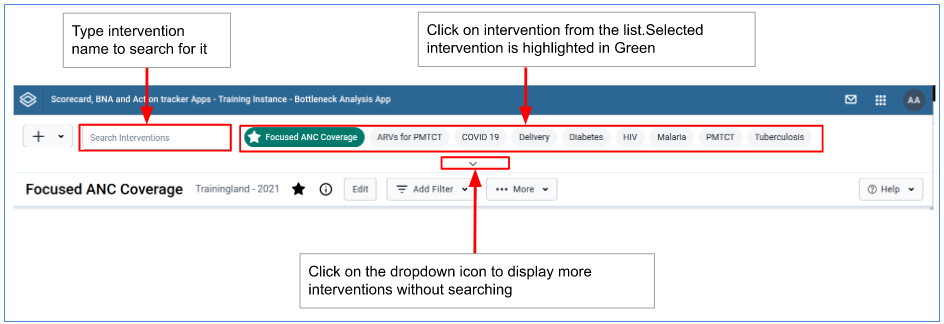
Seznam intervencí
Po načtení aplikace BNA budou mít uživatelé přístup k dostupným zásahům a možnost vyhledávat další zásahy. Přístup ke sdíleným zásahům je omezen na úroveň přístupu, kterou sdílejí.
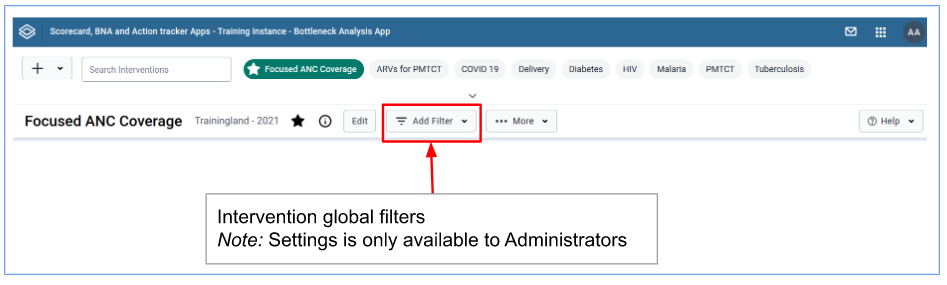
Intervence Globální filtry
Right under the interventions list there is a filter control for the active intervention.The filter control when clicked expands to offer the user an ability to select a new period and/or organization unit.The applied filters will affect the entire BNA dashboard and the changes will only be visible for that particular user at that particular time.
Intervenční položky
1)The Bottleneck Analysis Chart
2)The Sublevel Analysis Table
3)The Root Cause Analysis Widget