DHIS2 Android App version 2.4 Release Notes
DHIS2 Android Capture App 2.4 is out with many improvements. This release we have focused mainly on improving the user interface and the data entry user experience for events and tracker. We have also including local analytics at the enrollment scope, and several improvements in the maps.
This version is fully compatible with the DHIS2 2.36 and you can find the detailed new features and fixes below.
ZKUŠENOST UŽIVATELE A UŽIVATELSKÉ ROZHRANͶ
Nová ikona pro vyhledávání TEI: Ikona pro vyhledávání TEI byla přepracována tak, aby vyjadřovala akci vyhledávání / registrace. Aplikace pro Android si vynutí vyhledávání před vytvořením nového TEI, ale informace zadané do vyhledávacích polí se přenesou do polí registračního formuláře, když vyhledávání není úspěšné a uživatel se rozhodne zadat nový TEI. Díky tomu je hledání prvním krokem pro registraci, proto byla ikona aktualizována, aby odrážela tuto integrovanou akci.

Nová navigační lišta: V aktuální a další verzi aplikace jsou nové moduly jako Analytika a Úkoly (další verze). Chcete-li rozšířit strukturu aplikace a nabídnout snadnou a intuitivní navigaci mezi novými moduly, byla navigace přesunuta na spodní lištu. Nová navigační lišta je v aktuální verzi k dispozici na obrazovkách Ovládacího panelu Událostí a Trasovaných entit. Přidá se i na další obrazovky, protože nová funkce bude implementována v nadcházejících verzích.
Jira | Screenshot | Screenshot2


New layout for events and data sets lists: The user inteface of the lists of events and datasets has been modified to have a look that integrates with the lists of TEI's in tracker programs.
Jira | Jira2 | Screenshot | Screenshot2


Mandatory Data Elements are always displayed: When a data element is configured as mandatory it will not be hidden by program rules. This behaviour aligns with web Capture App.
Apply legends to data element fields: Now if a numeric data element has a legend, the app will display a badge with the color and description for the given legend value.

EVENTS & TRACKER DATA ENTRY
Program Indicators in Event Programs: The event programs display now program indicators in the event data entry. The events implement the new navigation bar which allows the user to switch between event details, event data entry form and event program indicators.

DATASETS DATA ENTRY
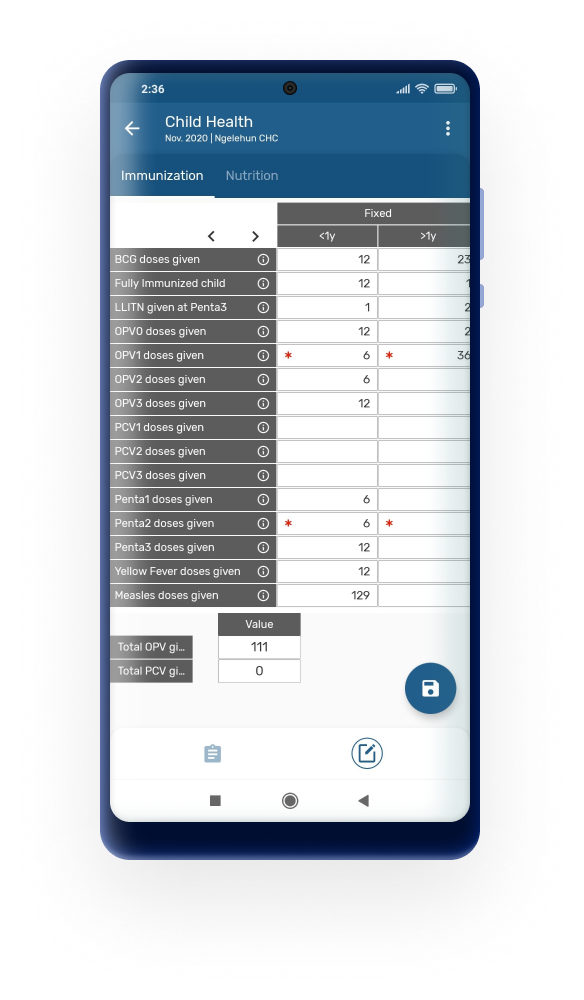
Indicators in Datasets: The datasets display now indicators in the dataset data entry screen. The indicators will be displayed in the section, after the tables.
LOCAL ANALYTICS
Local offline analytics in TEI Dashboard: This version of the app includes the display of charts and tables in the domain of a Tracked Entity Instance. In the TEI Dashbaord the "Indicators" tab has been replaced by the Analytics tab. In this section the app will display:
- One value: either a Data Element or a Program Indicator
- Zpětná vazba
- Charts to display evolution of one data element or program indicator accross time in repeteable stages.
- Column Plain Chart (no background)
- Line Plain Chart (no background)
- Line Child Growth Chart (WHO models backgroud): weight for age, height for age, weight for height
- Tables for evolution of one data element or program indicator accross time in repeteable stages.
Jira | Screenshot | Screenshot2 | Screenshot3


MAPS
Display Attributes and Data Elements: It is possible now to display in the map Attributes and Data Elements together with TEI, Enrollment and Event coordinates. When a program has Attributes or Data Elements configured as either coordinates or polygons they will be listed as maps layers to be displayed in the maps.
Jira | Jira2 | Screenshot | Screenshot2


Display current location: When the user opens the map, the current location of the device will be displayed.

Navigate to selected location: When the user opens the map, s/he will be able to open the default navigation app (i.e. Google Maps) from the DHIS2 Android Capture App. The default navigation app will open to guide the navigation from the current location of the user to the previously selected coordinate from a TEI, Enrollment, Attribute, Event or Data element.

TEI SEARCH, REGISTRATION & DASHBOARD
Search form opens in full screen more: The search screen covers most of the screen in most implementations not allowing to see the resulting TEI list. To avoid confusion the TEI search form will be open in full screen mode and the results will be shown when the user returns to the tracker program screen.

Display Enrolling Organisation Unit in TEI list: When the user opens a tracker program and a list of TEI's is displayed, the Enrolling Organisation Unit will be shown in the TEI Card after the TEI Attributes.

TRACKER & EVENT FEATURES
Working lists: Working lists have been implemented and are available in either event or tracker programs. Working lists are downloaded from the server while user in the app is not able to edit them. The user is able to add filters to a selected working list.
Jira | Screenshot | Screenshot


Edit Enrollment or Incident date: The Enrollment and Incident date in tracker programs can be edited even if auto-generated events have been created. This behaviour aligns the functionality with the current implementation in web Capture App.

Organisation unit of a program stage not editable: The Organisation Unit of a program stage (event) can not be edited. This behaviour aligns the functionality with the current implementation in web Capture App.
INFORMACE O VYDÁNÍ
| Informace o vydání | Odkaz |
|---|---|
| Download app from Google Play or Github (ADD GITHUB) | https://www.dhis2.org/app-store |
| Dokumentace a Javadocs | https://www.dhis2.org/android-documentation |
| Podrobnosti o každé funkci v JIRA (vyžaduje přihlášení) | 2.4 Features |
| Přehled opravených chyb na JIRA (vyžaduje přihlášení) | 2.4 Bugs |
| Demo instance (uživatel / heslo) | https://play.dhis2.org/demo/ android / Android123 |
| Komunita DHIS 2 | https://community.dhis2.org Mobilní komunita |
| Zdrojový kód na Githubu | https://github.com/dhis2/dhis2-android-capture-app |
| Zdrojový kód SDK na Githubu | SDK 1.4.0 |