Insecticide Treated Nets (ITN)
Insecticide treated nets (ITNs) are the most widely used vector control intervention and the one to which we owe the greatest share of gains in malaria burden reduction seen in Africa in the last decades. Insecticide treated nets are nets impregnated with an insecticide that serve two functions:
1) to kill and repel mosquitoes that come in contact with the net and 2) to create a physical barrier between mosquitoes and humans so that humans don’t get bitten by infected mosquitoes.
ITNs are one of the two malaria vector control interventions recommended by WHO for large scale deployment.
ITN Bioefficacy
ITNs lose their mosquito killing or repelling capacity over time because the insecticide impregnated on them fades slowly away. The bio-efficacy of ITNs, namely, their capacity to kill susceptible mosquitoes over time, is monitored by measuring the percentage of susceptible mosquitoes that die within 24 hours of exposure to an impregnated net. ITN bioefficacy is measured through a procedure called the WHO cone bioassay, which consists in attaching plastic cones to an impregnated net, introducing susceptible mosquitoes into them, leaving mosquitos in for 3 minutes to allow contact with the sprayed surface (exposure period) and measuring mosquito mortality 24 hours after the end of those 3min (holding period).
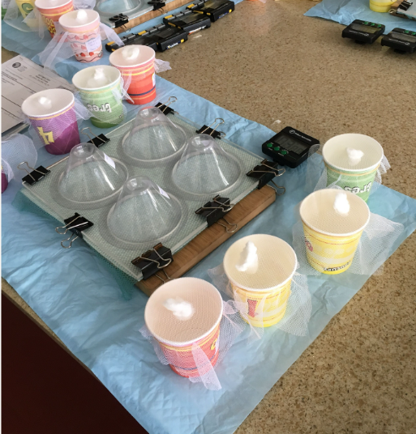
WHO guidelines for testing ITN bioefficacy can be found here.
The linked webinar supports this design document and further clarifies the configuration and the use cases for this module.
Event Configuration
| Sections | Popis |
|---|---|
| Basic Info | Key identifying info of the WHO cone bioassay (date) and coordinates |
| Test details | General information to give background knowledge - ITN brand and ID, year and month of ITN distribution, type of vectors used, environmental conditions during the bioassay |
| Position X- Results 24h after exposure | These sections gather the basic info on the results of the WHO cone bioassay on pieces of nets from different positions (e.g. upper, sides, bottom). The structure of the section is repeated throughout the following sections up to Position 5 |
| Results on control mosquitoes | The same information gathered for the mosquitoes in the different 1 to 5 positions is also collected for the control mosquitoes. |
| Final results | Automatic calculation of the mortality outcome of the test |
| Status and Comments | Where to report the completeness of the event and eventual comments. |
Datové prvky
The full list of data elements is available in the metadata reference file.
Some of the DEs in this program could be shared with other E&VC programs.
New Event Registration
The creation of a new event requires the selection of: A registering unit from the Organization Unit (OU) hierarchy (this is the location where the net was collected) The “VC- ITN - Bioefficacy” program The reporting institution - MoH, Partner, Publication

Event Details
Basic Info
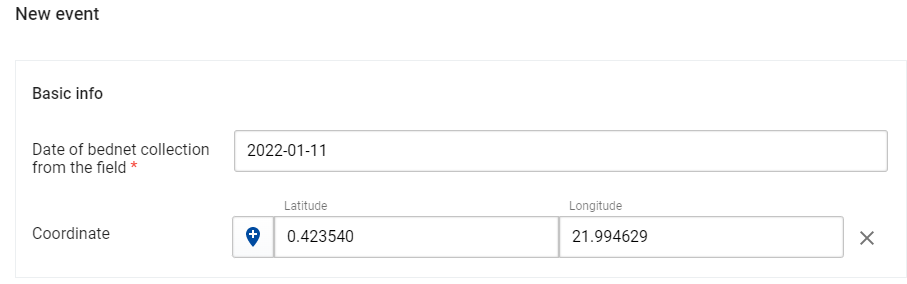
The basic info section includes the date of the event (“Date of bednet collection from the field”) and the precise coordinates of the location if available. The coordinates can be either written manually in the provided empty fields, or can be selected in the map by clicking on the “pin” blue icon.
Test Details
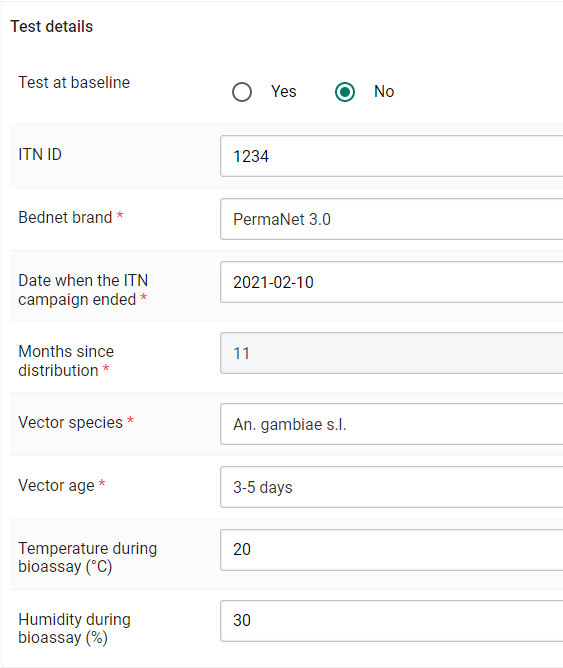
WHO cone bioassays can be conducted to determine the baseline efficacy of a net (a new product or an established one before it is distributed to serve as baseline to monitor bio-efficacy over time). If the test is being conducted during product development or for an established product before it is distributed the box “Yes” in Test at baseline should be ticked. Whenever ticking “Yes” the “months since distribution will automatically change from being a compulsory DE to optional as the campaign has not ended yet. If the test is conducted on a net that has already been used for a period of time in the field, “No” should be ticked. The rest of the section collects the basic information on the ITN brand, ITN ID (ID given to identify the net during testing), the date of the campaign during which the ITN was distributed ("Date when the ITN campaign ended"), the vector species used in the test and their age and the environmental conditions during the bioassays. The months between the distribution and the test are automatically calculated via a program rule assigned to the DE. The full list of the default mosquito species is available in this file - countries should adapt the default configuration and keep in the program only the relevant species for their context and activities.
Results Per Position - 24 hours after exposure
For the purpose of monitoring net bioefficacy over time, or after washing, WHO cone bioassays are conducted on five different pieces of net (25x25cm), each from a different position (see figure): one piece from the roof panel, and the other four pieces from four different heights along the sides panel(s) of the net. Position 3 refers to the piece cut from the roof panel of the net. Position 1,2,4 and 5 refer to pieces cut from the side panel of the net, with Position 1 being the piece from the lower part of the side panel and position 5 from the higher part. At least 10 mosquitoes (2 cones) should be tested in each position, so that a total of 50 mosquitoes is tested in each net.
For the purpose of testing new ITNs or established ITNs before they are distributed (baseline), only one piece of net is needed from each ITN. A total of 50 mosquitos should be tested in each net. Up to four cones at a time are attached to the piece of netting and 5 mosquitoes introduced in each one.
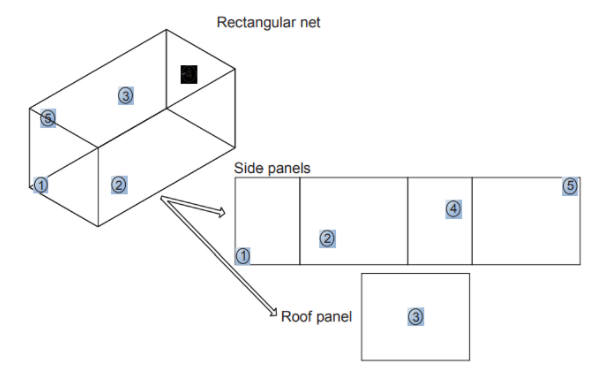
Each position in the dataset (position 1, POsition 2, etc) reprsents the positions of where the mosquito collection happens on the net as per the diagnrame above.
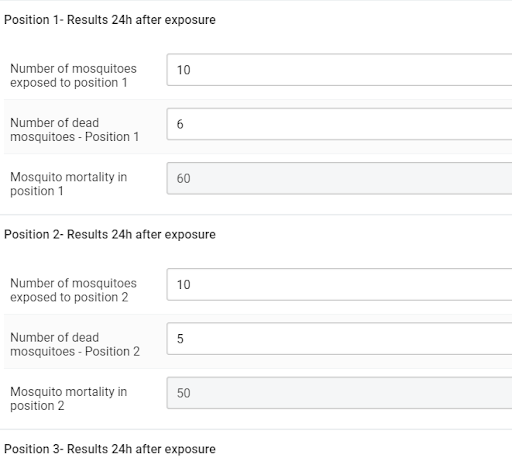
This section and its structure is repeated five times, one for each net piece position. It is meant to record the total number of mosquitoes exposed and dead 24h after exposure (considering all cones). The mosquito mortality is expressed in percentage and is automatically calculated during the data entry via program rules assigned to the DE. For the sake of simplicity the screenshot only shows the first two positions.
Results on control mosquitoes
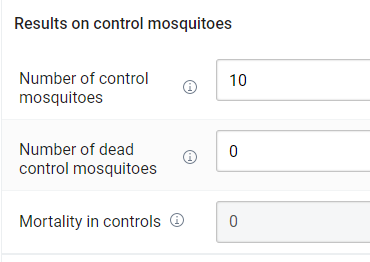
The same information provided for the five previous sections need to be reported also for the control group. The total number of mosquitoes exposed and dead after exposure against untreated pieces of nets should be reported.
If the control mortality is ⩾10%, an error message appears asking the user to discard the test and repeat it.
Warning message on control mortality

Final Results

The final mortality is the mortality across all positions. It is automatically calculated via two program rules: one that considers the numbers of mosquitoes exposed and dead in all positions to calculate the total mortality and assign it to a program rule variable and a second one that takes the value of this program rule variable and corrects it using the Abbott’s formula if the control mortality is <10%. If the control mortality is >=10%, the mortality is not calculated because the test is considered invalid.

Status
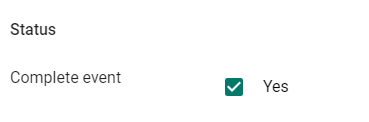
The event will be recorded as completed and displayed in the working list as such only if the YES option is ticked. Please, only tick the box if all the data has been introduced. If you want to introduce a piece of the data and come back to continue later, please do not tick the box.
Pravidla programu
Some program rules have been applied at data entry in order to calculate the value of some DE. This use of the PRs removes the complexity of maintaining a great number of program indicators, while guiding the user through the protocol (e.g. by telling him/her the needed exposure. The full list of PRs is available in the metadata reference file.
Analytika
Programové Indikátory
The list of PI is available in the metadata reference file. The list of PIs can be expanded depending on local analytic needs.
Vizualizace
No predefined dashboards or visualizations have been set for the moment.